instrument cluster BUICK ENVISION 2022 Owners Manual
[x] Cancel search | Manufacturer: BUICK, Model Year: 2022, Model line: ENVISION, Model: BUICK ENVISION 2022Pages: 369, PDF Size: 14.04 MB
Page 6 of 369
Buick Envision Owner Manual (GMNA-Localizing-U.S./Canada/Mexico-
15218978) - 2022 - CRC - 5/12/21
Introduction 5
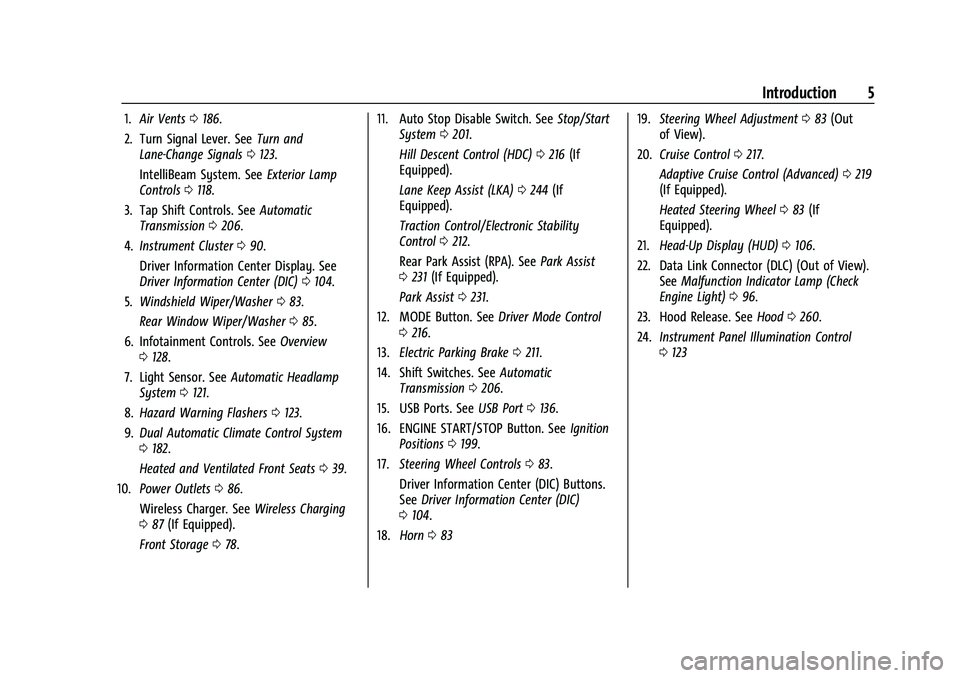
1.Air Vents 0186.
2. Turn Signal Lever. See Turn and
Lane-Change Signals 0123.
IntelliBeam System. See Exterior Lamp
Controls 0118.
3. Tap Shift Controls. See Automatic
Transmission 0206.
4. Instrument Cluster 090.
Driver Information Center Display. See
Driver Information Center (DIC) 0104.
5. Windshield Wiper/Washer 083.
Rear Window Wiper/Washer 085.
6. Infotainment Controls. See Overview
0 128.
7. Light Sensor. See Automatic Headlamp
System 0121.
8. Hazard Warning Flashers 0123.
9. Dual Automatic Climate Control System
0182.
Heated and Ventilated Front Seats 039.
10. Power Outlets 086.
Wireless Charger. See Wireless Charging
0 87 (If Equipped).
Front Storage 078. 11. Auto Stop Disable Switch. See
Stop/Start
System 0201.
Hill Descent Control (HDC) 0216 (If
Equipped).
Lane Keep Assist (LKA) 0244 (If
Equipped).
Traction Control/Electronic Stability
Control 0212.
Rear Park Assist (RPA). See Park Assist
0 231 (If Equipped).
Park Assist 0231.
12. MODE Button. See Driver Mode Control
0 216.
13. Electric Parking Brake 0211.
14. Shift Switches. See Automatic
Transmission 0206.
15. USB Ports. See USB Port0136.
16. ENGINE START/STOP Button. See Ignition
Positions 0199.
17. Steering Wheel Controls 083.
Driver Information Center (DIC) Buttons.
See Driver Information Center (DIC)
0 104.
18. Horn 083 19.
Steering Wheel Adjustment 083 (Out
of View).
20. Cruise Control 0217.
Adaptive Cruise Control (Advanced) 0219
(If Equipped).
Heated Steering Wheel 083 (If
Equipped).
21. Head-Up Display (HUD) 0106.
22. Data Link Connector (DLC) (Out of View). SeeMalfunction Indicator Lamp (Check
Engine Light) 096.
23. Hood Release. See Hood0260.
24. Instrument Panel Illumination Control
0123
Page 25 of 369
Buick Envision Owner Manual (GMNA-Localizing-U.S./Canada/Mexico-
15218978) - 2022 - CRC - 5/12/21
24 Keys, Doors, and Windows
How to Detect a Tamper Condition
IfKis pressed and the horn chirps and the
lights flash three times, the alarm was
activated while the alarm system was
armed.
If the alarm system has been activated, a
message will appear on the DIC.
Steering Column Lock
If equipped, the steering column lock is a
theft-deterrent device. This feature locks the
steering column when the vehicle is turned
off and the driver door is opened, or when
the driver door is opened and then the
vehicle is turned off. The steering column
unlocks when the vehicle is turned on.
The Driver Information Center (DIC) may
display one of these messages:
.A message to service the steering column
lock indicates that an issue has been
detected with the column lock feature
and the vehicle should be serviced.
.A message that the steering column is
locked indicates that the engine is
running, but the steering column is still
locked. It is normal for the column to be
locked during a remote start, but the
column should unlock after the brake pedal is pressed and the vehicle is started.
No message will display during a remote
start.
.A message that the steering wheel must
be turned and the vehicle must be started
again indicates that the column lock
mechanism is bound, the column locking
device was unable to unlock the steering
column, and the vehicle did not start.
If this happens, immediately turn the
steering wheel from side to side to
unbind the column lock. If this does not
unlock the steering column, turn the
vehicle off and open the driver door to
reset the system. Then turn the vehicle
on and immediately turn the steering
wheel side to side for about 15 seconds.
In some cases, it may take significant
force to unbind the column.
To keep the steering column from binding,
straighten the front wheels before turning
off the vehicle.
Immobilizer Operation
This vehicle has a passive theft-deterrent
system.
The system does not have to be manually
armed or disarmed. The vehicle is automatically immobilized
when the vehicle is turned off.
The immobilization system is disarmed
when the ignition is on or in ACC/
ACCESSORY and a valid remote key is
present in the vehicle.
The security light, in the instrument cluster,
comes on if there is a problem with arming
or disarming the theft-deterrent system.
The system has one or more remote keys
matched to an immobilizer control unit in
your vehicle. Only a correctly matched
remote key will start the vehicle. If the
remote key is ever damaged, you may not
be able to start your vehicle.
When trying to start the vehicle, the
security light may come on briefly when the
ignition is turned on.
If the engine does not start and the security
light stays on, there is a problem with the
system. Turn the ignition off and try again.
Page 52 of 369

Buick Envision Owner Manual (GMNA-Localizing-U.S./Canada/Mexico-
15218978) - 2022 - CRC - 5/12/21
Seats and Restraints 51
There is an airbag readiness light on the
instrument cluster, which shows the airbag
symbol.
The system checks the airbag electrical
system for malfunctions. The light tells you
if there is an electrical problem. SeeAirbag
Readiness Light 095.
Where Are the Airbags?
The driver frontal airbag is in the center of
the steering wheel.
The front outboard passenger frontal airbag
is in the passenger side instrument panel.
The driver knee airbag is below the steering
column.
Driver Side Shown, Passenger Side Similar
The driver and front outboard passenger
seat-mounted side impact airbags are in the
side of the seatbacks closest to the door.
Page 83 of 369
Buick Envision Owner Manual (GMNA-Localizing-U.S./Canada/Mexico-
15218978) - 2022 - CRC - 5/12/21
82 Instruments and Controls
Instruments and Controls
Controls
Steering Wheel Adjustment . . . . . . . . . . . . 83
Steering Wheel Controls . . . . . . . . . . . . . . . . 83
Heated Steering Wheel . . . . . . . . . . . . . . . . . 83
Horn . . . . . . . . . . . . . . . . . . . . . . . . . . . . . . . . . . . 83
Windshield Wiper/Washer . . . . . . . . . . . . . . 83
Rear Window Wiper/Washer . . . . . . . . . . . 85
Clock . . . . . . . . . . . . . . . . . . . . . . . . . . . . . . . . . . . 86
Power Outlets . . . . . . . . . . . . . . . . . . . . . . . . . . 86
Wireless Charging . . . . . . . . . . . . . . . . . . . . . . 87
Warning Lights, Gauges, and Indicators
Warning Lights, Gauges, andIndicators . . . . . . . . . . . . . . . . . . . . . . . . . . . . 90
Instrument Cluster . . . . . . . . . . . . . . . . . . . . . 90
Speedometer . . . . . . . . . . . . . . . . . . . . . . . . . . . 93
Odometer . . . . . . . . . . . . . . . . . . . . . . . . . . . . . . 93
Trip Odometer . . . . . . . . . . . . . . . . . . . . . . . . . 93
Tachometer . . . . . . . . . . . . . . . . . . . . . . . . . . . . 93
Fuel Gauge . . . . . . . . . . . . . . . . . . . . . . . . . . . . . 93
Engine Coolant Temperature Gauge . . . . 94
Seat Belt Reminders . . . . . . . . . . . . . . . . . . . . 94
Airbag Readiness Light . . . . . . . . . . . . . . . . . 95
Passenger Airbag Status Indicator . . . . . . 95
Charging System Light . . . . . . . . . . . . . . . . . 96 Malfunction Indicator Lamp (Check
Engine Light) . . . . . . . . . . . . . . . . . . . . . . . . . 96
Brake System Warning Light . . . . . . . . . . . 97
Electric Parking Brake Light . . . . . . . . . . . . . 98
Service Electric Parking Brake Light . . . . . 98
Antilock Brake System (ABS) Warning Light . . . . . . . . . . . . . . . . . . . . . . . . . . . . . . . . . 98
All-Wheel-Drive Light . . . . . . . . . . . . . . . . . . . 99
Hill Descent Control Light . . . . . . . . . . . . . . 99
Lane Keep Assist (LKA) Light . . . . . . . . . . . 99
Automatic Emergency Braking (AEB) Disabled Light . . . . . . . . . . . . . . . . . . . . . . . 100
Vehicle Ahead Indicator . . . . . . . . . . . . . . . 100
Pedestrian Ahead Indicator . . . . . . . . . . . . 100
Traction Off Light . . . . . . . . . . . . . . . . . . . . . 100
StabiliTrak OFF Light . . . . . . . . . . . . . . . . . . 100
Traction Control System (TCS)/ StabiliTrak Light . . . . . . . . . . . . . . . . . . . . . . 101
Engine Coolant Temperature Warning Light . . . . . . . . . . . . . . . . . . . . . . . . . . . . . . . . . 101
Driver Mode Control Light . . . . . . . . . . . . . 101
Tire Pressure Light . . . . . . . . . . . . . . . . . . . . . 102
Engine Oil Pressure Light . . . . . . . . . . . . . . 102
Low Fuel Warning Light . . . . . . . . . . . . . . . 103
Security Light . . . . . . . . . . . . . . . . . . . . . . . . . . 103
High-Beam On Light . . . . . . . . . . . . . . . . . . . 103
Lamps On Reminder . . . . . . . . . . . . . . . . . . . 103
Cruise Control Light . . . . . . . . . . . . . . . . . . . 103
Door Ajar Light . . . . . . . . . . . . . . . . . . . . . . . . 104
Information Displays
Driver Information Center (DIC) . . . . . . . 104
Head-Up Display (HUD) . . . . . . . . . . . . . . . . 106
Vehicle Messages
Vehicle Messages . . . . . . . . . . . . . . . . . . . . . 109
Engine Power Messages . . . . . . . . . . . . . . . 110
Vehicle Speed Messages . . . . . . . . . . . . . . . 110
Vehicle Personalization
Vehicle Personalization . . . . . . . . . . . . . . . . . 110
Universal Remote System
Universal Remote System . . . . . . . . . . . . . . 114
Universal Remote System Programming . . . . . . . . . . . . . . . . . . . . . . . . 114
Universal Remote System Operation . . . 116
Page 91 of 369
Buick Envision Owner Manual (GMNA-Localizing-U.S./Canada/Mexico-
15218978) - 2022 - CRC - 5/12/21
90 Instruments and Controls
Warning Lights, Gauges, and
Indicators
Warning lights and gauges can signal that
something is wrong before it becomes
serious enough to cause an expensive repair
or replacement. Paying attention to the
warning lights and gauges could prevent
injury.
Some warning lights come on briefly when
the engine is started to indicate they are
working. When one of the warning lights
comes on and stays on while driving,
or when one of the gauges shows there
may be a problem, check the section that
explains what to do. Waiting to do repairs
can be costly and even dangerous.
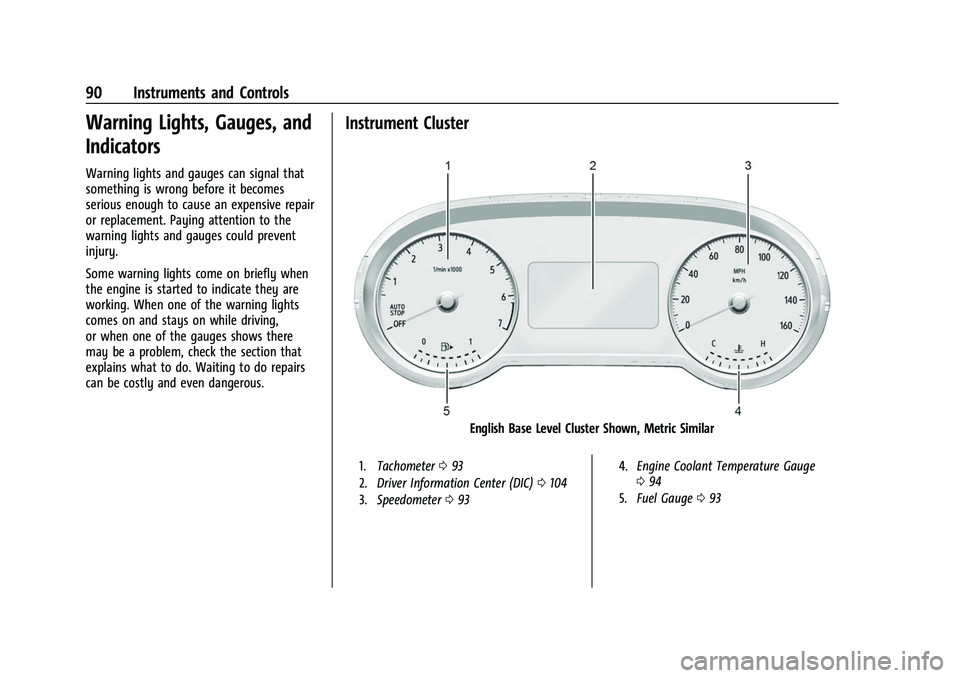
Instrument Cluster
English Base Level Cluster Shown, Metric Similar
1.Tachometer 093
2. Driver Information Center (DIC) 0104
3. Speedometer 093 4.
Engine Coolant Temperature Gauge
094
5. Fuel Gauge 093
Page 92 of 369

Buick Envision Owner Manual (GMNA-Localizing-U.S./Canada/Mexico-
15218978) - 2022 - CRC - 5/12/21
Instruments and Controls 91
English Uplevel Cluster Shown, Metric Similar
1.Tachometer 093
2. Driver Information Center (DIC) 0104
3. Speedometer 093 4.
Engine Coolant Temperature Gauge
094
5. Fuel Gauge 093
Cluster Menu
There is an interactive display area in the
center of the instrument cluster.
Use the right steering wheel control to open
and scroll through the different items and
displays.
Press
SorTto access the cluster
applications. Use the thumbwheel to scroll
through the list of available features within
the applications. Not all applications or
features will be available on all vehicles.
Page 95 of 369

Buick Envision Owner Manual (GMNA-Localizing-U.S./Canada/Mexico-
15218978) - 2022 - CRC - 5/12/21
94 Instruments and Controls
.It takes a little more, or less fuel to fill up
than the gauge indicated. For example,
the gauge may have indicated the tank
was half full, but it actually took a little
more, or less than half the tank's capacity
to fill the tank.
.The gauge moves a little while turning a
corner, speeding up or braking.
.The gauge takes a few seconds to
stabilize after the ignition is turned on
and goes back to empty when the
ignition is turned off.
Engine Coolant Temperature
Gauge
This gauge measures the temperature of the
vehicle's engine.
While driving under normal operating
conditions, if the red LED is illuminated, the
engine is too hot. Pull off the road, stop the
vehicle, and turn off the engine as soon as
possible.
Seat Belt Reminders
Driver Seat Belt Reminder Light
There is a driver seat belt reminder light on
the instrument cluster.
When the vehicle is started, this light
flashes and a chime may come on to remind
the driver to fasten their seat belt.
Then the light stays on solid until the belt is
buckled. This cycle may continue several
times if the driver remains or becomes
unbuckled while the vehicle is moving.
If the driver seat belt is buckled, neither the
light nor the chime comes on.
Front Passenger Seat Belt Reminder
Light
The vehicle may have a front passenger seat
belt reminder light near the passenger
airbag status indicator. SeePassenger
Sensing System 054.
When the vehicle is started, this light
flashes and a chime may come on to remind
passengers to fasten their seat belt.
Then the light stays on solid until the belt is
buckled. This cycle continues several times if
the front passenger remains or becomes
unbuckled while the vehicle is moving.
If the front passenger seat belt is buckled,
neither the chime nor the light comes on.
The front passenger seat belt reminder light
and chime may come on if an object is put
on the seat such as a briefcase, handbag,
grocery bag, laptop, or other electronic
Page 96 of 369

Buick Envision Owner Manual (GMNA-Localizing-U.S./Canada/Mexico-
15218978) - 2022 - CRC - 5/12/21
Instruments and Controls 95
device. To turn off the reminder light and/or
chime, remove the object from the seat or
buckle the seat belt.
Airbag Readiness Light
This light shows if there is an electrical
problem with the airbag system. It is
located in the instrument cluster. The
system check includes the airbag sensor(s),
the passenger sensing system, the
pretensioners, the airbag modules, the
wiring, and the crash sensing and diagnostic
module. For more information on the airbag
system, seeAirbag System 049.
The airbag readiness light comes on for
several seconds when the vehicle is started.
If the light does not come on then, have it
fixed immediately.
{Warning
If the airbag readiness light stays on
after the vehicle is started or comes on
while driving, it means the airbag system
might not be working properly. The
airbags in the vehicle might not inflate in
a crash, or they could even inflate
without a crash. To help avoid injury,
have the vehicle serviced right away.
If there is a problem with the airbag
system, a Driver Information Center (DIC)
message may also come on.
Passenger Airbag Status Indicator
The vehicle has a passenger sensing system.
See Passenger Sensing System 054 for
important safety information. The overhead
console has a passenger airbag status
indicator.
When the vehicle is started, the passenger
airbag status indicator will light ON and OFF,
and the symbols for on and off, for several
seconds as a system check. Then, after
several more seconds, the status indicator
will light either ON or OFF, and either the
symbol for on or off, to let you know the
status of the front outboard passenger
frontal airbag.
If the word ON, and the on symbol, are lit
on the passenger airbag status indicator, it
means that the front outboard passenger
frontal airbag is allowed to inflate.
If the word OFF, and the off symbol, are lit
on the passenger airbag status indicator, it
means that the passenger sensing system
has turned off the front outboard passenger
frontal airbag.
If, after several seconds, both status
indicator lights remain on, or if there are no
lights at all, or if the airbag readiness light
is on, there may be a problem with the
lights or the passenger sensing system. See
your dealer for service right away.
Page 105 of 369
Buick Envision Owner Manual (GMNA-Localizing-U.S./Canada/Mexico-
15218978) - 2022 - CRC - 5/12/21
104 Instruments and Controls
Adaptive Cruise Control Light
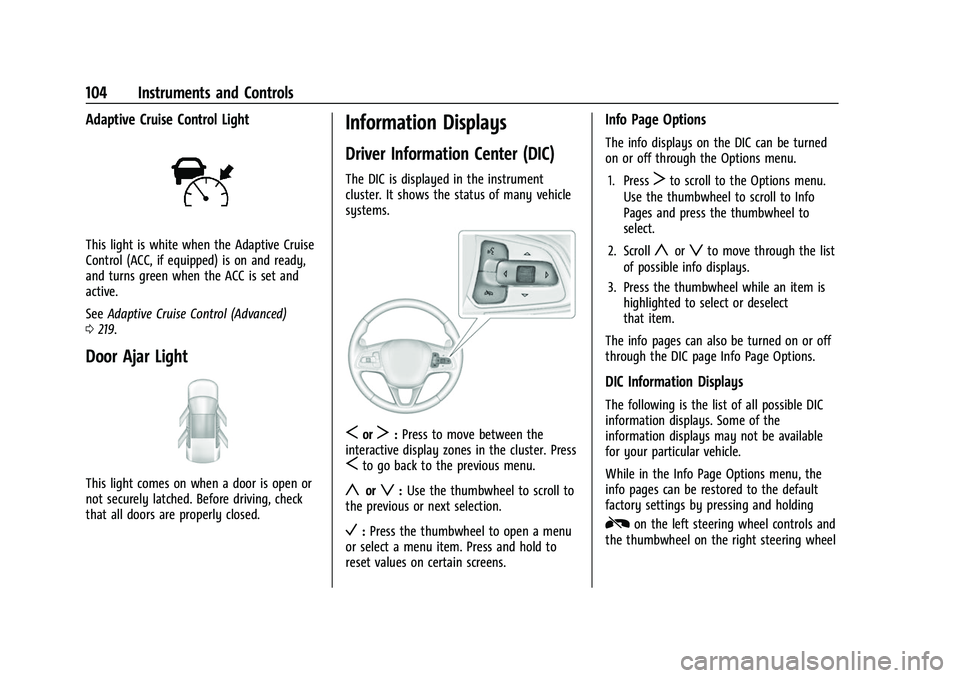
This light is white when the Adaptive Cruise
Control (ACC, if equipped) is on and ready,
and turns green when the ACC is set and
active.
SeeAdaptive Cruise Control (Advanced)
0 219.
Door Ajar Light
This light comes on when a door is open or
not securely latched. Before driving, check
that all doors are properly closed.
Information Displays
Driver Information Center (DIC)
The DIC is displayed in the instrument
cluster. It shows the status of many vehicle
systems.
SorT:Press to move between the
interactive display zones in the cluster. Press
Sto go back to the previous menu.
yorz: Use the thumbwheel to scroll to
the previous or next selection.
V: Press the thumbwheel to open a menu
or select a menu item. Press and hold to
reset values on certain screens.
Info Page Options
The info displays on the DIC can be turned
on or off through the Options menu.
1. Press
Tto scroll to the Options menu.
Use the thumbwheel to scroll to Info
Pages and press the thumbwheel to
select.
2. Scroll
yorzto move through the list
of possible info displays.
3. Press the thumbwheel while an item is highlighted to select or deselect
that item.
The info pages can also be turned on or off
through the DIC page Info Page Options.
DIC Information Displays
The following is the list of all possible DIC
information displays. Some of the
information displays may not be available
for your particular vehicle.
While in the Info Page Options menu, the
info pages can be restored to the default
factory settings by pressing and holding
Ron the left steering wheel controls and
the thumbwheel on the right steering wheel
Page 106 of 369
Buick Envision Owner Manual (GMNA-Localizing-U.S./Canada/Mexico-
15218978) - 2022 - CRC - 5/12/21
Instruments and Controls 105
controls at the same time. For uplevel
clusters, this will also reset the Display
settings. SeeInstrument Cluster 090.
Speed : Shows the vehicle speed in either
kilometers per hour (km/h) or miles per
hour (mph).
Trip 1 or Trip 2 and Average Fuel
Economy : The Trip display shows the
current distance traveled, in either
kilometers (km) or miles (mi), since the trip
odometer was last reset. The trip odometer
can be reset by pressing
Vand selecting
yes or no while this display is active.
Shows the approximate average liters per
100 kilometers (L/100 km) or miles per
gallon (mpg). This number is calculated
based on the number of L/100 km (mpg)
recorded since the last time this menu item
was reset. This number reflects only the
approximate average fuel economy that the
vehicle has right now, and will change as
driving conditions change. The Average Fuel
Economy can be reset by pressing
Vand
selecting yes or no while this display is
active.
Fuel Range : Shows the approximate
distance the vehicle can be driven without
refueling. LOW will be displayed when the vehicle is low on fuel. The fuel range
estimate is based on an average of the
vehicle's fuel economy over recent driving
history and the amount of fuel remaining in
the fuel tank.
Fuel Information :
Shows the fuel range and
instantaneous fuel economy.
Oil Life : Shows an estimate of the oil's
remaining useful life. If REMAINING OIL LIFE
99% is displayed, that means 99% of the
current oil life remains.
When the remaining oil life is low, the
CHANGE ENGINE OIL SOON message will
appear on the display. The oil should be
changed as soon as possible. See Engine Oil
0 262. In addition to the engine oil life
system monitoring the oil life, additional
maintenance is recommended. See
Maintenance Schedule 0321.
The Oil Life display must be reset after each
oil change. It will not reset itself. Do not
reset the Oil Life display accidentally at any
time other than when the oil has just been
changed. It cannot be reset accurately until
the next oil change. To reset, see Engine Oil
Life System 0264. Tire Pressure :
Shows the approximate
pressures of all four tires. Tire pressure is
displayed in either kilopascal (kPa) or in
pounds per square inch (psi). If the pressure
is low, the value for that tire is shown in
amber. See Tire Pressure Monitor System
0 292 and
Tire Pressure Monitor Operation 0293.
Air Filter Life : Shows an estimate of the
engine air filter’s remaining useful life and
the state of the system. Engine Air Filter Life
95% means 95% of the current air filter life
remains. Messages will display based on the
engine air filter life and the state of the
system. When the REPLACE AT NEXT OIL
CHANGE message displays, the engine air
filter should be replaced at the time of the
next oil change. When the REPLACE SOON
message displays, the engine air filter
should be replaced at the earliest
convenience.
The Air Filter Life display must be reset after
the engine air filter replacement. To reset,
see Engine Air Filter Life System 0265.
Fuel Economy : Displays average fuel
economy, the best fuel economy over the
selected distance, and a bar graph showing
instantaneous fuel economy.