automatic transmission BUICK ENVISION 2023 User Guide
[x] Cancel search | Manufacturer: BUICK, Model Year: 2023, Model line: ENVISION, Model: BUICK ENVISION 2023Pages: 356, PDF Size: 7.42 MB
Page 199 of 356
Buick Envision Owner Manual (GMNA-Localizing-U.S./Canada/Mexico-
16060855) - 2023 - CRC - 2/9/22
198 Driving and Operating
Automatic Transmission
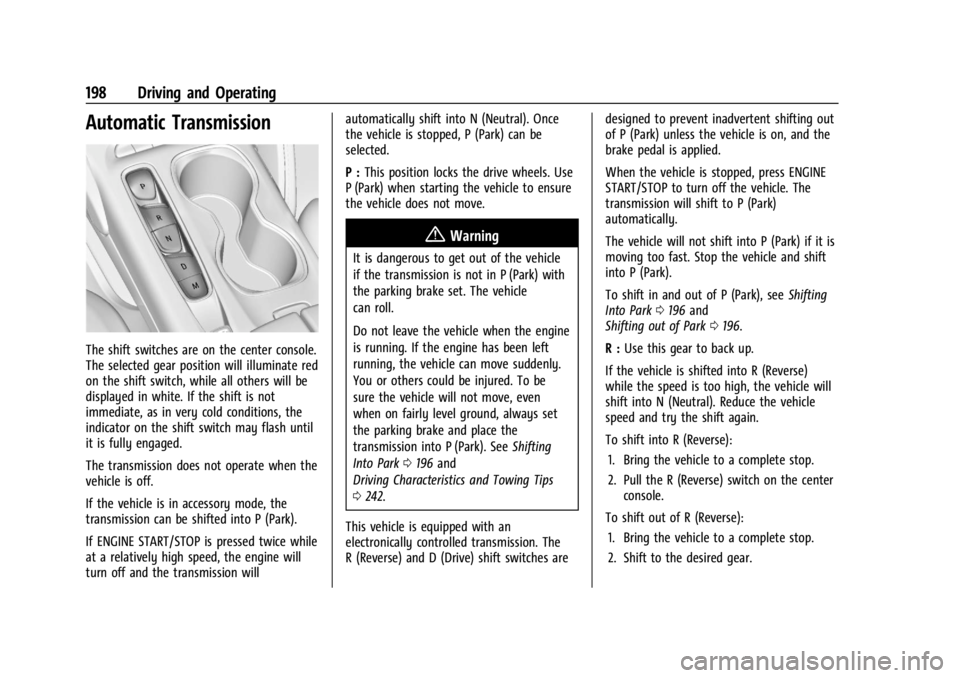
The shift switches are on the center console.
The selected gear position will illuminate red
on the shift switch, while all others will be
displayed in white. If the shift is not
immediate, as in very cold conditions, the
indicator on the shift switch may flash until
it is fully engaged.
The transmission does not operate when the
vehicle is off.
If the vehicle is in accessory mode, the
transmission can be shifted into P (Park).
If ENGINE START/STOP is pressed twice while
at a relatively high speed, the engine will
turn off and the transmission willautomatically shift into N (Neutral). Once
the vehicle is stopped, P (Park) can be
selected.
P :
This position locks the drive wheels. Use
P (Park) when starting the vehicle to ensure
the vehicle does not move.
{Warning
It is dangerous to get out of the vehicle
if the transmission is not in P (Park) with
the parking brake set. The vehicle
can roll.
Do not leave the vehicle when the engine
is running. If the engine has been left
running, the vehicle can move suddenly.
You or others could be injured. To be
sure the vehicle will not move, even
when on fairly level ground, always set
the parking brake and place the
transmission into P (Park). See Shifting
Into Park 0196 and
Driving Characteristics and Towing Tips
0 242.
This vehicle is equipped with an
electronically controlled transmission. The
R (Reverse) and D (Drive) shift switches are designed to prevent inadvertent shifting out
of P (Park) unless the vehicle is on, and the
brake pedal is applied.
When the vehicle is stopped, press ENGINE
START/STOP to turn off the vehicle. The
transmission will shift to P (Park)
automatically.
The vehicle will not shift into P (Park) if it is
moving too fast. Stop the vehicle and shift
into P (Park).
To shift in and out of P (Park), see
Shifting
Into Park 0196 and
Shifting out of Park 0196.
R : Use this gear to back up.
If the vehicle is shifted into R (Reverse)
while the speed is too high, the vehicle will
shift into N (Neutral). Reduce the vehicle
speed and try the shift again.
To shift into R (Reverse): 1. Bring the vehicle to a complete stop.
2. Pull the R (Reverse) switch on the center console.
To shift out of R (Reverse): 1. Bring the vehicle to a complete stop.
2. Shift to the desired gear.
Page 200 of 356

Buick Envision Owner Manual (GMNA-Localizing-U.S./Canada/Mexico-
16060855) - 2023 - CRC - 2/9/22
Driving and Operating 199
At low vehicle speeds, R (Reverse) can be
used to rock the vehicle back and forth to
get out of snow, ice, or sand without
damaging the transmission. SeeIf the
Vehicle Is Stuck 0187.
N : In this position, the engine does not
connect with the wheels. To restart the
engine when the vehicle is already moving,
use N (Neutral) only.
{Warning
Shifting into a drive gear while the
engine is running at high speed is
dangerous. Unless your foot is firmly on
the brake pedal, the vehicle could move
very rapidly. You could lose control and
hit people or objects. Do not shift into a
drive gear while the engine is running at
high speed.
Caution
Shifting out of P (Park) or N (Neutral) with
the engine running at high speed may
damage the transmission. The repairs
would not be covered by the vehicle
(Continued)
Caution (Continued)
warranty. Be sure the engine is not
running at high speed when shifting the
vehicle.
Caution
The vehicle is not designed to stay in
N (Neutral) for extended periods of time.
It will automatically shift into P (Park).
To shift into N (Neutral), press the
N (Neutral) switch until the N indicator
is red.
To shift out of N (Neutral): 1. Bring the vehicle to a complete stop.
2. Shift into the desired gear.
Car Wash Mode
This vehicle includes a Car Wash Mode that
allows the vehicle to remain in N (Neutral)
for use in automatic car washes. Car Wash
Mode is not to be used for vehicle towing.
If the vehicle needs to be towed, see
Transporting a Disabled Vehicle 0302.
Caution
The vehicle is not designed to stay in
N (Neutral) for extended periods of time.
It will automatically shift into P (Park) if
left in Car Wash Mode.
Car Wash Mode (Engine Off –Driver in
Vehicle)
To place the vehicle in N (Neutral) with the
engine off and the vehicle occupied:
1. Drive to the entrance of the car wash.
2. Apply the brake pedal.
3. Shift to N (Neutral).
4. Turn off the engine and release the brake pedal.
5. The indicator should continue to show N. If it does not, start the engine and
repeat Steps 2–4.
6. The vehicle is now ready for the car wash.
Car Wash Mode (Engine Off –Driver out of
Vehicle)
To place the vehicle in N (Neutral) with the
engine off and the vehicle unoccupied:
1. Drive to the entrance of the car wash.
2. Apply the brake pedal.
Page 201 of 356

Buick Envision Owner Manual (GMNA-Localizing-U.S./Canada/Mexico-
16060855) - 2023 - CRC - 2/9/22
200 Driving and Operating
3. Open the door.
4. Shift to N (Neutral).
5. Turn off the engine and release thebrake pedal.
6. The indicator should continue to show N. If it does not, start the engine and
repeat Steps 2–5.
7. Exit the vehicle and close the door. The vehicle is now ready for the car wash.
8. The vehicle may automatically shift to P (Park) upon re-entry.
Car Wash Mode (Engine On –Driver in
Vehicle)
To place the vehicle in N (Neutral) with the
engine on and the vehicle occupied:
1. Drive to the entrance of the car wash.
2. Apply the brake pedal.
3. Shift into N (Neutral).
4. Release the brake pedal. The vehicle is now ready for the car wash.
Car Wash Mode (Engine On –Driver out of
Vehicle
To place the vehicle in N (Neutral) with the
engine on and the vehicle unoccupied:
1. Drive to the entrance of the car wash. 2. Apply the brake pedal.
3. Open the door.
4. Shift into N (Neutral), then release the
brake pedal.
5. The indicator should continue to show N. If it does not, repeat Steps 2–4.
6. Exit the vehicle and close the door. The vehicle is now ready for the car wash.
7. The vehicle may automatically shift into P (Park) upon re-entry.
Caution
A transmission hot message may display
if the automatic transmission fluid is too
hot. Driving under this condition can
damage the vehicle. Stop and idle the
engine to cool the automatic
transmission fluid. This message clears
when the transmission fluid has cooled
sufficiently.
D : This position is for normal driving.
If more power is needed for passing, press
the accelerator pedal down. If the vehicle is shifted into D (Drive) while
the speed is too high, the transmission will
get ready to engage D (Drive). Reduce the
vehicle speed, then the transmission will
engage D (Drive).
To shift into D (Drive):
1. Bring the vehicle to a complete stop.
2. Pull the D (Drive) switch on the center console.
To shift out of D (Drive): 1. Bring the vehicle to a complete stop.
2. Shift to the desired gear.
Downshifting the transmission in slippery
road conditions could result in skidding. See
“Skidding” underLoss of Control 0184.
Caution
Spinning the tires or holding the vehicle
in one place on a hill using only the
accelerator pedal may damage the
transmission. The repair will not be
covered by the vehicle warranty. If the
vehicle is stuck, do not spin the tires.
When stopping on a hill, use the brakes
to hold the vehicle in place.
M : SeeManual Mode 0201.
Page 202 of 356

Buick Envision Owner Manual (GMNA-Localizing-U.S./Canada/Mexico-
16060855) - 2023 - CRC - 2/9/22
Driving and Operating 201
Manual Mode
Tap ShiftCaution
Driving with the engine at a high rpm
without upshifting while using Tap Shift,
could damage the vehicle. Always upshift
when necessary while using Tap Shift.
Vehicles with Tap Shift have controls on the
back of the steering wheel to manually shift
the automatic transmission. Permanent Tap Shift Mode
To enter Permanent Tap Shift Mode:
1. With the vehicle in D (Drive), press the M (Manual Mode) button.
2. Pull the steering wheel control toward you to shift. Pull the left control to
downshift, and the right control to
upshift.
To exit Permanent Tap Shift Mode, pull the
D (Drive) switch on the center console.
Temporary Tap Manual Shift Mode
To enter Temporary Tap Shift Mode: 1. With the transmission in D (Drive) and not in Permanent Tap Shift Mode, the
Tap Shift controls will activate a
Temporary Tap Shift Mode, allowing the
transmission to be manually shifted.
2. To deactivate, hold the right control briefly. Automatic shifts return after no
manual shifts have been done for seven
to 10 seconds.
While using Tap Shift, the vehicle will have
firmer, quicker shifting. This can be used for
sport driving or when climbing or
descending hills, to stay in gear longer,
or to downshift for more power or engine
braking. The transmission will only allow shifting
into gears appropriate for the vehicle speed
and engine revolutions per minute (rpm).
If shifting is prevented for any reason, the
M or D will flash in the instrument cluster.
The transmission will not automatically shift
to the next higher gear if the engine rpm is
too high. It will only automatically shift to
the next lower gear if the engine rpm is
much too low.
Drive Systems
All-Wheel Drive
Vehicles with this feature can operate in
All-Wheel Drive (AWD) Mode. When the
AWD feature is active, the system transfers
engine power, if required, to all four wheels.
The system is fully automatic and adjusts to
road conditions for improved traction and
control. In FWD Mode engine power is
transferred to the front wheels only, and
the AWD feature is off.
The AWD feature is automatically activated
when certain modes are selected using the
Driver Mode Control switch. When an AWD
mode change is requested the light will
flash briefly while the system is engaging
and the AWD light will be displayed when
Page 209 of 356

Buick Envision Owner Manual (GMNA-Localizing-U.S./Canada/Mexico-
16060855) - 2023 - CRC - 2/9/22
208 Driving and Operating
HDC can maintain vehicle speeds between
3 and 22 km/h (2 and 14 mph) on an incline
greater than or equal to a 10% grade.
A blinking HDC light indicates the system is
actively applying the brakes to maintain
vehicle speed.
When HDC is activated, the initial HDC
speed is set to the current driving speed.
It can be increased or decreased by pressing
+RES or–SET on the steering wheel or by
applying the accelerator or brake pedal. This
adjusted speed becomes the new set speed.
HDC will remain enabled between 22 and
60 km/h (14 and 37 mph); however vehicle
speed cannot be set or maintained in this
range. It will automatically disable if the
vehicle speed is above 80 km/h (50 mph) or
above 60 km/h (37 mph) for at least
30 seconds. Press
5again to re-enable HDC.
Driver Mode Control
Driver Mode Control (DMC) allows the driver
to adjust the overall driving experience to
better suit preference by adjusting multiple
subsystems. Driver Mode availability and
affected vehicle subsystems are dependent
upon vehicle trim level, region, and optional
features. If the vehicle is in Tour Mode or AWD
Mode, it will stay in that mode through
future ignition cycles. If the vehicle is in any
other mode, it will return to Tour Mode
when the vehicle is restarted. When a mode
is selected, an indicator will come on in the
instrument cluster.
Driver Mode Control Switch
To activate each mode, press the MODE
button on the center console.
Tour Mode : Use for normal city and
highway driving to provide a smooth ride.
This setting provides balance between
comfort and handling. This is the standard/ default mode. There is no persistent
indicator in the instrument cluster for
this mode.
AWD Mode :
AWD Mode provides drive
torque to all four wheels. Select AWD Mode
to improve traction and control on slippery
road surfaces, such as gravel, sand, wet
pavement, snow, and ice. When in AWD
Mode, the AWD Mode indicator light will be
on. For more information on AWD Mode,
see All-Wheel Drive 0201.
Sport Mode : Use where road conditions or
personal preference demand a more
controlled response.
Sport Mode improves vehicle handling and
acceleration on dry pavement. When active,
Sport Mode modifies steering efforts,
transmission shifting, AWD torque and
suspension tuning, if equipped.
Off-Road Mode : Use this mode for off-road
recreational driving. Off-Road Mode should
be used to improve driving at moderate
speeds, on grass, gravel, dirt, unpaved roads,
or snow-covered roads. The accelerator pedal
is tuned for off-road use. This mode modifies
pedal mapping, AWD, ABS, ESC, and TCS
Performance.
Page 243 of 356
Buick Envision Owner Manual (GMNA-Localizing-U.S./Canada/Mexico-
16060855) - 2023 - CRC - 2/9/22
242 Driving and Operating
Driving Characteristics and
Towing Tips
{Warning
You can lose control when towing a
trailer if the correct equipment is not
used or the vehicle is not driven properly.
For example, if the trailer is too heavy or
the trailer brakes are inadequate for the
load, the vehicle may not stop as
expected. You and others could be
seriously injured. The vehicle may also be
damaged, and the repairs would not be
covered by the vehicle warranty. Pull a
trailer only if all the steps in this section
have been followed. Ask your dealer for
advice and information about towing a
trailer with the vehicle.
Driving with a Trailer
Trailering is different than just driving the
vehicle by itself. Trailering means changes in
handling, acceleration, braking, durability,
and fuel economy. Successful, safe trailering
takes correct equipment, and it has to be
used properly.The following information has many
time-tested, important trailering tips and
safety rules. Many of these are important
for your safety and that of your passengers.
Read this section carefully before pulling a
trailer.
When towing a trailer:
.Become familiar with and follow all state
and local laws that apply to trailer
towing. These requirements vary from
state to state.
.State laws may require the use of
extended side view mirrors. If your
visibility is limited or restricted while
towing, install extended side view mirrors,
even if not required.
.Do not tow a trailer during the first
800 km (500 mi) of vehicle use to prevent
damage to the engine, axle, or other
parts.
.GM recommends performing an oil
change to the vehicle before heavy
towing.
.Do not drive over 80 km/h (50 mph) and
do not make starts at full throttle during
the first 800 km (500 mi) of trailer
towing.
.Vehicles can tow in D (Drive). If the
transmission downshifts too often, a
lower gear may be selected using Manual
Mode. See
Manual Mode 0201.
If equipped, the following driver assistance
features should be turned off when towing
a trailer:
.Adaptive Cruise Control (ACC)
.Super Cruise Control
.Park Assist
.Automatic Parking Assist (APA)
.Reverse Automatic Braking (RAB)
If equipped, the following driver assistance
features should be turned to alert or off
when towing a trailer:
.Automatic Emergency Braking (AEB)
.Intelligent Brake Assist (IBA)
.Front Pedestrian Braking (FPB)
If equipped with Lane Change Alert (LCA),
the LCA detection zones that extend back
from the side of the vehicle do not move
further back when a trailer is towed. Use
caution while changing lanes when towing a
trailer.
If equipped with Rear Cross Traffic Alert
(RCTA), use caution while backing up when
towing a trailer, as the RCTA detection zones
Page 245 of 356
Buick Envision Owner Manual (GMNA-Localizing-U.S./Canada/Mexico-
16060855) - 2023 - CRC - 2/9/22
244 Driving and Operating
Make wider turns than normal when towing,
so the trailer will not go over soft shoulders,
over curbs, or strike road signs, trees,
or other objects. Always signal turns well in
advance. Do not steer or brake suddenly.
Driving on Grades
Reduce speed and shift to a lower gear
before starting down a long or steep
downhill grade. If the transmission is not
shifted down, the brakes may overheat and
result in reduced braking efficiency.
The vehicle can tow in D (Drive). Shift the
transmission to a lower gear if the
transmission shifts too often under heavy
loads and/or hilly conditions.
When towing at higher altitudes, engine
coolant will boil at a lower temperature
than at lower altitudes. If the engine is
turned off immediately after towing at high
altitude on steep uphill grades, the vehicle
could show signs similar to engine
overheating. To avoid this, let the engine
run, preferably on level ground, with the
transmission in P (Park) for a few minutes
before turning the engine off. If the
overheat warning comes on, seeEngine
Overheating 0262.
Parking on Hills
{Warning
To prevent serious injury or death,
always park your vehicle and trailer on a
level surface when possible.
When parking your vehicle and your trailer
on a hill: 1. Press the brake pedal, but do not shift into P (Park) yet. Turn the wheels into
the curb if facing downhill or into traffic
if facing uphill.
2. Have someone place chocks under the trailer wheels.
3. When the wheel chocks are in place, gradually release the brake pedal to
allow the chocks to absorb the load of
the trailer.
4. Reapply the brake pedal. Then apply the parking brake and shift into P (Park).
5. Release the brake pedal.
Leaving After Parking on a Hill
1. Apply and hold the brake pedal.
.Start the engine.
.Shift into the desired gear.
.Release the parking brake.
2. Let up on the brake pedal.
3. Drive slowly until the trailer is clear of the chocks.
4. Stop and have someone pick up and store the chocks.
Maintenance When Trailer Towing
The vehicle needs service more often when
used to tow trailers. See Maintenance
Schedule 0313. It is especially important to
check the automatic transmission fluid,
engine oil, axle lubricant, belts, cooling
system, and brake system before and during
each trip.
Check periodically that all nuts and bolts on
the trailer hitch are tight.
Engine Cooling When Trailer Towing
The cooling system may temporarily
overheat during severe operating conditions.
See Engine Overheating 0262.
Page 252 of 356
Buick Envision Owner Manual (GMNA-Localizing-U.S./Canada/Mexico-
16060855) - 2023 - CRC - 2/9/22
Vehicle Care 251
Vehicle Care
General Information
General Information . . . . . . . . . . . . . . . . . . . 252
California Perchlorate MaterialsRequirements . . . . . . . . . . . . . . . . . . . . . . . . 252
Accessories and Modifications . . . . . . . . . 252
Vehicle Checks
Doing Your Own Service Work . . . . . . . . . 252
Hood . . . . . . . . . . . . . . . . . . . . . . . . . . . . . . . . . . 253
Engine Compartment Overview . . . . . . . . 254
Engine Oil . . . . . . . . . . . . . . . . . . . . . . . . . . . . . 255
Engine Oil Life System . . . . . . . . . . . . . . . . . 257
Automatic Transmission Fluid . . . . . . . . . 258
Engine Air Filter Life System . . . . . . . . . . 258
Engine Air Cleaner/Filter . . . . . . . . . . . . . . . 258
Cooling System . . . . . . . . . . . . . . . . . . . . . . . 259
Engine Overheating . . . . . . . . . . . . . . . . . . . 262
Washer Fluid . . . . . . . . . . . . . . . . . . . . . . . . . . 263
Brakes . . . . . . . . . . . . . . . . . . . . . . . . . . . . . . . . 264
Brake Fluid . . . . . . . . . . . . . . . . . . . . . . . . . . . . 265
Battery - North America . . . . . . . . . . . . . . . 266
All-Wheel Drive . . . . . . . . . . . . . . . . . . . . . . . 266
Park Brake and P (Park) Mechanism Check . . . . . . . . . . . . . . . . . . . . . . . . . . . . . . . 266
Wiper Blade Replacement . . . . . . . . . . . . . 267
Windshield Replacement . . . . . . . . . . . . . . 268
Gas Strut(s) . . . . . . . . . . . . . . . . . . . . . . . . . . . 268
Headlamp Aiming
Front Headlamp Aiming . . . . . . . . . . . . . . . 269
Bulb Replacement
Bulb Replacement . . . . . . . . . . . . . . . . . . . . . 269
LED Lighting . . . . . . . . . . . . . . . . . . . . . . . . . . 269
Electrical System
Electrical System Overload . . . . . . . . . . . . 269
Fuses and Circuit Breakers . . . . . . . . . . . . . 271
Engine Compartment Fuse Block . . . . . . . 271
Instrument Panel Fuse Block . . . . . . . . . . . 274
Wheels and Tires
Tires . . . . . . . . . . . . . . . . . . . . . . . . . . . . . . . . . . . 277
All-Season Tires . . . . . . . . . . . . . . . . . . . . . . . . 278
Winter Tires . . . . . . . . . . . . . . . . . . . . . . . . . . . 278
Tire Sidewall Labeling . . . . . . . . . . . . . . . . . 279
Tire Designations . . . . . . . . . . . . . . . . . . . . . . 280
Tire Terminology and Definitions . . . . . . 281
Tire Pressure . . . . . . . . . . . . . . . . . . . . . . . . . . 283
Tire Pressure for High-Speed Operation . . . . . . . . . . . . . . . . . . . . . . . . . . . 284
Tire Pressure Monitor System . . . . . . . . . 285
Tire Pressure Monitor Operation . . . . . . 286
Tire Inspection . . . . . . . . . . . . . . . . . . . . . . . . 288
Tire Rotation . . . . . . . . . . . . . . . . . . . . . . . . . . 288
When It Is Time for New Tires . . . . . . . . 289
Buying New Tires . . . . . . . . . . . . . . . . . . . . . 290
Different Size Tires and Wheels . . . . . . . . 291
Uniform Tire Quality Grading . . . . . . . . . . 291 Wheel Alignment and Tire Balance . . . . 293
Wheel Replacement . . . . . . . . . . . . . . . . . . . 293
Tire Chains . . . . . . . . . . . . . . . . . . . . . . . . . . . . 293
If a Tire Goes Flat . . . . . . . . . . . . . . . . . . . . . 294
Tire Changing . . . . . . . . . . . . . . . . . . . . . . . . . 295
Compact Spare Tire . . . . . . . . . . . . . . . . . . . 300
Jump Starting
Jump Starting - North America . . . . . . . . 300
Towing the Vehicle
Transporting a Disabled Vehicle . . . . . . . 302
Recreational Vehicle Towing . . . . . . . . . . . 304
Appearance Care
Exterior Care . . . . . . . . . . . . . . . . . . . . . . . . . . 304
Interior Care . . . . . . . . . . . . . . . . . . . . . . . . . . 308
Floor Mats . . . . . . . . . . . . . . . . . . . . . . . . . . . . . 311
Page 259 of 356
Buick Envision Owner Manual (GMNA-Localizing-U.S./Canada/Mexico-
16060855) - 2023 - CRC - 2/9/22
258 Vehicle Care
Automatic Transmission Fluid
A transmission fluid leak is the only reason
for fluid loss. If a leak occurs, take the
vehicle to your dealer and have it repaired
as soon as possible.
Caution
Use of the incorrect automatic
transmission fluid may damage the
vehicle, and the damage may not be
covered by the vehicle warranty. Always
use the correct automatic transmission
fluid. SeeRecommended Fluids and
Lubricants 0317.
See your dealer to have the fluid and filter
changed at the intervals.
Engine Air Filter Life System
If equipped, this feature displays a Driver
Information Center (DIC) message with the
remaining air filter life and service timing
schedule. Frequency of the service prompts
depend on driving and environmental
conditions.
When to Change Engine Air Filter
Change the engine air filter when the DIC
message indicates to:
.Change the air filter at the next oil
change.
.Replace the engine air filter at the earliest
convenience.
If the DIC displays a message to check the
engine air filter life system, see your dealer.
How to Reset Engine Air Filter Life
System
To reset: 1. Place the vehicle in P (Park).
2. Display the Air Filter Life on the DIC. See Driver Information Center (DIC) 0106.
3. Press the thumbwheel on the steering wheel to move to the Reset/Disable
display area. Select Rest then press the
thumbwheel for several seconds.
4. Press the thumbwheel to confirm reset.
Engine Air Cleaner/Filter
The engine air cleaner/filter is in the engine
compartment on the passenger side of the
vehicle. See Engine Compartment Overview
0 254.
When to Inspect the Engine Air Cleaner/
Filter
.For intervals on changing and inspecting
the engine air cleaner/filter, see
Maintenance Schedule 0313.
.If equipped with Engine Air Filter Life
System, see Engine Air Filter Life System
0 258.
.If driving in dusty areas, follow the
engine air filter inspecting and changing
intervals, see Maintenance Schedule 0313.
How to Inspect/Replace the Engine Air
Cleaner/Filter
Do not start the engine or have the engine
running with the engine air cleaner/filter
housing open. Before removing the engine
air cleaner/filter, make sure that the engine
air cleaner/filter housing and nearby
components are free of dirt and debris. Do
not clean the engine air cleaner/filter or
components with water or compressed air.
Page 263 of 356

Buick Envision Owner Manual (GMNA-Localizing-U.S./Canada/Mexico-
16060855) - 2023 - CRC - 2/9/22
262 Vehicle Care
3. If topping off the level in the coolantsurge tank, add the proper mixture until
the level reaches the mark on the front
of the tank and replace the cap. Operate
the vehicle. Repeat steps 1–3, as
necessary.
If filling the system (such as after
servicing), follow the Automatic Coolant
Service Fill Instructions.
Caution
If the pressure cap is not tightly installed,
coolant loss and engine damage may
occur. Be sure the cap is properly and
tightly secured.
Automatic Coolant Service Fill
Instructions
This feature assists in filling and removing
air from the cooling system after service of
components or when coolant is added after
being too low. To activate the fill and air removal process:
1. With a cold system, add coolant to the
indicated mark on the surge tank.
2. Replace the cap on the surge tank.
3. Connect the vehicle to a battery charger.
4. Press and hold the Engine Start/Stop button for more than five seconds.
5. Turn off the air conditioning.
6. Set the parking brake.
7. At the same time, press the accelerator and the brake for automatic transmission
vehicles for two seconds, then release. At the end of the cycle, check the coolant
level in the surge tank and add coolant if it
is low. Turn off the vehicle, allow the
Electronic Control Module (ECM) to go to
sleep, about two minutes, and repeat
Steps 3-7.
Listen for pump activation and movement of
the control valves while watching the level
of the coolant in the surge tank. If the tank
empties, turn the ignition off, carefully
remove the surge tank cap, refill to the
indicated mark, and repeat Steps 3-6. The fill
and air removal process will run for
approximately 10 minutes.Engine Overheating
The vehicle has several indicators to warn of
the engine overheating.
There is an engine coolant temperature
gauge and an engine coolant temperature
warning light on the instrument cluster. See
Engine Coolant Temperature Gauge
096.
The vehicle may also display a message on
the Driver Information Center (DIC).
If the decision is made not to lift the hood
when this warning appears, get service help
right away.