mirror BUICK ENVISION 2023 Owners Manual
[x] Cancel search | Manufacturer: BUICK, Model Year: 2023, Model line: ENVISION, Model: BUICK ENVISION 2023Pages: 356, PDF Size: 7.42 MB
Page 8 of 356

Buick Envision Owner Manual (GMNA-Localizing-U.S./Canada/Mexico-
16060855) - 2023 - CRC - 2/9/22
Keys, Doors, and Windows 7
Keys, Doors, and
Windows
Keys and Locks
Keys . . . . . . . . . . . . . . . . . . . . . . . . . . . . . . . . . . . . . 7
Remote Key . . . . . . . . . . . . . . . . . . . . . . . . . . . . . 8
Remote Key Operation . . . . . . . . . . . . . . . . . . 8
Remote Vehicle Start . . . . . . . . . . . . . . . . . . . 13
Door Locks . . . . . . . . . . . . . . . . . . . . . . . . . . . . . . 14
Power Door Locks . . . . . . . . . . . . . . . . . . . . . . . 16
Delayed Locking . . . . . . . . . . . . . . . . . . . . . . . . 16
Automatic Door Locks . . . . . . . . . . . . . . . . . . . 17
Lockout Protection . . . . . . . . . . . . . . . . . . . . . . 17
Safety Locks . . . . . . . . . . . . . . . . . . . . . . . . . . . . 17
Doors
Liftgate . . . . . . . . . . . . . . . . . . . . . . . . . . . . . . . . . 18
Vehicle Security
Vehicle Security . . . . . . . . . . . . . . . . . . . . . . . . 24
Vehicle Alarm System . . . . . . . . . . . . . . . . . . 24
Steering Column Lock . . . . . . . . . . . . . . . . . . . 25
Immobilizer . . . . . . . . . . . . . . . . . . . . . . . . . . . . . 25
Immobilizer Operation . . . . . . . . . . . . . . . . . . 25
Exterior Mirrors
Convex Mirrors . . . . . . . . . . . . . . . . . . . . . . . . . 26
Power Mirrors . . . . . . . . . . . . . . . . . . . . . . . . . . 26
Folding Mirrors . . . . . . . . . . . . . . . . . . . . . . . . . 27
Heated Mirrors . . . . . . . . . . . . . . . . . . . . . . . . . 27Automatic Dimming Mirror . . . . . . . . . . . . . 27
Reverse Tilt Mirrors . . . . . . . . . . . . . . . . . . . . . 27
Interior Mirrors
Interior Rearview Mirrors . . . . . . . . . . . . . . . 27
Manual Rearview Mirror . . . . . . . . . . . . . . . . 27
Automatic Dimming Rearview Mirror . . . 27
Rear Camera Mirror . . . . . . . . . . . . . . . . . . . . . 27
Windows
Windows . . . . . . . . . . . . . . . . . . . . . . . . . . . . . . . 30
Power Windows . . . . . . . . . . . . . . . . . . . . . . . . 30
Sun Visors . . . . . . . . . . . . . . . . . . . . . . . . . . . . . . 31
Roof
Sunroof . . . . . . . . . . . . . . . . . . . . . . . . . . . . . . . . . 32
Keys and Locks
Keys
{Warning
Leaving children in a vehicle with a
remote key is dangerous and children or
others could be seriously injured or killed.
They could operate the power windows
or other controls or make the vehicle
move. The windows will function with
the remote key in the vehicle, and
children or others could be caught in the
path of a closing window. Do not leave
children in a vehicle with a remote key.
Page 9 of 356
Buick Envision Owner Manual (GMNA-Localizing-U.S./Canada/Mexico-
16060855) - 2023 - CRC - 2/9/22
8 Keys, Doors, and Windows
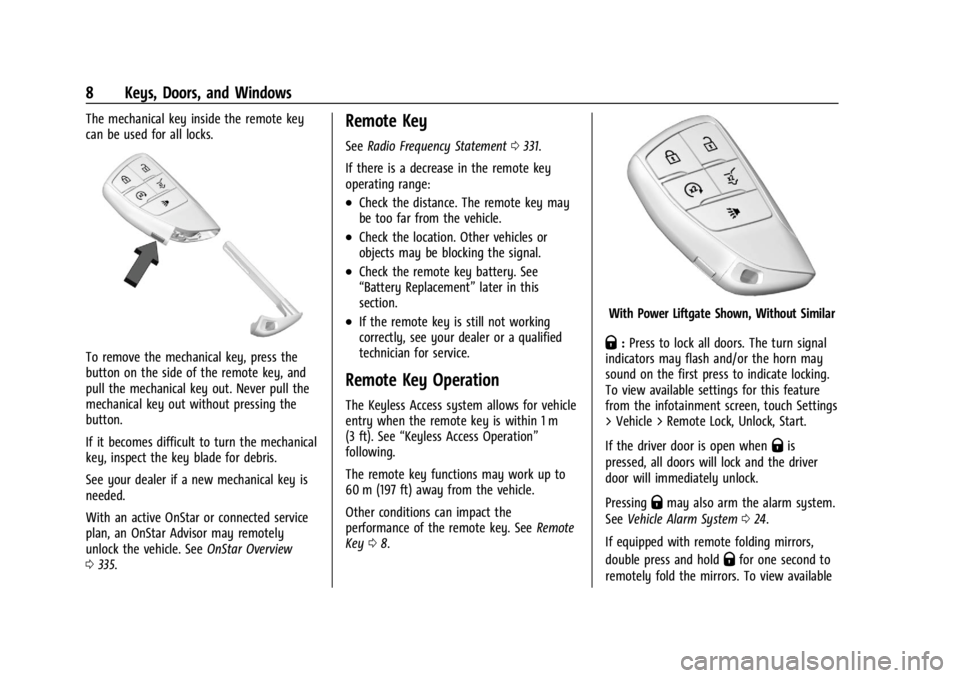
The mechanical key inside the remote key
can be used for all locks.
To remove the mechanical key, press the
button on the side of the remote key, and
pull the mechanical key out. Never pull the
mechanical key out without pressing the
button.
If it becomes difficult to turn the mechanical
key, inspect the key blade for debris.
See your dealer if a new mechanical key is
needed.
With an active OnStar or connected service
plan, an OnStar Advisor may remotely
unlock the vehicle. SeeOnStar Overview
0 335.
Remote Key
See Radio Frequency Statement 0331.
If there is a decrease in the remote key
operating range:
.Check the distance. The remote key may
be too far from the vehicle.
.Check the location. Other vehicles or
objects may be blocking the signal.
.Check the remote key battery. See
“Battery Replacement” later in this
section.
.If the remote key is still not working
correctly, see your dealer or a qualified
technician for service.
Remote Key Operation
The Keyless Access system allows for vehicle
entry when the remote key is within 1 m
(3 ft). See “Keyless Access Operation”
following.
The remote key functions may work up to
60 m (197 ft) away from the vehicle.
Other conditions can impact the
performance of the remote key. See Remote
Key 08.
With Power Liftgate Shown, Without Similar
Q:Press to lock all doors. The turn signal
indicators may flash and/or the horn may
sound on the first press to indicate locking.
To view available settings for this feature
from the infotainment screen, touch Settings
> Vehicle > Remote Lock, Unlock, Start.
If the driver door is open when
Qis
pressed, all doors will lock and the driver
door will immediately unlock.
Pressing
Qmay also arm the alarm system.
See Vehicle Alarm System 024.
If equipped with remote folding mirrors,
double press and hold
Qfor one second to
remotely fold the mirrors. To view available
Page 10 of 356
Buick Envision Owner Manual (GMNA-Localizing-U.S./Canada/Mexico-
16060855) - 2023 - CRC - 2/9/22
Keys, Doors, and Windows 9
settings for this feature from the
infotainment screen, touch Settings >
Vehicle > Comfort and Convenience.
K:Press to unlock the driver door.
Press
Kagain within five seconds to unlock
all doors. The remote key can be
programmed to unlock all doors on the first
button press. To view available settings for
this feature from the infotainment screen,
touch Settings > Vehicle > Remote Lock,
Unlock, Start. When remotely unlocking the
vehicle at night, the lights come on briefly
to light your approach to the vehicle. The
turn signal indicators may flash to indicate
unlocking.
Pressing
Kwill disarm the alarm system.
See Vehicle Alarm System 024.
If equipped with remote folding mirrors,
double press and hold
Kfor one second to
remotely unfold the mirrors. To view
available settings for this feature from the
infotainment screen, touch Settings >
Vehicle > Comfort and Convenience.
Double press and hold
Kuntil the windows
fully open. Windows will not operate unless
remote window operation is enabled. To view available settings for this feature from
the infotainment screen, touch Settings >
Vehicle > Remote Lock, Unlock, Start.
S:
Double pressSto start the engine
from outside the vehicle using the remote
key. See Remote Vehicle Start 013.
7:Press and release one time to initiate
the vehicle locator. The exterior lamps flash
and the horn chirps three times. Press and
hold
7for three seconds to sound the
panic alarm. The horn sounds and the turn
signal lamps flash for 30 seconds, or until
7
is pressed again or the vehicle is started.
b: If equipped, press twice quickly to
open or close the liftgate.
Press once to stop the liftgate from moving.
Keyless Access Operation
With the Keyless Access system, you can
lock and unlock the doors and access the
liftgate without removing the remote key
from your pocket, purse, briefcase, etc. The
remote key should be within 1 m (3 ft) of the
liftgate or door being opened.
Keyless Access can be programmed to
unlock all doors on the first lock/unlock
press from the driver door. To view available settings for this feature from the
infotainment screen, touch Settings >
Vehicle > Remote Lock, Unlock, Start.
If equipped with memory seats, remote keys
1 and 2 are linked to seating positions of
memory 1 or 2. See
Memory Seats038.
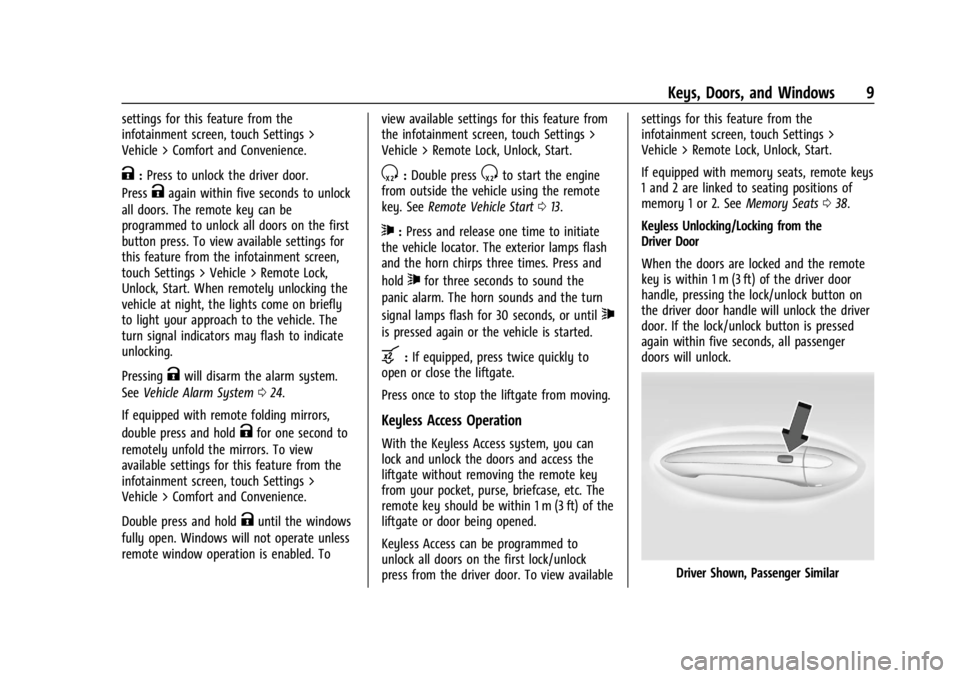
Keyless Unlocking/Locking from the
Driver Door
When the doors are locked and the remote
key is within 1 m (3 ft) of the driver door
handle, pressing the lock/unlock button on
the driver door handle will unlock the driver
door. If the lock/unlock button is pressed
again within five seconds, all passenger
doors will unlock.
Driver Shown, Passenger Similar
Page 27 of 356
Buick Envision Owner Manual (GMNA-Localizing-U.S./Canada/Mexico-
16060855) - 2023 - CRC - 2/9/22
26 Keys, Doors, and Windows
When trying to start the vehicle, the
security light may come on briefly when the
ignition is turned on.
If the engine does not start and the security
light stays on, there is a problem with the
system. Turn the ignition off and try again.
If the vehicle will not change ignition modes
(accessory mode, on, off), and the remote
key appears to be undamaged, try another
remote key. Or, you may try placing the
remote key in the front cupholder located in
the center console. SeeRemote Key
Operation 08.
If the ignition mode will not change with
the other remote key or in the front
cupholder, your vehicle needs service. If the
ignition does change modes, the first
remote key may be faulty. See your dealer
who can service the theft-deterrent system
and have a new remote key programmed to
the vehicle.
It is possible for the immobilizer system to
learn new or replacement remote keys. Up
to eight remote keys can be programmed
for the vehicle. To program additional
remote keys, see “Programming Remote
Keys to the Vehicle” underRemote Key
Operation 08. Do not leave the remote key or device that
disarms or deactivates the theft-deterrent
system in the vehicle.
Exterior Mirrors
Convex Mirrors
{Warning
A convex mirror can make things, like
other vehicles, look farther away than
they really are. If you cut too sharply
into the right lane, you could hit a
vehicle on the right. Check the inside
mirror or glance over your shoulder
before changing lanes.
The passenger side mirror is convex shaped.
A convex mirror's surface is curved so more
can be seen from the driver seat.
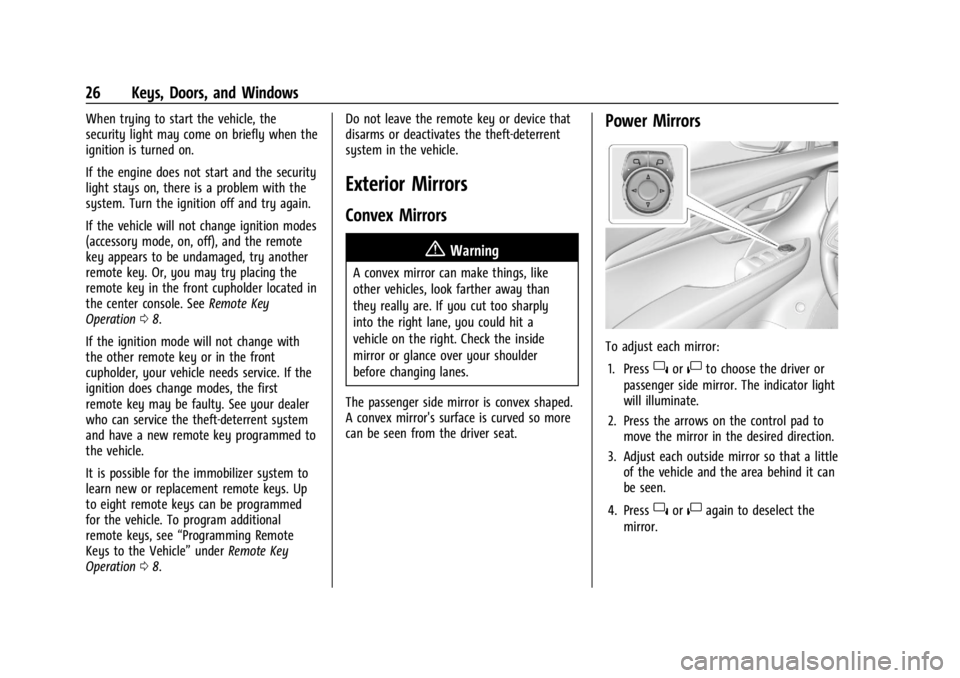
Power Mirrors
To adjust each mirror: 1. Press
}or|to choose the driver or
passenger side mirror. The indicator light
will illuminate.
2. Press the arrows on the control pad to move the mirror in the desired direction.
3. Adjust each outside mirror so that a little of the vehicle and the area behind it can
be seen.
4. Press
}or|again to deselect the
mirror.
Page 28 of 356
Buick Envision Owner Manual (GMNA-Localizing-U.S./Canada/Mexico-
16060855) - 2023 - CRC - 2/9/22
Keys, Doors, and Windows 27
Memory Mirrors
The vehicle may have memory mirrors. See
Memory Seats038.
Lane Change Alert (LCA)
The vehicle may have LCA. See Lane Change
Alert (LCA) 0235.
Side Blind Zone Alert (SBZA)
The vehicle may have Side Blind Zone Alert.
See Side Blind Zone Alert (SBZA) 0235.
Turn Signal Indicator
The vehicle may have a turn signal indicator
on the mirror housings. The indicator will
flash when turn signal or hazard warning
flashers are used.
Folding Mirrors
Manual Folding Mirrors
If equipped, manually fold the mirrors
inward toward the vehicle to prevent
damage when going through an automatic
car wash. Push the mirror outward to return
it to the original position.
Heated Mirrors
K: Press to heat the mirrors. See
“Rear Window Defogger” underDual
Automatic Climate Control System 0174.
Automatic Dimming Mirror
If the vehicle has the automatic dimming
mirror, the driver outside mirror
automatically adjusts for the glare of
headlamps behind you.
Reverse Tilt Mirrors
If equipped with reverse tilt mirrors and
memory seats, the passenger and/or driver
mirror tilts to a preselected position when
the vehicle is in R (Reverse). This allows the
curb to be seen when parallel parking.
The mirror(s) may move from their tilted
position when:
.The vehicle is shifted out of R (Reverse),
or remains in R (Reverse) for about
30 seconds.
.The vehicle is turned off.
.The vehicle is driven in R (Reverse) above
a set speed.
To view available settings for this feature,
touch the Settings icon on the infotainment
home page. Select “Vehicle”to display the
list of available options and select “Comfort
and Convenience”.
Interior Mirrors
Interior Rearview Mirrors
Adjust the rearview mirror for a clear view
of the area behind the vehicle.
Do not spray glass cleaner directly on the
mirror. Use a soft towel dampened with
water.
Manual Rearview Mirror
If equipped, push the tab forward for
daytime use and pull it rearward for
nighttime use to avoid glare of the
headlamps from behind.
Automatic Dimming Rearview
Mirror
If equipped, automatic dimming reduces the
glare of headlamps from behind. The
dimming feature comes on when the vehicle
is started.
Rear Camera Mirror
If equipped, this automatic dimming mirror
provides a wide angle camera view of the
area behind the vehicle.
Page 29 of 356
Buick Envision Owner Manual (GMNA-Localizing-U.S./Canada/Mexico-
16060855) - 2023 - CRC - 2/9/22
28 Keys, Doors, and Windows
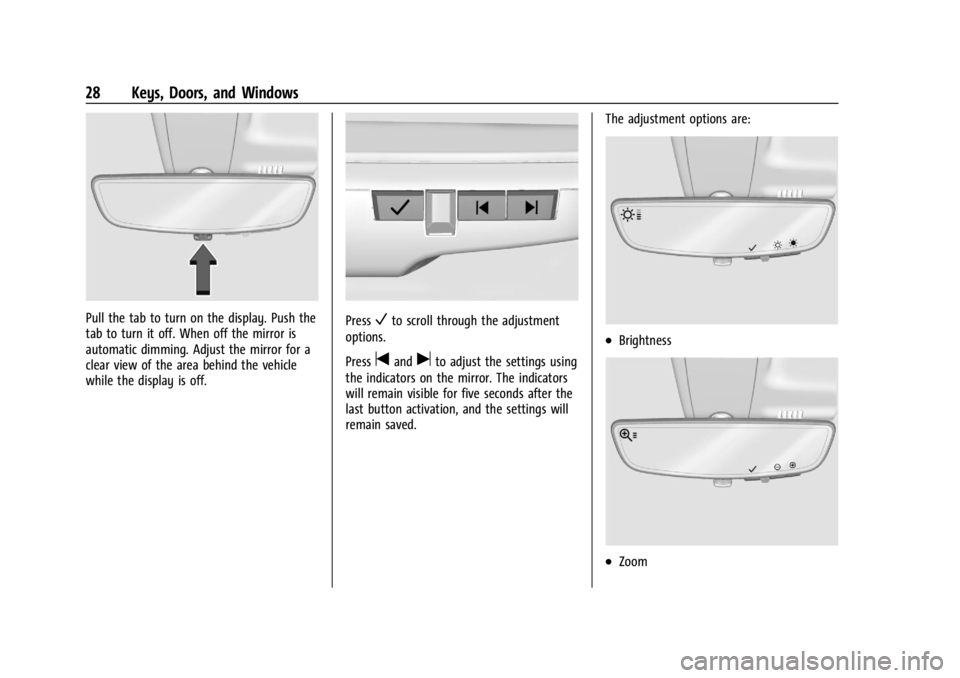
Pull the tab to turn on the display. Push the
tab to turn it off. When off the mirror is
automatic dimming. Adjust the mirror for a
clear view of the area behind the vehicle
while the display is off.PressVto scroll through the adjustment
options.
Press
tanduto adjust the settings using
the indicators on the mirror. The indicators
will remain visible for five seconds after the
last button activation, and the settings will
remain saved. The adjustment options are:
.Brightness
.Zoom
Page 30 of 356
Buick Envision Owner Manual (GMNA-Localizing-U.S./Canada/Mexico-
16060855) - 2023 - CRC - 2/9/22
Keys, Doors, and Windows 29
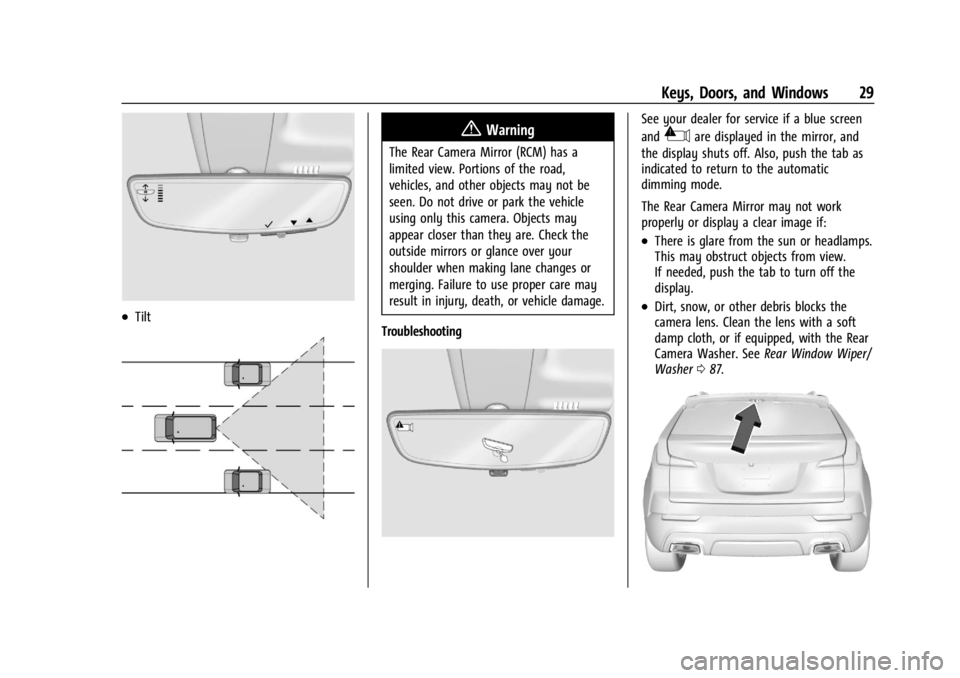
.Tilt
{Warning
The Rear Camera Mirror (RCM) has a
limited view. Portions of the road,
vehicles, and other objects may not be
seen. Do not drive or park the vehicle
using only this camera. Objects may
appear closer than they are. Check the
outside mirrors or glance over your
shoulder when making lane changes or
merging. Failure to use proper care may
result in injury, death, or vehicle damage.
Troubleshooting
See your dealer for service if a blue screen
and
3are displayed in the mirror, and
the display shuts off. Also, push the tab as
indicated to return to the automatic
dimming mode.
The Rear Camera Mirror may not work
properly or display a clear image if:
.There is glare from the sun or headlamps.
This may obstruct objects from view.
If needed, push the tab to turn off the
display.
.Dirt, snow, or other debris blocks the
camera lens. Clean the lens with a soft
damp cloth, or if equipped, with the Rear
Camera Washer. See Rear Window Wiper/
Washer 087.
Page 89 of 356
Buick Envision Owner Manual (GMNA-Localizing-U.S./Canada/Mexico-
16060855) - 2023 - CRC - 2/9/22
88 Instruments and Controls
lever is in R (Reverse), and the front
windshield wiper is performing interval
wipes, then the rear wiper automatically
performs interval wipes.
This feature can be turned on or off.
The windshield washer reservoir is used for
the windshield and rear window. Check the
fluid level if either washer is not working.
SeeWasher Fluid 0263.
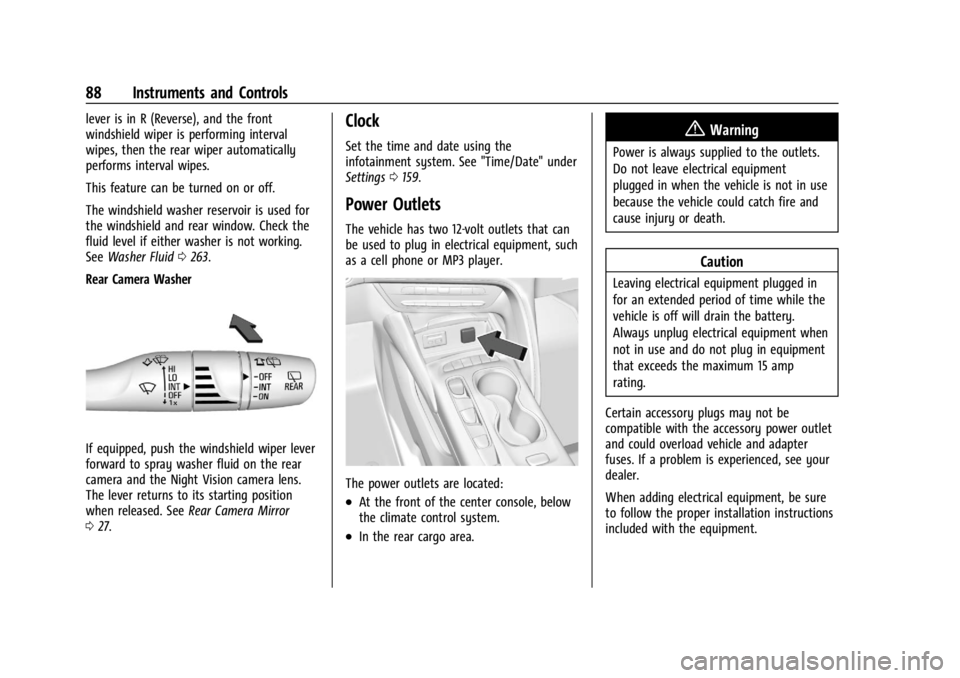
Rear Camera Washer
If equipped, push the windshield wiper lever
forward to spray washer fluid on the rear
camera and the Night Vision camera lens.
The lever returns to its starting position
when released. See Rear Camera Mirror
0 27.
Clock
Set the time and date using the
infotainment system. See "Time/Date" under
Settings 0159.
Power Outlets
The vehicle has two 12-volt outlets that can
be used to plug in electrical equipment, such
as a cell phone or MP3 player.
The power outlets are located:
.At the front of the center console, below
the climate control system.
.In the rear cargo area.
{Warning
Power is always supplied to the outlets.
Do not leave electrical equipment
plugged in when the vehicle is not in use
because the vehicle could catch fire and
cause injury or death.
Caution
Leaving electrical equipment plugged in
for an extended period of time while the
vehicle is off will drain the battery.
Always unplug electrical equipment when
not in use and do not plug in equipment
that exceeds the maximum 15 amp
rating.
Certain accessory plugs may not be
compatible with the accessory power outlet
and could overload vehicle and adapter
fuses. If a problem is experienced, see your
dealer.
When adding electrical equipment, be sure
to follow the proper installation instructions
included with the equipment.
Page 174 of 356
Buick Envision Owner Manual (GMNA-Localizing-U.S./Canada/Mexico-
16060855) - 2023 - CRC - 2/9/22
Climate Controls 173
Manual Operation
ON/OFF :Press to turn the system off or
on. When off is selected, the system will
prevent outside air from entering the
vehicle. Pressing most climate control
buttons will turn the system on.
]: Turn the knob clockwise or
counterclockwise to increase or decrease the
fan speed.
TEMP : Turn the knob clockwise or
counterclockwise to increase or decrease the
temperature.
Air Delivery Mode Controls : Press
z,Y,
or
[to change the direction of the
airflow. The indicator light in the button will
turn on. Any combination of the three
buttons can be selected. The current mode
appears in the display.
To change the current mode, select one or
more of the following:
z: Clears the windows of fog or moisture.
Air is directed to the windshield.
Y: Air is directed to the instrument panel
outlets.
[: Air is directed to the floor outlets.
0FRONT : Clears the windshield of fog or
frost more quickly. Air is directed to the
windshield.
For best results, clear all snow and ice from
the windshield before defrosting.
A/C : Press to turn the air conditioning
system on or off. If the climate control
system is turned off or the outside
temperature falls below freezing, the air
conditioner will not run.
@: Press to turn on recirculation. An
indicator light comes on. Air is recirculated
to quickly cool the inside of the vehicle or
prevent outside air and odors from entering.
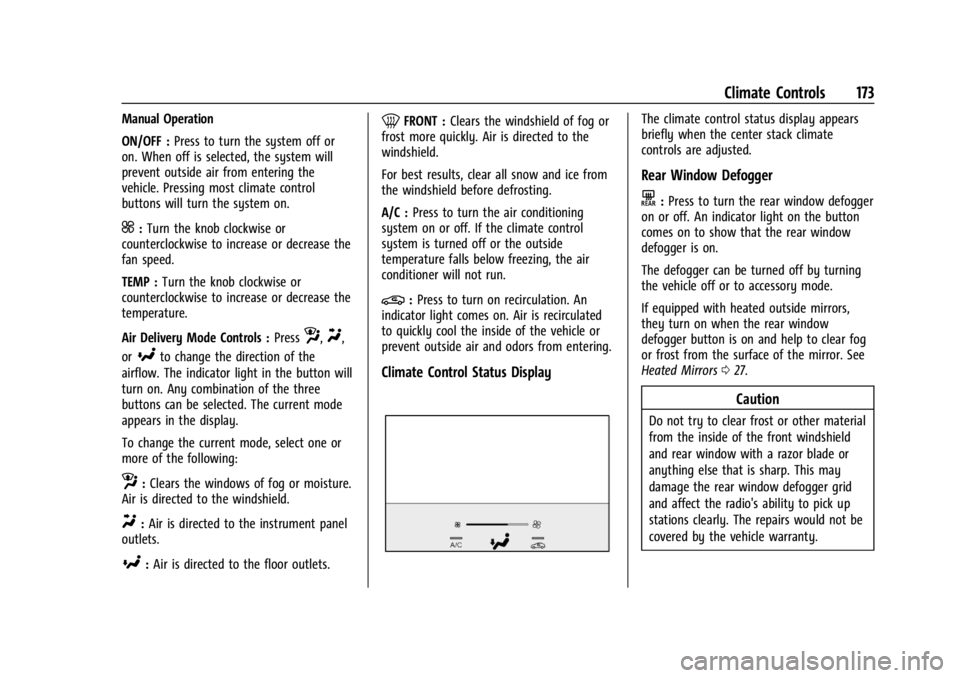
Climate Control Status Display
The climate control status display appears
briefly when the center stack climate
controls are adjusted.
Rear Window Defogger
K: Press to turn the rear window defogger
on or off. An indicator light on the button
comes on to show that the rear window
defogger is on.
The defogger can be turned off by turning
the vehicle off or to accessory mode.
If equipped with heated outside mirrors,
they turn on when the rear window
defogger button is on and help to clear fog
or frost from the surface of the mirror. See
Heated Mirrors 027.
Caution
Do not try to clear frost or other material
from the inside of the front windshield
and rear window with a razor blade or
anything else that is sharp. This may
damage the rear window defogger grid
and affect the radio's ability to pick up
stations clearly. The repairs would not be
covered by the vehicle warranty.
Page 178 of 356

Buick Envision Owner Manual (GMNA-Localizing-U.S./Canada/Mexico-
16060855) - 2023 - CRC - 2/9/22
Climate Controls 177
Auto Defog :The climate control system
may have a sensor to automatically detect
high humidity inside the vehicle. When high
humidity is detected, the climate control
system may adjust to outside air supply and
turn on the air conditioner. The fan speed
may slightly increase to help prevent
fogging. If the climate control system does
not detect possible window fogging, it
returns to normal operation.
Rear Window Defogger
K: Press to turn the rear window defogger
on or off. An indicator light on the button
comes on to show that the rear window
defogger is on.
The defogger can be turned off by turning
the vehicle off or to accessory mode.
The rear window defogger can be set to
automatic operation. When auto rear defog
is selected, the rear window defogger turns
on automatically when the interior
temperature is cold and the outside
temperature is about 7 °C (44 °F) and below.
The auto rear defogger turns off
automatically. If equipped, the heated outside mirrors turn
on when the rear window defogger button
is on and help to clear fog or frost from the
surface of the mirror. See
Heated Mirrors
0 27.
Caution
Do not try to clear frost or other material
from the inside of the front windshield
and rear window with a razor blade or
anything else that is sharp. This may
damage the rear window defogger grid
and affect the radio's ability to pick up
stations clearly. The repairs would not be
covered by the vehicle warranty.
Remote Start Climate Control Operation :
If equipped with remote start, the climate
control system may run when the vehicle is
started remotely. If equipped with heated or
ventilated seats or a heated steering wheel,
these features may come on during a
remote start. See Remote Vehicle Start 013,
Heated and Ventilated Front Seats 041, and
Heated Steering Wheel 085.
Sensor
The solar sensor, on top of the instrument
panel near the windshield, monitors the
solar heat. The climate control system uses the sensor
information to adjust the temperature, fan
speed, recirculation, and air delivery mode
for best comfort.
Do not cover the sensor; otherwise the
automatic climate control system may not
work properly.
Interior Air Quality
If equipped, the Interior Air Quality display
indicates the concentration of PM2.5
(2.5 micron and smaller) pollution present in
the interior air of the vehicle. The source of
this pollution is the environment
surrounding the vehicle. Your vehicle is