3-71 BUICK LACROSSE 2005 Owner's Manual
[x] Cancel search | Manufacturer: BUICK, Model Year: 2005, Model line: LACROSSE, Model: BUICK LACROSSE 2005Pages: 410, PDF Size: 2.59 MB
Page 77 of 410
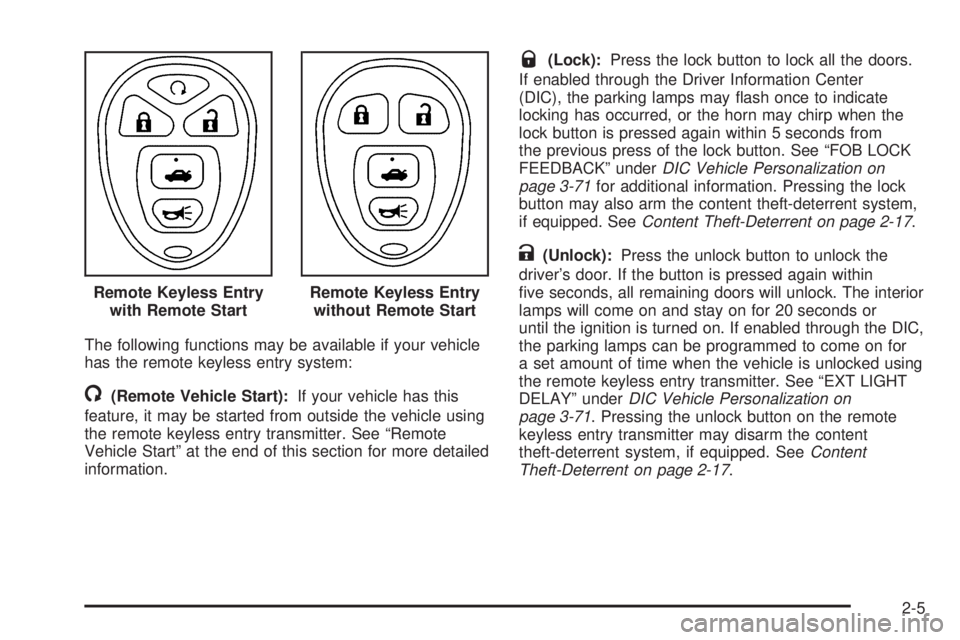
The following functions may be available if your vehicle
has the remote keyless entry system:
/(Remote Vehicle Start):If your vehicle has this
feature, it may be started from outside the vehicle using
the remote keyless entry transmitter. See “Remote
Vehicle Start” at the end of this section for more detailed
information.
Q(Lock):Press the lock button to lock all the doors.
If enabled through the Driver Information Center
(DIC), the parking lamps may ash once to indicate
locking has occurred, or the horn may chirp when the
lock button is pressed again within 5 seconds from
the previous press of the lock button. See “FOB LOCK
FEEDBACK” underDIC Vehicle Personalization on
page 3-71for additional information. Pressing the lock
button may also arm the content theft-deterrent system,
if equipped. SeeContent Theft-Deterrent on page 2-17.
K(Unlock):Press the unlock button to unlock the
driver’s door. If the button is pressed again within
ve seconds, all remaining doors will unlock. The interior
lamps will come on and stay on for 20 seconds or
until the ignition is turned on. If enabled through the DIC,
the parking lamps can be programmed to come on for
a set amount of time when the vehicle is unlocked using
the remote keyless entry transmitter. See “EXT LIGHT
DELAY” underDIC Vehicle Personalization on
page 3-71. Pressing the unlock button on the remote
keyless entry transmitter may disarm the content
theft-deterrent system, if equipped. SeeContent
Theft-Deterrent on page 2-17. Remote Keyless Entry
with Remote Start
Remote Keyless Entry
without Remote Start
2-5
Page 81 of 410
If you enter the vehicle after a remote start, and the
engine is still running, insert the key into the ignition lock
cylinder and turn it to the RUN position to drive the
vehicle.
Your vehicle’s engine can be started two times using
the transmitter’s remote start feature.
If only one remote start procedure has been done, since
last driving the vehicle or resetting the remote start
system, the engine may be started again remotely
following the remote start procedure a second time.
If the remote start procedure is used again before the
rst ten minute time frame has ended, 10 minutes will be
added to the remaining minutes. The added
10 minutes are considered a second remote start.
The remote vehicle start feature will not operate if:
The remote start system is disabled.
The vehicle’s key is in the ignition.
A door is open or the vehicle’s hood is not closed.
The hazard warning ashers are on.
There is an emission control system malfunction.
The engine coolant temperature is too high.
The oil pressure is low.
Two remote vehicle starts have already been
provided. The maximum number of remote starts or
remote start attempts between ignition cycles
with the key is two.
If a remote start is attempted and is unsuccessful, the
Driver Information Center (DIC) will display REMOTE
START DISABLED.
Vehicles equipped with the remote vehicle start feature
are shipped from the factory with the remote vehicle
start system enabled. The system may be disabled
through the DIC. See “REMOTE START” under
DIC Vehicle Personalization on page 3-71for additional
information.
2-9
Page 83 of 410
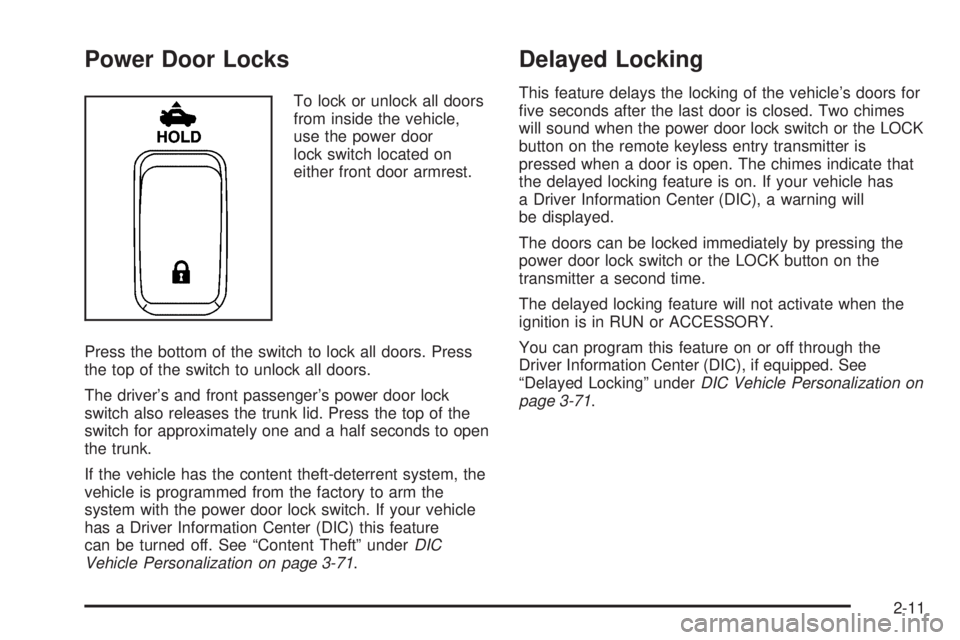
Power Door Locks
To lock or unlock all doors
from inside the vehicle,
use the power door
lock switch located on
either front door armrest.
Press the bottom of the switch to lock all doors. Press
the top of the switch to unlock all doors.
The driver’s and front passenger’s power door lock
switch also releases the trunk lid. Press the top of the
switch for approximately one and a half seconds to open
the trunk.
If the vehicle has the content theft-deterrent system, the
vehicle is programmed from the factory to arm the
system with the power door lock switch. If your vehicle
has a Driver Information Center (DIC) this feature
can be turned off. See “Content Theft” underDIC
Vehicle Personalization on page 3-71.
Delayed Locking
This feature delays the locking of the vehicle’s doors for
ve seconds after the last door is closed. Two chimes
will sound when the power door lock switch or the LOCK
button on the remote keyless entry transmitter is
pressed when a door is open. The chimes indicate that
the delayed locking feature is on. If your vehicle has
a Driver Information Center (DIC), a warning will
be displayed.
The doors can be locked immediately by pressing the
power door lock switch or the LOCK button on the
transmitter a second time.
The delayed locking feature will not activate when the
ignition is in RUN or ACCESSORY.
You can program this feature on or off through the
Driver Information Center (DIC), if equipped. See
“Delayed Locking” underDIC Vehicle Personalization on
page 3-71.
2-11
Page 84 of 410
Automatic Door Locks
The vehicle’s doors are programmed from the factory to
lock when the shift lever is moved into a forward
gear, and to unlock when the shift lever is moved into
PARK (P).
If someone needs to get in or out of the vehicle after
the doors have been locked, place the shift lever
into PARK (P). You may also unlock all doors using the
power door lock switch or unlock one door using the
inside manual door lock.
If your vehicle has a Driver Information Center (DIC),
there are different programming options for locking and
unlocking the doors automatically. SeeDIC Vehicle
Personalization on page 3-71.
Lockout Protection
The lockout protection feature makes it more difficult to
lock the key in the vehicle. If the driver’s door is
open while the key is in the ignition, the door cannot be
locked with the power door lock switch.
This feature cannot guarantee that you will never be
locked out of the vehicle. If the key is not left in
the ignition, or, if the manual door lock pin is used, the
key could still be locked inside the vehicle. Always
remember to take the key with you.
2-12
Page 89 of 410
Sun Visors
To block out glare, you can swing down the visors and
slide them along the rod to cover different areas of
the front window. You can also move them to cover the
side windows.
Visor Vanity Mirror
Swing down the sun visors and lift the cover to expose
the vanity mirror. If your vehicle has lighted vanity
mirrors, the light will come on when you lift the cover.
Theft-Deterrent Systems
Vehicle theft is big business, especially in some cities.
Although your vehicle has a number of theft-deterrent
features, we know that nothing we put on it can make it
impossible to steal.
Content Theft-Deterrent
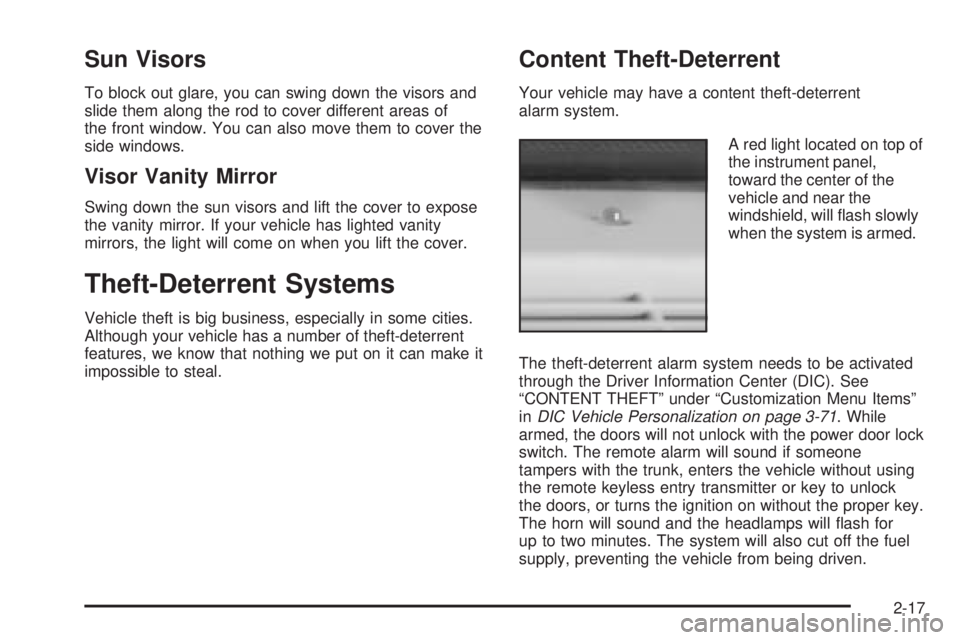
Your vehicle may have a content theft-deterrent
alarm system.
A red light located on top of
the instrument panel,
toward the center of the
vehicle and near the
windshield, will ash slowly
when the system is armed.
The theft-deterrent alarm system needs to be activated
through the Driver Information Center (DIC). See
“CONTENT THEFT” under “Customization Menu Items”
inDIC Vehicle Personalization on page 3-71. While
armed, the doors will not unlock with the power door lock
switch. The remote alarm will sound if someone
tampers with the trunk, enters the vehicle without using
the remote keyless entry transmitter or key to unlock
the doors, or turns the ignition on without the proper key.
The horn will sound and the headlamps will ash for
up to two minutes. The system will also cut off the fuel
supply, preventing the vehicle from being driven.
2-17
Page 90 of 410
Arming with the Power Lock Switch
The vehicle’s content theft-deterrent alarm system can
be activated when the key is removed from the
ignition and the power door lock switch of either the
driver’s or front passenger’s door is used to lock
the vehicle. The door needs to be in the open position
when pressing the power door lock switch. The
alarm system will not activate if the door is closed when
the power door lock switch is pressed. This system
can be activated through the Driver Information
Center (DIC). See “CONTENT THEFT” under
“Customization Menu Items” inDIC Vehicle
Personalization on page 3-71.
When the doors are locked using the power door lock
switch of either front door, the red light on top of
the instrument panel will start ashing at a fast rate,
indicating that the system is arming. After all the doors
are locked there will be a time delay and then the
red light will begin to ash at a very slow rate, indicating
the system is armed.
Arming with the Remote Keyless Entry
Transmitter
The alarm system will arm when the remote keyless
entry transmitter is used to lock the doors after the key
is removed from the ignition. The red light will comeon to indicate that the system is arming. After all doors
are closed and locked, and after a time delay, the
red light will begin ashing at a very slow rate to show
the system is armed.
Arming Conrmation
A red light located on top of the instrument panel,
towards the center of the vehicle and near the
windshield, will ash slowly to conrm when the system
is armed.
Disarming with the Remote Keyless
Entry Transmitter
The alarm system will disarm when the remote keyless
entry transmitter is used to unlock the doors. The
red light will go out to show that the system is disarmed.
Disarming with Your Key
The alarm system will disarm when the key is used to
unlock the doors. The red light will stop ashing
when the system is disarmed. If you would like the key
to disarm the alarm system, see “CONTENT THEFT”
underDIC Vehicle Personalization on page 3-71
for more information.
2-18
Page 116 of 410
Engine Coolant Temperature Gage..................3-38
Low Coolant Warning Light............................3-39
Malfunction Indicator Lamp.............................3-39
Oil Pressure Light.........................................3-42
Change Engine Oil Light................................3-43
Security Light...............................................3-43
Cruise Control Light......................................3-43
Reduced Engine Power Light.........................3-44
Highbeam On Light.......................................3-44
Headlamps Suggested Light...........................3-44
Low Washer Fluid Warning Light.....................3-45
Door Ajar Light.............................................3-45
Trunk Ajar Light............................................3-45
Service Vehicle Soon Light............................3-45
Fuel Gage...................................................3-46
Low Fuel Warning Light.................................3-46
Check Gas Cap Light....................................3-46Driver Information Center (DIC).......................3-47
DIC Operation and Displays...........................3-47
DIC Warnings and Messages.........................3-53
DIC Vehicle Personalization............................3-71
Audio System(s).............................................3-79
Setting the Time...........................................3-79
Radio with CD (Base)...................................3-79
Radio with CD (UpLevel)...............................3-84
Radio with CD (MP3)....................................3-92
Radio with Six-Disc CD................................3-105
Theft-Deterrent Feature................................3-117
Audio Steering Wheel Controls......................3-118
Radio Reception.........................................3-119
Care of Your CDs.......................................3-119
Care of Your CD Player...............................3-119
Backglass Antenna......................................3-120
Chime Level Adjustment...............................3-120
Section 3 Instrument Panel
3-2
Page 131 of 410
Entry lighting includes a feature called theater dimming.
With theater dimming, the lamps do not turn off at
the end of the delay time. Instead, they slowly dim after
the delay time and then turn off.
The courtesy lamps turn off when the ignition key is
turned to RUN or START. They will come on again when
a door is opened.
Delayed Entry Lighting
Delayed entry lighting lights the vehicle’s interior for a
period of time after all the doors have been closed.
After all the doors have been closed, the delayed entry
lighting feature will continue to work until one of the
following occurs:
The ignition is in run.
The doors are locked.
Twenty-ve seconds has elapsed.
If during the illumination period a door is opened, the
timed illumination period will be canceled and the interior
lamps will remain on.
Theater Dimming
This feature allows for a three to ve-second fade out of
the courtesy lamps instead of immediate turn off.
Delayed Exit Lighting
This feature can be programmed either on or off using
the Driver Information Center. SeeDIC Vehicle
Personalization on page 3-71under INT LIGHTS KEYS
REMOVED. When activated, this feature illuminates
the interior for a period of time after the ignition key is
removed from the ignition.
The ignition must be off and the interior lamp control
must be in the door position for delayed exit lighting to
work. When the ignition key is removed, interior
illumination will activate and remain on until one of the
following occurs:
The ignition is in run.
The power door locks are activated.
Twenty-ve seconds has elapsed.
If during the illumination period a door is opened, the
timed illumination period will be canceled and the interior
lamps will remain on.
3-17
Page 132 of 410
Perimeter Lighting
Perimeter lighting provides a period of exterior vehicle
lighting. Perimeter lighting activates when the key
is removed from the ignition or the vehicle is unlocked
using the remote keyless entry transmitter. The
amount of time the exterior lamps will remain on can be
programmed using the Driver Information Center
(DIC). See “EXIT LIGHT DELAY” underDIC Vehicle
Personalization on page 3-71for additional information.
Overhead Console Reading
Lamps
Your vehicle may have reading lamps located on the
overhead console. Press the lens to turn them on
and off.
Rear Assist Handle Reading Lamps
Your vehicle may have reading lamps located near
the rear assist handles. Press the lens to turn them on
and off.
Battery Run-Down Protection
This helps prevent the vehicle’s battery from draining in
case the interior courtesy lamps, reading lamps,
trunk lamp, underhood lamp, glove box lamps, or sun
visor vanity lamps, if equipped, are accidently left on. If
any of these lamps are left on while the ignition is
off, they will automatically turn off after 10 minutes. The
lamps will not come back on again until one of the
following occurs:
The ignition is turned on.
The interior lamps control is turned off, then to
door or on.
Ultrasonic Rear Parking
Assist (URPA)
Your vehicle may be equipped with Ultrasonic Rear
Parking Assist (URPA). URPA is designed to help you
park while in REVERSE (R) and operates only at speeds
less than 3 mph (5 km/h). URPA can help you avoid
colliding with objects such as parked vehicles. The
system can detect objects 5 feet (1.5 m) behind your
vehicle and tell you how close those objects are to your
rear bumper.
3-18
Page 161 of 410
Driver Information Center (DIC)
Your vehicle may have a Driver Information
Center (DIC).
All messages will appear in the DIC display located in
the instrument panel cluster, below the speedometer.
The DIC buttons are located on the center of the
instrument panel, below the center outlets.
The DIC comes on when the ignition is on. After a short
delay, the DIC on the uplevel vehicle will display the
WELCOME DRIVER (1 or 2) if a personalized key 1 or 2
is used, and then the information that was last
displayed before the engine was turned off.
The DIC on the base level vehicle displays the odometer
and trip odometers only.
The DIC on the uplevel vehicle displays the odometer,
trip odometers, fuel economy, trip computer, vehicle
system, and compass display information. It also
displays warning messages if a system problem is
detected. In addition, the DIC on the uplevel vehicle
displays phone numbers that are called using the
OnStar
®system, if equipped. SeeOnStar®System on
page 2-34.The outside air temperature automatically appears in
the bottom right corner of the uplevel DIC display when
viewing the trip/odometer screens, fuel screens and
some of the gages screens. If the outside air
temperature is at or below 37°F (3°C), the temperature
reading will toggle between displaying the outside
temperature and the word ICE for two minutes. If there
is a problem with the system that controls the
temperature display, the letters OC (open circuit) or SC
(short circuit) will appear on the display. If this occurs,
have the vehicle serviced by your GM dealer.
The DIC on the uplevel vehicle also allows some
features to be customized or personalized. SeeDIC
Vehicle Personalization on page 3-71for more
information.
DIC Operation and Displays
The DIC has different modes which can be accessed by
pressing the DIC buttons located on the center of the
instrument panel. Depending on whether your vehicle
has the base level or uplevel DIC, the buttons and
modes available will differ.
The buttons on the base level vehicle are the
trip/odometer and English/Metric buttons.
The buttons on the uplevel vehicle are the trip/odometer,
set/reset, gages, fuel, and option buttons.
The button functions are detailed in the following pages.
3-47