keyless BUICK LACROSSE 2007 User Guide
[x] Cancel search | Manufacturer: BUICK, Model Year: 2007, Model line: LACROSSE, Model: BUICK LACROSSE 2007Pages: 512
Page 161 of 512
Interior Lamps
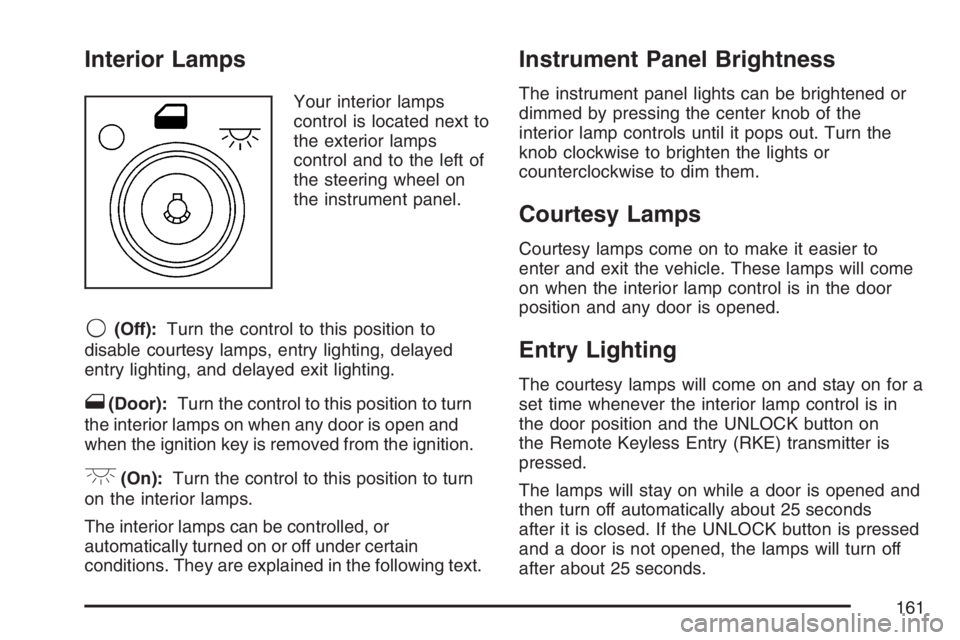
Your interior lamps
control is located next to
the exterior lamps
control and to the left of
the steering wheel on
the instrument panel.
9(Off):Turn the control to this position to
disable courtesy lamps, entry lighting, delayed
entry lighting, and delayed exit lighting.
1(Door):Turn the control to this position to turn
the interior lamps on when any door is open and
when the ignition key is removed from the ignition.
+(On):Turn the control to this position to turn
on the interior lamps.
The interior lamps can be controlled, or
automatically turned on or off under certain
conditions. They are explained in the following text.
Instrument Panel Brightness
The instrument panel lights can be brightened or
dimmed by pressing the center knob of the
interior lamp controls until it pops out. Turn the
knob clockwise to brighten the lights or
counterclockwise to dim them.
Courtesy Lamps
Courtesy lamps come on to make it easier to
enter and exit the vehicle. These lamps will come
on when the interior lamp control is in the door
position and any door is opened.
Entry Lighting
The courtesy lamps will come on and stay on for a
set time whenever the interior lamp control is in
the door position and the UNLOCK button on
the Remote Keyless Entry (RKE) transmitter is
pressed.
The lamps will stay on while a door is opened and
then turn off automatically about 25 seconds
after it is closed. If the UNLOCK button is pressed
and a door is not opened, the lamps will turn off
after about 25 seconds.
161
Page 163 of 512
Perimeter Lighting
Perimeter lighting provides a period of exterior
vehicle lighting. Perimeter lighting activates when
the key is removed from the ignition or the vehicle is
unlocked using the Remote Keyless Entry (RKE)
transmitter. The amount of time the exterior lamps
will remain on can be programmed using the Driver
Information Center (DIC). See “EXIT LIGHT
DELAY” underDIC Vehicle Personalization on
page 229for additional information.
Overhead Console Reading Lamps
Your vehicle may have reading lamps located
on the overhead console. Press the lens to turn
them on and off.
Rear Assist Handle Reading Lamps
Your vehicle may have reading lamps located
near the rear assist handles. Press the lens to turn
them on and off.
Electric Power Management
The vehicle has Electric Power Management (EPM)
that estimates the battery’s temperature and state
of charge. It then adjusts the voltage for best
performance and extended life of the battery.
When the battery’s state of charge is low, the
voltage is raised slightly to quickly put the charge
back in. When the state of charge is high, the
voltage is lowered slightly to prevent overcharging.
If the vehicle has a voltmeter gage or voltage
display on the Driver Information Center (DIC), you
may see the voltage move up or down. This is
normal. If there is a problem, an alert will be
displayed.
The battery can be discharged at idle if the
electrical loads are very high. This is true for all
vehicles. This is because the generator (alternator)
may not be spinning fast enough at idle to
produce all the power that is needed for very high
electrical loads.
163
Page 211 of 512
CHECK TIRE PRESSURE
This message displays when the tire pressure in
one of the tires needs to be checked. This
message also displays LEFT FRONT, RIGHT
FRONT, LEFT REAR, or RIGHT REAR to indicate
which tire needs to be checked. You can receive
more than one tire pressure message at a time. To
read the other messages that may have been
sent at the same time, press the set/reset button.
If a tire pressure message appears on the
DIC, stop as soon as you can. Have the tire
pressures checked and set to those shown on the
Tire Loading Information label. SeeTires on
page 402,Loading Your Vehicle on page 319, and
Ination - Tire Pressure on page 409. The DIC
display also shows the tire pressure values for the
front and rear tires by pressing the gages
button. SeeDIC Operation and Displays on
page 200. If the tire pressure is low, the low tire
pressure warning light comes on. SeeTire
Pressure Light on page 190.
This message displays while the ignition is in RUN.
Press any of the DIC buttons to acknowledge this
message and to clear it from the screen.This message continues to display for two seconds
if it has not been acknowledged when the engine is
turned off. It also re-displays for two seconds if the
message has been acknowledged, but the
condition still exists when the engine is turned off.
If the condition still exists, the message re-appears
when the engine is turned on.
DELAYED LOCKING
This message displays to inform the driver that
even though a door lock switch or the lock button
on the Remote Keyless Entry (RKE) transmitter
has been pressed, that actual locking of the doors
is being delayed because the delayed locking
feature has been activated in the DIC. See
“DELAYED LOCKING” underDIC Vehicle
Personalization on page 229for more information.
This message appears and a chime sounds
when the ignition is off.
This message cannot be acknowledged.
211
Page 215 of 512
KEY FOB BATTERY LOW
This message displays when the battery in the
Remote Keyless Entry (RKE) transmitter needs to
be replaced. To replace the battery, see “Battery
Replacement” underRemote Keyless Entry (RKE)
System Operation on page 90.
This message displays while the ignition is in RUN.
Press any of the DIC buttons to acknowledge this
message and to clear it from the screen.
This message continues to display for two seconds
if it has not been acknowledged when the engine is
turned off. It also re-displays for two seconds if the
message has been acknowledged, but the
condition still exists when the engine is turned off.
If the condition still exists, the message re-appears
when the engine is turned on.
KEY IN IGNITION
This message displays and a chime sounds
continuously when the driver’s door is open and
the key is in ACCESSORY or OFF.
This message cannot be acknowledged.
This message disappears and the chiming stops
when the key is removed from the ignition.
LEFT FRONT TURN LAMP OUT
This message displays when the left front turn
signal bulb needs to be replaced. SeeFront Turn
Signal and Parking Lamps on page 397.
This message displays while the ignition is in RUN.
Press any of the DIC buttons to acknowledge this
message and to clear it from the screen.
This message continues to display for two seconds
if it has not been acknowledged when the engine is
turned off. It also re-displays for two seconds if the
message has been acknowledged, but the
condition still exists when the engine is turned off.
If the condition still exists, the message re-appears
when the engine is turned on.
215
Page 221 of 512
REMOTE START DISABLED
If your vehicle has the remote start feature, this
message displays if a remote start attempt is
unsuccessful. This may be caused if any of the
following conditions are true when a remote
start attempt is made:
The remote start system is disabled through
the DIC.
The key is in the ignition.
The hood or the doors are not closed.
There is an emission control system
malfunction.
The engine coolant temperature is too high.
The oil pressure is low.
The hazard warning ashers are turned on.
The maximum number of remote starts
or remote start attempts between ignition
cycles has been reached.
The content theft-deterrent alarm is on while
attempting to remote start the vehicle.
See “REMOTE START” underDIC Vehicle
Personalization on page 229and “Remote Vehicle
Start” underRemote Keyless Entry (RKE)
System Operation on page 90for more
information.
RIGHT FRONT TURN LAMP OUT
This message displays when the right front turn
signal bulb needs to be replaced. SeeFront Turn
Signal and Parking Lamps on page 397.
This message displays while the ignition is in RUN.
Press any of the DIC buttons to acknowledge this
message and to clear it from the screen.
This message continues to display for two seconds
if it has not been acknowledged when the engine is
turned off. It also re-displays for two seconds if the
message has been acknowledged, but the
condition still exists when the engine is turned off.
If the condition still exists, the message re-appears
when the engine is turned on.
221
Page 229 of 512
DIC Vehicle Personalization
Your vehicle may have customization capabilities
that allow you to program certain features to
one preferred setting. Customization features can
only be programmed to one setting on the
vehicle and cannot be programmed to a preferred
setting for two different drivers. The customization
features include the following:
Exterior lighting delay
Interior lighting delay
Delayed locking
Content theft
Remote keyless entry feedback
Remote start
Your vehicle may also have personalization
capabilities that allow you to program certain
features to a preferred setting for up to two drivers.The rst personalized key corresponds to
driver 1 and the second personalized key
corresponds to driver 2. The personalization
features include the following:
Radio station presets
Auto door unlock preferences
Remote keyless entry unlock preferences
All of the customization and personalization options
may not be available on your vehicle. Only the
options available will be displayed on your DIC.
The default settings for the customization and
personalization features were set when your
vehicle left the factory, but may have been
changed from their default state since then.
The customization preferences are
automatically recalled.
The driver’s personalization preferences are
recalled by using the key programmed for
driver 1 or 2.
To change customization and personalization
preferences, use the following procedure.
229
Page 231 of 512
ALL KEYS WILL BE RESET
This screen will only display if YES was selected
on the FACTORY DEFAULTS screen.
Press the set/reset button to scroll through the
following choices:
CANCEL (default):The features will not be set to
their factory default settings and the DIC will
return to the PERSONAL PROGRAM menu.
OK:The features will be set to their factory default
settings, the DIC will exit the personal program
menu, and PERSONAL OPTIONS SAVED will
display.
EXT (Exterior) LIGHT DELAY
This feature allows you to set the amount of time
the exterior lamps remain on after the key is
removed from the ignition or the vehicle is
unlocked using the remote keyless entry
transmitter.Press the option button until EXT LIGHT DELAY
appears on the DIC display. Press the set/reset
button to scroll through the following choices:
OFF:The exterior lamps will not turn on.
15 seconds:The exterior lamps will stay on for
15 seconds.
30 seconds (default):The exterior lamps will
stay on for 30 seconds.
60 seconds:The exterior lamps will stay on for
60 seconds.
90 seconds:The exterior lamps will stay on for
90 seconds.
Select one of the available choices and press the
option button while it is displayed on the DIC
to select it and move on to the next feature.
231
Page 232 of 512
INT (Interior) LIGHTS KEYS REMOVED
This feature enables the interior lamps in
the vehicle to turn on for about 25 seconds after
the key is removed from the ignition.
Press the option button until INT LIGHTS KEYS
REMOVED appears on the DIC display. Press the
set/reset button to scroll through the following
choices:
OFF:Removing the key from the ignition will not
cause the interior lamps to turn on.
ON (default):Removing the key from the ignition
will cause the interior lamps to be turned on for
about 25 seconds.
Select one of the available choices and press the
option button while it is displayed on the DIC
to select it and move on to the next feature.
DELAYED LOCKING
This feature allows the locking of the vehicle to be
delayed until all of the doors have been closed
for about ve seconds.
When the delayed locking feature is enabled, it
may be activated when the key is out of the
ignition by doing one of the following:
Pressing the driver’s door power lock switch
one time while the driver’s door is open.
Pressing the passenger’s door power lock
switch one time while the passenger’s
door is open.
Pressing the lock button on the remote
keyless entry transmitter one time while any
door is open.
Two chimes will sound to signal that delayed
locking is active.
The doors may be locked immediately by repeating
one of the above actions more than one time.
232
Page 233 of 512
If a door remains open, without any other door
being opened or closed, the vehicle will lock after
about 45 seconds.
If a key is in the ignition, this feature will not lock
the doors. SeeDelayed Locking on page 97
for more information.
Press the option button until DELAYED LOCKING
appears on the DIC display. Press the set/reset
button to scroll through the following choices:
OFF:There will be no delayed locking of
the vehicle’s doors.
ON (default):The locking of the vehicle’s doors
will be delayed by ve seconds while a door
is open after a power door lock switch is pressed,
or the lock button on the remote keyless entry
transmitter is pressed while a door is open.
Select one of the available choices and press the
option button while it is displayed on the DIC
to select it and move on to the next feature.CONTENT THEFT
If your vehicle has the content theft-deterrent
system, once this feature is turned on, the system
will activate if someone tries to enter the vehicle
without using the remote keyless entry transmitter
or the correct key.
Press the option button until CONTENT THEFT
appears on the DIC display. Press the set/reset
button to scroll through the following choices:
OFF:The content theft-deterrent system will be
turned off.
ON (default):The content theft-deterrent system
will be turned on.
When ON is selected, the content theft-deterrent
system will be armed when the vehicle is locked by
pressing the lock button on the remote keyless
entry transmitter or by pressing the power
door lock switch. SeeContent Theft-Deterrent on
page 104andPower Door Locks on page 97
for more information.
Select one of the available choices and press the
option button while it is displayed on the DIC
to select it and move on to the next feature.
233
Page 234 of 512
FOB LOCK FEEDBACK
This feature allows you to select the type of
feedback you will receive when locking the vehicle
with the remote keyless entry transmitter.
Press the option button until FOB LOCK
FEEDBACK appears on the DIC display. Press
the set/reset button to scroll through the following
choices:
OFF:There will be no feedback when locking the
vehicle.
LIGHTS:The exterior lamps will ash when you
press the lock button on the remote keyless
entry transmitter.
LIGHTS and HORN (default):The exterior lamps
will ash when you press the lock button on the
remote keyless entry transmitter, and the horn will
sound when the lock button is pressed again
within ve seconds of the previous command.
Select one of the available choices and press the
option button while it is displayed on the DIC
to select it and move on to the next feature.
REMOTE START
If your vehicle has remote start, this feature allows
the remote start to be turned off or on. The
remote start feature allows you to start the engine
from outside of the vehicle using your remote
keyless entry transmitter. See “Remote Vehicle
Start” underRemote Keyless Entry (RKE) System
Operation on page 90for more information.
Press the option button until REMOTE START
appears on the DIC display. Press the set/reset
button to scroll through the following choices:
OFF:The remote start feature will be disabled.
ON (default):The remote start feature will
be enabled.
Select one of the available choices and press the
option button while it is displayed on the DIC
to select it and move on to the next feature.
234