service BUICK LACROSSE 2007 Repair Manual
[x] Cancel search | Manufacturer: BUICK, Model Year: 2007, Model line: LACROSSE, Model: BUICK LACROSSE 2007Pages: 512
Page 279 of 512
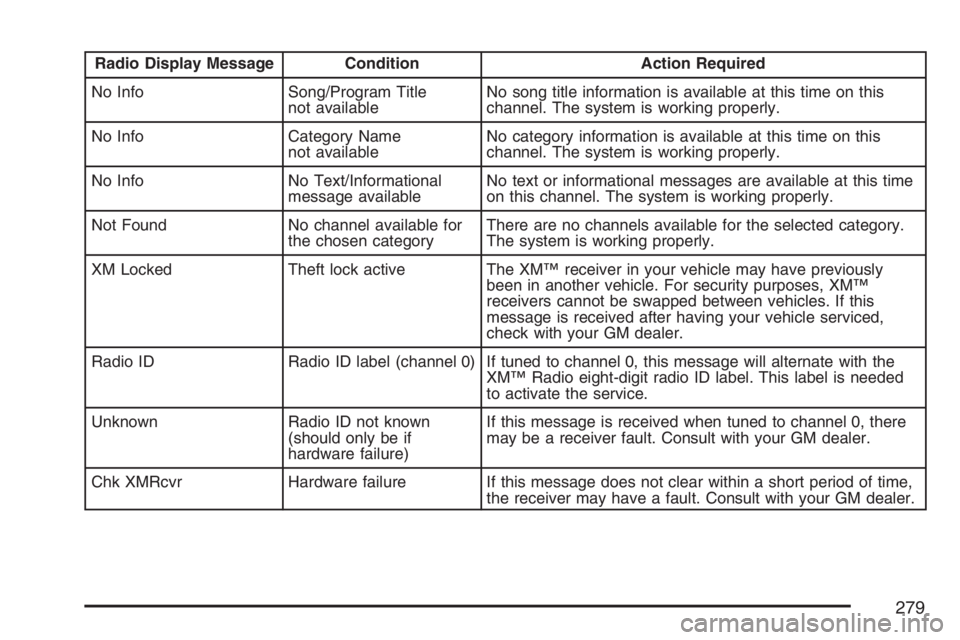
Radio Display Message Condition Action Required
No Info Song/Program Title
not availableNo song title information is available at this time on this
channel. The system is working properly.
No Info Category Name
not availableNo category information is available at this time on this
channel. The system is working properly.
No Info No Text/Informational
message availableNo text or informational messages are available at this time
on this channel. The system is working properly.
Not Found No channel available for
the chosen categoryThere are no channels available for the selected category.
The system is working properly.
XM Locked Theft lock active The XM™ receiver in your vehicle may have previously
been in another vehicle. For security purposes, XM™
receivers cannot be swapped between vehicles. If this
message is received after having your vehicle serviced,
check with your GM dealer.
Radio ID Radio ID label (channel 0) If tuned to channel 0, this message will alternate with the
XM™ Radio eight-digit radio ID label. This label is needed
to activate the service.
Unknown Radio ID not known
(should only be if
hardware failure)If this message is received when tuned to channel 0, there
may be a receiver fault. Consult with your GM dealer.
Chk XMRcvr Hardware failure If this message does not clear within a short period of time,
the receiver may have a fault. Consult with your GM dealer.
279
Page 282 of 512
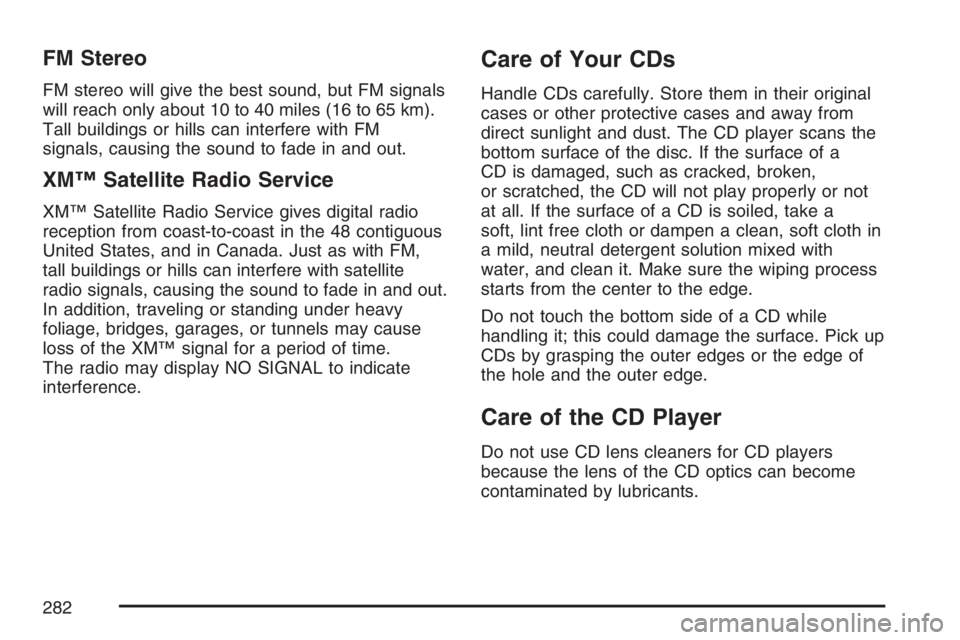
FM Stereo
FM stereo will give the best sound, but FM signals
will reach only about 10 to 40 miles (16 to 65 km).
Tall buildings or hills can interfere with FM
signals, causing the sound to fade in and out.
XM™ Satellite Radio Service
XM™ Satellite Radio Service gives digital radio
reception from coast-to-coast in the 48 contiguous
United States, and in Canada. Just as with FM,
tall buildings or hills can interfere with satellite
radio signals, causing the sound to fade in and out.
In addition, traveling or standing under heavy
foliage, bridges, garages, or tunnels may cause
loss of the XM™ signal for a period of time.
The radio may display NO SIGNAL to indicate
interference.
Care of Your CDs
Handle CDs carefully. Store them in their original
cases or other protective cases and away from
direct sunlight and dust. The CD player scans the
bottom surface of the disc. If the surface of a
CD is damaged, such as cracked, broken,
or scratched, the CD will not play properly or not
at all. If the surface of a CD is soiled, take a
soft, lint free cloth or dampen a clean, soft cloth in
a mild, neutral detergent solution mixed with
water, and clean it. Make sure the wiping process
starts from the center to the edge.
Do not touch the bottom side of a CD while
handling it; this could damage the surface. Pick up
CDs by grasping the outer edges or the edge of
the hole and the outer edge.
Care of the CD Player
Do not use CD lens cleaners for CD players
because the lens of the CD optics can become
contaminated by lubricants.
282
Page 294 of 512
Traction Control System (TCS)
Your vehicle may have a Traction Control System
(TCS) that limits wheel spin. This is especially
useful in slippery road conditions. The system
operates only if it senses that one or both of the
front wheels are spinning or beginning to lose
traction. When this happens, the system works the
front brakes and reduces engine power to limit
wheel spin. It may also upshift the transaxle to limit
wheel spin. You may feel or hear the system
working, but this is normal.
The TRACTION CONTROL ACTIVE message on
the Driver Information Center (DIC) will be
displayed when the system is limiting wheel spin.
If the vehicle is in cruise control when the TCS
begins to limit wheel spin, the cruise control will
automatically disengage. When road conditions
allow safe use of the cruise control, it can be used
again. SeeCruise Control on page 154.The TCS operates in all transaxle shift lever
positions. But the system can upshift the transaxle
only as high as the shift lever position that was
chosen, so use the lower gears only when
necessary. SeeAutomatic Transaxle Operation
on page 114.
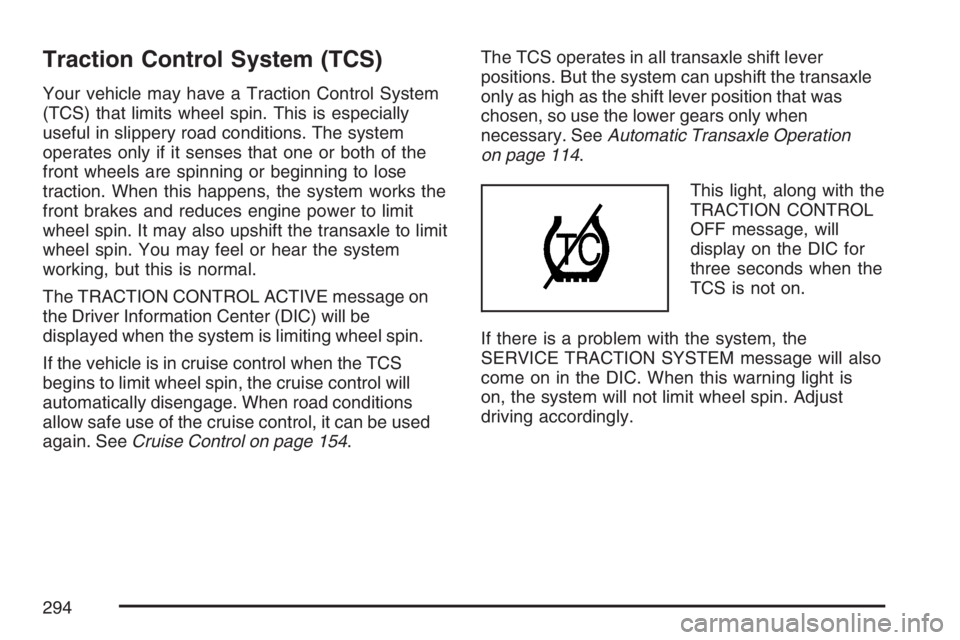
This light, along with the
TRACTION CONTROL
OFF message, will
display on the DIC for
three seconds when the
TCS is not on.
If there is a problem with the system, the
SERVICE TRACTION SYSTEM message will also
come on in the DIC. When this warning light is
on, the system will not limit wheel spin. Adjust
driving accordingly.
294
Page 296 of 512
The ETS operates in all transaxle shift lever
positions. But the system can upshift the transaxle
only as high as the chosen shift lever position,
so use the lower gears only when necessary. See
Automatic Transaxle Operation on page 114.
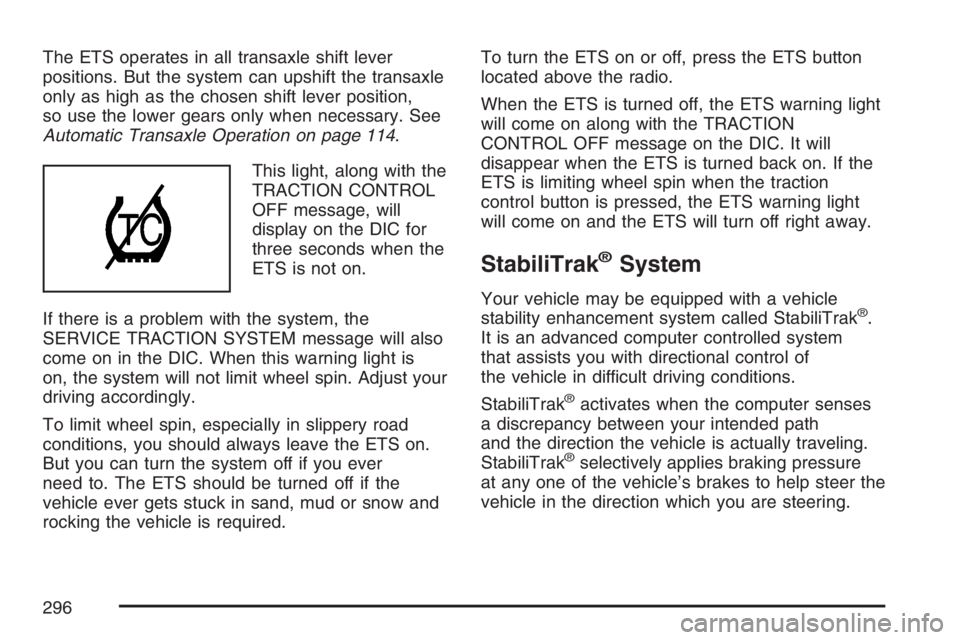
This light, along with the
TRACTION CONTROL
OFF message, will
display on the DIC for
three seconds when the
ETS is not on.
If there is a problem with the system, the
SERVICE TRACTION SYSTEM message will also
come on in the DIC. When this warning light is
on, the system will not limit wheel spin. Adjust your
driving accordingly.
To limit wheel spin, especially in slippery road
conditions, you should always leave the ETS on.
But you can turn the system off if you ever
need to. The ETS should be turned off if the
vehicle ever gets stuck in sand, mud or snow and
rocking the vehicle is required.To turn the ETS on or off, press the ETS button
located above the radio.
When the ETS is turned off, the ETS warning light
will come on along with the TRACTION
CONTROL OFF message on the DIC. It will
disappear when the ETS is turned back on. If the
ETS is limiting wheel spin when the traction
control button is pressed, the ETS warning light
will come on and the ETS will turn off right away.
StabiliTrak®System
Your vehicle may be equipped with a vehicle
stability enhancement system called StabiliTrak®.
It is an advanced computer controlled system
that assists you with directional control of
the vehicle in difficult driving conditions.
StabiliTrak
®activates when the computer senses
a discrepancy between your intended path
and the direction the vehicle is actually traveling.
StabiliTrak
®selectively applies braking pressure
at any one of the vehicle’s brakes to help steer the
vehicle in the direction which you are steering.
296
Page 297 of 512
When the system activates, a STABILITY
CONTROL ACTIVE message will be displayed on
the Driver Information Center (DIC). SeeDIC
Warnings and Messages on page 208. You may
also hear a noise or feel vibration in the brake
pedal. This is normal. Continue to steer the vehicle
in the direction you want it to go.
If there is a problem detected with StabiliTrak
®,a
SERVICE STABILITY SYSTEM or STABILITY
CONTROL OFF message will be displayed on the
Driver Information Center (DIC). A warning light
will also appear on the instrument panel cluster.
SeeDIC Warnings and Messages on page 208.
When this message is displayed, the system is not
operational. Driving should be adjusted
accordingly.
If your vehicle is in cruise control when the
StabiliTrak
®activates, the cruise control will
automatically disengage. When road conditions
allow you to safely use it again, you may reengage
the cruise control. SeeCruise Control on
page 154for more information.
Steering
Power Steering
If you lose power steering assist because the
engine stops or the system is not functioning, you
can steer but it will take much more effort.
Steering Tips
It is important to take curves at a reasonable
speed.
A lot of the “driver lost control” accidents mentioned
on the news happen on curves. Here is why:
Experienced driver or beginner, each of us is
subject to the same laws of physics when driving on
curves. The traction of the tires against the road
surface makes it possible for the vehicle to change
its path when you turn the front wheels. If there is
no traction, inertia will keep the vehicle going in the
same direction. If you have ever tried to steer a
vehicle on wet ice, you will understand this.
297
Page 310 of 512
Once you are moving on the freeway, make
certain you allow a reasonable following distance.
Expect to move slightly slower at night.
When you want to leave the freeway, move to the
proper lane well in advance. If you miss your
exit, do not, under any circumstances, stop and
back up. Drive on to the next exit.
The exit ramp can be curved, sometimes quite
sharply. The exit speed is usually posted. Reduce
your speed according to your speedometer, not
to your sense of motion. After driving for any
distance at higher speeds, you may tend to think
you are going slower than you actually are.
Before Leaving on a Long Trip
Make sure you are ready. Try to be well rested. If
you must start when you are not fresh — such
as after a day’s work — do not plan to make too
many miles that rst part of the journey. Wear
comfortable clothing and shoes you can easily
drive in.Is your vehicle ready for a long trip? If you keep it
serviced and maintained, it is ready to go. If it needs
service, have it done before starting out. Of course,
you will nd experienced and able service experts
in GM dealerships all across North America. They
will be ready and willing to help if you need it.
Here are some things you can check before a trip:
Windshield Washer Fluid:Is the reservoir
full? Are all windows clean inside and outside?
Wiper Blades:Are they in good shape?
Fuel, Engine Oil, Other Fluids:Have you
checked all levels?
Lamps:Are they all working? Are the lenses
clean?
Tires:They are vitally important to a safe,
trouble-free trip. Is the tread good enough
for long-distance driving? Are the tires
all inated to the recommended pressure?
Weather Forecasts:What is the weather
outlook along your route? Should you
delay your trip a short time to avoid a major
storm system?
Maps:Do you have up-to-date maps?
310
Page 311 of 512
Highway Hypnosis
Is there actually such a condition as highway
hypnosis? Or is it just plain falling asleep at the
wheel? Call it highway hypnosis, lack of
awareness, or whatever.
There is something about an easy stretch of road
with the same scenery, along with the hum of the
tires on the road, the drone of the engine, and the
rush of the wind against the vehicle that can make
you sleepy. Do not let it happen to you! If it does,
your vehicle can leave the road in less than a
second, and you could crash and be injured.
What can you do about highway hypnosis? First,
be aware that it can happen.Then here are some tips:Make sure your vehicle is well ventilated, with
a comfortably cool interior.
Keep your eyes moving. Scan the road ahead
and to the sides. Check your rearview mirrors
and your instruments frequently.
If you get sleepy, pull off the road into a rest,
service, or parking area and take a nap, get
some exercise, or both. For safety, treat
drowsiness on the highway as an emergency.
311
Page 325 of 512
{CAUTION:
Things you put inside your vehicle can
strike and injure people in a sudden stop
or turn, or in a crash.
Put things in the trunk of your vehicle.
In a trunk, put them as far forward as
you can. Try to spread the weight
evenly.
Never stack heavier things, like
suitcases, inside the vehicle so that
some of them are above the tops of
the seats.
Do not leave an unsecured child
restraint in your vehicle.
When you carry something inside the
vehicle, secure it whenever you can.
Do not leave a seat folded down
unless you need to.
Towing
Towing Your Vehicle
Consult your dealer or a professional towing
service if you need to have your disabled vehicle
towed. SeeRoadside Assistance Program on
page 484.
If you want to tow your vehicle behind another
vehicle for recreational purposes (such as behind
a motorhome), see “Recreational Vehicle
Towing” following.
325
Page 335 of 512
When You Are Ready to Leave After
Parking on a Hill
1. Apply the regular brakes and hold the pedal
down while you:
Start the engine.
Shift into a gear.
Release the parking brake.
2. Let up on the brake pedal.
3. Drive slowly until the trailer is clear of the
chocks.
4. Stop and have someone pick up and store the
chocks.
Maintenance When Trailer Towing
The vehicle will need service more often when it
pulls a trailer. SeeScheduled Maintenance
on page 462for more information. Things that are
especially important in trailer operation are
automatic transaxle uid; which should not be
overlled; engine oil, drive belt(s), and cooling and
brake systems. Each of these is covered in this
manual, and the Index will help you nd them
quickly. If trailering, it is a good idea to review this
information before starting on a trip.
Check periodically to see that all hitch nuts and
bolts are tight.
Engine Cooling When Trailer Towing
The cooling system may temporarily overheat
during severe operating conditions. SeeEngine
Overheating on page 367.
335
Page 337 of 512
Service........................................................ 340
Accessories and Modications................... 341
California Proposition 65 Warning.............. 341
Doing Your Own Service Work.................. 342
Adding Equipment to the Outside
of Your Vehicle...................................... 343
Fuel............................................................. 343
Gasoline Octane........................................ 343
Gasoline Specications.............................. 344
California Fuel........................................... 344
Additives................................................... 344
Fuels in Foreign Countries........................ 345
Filling the Tank......................................... 346
Filling a Portable Fuel Container............... 348
Checking Things Under the Hood.............. 348
Hood Release........................................... 349
Engine Compartment Overview.................. 350
Engine Oil................................................. 353
Engine Oil Life System.............................. 356
Engine Air Cleaner/Filter............................ 358
Automatic Transaxle Fluid......................... 360Engine Coolant.......................................... 363
Radiator Pressure Cap.............................. 367
Engine Overheating................................... 367
Overheated Engine Protection
Operating Mode..................................... 370
Cooling System......................................... 370
Power Steering Fluid ................................. 378
Windshield Washer Fluid........................... 380
Brakes...................................................... 381
Battery...................................................... 384
Jump Starting............................................ 385
Headlamp Aiming........................................ 391
Bulb Replacement....................................... 394
Halogen Bulbs........................................... 394
Headlamps and Sidemarker Lamps........... 395
Front Turn Signal and Parking Lamps....... 397
Taillamps, Turn Signal, Sidemarker,
Stoplamps and Back-up Lamps.............. 398
License Plate Lamp................................... 400
Replacement Bulbs................................... 400
Windshield Replacement............................ 401
Section 5 Service and Appearance Care
337