Driver information center BUICK LACROSSE 2008 Owner's Guide
[x] Cancel search | Manufacturer: BUICK, Model Year: 2008, Model line: LACROSSE, Model: BUICK LACROSSE 2008Pages: 440
Page 184 of 440
DIC Compass (Uplevel Only)
Your vehicle may have a compass in the Driver
Information Center (DIC).
Compass Zone
The zone is set to zone eight upon leaving the factory.
Your dealer/retailer will set the correct zone for your
location.
Under certain circumstances, such as during a long
distance cross-country trip or moving to a new state or
province, it will be necessary to compensate for
compass variance by resetting the zone through the
DIC if the zone is not set correctly.
Compass variance is the difference between the earth’s
magnetic north and true geographic north. If the compass
is not set to the zone where you live, the compass may
give false readings. The compass must be set to the
variance zone in which the vehicle is traveling.
To adjust for compass variance, use the following
procedure:
Compass Variance (Zone) Procedure
1. Do not set the compass zone when the vehicle is
moving. Only set it when the vehicle is in PARK (P).
Press the option button until COMPASS ZONE
displays.
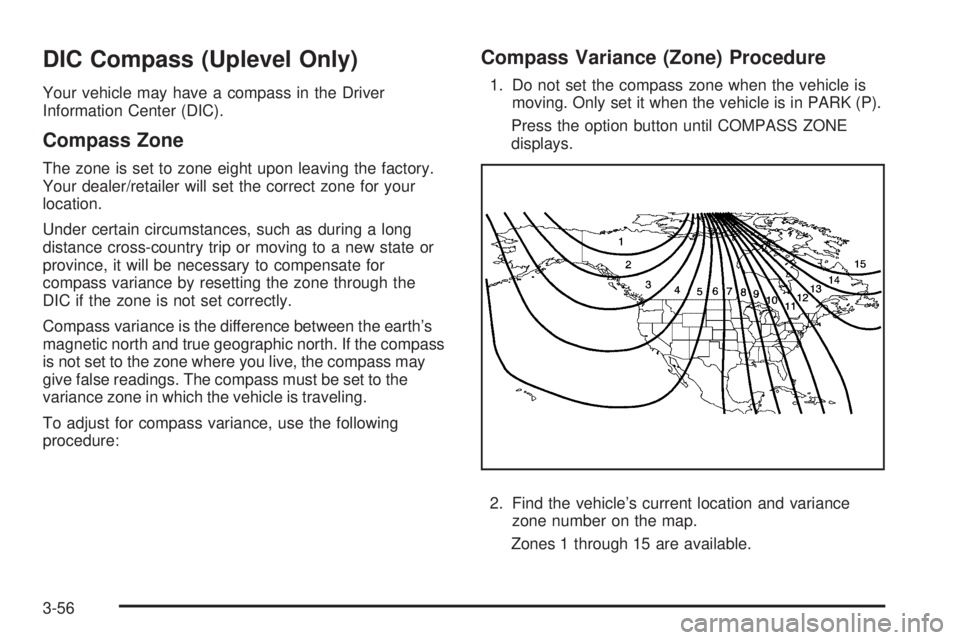
2. Find the vehicle’s current location and variance
zone number on the map.
Zones 1 through 15 are available.
3-56
Page 240 of 440
Traction Control System (TCS)
Your vehicle may have a Traction Control System (TCS)
that limits wheel spin. This is especially useful in
slippery road conditions. The system operates only if it
senses that one or both of the front wheels are
spinning or beginning to lose traction. When this
happens, the system works the front brakes and reduces
engine power to limit wheel spin. It may also upshift
the transmission to limit wheel spin. You may feel
or hear the system working, but this is normal.
The TRACTION CONTROL ACTIVE message on the
Driver Information Center (DIC) will be displayed
when the system is limiting wheel spin.
If the vehicle is in cruise control when the TCS begins
to limit wheel spin, the cruise control will automatically
disengage. When road conditions allow safe use of
the cruise control, it can be used again. SeeCruise
Control on page 3-10.
The TCS operates in all transmission shift lever
positions. But the system can upshift the transmission
only as high as the shift lever position that was chosen,
so use the lower gears only when necessary. See
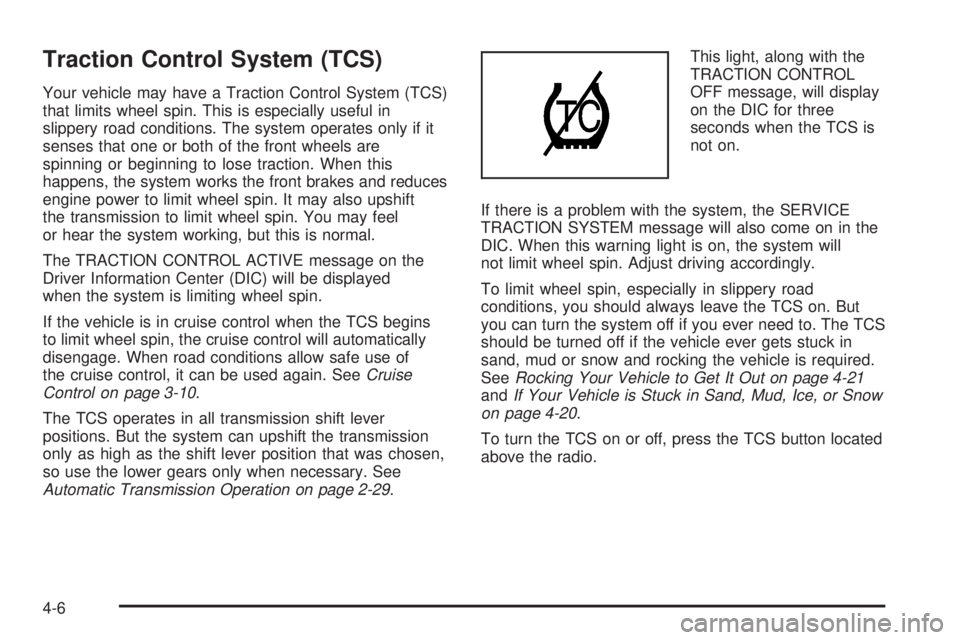
Automatic Transmission Operation on page 2-29.This light, along with the
TRACTION CONTROL
OFF message, will display
on the DIC for three
seconds when the TCS is
not on.
If there is a problem with the system, the SERVICE
TRACTION SYSTEM message will also come on in the
DIC. When this warning light is on, the system will
not limit wheel spin. Adjust driving accordingly.
To limit wheel spin, especially in slippery road
conditions, you should always leave the TCS on. But
you can turn the system off if you ever need to. The TCS
should be turned off if the vehicle ever gets stuck in
sand, mud or snow and rocking the vehicle is required.
SeeRocking Your Vehicle to Get It Out on page 4-21
andIf Your Vehicle is Stuck in Sand, Mud, Ice, or Snow
on page 4-20.
To turn the TCS on or off, press the TCS button located
above the radio.
4-6
Page 241 of 440
When the TCS is turned off, the TCS warning light will
come on along with the TRACTION CONTROL OFF
message on the DIC. It will disappear when the TCS is
turned back on. If the TCS is limiting wheel spin
when the TCS button is pressed, the TCS warning light
will come on and the TCS will turn off right away.
Adding non-dealer/non-retailer accessories can affect
your vehicle’s performance. SeeAccessories and
Modifications on page 5-3for more information.
Enhanced Traction System (ETS)
Your vehicle may have an Enhanced Traction
System (ETS) that limits wheel spin. This is especially
useful in slippery road conditions. The system operates
only if it senses that one or both of the front wheels
are spinning or beginning to lose traction. When
this happens, the system reduces engine power and
may also upshift the transmission to limit wheel
spin. You may feel or hear the system working, but this
is normal.
The TRACTION CONTROL ACTIVE message on the
Driver Information Center (DIC) will be displayed
when the system is limiting wheel spin.If the vehicle is in cruise control when ETS begins to
limit wheel spin, the cruise control will automatically
disengage. When road conditions allow safe use of it,
the cruise control can be used again. SeeCruise Control
on page 3-10.
The ETS operates in all transmission shift lever
positions. But the system can upshift the transmission
only as high as the chosen shift lever position, so
use the lower gears only when necessary. See
Automatic Transmission Operation on page 2-29.
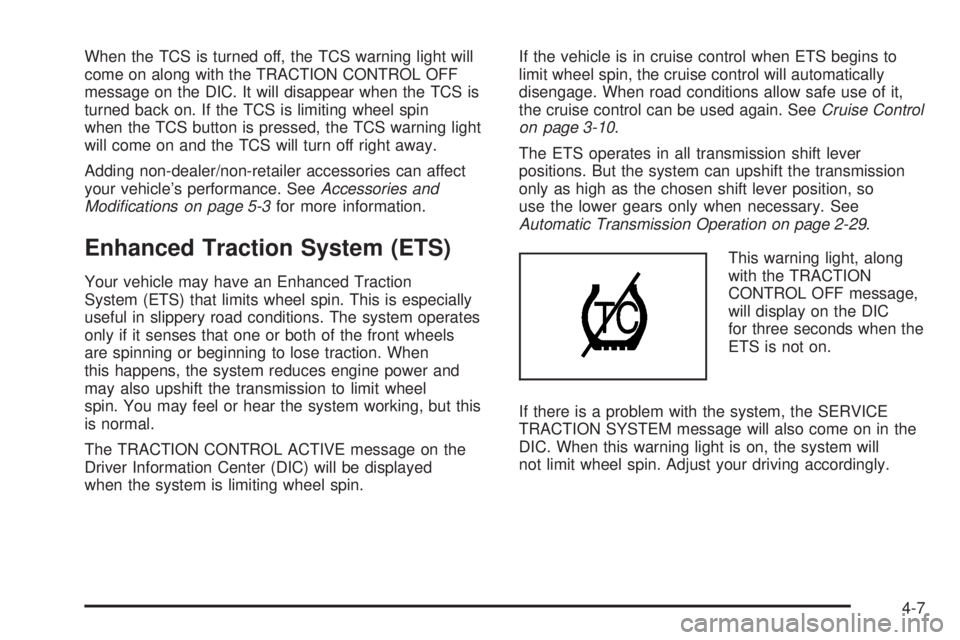
This warning light, along
with the TRACTION
CONTROL OFF message,
will display on the DIC
for three seconds when the
ETS is not on.
If there is a problem with the system, the SERVICE
TRACTION SYSTEM message will also come on in the
DIC. When this warning light is on, the system will
not limit wheel spin. Adjust your driving accordingly.
4-7
Page 242 of 440
To limit wheel spin, especially in slippery road
conditions, you should always leave the ETS on. But
you can turn the system off if you ever need to. The ETS
should be turned off if the vehicle ever gets stuck in
sand, mud or snow and rocking the vehicle is required
To turn the ETS on or off, press the Traction Control
button located above the radio.
When the ETS is turned off, the ETS warning light will
come on along with the TRACTION CONTROL OFF
message on the DIC. It will disappear when the ETS is
turned back on. If the ETS is limiting wheel spin when the
traction control button is pressed, the ETS warning light
will come on and the ETS will turn off right away.
StabiliTrak®System
Your vehicle may be equipped with a vehicle stability
enhancement system called StabiliTrak®.Itisan
advanced computer controlled system that assists you
with directional control of the vehicle in difficult
driving conditions.
StabiliTrak
®activates when the computer senses a
discrepancy between your intended path and the
direction the vehicle is actually traveling.
StabiliTrak
®selectively applies braking pressure at any
one of the vehicle’s brakes to help steer the vehicle
in the direction which you are steering.When the system activates, a STABILITY CONTROL
ACTIVE message will be displayed on the Driver
Information Center (DIC). SeeDIC Warnings and
Messages on page 3-58. You may also hear a noise or
feel vibration in the brake pedal. This is normal. Continue
to steer the vehicle in the direction you want it to go.
If there is a problem detected with StabiliTrak
®,a
SERVICE STABILITY SYSTEM or STABILITY
CONTROL OFF message will be displayed on the
Driver Information Center (DIC). A warning light will also
appear on the instrument panel cluster. SeeDIC
Warnings and Messages on page 3-58. When this
message is displayed, the system is not operational.
Driving should be adjusted accordingly.
If your vehicle is in cruise control when the StabiliTrak
®
activates, the cruise control will automatically
disengage. When road conditions allow you to safely
use it again, you may reengage the cruise control. See
Cruise Control on page 3-10for more information.
For vehicles with the 5.3L V8 engine, StabiliTrak
®can
be turned off by pressing and holding the traction control
button, located above the radio, for approximately ve
seconds. A STABILITY CONTROL OFF message will be
displayed on the Driver Information Center (DIC)
when StabiliTrak
®is turned off. StabiliTrak®will remain
off until the traction control button is pressed once to
turn it back on, or until the engine is started.
4-8
Page 256 of 440
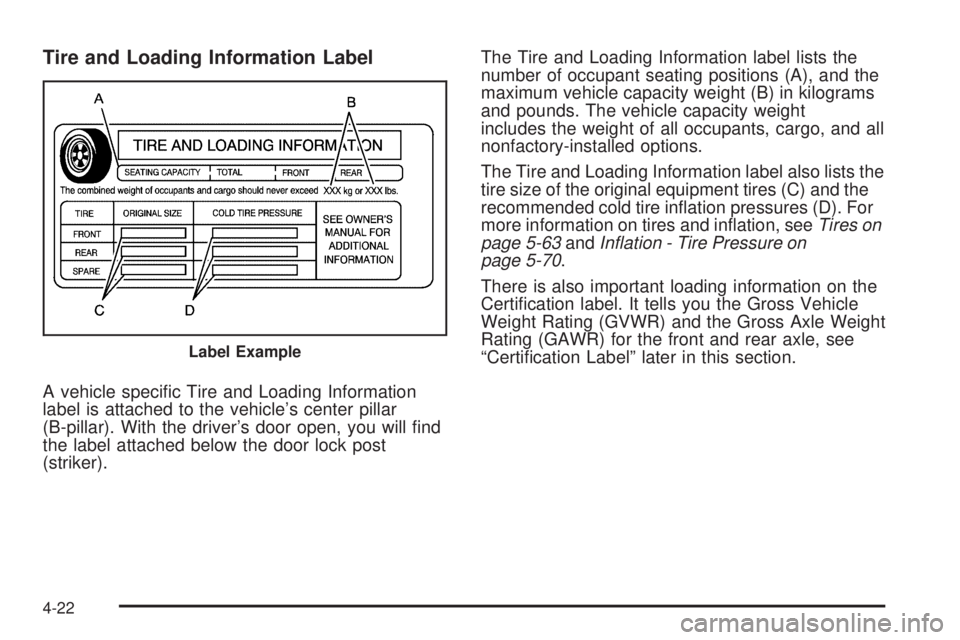
Tire and Loading Information Label
A vehicle specic Tire and Loading Information
label is attached to the vehicle’s center pillar
(B-pillar). With the driver’s door open, you will nd
the label attached below the door lock post
(striker).The Tire and Loading Information label lists the
number of occupant seating positions (A), and the
maximum vehicle capacity weight (B) in kilograms
and pounds. The vehicle capacity weight
includes the weight of all occupants, cargo, and all
nonfactory-installed options.
The Tire and Loading Information label also lists the
tire size of the original equipment tires (C) and the
recommended cold tire ination pressures (D). For
more information on tires and ination, seeTires on
page 5-63andInflation - Tire Pressure on
page 5-70.
There is also important loading information on the
Certication label. It tells you the Gross Vehicle
Weight Rating (GVWR) and the Gross Axle Weight
Rating (GAWR) for the front and rear axle, see
“Certication Label” later in this section.
Label Example
4-22
Page 279 of 440
{CAUTION:
Fuel can spray out on you if you open the fuel
cap too quickly. If you spill fuel and then
something ignites it, you could be badly
burned. This spray can happen if your tank is
nearly full, and is more likely in hot weather.
Open the fuel cap slowly and wait for any hiss
noise to stop. Then unscrew the cap all the way.
Be careful not to spill fuel. Do not top off or overll the
tank and wait a few seconds after you have nished
pumping before removing the nozzle. Clean fuel from
painted surfaces as soon as possible. SeeWashing Your
Vehicle on page 5-102.
When replacing the fuel cap, turn it clockwise until it
clicks. Make sure the cap is fully installed. The
diagnostic system can determine if the fuel cap has
been left off or improperly installed. This would allow fuel
to evaporate into the atmosphere. SeeMalfunction
Indicator Lamp on page 3-42.
Your vehicle may also have a check gas cap warning
light, which will be displayed on the instrument panel
cluster if the fuel cap is not properly installed. SeeCheck
Gas Cap Light on page 3-49for more information.If your vehicle has a Driver Information Center (DIC),
the CHECK GAS CAP message will be displayed if the
fuel cap is not properly installed. SeeDIC Warnings
and Messages on page 3-58for more information.
{CAUTION:
If a re starts while you are refueling, do not
remove the nozzle. Shut off the ow of fuel by
shutting off the pump or by notifying the
station attendant. Leave the area immediately.
Notice:If you need a new fuel cap, be sure to get
the right type. Your dealer/retailer can get one for
you. If you get the wrong type, it may not t properly.
This may cause your malfunction indicator lamp to
light and may damage your fuel tank and emissions
system. SeeMalfunction Indicator Lamp
on page 3-42.
5-9
Page 291 of 440
Engine Oil Additives
Do not add anything to the oil. The recommended oils
with the starburst symbol that meet
GM Standard GM6094M are all you need for good
performance and engine protection.
Engine Oil Life System
When to Change Engine Oil
Your vehicle has a computer system that lets you know
when to change the engine oil and lter. This is based
on engine revolutions and engine temperature, and not
on mileage. Based on driving conditions, the mileage at
which an oil change will be indicated can vary
considerably. For the oil life system to work properly, you
must reset the system every time the oil is changed.When the system has calculated that oil life has been
diminished, it will indicate that an oil change is
necessary. A change engine oil light or, if your vehicle
has the Driver Information Center (DIC), a CHANGE OIL
SOON message will come on. SeeChange Engine Oil
Light on page 3-45orDIC Warnings and Messages on
page 3-58. Change the oil as soon as possible within the
next 600 miles (1 000 km). It is possible that, if you are
driving under the best conditions, the oil life system might
not indicate that an oil change is necessary for over a
year. However, the engine oil and lter must be changed
at least once a year and at this time the system must be
reset. Your dealer/retailer has trained service people who
will perform this work using genuine parts and reset the
system. It is also important to check the oil regularly and
keep it at the proper level.
If the system is ever reset accidentally, you must
change the oil at 3,000 miles (5 000 km) since the last
oil change. Remember to reset the oil life system
whenever the oil is changed.
5-21
Page 292 of 440
How to Reset the Engine Oil Life
System
The Engine Oil Life System calculates when to change
the engine oil and lter based on vehicle use.
Whenever the oil is changed, reset the system so it can
calculate when the next oil change is required. If a
situation occurs where you change the oil prior to a
change engine oil light or CHANGE OIL SOON message
being turned on, reset the system.
After changing the engine oil, reset the system:
Vehicles with Driver Information Center (DIC)
1. Press the option button on the DIC until
ENGINE OIL MONITOR appears on the
DIC screen.
2. Press the set/reset button to reset the system.
The next screen indicates that the CHANGE
OIL SOON message has been reset.
If the vehicle has the uplevel DIC, when the
gages button is pressed and the OIL
LIFE REMAINING mode appears, it should
read 100 percent OIL LIFE REMAINING.
3. Turn the key to LOCK/OFF.
Vehicles without Driver Information Center (DIC)
1. With the engine off, turn the ignition key to
ON/RUN.
2. Fully press and release the accelerator pedal
slowly three times within ve seconds.
3. Turn the key to LOCK/OFF, then start the
vehicle.
If the light or message comes back on when you start
your vehicle, the oil life system has not reset. Repeat the
procedure.
What to Do with Used Oil
Used engine oil contains certain elements that can be
unhealthy for your skin and could even cause cancer.
Do not let used oil stay on your skin for very long. Clean
your skin and nails with soap and water, or a good hand
cleaner. Wash or properly dispose of clothing or rags
containing used engine oil. See the manufacturer’s
warnings about the use and disposal of oil products.
Used oil can be a threat to the environment. If you
change your own oil, be sure to drain all the oil from the
lter before disposal. Never dispose of oil by putting it
in the trash, pouring it on the ground, into sewers, or into
streams or bodies of water. Instead, recycle it by taking
it to a place that collects used oil. If you have a problem
properly disposing of used oil, ask your dealer/retailer, a
service station, or a local recycling center for help.
5-22
Page 300 of 440
Pressure Cap
Notice:If the pressure cap is not tightly installed,
coolant loss and possible engine damage may
occur. Be sure the cap is properly and tightly
secured.
SeeEngine Compartment Overview on page 5-12for
more information on location.
Engine Overheating
There is a coolant temperature gage and a warning light
on the instrument panel cluster that indicate an
overheated engine condition. SeeEngine Coolant
Temperature Gage on page 3-40andEngine Coolant
Temperature Warning Light on page 3-40for more
information.
In addition, if your vehicle is equipped with a Driver
Information Center (DIC), you will nd an ENGINE
COOLANT HOT and a REDUCED POWER STOP
WHEN SAFE message displayed on the DIC. SeeDIC
Warnings and Messages on page 3-58for more
information.
5-30
Page 302 of 440
If you no longer have the overheat warning, you can
drive. Just to be safe, drive slower for about 10 minutes.
If the warning does not come back on, you can drive
normally.
If the warning continues and you have not stopped, pull
over, stop, and park your vehicle right away.
If there is still no sign of steam, you can idle the engine
for three minutes while you are parked. If you still
have the warning, turn off the engine and get everyone
out of the vehicle until it cools down. Also, see
“Overheated Engine Protection Operating Mode” later in
this section.
You may decide not to lift the hood but to get service
help right away.Overheated Engine Protection
Operating Mode
This emergency operating mode allows your vehicle to
be driven to a safe place in an emergency situation.
If an overheated engine condition exists, an overheat
protection mode which alternates ring groups of
cylinders helps prevent engine damage. In this mode,
you will notice a signicant loss in power and engine
performance. The REDUCED POWER STOP WHEN
SAFE message will come on in the Driver Information
Center (DIC), if the vehicle has one, along with the
engine coolant temperature warning light on the
instrument panel, to indicate the vehicle has entered
overheated engine protection operating mode. The
temperature gage will also indicate an overheat condition
exists. Driving extended miles (km) and/or towing a trailer
in the overheat protection mode should be avoided.
Notice:After driving in the overheated engine
protection operating mode, to avoid engine damage,
allow the engine to cool before attempting any
repair. The engine oil will be severely degraded.
Repair the cause of coolant loss, change the oil and
reset the oil life system. SeeEngine Oil on page 5-18.
5-32