engine BUICK LACROSSE 2009 Owner's Manual
[x] Cancel search | Manufacturer: BUICK, Model Year: 2009, Model line: LACROSSE, Model: BUICK LACROSSE 2009Pages: 428
Page 4 of 428
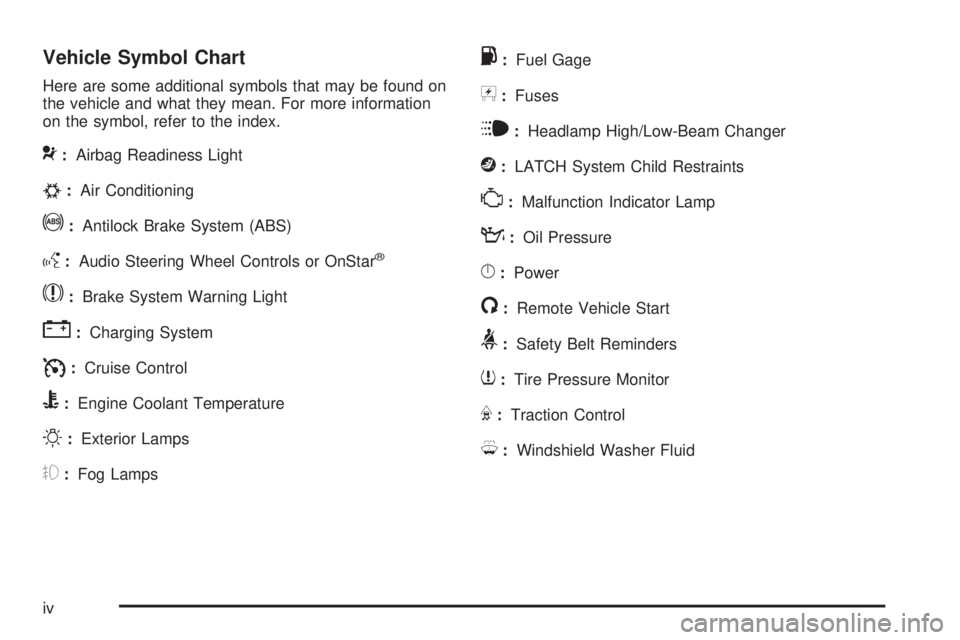
Vehicle Symbol Chart
Here are some additional symbols that may be found on
the vehicle and what they mean. For more information
on the symbol, refer to the index.
9:Airbag Readiness Light
#:Air Conditioning
!:Antilock Brake System (ABS)
g:Audio Steering Wheel Controls or OnStar®
$:Brake System Warning Light
":Charging System
I:Cruise Control
B:Engine Coolant Temperature
O:Exterior Lamps
#:Fog Lamps
.:Fuel Gage
+:Fuses
i:Headlamp High/Low-Beam Changer
j:LATCH System Child Restraints
*:Malfunction Indicator Lamp
::Oil Pressure
}:Power
/:Remote Vehicle Start
>:Safety Belt Reminders
7:Tire Pressure Monitor
F:Traction Control
M:Windshield Washer Fluid
iv
Page 75 of 428

Keys...............................................................2-2
Remote Keyless Entry (RKE) System................2-3
Remote Keyless Entry (RKE) System
Operation...................................................2-4
Remote Vehicle Start......................................2-7
Doors and Locks.............................................2-9
Door Locks....................................................2-9
Power Door Locks..........................................2-9
Delayed Locking...........................................2-10
Automatic Door Lock.....................................2-10
Programmable Automatic Door Unlock.............2-10
Rear Door Security Locks..............................2-11
Lockout Protection........................................2-11
Trunk..........................................................2-12
Windows........................................................2-14
Power Windows............................................2-15
Sun Visors...................................................2-16
Theft-Deterrent Systems..................................2-16
Content Theft-Deterrent.................................2-17
PASS-Key
®III Electronic Immobilizer...............2-18
PASS-Key®III Electronic Immobilizer
Operation.................................................2-19
Starting and Operating Your Vehicle................2-21
New Vehicle Break-In....................................2-21
Ignition Positions..........................................2-21
Retained Accessory Power (RAP)...................2-22
Starting the Engine.......................................2-23Engine Coolant Heater..................................2-24
Active Fuel Management™.............................2-25
Automatic Transmission Operation...................2-26
Parking Brake..............................................2-29
Shifting Into Park..........................................2-29
Shifting Out of Park......................................2-32
Parking Over Things That Burn.......................2-33
Engine Exhaust............................................2-33
Running the Vehicle While Parked..................2-34
Mirrors...........................................................2-35
Manual Rearview Mirror.................................2-35
Automatic Dimming Rearview Mirror................2-35
Outside Power Mirrors...................................2-36
Outside Convex Mirror...................................2-36
Outside Heated Mirrors..................................2-36
Object Detection Systems...............................2-37
Ultrasonic Rear Parking
Assist (URPA)...........................................2-37
OnStar
®System.............................................2-39
Universal Home Remote System......................2-43
Universal Home Remote System Operation......2-43
Storage Areas................................................2-47
Glove Box...................................................2-47
Cupholders..................................................2-47
Center Console Storage.................................2-47
Convenience Net..........................................2-48
Sunroof.........................................................2-48
Section 2 Features and Controls
2-1
Page 79 of 428
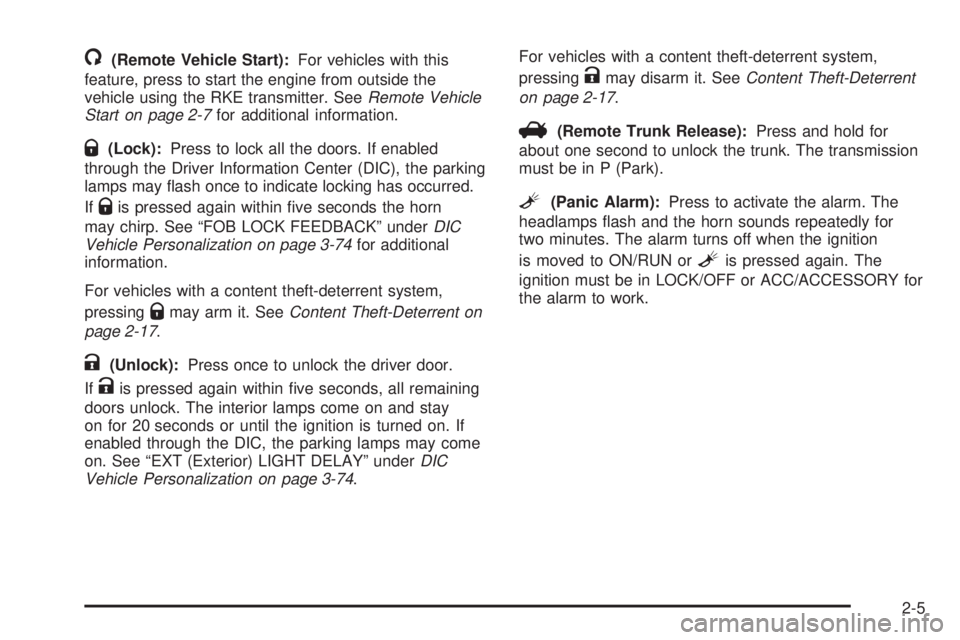
/(Remote Vehicle Start):For vehicles with this
feature, press to start the engine from outside the
vehicle using the RKE transmitter. SeeRemote Vehicle
Start on page 2-7for additional information.
Q(Lock):Press to lock all the doors. If enabled
through the Driver Information Center (DIC), the parking
lamps may ash once to indicate locking has occurred.
If
Qis pressed again within ve seconds the horn
may chirp. See “FOB LOCK FEEDBACK” underDIC
Vehicle Personalization on page 3-74for additional
information.
For vehicles with a content theft-deterrent system,
pressing
Qmay arm it. SeeContent Theft-Deterrent on
page 2-17.
K(Unlock):Press once to unlock the driver door.
If
Kis pressed again within ve seconds, all remaining
doors unlock. The interior lamps come on and stay
on for 20 seconds or until the ignition is turned on. If
enabled through the DIC, the parking lamps may come
on. See “EXT (Exterior) LIGHT DELAY” underDIC
Vehicle Personalization on page 3-74.For vehicles with a content theft-deterrent system,
pressing
Kmay disarm it. SeeContent Theft-Deterrent
on page 2-17.
V(Remote Trunk Release):Press and hold for
about one second to unlock the trunk. The transmission
must be in P (Park).
L(Panic Alarm):Press to activate the alarm. The
headlamps ash and the horn sounds repeatedly for
two minutes. The alarm turns off when the ignition
is moved to ON/RUN or
Lis pressed again. The
ignition must be in LOCK/OFF or ACC/ACCESSORY for
the alarm to work.
2-5
Page 81 of 428
Remote Vehicle Start
Your vehicle may have a remote starting feature that
allows you to start the engine from outside the vehicle.
It may also start the vehicle’s heating or air conditioning
systems and rear window defogger. When the remote
start system is active and the vehicle has an automatic
climate control system, it will automatically regulate
the inside temperature. Normal operation of these
systems will return after the ignition key is turned to
ON/RUN.
Laws in some communities may restrict the use of
remote starters. For example, some laws may require a
person using remote start to have the vehicle in view
when doing so. Check local regulations for any
requirements on remote starting of vehicles.
Do not use the remote start feature if your vehicle
is low on fuel. Your vehicle may run out of fuel.
If your vehicle has the remote start feature, the RKE
transmitter functions will have an increased range
of operation. However, the range may be less while the
vehicle is running.
There are other conditions which can affect the
performance of the transmitter, seeRemote Keyless
Entry (RKE) System on page 2-3for additional
information.
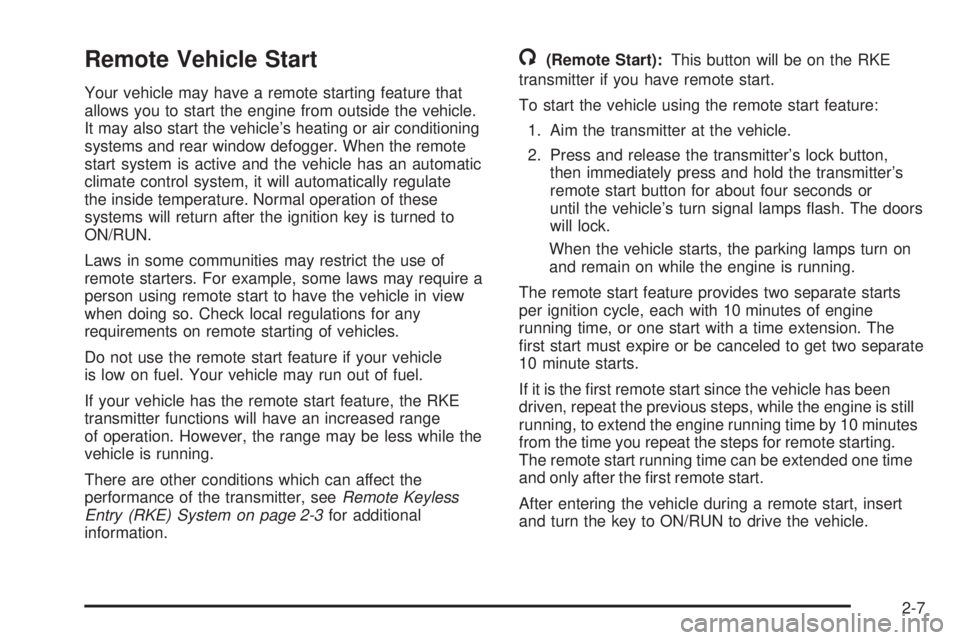
/(Remote Start):This button will be on the RKE
transmitter if you have remote start.
To start the vehicle using the remote start feature:
1. Aim the transmitter at the vehicle.
2. Press and release the transmitter’s lock button,
then immediately press and hold the transmitter’s
remote start button for about four seconds or
until the vehicle’s turn signal lamps ash. The doors
will lock.
When the vehicle starts, the parking lamps turn on
and remain on while the engine is running.
The remote start feature provides two separate starts
per ignition cycle, each with 10 minutes of engine
running time, or one start with a time extension. The
rst start must expire or be canceled to get two separate
10 minute starts.
If it is the rst remote start since the vehicle has been
driven, repeat the previous steps, while the engine is still
running, to extend the engine running time by 10 minutes
from the time you repeat the steps for remote starting.
The remote start running time can be extended one time
and only after the rst remote start.
After entering the vehicle during a remote start, insert
and turn the key to ON/RUN to drive the vehicle.
2-7
Page 82 of 428
The engine will shut off automatically after 10 minutes,
unless a time extension has been done or the
vehicle’s key is inserted into the ignition switch and
turned to ON/RUN.
To manually shut off a remote start, do any of the
following.
Aim the RKE transmitter at the vehicle and press
and release the remote start button.
Turn on the hazard warning ashers.
Turn the ignition switch out of LOCK/OFF position
and then back to LOCK/OFF.
The parking lamps turn off to indicate the engine is off.
After the engine has been started two times, or one
time with a time extension, the vehicle’s ignition must be
turned to ON/RUN using the key before the remote
start procedure can be used again. SeeIgnition
Positions on page 2-21for information regarding the
ignition positions on your vehicle.
The remote vehicle start feature will not operate if any
of the follow occur:
The remote start system is disabled through the DIC.
The vehicle’s key is in the ignition.
A door on the vehicle is open.
The vehicle’s hood is open.
The hazard warning ashers are on.
The check engine light is on. SeeMalfunction
Indicator Lamp on page 3-40
The engine coolant temperature is too high.
The oil pressure is low.
Two remote vehicle starts, or one start with a time
extension, have already been provided for that
ignition cycle.
If a remote start is attempted and is unsuccessful, the
Driver Information Center (DIC) will display REMOTE
START DISABLED.
Vehicles that have the remote start feature are shipped
from the factory with the remote vehicle start system
enabled. The system may be enabled or disabled
through the DIC. See “REMOTE START” underDIC
Vehicle Personalization on page 3-74for additional
information. If your vehicle does not have the DIC
feature, and remote vehicle start was installed at the
dealer/retailer, you will need to have the dealer/retailer
enable or disable the system.
2-8
Page 86 of 428
Trunk
{CAUTION:
Exhaust gases may enter the vehicle if it is driven
with the liftgate, trunk/hatch open, or with any
objects that pass through the seal between the
body and the trunk/hatch or liftgate. Engine
exhaust contains Carbon Monoxide (CO) which
cannot be seen or smelled. It can cause
unconsciousness and even death.
If the vehicle must be driven with the liftgate, or
trunk/hatch open:
Close all of the windows
Fully open the air outlets on or under the
instrument panel
Adjust the Climate Control system to a setting
that brings in only outside air and set the fan
speed to the highest setting. See Climate
Control System in the Index.
If the vehicle is equipped with a power liftgate,
disable the power liftgate function.
For more information about carbon monoxide, see
Engine Exhaust on page 2-33.
Opening the Trunk
To open the trunk from the outside, use the Remote
Keyless Entry (RKE) transmitter. SeeRemote Keyless
Entry (RKE) System Operation on page 2-4for more
information.
The ignition must be off, or the transmission must be in
(P) Park to open the trunk.
Remote Trunk Release
This feature is used to unlock the trunk from inside the
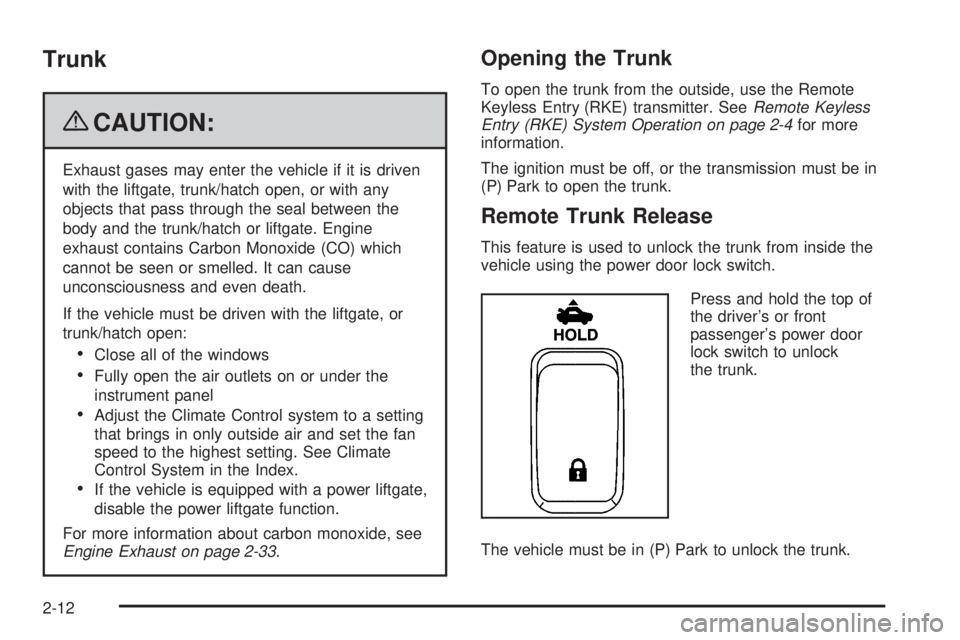
vehicle using the power door lock switch.
Press and hold the top of
the driver’s or front
passenger’s power door
lock switch to unlock
the trunk.
The vehicle must be in (P) Park to unlock the trunk.
2-12
Page 93 of 428
PASS-Key®III Electronic
Immobilizer Operation
Your vehicle is equipped with PASS-Key®III
(Personalized Automotive Security System)
theft-deterrent system. PASS-Key
®III is a passive
theft-deterrent system.
The system is automatically armed when the key is
removed from the ignition.
You do not have to manually arm or disarm the system.
The security light will come on if there is a problem
with arming or disarming the theft-deterrent system.
PASS-Key III
®uses a transponder in the ignition
key that matches a decoder in the vehicle.
When the PASS-Key
®III system senses that the wrong
key has been inserted into the ignition, it shuts down
the vehicle’s starter and fuel systems. The starter will not
work and fuel will stop owing to the engine.If someone tries to start the vehicle again with the
wrong key, the vehicle will not start. Anyone using a
trial-and-error method to start the vehicle will be
discouraged to do so because of the high number of
electrical key codes.
When trying to start the vehicle, if the engine does not
start and the STARTING DISABLED warning message
on the Driver Information Center (DIC) comes on,
there may be a problem with your theft-deterrent system.
Turn the ignition off and try again.
If the engine still does not start, and the key appears to
be undamaged, try another ignition key. At this time,
you may also want to check the fuse. SeeFuses
and Circuit Breakers on page 5-99. If the engine still
does not start with the other key, the vehicle needs
service. If the vehicle does start, the rst key may be
faulty. See your dealer/retailer who can service the
PASS-Key®III to have a new key made. In an
emergency, contact Roadside Assistance. SeeRoadside
Assistance Program on page 7-7for more information.
2-19
Page 94 of 428
It is possible for the PASS-Key®III decoder to accept
the transponder value of a new or replacement key. Up
to 10 keys may be programmed for the vehicle. The
following procedure is for programming additional keys
only. If all the programmed keys are lost or do not
operate, see your dealer/retailer or a locksmith who can
service PASS-Key
®III to have keys made and
programmed to the system.
To program the new key do the following:
1. Verify that the new key has PK3 stamped on it.
2. Insert the master key in the ignition and start
the engine. If the engine will not start, see your
dealer/retailer for service.
3. After the engine has started, turn the key to
LOCK/OFF, and remove the key.
4. Insert the key to be programmed and turn it to
ON/RUN within ve seconds of removing the
original key.5. The SERVICE THEFT SYSTEM warning message
on the DIC will turn off, once the key has been
programmed. It may not be apparent that the
SERVICE THEFT SYSTEM warning message went
on due to how quickly the key is programmed.
6. Repeat Steps 1 through 5 if additional keys are to
be programmed.
If the SERVICE THEFT SYSTEM warning message
appears and stays on the DIC while the vehicle is being
driven, the engine will be able to be restarted if it is
turned off. Your PASS-Key
®III system, however, is not
working properly and must be serviced by your
dealer/retailer. The vehicle is not protected by the
PASS-Key
®III system at this time.
If the PASS-Key
®III key is lost or stolen, see your
dealer/retailer or a locksmith who can service
PASS-Key
®III to have a new key made.
Do not leave the key or device that disarms or
deactivates the theft deterrent system in the vehicle.
2-20
Page 95 of 428
Starting and Operating Your
Vehicle
New Vehicle Break-In
Notice:The vehicle does not need an elaborate
break-in. But it will perform better in the long run if
you follow these guidelines:
Do not drive at any one constant speed, fast or
slow, for the rst 500 miles (805 km). Do not
make full-throttle starts. Avoid downshifting to
brake or slow the vehicle.
Avoid making hard stops for the rst 200 miles
(322 km) or so. During this time the new brake
linings are not yet broken in. Hard stops
with new linings can mean premature wear and
earlier replacement. Follow this breaking-in
guideline every time you get new brake linings.
Do not tow a trailer during break-in. SeeTowing
a Trailer on page 4-28for the trailer towing
capabilities of your vehicle and more
information.
Following break-in, engine speed and load can be
gradually increased.
Ignition Positions
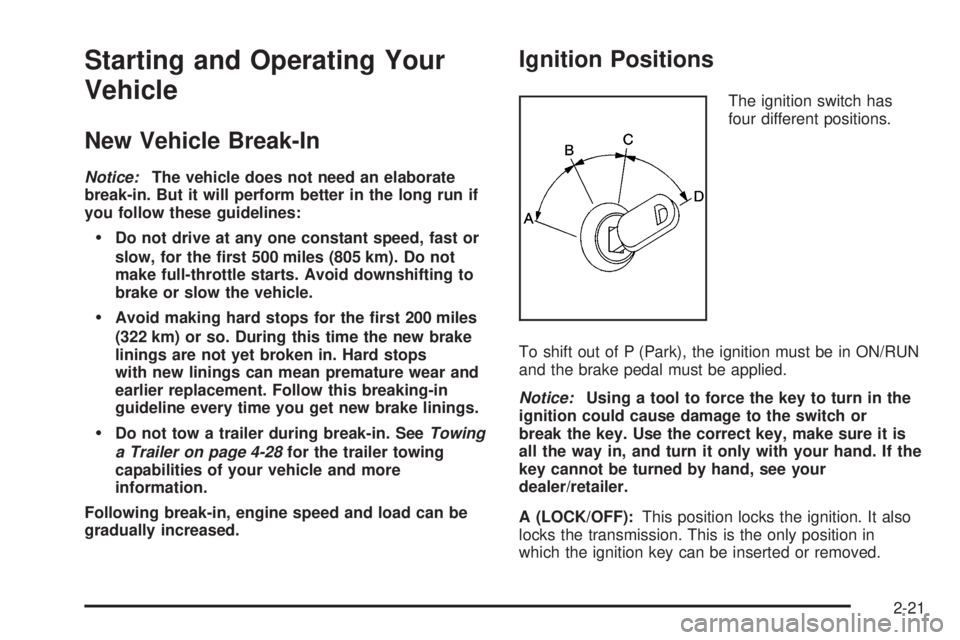
The ignition switch has
four different positions.
To shift out of P (Park), the ignition must be in ON/RUN
and the brake pedal must be applied.
Notice:Using a tool to force the key to turn in the
ignition could cause damage to the switch or
break the key. Use the correct key, make sure it is
all the way in, and turn it only with your hand. If the
key cannot be turned by hand, see your
dealer/retailer.
A (LOCK/OFF):This position locks the ignition. It also
locks the transmission. This is the only position in
which the ignition key can be inserted or removed.
2-21
Page 96 of 428
The steering can bind with the wheels turned off center.
If this happens, move the steering wheel from left to
right while turning the key to ACC/ACCESSORY. If this
doesn’t work, then the vehicle needs service.
B (ACC/ACCESSORY):This is the position in which
you can operate the radio and windshield wipers
while the engine is off. To use ACC/ACCESSORY, turn
the key clockwise.
C (ON/RUN):This position can be used to operate the
electrical accessories and to display some instrument
panel cluster warning and indicator lights. The
switch stays in this position when the engine is running.
If you leave the key in the ACC/ACCESSORY or
ON/RUN position with the engine off, the battery could
be drained. You may not be able to start the vehicle
if the battery is allowed to drain for an extended period
of time.D (START):This is the position that starts the engine.
When the engine starts, release the key. The ignition
switch returns to ON/RUN for driving.
A warning chime will sound and the Driver Information
Center (DIC) will display DRIVER’S DOOR AJAR
when the driver door is opened, the ignition is in
ACC/ACCESSORY or LOCK/OFF and the key is in the
ignition. SeeDIC Warnings and Messages on
page 3-56for more information.
Retained Accessory Power (RAP)
These vehicle accessories can be used for up to
10 minutes after the engine is turned off:
Audio System
Power Windows
Power to these accessories continues to work for
10 minutes or until a door is opened.
2-22