keyless BUICK LACROSSE 2010 User Guide
[x] Cancel search | Manufacturer: BUICK, Model Year: 2010, Model line: LACROSSE, Model: BUICK LACROSSE 2010Pages: 414
Page 20 of 414
1-14 Keys, Doors and Windows
the system. Only the correct key
starts the vehicle. The vehicle may
not start if the key is damaged.
The security light, located in the
instrument panel cluster, comes on
if there is a problem with arming or
disarming the theft-deterrent
system.
When trying to start the vehicle, the
security light comes on briefly when
the ignition is turned on.
If the engine does not start and the
security light stays on there is a
problem with the system. Turn the
ignition off and try again.
If the engine still does not start, and
the key appears to be undamaged
or the light continues to stay on, try
another ignition key.If the engine still does not start with
the other key, the vehicle needs
service. If the vehicle does start, the
first key may be damaged. See your
dealer/retailer who can service the
theft-deterrent system and have a
new key made.
Do not leave the key or device that
disarms or deactivates the theft
deterrent system in the vehicle.
Immobilizer Operation
(Keyless Access)
This vehicle has a passive
theft-deterrent system.
The system does not have to be
manually armed or disarmed.
The vehicle is automatically
immobilized when the transmitter
leaves the vehicle.
The immobilization system is
disarmed when the ignition button is
pushed in and a valid transmitter is
found in the vehicle.
The security light, located in the
instrument panel cluster, comes on
if there is a problem with arming or
disarming the theft-deterrent
system.
The system has one or more
transmitters that are matched to an
immobilizer control unit in your
vehicle. Only a correctly matched
transmitter will start the vehicle.
If the transmitter is ever damaged,
you may not be able to start your
vehicle.
When trying to start the vehicle, the
security light comes on briefly when
the ignition is turned on.
If the engine does not start and the
security light stays on there is a
problem with the system. Turn the
ignition off and try again.
Page 21 of 414
Keys, Doors and Windows 1-15
If the keyless access transmitter
appears to be undamaged, try
another keyless access transmitter.
Or, you may try placing the
transmitter in the transmitter pocket
located in the center console. See
“No Remote Detected”underKey
and Lock Messages on page 4‑36.
If the engine does not start with the
other transmitter or when the
transmitter is on the pocket in the
center console, your vehicle needs
service. See your dealer/retailer
who can service the theft-deterrent
system and have a new transmitter
programmed to the vehicle.
Do not leave the key or device that
disarms or deactivates the theft
deterrent system in the vehicle.Exterior Mirrors
Power Mirrors
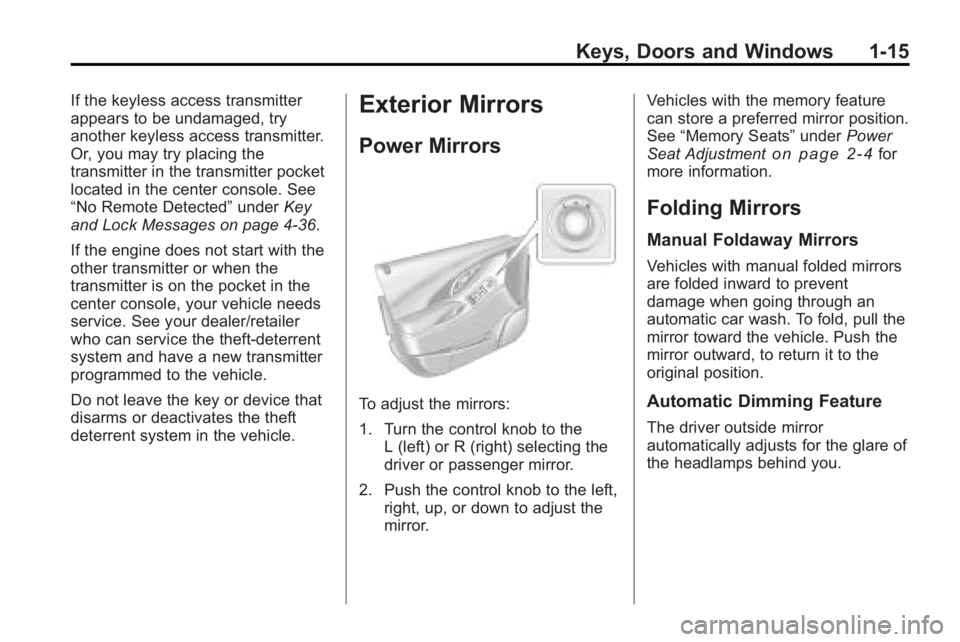
To adjust the mirrors:
1. Turn the control knob to the L (left) or R (right) selecting the
driver or passenger mirror.
2. Push the control knob to the left, right, up, or down to adjust the
mirror. Vehicles with the memory feature
can store a preferred mirror position.
See
“Memory Seats” underPower
Seat Adjustment
on page 2‑4for
more information.
Folding Mirrors
Manual Foldaway Mirrors
Vehicles with manual folded mirrors
are folded inward to prevent
damage when going through an
automatic car wash. To fold, pull the
mirror toward the vehicle. Push the
mirror outward, to return it to the
original position.
Automatic Dimming Feature
The driver outside mirror
automatically adjusts for the glare of
the headlamps behind you.
Page 31 of 414
Seats and Restraints 2-5
Using the Remote Keyless Entry
(RKE) transmitter to enter the
vehicle with the remote recall
memory feature on causes
automatic seat and mirror
adjustment associated with that
transmitter. There is no adjustment
when the position has not been
changed by another seating
position.
To stop recall movement of the
memory feature at any time, press
one of the power seat controls,
memory buttons, or power mirror
buttons.
If something has blocked the driver
seat while recalling a memory
position, the driver seat recall may
stop working. If this happens, press
the appropriate control for the area
that is not recalling for two seconds,
after the obstruction is removed.Then try recalling the memory
position again by pressing the
appropriate memory button. If the
memory position is still not being
recalled, see your dealer/retailer for
service.
Easy Exit Seat
With this feature, the driver seat
automatically moves back to give
the driver more room to exit when
the ignition is turned to OFF and the
driver door is opened.
Lumbar Adjustment
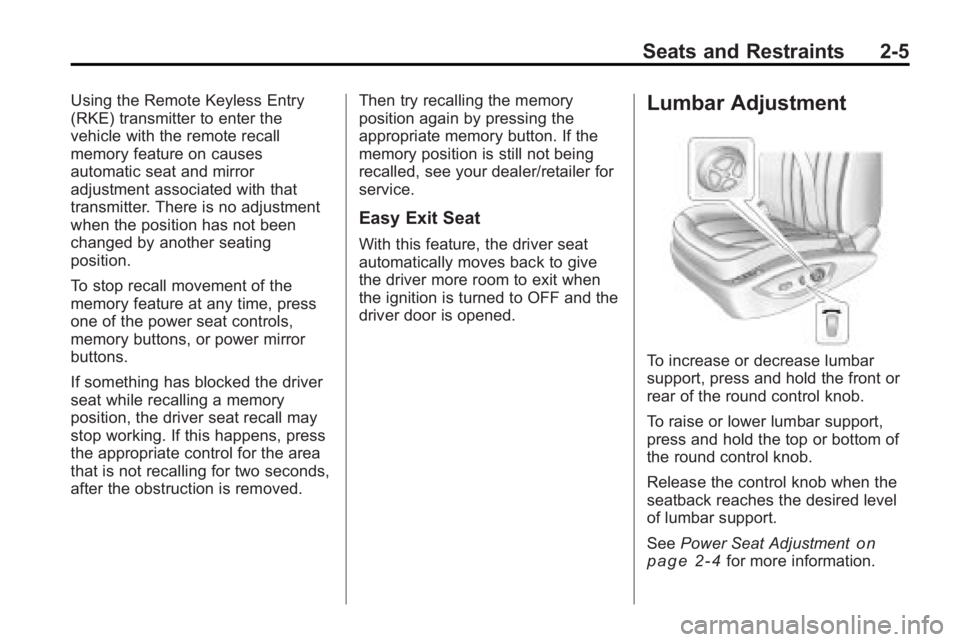
To increase or decrease lumbar
support, press and hold the front or
rear of the round control knob.
To raise or lower lumbar support,
press and hold the top or bottom of
the round control knob.
Release the control knob when the
seatback reaches the desired level
of lumbar support.
See
Power Seat Adjustment
on
page 2‑4for more information.
Page 34 of 414
2-8 Seats and Restraints
Heated Front Seats
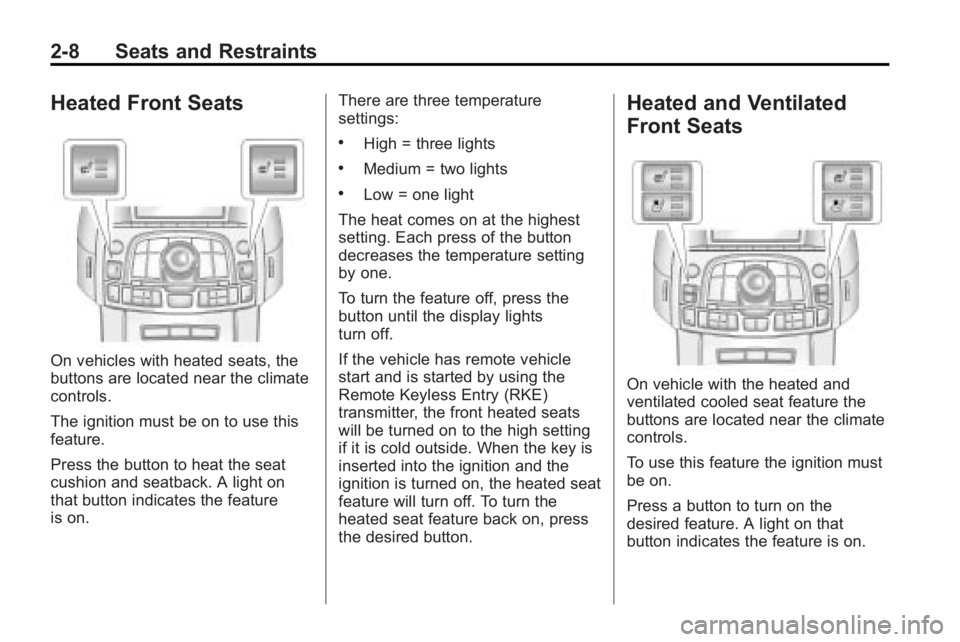
On vehicles with heated seats, the
buttons are located near the climate
controls.
The ignition must be on to use this
feature.
Press the button to heat the seat
cushion and seatback. A light on
that button indicates the feature
is on.There are three temperature
settings:
.High = three lights
.Medium = two lights
.Low = one light
The heat comes on at the highest
setting. Each press of the button
decreases the temperature setting
by one.
To turn the feature off, press the
button until the display lights
turn off.
If the vehicle has remote vehicle
start and is started by using the
Remote Keyless Entry (RKE)
transmitter, the front heated seats
will be turned on to the high setting
if it is cold outside. When the key is
inserted into the ignition and the
ignition is turned on, the heated seat
feature will turn off. To turn the
heated seat feature back on, press
the desired button.
Heated and Ventilated
Front Seats
On vehicle with the heated and
ventilated cooled seat feature the
buttons are located near the climate
controls.
To use this feature the ignition must
be on.
Press a button to turn on the
desired feature. A light on that
button indicates the feature is on.
Page 35 of 414
Seats and Restraints 2-9
There are three temperature
settings for each feature:
.High = three
.Medium = two
.Low = one
Press a button to turn the feature on
at the maximum setting. Each press
of the button changes the
temperature one setting.
Turn the feature off by pressing the
button until the display lights
turn off.
If the vehicle has remote vehicle
start and is started by using the
remote keyless entry transmitter, the
heated and ventilated seats turn on
at the maximum setting according to
the temperature outside. When the
key is inserted into the ignition and
the ignition is turned on, the heated
or cooled seat feature turns off. To
turn this feature back on, press the
desired button.
Rear Seats
The vehicle's rear seat can be
folded down to allow for more cargo
space or it can be placed back into
a locked upright position. Adjust the
seatback only when the vehicle is
not moving.
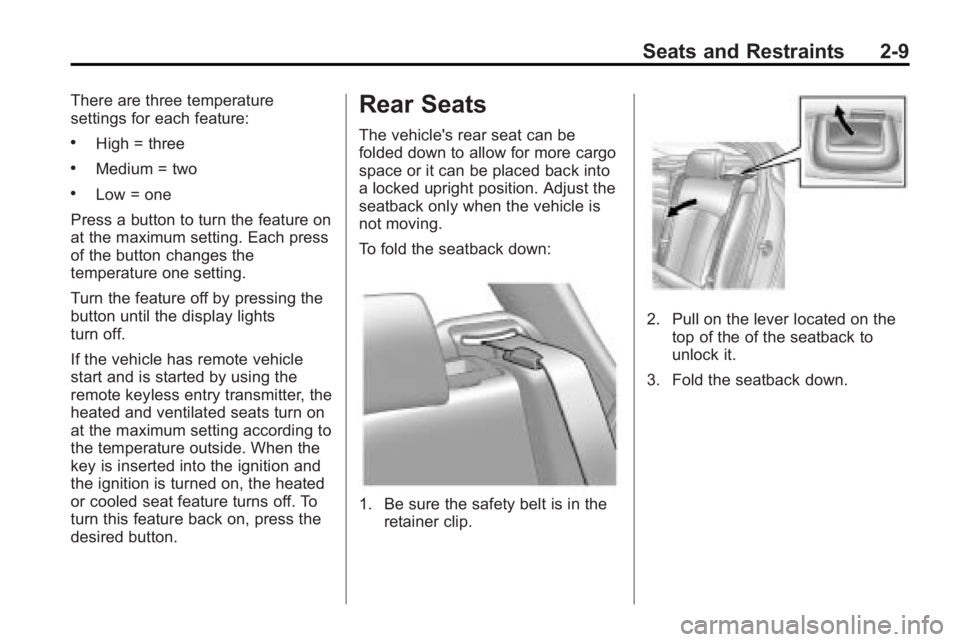
To fold the seatback down:
1. Be sure the safety belt is in the retainer clip.
2. Pull on the lever located on the
top of the of the seatback to
unlock it.
3. Fold the seatback down.
Page 93 of 414
Instruments and Controls 4-5
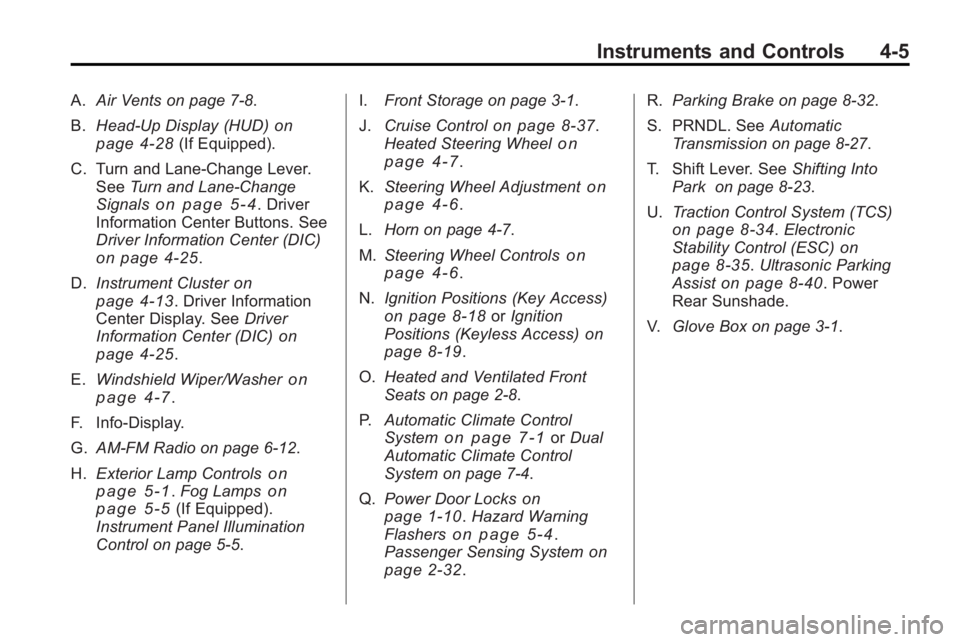
A.Air Vents on page 7‑8.
B. Head-Up Display (HUD)
on
page 4‑28(If Equipped).
C. Turn and Lane-Change Lever. See Turn and Lane-Change
Signals
on page 5‑4. Driver
Information Center Buttons. See
Driver Information Center (DIC)
on page 4‑25.
D. Instrument Cluster
on
page 4‑13. Driver Information
Center Display. See Driver
Information Center (DIC)
on
page 4‑25.
E. Windshield Wiper/Washer
on
page 4‑7.
F. Info-Display.
G. AM-FM Radio on page 6‑12.
H. Exterior Lamp Controls
on
page 5‑1. Fog Lampson
page 5‑5(If Equipped).
Instrument Panel Illumination
Control on page 5‑5. I.
Front Storage on page 3‑1.
J. Cruise Control
on page 8‑37.
Heated Steering Wheelon
page 4‑7.
K. Steering Wheel Adjustment
on
page 4‑6.
L. Horn on page 4‑7.
M. Steering Wheel Controls
on
page 4‑6.
N. Ignition Positions (Key Access)
on page 8‑18orIgnition
Positions (Keyless Access)on
page 8‑19.
O. Heated and Ventilated Front
Seats on page 2‑8.
P. Automatic Climate Control
System
on page 7‑1orDual
Automatic Climate Control
System on page 7‑4.
Q. Power Door Locks
on
page 1‑10. Hazard Warning
Flasherson page 5‑4.
Passenger Sensing Systemon
page 2‑32. R.
Parking Brake on page 8‑32.
S. PRNDL. See Automatic
Transmission on page 8‑27.
T. Shift Lever. See Shifting Into
Park on page 8‑23.
U. Traction Control System (TCS)
on page 8‑34.Electronic
Stability Control (ESC)on
page 8‑35. Ultrasonic Parking
Assiston page 8‑40. Power
Rear Sunshade.
V. Glove Box on page 3‑1.
Page 124 of 414
4-36 Instruments and Controls
message stays on, the vehicle
should be taken to your dealer/
retailer for service as soon as
possible.
Fuel System Messages
Fuel Level Low
This message displays when the
vehicle is low on fuel. Refuel as
soon as possible.
Tighten Gas Cap
This message displays when the
fuel cap is not on tight. Tighten the
fuel cap.
Key and Lock Messages
No Remote Detected
This message displays when the
transmitter battery is weak on
vehicles with Keyless Access. See
“Starting the Vehicle with a Low
Battery”under“Remote Keyless
Transmitter Operation (Keyless
Access)” for more information.
Replace Battery In Remote Key
This message displays when the
battery in the Remote Keyless Entry
(RKE) transmitter needs to be
replaced.
Lamp Messages
AFL (Adaptive Forward
Lighting) Lamps Need Service
This message displays when the
Adaptive Forward Lighting (AFL)
system is disabled and needs
service. See your dealer/retailer.
SeeAdaptive Forward Lighting
(AFL)
on page 5‑3for more
information.
Ride Control System
Messages
Service Rear Axle
This message displays when there
is a problem with the All-Wheel
Drive (AWD) System. See your
dealer/retailer for service.
Service Traction Control
This message displays when there
is a problem with the Traction
Control System (TCS). When this
message is displayed, the system
will not limit wheel spin. Adjust your
driving accordingly. See your dealer/
retailer for service.
Service Stabilitrak
This message displays if there is a
problem with the StabiliTrak®
system. If this message appears, try
to reset the system. Stop; turn off
the engine for at least 15 seconds;
then start the engine again. If this
message still comes on, it means
there is a problem. See your dealer/
retailer for service. The vehicle is
safe to drive, however, you do not
have the benefit of StabiliTrak, so
reduce your speed and drive
accordingly.
Page 144 of 414
5-6 Lighting
Lighting Features
Entry Lighting
The headlamps, taillamps, license
plate lamps, reverse lamps, dome
lamps, and most of the interior lights
turn on briefly, when the Remote
Keyless Entry (RKE)
Kis pressed,
or when the door handle is pulled on
a Keyless Access Vehicle. See
Ignition Positions (Key Access)
on
page 8‑18or Ignition Positions
(Keyless Access)on page 8‑19.
After about 30 seconds the exterior
lamps turn off, and then the dome
and remaining interior lights will dim
to off. Entry lighting can be disabled
manually by changing the ignition
out of the OFF position, or by
pressing the Remote Keyless
Entry (RKE)
Qbutton. This feature can be activated or
deactivated in the menu SETTINGS
in the Info Display. Press CONFIG
on the infotainment system to call
up the menu. See
Vehicle
Personalization on page 4‑38.
Exit Lighting
The headlamps, taillamps, parking
lamps, reverse lamps, and license
plate lamps come on at night, or in
areas with limited lighting, when the
key is removed from the ignition.
The dome lamps also come on
when the key is removed from the
ignition. The exterior lights and
dome lamps remain on after the
door is closed for a set amount of
time, then automatically turn off.
For a vehicle with Keyless Access,
the exterior lights and dome lamps
automatically turn on when a door is
opened after the ignition is turned
off. See Ignition Positions (Key
Access)
on page 8‑18or Ignition
Positions (Keyless Access)on
page 8‑19. The exterior lights turn off
immediately by turning the exterior
lamps control to OFF.
The exit lighting feature can be
activated, deactivated, or the
timeframe for the lighting can be
changed in the menu Settings in the
Info. Display. Press CONFIG on the
Infotainment system to access the
menu. See
Vehicle Personalization
on page 4‑38.
Battery Load
Management
The vehicle has Electric Power
Management (EPM) that estimates
the battery's temperature and state
of charge. It then adjusts the voltage
for best performance and extended
life of the battery.
When the battery's state of charge
is low, the voltage is raised slightly
to quickly bring the charge back up.
When the state of charge is high,
the voltage is lowered slightly to
prevent overcharging. If the vehicle
Page 223 of 414
Driving and Operating 8-1
Driving and
Operating
Driving Information
Driving for Better FuelEconomy . . . . . . . . . . . . . . . . . . . . 8-2
Defensive Driving . . . . . . . . . . . . . 8-3
Drunk Driving . . . . . . . . . . . . . . . . . 8-3
Control of a Vehicle . . . . . . . . . . . 8-4
Braking . . . . . . . . . . . . . . . . . . . . . . . 8-4
Steering . . . . . . . . . . . . . . . . . . . . . . . 8-5
Off-Road Recovery . . . . . . . . . . . . 8-6
Loss of Control . . . . . . . . . . . . . . . . 8-7
Driving on Wet Roads . . . . . . . . . 8-8
Highway Hypnosis . . . . . . . . . . . . 8-8
Hill and Mountain Roads . . . . . . 8-9
Winter Driving . . . . . . . . . . . . . . . . . 8-9
If the Vehicle is Stuck . . . . . . . . 8-11
Vehicle Load Limits . . . . . . . . . . 8-12
Starting and Operating
New Vehicle Break-In . . . . . . . . 8-17
Ignition Positions (Key Access) . . . . . . . . . . . . . . . . . . . . 8-18
Ignition Positions (Keyless Access) . . . . . . . . . . . . . . . . . . . . 8-19 Retained Accessory
Power (RAP) . . . . . . . . . . . . . . . 8-20
Starting the Engine . . . . . . . . . . 8-20
Engine Heater . . . . . . . . . . . . . . . 8-22
Shifting Into Park . . . . . . . . . . . . 8-23
Shifting Out of Park . . . . . . . . . . 8-25
Parking Over Things That Burn . . . . . . . . . . . . . . . . . . 8-25
Engine Exhaust
Engine Exhaust . . . . . . . . . . . . . . 8-26
Running the Vehicle WhileParked . . . . . . . . . . . . . . . . . . . . . 8-26
Automatic Transmission
Automatic Transmission . . . . . 8-27
Manual Mode . . . . . . . . . . . . . . . . 8-29
Drive Systems
All-Wheel Drive . . . . . . . . . . . . . . 8-30
Brakes
Antilock BrakeSystem (ABS) . . . . . . . . . . . . . . 8-31
Parking Brake . . . . . . . . . . . . . . . 8-32
Brake Assist . . . . . . . . . . . . . . . . . 8-34
Ride Control Systems
Traction Control System (TCS) . . . . . . . . . . . . . . 8-34
Electronic Stability Control (ESC) . . . . . . . . . . . . . . 8-35
Selective Ride Control . . . . . . . 8-36
Cruise Control
Cruise Control . . . . . . . . . . . . . . . 8-37
Object Detection Systems
Ultrasonic Parking Assist . . . . 8-40
Side Blind Zone
Alert (SBZA) . . . . . . . . . . . . . . . 8-43
Rear Vision Camera (RVC) . . . . . . . . . . . . . 8-46
Fuel
Fuel . . . . . . . . . . . . . . . . . . . . . . . . . 8-49
Recommended Fuel . . . . . . . . . 8-50
Gasoline Specifications . . . . . . 8-50
California FuelRequirements . . . . . . . . . . . . . . 8-51
Fuels in Foreign Countries . . . 8-51
Fuel Additives . . . . . . . . . . . . . . . 8-51
Filling the Tank . . . . . . . . . . . . . . 8-52
Filling a Portable Fuel Container . . . . . . . . . . . . . . . . . . . 8-53
Page 241 of 414
Driving and Operating 8-19
Ignition Positions
(Keyless Access)
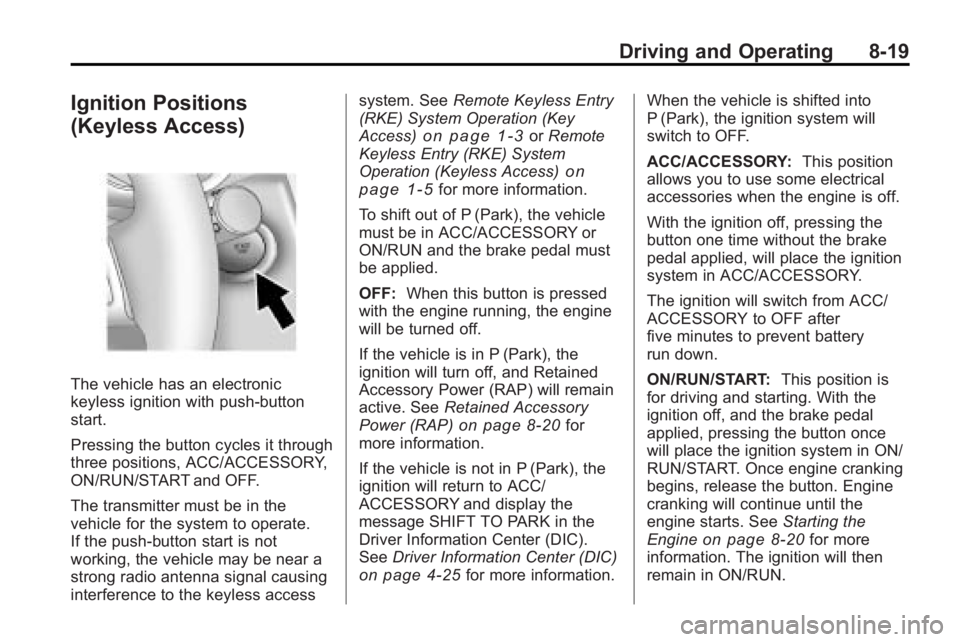
The vehicle has an electronic
keyless ignition with push-button
start.
Pressing the button cycles it through
three positions, ACC/ACCESSORY,
ON/RUN/START and OFF.
The transmitter must be in the
vehicle for the system to operate.
If the push-button start is not
working, the vehicle may be near a
strong radio antenna signal causing
interference to the keyless accesssystem. See
Remote Keyless Entry
(RKE) System Operation (Key
Access)
on page 1‑3or Remote
Keyless Entry (RKE) System
Operation (Keyless Access)
on
page 1‑5for more information.
To shift out of P (Park), the vehicle
must be in ACC/ACCESSORY or
ON/RUN and the brake pedal must
be applied.
OFF: When this button is pressed
with the engine running, the engine
will be turned off.
If the vehicle is in P (Park), the
ignition will turn off, and Retained
Accessory Power (RAP) will remain
active. See Retained Accessory
Power (RAP)
on page 8‑20for
more information.
If the vehicle is not in P (Park), the
ignition will return to ACC/
ACCESSORY and display the
message SHIFT TO PARK in the
Driver Information Center (DIC).
See Driver Information Center (DIC)
on page 4‑25for more information. When the vehicle is shifted into
P (Park), the ignition system will
switch to OFF.
ACC/ACCESSORY:
This position
allows you to use some electrical
accessories when the engine is off.
With the ignition off, pressing the
button one time without the brake
pedal applied, will place the ignition
system in ACC/ACCESSORY.
The ignition will switch from ACC/
ACCESSORY to OFF after
five minutes to prevent battery
run down.
ON/RUN/START: This position is
for driving and starting. With the
ignition off, and the brake pedal
applied, pressing the button once
will place the ignition system in ON/
RUN/START. Once engine cranking
begins, release the button. Engine
cranking will continue until the
engine starts. See Starting the
Engine
on page 8‑20for more
information. The ignition will then
remain in ON/RUN.