light BUICK LACROSSE 2010 User Guide
[x] Cancel search | Manufacturer: BUICK, Model Year: 2010, Model line: LACROSSE, Model: BUICK LACROSSE 2010Pages: 414
Page 50 of 414
2-24 Seats and Restraints
Replacing Safety Belt
System Parts After a
Crash
{WARNING
A crash can damage the safety
belt system in the vehicle.
A damaged safety belt system
may not properly protect the
person using it, resulting in
serious injury or even death in a
crash. To help make sure the
safety belt systems are working
properly after a crash, have them
inspected and any necessary
replacements made as soon as
possible.After a minor crash, replacement of
safety belts may not be necessary.
But the safety belt assemblies that
were used during any crash may
have been stressed or damaged.
See your dealer/retailer to have the
safety belt assemblies inspected or
replaced.
New parts and repairs may be
necessary even if the safety belt
system was not being used at the
time of the crash.
Have the safety belt pretensioners
checked if the vehicle has been in a
crash, or if the airbag readiness light
stays on after you start the vehicle
or while you are driving. See
Airbag
Readiness Light on page 4‑16.
Airbag System
The vehicle has the following
airbags:
.A frontal airbag for the driver.
.A frontal airbag for the right front
passenger.
.A seat-mounted side impact
airbag for the driver.
.A seat-mounted side impact
airbag for the right front
passenger.
.A roof-rail airbag for the driver
and the passenger seated
directly behind the driver.
.A roof-rail airbag for the right
front passenger and the
passenger seated directly
behind the right front passenger.
Page 53 of 414
Seats and Restraints 2-27
There is an airbag readiness light
on the instrument panel cluster,
which shows the airbag symbol. The
system checks the airbag electrical
system for malfunctions. The light
tells you if there is an electrical
problem. SeeAirbag Readiness
Light
on page 4‑16for more
information.
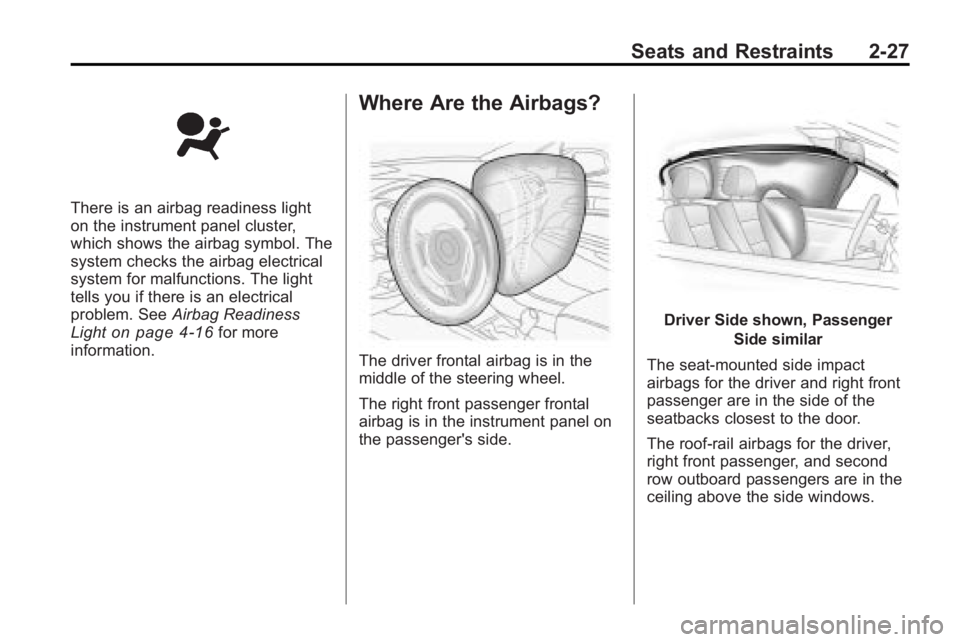
Where Are the Airbags?
The driver frontal airbag is in the
middle of the steering wheel.
The right front passenger frontal
airbag is in the instrument panel on
the passenger's side.
Driver Side shown, Passenger
Side similar
The seat-mounted side impact
airbags for the driver and right front
passenger are in the side of the
seatbacks closest to the door.
The roof-rail airbags for the driver,
right front passenger, and second
row outboard passengers are in the
ceiling above the side windows.
Page 60 of 414
2-34 Seats and Restraints
The passenger sensing system is
designed to turn off the right front
passenger frontal airbag if:
.The right front passenger seat is
unoccupied.
.The system determines that an
infant is present in a rear-facing
infant seat.
.The system determines that a
small child is present in a child
restraint.
.The system determines that a
small child is present in a
booster seat.
.A right front passenger takes
his/her weight off of the seat for
a period of time.
.The right front passenger seat is
occupied by a smaller person,
such as a child who has
outgrown child restraints.
.Or, if there is a critical problem
with the airbag system or the
passenger sensing system.
When the passenger sensing
system has turned off the right front
passenger frontal airbag, the off
indicator will light and stay lit to
remind you that the airbags are off.
See Passenger Airbag Status
Indicator on page 4‑16. The passenger sensing system is
designed to turn on (may inflate) the
right front passenger frontal airbag
anytime the system senses that a
person of adult size is sitting
properly in the right front passenger
seat. When the passenger sensing
system has allowed the airbag to be
enabled, the on indicator will light
and stay lit to remind you that the
airbag is active.
For some children who have
outgrown child restraints and for
very small adults, the passenger
sensing system may or may not
turn off the right front passenger
frontal airbag, depending upon the
person's seating posture and body
build. Everyone in the vehicle
who has outgrown child restraints
should wear a safety belt
properly
—whether or not there
is an airbag for that person.
Page 61 of 414
Seats and Restraints 2-35
{WARNING
If the airbag readiness light ever
comes on and stays on, it means
that something may be wrong
with the airbag system. To help
avoid injury to yourself or others,
have the vehicle serviced right
away. SeeAirbag Readiness
Light
on page 4‑16for more
information, including important
safety information.
If the On Indicator is Lit for a
Child Restraint
If a child restraint has been installed
and the on indicator is lit:
1. Turn the vehicle off.
2. Remove the child restraint from the vehicle.
3. Remove any additional items from the seat such as blankets,
cushions, seat covers, seat
heaters, or seat massagers.
4. Reinstall the child restraint following the directions provided
by the child restraint
manufacturer and refer to
Securing Child Restraints (Rear
Seat)
on page 2‑55orSecuring
Child Restraints (Front Seat )on
page 2‑57. 5. If, after reinstalling the child
restraint and restarting the
vehicle, the on indicator is still lit,
turn the vehicle off. Then slightly
recline the vehicle seatback and
adjust the seat cushion,
if adjustable, to make sure that
the vehicle seatback is not
pushing the child restraint into
the seat cushion.
Also make sure the child
restraint is not trapped under the
vehicle head restraint. If this
happens, adjust the head
restraint. See Head Restraints
on page 2‑2.
6. Restart the vehicle.
If the on indicator is still lit,
secure the child in the child
restraint in a rear seat position in
the vehicle, and check with your
dealer/retailer.
Page 65 of 414
Seats and Restraints 2-39
In addition, your dealer/retailer and
the service manual have information
about the location of the airbag
sensors, sensing and diagnostic
module and airbag wiring.
Airbag System Check
The airbag system does not need
regularly scheduled maintenance or
replacement. Make sure the airbag
readiness light is working. See
Airbag Readiness Light
on
page 4‑16for more information.
Notice: If an airbag covering is
damaged, opened, or broken, the
airbag may not work properly. Do
not open or break the airbag
coverings. If there are any
opened or broken airbag covers,
have the airbag covering and/or
airbag module replaced. For the
location of the airbag modules,
see What Makes an Airbag
Inflate?
on page 2‑30. See your
dealer/retailer for service.
Replacing Airbag System
Parts After a Crash
{WARNING
A crash can damage the airbag
systems in your vehicle.
A damaged airbag system may
not work properly and may not
protect you and your
passenger(s) in a crash, resulting
in serious injury or even death.
To help make sure your airbag
systems are working properly
after a crash, have them
inspected and any necessary
replacements made as soon as
possible. If an airbag inflates, you will need to
replace airbag system parts. See
your dealer/retailer for service.
If the airbag readiness light stays on
after the vehicle is started or comes
on when you are driving, the airbag
system may not work properly. Have
the vehicle serviced right away. See
Airbag Readiness Light
on
page 4‑16for more information.
Page 85 of 414
Seats and Restraints 2-59
You will be using the lap-shoulder
belt to secure the child restraint in
this position. Follow the instructions
that came with the child restraint.
1. Move the seat as far back as itwill go before securing the
forward-facing child restraint.
When the passenger sensing
system has turned off the right
front passenger frontal airbag,
the off indicator on the
passenger airbag status
indicator should light and stay lit
when you start the vehicle. See
Passenger Airbag Status
Indicator on page 4‑16.
2. Put the child restraint on the seat.
3. Pick up the latch plate, and run the lap and shoulder portions of
the vehicle's safety belt through
or around the restraint. The child
restraint instructions will show
you how.
4. Push the latch plate into the
buckle until it clicks.
Position the release button on
the buckle so that the safety belt
could be quickly unbuckled if
necessary.5. Pull the rest of the shoulder beltall the way out of the retractor to
set the lock.
Page 89 of 414
Instruments and Controls 4-1
Instruments and
Controls
Instrument Panel Overview
Instrument Panel Overview . . . . 4-4
Controls
Steering Wheel Adjustment . . . 4-6
Steering Wheel Controls . . . . . . 4-6
Heated Steering Wheel . . . . . . . 4-7
Horn . . . . . . . . . . . . . . . . . . . . . . . . . . 4-7
Windshield Wiper/Washer . . . . . 4-7
Compass . . . . . . . . . . . . . . . . . . . . . 4-8
Clock (Without DateDisplay) . . . . . . . . . . . . . . . . . . . . . 4-9
Clock (With Date Display) . . . . . 4-9
Power Outlets . . . . . . . . . . . . . . . 4-10
Warning Lights, Gages, and
Indicators
Warning Lights, Gages, and Indicators . . . . . . . . . . . . . . 4-12
Instrument Cluster . . . . . . . . . . . 4-13
Speedometer . . . . . . . . . . . . . . . . 4-14
Odometer . . . . . . . . . . . . . . . . . . . . 4-14
Tachometer . . . . . . . . . . . . . . . . . . 4-14
Fuel Gage . . . . . . . . . . . . . . . . . . . 4-14
Engine Coolant Temperature Gage . . . . . . . . . 4-15
Safety Belt Reminders . . . . . . . 4-15
Airbag Readiness Light . . . . . . 4-16
Passenger Airbag Status Indicator . . . . . . . . . . . . . . . . . . . . 4-16
Charging System Light . . . . . . 4-17
Malfunction Indicator Lamp . . . . . . . . . . . . . 4-17
Brake System Warning Light . . . . . . . . . . . . . . . . . . . . . . . 4-20 Electric Parking Brake
Light . . . . . . . . . . . . . . . . . . . . . . . 4-20
Antilock Brake System (ABS) Warning Light . . . . . . . . . . . . . . 4-21
Traction Off Light . . . . . . . . . . . . 4-22
Electronic Stability Control
(ESC) Indicator Light . . . . . . . 4-22
Electronic Stability Control (ESC)/Traction Control
System (TCS) Indicator/
Warning Light . . . . . . . . . . . . . . 4-22
Tire Pressure Light . . . . . . . . . . 4-23
Engine Oil Pressure Light . . . . 4-23
Low Fuel Warning Light . . . . . . 4-24
Security Light . . . . . . . . . . . . . . . . 4-24
High-Beam on Light . . . . . . . . . 4-24
Fog Lamp Light . . . . . . . . . . . . . . 4-24
Taillamp Indicator Light . . . . . . 4-25
Cruise Control Light . . . . . . . . . 4-25
Page 95 of 414
Instruments and Controls 4-7
Heated Steering Wheel
For vehicles with a heated steering
wheel, the button for this feature is
located on the climate control
system.
(:Press to turn the heated
steering wheel on or off. A light on
the button displays when the feature
is turned on.
The steering wheel takes about
three minutes to start heating.
Horn
Press near or on the horn symbols
on the steering wheel pad to sound
the horn.
Windshield Wiper/Washer
The windshield wiper lever is on the
side of the steering column. With
the ignition in ACC/ACCESSORY or
ON/RUN, move the windshield
wiper lever to select the wiper
speed.
2: Fast wipes.
1: Slow wipes.
&(Adjustable Interval Wipes):
Turn the band up for more frequent
wipes or down for less frequent
wipes.
9(Off): Turns the windshield
wipers off.
3(Mist): Single wipe, briefly
move the wiper lever down. Several
wipes, hold the wiper lever down.
Clear ice and snow from the wiper
blades before using them. If frozen
to the windshield, carefully loosen or
thaw them. Damaged wiper blades
should be replaced. See Wiper
Blade Replacement on page 9‑29.
Heavy snow or ice can overload the
wipers. A circuit breaker stops them
until the motor cools.
Page 97 of 414
Instruments and Controls 4-9
Clock (Without Date
Display)
The infotainment system controls
are used to access the time and
date settings through the menu
system. SeeOperation
on
page 6‑7for information about how
to use the menu system.
Setting the Time
1. Press the CONFIG button and select Time Settings, or press
the
Hbutton.
2. Select Set Time.
3. Turn the Menu knob to adjust the highlighted value.
4. Press the SELECT button to select the next value.
5. To save the time and return to the Time Settings menu, press
the
0BACK button at any time
or press the SELECT button
after adjusting the minutes.
Setting the 12/24 Hour Format
1. Press the CONFIG button and select Time Settings, or press
the
Hbutton.
2. Highlight 12/24 Hour Format.
3. Press the SELECT button to select the 12 hour or 24 hour
display format.
Clock (With Date Display)
The infotainment system controls
are used to access the time and
date settings through the menu
system. See Operation
on
page 6‑7for information about how
to use the menu system.
Setting the Time and Date
1. Press the CONFIG button and select Time and Date Settings,
or press the
Hbutton.
2. Select Set Time or Set Date. 3. Turn the Menu knob to adjust
the highlighted value.
4. Press the SELECT button to select the next value.
5. To save the time or date and return to the Time and Date
Settings menu, press
the
0BACK button at any
time or press the SELECT
button after adjusting the
minutes or year.
Setting the 12/24 Hour Format
1. Press the CONFIG button and select Time and Date Settings,
or press the
Hbutton.
2. Highlight Set Time Format.
3. Press the SELECT button to select the 12 hour or 24 hour
display format.
Page 98 of 414
4-10 Instruments and Controls
Setting the Month & Day
Format
1. Press the CONFIG button andselect Time and Date Settings,
or press the
Hbutton.
2. Highlight Set Date Format.
3. Press the SELECT button to select MM/DD/YY (month/day/
year) or DD/MM/YY (day/
month/year).
Setting the Auto Time Adjust
1. Press the CONFIG button andselect Time and Date Settings,
or press the
Hbutton.
2. Highlight Auto Time Adjust.
3. Press the SELECT button to turn Auto Time Adjust on or off.
4. Press the SELECT button to select Time Zone, and then
select the Time Zone.
5. Press the SELECT button to turn Daylight Savings on or off.
Power Outlets
The accessory power outlets can be
used to connect electrical
equipment, such as a cellular
phone.
There are two accessory power
outlets, one is located inside the
center console storage and other on
the rear of the center floor console.
Open the protective cover to use the
accessory power outlet.
Certain electrical accessories may
not be compatible with the
accessory power outlets and could
result in blown vehicle or adapter
fuses. If you experience a problem,
see your dealer/retailer for
additional information on the
accessory power outlet.
Notice: Adding any electrical
equipment to the vehicle can
damage it or keep other
components from working as
they should. The repairs would not be covered by the vehicle
warranty. Do not use equipment
exceeding maximum amperage
rating of 20 amperes. Check with
your dealer/retailer before adding
electrical equipment.
When adding electrical equipment,
be sure to follow the installation
instructions included with the
equipment.
Notice:
Improper use of the
power outlet can cause damage
not covered by the vehicle
warranty. Do not hang any type of
accessory or accessory bracket
from the plug because the power
outlets are designed for
accessory power plugs only.
Power Outlet 120 Volt Alternating
Current
The vehicle may have a power
outlet that can be used to plug in
electrical equipment that uses a
maximum limit of 150 watts.