onstar BUICK LACROSSE 2010 User Guide
[x] Cancel search | Manufacturer: BUICK, Model Year: 2010, Model line: LACROSSE, Model: BUICK LACROSSE 2010Pages: 414
Page 133 of 414
Instruments and Controls 4-45
Your Responsibility
Increase the volume of the radio if
the OnStar advisor cannot be heard.
If the light next to the OnStar
buttons is red, the system may not
be functioning properly. Press
Q
and request a vehicle diagnostic.
If the light appears clear (no light is
appearing), your OnStar
subscription has expired and all
services have been deactivated.
Press
Qto confirm that the OnStar
equipment is active.
Universal Remote
System
See Radio Frequency Statement
(US, Can)on page 12‑16for
information regarding Part 15 of
the Federal Communications
Commission (FCC) Rules and
RSS-210/211 of Industry and
Science Canada.
Universal Remote System
Programming
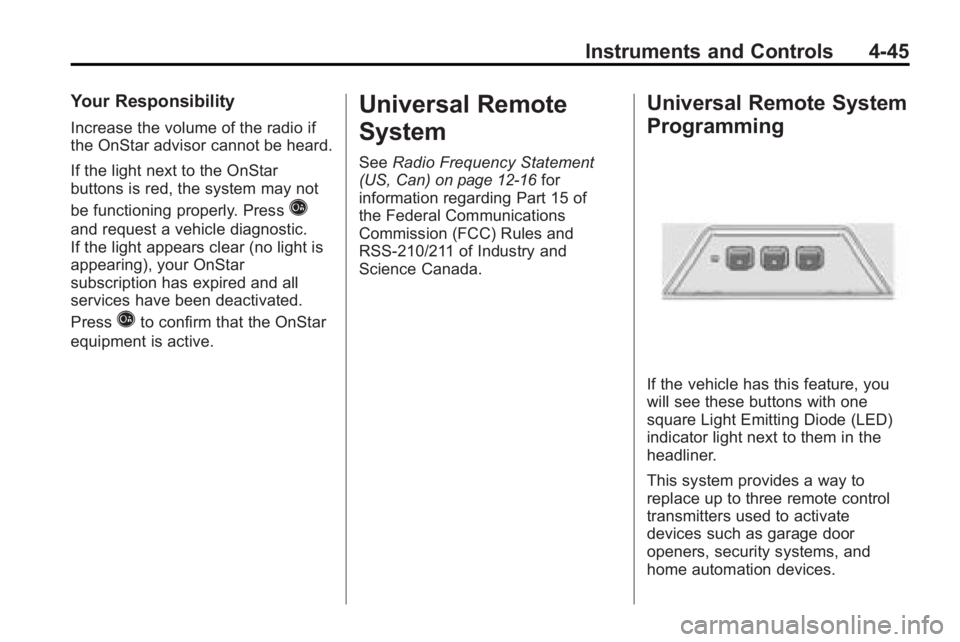
If the vehicle has this feature, you
will see these buttons with one
square Light Emitting Diode (LED)
indicator light next to them in the
headliner.
This system provides a way to
replace up to three remote control
transmitters used to activate
devices such as garage door
openers, security systems, and
home automation devices.
Page 153 of 414
Infotainment System 6-7
R.5
.Opens the phone
main menu.
.Mutes the audio system.
S. MEM/DVD/AUX
.Selects MEM, CD/DVD,
USB, or a connected front
or rear auxillary audio
source.
Operation
Controls
The infotainment system is operated
by using the pushbuttons,
multifunction knobs, menus that are
shown on the display, and steering
wheel controls, if equipped.
Turning the System On or Off
VOL/O(Volume/Power): Press to
turn the system on and off.
Automatic Switch-Off
If the infotainment system has been
turned on after the ignition is turned
off, the system will turn off
automatically after ten minutes.
Volume Control
VOL/O(Volume/Power): Turn to
adjust the volume.
5(Phone/Mute): For vehicles with
OnStar®, press and hold5to mute
the infotainment system. Press and
hold
5again, or turn the VOL/O
knob to cancel mute.
For vehicles without OnStar
®, press5to mute the infotainment system.
Press
5again, or turn the VOL/O
knob to cancel mute.
Menu System
Controls
The Menu knob, SELECT button,
and the
0BACK button are used to
navigate the menu system.
Menu Knob: Turn to:
.Enter the menu system.
.Highlight a menu option.
.Select a value.
SELECT: Press to:
.Select or activate the highlighted
menu option.
.Confirm a set value.
.Turn a system setting on or off.
0BACK:Press to:
.Exit a menu.
.Return from a submenu screen
to the previous menu screen.
.Delete the last character in a
sequence.
Page 188 of 414
6-42 Infotainment System
DVD Distortion
Video distortion can occur when
operating cellular phones, scanners,
CB radios, Global Position Systems
(GPS)*, two-way radios, mobile fax,
or walkie talkies.
It might be necessary to turn off the
DVD player when operating one of
these devices in or near the vehicle.
*Excludes the OnStar
®System.
Cleaning the RSE Seatback
Console
Use only a clean cloth dampened
with clean water to clean the RSE
seatback console surface.
Cleaning the Video Screens
Use only a clean cloth dampened
with clean water. Use care when
touching or cleaning the screens as
damage could result.
Phone
Bluetooth (Overview)
Vehicles with a Bluetooth system
can use a Bluetooth capable cell
phone with a Hands-Free Profile to
make and receive phone calls. The
infotainment system and voice
recognition are used to control the
system. The system can be used
while the ignition is in ON/RUN or
ACC/ACCESSORY. The range of
the Bluetooth system can be up to
9.1 m (30 ft.). Not all phones support
all functions and not all phones work
with the Bluetooth system. See
www.gm.com/bluetooth for more
information about compatible
phones.
Bluetooth Controls
Use the buttons located on the
infotainment system and the
steering wheel to operate the
Bluetooth system.
Steering Wheel Controls
b/g(Push To Talk):Press to
answer incoming calls, to confirm
system information, and to start
voice recognition.
c/$(End Call / Mute): Press to
end a call, reject a call, or to cancel
an operation.
Infotainment System Controls
For information about how to
navigate the menu system using the
infotainment controls, see Operation
on page 6‑7.
5(Phone):Press to enter the
Phone main menu.
Page 189 of 414
Infotainment System 6-43
Voice Recognition
The voice recognition system uses
commands to control the system
and dial phone numbers.
Noise:The system may not
recognize voice commands if there
is too much background noise.
When to Speak: A tone sounds to
indicate that the system is ready for
a voice command. Wait for the tone
and then speak.
How to Speak: Speak clearly in a
calm and natural voice.
Audio System
When using the Bluetooth system,
sound comes through the vehicle's
front audio system speakers and
overrides the audio system. Use the
VOL/
Oknob during a call to
change the volume level. The
adjusted volume level remains in
memory for later calls. The system
maintains a minimum volume level.
Other Information
The Bluetooth®word mark and
logos are owned by the Bluetooth®
SIG, Inc. and any use of such marks
by General Motors is under license.
Other trademarks and trade names
are those of their respective owners.
See Radio Frequency Statement
(US, Can)
on page 12‑16for FCC
information.
Bluetooth (Infotainment
Controls)
For information about how to
navigate the menu system using the
infotainment controls, see Operation
on page 6‑7.
Pairing
A Bluetooth enabled cell phone
must be paired to the Bluetooth
system first and then connected to
the vehicle before it can be used.
See the cell phone manufacturer
user guide for Bluetooth functions
before pairing the cell phone. If a
Bluetooth phone is not connected, calls will be made using OnStar
®
Hands-Free Calling, if available.
Refer to the OnStar Owner's Guide
for more information.
The pairing process can be started
by using the voice recognition
system or the controls on the
infotainment system.
Pairing Information:
.Up to five cell phones can be
paired to the Bluetooth system.
.The pairing process is disabled
when the vehicle is moving.
.The Bluetooth system links with
the first available paired cell
phone in the order the phone
was paired.
.Only one paired cell phone can
be connected to the Bluetooth
system at a time.
.Pairing should only need to be
completed once, unless changes
to the pairing information have
been made or the phone is
deleted.
Page 192 of 414
6-46 Infotainment System
Ending a Call
Turn the menu knob and select
Hang Up.
Muting a Call
To Mute a Call
Turn the menu knob and select
Mute Call.
To Cancel Mute
Turn the menu knob and select
Mute Call.
Dual Tone Multi-Frequency
(DTMF) Tones
The in-vehicle Bluetooth system can
send numbers during a call. This is
used when calling a menu driven
phone system.
1. Turn the menu knob and selectEnter Number.
2. Enter the character sequence, see “Entering a Character
Sequence” inOperation
on
page 6‑7for more information.
Bluetooth (Voice
Recognition)
Pairing
A Bluetooth cell phone must be
paired to the Bluetooth system and
then connected to the vehicle before
it can be used. See the cell phone
manufacturers user guide for
Bluetooth functions before pairing
the cell phone. If a Bluetooth phone
is not connected, calls will be made
using OnStar
®Hands-Free Calling,
if available. Refer to the OnStar
owner's guide for more information.
The pairing process can be started
by using the voice recognition
system or the controls on the
infotainment system. Pairing Information:
.Up to five cell phones can be
paired to the Bluetooth system.
.The pairing process is disabled
when the vehicle is moving.
.The Bluetooth system links with
the first available paired cell
phone in the order the phone
was paired.
.Only one paired cell phone can
be connected to the Bluetooth
system at a time.
.Pairing only needs to be
completed once, unless the
pairing information changes or
the phone is deleted.
To link to a different paired phone,
see Linking to a Different Phone
later in this section.
Page 194 of 414
6-48 Infotainment System
Deleting a Paired Phone
1. Press
b/g.
.For vehicles without a
navigation system, the
system responds“Ready”
followed by a tone.
.For vehicles with a
navigation system, the
system responds with a
tone. After the tone say
“Hands Free”. The system
responds “Ready”followed
by a tone.
2. Say “Bluetooth”. The system
responds “Bluetooth ready”
followed by a tone.
3. Say “Delete”. The system asks
which phone to delete followed
by a tone. 4. Say the name of the phone to be
deleted. If the phone name is
unknown, use the “List”
command for a list of all paired
phones. The system responds
“Would you like to delete
a tone.
5. Say “Yes”to delete the phone.
The system responds “OK,
deleting
Linking to a Different Phone
1. Press
b/g.
.For vehicles without a
navigation system, the
system responds “Ready”
followed by a tone.
.For vehicles with a
navigation system, the
system responds with a
tone. After the tone say
“Hands Free”. The system
responds “Ready”followed
by a tone. 2. Say
“Bluetooth”. The system
responds “Bluetooth ready”
followed by a tone.
3. Say “Change phone”. The
system responds “Please wait
while I search for other phones”.
.If another phone is found,
the response will be
“
connected”.
.If another phone is not
found, the original phone
remains connected.
Storing Name Tags
The system can store up to thirty
phone numbers as name tags that
are shared between the Bluetooth
and OnStar systems.
The system uses the following
commands to store and retrieve
phone numbers:
.Store
.Digit Store
.Directory
Page 198 of 414
6-52 Infotainment System
Using the Delete All Name Tags
Command
The delete all name tags command
deletes all stored phone book name
tags and route name tags for
OnStar if stored.
To delete all name tags:
1. Press
b/g.
.For vehicles without a
navigation system, the
system responds“Ready”
followed by a tone.
.For vehicles with a
navigation system, the
system responds with a
tone. After the tone say
“Hands Free”. The system
responds “Ready”followed
by a tone. 2. Say
“Delete all name tags”. The
system responds “You are about
to delete all name tags stored in
your phone directory and your
route destination directory. Are
you sure you want to do this?
Please say yes or no.”
.Say “Yes” to delete all
name tags.
.Say “No” to cancel the
function and return to the
main menu.
Making a Call
Calls can be made using the
following commands:
.Dial
.Digit Dial
.Call
.Re-dial Using the Dial Command
1. Press
b/g.
.For vehicles without a
navigation system, the
system responds
“Ready”
followed by a tone.
.For vehicles with a
navigation system, the
system responds with a
tone. After the tone say
“Hands Free”. The system
responds “Ready”followed
by a tone.
2. Say “Dial”. The system responds
“Dial using
“Number please” followed by
a tone.
Page 204 of 414
6-58 Infotainment System
Bluetooth Pairing
To make calls with a Bluetooth cell
phone through your vehicle, it must
be paired to the vehicle's Bluetooth
system first and then connected to
the vehicle before it can be used.
Refer to the cell phone
manufacturer's user guide for
Bluetooth pairing instructions. If a
Bluetooth phone is off or not
connected, calls will automatically
be made using the OnStar
®
Hands-Free Calling feature,
if available. Refer to the OnStar
owner's guide for more information
about OnStar Hands-Free Calling.
The pairing process can be started
by using the voice recognition
system or the controls on the
infotainment system.Pairing Information:
.Up to five cell phones can be
paired to the Bluetooth system.
.The pairing process is disabled
when the vehicle is moving.
.The Bluetooth system
automatically links with the
paired cell phone in the order
the phones were paired.
.Only one paired cell phone can
be connected to the vehicle's
Bluetooth system at a time.
.Pairing should only need to be
completed once.
Pairing a Phone
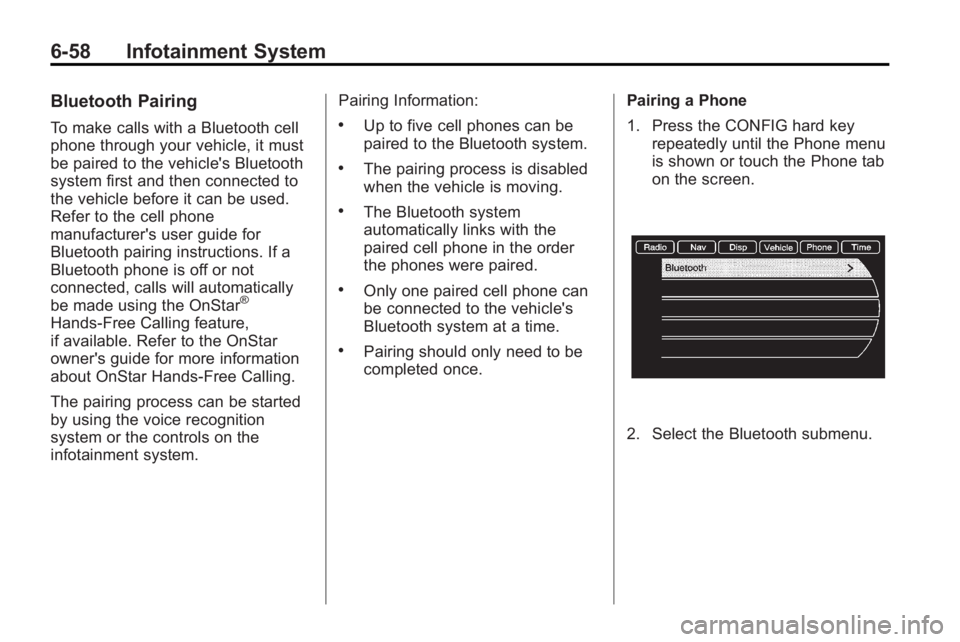
1. Press the CONFIG hard key
repeatedly until the Phone menu
is shown or touch the Phone tab
on the screen.
2. Select the Bluetooth submenu.
Page 324 of 414
9-42 Vehicle Care
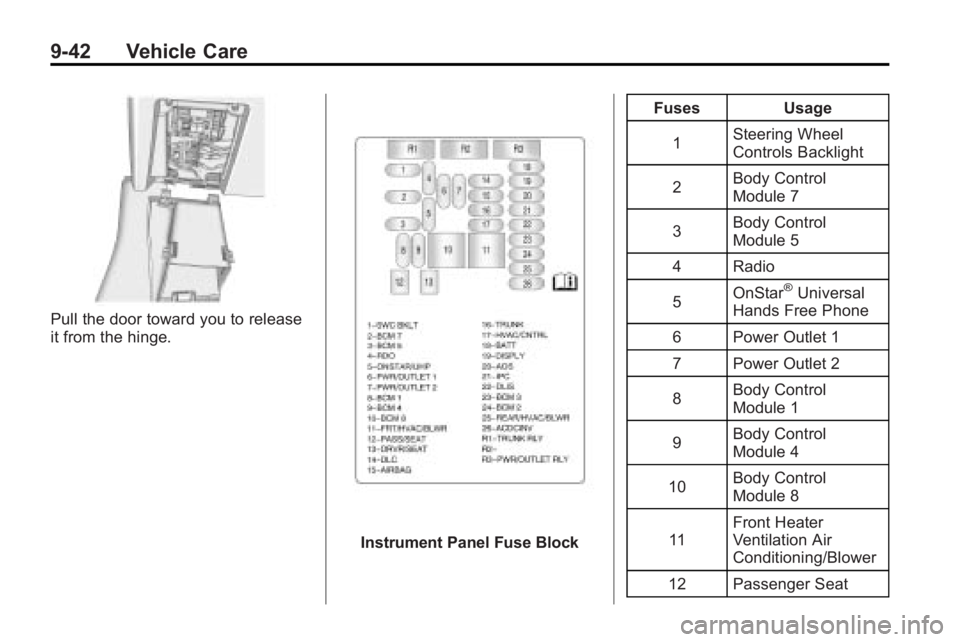
Pull the door toward you to release
it from the hinge.
Instrument Panel Fuse BlockFuses Usage
1 Steering Wheel
Controls Backlight
2 Body Control
Module 7
3 Body Control
Module 5
4 Radio
5 OnStar
®Universal
Hands Free Phone
6 Power Outlet 1
7 Power Outlet 2
8 Body Control
Module 1
9 Body Control
Module 4
10 Body Control
Module 8
11 Front Heater
Ventilation Air
Conditioning/Blower
12 Passenger Seat
Page 325 of 414
Vehicle Care 9-43
FusesUsage
13 Driver Seat
14 Diagnostic Link
Connector
15 Airbag
16 Trunk
17 Heater Ventilation
Air Conditioning
Controller
18 Radio, OnStar
®,
Universal Hands
Free Phone
19 Display
20 Automatic Occupant
Sensing
21 Instrument Panel
Cluster
22 Discrete Logic
Ignition Switch
23 Body Control
Module 3 Fuses Usage
24 Body Control
Module 2
25 Rear Heater
Ventilation Air
Conditioning/Blower
26 AC/DC Inverter
Relays Usage R1 Trunk Relay
R2 Not Used
R3 Power Outlet Relay
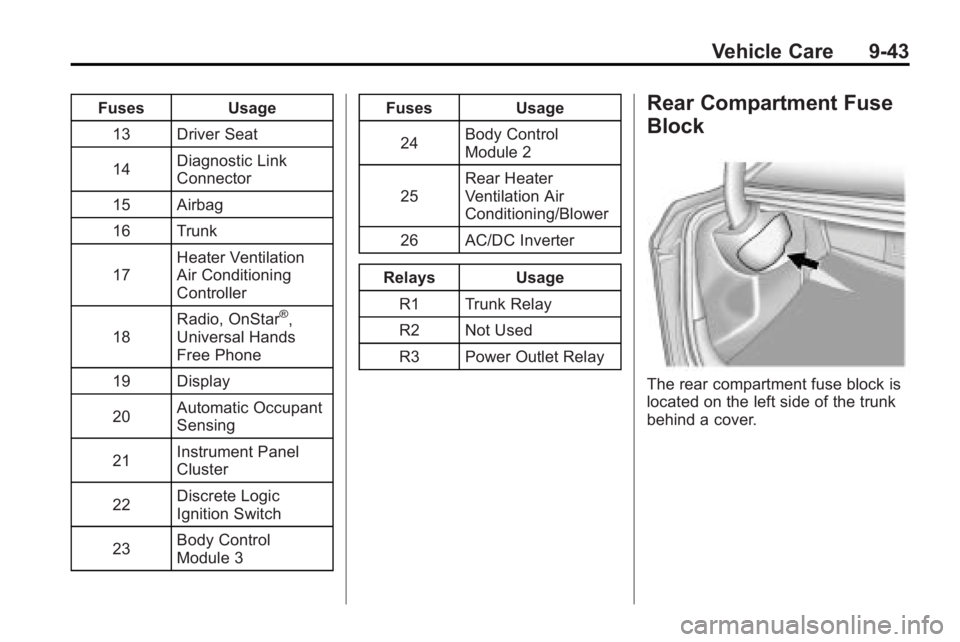
Rear Compartment Fuse
Block
The rear compartment fuse block is
located on the left side of the trunk
behind a cover.