engine BUICK LACROSSE 2010 Owner's Guide
[x] Cancel search | Manufacturer: BUICK, Model Year: 2010, Model line: LACROSSE, Model: BUICK LACROSSE 2010Pages: 414
Page 107 of 414
Instruments and Controls 4-19
An emission system malfunction
might be corrected.
.Make sure the fuel cap is fully
installed. SeeFilling the Tankon
page 8‑52. The diagnostic
system can determine if the fuel
cap has been left off or
improperly installed. A loose or
missing fuel cap allows fuel to
evaporate into the atmosphere.
A few driving trips with the cap
properly installed should turn the
light off.
.If the vehicle has been driven
through a deep puddle of water,
the vehicle's electrical system
might be wet. The condition is
usually corrected when the
electrical system dries out. A few
driving trips should turn the
light off.
.Make sure to fuel the vehicle
with quality fuel. Poor fuel quality
causes the engine not to run as
efficiently as designed and may
cause: stalling after start-up,
stalling when the vehicle is
changed into gear, misfiring,
hesitation on acceleration,
or stumbling on acceleration.
These conditions might go away
once the engine is warmed up.
If one or more of these
conditions occurs, change the
fuel brand used. It will require at
least one full tank of the proper
fuel to turn the light off.
See Gasoline Specifications
on
page 8‑50.
If none of the above have made the
light turn off, your dealer/retailer can
check the vehicle. The dealer/
retailer has the proper test
equipment and diagnostic tools to
fix any mechanical or electrical
problems that might have
developed.
Emissions Inspection and
Maintenance Programs
Some state/provincial and local
governments have or might begin
programs to inspect the emission
control equipment on the vehicle.
Failure to pass this inspection could
prevent getting a vehicle
registration.
Here are some things to know to
help the vehicle pass an inspection:
.The vehicle will not pass this
inspection if the check engine
light is on with the engine
running, or if the ignition is in
ON/RUN and the light is not on.
.The vehicle will not pass this
inspection if the OBD II
(on-board diagnostic) system
determines that critical emission
control systems have not been
completely diagnosed by the
system. The vehicle would be
considered not ready for
inspection. This can happen if
Page 109 of 414
Instruments and Controls 4-21
released, or while driving, there is a
problem with the Electric Parking
Brake system. A Service Parking
Brake message may also display in
the Driver Information Center (DIC).
SeeBrake System Messages
on
page 4‑33for more information.
If the light does not come on,
or remains flashing, see you dealer/
retailer.
For vehicles with the Electric Park
Brake (EPB), the park brake
warning light should come on briefly
when ignition is placed in ON/RUN.
If it does not come on, then have it
fixed so it will be ready to warn if
there is a problem.
If this light comes on, there is a
problem with a system on the
vehicle that is causing the park
brake system to work at a reduced level. The vehicle can still be driven,
but should be taken to a dealer/
retailer as soon as possible. See
Parking Brake
on page 8‑32for
more information.
For vehicles with the uplevel cluster,
this telltale displays in the Driver
Information Center (DIC) screen.
Antilock Brake System
(ABS) Warning Light
This light comes on briefly when the
engine is started.
If the light does not come on, have it
fixed so it will be ready to warn if
there is a problem.
If the ABS light stays on, turn the
ignition off. If the light comes on while driving,
stop as soon as it is safely possible
and turn off the vehicle. Then start
the engine again to reset the
system. If the ABS light stays on,
or comes on again while driving, the
vehicle needs service. A chime may
also sound when the light comes on
steady.
If the ABS light is the only light on,
the vehicle has regular brakes, but
the antilock brakes are not
functioning.
If both lights are on, the vehicle's
antilock brakes are not functioning
and there is a problem with the
regular brakes. See your dealer/
retailer for service.
See
Brake System Warning Light
on page 4‑20.
See Brake System Messages
on
page 4‑33for all brake related
DIC messages.
Page 110 of 414
4-22 Instruments and Controls
Traction Off Light
This light comes on when the
Traction Control System (TCS) has
been turned off by pressing and
releasing the traction control button.
This light also comes on and the
system turns off if there is a problem
with the traction control system.
If the light comes on and stays on
for an extended period of time while
the system is turned on, the vehicle
needs service.
SeeTraction Control System (TCS)
on page 8‑34andElectronic
Stability Control (ESC)on
page 8‑35for more information.
Electronic Stability
Control (ESC) Indicator
Light
This light comes on briefly while
starting the engine.
If it does not, have the vehicle
serviced by your dealer/retailer.
If the system is working normally the
indicator light then goes off.
If the light comes on and stays on
while driving, there could be a
problem with the ESC and the
vehicle might need service. When
this warning light is on, the ESC is
off and does not limit wheel spin.
The light flashes if the system is
active and is working to assist the
driver with directional control of the
vehicle in difficult driving conditions. For vehicles with the uplevel cluster,
this telltale is shown in the Driver
Information Center (DIC) screen.
See
Electronic Stability Control
(ESC)
on page 8‑35for more
information.
Electronic Stability
Control (ESC)/Traction
Control System (TCS)
Indicator/Warning Light
This light comes on when the
Electronic Stability Control (ESC)
system is turned off. If the Traction
Control System (TCS) is off, wheel
spin is not limited. If the ESC is off,
the system does not assist in
controlling the vehicle. Turn on the
TCS and the ESC and the warning
light turns off.
Page 111 of 414
Instruments and Controls 4-23
SeeTraction Control System (TCS)on page 8‑34andElectronic
Stability Control (ESC)on
page 8‑35for more information
Tire Pressure Light
For vehicles with a tire pressure
monitoring system, this light comes
on briefly when the engine is
started. It provides information
about tire pressures and the Tire
Pressure Monitoring System.
When the Light is On Steady
This indicates that one or more of
the tires are significantly
underinflated.
A tire pressure message in the
Driver Information Center (DIC), can
accompany the light. See Tire
Messages
on page 4‑37for more information. Stop and check the
tires as soon as it is safe to do so.
If underinflated, inflate to the proper
pressure. See
Tire Pressure
on
page 9‑53for more information.
When the Light Flashes First and
Then is On Steady
This indicates that there may be a
problem with the Tire Pressure
Monitor System. The light flashes
for about a minute and stays on
steady for the remainder of the
ignition cycle. This sequence
repeats with every ignition cycle.
See Tire Pressure Monitor
Operation
on page 9‑55for more
information.
Engine Oil Pressure Light
{WARNING
Do not keep driving if the oil
pressure is low. The engine can
become so hot that it catches fire.
(Continued)
WARNING (Continued)
Someone could be burned. Check
the oil as soon as possible and
have the vehicle serviced.
Notice: Lack of proper engine oil
maintenance can damage the
engine. The repairs would not be
covered by the vehicle warranty.
Always follow the maintenance
schedule in this manual for
changing engine oil.
The oil pressure light should come
on briefly as the engine is started.
If it does not come on have the
vehicle serviced by your dealer/
retailer.
Page 112 of 414
4-24 Instruments and Controls
If the light comes on and stays on, it
means that oil is not flowing through
the engine properly. The vehicle
could be low on oil and might have
some other system problem. See
your dealer/retailer.
For vehicles with the uplevel cluster
this telltale displays in the Driver
Information Center (DIC) screen.
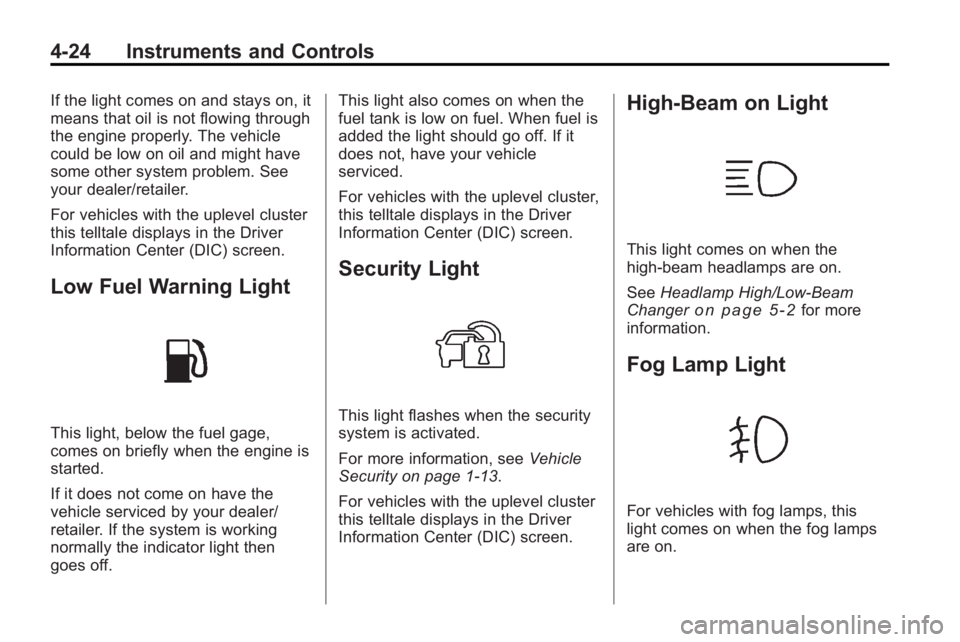
Low Fuel Warning Light
This light, below the fuel gage,
comes on briefly when the engine is
started.
If it does not come on have the
vehicle serviced by your dealer/
retailer. If the system is working
normally the indicator light then
goes off.This light also comes on when the
fuel tank is low on fuel. When fuel is
added the light should go off. If it
does not, have your vehicle
serviced.
For vehicles with the uplevel cluster,
this telltale displays in the Driver
Information Center (DIC) screen.
Security Light
This light flashes when the security
system is activated.
For more information, see
Vehicle
Security on page 1‑13.
For vehicles with the uplevel cluster
this telltale displays in the Driver
Information Center (DIC) screen.
High-Beam on Light
This light comes on when the
high-beam headlamps are on.
See Headlamp High/Low-Beam
Changer
on page 5‑2for more
information.
Fog Lamp Light
For vehicles with fog lamps, this
light comes on when the fog lamps
are on.
Page 116 of 414
4-28 Instruments and Controls
Unit
Move
w xto switch between
Metric or US when the Unit display
is active. Press SET to confirm the
setting. This will change the
displays on the cluster and DIC to
either metric or English (US)
measurements.
Tire Pressure
The display will show a vehicle with
the approximate pressures of all
four tires. Tire pressure is displayed
in either kilopascal (kPa) or pounds
per square inch (psi). See Tire
Pressure Monitor System
on
page 9‑54and Tire Pressure
Monitor Operationon page 9‑55for
more information.
Remaining Oil Life
This display shows an estimate of
the oil's remaining useful life.
If Remaining Oil Life 99% is
displayed, that means 99% of the
current oil life remains. When the remaining oil life is low,
the CHANGE ENGINE OIL SOON
message will appear on the display.
See
Engine Oil Messages
on
page 4‑35. The oil should changed
as soon as possible. See Engine Oil
on page 9‑11. In addition to the
engine oil life system monitoring the
oil life, additional maintenance is
recommended in the Maintenance
Schedule in this manual. See
Scheduled Maintenance
on
page 10‑2for more information.
Remember, the Oil Life display must
be reset after each oil change. It will
not reset itself. Also, be careful not
to reset the Oil Life display
accidentally at any time other than
when the oil has just been changed.
It cannot be reset accurately until
the next oil change. To reset the
engine oil life system press SET
while the Oil Life display is active.
See Engine Oil Life System
on
page 9‑13.
Compass
The vehicle may have a compass
display in the Driver Information
Center (DIC). See Compass
on
page 4‑8for more information.
Head-Up Display (HUD)
{WARNING
If the HUD image is too bright or
too high in your field of view, it
may take you more time to see
things you need to see when it is
dark outside. Be sure to keep the
HUD image dim and placed low in
your field of view.
For vehicles with the Head-Up
Display (HUD), some information
concerning the operation of the
vehicle is projected onto the
windshield. This includes the
speedometer reading, RPM reading,
transmission position, outside air
temperature, compass heading and
a brief display of the current radio
Page 118 of 414
4-30 Instruments and Controls
is reduced when radio,
CD information, warnings,
or turn-by-turn navigation
information are displayed on
the HUD.
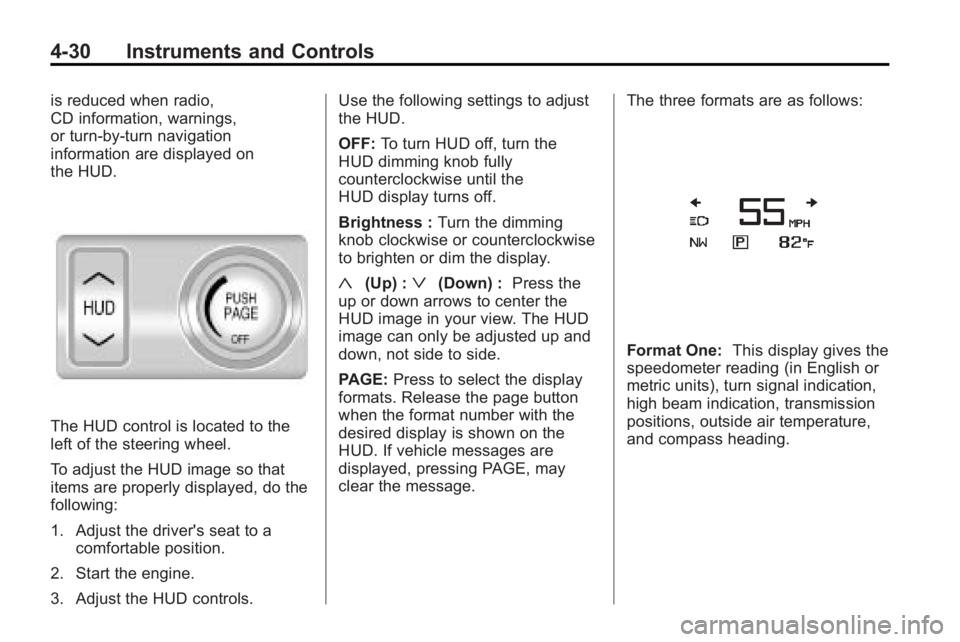
The HUD control is located to the
left of the steering wheel.
To adjust the HUD image so that
items are properly displayed, do the
following:
1. Adjust the driver's seat to acomfortable position.
2. Start the engine.
3. Adjust the HUD controls. Use the following settings to adjust
the HUD.
OFF:
To turn HUD off, turn the
HUD dimming knob fully
counterclockwise until the
HUD display turns off.
Brightness : Turn the dimming
knob clockwise or counterclockwise
to brighten or dim the display.
«(Up) :ª(Down) : Press the
up or down arrows to center the
HUD image in your view. The HUD
image can only be adjusted up and
down, not side to side.
PAGE: Press to select the display
formats. Release the page button
when the format number with the
desired display is shown on the
HUD. If vehicle messages are
displayed, pressing PAGE, may
clear the message. The three formats are as follows:
Format One:
This display gives the
speedometer reading (in English or
metric units), turn signal indication,
high beam indication, transmission
positions, outside air temperature,
and compass heading.
Page 122 of 414
4-34 Instruments and Controls
Cruise Control Messages
Apply Brakes Before Cruise
If this message displays when
attempting to activate cruise control,
apply the brake and then try again.
Cruise Set to XXX
This message will display when the
cruise control is set and it will show
the speed it was set to. SeeCruise
Control
on page 8‑37for more
information.
Door Ajar Messages
Driver Door Open
This message will display when the
driver door is open. Close the door
completely.
Hood Open
This message will display when the
hood is open. Close the hood
completely.
Left Rear Door Open
This message will display when the
driver side rear passenger door is
open. Close the door completely.
Passenger Door Open
This message will display when the
passenger door is open. Close the
door completely.
Right Rear Door Open
This message will display when the
passenger side rear passenger door
is open. Close the door completely.
Trunk Open
This message will display when the
trunk is open. Close the trunk
completely.
Engine Cooling System
Messages
A/C Off Due to High
Engine Temp
This message displays when the
engine coolant becomes hotter than
the normal operating temperature.
To avoid added strain on a hot
engine, the air conditioning
compressor automatically turns off.
When the coolant temperature
returns to normal, the air
conditioning compressor turns back
on. You can continue to drive your
vehicle.
If this message continues to appear,
have the system repaired by your
dealer/retailer as soon as possible
to avoid damage to the engine.
Coolant Level Low Add
Coolant
This message will display if the
coolant is low, see Engine Coolant
on page 9‑18.
Page 123 of 414
Instruments and Controls 4-35
Engine Overheated—Idle
Engine
This message displays when the
engine coolant temperature is too
hot. Stop and allow the vehicle to
idle until it cools down.
Engine Overheated —Stop
Engine
This message displays and a
continuous chime sounds if the
engine cooling system reaches
unsafe temperatures for operation.
Stop and turn off the vehicle as
soon as it is safe to do so to avoid
severe damage. This message
clears when the engine has cooled
to a safe operating temperature.
High Coolant Temperature
This message displays if the coolant
temperature is hot, see Engine
Overheating on page 9‑20.
Engine Oil Messages
Change Engine Oil Soon
This message displays when the
engine oil needs to be changed.
When you change the engine oil, be
sure to reset the CHANGE ENGINE
OIL SOON message. See Engine
Oil Life System
on page 9‑13and
Driver Information Center (DIC)on
page 4‑25for information on how to
reset the message. See Engine Oil
on page 9‑11andScheduled
Maintenanceon page 10‑2for
more information.
Engine Oil Hot, Idle Engine
This message displays when the
engine oil temperature is too hot.
Stop and allow the vehicle to idle
until it cools down.
Engine Oil Low –Add Oil
This message displays when the
engine oil level is too low. Check the
oil level. See Engine Oil
on
page 9‑11.
Oil Pressure Low –Stop
Engine
This message displays if low oil
pressure levels occur. Stop the
vehicle as soon as safely possible
and do not operate it until the cause
of the low oil pressure has been
corrected. Check the oil as soon as
possible and have your vehicle
serviced by your dealer/retailer.
Engine Power Messages
Engine Power Is Reduced
This message displays when the
vehicle's engine power is reduced.
Reduced engine power can affect
the vehicle's ability to accelerate.
If this message is on, but there is no
reduction in performance, proceed
to your destination. The
performance may be reduced the
next time the vehicle is driven. The
vehicle may be driven at a reduced
speed while this message is on, but
maximum acceleration and speed
may be reduced. Anytime this
Page 124 of 414
4-36 Instruments and Controls
message stays on, the vehicle
should be taken to your dealer/
retailer for service as soon as
possible.
Fuel System Messages
Fuel Level Low
This message displays when the
vehicle is low on fuel. Refuel as
soon as possible.
Tighten Gas Cap
This message displays when the
fuel cap is not on tight. Tighten the
fuel cap.
Key and Lock Messages
No Remote Detected
This message displays when the
transmitter battery is weak on
vehicles with Keyless Access. See
“Starting the Vehicle with a Low
Battery”under“Remote Keyless
Transmitter Operation (Keyless
Access)” for more information.
Replace Battery In Remote Key
This message displays when the
battery in the Remote Keyless Entry
(RKE) transmitter needs to be
replaced.
Lamp Messages
AFL (Adaptive Forward
Lighting) Lamps Need Service
This message displays when the
Adaptive Forward Lighting (AFL)
system is disabled and needs
service. See your dealer/retailer.
SeeAdaptive Forward Lighting
(AFL)
on page 5‑3for more
information.
Ride Control System
Messages
Service Rear Axle
This message displays when there
is a problem with the All-Wheel
Drive (AWD) System. See your
dealer/retailer for service.
Service Traction Control
This message displays when there
is a problem with the Traction
Control System (TCS). When this
message is displayed, the system
will not limit wheel spin. Adjust your
driving accordingly. See your dealer/
retailer for service.
Service Stabilitrak
This message displays if there is a
problem with the StabiliTrak®
system. If this message appears, try
to reset the system. Stop; turn off
the engine for at least 15 seconds;
then start the engine again. If this
message still comes on, it means
there is a problem. See your dealer/
retailer for service. The vehicle is
safe to drive, however, you do not
have the benefit of StabiliTrak, so
reduce your speed and drive
accordingly.