air conditioning BUICK LACROSSE 2010 Owner's Manual
[x] Cancel search | Manufacturer: BUICK, Model Year: 2010, Model line: LACROSSE, Model: BUICK LACROSSE 2010Pages: 414
Page 5 of 414
Introduction v
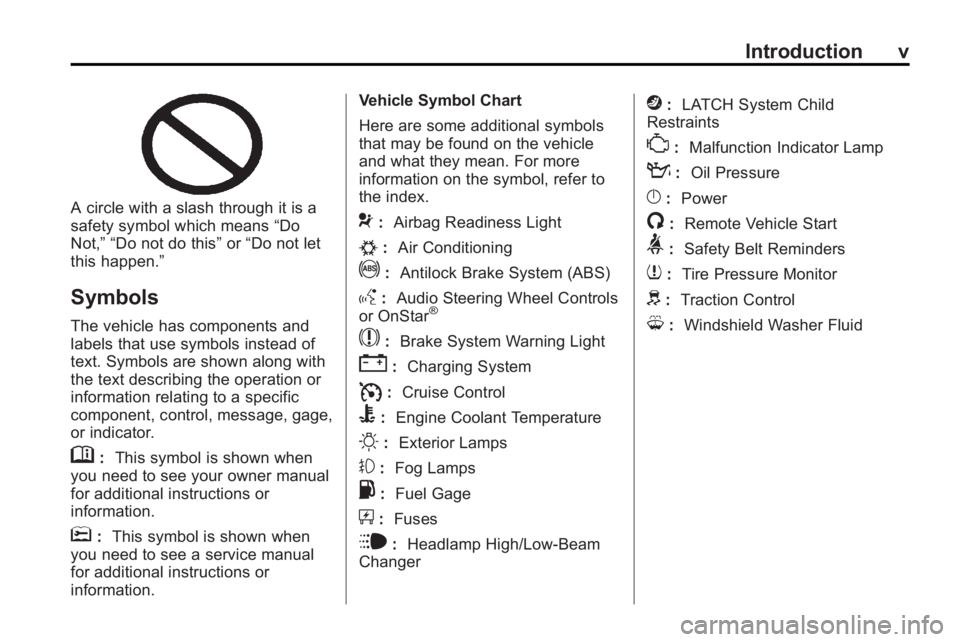
A circle with a slash through it is a
safety symbol which means“Do
Not,” “Do not do this” or“Do not let
this happen.”
Symbols
The vehicle has components and
labels that use symbols instead of
text. Symbols are shown along with
the text describing the operation or
information relating to a specific
component, control, message, gage,
or indicator.
M: This symbol is shown when
you need to see your owner manual
for additional instructions or
information.
*: This symbol is shown when
you need to see a service manual
for additional instructions or
information. Vehicle Symbol Chart
Here are some additional symbols
that may be found on the vehicle
and what they mean. For more
information on the symbol, refer to
the index.
9:
Airbag Readiness Light
#:Air Conditioning
!:Antilock Brake System (ABS)
g:Audio Steering Wheel Controls
or OnStar®
$: Brake System Warning Light
":Charging System
I:Cruise Control
B: Engine Coolant Temperature
O:Exterior Lamps
#:Fog Lamps
.: Fuel Gage
+:Fuses
i: Headlamp High/Low-Beam
Changer
j: LATCH System Child
Restraints
*: Malfunction Indicator Lamp
::Oil Pressure
}:Power
/:Remote Vehicle Start
>:Safety Belt Reminders
7:Tire Pressure Monitor
d:Traction Control
M:Windshield Washer Fluid
Page 122 of 414
4-34 Instruments and Controls
Cruise Control Messages
Apply Brakes Before Cruise
If this message displays when
attempting to activate cruise control,
apply the brake and then try again.
Cruise Set to XXX
This message will display when the
cruise control is set and it will show
the speed it was set to. SeeCruise
Control
on page 8‑37for more
information.
Door Ajar Messages
Driver Door Open
This message will display when the
driver door is open. Close the door
completely.
Hood Open
This message will display when the
hood is open. Close the hood
completely.
Left Rear Door Open
This message will display when the
driver side rear passenger door is
open. Close the door completely.
Passenger Door Open
This message will display when the
passenger door is open. Close the
door completely.
Right Rear Door Open
This message will display when the
passenger side rear passenger door
is open. Close the door completely.
Trunk Open
This message will display when the
trunk is open. Close the trunk
completely.
Engine Cooling System
Messages
A/C Off Due to High
Engine Temp
This message displays when the
engine coolant becomes hotter than
the normal operating temperature.
To avoid added strain on a hot
engine, the air conditioning
compressor automatically turns off.
When the coolant temperature
returns to normal, the air
conditioning compressor turns back
on. You can continue to drive your
vehicle.
If this message continues to appear,
have the system repaired by your
dealer/retailer as soon as possible
to avoid damage to the engine.
Coolant Level Low Add
Coolant
This message will display if the
coolant is low, see Engine Coolant
on page 9‑18.
Page 213 of 414
Climate Controls 7-1
Climate Controls
Climate Control Systems
Automatic Climate ControlSystem . . . . . . . . . . . . . . . . . . . . . . 7-1
Dual Automatic Climate Control System . . . . . . . . . . . . . . 7-4
Air Vents
Air Vents . . . . . . . . . . . . . . . . . . . . . . 7-8
Maintenance
Air Intake . . . . . . . . . . . . . . . . . . . . . 7-8
Passenger Compartment AirFilter . . . . . . . . . . . . . . . . . . . . . . . . . 7-8
Climate Control Systems
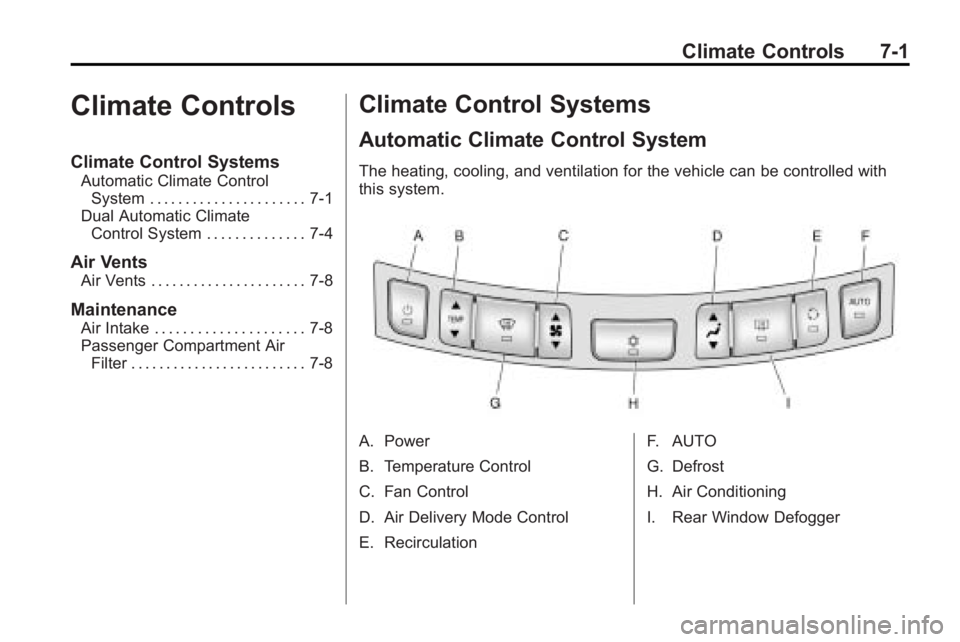
Automatic Climate Control System
The heating, cooling, and ventilation for the vehicle can be controlled with
this system.
A. Power
B. Temperature Control
C. Fan Control
D. Air Delivery Mode Control
E. Recirculation F. AUTO
G. Defrost
H. Air Conditioning
I. Rear Window Defogger
Page 214 of 414
7-2 Climate Controls
Automatic Operation
The system automatically controls
the fan speed, air delivery, air
conditioning and recirculation in
order to heat or cool the vehicle to
the desired temperature.
When the AUTO indicator light is
on, the system is in full automatic
operation. If the air delivery mode,
fan speed, recirculation or air
conditioning setting is adjusted, the
AUTO indicator turns off and the
selected settings will appear on the
display.
To place the system in automatic
mode do the following:
1. Press AUTO.
2. Set the temperature. Allow thesystem time to stabilize. Adjust
the temperature as needed for
best comfort.
Q/R(Temperature Control):
Press to increase or decrease the
temperature. Manual Operation
O(Power):
Press to turn the fan
on or off.
D C(Fan Control): Press to
increase or decrease the fan speed.
The fan speed setting appears on
the main display. Pressing either
button cancels automatic fan control
and the fan can be controlled
manually. Press AUTO to return to
automatic operation.
e *(Air Delivery Mode
Control): Press to change the
direction of the airflow. The current
mode appears in the display screen.
Pressing either button cancels
automatic air delivery control and
the direction of the airflow can be
controlled manually. Press AUTO to
return to automatic operation.
To change the current mode, select
one of the following:
Y(Vent): Air is directed to the
instrument panel outlets.
\(Bi-Level): Air is divided
between the instrument panel
outlets and the floor outlets.
C(Tri-Level): Air is divided
between the windshield, instrument
panel, and floor outlets.
[(Floor): Air is directed to the
floor outlets.
-(Defog): Clears the windows of
fog or moisture. Air is directed to the
windshield and floor outlets.
0(Defrost): Clears the
windshield of fog or frost more
quickly. Air is directed to the
windshield. Selecting defrost will
disable automatic control.
For best results, clear all snow and
ice from windshield before
defrosting.
#(Air Conditioning): Press to
turn the air conditioning system on
or off. If the fan is turned off or the
outside temperature falls below
freezing, the air conditioning system
will not run.
Page 215 of 414
Climate Controls 7-3
Pressing this button cancels
automatic air conditioning and turns
off the air conditioner. Press AUTO
to return to automatic operation and
the air conditioner runs
automatically as needed. When the
indicator light is on, the air
conditioner runs automatically to
cool the air inside the vehicle or to
dry the air needed to defog the
windshield faster.
>(Recirculation):Press to
alternate between recirculating air
inside the vehicle or pulling in
outside air. When the indicator light
is on, air is being recirculated inside
the vehicle. This helps to quickly
cool the air inside the vehicle or
prevent outside air and odors from
entering.
Pressing this button cancels
automatic recirculation. Press AUTO
to return to automatic operation and
recirculation runs automatically as
needed.
Rear Window Defogger
=(Rear Window Defogger):
Press to turn the rear window
defogger on or off.
The rear window defogger turns off
automatically after about
10 minutes. If turned on again it
runs for about 5 minutes before
turning off. The defogger can also
be turned off by turning the ignition
to ACC/ACCESSORY or
LOCK/OFF.
The rear window defogger can be
set to automatic operation, see
Climate and Air Quality under
Vehicle Personalization
on
page 4‑38. When auto rear defog is
selected, the rear window defogger
turns on automatically when the
interior temperature is cold and the
outside temperature is about 40°F
and below. The auto rear defogger
turns off automatically after about
10 minutes, or after 5 minutes if the
outside temperature is not as cold. For vehicles with heated outside
rearview mirrors, they turn on when
the rear window defogger button is
on and helps to clear fog or frost
from the surface of the mirror. See
Heated Mirrors on page 1‑16.
Notice:
Do not try to clear frost
or other material from the inside
of the front windshield and rear
window with a razor blade or
anything else that is sharp. This
may damage the rear window
defogger grid and affect your
radio's ability to pick up stations
clearly. The repairs wouldn't be
covered by your warranty.
Remote Start Climate Control
Operation: For vehicles with the
remote vehicle start feature, the
climate control system may run
when the vehicle is started remotely.
The system uses the driver's
previous settings to heat or cool the
inside of the vehicle. See Remote
Vehicle Start on page 1‑8.
The rear window defogger turns on
if it is cold outside.
Page 216 of 414
7-4 Climate Controls
Sensors
The solar sensor located on top of
the instrument panel near the
windshield monitors the solar heat.
The climate control system uses the
sensor information to adjust the
temperature, fan speed,
recirculation, and air delivery mode
for best comfort.
Do not cover the sensors or the
automatic climate control system
may not work properly.
Dual Automatic Climate Control System
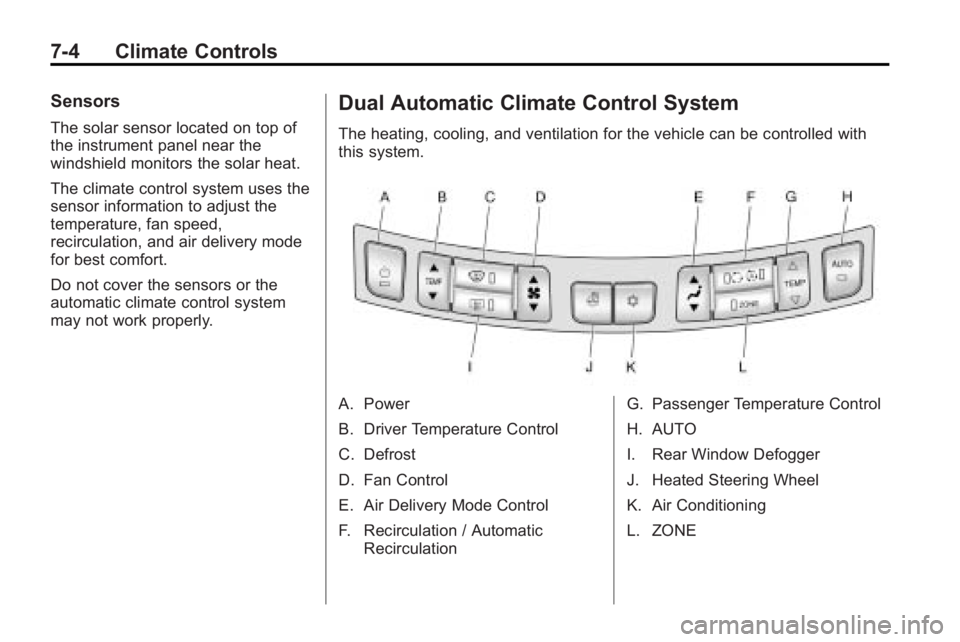
The heating, cooling, and ventilation for the vehicle can be controlled with
this system.
A. Power
B. Driver Temperature Control
C. Defrost
D. Fan Control
E. Air Delivery Mode Control
F. Recirculation / AutomaticRecirculation G. Passenger Temperature Control
H. AUTO
I. Rear Window Defogger
J. Heated Steering Wheel
K. Air Conditioning
L. ZONE
Page 217 of 414
Climate Controls 7-5
Automatic Operation
The system automatically controls
the fan speed, air delivery, air
conditioning and recirculation in
order to heat or cool the vehicle to
the desired temperature.
When the AUTO indicator light is
on, the system is in full automatic
operation. If the air delivery mode,
fan speed, recirculation or air
conditioning setting is adjusted, the
AUTO indicator turns off and the
selected settings will appear on the
display.
To place the system in automatic
mode do the following:
1. Press AUTO.
2. Set the temperature. Allow thesystem time to stabilize. Adjust
the temperature as needed for
best comfort.Q/R(Driver and Passenger
Temperature Control): The
temperature can be adjusted
separately for the driver and the
passenger. Press to increase or
decrease the temperature.
ZONE: Press to link all climate
zone settings to the driver's
settings. The ZONE indicator light
will turn off. When the passenger
settings are adjusted, the ZONE
indicator light is on.
Manual Operation
O(Power): Press to turn the fan
off or on.
D C(Fan Control): Press to
increase or decrease the fan speed.
The fan speed setting appears on
the main display. Pressing either
button cancels automatic fan control
and the fan is controlled manually.
Press AUTO to return to automatic
operation.
e *(Air Delivery Mode
Control): Press to change the
direction of the airflow. The current
mode appears in the display screen.
Pressing either button cancels
automatic air delivery control and
the direction of the airflow is
controlled manually. Press AUTO to
return to automatic operation.
To change the current mode, select
one of the following:
Y(Vent): Air is directed to the
instrument panel outlets.
\(Bi-Level): Air is divided
between the instrument panel
outlets and the floor outlets.
C(Tri-Level): Air is divided
between the windshield, instrument
panel, and floor outlets.
[(Floor): Air is directed to the
floor outlets.
-(Defog): Clears the windows of
fog or moisture. Air is directed to the
windshield and floor outlets.
Page 218 of 414
7-6 Climate Controls
0(Defrost):Clears the
windshield of fog or frost more
quickly. Air is directed to the
windshield.
For best results, clear all snow and
ice from windshield before
defrosting.
#(Air Conditioning): Press to
turn the air conditioning system on
or off. If the fan is turned off or the
outside temperature falls below
freezing, the air conditioner will
not run.
Pressing this button cancels
automatic air conditioning and turns
off the air conditioner. Press AUTO
to return to automatic operation and
the air conditioner runs
automatically as needed. When the
indicator light is on, the air
conditioner runs automatically to
cool the air inside the vehicle or to
dry the air needed to defog the
windshield faster.
>//(Recirculation/Auto
Recirculation): Press to change to
automatic control of air recirculation
inside the vehicle. When the auto
recirculation indicator light is on, the
air is automatically recirculated as
needed to help quickly cool the air
inside the vehicle.
In auto recirculation control, the Air
Quality Control system may operate
when pollution is detected. To adjust
the sensitivity of the Air Quality
Control, see Climate and Air Quality
under Vehicle Personalization
on
page 4‑38.
When the
>indicator light is on, air
is recirculated inside the vehicle.
If both indicator lights are off,
outside air will flow into the vehicle.
Press AUTO or
/to return to
automatic operation. Auto Defog:
The climate control
system may have a sensor to
automatically detect high humidity
inside the vehicle. When high
humidity is detected, the climate
control system may adjust to
outside air supply and turn on the
air conditioner. The fan speed may
slightly increase to help prevent
fogging. If the climate control
system does not detect possible
window fogging, it returns to normal
operation. To turn Auto Defog off or
on, see Climate and Air Quality
under Vehicle Personalization
on
page 4‑38.
Page 303 of 414
Vehicle Care 9-21
If No Steam Is Coming From
The Engine Compartment
If an engine overheat warning is
displayed but no steam can be seen
or heard, the problem might not be
too serious. Sometimes the engine
can get a little too hot when the
vehicle:
.Climbing a long hill on a hot day.
.Stopping after high-speed
driving.
.Idling for long periods in traffic.
.Towing a trailer.
If the overheat warning displays with
no sign of steam:
1. Turn the air conditioning off.
2. Turn the heater on to the highest temperature and to the highest
fan speed. Open the windows as
necessary. 3. In heavy traffic, let the engine
idle in N (Neutral) while stopped.
If it is safe to do so, pull off the
road, shift to P (Park) or
N (Neutral) and let the
engine idle.
If the temperature overheat gage is
no longer in the overheat zone or an
overheat warning no longer
displays, the vehicle can be driven.
Continue to drive the vehicle slow
for about 10 minutes. Keep a safe
vehicle distance from the vehicle in
front. If the warning does not come
back on, continue to drive normally.
If the warning continues, pull over,
stop, and park the vehicle
right away.
If there is no sign of steam, idle the
engine for three minutes while
parked. If the warning is still
displayed, turn off the engine until it
cools down. Also, see “Overheated
Engine Protection Operating Mode”
later in this section.
Overheated Engine
Protection
Operating Mode
This emergency operating mode
allows the vehicle to be driven to a
safe place in an emergency
situation. If an overheated engine
condition exists, an overheat
protection mode which alternates
firing groups of cylinders helps
prevent engine damage. In this
mode, there is significant loss in
power and engine performance. The
engine coolant temperature warning
light comes on the instrument panel,
to indicate the vehicle has entered
overheated engine protection
operating mode. The temperature
gage also indicates an overheat
condition exists. Driving
extended km (miles) and/or towing a
trailer in the overheat protection
mode should be avoided.
Page 322 of 414
9-40 Vehicle Care
J-CaseFuses Usage
28 Rear Window
Defogger
41 Brake
Vacuum Pump
42 Cooling Fan K2
45 Cooling Fan K1
Mini Fuses Usage 1 Transmission
Control Module
2 Engine Control
Module Battery
5 Engine Control
Module Ignition
8 Ignition Coils ‐Even
9 Ignition Coils ‐Odd
10 Engine Control
Module Mini Fuses Usage
11 Post Catalytic
Converter Oxygen
Sensor Heater
13 Trans Ignition / Fuel
System Control
Module
16 MAF
17 Airbag Module
18 SBZ Ignition
23 Variable Effort
Steering
29 Power Lumbar, Left
32 Body Control
Module
33 Heated Seat
34 Antilock Brake
System Valves
35 Amplifier
36 AFL Ignition
37 Right High Beam Mini Fuses Usage
38 Left High Beam
46 Cooling Fan Relay
47 Pre Catalytic
Converter Oxygen
Sensor Heater
48 Fog Lamps
49 Right High Intensity
Discharge
Headlamp
50 Left High Intensity
Discharge
Headlamp
51 Horn
52 Cluster Ignition
53 Inside Rearview
Mirror, Rear Vision
Camera,
Vacuum Pump
54 Heating, Ventilation
and Air Conditioning