console BUICK LACROSSE 2011 Owner's Guide
[x] Cancel search | Manufacturer: BUICK, Model Year: 2011, Model line: LACROSSE, Model: BUICK LACROSSE 2011Pages: 462, PDF Size: 5.73 MB
Page 221 of 462
Black plate (41,1)Buick LaCrosse Owner Manual - 2011
Infotainment System 7-41
Video Screen Input Jack
Each video screen is equipped
with a video input jack to allow
video cables to be connected
from an auxiliary device such as
a camcorder or a video game
system. This signal will override
any video provided by the RSE
system; either the DVD or auxiliary
A/V jack source. The RSE system
must be on for this input to operate.
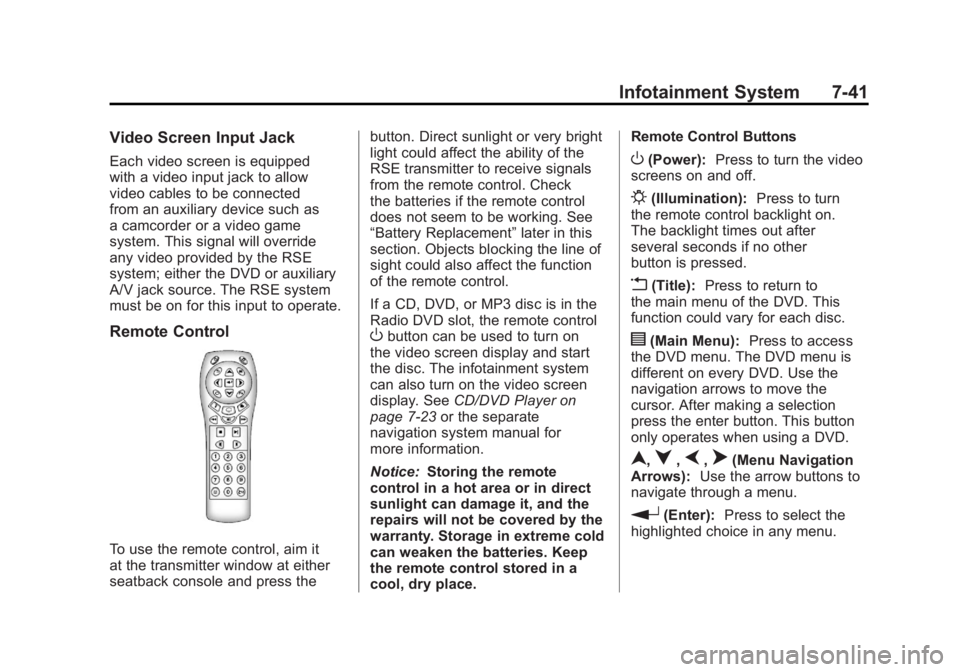
Remote Control
To use the remote control, aim it
at the transmitter window at either
seatback console and press thebutton. Direct sunlight or very bright
light could affect the ability of the
RSE transmitter to receive signals
from the remote control. Check
the batteries if the remote control
does not seem to be working. See
“Battery Replacement”
later in this
section. Objects blocking the line of
sight could also affect the function
of the remote control.
If a CD, DVD, or MP3 disc is in the
Radio DVD slot, the remote control
Obutton can be used to turn on
the video screen display and start
the disc. The infotainment system
can also turn on the video screen
display. See CD/DVD Player on
page 7‑23 or the separate
navigation system manual for
more information.
Notice: Storing the remote
control in a hot area or in direct
sunlight can damage it, and the
repairs will not be covered by the
warranty. Storage in extreme cold
can weaken the batteries. Keep
the remote control stored in a
cool, dry place. Remote Control Buttons
O(Power):
Press to turn the video
screens on and off.
P(Illumination): Press to turn
the remote control backlight on.
The backlight times out after
several seconds if no other
button is pressed.
v(Title): Press to return to
the main menu of the DVD. This
function could vary for each disc.
y(Main Menu): Press to access
the DVD menu. The DVD menu is
different on every DVD. Use the
navigation arrows to move the
cursor. After making a selection
press the enter button. This button
only operates when using a DVD.
n,q,p,o(Menu Navigation
Arrows): Use the arrow buttons to
navigate through a menu.
r(Enter): Press to select the
highlighted choice in any menu.
Page 226 of 462
Black plate (46,1)Buick LaCrosse Owner Manual - 2011
7-46 Infotainment System
DVD Display Error Messages
The DVD display error message
depends on which radio the vehicle
has. The video screen may display
one of the following:
Disc Load/Eject Error or
Mechanical Error:There are
disc load or eject problems.
Disc Format Error or Unknown
Format: The disc is inserted with
the disc label wrong side up, or the
disc is damaged.
Disc Region Error or Disc Error:
The disc is not from a correct
region.
No Disc Inserted: No disc is
present when the
XEJECT or
MEM/DVD/AUX button is pressed
on the radio.
DVD Distortion
Video distortion can occur when
operating cellular phones, scanners,
CB radios, Global Position Systems
(GPS)*, two-way radios, mobile fax,
or walkie talkies.
It might be necessary to turn off the
DVD player when operating one of
these devices in or near the vehicle.
*Excludes the OnStar
®System.
Cleaning the RSE Seatback
Console
Use only a clean cloth dampened
with clean water to clean the RSE
seatback console surface.
Cleaning the Video Screen
Use only a clean cloth dampened
with clean water. Use care when
touching or cleaning the screen
as damage could result.
Phone
Bluetooth (Overview)
For vehicles equipped with
Bluetooth capability, the system
can interact with many cell phones,
allowing:
.Placement and receipt of calls in
a hands-free mode.
.Sharing of the cell phone’s
address book or contact list
with the vehicle.
To minimize driver distraction,
before driving, and with the vehicle
parked:
.Become familiar with the
features of the cell phone.
Organize the phone book and
contact lists clearly and delete
duplicate or rarely used entries.
If possible, program speed dial
or other shortcuts.
.Review the controls and
operation of the infotainment
system.
Page 276 of 462
Black plate (26,1)Buick LaCrosse Owner Manual - 2011
9-26 Driving and Operating
Torque Lock
Torque lock is when the weight
of the vehicle puts too much
force on the parking pawl in the
transmission. This happens when
parking on a hill and shifting the
transmission into P (Park) is not
done properly and then it is difficult
to shift out of P (Park). To prevent
torque lock, set the parking brake
and then shift into P (Park). To find
out how, see "Shifting Into P (Park)"
listed previously.
If torque lock does occur, your
vehicle may need to be pushed
uphill by another vehicle to relieve
the parking pawl pressure, so you
can shift out of P (Park).
If you are towing a trailer and
parking on a hill, seeDriving
Characteristics and Towing
Tips on page 9‑56.
Shifting Out of Park
Automatic Transmission
Shift Lock
The vehicle has an electronic shift
lock release system. The shift lock
release is designed to:
.Prevent ignition key removal
unless the shift lever is in
P (Park).
.Prevent movement of the shift
lever out of P (Park), unless the
ignition is in ON/RUN and the
brake pedal is applied.
The shift lock is always functional
except in the case of an uncharged
or low voltage (less than 9‐volt)
battery.
If the vehicle has an uncharged
battery or a battery with low voltage,
try charging or jump starting the
battery. See Jump Starting on
page 10‑86. If the console shift lever cannot be
moved out of P (Park):
1. Apply and maintain the regular
brakes.
2. Turn the ignition to the ON/RUN position. See Ignition Positions
(Key Access) on page 9‑17
or Ignition Positions (Keyless
Access) on page 9‑19 for more
information.
3. Let up on the shift lever and make sure the shift lever is
pushed all the way into P (Park).
4. Press the shift lever button.
5. Move the shift lever into the desired gear.
If you still cannot move the shift
lever from P (Park), consult your
dealer or a professional towing
service.
Page 278 of 462
Black plate (28,1)Buick LaCrosse Owner Manual - 2011
9-28 Driving and Operating
Running the Vehicle
While Parked
It is better not to park with the
engine running. But if you ever have
to, here are some things to know.
{WARNING
Idling a vehicle in an enclosed
area with poor ventilation is
dangerous. Engine exhaust may
enter the vehicle. Engine exhaust
contains Carbon Monoxide (CO)
which cannot be seen or smelled.
It can cause unconsciousness
and even death. Never run the
engine in an enclosed area
that has no fresh air ventilation.
For more information, seeEngine
Exhaust on page 9‑27.
{WARNING
It can be dangerous to get out
of the vehicle if the automatic
transmission shift lever is not
fully in P (Park) with the parking
brake firmly set. The vehicle
can roll. Do not leave the vehicle
when the engine is running
unless you have to. If you have
left the engine running, the
vehicle can move suddenly.
You or others could be injured.
To be sure the vehicle will not
move, even when you are on
fairly level ground, always set
the parking brake and move
the shift lever to P (Park).
Follow the proper steps to be
sure the vehicle will not move.
See Shifting Into Park on
page 9‑25.
If parking on a hill and pulling a
trailer, see Driving Characteristics
and Towing Tips on page 9‑56.
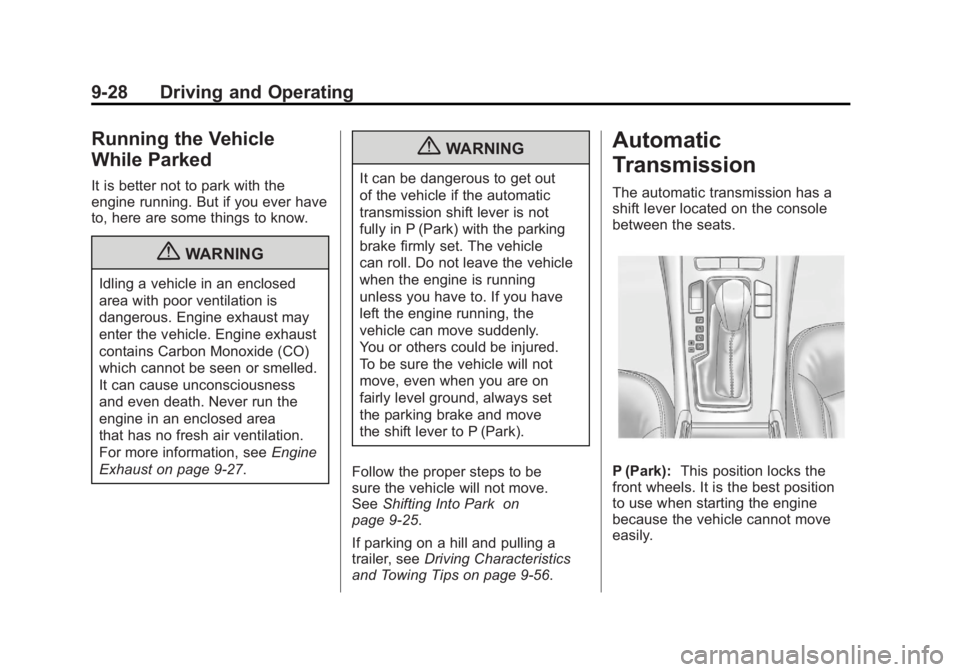
Automatic
Transmission
The automatic transmission has a
shift lever located on the console
between the seats.
P (Park): This position locks the
front wheels. It is the best position
to use when starting the engine
because the vehicle cannot move
easily.
Page 283 of 462
Black plate (33,1)Buick LaCrosse Owner Manual - 2011
Driving and Operating 9-33
Using ABS
Do not pump the brakes. Just hold
the brake pedal down firmly and let
ABS work. You might hear the ABS
pump or motor operating and feel
the brake pedal pulsate, but this is
normal.
Braking in Emergencies
ABS allows the driver to steer and
brake at the same time. In many
emergencies, steering can help
more than even the very best
braking.
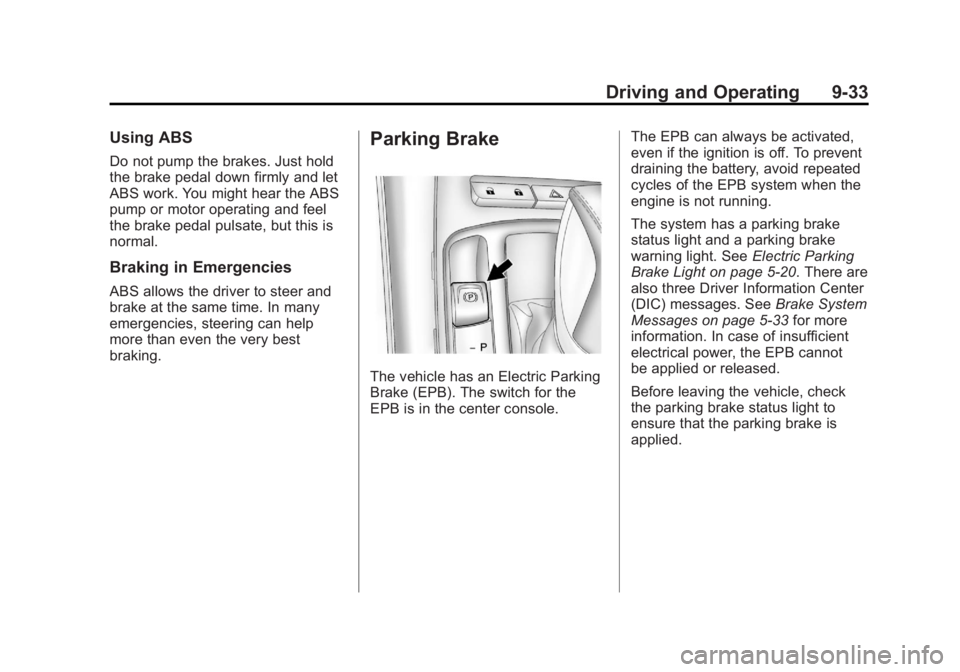
Parking Brake
The vehicle has an Electric Parking
Brake (EPB). The switch for the
EPB is in the center console.The EPB can always be activated,
even if the ignition is off. To prevent
draining the battery, avoid repeated
cycles of the EPB system when the
engine is not running.
The system has a parking brake
status light and a parking brake
warning light. See
Electric Parking
Brake Light on page 5‑20. There are
also three Driver Information Center
(DIC) messages. See Brake System
Messages on page 5‑33 for more
information. In case of insufficient
electrical power, the EPB cannot
be applied or released.
Before leaving the vehicle, check
the parking brake status light to
ensure that the parking brake is
applied.
Page 287 of 462
Black plate (37,1)Buick LaCrosse Owner Manual - 2011
Driving and Operating 9-37
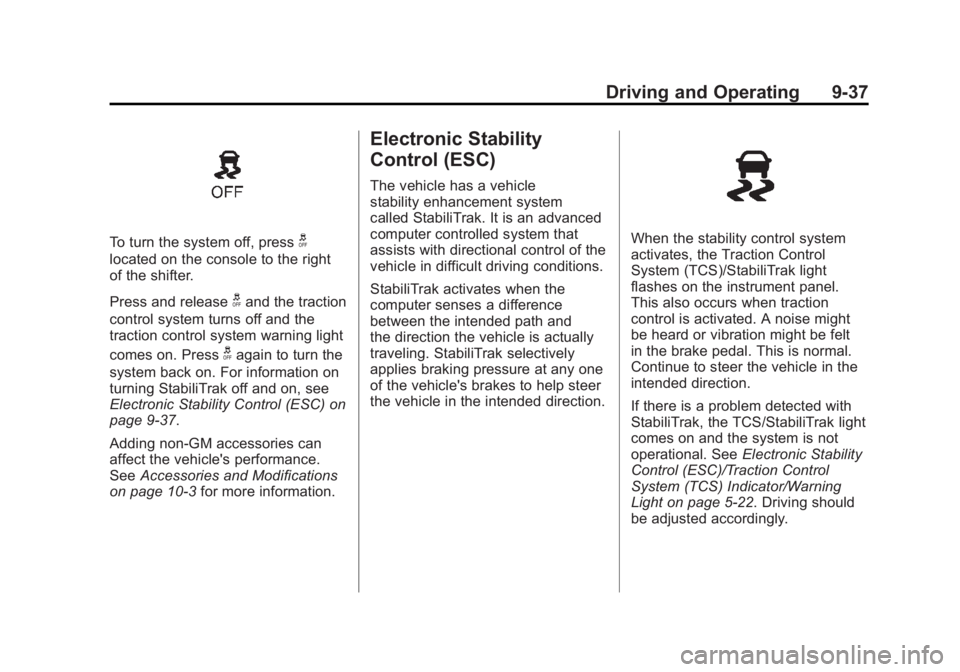
To turn the system off, pressg
located on the console to the right
of the shifter.
Press and release
gand the traction
control system turns off and the
traction control system warning light
comes on. Press
gagain to turn the
system back on. For information on
turning StabiliTrak off and on, see
Electronic Stability Control (ESC) on
page 9‑37.
Adding non‐GM accessories can
affect the vehicle's performance.
See Accessories and Modifications
on page 10‑3 for more information.
Electronic Stability
Control (ESC)
The vehicle has a vehicle
stability enhancement system
called StabiliTrak. It is an advanced
computer controlled system that
assists with directional control of the
vehicle in difficult driving conditions.
StabiliTrak activates when the
computer senses a difference
between the intended path and
the direction the vehicle is actually
traveling. StabiliTrak selectively
applies braking pressure at any one
of the vehicle's brakes to help steer
the vehicle in the intended direction.
When the stability control system
activates, the Traction Control
System (TCS)/StabiliTrak light
flashes on the instrument panel.
This also occurs when traction
control is activated. A noise might
be heard or vibration might be felt
in the brake pedal. This is normal.
Continue to steer the vehicle in the
intended direction.
If there is a problem detected with
StabiliTrak, the TCS/StabiliTrak light
comes on and the system is not
operational. See Electronic Stability
Control (ESC)/Traction Control
System (TCS) Indicator/Warning
Light on page 5‑22. Driving should
be adjusted accordingly.
Page 451 of 462
Black plate (3,1)Buick LaCrosse Owner Manual - 2011
INDEX i-3
CD Player . . . . . . . . . . . . . . . . . . . . . 7-20
CD/DVD Player . . . . . . . . . . . . . . . . 7-23
Center Console Storage . . . . . . . . 4-1
Chains, Tire . . . . . . . . . . . . . . . . . . 10-69
ChargingSystem Light . . . . . . . . . . . . . . . . . 5-16
Check
Engine Light . . . . . . . . . . . . . . . . . . 5-17
IgnitionTransmission Lock . . . . . . . . 10-28
Child Restraints
Infants and YoungChildren . . . . . . . . . . . . . . . . . . . . . 3-46
Lower Anchors and Tethers for Children . . . . . . . . . 3-52
Older Children . . . . . . . . . . . . . . . . 3-44
Securing . . . . . . . . . . . . . . . . 3-61, 3-63
Systems . . . . . . . . . . . . . . . . . . . . . . 3-49
Circuit Breakers . . . . . . . . . . . . . . 10-39 Cleaning
Exterior Care . . . . . . . . . . . . . . . 10-92
Interior Care . . . . . . . . . . . . . . . . 10-97
Climate Control Systems Automatic . . . . . . . . . . . . . . . . . . . . . . 8-1
Dual Automatic . . . . . . . . . . . . . . . . 8-4
Clock . . . . . . . . . . . . . . . . . . . . . . . 5-5, 5-6
Cluster, Instrument . . . . . . . . . . . . 5-10
Collision Damage Repair . . . . . 13-13
Compact Spare Tire . . . . . . . . . . 10-85
Compass . . . . . . . . . . . . . . . . . . . . . . . 5-5
Messages . . . . . . . . . . . . . . . . . . . . 5-34
Compressor Kit, Tire Sealant . . . . . . . . . . . . . . . . . . . . . . 10-72
Control of a Vehicle . . . . . . . . . . . . . 9-3
Convenience Net . . . . . . . . . . . . . . . 4-2
Coolant Engine . . . . . . . . . . . . . . . . . . . . . . 10-18
Engine TemperatureGauge . . . . . . . . . . . . . . . . . . . . . . 5-13 Cooling System . . . . . . . . . . . . . . . 10-17
Engine Messages . . . . . . . . . . . . 5-35
Courtesy Transportation Program . . . . . . . . . . . . . . . . . . . . . 13-11
Cruise Control . . . . . . . . . . . . . . . . . 9-39 Light . . . . . . . . . . . . . . . . . . . . . . . . . . 5-25
Messages . . . . . . . . . . . . . . . . . . . . 5-34
Cupholders . . . . . . . . . . . . . . . . . . . . . 4-1
Customer Assistance . . . . . . . . . . 13-6 Offices . . . . . . . . . . . . . . . . . . 13-5, 13-6
Text Telephone (TTY)Users . . . . . . . . . . . . . . . . . . . . . . . 13-6
Customer Information Service PublicationsOrdering Information . . . . . . 13-15
Customer Satisfaction
Procedure . . . . . . . . . . . . . . 13-1, 13-3
Page 460 of 462
Black plate (12,1)Buick LaCrosse Owner Manual - 2011
i-12 INDEX
ServiceAccessories and
Modifications . . . . . . . . . . . . . . . . 10-3
Doing Your Own Work . . . . . . . . 10-4
Engine Soon Light . . . . . . . . . . . . 5-17
Maintenance Records . . . . . . .11-10
Maintenance, General Information . . . . . . . . . . . . . . . . . . 11-1
Parts Identification Label . . . . . 12-1
Publications Ordering Information . . . . . . . . . . . . . . . . 13-15
Scheduling Appointments . . . .13-11
Servicing the Airbag . . . . . . . . . . . 3-41
Shift Lock Control Function Check, Automatic
Transmission . . . . . . . . . . . . . . . . 10-28
Shifting Into Park . . . . . . . . . . . . . . . . . . . . . . 9-25
Out of Park . . . . . . . . . . . . . . . . . . . 9-26 Side Blind Zone Alert . . . . . . . . . . 9-44
Signals, Turn and
Lane-Change . . . . . . . . . . . . . . . . . 6-4
Spare Tire Compact . . . . . . . . . . . . . . . . . . . . 10-85
Specifications and Capacities . . . . . . . . . . . . . . . . . . . . 12-2
Speedometer . . . . . . . . . . . . . . . . . . 5-11
Start Assist, Hills . . . . . . . . . . . . . . 9-35
Start Vehicle, Remote . . . . . . . . . . 2-8
Starter Switch Check . . . . . . . . . 10-27
Starting the Engine . . . . . . . . . . . . 9-20
Steering . . . . . . . . . . . . . . . . . . . . . . . . 9-4 Fluid, Power . . . . . . . . . . . . . . . . 10-23
Heated Wheel . . . . . . . . . . . . . . . . . 5-3
Wheel Adjustment . . . . . . . . . . . . . 5-2
Wheel Controls . . . . . . . . . . . . . . . . 5-2
Stoplamps and Back-Up Lamps Bulb Replacement . . . . . . . . . . 10-35 Storage
Mass Media (MEM) . . . . . . . . . . . 7-27
Storage Areas Center Console . . . . . . . . . . . . . . . . 4-1
Convenience Net . . . . . . . . . . . . . . 4-2
Front . . . . . . . . . . . . . . . . . . . . . . . . . . 4-1
Glove Box . . . . . . . . . . . . . . . . . . . . . 4-1
Storing the Tire Sealant and Compressor Kit . . . . . . . . . 10-79
Stuck Vehicle . . . . . . . . . . . . . . . . . . 9-11
Sun Visor Lamps . . . . . . . . . . . . . . . 6-5
Sun Visors . . . . . . . . . . . . . . . . . . . . . 2-20
Sunroof . . . . . . . . . . . . . . . . . . . . . . . . 2-21
Symbols . . . . . . . . . . . . . . . . . . . . . . . . . . .v
System Infotainment . . . . . . . . . . . . . . . . . . . 7-1