radio controls BUICK LACROSSE 2011 Owner's Guide
[x] Cancel search | Manufacturer: BUICK, Model Year: 2011, Model line: LACROSSE, Model: BUICK LACROSSE 2011Pages: 462, PDF Size: 5.73 MB
Page 226 of 462
Black plate (46,1)Buick LaCrosse Owner Manual - 2011
7-46 Infotainment System
DVD Display Error Messages
The DVD display error message
depends on which radio the vehicle
has. The video screen may display
one of the following:
Disc Load/Eject Error or
Mechanical Error:There are
disc load or eject problems.
Disc Format Error or Unknown
Format: The disc is inserted with
the disc label wrong side up, or the
disc is damaged.
Disc Region Error or Disc Error:
The disc is not from a correct
region.
No Disc Inserted: No disc is
present when the
XEJECT or
MEM/DVD/AUX button is pressed
on the radio.
DVD Distortion
Video distortion can occur when
operating cellular phones, scanners,
CB radios, Global Position Systems
(GPS)*, two-way radios, mobile fax,
or walkie talkies.
It might be necessary to turn off the
DVD player when operating one of
these devices in or near the vehicle.
*Excludes the OnStar
®System.
Cleaning the RSE Seatback
Console
Use only a clean cloth dampened
with clean water to clean the RSE
seatback console surface.
Cleaning the Video Screen
Use only a clean cloth dampened
with clean water. Use care when
touching or cleaning the screen
as damage could result.
Phone
Bluetooth (Overview)
For vehicles equipped with
Bluetooth capability, the system
can interact with many cell phones,
allowing:
.Placement and receipt of calls in
a hands-free mode.
.Sharing of the cell phone’s
address book or contact list
with the vehicle.
To minimize driver distraction,
before driving, and with the vehicle
parked:
.Become familiar with the
features of the cell phone.
Organize the phone book and
contact lists clearly and delete
duplicate or rarely used entries.
If possible, program speed dial
or other shortcuts.
.Review the controls and
operation of the infotainment
system.
Page 228 of 462
Black plate (48,1)Buick LaCrosse Owner Manual - 2011
7-48 Infotainment System
Voice Recognition
The voice recognition system uses
commands to control the system
and dial phone numbers.
Noise:The system may not
recognize voice commands if there
is too much background noise.
When to Speak: A tone sounds to
indicate that the system is ready for
a voice command. Wait for the tone
and then speak.
How to Speak: Speak clearly in a
calm and natural voice.
Audio System
When using the Bluetooth system,
sound comes through the vehicle's
front audio system speakers
and overrides the audio system.
Use the VOL/
Oknob during a
call to change the volume level.
The adjusted volume level
remains in memory for later calls.
The system maintains a minimum
volume level.
Other Information
The Bluetooth®word mark and
logos are owned by the Bluetooth®
SIG, Inc. and any use of such marks
by General Motors is under license.
Other trademarks and trade names
are those of their respective owners.
See Radio Frequency Statement on
page 13‑20 for Federal
Communications Commission
and Industry Canada information.
Bluetooth (Infotainment
Controls)
For information about how to
navigate the menu system using
the infotainment controls, see
Operation on page 7‑7.
Pairing
A Bluetooth‐enabled cell phone
must be paired to the Bluetooth
system first and then connected to
the vehicle before it can be used.
See the cell phone manufacturer
user guide for Bluetooth functions
before pairing the cell phone. If a
Bluetooth phone is not connected,
calls will be made using OnStar
®
Hands‐Free Calling, if available.
Refer to the OnStar Owner's Guide
for more information.
Page 243 of 462
Black plate (3,1)Buick LaCrosse Owner Manual - 2011
Climate Controls 8-3
Pressing this button cancels
automatic air conditioning and
turns off the air conditioner.
Press AUTO to return to automatic
operation and the air conditioner
runs automatically as needed.
When the indicator light is on, the
air conditioner runs automatically
to cool the air inside the vehicle or
to dry the air needed to defog the
windshield faster.
>(Recirculation):Press to
alternate between recirculating
air inside the vehicle or pulling in
outside air. When the indicator light
is on, air is being recirculated inside
the vehicle. This helps to quickly
cool the air inside the vehicle or
prevent outside air and odors from
entering.
Pressing this button cancels
automatic recirculation. Press AUTO
to return to automatic operation and
recirculation runs automatically as
needed.
Rear Window Defogger
=(Rear Window Defogger):
Press to turn the rear window
defogger on or off.
The rear window defogger
turns off automatically after
about 10 minutes. If turned on
again it runs for about five minutes
before turning off. The defogger
can also be turned off by turning
the ignition to ACC/ACCESSORY
or LOCK/OFF.
The rear window defogger can
be set to automatic operation.
See “Climate and Air Quality”
under Vehicle Personalization on
page 5‑39. When auto rear defog is
selected, the rear window defogger
turns on automatically when the
interior temperature is cold and
the outside temperature is about
4°C (40°F) and below. The auto
rear defogger turns off automatically
after about 10 minutes, or after
five minutes if the outside
temperature is not as cold. For vehicles with heated outside
rearview mirrors, they turn on when
the rear window defogger button
is on and help to clear fog or frost
from the surface of the mirror.
See
Heated Mirrors on page 2‑17.
Notice: Do not try to clear frost
or other material from the inside
of the front windshield and rear
window with a razor blade or
anything else that is sharp. This
may damage the rear window
defogger grid and affect your
radio's ability to pick up stations
clearly. The repairs wouldn't be
covered by your warranty.
Remote Start Climate Control
Operation: For vehicles with the
remote vehicle start feature, the
climate control system may run
when the vehicle is started remotely.
The system uses the driver's
previous settings to heat or cool the
inside of the vehicle. See Remote
Vehicle Start on page 2‑8.
The rear window defogger turns on
if it is cold outside.
Page 247 of 462
Black plate (7,1)Buick LaCrosse Owner Manual - 2011
Climate Controls 8-7
Rear Window Defogger
=(Rear Window Defogger):
Press to turn the rear window
defogger on or off.
The rear window defogger
turns off automatically after
about 10 minutes. If turned on
again it runs for about five minutes
before turning off. The defogger
can also be turned off by turning
the ignition to ACC/ACCESSORY
or LOCK/OFF.
The rear window defogger can
be set to automatic operation.
See “Climate and Air Quality”
under Vehicle Personalization on
page 5‑39. When auto rear defog is
selected, the rear window defogger
turns on automatically when the
interior temperature is cold and
the outside temperature is about
4°C (40°F) and below. The auto
rear defogger turns off automatically after about 10 minutes, or after
five minutes if the outside
temperature is not as cold.
For vehicles with heated outside
rearview mirrors, they turn on when
the rear window defogger button
is on and help to clear fog or frost
from the surface of the mirror.
See
Heated Mirrors on page 2‑17.
Notice: Do not try to clear frost
or other material from the inside
of the front windshield and rear
window with a razor blade or
anything else that is sharp. This
may damage the rear window
defogger grid and affect your
radio's ability to pick up stations
clearly. The repairs wouldn't be
covered by your warranty.
((Heated Steering Wheel): For
vehicles with this feature, press to
turn on or off. See Heated Steering
Wheel on page 5‑3. Remote Start Climate Control
Operation:
For vehicles with
the remote vehicle start feature,
the climate control system may
run when the vehicle is started
remotely. The system uses the
driver's previous settings to heat
or cool the inside of the vehicle.
See Remote Vehicle Start on
page 2‑8.
The rear window defogger turns on
if it is cold outside.
Sensor
The solar sensor, located on top
of the instrument panel near the
windshield, monitors the solar heat.
The climate control system
uses the sensor information to
adjust the temperature, fan speed,
recirculation, and air delivery mode
for best comfort.
Do not cover the sensor or the
automatic climate control system
may not work properly.
Page 355 of 462
Black plate (43,1)Buick LaCrosse Owner Manual - 2011
Vehicle Care 10-43
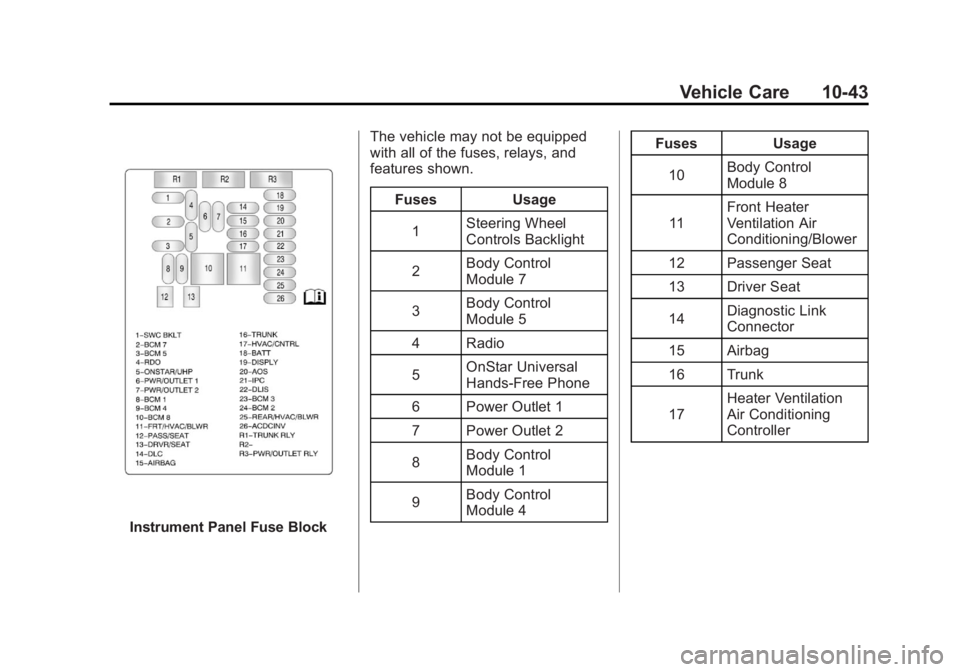
Instrument Panel Fuse BlockThe vehicle may not be equipped
with all of the fuses, relays, and
features shown.
Fuses Usage
1 Steering Wheel
Controls Backlight
2 Body Control
Module 7
3 Body Control
Module 5
4 Radio
5 OnStar Universal
Hands‐Free Phone
6 Power Outlet 1
7 Power Outlet 2
8 Body Control
Module 1
9 Body Control
Module 4 Fuses Usage
10 Body Control
Module 8
11 Front Heater
Ventilation Air
Conditioning/Blower
12 Passenger Seat
13 Driver Seat
14 Diagnostic Link
Connector
15 Airbag
16 Trunk
17 Heater Ventilation
Air Conditioning
Controller