audio BUICK LACROSSE 2012 User Guide
[x] Cancel search | Manufacturer: BUICK, Model Year: 2012, Model line: LACROSSE, Model: BUICK LACROSSE 2012Pages: 512, PDF Size: 6.21 MB
Page 181 of 512
Black plate (1,1)Buick LaCrosse Owner Manual - 2012
Infotainment System 7-1
Infotainment
System
Introduction
Infotainment . . . . . . . . . . . . . . . . . . . 7-1
Theft-Deterrent Feature . . . . . . . 7-2
Overview (Radio with CD) . . . . . 7-3
Overview (Radio with CD/DVDand MEM) . . . . . . . . . . . . . . . . . . . 7-5
Overview (Radio with CD and Touchscreen) . . . . . . . . . . . . . . . . 7-7
Operation . . . . . . . . . . . . . . . . . . . . 7-13
Radio
AM-FM Radio (Radio with CD/ DVD/MEM) . . . . . . . . . . . . . . . . . 7-18
AM-FM Radio (Radio with CD and Touchscreen) . . . . . . . . . . 7-21
Satellite Radio . . . . . . . . . . . . . . . 7-24
Radio Reception . . . . . . . . . . . . . 7-26
Backglass Antenna . . . . . . . . . . 7-27
Satellite Radio Antenna . . . . . . 7-27
Audio Players
CD Player . . . . . . . . . . . . . . . . . . . 7-28
CD/DVD Player . . . . . . . . . . . . . . 7-30
MP3 . . . . . . . . . . . . . . . . . . . . . . . . . 7-33
Mass Storage Media (MEM) . . . . . . . . . . . . . . . 7-36
Auxiliary Devices (Radio with CD and Touchscreen) . . . . . . 7-39
Rear Seat Infotainment
Rear Seat Entertainment(RSE) System . . . . . . . . . . . . . . 7-47
Phone
Bluetooth (Overview) . . . . . . . . 7-57
Bluetooth (InfotainmentControls) . . . . . . . . . . . . . . . . . . . 7-59
Bluetooth (Voice Recognition) . . . . . . . . . . . . . . . 7-63
Bluetooth (UHP Mexico Only) . . . . . . . . . . . . . . . 7-69
Trademarks and License
Agreements
Trademarks and LicenseAgreements . . . . . . . . . . . . . . . . 7-80
Introduction
Infotainment
Read the following pages to
become familiar with the audio
system's features.
{WARNING
Taking your eyes off the road for
extended periods could cause a
crash resulting in injury or death
to you or others. Do not give
extended attention to
entertainment tasks while driving.
This system provides access to
many audio and non‐audio listings.
Page 182 of 512
Black plate (2,1)Buick LaCrosse Owner Manual - 2012
7-2 Infotainment System
To minimize taking your eyes off the
road while driving, do the following
while the vehicle is parked:
.Become familiar with the
operation and controls of the
audio system.
.Set up the tone, speaker
adjustments, and preset radio
stations.
For more information, see Defensive
Driving on page 9‑3.
Notice: Contact your dealer
before adding any equipment.
Adding audio or communication
equipment could interfere with
the operation of the engine, radio,
or other systems, and could
damage them. Follow federal
rules covering mobile radio and
telephone equipment. The vehicle has Retained
Accessory Power (RAP). With RAP,
the audio system can be played
even after the ignition is turned off.
See
Retained Accessory Power
(RAP) on page 9‑27 for more
information.Navigation System
For vehicles with a navigation
system, see the separate navigation
manual.
Theft-Deterrent Feature
The theft-deterrent feature works by
learning a portion of the Vehicle
Identification Number (VIN) to the
infotainment system. The
infotainment system does not
operate if it is stolen or moved to a
different vehicle.
Page 183 of 512
Black plate (3,1)Buick LaCrosse Owner Manual - 2012
Infotainment System 7-3
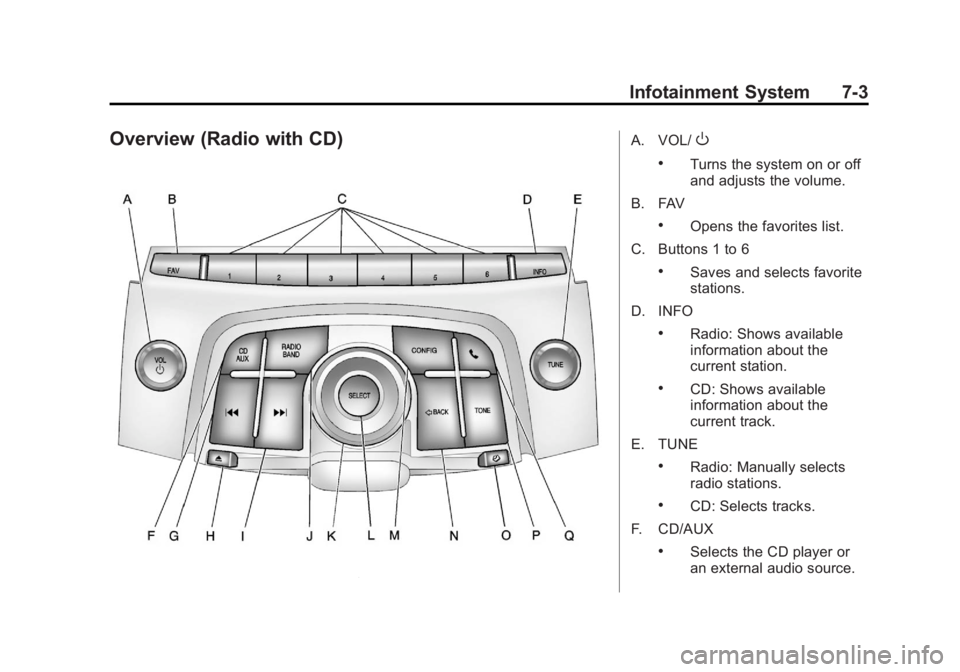
Overview (Radio with CD)A. VOL/O
.Turns the system on or off
and adjusts the volume.
B. FAV
.Opens the favorites list.
C. Buttons 1 to 6
.Saves and selects favorite
stations.
D. INFO
.Radio: Shows available
information about the
current station.
.CD: Shows available
information about the
current track.
E. TUNE
.Radio: Manually selects
radio stations.
.CD: Selects tracks.
F. CD/AUX
.Selects the CD player or
an external audio source.
Page 184 of 512
Black plate (4,1)Buick LaCrosse Owner Manual - 2012
7-4 Infotainment System
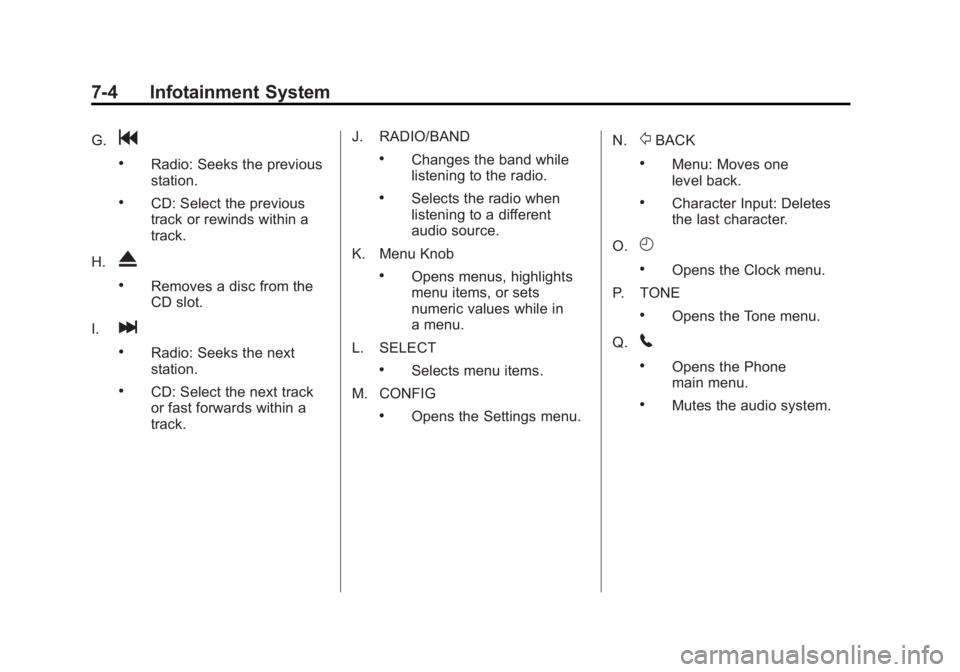
G.g
.Radio: Seeks the previous
station.
.CD: Select the previous
track or rewinds within a
track.
H.
X
.Removes a disc from the
CD slot.
I.
l
.Radio: Seeks the next
station.
.CD: Select the next track
or fast forwards within a
track. J. RADIO/BAND
.Changes the band while
listening to the radio.
.Selects the radio when
listening to a different
audio source.
K. Menu Knob
.Opens menus, highlights
menu items, or sets
numeric values while in
a menu.
L. SELECT
.Selects menu items.
M. CONFIG
.Opens the Settings menu. N.
/BACK
.Menu: Moves one
level back.
.Character Input: Deletes
the last character.
O.
H
.Opens the Clock menu.
P. TONE
.Opens the Tone menu.
Q.
5
.Opens the Phone
main menu.
.Mutes the audio system.
Page 186 of 512
Black plate (6,1)Buick LaCrosse Owner Manual - 2012
7-6 Infotainment System
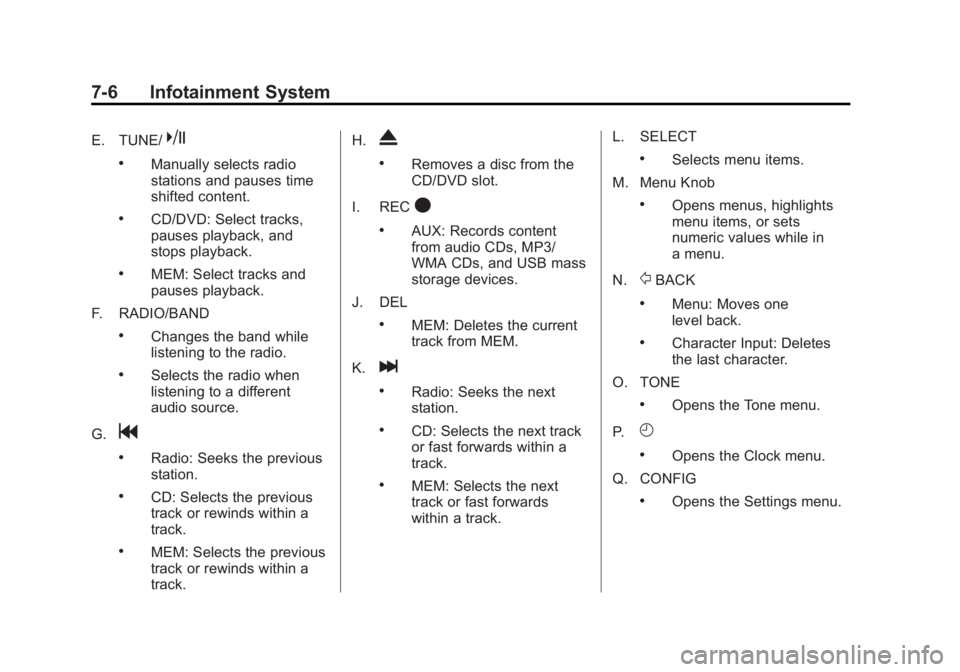
E. TUNE/k
.Manually selects radio
stations and pauses time
shifted content.
.CD/DVD: Select tracks,
pauses playback, and
stops playback.
.MEM: Select tracks and
pauses playback.
F. RADIO/BAND
.Changes the band while
listening to the radio.
.Selects the radio when
listening to a different
audio source.
G.
g
.Radio: Seeks the previous
station.
.CD: Selects the previous
track or rewinds within a
track.
.MEM: Selects the previous
track or rewinds within a
track. H.
X
.Removes a disc from the
CD/DVD slot.
I. REC
O
.AUX: Records content
from audio CDs, MP3/
WMA CDs, and USB mass
storage devices.
J. DEL
.MEM: Deletes the current
track from MEM.
K.
l
.Radio: Seeks the next
station.
.CD: Selects the next track
or fast forwards within a
track.
.MEM: Selects the next
track or fast forwards
within a track. L. SELECT
.Selects menu items.
M. Menu Knob
.Opens menus, highlights
menu items, or sets
numeric values while in
a menu.
N.
/BACK
.Menu: Moves one
level back.
.Character Input: Deletes
the last character.
O. TONE
.Opens the Tone menu.
P.
H
.Opens the Clock menu.
Q. CONFIG
.Opens the Settings menu.
Page 187 of 512
Black plate (7,1)Buick LaCrosse Owner Manual - 2012
Infotainment System 7-7
R.5
.Opens the Phone
main menu.
.Mutes the audio system.
S. MEM/DVD/AUX
.Selects MEM (Memory),
CD/DVD, USB, or a
connected front or rear
auxiliary audio source.
Overview (Radio with CD
and Touchscreen)
For vehicles equipped with the
MyLink®or IntelliLink®infotainment
system, see the separate MyLink/
IntelliLink Features and Functions
Guide for more information.
Keeping your eyes on the road and
your mind on the drive is important
for safe driving. The infotainment
system has built-in features
intended to help with this by
disabling some features when driving. A grayed-out function is not
available when the vehicle is
moving.
All functions are available when the
vehicle is parked. Do the following
before driving:
.Become familiar with the
infotainment system operation,
buttons on the faceplate, and
touch-sensitive screen buttons.
.Set up the audio by presetting
favorite stations, setting the
tone, and adjusting the
speakers.
.Set up phone numbers in
advance so they can be called
easily by pressing a single
button or a single voice
command for vehicles equipped
with phone capability.
{WARNING
Taking your eyes off the road too
long or too often while using the
navigation system could cause a
crash and you or others could be
injured or killed. Focus your
attention on driving and limit
glances at the moving map on the
navigation screen. Use voice
guidance whenever possible.
Infotainment System Overview
The infotainment system is
controlled by using the buttons on
the faceplate and the touch screen.
See
“Infotainment Control Buttons”
in this section for more information.
Page 189 of 512
Black plate (9,1)Buick LaCrosse Owner Manual - 2012
Infotainment System 7-9
Q. TONE
R.
5(Phone menu)
Infotainment Control Buttons
The buttons on the faceplate are
used to start primary functions while
using the infotainment system.
VOL/
O(Volume/Power):
1. Press to turn the system on and off.
2. Turn to adjust the volume.
TUNE /
k(Tune/Play/Pause):
Press TUNE /
kto start, pause,
and resume playback. Turn to
manually change radios stations.
See CD Player on page 7‑28 and
MP3 on page 7‑33 for more
information.
SOURCE: Press to change the
audio sources such as AM-FM
Radio, XM™ (if equipped), CD,
and AUX. TONE:
Press to access the sound
menu screen to adjust bass,
midrange, and treble. See AM-FM
Radio (Radio with CD/DVD/MEM)
on page 7‑18 orAM-FM Radio
(Radio with CD and Touchscreen)
on page 7‑21 for more information.
INFO (Information): Press to
toggle through an audio information
screen.
CONFIG (Configure): Press to
adjust features for radio, display,
phone, vehicle, and time.
D/HOME (Home): See“Home
Page” following in this section.
MENU/SEL: Turn to highlight a
feature. Press to activate the
highlighted feature.
5(Phone): SeeBluetooth
(Overview) on page 7‑57 or
Bluetooth (Infotainment Controls) on
page 7‑59 orBluetooth (Voice
Recognition) on page 7‑63 or
Bluetooth (UHP Mexico Only) on
page 7‑69 for more information.
/BACK:Press to return to the
previous screen in a menu.
If on a page accessed directly by a
faceplate button or Home Page
screen button, pressing
/BACK will
go to the previous menu.
FAV (Favorite Pages 1-6): Press
to display the current page number
above the preset buttons. The
stored stations for each list display
on the touch-sensitive preset
buttons at the bottom of the screen.
The number of preset FAV lists can
be changed in the
Configuration Menu.
g(Seek Down):
1. Press to seek to the beginning of the current or previous track.
If the track has been playing for
less than five seconds, it seeks
the previous track. If longer than
five seconds, the current track
starts from the beginning.
2. Press and hold to fast forward through a track.
Page 195 of 512
Black plate (15,1)Buick LaCrosse Owner Manual - 2012
Infotainment System 7-15
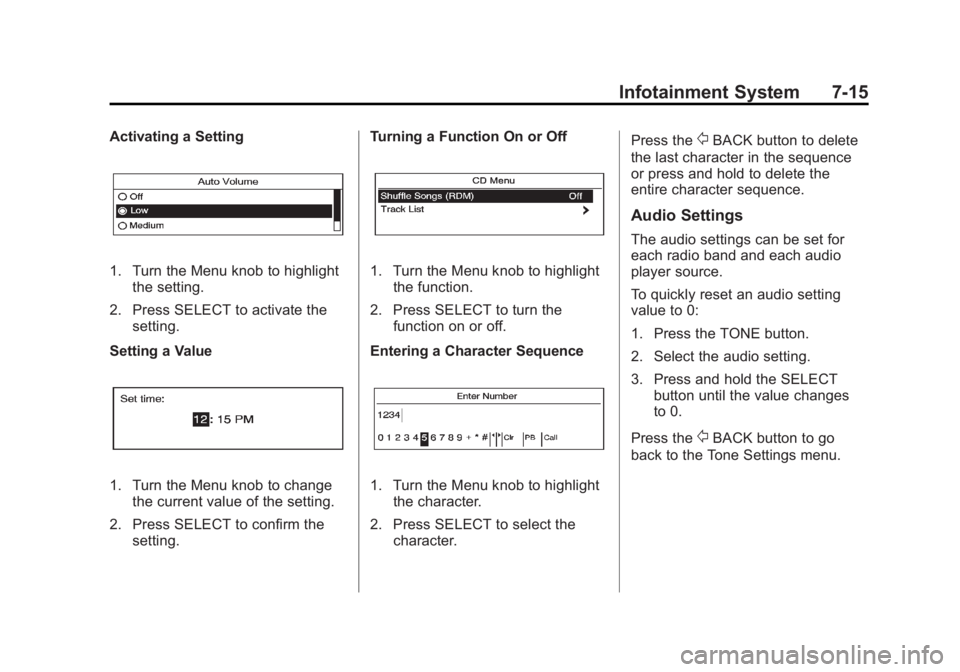
Activating a Setting
1. Turn the Menu knob to highlightthe setting.
2. Press SELECT to activate the setting.
Setting a Value
1. Turn the Menu knob to change the current value of the setting.
2. Press SELECT to confirm the setting. Turning a Function On or Off
1. Turn the Menu knob to highlight
the function.
2. Press SELECT to turn the function on or off.
Entering a Character Sequence
1. Turn the Menu knob to highlight the character.
2. Press SELECT to select the character. Press the
/BACK button to delete
the last character in the sequence
or press and hold to delete the
entire character sequence.
Audio Settings
The audio settings can be set for
each radio band and each audio
player source.
To quickly reset an audio setting
value to 0:
1. Press the TONE button.
2. Select the audio setting.
3. Press and hold the SELECT button until the value changes
to 0.
Press the
/BACK button to go
back to the Tone Settings menu.
Page 197 of 512
Black plate (17,1)Buick LaCrosse Owner Manual - 2012
Infotainment System 7-17
DSP (Digital Signal Processing)
Settings
For vehicles with DSP, it is used to
provide a choice of different
listening experiences.
The DSP settings for the radio with
CD are:
.normal‐Select this setting to
adjust the audio for stereo
mode. This provides the best
sound quality for the driver seat
first, with the front passenger
second.
.hk surround ‐Select to enable
hk surround. This produces a
true 6.1 matrix surround from
any two channel digital source.
This feature is not available in
AM/FM radio mode. The DSP settings for the radio with
CD/DVD and MEM are:
.2.0 normal
‐Select this setting to
adjust the audio for stereo
mode. This provides the best
sound quality for the driver seat
first, with the front passenger
second.
.hk surround ‐Select to enable
hk surround. This produces a
true 6.1 matrix surround from
any two channel digital source.
This feature is not available in
AM/FM radio mode.
To adjust the DSP settings:
1. Press the TONE button.
2. Select DSP.
3. Select the setting.
Press the
/BACK button to go
back to the Tone Settings menu.
System Settings
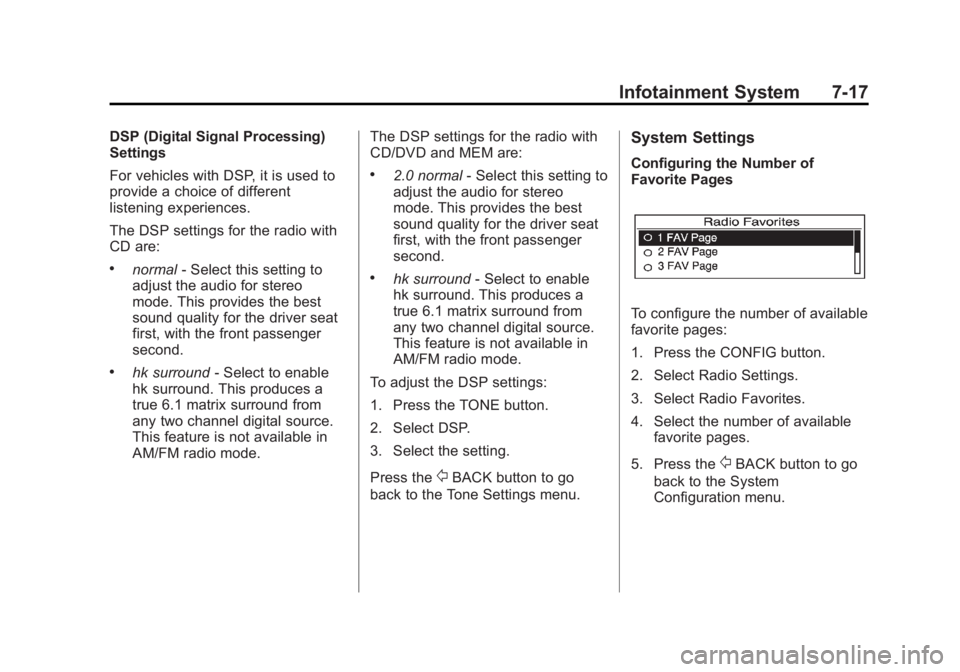
Configuring the Number of
Favorite Pages
To configure the number of available
favorite pages:
1. Press the CONFIG button.
2. Select Radio Settings.
3. Select Radio Favorites.
4. Select the number of available favorite pages.
5. Press the
/BACK button to go
back to the System
Configuration menu.
Page 201 of 512
Black plate (21,1)Buick LaCrosse Owner Manual - 2012
Infotainment System 7-21
To resume playback from the
current pause point, press
kagain.
The radio is no longer live, but
played from the time shift buffer.
A status bar displays below the
station number.
Press and hold
lorgto fast
forward or rewind through the time
shift buffer. Hold
luntil the end of
the recorded buffer resumes live
playback.
Press and release
lorgto jump
forward or back 30 seconds in the
time shift buffer.
When the radio station is changed,
the buffer is cleared and
automatically restarted for the
current station. Content from a
previously tuned station is no longer
available.
The time shift feature is not
available while recording or with
other sources of playback. Pausing AM/FM with the Vehicle
Turned Off
If AM/FM is paused when the
vehicle is turned off, the radio
continues to buffer the current radio
station for up to 20 minutes. If the
vehicle is turned back on within
20 minutes, the radio resumes
playback from the paused point.
AM-FM Radio (Radio with
CD and Touchscreen)
Playing the Radio
For vehicles equipped with the
MyLink or IntelliLink infotainment
system, see the separate MyLink/
IntelliLink Features and Functions
Guide for more information.
Audio Source
VOL/
O(Volume/Power):
1. Press to turn the radio on or off.
2. Turn to increase or decrease the volume of the active source
(i.e., current audio source, active
navigation voice guidance,
or traffic prompts).
The steering wheel controls can
also be used to adjust the volume.
See “Steering Wheel Controls” in
the vehicle owner manual for more
information.
To access the radio main page,
press the SOURCE button on the
faceplate, the Now Playing screen
button, or one of the audio screen
buttons on the Home Page.
While on the audio main page,
press the Source button repeatedly
to display and cycle through the
available sources (AM, FM, and XM
(if equipped), CD, USB/iPod,
and AUX).