turn signal BUICK LACROSSE 2012 Owner's Manual
[x] Cancel search | Manufacturer: BUICK, Model Year: 2012, Model line: LACROSSE, Model: BUICK LACROSSE 2012Pages: 512, PDF Size: 6.21 MB
Page 9 of 512
Black plate (3,1)Buick LaCrosse Owner Manual - 2012
In Brief 1-3
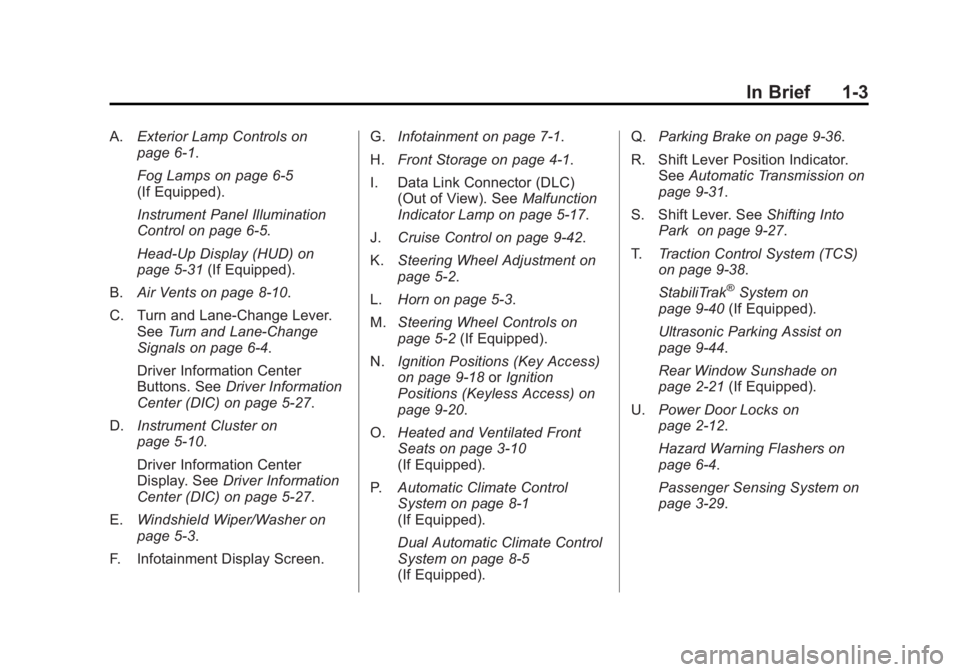
A.Exterior Lamp Controls on
page 6‑1.
Fog Lamps on page 6‑5
(If Equipped).
Instrument Panel Illumination
Control on page 6‑5.
Head-Up Display (HUD) on
page 5‑31 (If Equipped).
B. Air Vents on page 8‑10.
C. Turn and Lane‐Change Lever. See Turn and Lane-Change
Signals on page 6‑4.
Driver Information Center
Buttons. See Driver Information
Center (DIC) on page 5‑27.
D. Instrument Cluster on
page 5‑10.
Driver Information Center
Display. See Driver Information
Center (DIC) on page 5‑27.
E. Windshield Wiper/Washer on
page 5‑3.
F. Infotainment Display Screen. G.
Infotainment on page 7‑1.
H. Front Storage on page 4‑1.
I. Data Link Connector (DLC) (Out of View). See Malfunction
Indicator Lamp on page 5‑17.
J. Cruise Control on page 9‑42.
K. Steering Wheel Adjustment on
page 5‑2.
L. Horn on page 5‑3.
M. Steering Wheel Controls on
page 5‑2 (If Equipped).
N. Ignition Positions (Key Access)
on page 9‑18 orIgnition
Positions (Keyless Access) on
page 9‑20.
O. Heated and Ventilated Front
Seats on page 3‑10
(If Equipped).
P. Automatic Climate Control
System on page 8‑1
(If Equipped).
Dual Automatic Climate Control
System on page 8‑5
(If Equipped). Q.
Parking Brake on page 9‑36.
R. Shift Lever Position Indicator. See Automatic Transmission on
page 9‑31.
S. Shift Lever. See Shifting Into
Park on page 9‑27.
T. Traction Control System (TCS)
on page 9‑38.
StabiliTrak
®System on
page 9‑40 (If Equipped).
Ultrasonic Parking Assist on
page 9‑44.
Rear Window Sunshade on
page 2‑21 (If Equipped).
U. Power Door Locks on
page 2‑12.
Hazard Warning Flashers on
page 6‑4.
Passenger Sensing System on
page 3‑29.
Page 10 of 512
Black plate (4,1)Buick LaCrosse Owner Manual - 2012
1-4 In Brief
Initial Drive
Information
This section provides a brief
overview about some of the
important features that may or may
not be on your specific vehicle.
For more detailed information, refer
to each of the features which can be
found later in this owner manual.
Remote Keyless Entry
(RKE) System
The Remote Keyless Entry (RKE)
transmitter will work up to 20 m
(65 ft) away from the vehicle. On
vehicles with remote start the
distance will be greater.
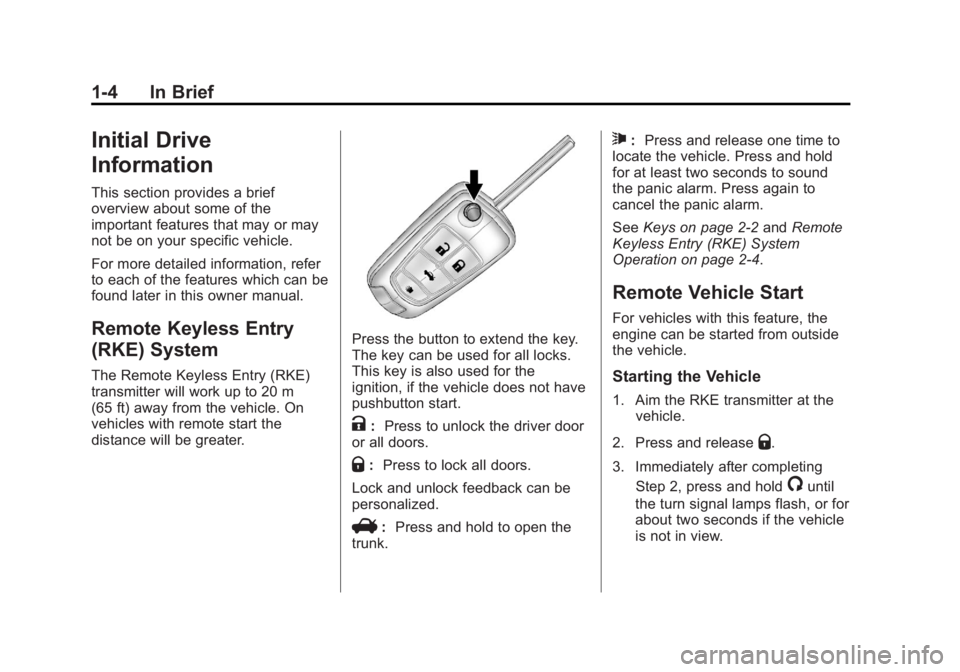
Press the button to extend the key.
The key can be used for all locks.
This key is also used for the
ignition, if the vehicle does not have
pushbutton start.
K:Press to unlock the driver door
or all doors.
Q: Press to lock all doors.
Lock and unlock feedback can be
personalized.
V: Press and hold to open the
trunk.
7: Press and release one time to
locate the vehicle. Press and hold
for at least two seconds to sound
the panic alarm. Press again to
cancel the panic alarm.
See Keys on page 2‑2 andRemote
Keyless Entry (RKE) System
Operation on page 2‑4.
Remote Vehicle Start
For vehicles with this feature, the
engine can be started from outside
the vehicle.
Starting the Vehicle
1. Aim the RKE transmitter at the vehicle.
2. Press and release
Q.
3. Immediately after completing Step 2, press and hold
/until
the turn signal lamps flash, or for
about two seconds if the vehicle
is not in view.
Page 26 of 512
Black plate (20,1)Buick LaCrosse Owner Manual - 2012
1-20 In Brief
Driver Information
Center (DIC)
The DIC display is located in the
center of the instrument panel
cluster. It shows the status of many
vehicle systems. The controls for
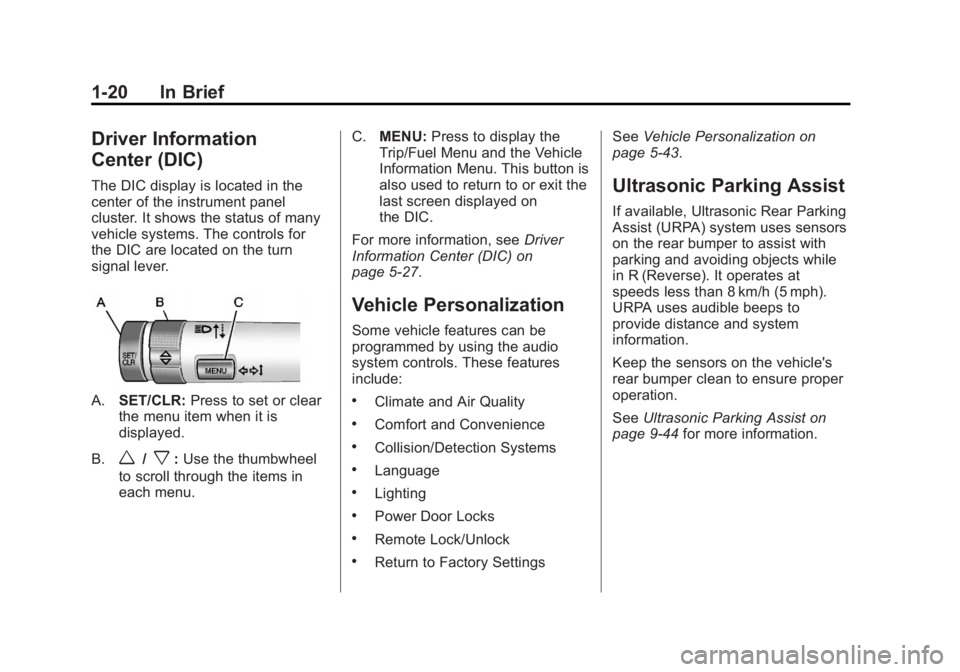
the DIC are located on the turn
signal lever.
A.SET/CLR: Press to set or clear
the menu item when it is
displayed.
B.
w/x: Use the thumbwheel
to scroll through the items in
each menu. C.
MENU: Press to display the
Trip/Fuel Menu and the Vehicle
Information Menu. This button is
also used to return to or exit the
last screen displayed on
the DIC.
For more information, see Driver
Information Center (DIC) on
page 5‑27.
Vehicle Personalization
Some vehicle features can be
programmed by using the audio
system controls. These features
include:
.Climate and Air Quality
.Comfort and Convenience
.Collision/Detection Systems
.Language
.Lighting
.Power Door Locks
.Remote Lock/Unlock
.Return to Factory Settings See
Vehicle Personalization on
page 5‑43.
Ultrasonic Parking Assist
If available, Ultrasonic Rear Parking
Assist (URPA) system uses sensors
on the rear bumper to assist with
parking and avoiding objects while
in R (Reverse). It operates at
speeds less than 8 km/h (5 mph).
URPA uses audible beeps to
provide distance and system
information.
Keep the sensors on the vehicle's
rear bumper clean to ensure proper
operation.
See Ultrasonic Parking Assist on
page 9‑44 for more information.
Page 33 of 512
Black plate (27,1)Buick LaCrosse Owner Manual - 2012
In Brief 1-27
Engine Oil Life System
The engine oil life system calculates
engine oil life based on vehicle use
and displays the CHANGE ENGINE
OIL SOON message when it is time
to change the engine oil and filter.
The oil life system should be reset
to 100% only following an oil
change.
Resetting the Oil Life System
1. Turn the ignition to ON/RUN withthe engine off.
2. Press the DIC MENU button on the turn signal lever to enter the
Vehicle Information Menu. Use
the thumbwheel to scroll through
the menu items until you reach
REMAINING OIL LIFE.
3. Press the SET/CLR button to reset the oil life at 100%.
4. Turn the ignition to LOCK/OFF.
See Engine Oil Life System on
page 10‑12.
Driving for Better Fuel
Economy
Driving habits can affect fuel
mileage. Here are some driving tips
to get the best fuel economy
possible.
.Avoid fast starts and accelerate
smoothly.
.Brake gradually and avoid
abrupt stops.
.Avoid idling the engine for long
periods of time.
.When road and weather
conditions are appropriate, use
cruise control.
.Always follow posted speed
limits or drive more slowly when
conditions require.
.Keep vehicle tires properly
inflated.
.Combine several trips into a
single trip.
.Replace the vehicle's tires with
the same TPC Spec number
molded into the tire's sidewall
near the size.
.Follow recommended scheduled
maintenance.
Roadside Assistance
Program
U.S.: 1-800-252-1112
TTY Users (U.S.): 1-888-889-2438
Canada: 1-800-268-6800
Mexico: 01-800-466-0818
As the owner of a new Buick, you
are automatically enrolled in the
Roadside Assistance program.
See Roadside Assistance Program
(U.S. and Canada) on page 13‑7 or
Roadside Assistance Program
(Mexico) on page 13‑10 for more
information.
Page 38 of 512
Black plate (4,1)Buick LaCrosse Owner Manual - 2012
2-4 Keys, Doors, and Windows
Remote Keyless Entry
(RKE) System Operation
The transmitter functions will work
up to 20 m (65 ft) away from the
vehicle. On vehicles with remote
start the distance will be greater.
Keep in mind that other conditions,
such as those previously stated, can
impact the performance of the
transmitter.
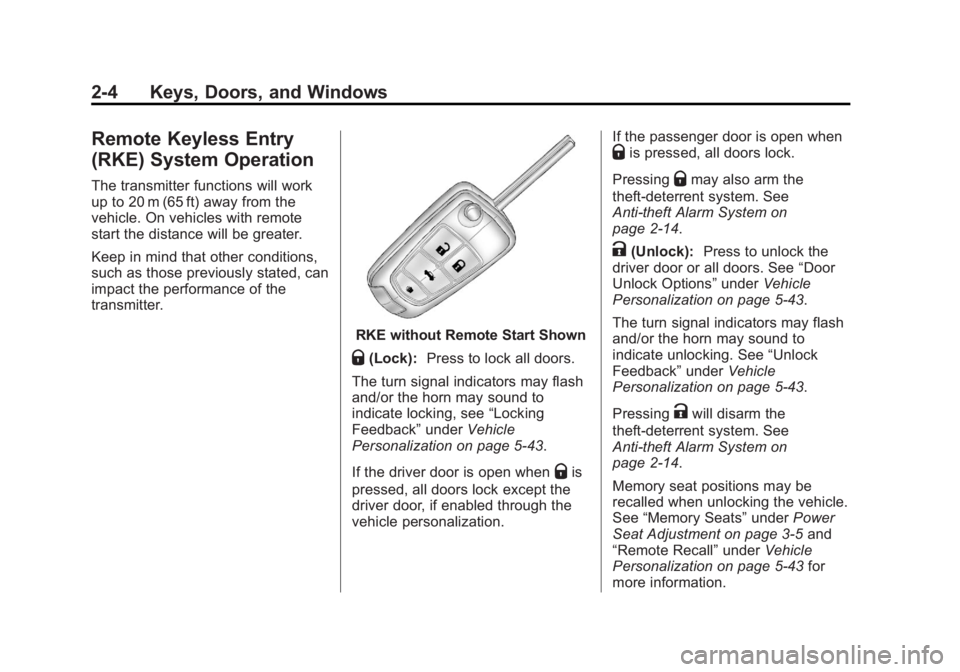
RKE without Remote Start Shown
Q(Lock):Press to lock all doors.
The turn signal indicators may flash
and/or the horn may sound to
indicate locking, see “Locking
Feedback” underVehicle
Personalization on page 5‑43.
If the driver door is open when
Qis
pressed, all doors lock except the
driver door, if enabled through the
vehicle personalization. If the passenger door is open when
Qis pressed, all doors lock.
Pressing
Qmay also arm the
theft-deterrent system. See
Anti-theft Alarm System on
page 2‑14.
K(Unlock): Press to unlock the
driver door or all doors. See “Door
Unlock Options” underVehicle
Personalization on page 5‑43.
The turn signal indicators may flash
and/or the horn may sound to
indicate unlocking. See “Unlock
Feedback” underVehicle
Personalization on page 5‑43.
Pressing
Kwill disarm the
theft-deterrent system. See
Anti-theft Alarm System on
page 2‑14.
Memory seat positions may be
recalled when unlocking the vehicle.
See “Memory Seats” underPower
Seat Adjustment on page 3‑5 and
“Remote Recall” underVehicle
Personalization on page 5‑43 for
more information.
Page 39 of 512
Black plate (5,1)Buick LaCrosse Owner Manual - 2012
Keys, Doors, and Windows 2-5
V(Remote Trunk Release):
Press and hold to unlock the trunk.
7(Vehicle Locator/Panic
Alarm): Press and release one
time to locate the vehicle. The
exterior lamps flash and the horn
chirps.
Press and hold
7for at least
two seconds to sound the panic
alarm. The horn sounds and the
turn signals flash until
7is pressed
again or the vehicle is started.
/(Remote Vehicle Start): For
vehicles with this feature, press to
operate the remote start feature.
See Remote Vehicle Start on
page 2‑9 for additional information.
The buttons on the keys are
disabled when there is a key in the
ignition, if equipped.
Keyless Access Operation
Some vehicles have a keyless
access system that lets you lock
and unlock the doors and access
the trunk without removing the RKE
transmitter from your pocket, purse,
briefcase, etc. The RKE transmitter
should be within 1 m (3 ft) of the
door or trunk being opened.
Keyless Unlocking
With the RKE transmitter within
1 m (3 ft), approach the front door
and pull the handle to unlock and
open the door. If the transmitter is
recognized, the door will unlock
and open.
Entering any door other than the
driver door will always cause all of
the doors to unlock. This is not
customizable.
To customize which doors unlock
when the driver door is opened, see
“Door Unlock Options” under
Vehicle Personalization on
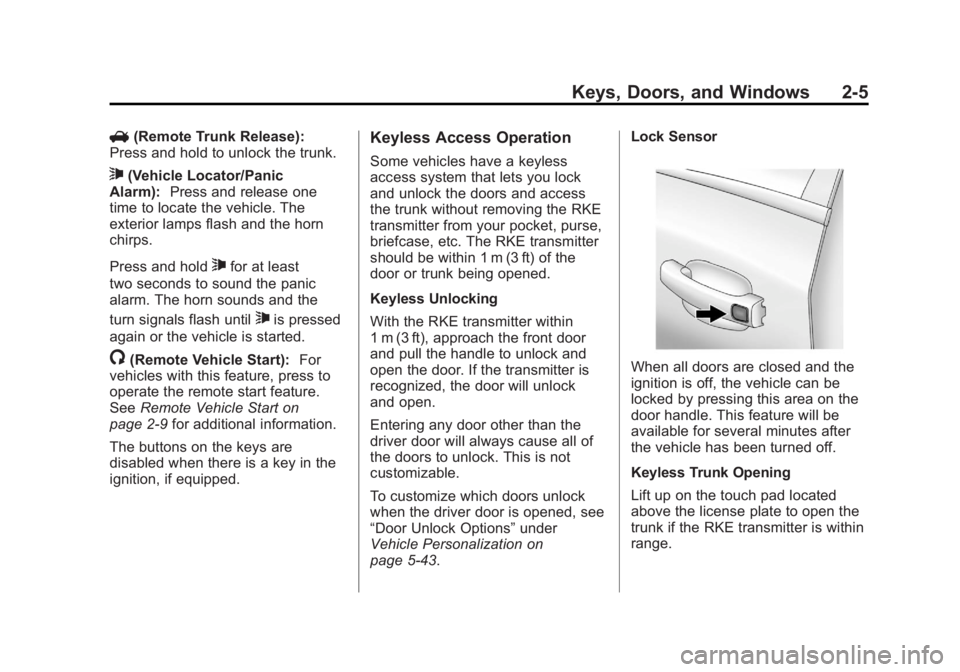
page 5‑43. Lock Sensor
When all doors are closed and the
ignition is off, the vehicle can be
locked by pressing this area on the
door handle. This feature will be
available for several minutes after
the vehicle has been turned off.
Keyless Trunk Opening
Lift up on the touch pad located
above the license plate to open the
trunk if the RKE transmitter is within
range.
Page 43 of 512
Black plate (9,1)Buick LaCrosse Owner Manual - 2012
Keys, Doors, and Windows 2-9
The battery is not rechargeable. To
replace the battery:
1. Push the button on thetransmitter to extend the key.
2. Remove the battery cover by prying it with a finger.
3. Remove the battery by pushing on the battery and sliding it
toward the key blade.
4. Insert the new battery, positive side facing up. Push the battery
down until it is held in place.
Replace with a CR2032 or
equivalent battery.
5. Snap the battery cover back on to the transmitter.Remote Vehicle Start
If available, this feature allows the
engine to be started from outside
the vehicle.
The
/button will be on the RKE
transmitter if the vehicle has remote
start.
Laws in some local communities
may restrict the use of remote
starters. For example, some laws
may require a person using remote
start to have the vehicle in view.
Check local regulations for any
requirements.
Starting the Engine Using Remote
Start
To start the engine using the remote
start feature:
1. Aim the RKE transmitter at the vehicle.
2. Press and release
Q. 3. Immediately after completing
Step 2, press and hold
/until
the turn signal lamps flash, or for
about two seconds if the vehicle
is not in view.
When the engine starts, the
parking lamps will turn on and
remain on as long as the engine
is running. The doors will be
locked and the climate control
system may come on.
Turn the ignition to ON/RUN (key
access), or select the ON/RUN/
START ignition position (keyless
access), to drive the vehicle.
The engine will shut off after
10 minutes unless a time extension
is done or the ignition is put in ON/
RUN (key access) or ON/RUN/
START (keyless access).
Page 51 of 512
Black plate (17,1)Buick LaCrosse Owner Manual - 2012
Keys, Doors, and Windows 2-17
Exterior Mirrors
Convex Mirrors
{WARNING
A convex mirror can make things,
like other vehicles, look farther
away than they really are. If you
cut too sharply into the right lane,
you could hit a vehicle on the
right. Check the inside mirror or
glance over your shoulder before
changing lanes.
The passenger side mirror is convex
shaped. A convex mirror's surface is
curved so more can be seen from
the driver seat.
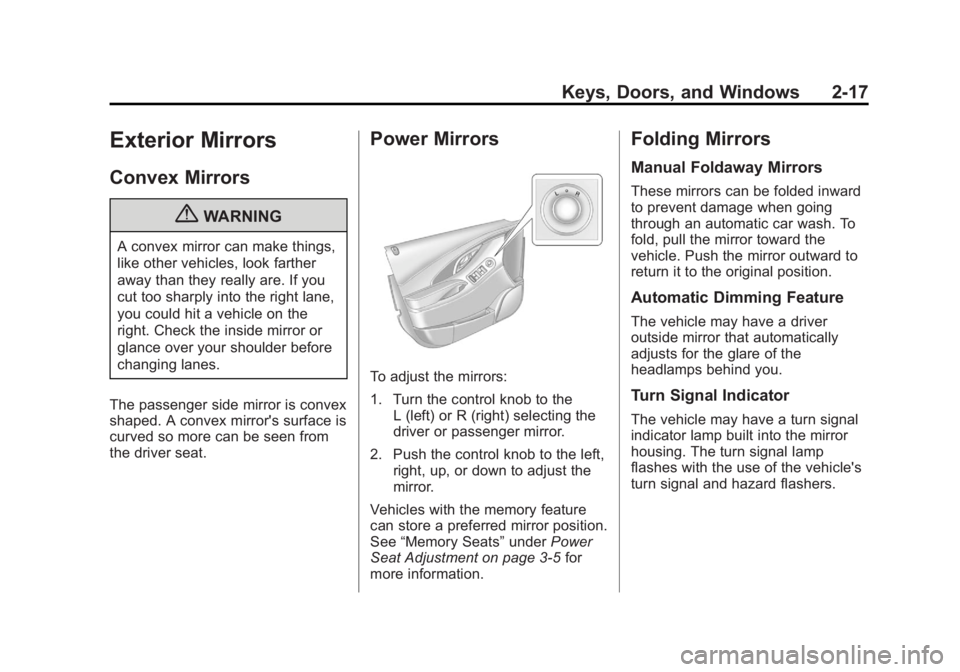
Power Mirrors
To adjust the mirrors:
1. Turn the control knob to the L (left) or R (right) selecting the
driver or passenger mirror.
2. Push the control knob to the left, right, up, or down to adjust the
mirror.
Vehicles with the memory feature
can store a preferred mirror position.
See “Memory Seats” underPower
Seat Adjustment on page 3‑5 for
more information.
Folding Mirrors
Manual Foldaway Mirrors
These mirrors can be folded inward
to prevent damage when going
through an automatic car wash. To
fold, pull the mirror toward the
vehicle. Push the mirror outward to
return it to the original position.
Automatic Dimming Feature
The vehicle may have a driver
outside mirror that automatically
adjusts for the glare of the
headlamps behind you.
Turn Signal Indicator
The vehicle may have a turn signal
indicator lamp built into the mirror
housing. The turn signal lamp
flashes with the use of the vehicle's
turn signal and hazard flashers.
Page 123 of 512
Black plate (5,1)Buick LaCrosse Owner Manual - 2012
Instruments and Controls 5-5
Compass
The vehicle may have a compass
display on the Driver Information
Center (DIC). The compass receives
its heading and other information
from the Global Positioning
System (GPS) antenna, StabiliTrak,
and vehicle speed information.
Avoid covering the GPS antenna for
long periods of time with objects
that may interfere with the antenna's
ability to receive a satellite signal.
SeeBackglass Antenna on
page 7‑27 andSatellite Radio
Antenna on page 7‑27 for the
location of the vehicle's antennas.
The compass system is designed to
operate for a certain number of
miles or degrees of turn before
needing a signal from the GPS
satellites. When the compass
display shows CAL, drive the
vehicle for a short distance in an
open area where it can receive a GPS signal. The compass system
will automatically determine when
the GPS signal is restored and
provide a heading again. See
Compass Messages on page 5‑36
for more information on the
messages that may be displayed for
the compass.
Clock (Radio with CD and
Touchscreen)
The infotainment system controls
are used to access the time and
date settings through the menu
system. See
Overview (Radio with
CD) on page 7‑3 orOverview
(Radio with CD/DVD and MEM) on
page 7‑5 orOverview (Radio with
CD and Touchscreen) on page 7‑7
and Operation on page 7‑13 for
information about how to use the
menu system.
Setting the Time (Without Date
Display)
1. Press the CONFIG button and
select Time Settings,
or press
H.
2. Select Set Time.
3. Turn the Menu knob to adjust the highlighted value.
4. Press SELECT to select the next value.
5. To save the time and return to the Time Settings menu, press
the
/BACK button at any time
or press SELECT after adjusting
the minutes.
Page 146 of 512
Black plate (28,1)Buick LaCrosse Owner Manual - 2012
5-28 Instruments and Controls
DIC Operation and Displays
The DIC has different displays
which can be accessed by using the
DIC buttons on the turn signal lever
to the left of the steering wheel. The
DIC displays trip, fuel, vehicle
system information, and warning
messages if a system problem is
detected.
The bottom of the DIC display
shows what position the shift lever
is in, the odometer, and the direction
the vehicle is driving.
In cold weather the DIC display may
change slowly. This is normal and
will move more quickly as the
vehicle's interior temperature rises.DIC Buttons
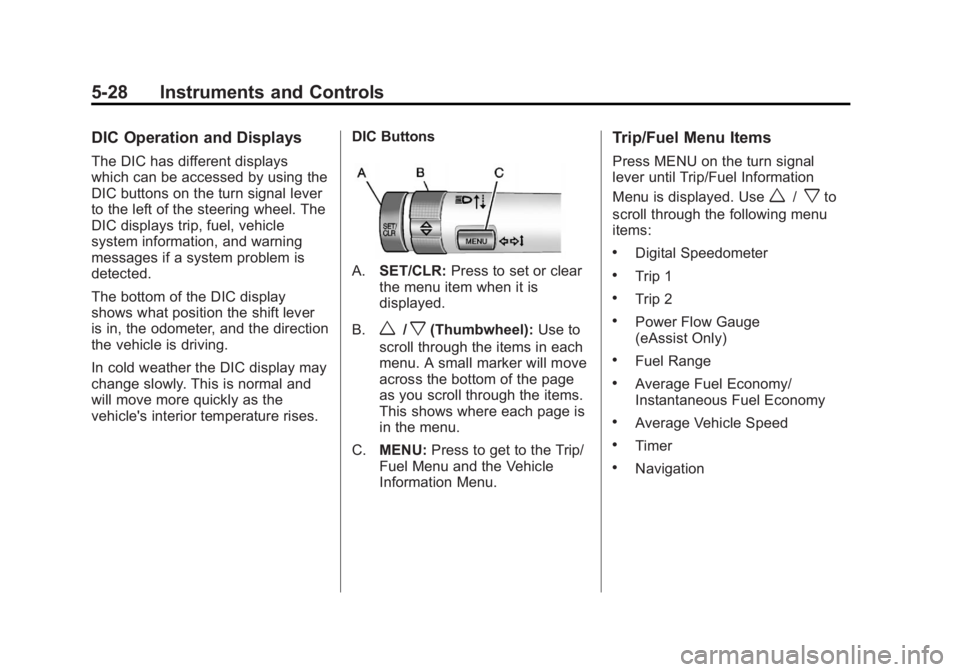
A.
SET/CLR: Press to set or clear
the menu item when it is
displayed.
B.
w/x(Thumbwheel): Use to
scroll through the items in each
menu. A small marker will move
across the bottom of the page
as you scroll through the items.
This shows where each page is
in the menu.
C. MENU: Press to get to the Trip/
Fuel Menu and the Vehicle
Information Menu.
Trip/Fuel Menu Items
Press MENU on the turn signal
lever until Trip/Fuel Information
Menu is displayed. Use
w/xto
scroll through the following menu
items:
.Digital Speedometer
.Trip 1
.Trip 2
.Power Flow Gauge
(eAssist Only)
.Fuel Range
.Average Fuel Economy/
Instantaneous Fuel Economy
.Average Vehicle Speed
.Timer
.Navigation