service BUICK LACROSSE 2013 Workshop Manual
[x] Cancel search | Manufacturer: BUICK, Model Year: 2013, Model line: LACROSSE, Model: BUICK LACROSSE 2013Pages: 422, PDF Size: 5.74 MB
Page 228 of 422

Black plate (26,1)Buick LaCrosse Owner Manual - 2013 - crc - 9/7/12
9-26 Driving and Operating
If the shift lever cannot be moved
out of P (Park):
1. Apply and maintain the regularbrakes.
2. Turn the ignition to the ON/RUN position. See Ignition Positions
(Keyless Access) on page 9‑15
or Ignition Positions (Key
Access) on page 9‑17 for more
information.
3. Let up on the shift lever and make sure the shift lever is
pushed all the way into P (Park).
4. Press the shift lever button.
5. Move the shift lever into the desired gear.
If you still cannot move the shift
lever from P (Park), consult your
dealer or a professional towing
service.Parking over Things
That Burn
{WARNING
Things that can burn could touch
hot exhaust parts under the
vehicle and ignite. Do not park
over papers, leaves, dry grass,
or other things that can burn.
Engine Exhaust
{WARNING
Engine exhaust contains carbon
monoxide (CO) which cannot be
seen or smelled. Exposure to CO
can cause unconsciousness and
even death.
Exhaust may enter the vehicle if:
.The vehicle idles in areas
with poor ventilation (parking
garages, tunnels, deep snow
that may block underbody
airflow or tail pipes).
.The exhaust smells or
sounds strange or different.
.The exhaust system leaks
due to corrosion or damage.
.The vehicle exhaust system
has been modified, damaged,
or improperly repaired. (Continued)
Page 231 of 422
Black plate (29,1)Buick LaCrosse Owner Manual - 2013 - crc - 9/7/12
Driving and Operating 9-29
D (Drive):This position is for
normal driving. It provides the best
fuel economy. If more power is
needed for passing, and the
vehicle is:
.Going less than 56 km/h
(35 mph), push the accelerator
pedal about halfway down.
.Going about 56 km/h (35 mph) or
more, push the accelerator all
the way down.
Notice: If the vehicle seems to
accelerate slowly or not shift
gears when you go faster, and
you continue to drive the vehicle
that way, you could damage the
transmission. Have the vehicle
serviced right away. You can
drive in L (Low) when you are
driving less than 56 km/h (35 mph)
and D (Drive) for higher speeds
until then.
Manual Mode: This position is
shown on the shift lever as a +/−.
It allows the driver to select the gears appropriate for current driving
conditions. See
Manual Mode on
page 9‑29 for more information.
Manual Mode
Driver Shift Control (DSC)
Notice:Driving with the engine at
a high rpm without upshifting
while using Driver Shift Control
(DSC), could damage the vehicle.
Always upshift when necessary
while using DSC.
DSC allows you to shift an
automatic transmission similar to a
manual transmission. To use the
DSC feature:
With Selective Ride Control
1. Move the shift lever to the left
from D (Drive).
The vehicle will be in Sport
Mode. The gear indicator in the
DIC will still display a D for
Drive, and the SPORT MODE
ON message will be displayed
momentarily. See Driver Information Center (DIC) on
page 5‑25. When you are in
Sport Mode, the vehicle will still
shift automatically, but chassis
tuning is modified. See
Selective
Ride Control on page 9‑37.
If you move the shift lever
forward or rearward, the
transmission will enter Manual
Mode, and the DIC gear
indicator will change to an M
followed by a number
representing the gear the vehicle
is currently in.
2. In Manual Mode, press the shift lever forward to upshift or
rearward to downshift.
Without Selective Ride Control
1. Move the shift lever to the left from D (Drive).
The transmission will enter
Manual Mode. The DIC gear
indicator will change to an M
followed by a number
representing the gear the vehicle
is currently in.
Page 234 of 422
Black plate (32,1)Buick LaCrosse Owner Manual - 2013 - crc - 9/7/12
9-32 Driving and Operating
Parking Brake
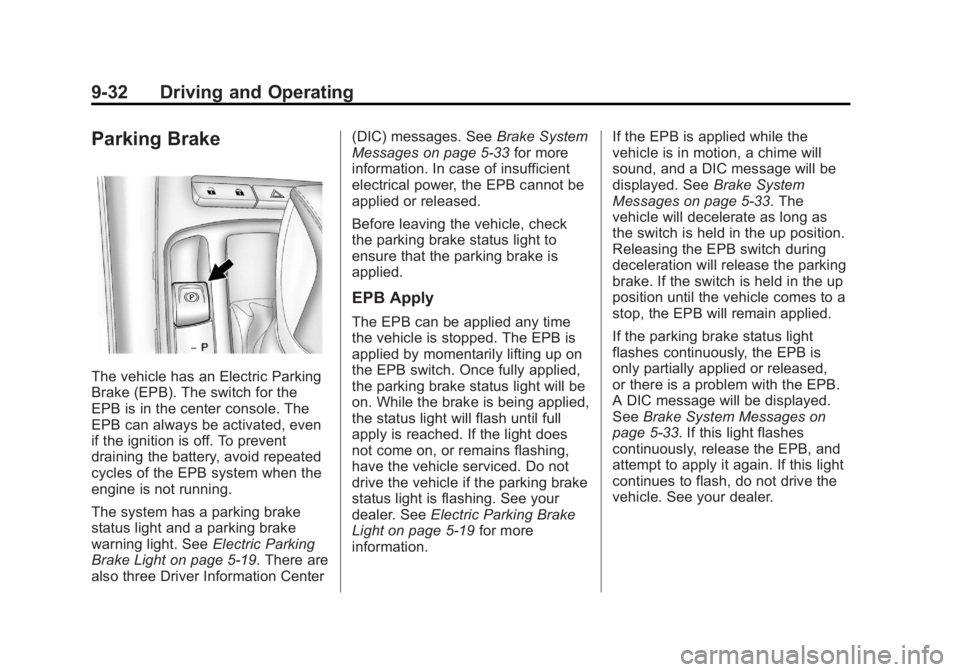
The vehicle has an Electric Parking
Brake (EPB). The switch for the
EPB is in the center console. The
EPB can always be activated, even
if the ignition is off. To prevent
draining the battery, avoid repeated
cycles of the EPB system when the
engine is not running.
The system has a parking brake
status light and a parking brake
warning light. SeeElectric Parking
Brake Light on page 5‑19. There are
also three Driver Information Center (DIC) messages. See
Brake System
Messages on page 5‑33 for more
information. In case of insufficient
electrical power, the EPB cannot be
applied or released.
Before leaving the vehicle, check
the parking brake status light to
ensure that the parking brake is
applied.
EPB Apply
The EPB can be applied any time
the vehicle is stopped. The EPB is
applied by momentarily lifting up on
the EPB switch. Once fully applied,
the parking brake status light will be
on. While the brake is being applied,
the status light will flash until full
apply is reached. If the light does
not come on, or remains flashing,
have the vehicle serviced. Do not
drive the vehicle if the parking brake
status light is flashing. See your
dealer. See Electric Parking Brake
Light on page 5‑19 for more
information. If the EPB is applied while the
vehicle is in motion, a chime will
sound, and a DIC message will be
displayed. See
Brake System
Messages on page 5‑33. The
vehicle will decelerate as long as
the switch is held in the up position.
Releasing the EPB switch during
deceleration will release the parking
brake. If the switch is held in the up
position until the vehicle comes to a
stop, the EPB will remain applied.
If the parking brake status light
flashes continuously, the EPB is
only partially applied or released,
or there is a problem with the EPB.
A DIC message will be displayed.
See Brake System Messages on
page 5‑33. If this light flashes
continuously, release the EPB, and
attempt to apply it again. If this light
continues to flash, do not drive the
vehicle. See your dealer.
Page 237 of 422
Black plate (35,1)Buick LaCrosse Owner Manual - 2013 - crc - 9/7/12
Driving and Operating 9-35
If there is a problem detected with
TCS, SERVICE TRACTION
CONTROL is displayed on the
Driver Information Center (DIC).
SeeRide Control System Messages
on page 5‑37. When this message
is displayed and
dcomes on and
stays on, the vehicle is safe to drive
but the system is not operational.
Driving should be adjusted
accordingly.
If
dcomes on and stays on, reset
the system.
To reset:
1. Stop the vehicle.
2. Turn the engine off and wait 15 seconds.
3. Start the engine.
If
dstill comes on and stays on, the
vehicle needs service.
Notice: Do not repeatedly brake
or accelerate heavily when TCS is
off. The vehicle's driveline could
be damaged.
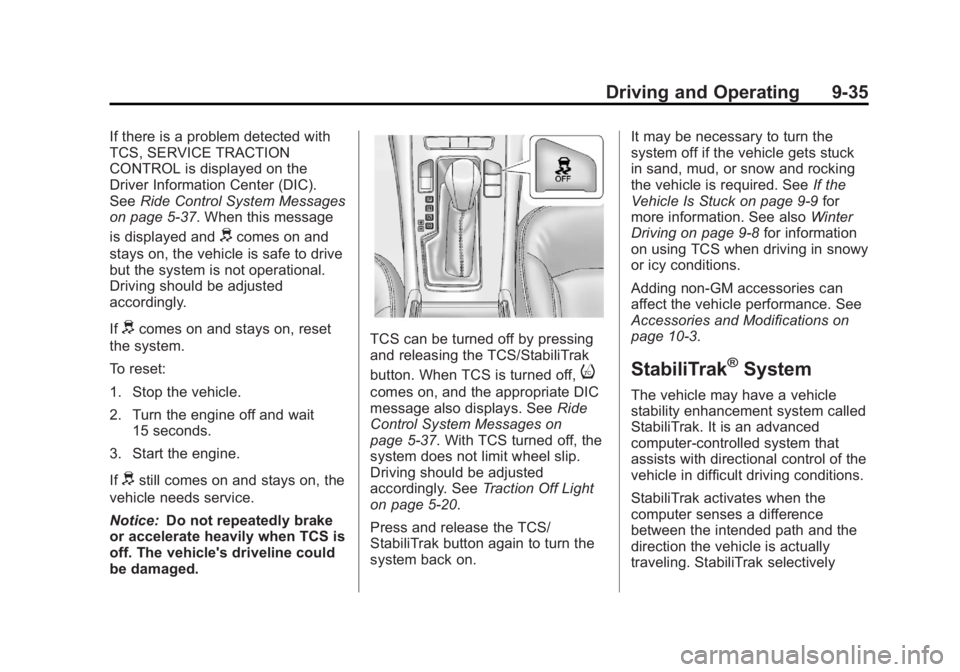
TCS can be turned off by pressing
and releasing the TCS/StabiliTrak
button. When TCS is turned off,
i
comes on, and the appropriate DIC
message also displays. See Ride
Control System Messages on
page 5‑37. With TCS turned off, the
system does not limit wheel slip.
Driving should be adjusted
accordingly. See Traction Off Light
on page 5‑20.
Press and release the TCS/
StabiliTrak button again to turn the
system back on. It may be necessary to turn the
system off if the vehicle gets stuck
in sand, mud, or snow and rocking
the vehicle is required. See
If the
Vehicle Is Stuck on page 9‑9 for
more information. See also Winter
Driving on page 9‑8 for information
on using TCS when driving in snowy
or icy conditions.
Adding non-GM accessories can
affect the vehicle performance. See
Accessories and Modifications on
page 10‑3.
StabiliTrak®System
The vehicle may have a vehicle
stability enhancement system called
StabiliTrak. It is an advanced
computer-controlled system that
assists with directional control of the
vehicle in difficult driving conditions.
StabiliTrak activates when the
computer senses a difference
between the intended path and the
direction the vehicle is actually
traveling. StabiliTrak selectively
Page 238 of 422
Black plate (36,1)Buick LaCrosse Owner Manual - 2013 - crc - 9/7/12
9-36 Driving and Operating
applies braking pressure to the
vehicle brakes to help steer the
vehicle in the intended direction.
StabiliTrak comes on automatically
whenever the vehicle is started. To
assist with directional control of the
vehicle, the system should always
be left on.
When StabiliTrak activates,
d
flashes on the instrument panel.
A noise may be heard or vibration
may be felt in the brake pedal. This
is normal. Continue to steer the
vehicle in the intended direction.
SeeTraction Control System (TCS)/
StabiliTrak
®Light on page 5‑21.
If a problem is detected with
StabiliTrak, SERVICE
STABILITRAK is displayed on the
Driver Information Center (DIC).
See Ride Control System Messages
on page 5‑37. When this message
is displayed and
dcomes on and
stays on, the vehicle is safe to drive
but the system is not operational.
Driving should be adjusted
accordingly. If
dcomes on and stays on, reset
the system.
To reset:
1. Stop the vehicle.
2. Turn the engine off and wait 15 seconds.
3. Start the engine.
If
dstill comes on and stays on, the
vehicle needs service.
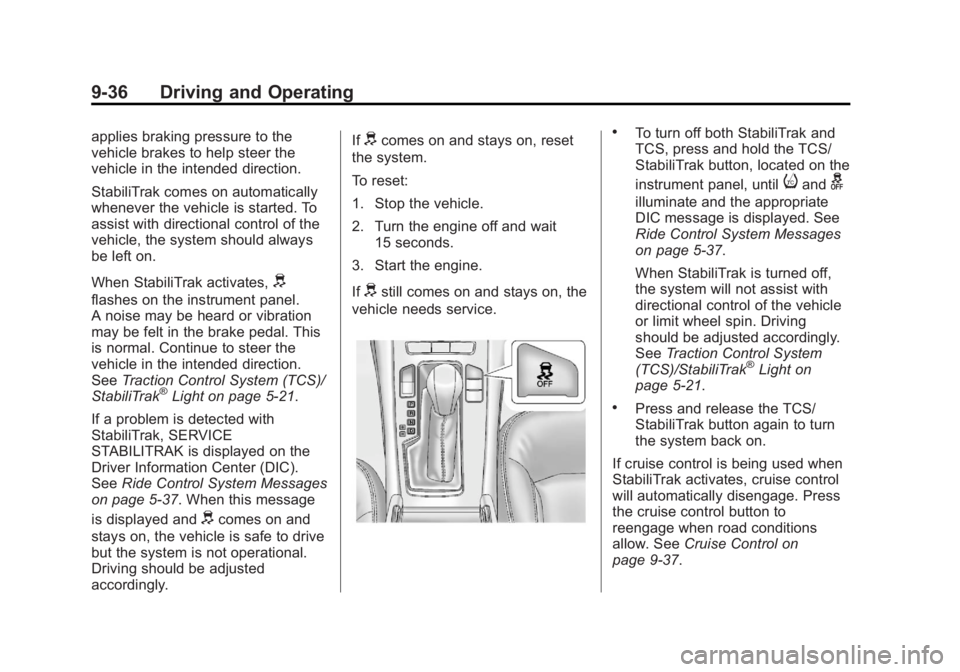
.To turn off both StabiliTrak and
TCS, press and hold the TCS/
StabiliTrak button, located on the
instrument panel, until
iandg
illuminate and the appropriate
DIC message is displayed. See
Ride Control System Messages
on page 5‑37.
When StabiliTrak is turned off,
the system will not assist with
directional control of the vehicle
or limit wheel spin. Driving
should be adjusted accordingly.
See Traction Control System
(TCS)/StabiliTrak
®Light on
page 5‑21.
.Press and release the TCS/
StabiliTrak button again to turn
the system back on.
If cruise control is being used when
StabiliTrak activates, cruise control
will automatically disengage. Press
the cruise control button to
reengage when road conditions
allow. See Cruise Control on
page 9‑37.
Page 243 of 422
Black plate (41,1)Buick LaCrosse Owner Manual - 2013 - crc - 9/7/12
Driving and Operating 9-41
When the System Does Not
Seem to Work Properly
The following messages may be
displayed on the DIC:
SERVICE PARK ASSIST:If this
message occurs, take the vehicle to
your dealer to repair the system.
PARK ASSIST OFF: If the URPA
system does not activate due to a
temporary condition, this message
displays on the DIC. This can occur
under the following conditions:
.The driver has disabled the
system.
.The ultrasonic sensors are not
clean. Keep the vehicle's rear
bumper free of mud, dirt, snow,
ice, and slush. For cleaning
instructions, see Exterior Care
on page 10‑92.
.The park assist sensors are
covered by frost or ice. Frost or
ice can form around and behind
the sensors and may not always
be seen; this can occur after
washing the vehicle in cold weather. The message may not
clear until the frost or ice has
melted.
.An object was hanging out of the
trunk during the last drive cycle.
Once the object is removed,
URPA will return to normal
operation.
.The bumper is damaged. Take
the vehicle to your dealer to
repair the system.
.Other conditions, such as
vibrations from a jackhammer or
the compression of air brakes on
a very large truck, are affecting
system performance.
Side Blind Zone
Alert (SBZA)
The vehicle may have a Side Blind
Zone Alert (SBZA) system. Read
this entire section before using the
system.
{WARNING
SBZA does not detect vehicles
rapidly approaching outside of the
side blind zones, pedestrians,
bicyclists, or animals. Failure to
use proper care when changing
lanes may result in injury, death,
or vehicle damage. Before
making a lane change, always
check mirrors, glance over your
shoulder, and use the turn
signals.
When the system detects a vehicle
in the side blind zone, amber SBZA
displays will light up in the side
mirrors. This indicates that it may be
unsafe to change lanes. Before
making a lane change, always
check the SBZA display, check the
outside and rearview mirrors, look
over your shoulder for vehicles and
hazards, and use the turn signal.
Page 244 of 422
Black plate (42,1)Buick LaCrosse Owner Manual - 2013 - crc - 9/7/12
9-42 Driving and Operating
SBZA Detection Zones
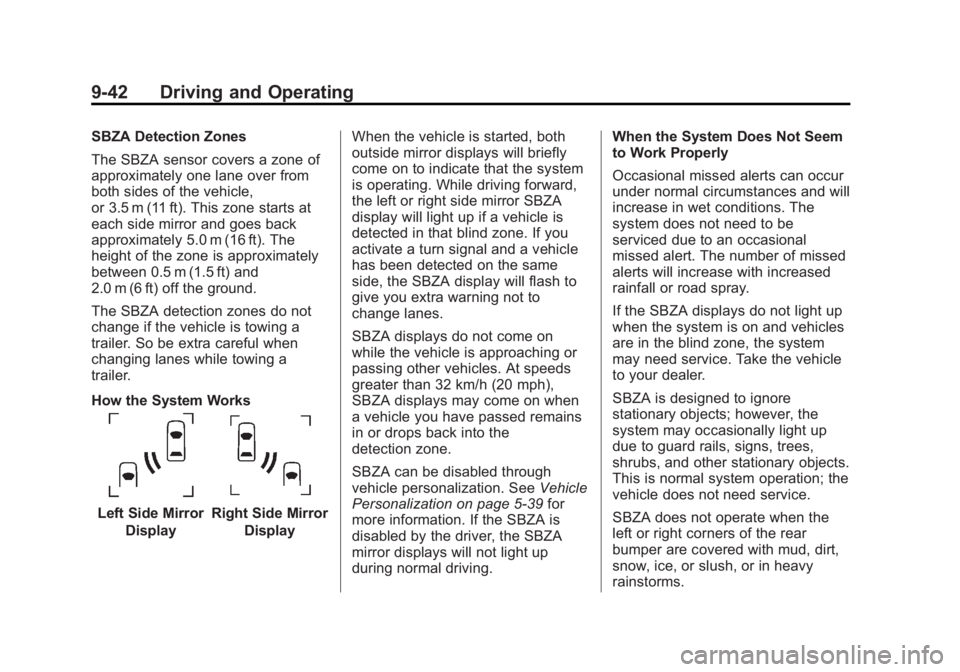
The SBZA sensor covers a zone of
approximately one lane over from
both sides of the vehicle,
or 3.5 m (11 ft). This zone starts at
each side mirror and goes back
approximately 5.0 m (16 ft). The
height of the zone is approximately
between 0.5 m (1.5 ft) and
2.0 m (6 ft) off the ground.
The SBZA detection zones do not
change if the vehicle is towing a
trailer. So be extra careful when
changing lanes while towing a
trailer.
How the System Works
Left Side MirrorDisplayRight Side Mirror Display When the vehicle is started, both
outside mirror displays will briefly
come on to indicate that the system
is operating. While driving forward,
the left or right side mirror SBZA
display will light up if a vehicle is
detected in that blind zone. If you
activate a turn signal and a vehicle
has been detected on the same
side, the SBZA display will flash to
give you extra warning not to
change lanes.
SBZA displays do not come on
while the vehicle is approaching or
passing other vehicles. At speeds
greater than 32 km/h (20 mph),
SBZA displays may come on when
a vehicle you have passed remains
in or drops back into the
detection zone.
SBZA can be disabled through
vehicle personalization. See
Vehicle
Personalization on page 5‑39 for
more information. If the SBZA is
disabled by the driver, the SBZA
mirror displays will not light up
during normal driving. When the System Does Not Seem
to Work Properly
Occasional missed alerts can occur
under normal circumstances and will
increase in wet conditions. The
system does not need to be
serviced due to an occasional
missed alert. The number of missed
alerts will increase with increased
rainfall or road spray.
If the SBZA displays do not light up
when the system is on and vehicles
are in the blind zone, the system
may need service. Take the vehicle
to your dealer.
SBZA is designed to ignore
stationary objects; however, the
system may occasionally light up
due to guard rails, signs, trees,
shrubs, and other stationary objects.
This is normal system operation; the
vehicle does not need service.
SBZA does not operate when the
left or right corners of the rear
bumper are covered with mud, dirt,
snow, ice, or slush, or in heavy
rainstorms.
Page 245 of 422
Black plate (43,1)Buick LaCrosse Owner Manual - 2013 - crc - 9/7/12
Driving and Operating 9-43
For cleaning instructions, see
Exterior Care on page 10‑92. If the
infotainment display still shows the
SIDE BLIND ZONE SYS.
UNAVAILABLE message after
cleaning the bumper, see your
dealer.
The SBZA displays may remain on
if a trailer is attached to the vehicle,
or a bicycle or object is extending
out to either side of the vehicle.
When SBZA is disabled for any
reason other than the driver turning
it off, the driver will not be able to
turn SBZA back on using vehicle
personalization. The On option will
not be selectable if the conditions
for normal system operation are not
met. Until normal operating
conditions for SBZA are met, you
should not rely upon SBZA while
driving.SBZA Error Messages
The following messages may
appear on the infotainment display:
SIDE BLIND ZONE ALERT
SYSTEM OFF:
This message
indicates that the driver has turned
the system off.
SIDE BLIND ZONE SYS.
UNAVAILABLE: This message
indicates that the SBZA system is
disabled because the sensor is
blocked and cannot detect vehicles
in the blind zone. The sensor may
be blocked by mud, dirt, snow, ice,
or slush. This message may also
activate during heavy rain or due to
road spray. The vehicle does not
need service. For cleaning, see
Exterior Care on page 10‑92.
SERVICE BLIND ZONE ALERT
SYSTEM: If this message appears,
both SBZA displays will remain on
indicating there is a problem with
the SBZA system. If these displays
remain on after continued driving,
the system needs service. Take the
vehicle to your dealer.FCC Information
See Radio Frequency Statement on
page 13‑20 for information
regarding Part 15 of the Federal
Communications Commission (FCC)
rules and Industry Canada
Standards RSS-GEN/210/220/310.
Rear Vision
Camera (RVC)
This vehicle may have an RVC
system. Read this entire section
before using it.
The RVC system can assist the
driver when backing up by
displaying a view of the area behind
the vehicle.
{WARNING
The RVC system does not display
children, pedestrians, bicyclists,
animals, or any other object
located outside the camera's field
of view, below the bumper,
(Continued)
Page 247 of 422
Black plate (45,1)Buick LaCrosse Owner Manual - 2013 - crc - 9/7/12
Driving and Operating 9-45
Guidelines
The RVC system may have a
guideline overlay that can help the
driver align the vehicle when
backing into a parking spot.
To turn the guidelines on or off:
1. Shift into P (Park).
2. Press the CONFIG button toenter the configure menu
options.
3. Select Display.
4. Select Rear Camera Options.
5. Select Guidelines. When a checkmark appears next to the
Guidelines option, guidelines will
appear.
Rear Vision Camera Error
Messages
SERVICE REAR VISION CAMERA
SYSTEM: This message can
display when the system is not
receiving information it requires from
other vehicle systems. If any other problem occurs or if a
problem persists, see your dealer.
Rear Vision Camera Location
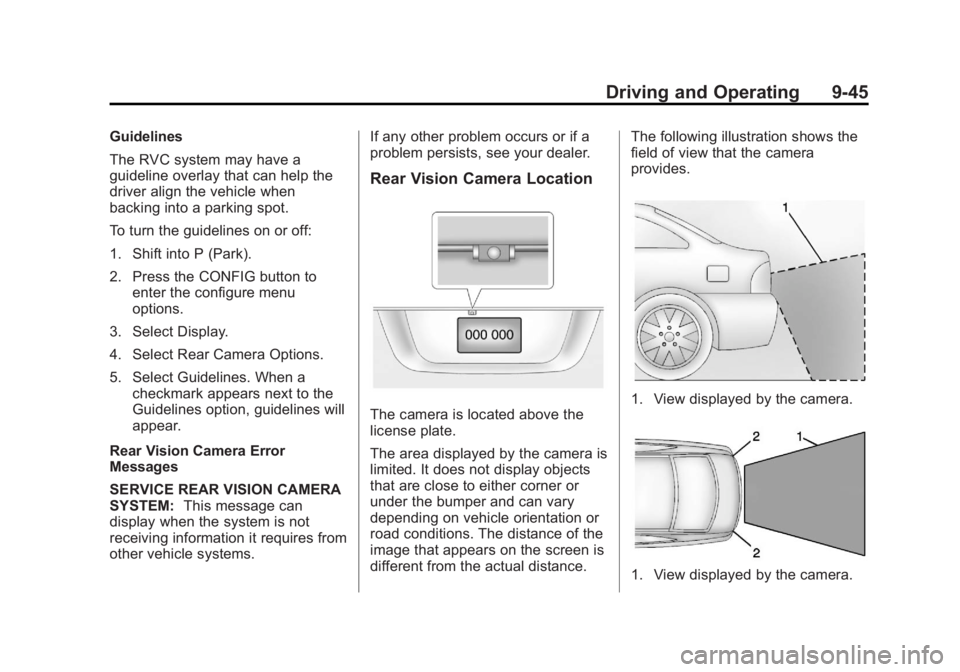
The camera is located above the
license plate.
The area displayed by the camera is
limited. It does not display objects
that are close to either corner or
under the bumper and can vary
depending on vehicle orientation or
road conditions. The distance of the
image that appears on the screen is
different from the actual distance.The following illustration shows the
field of view that the camera
provides.1. View displayed by the camera.
1. View displayed by the camera.
Page 249 of 422
Black plate (47,1)Buick LaCrosse Owner Manual - 2013 - crc - 9/7/12
Driving and Operating 9-47
The eighth digit of the Vehicle
Identification Number (VIN) shows
the code letter or number that
identifies the vehicle's engine. The
VIN is at the top left of the
instrument panel. SeeVehicle
Identification Number (VIN) on
page 12‑1.
Recommended Fuel
Use regular unleaded gasoline with
a posted octane rating of 87 or
higher. If the octane rating is less
than 87, an audible knocking noise,
commonly referred to as spark knock, might be heard when driving.
If this occurs, use a gasoline rated
at 87 octane or higher as soon as
possible. If heavy knocking is heard
when using gasoline rated at
87 octane or higher, the engine
needs service.
Gasoline Specifications
At a minimum, gasoline should meet
ASTM specification D 4814. Some
gasolines contain an
octane-enhancing additive called
methylcyclopentadienyl manganese
tricarbonyl (MMT). We recommend
against the use of gasolines
containing MMT. See
Fuel Additives
on page 9‑48.
California Fuel
Requirements
If the vehicle is certified to meet
California Emissions Standards, it is
designed to operate on fuels that
meet California specifications. See
the underhood emission control
label. If this fuel is not available in states adopting California Emissions
Standards, the vehicle will operate
satisfactorily on fuels meeting
federal specifications, but emission
control system performance might
be affected. The malfunction
indicator lamp could turn on and the
vehicle might fail a smog‐check test.
See
Malfunction Indicator Lamp on
page 5‑16. If this occurs, return to
your authorized dealer for diagnosis.
If it is determined that the condition
is caused by the type of fuel used,
repairs might not be covered by the
vehicle warranty.
Fuels in Foreign
Countries
Never use leaded gasoline or any
other fuel not recommended in the
previous text on fuel. Costly repairs
caused by use of improper fuel
would not be covered by the vehicle
warranty.