change wheel BUICK LACROSSE 2015 User Guide
[x] Cancel search | Manufacturer: BUICK, Model Year: 2015, Model line: LACROSSE, Model: BUICK LACROSSE 2015Pages: 407, PDF Size: 4.89 MB
Page 171 of 407
Black plate (4,1)Buick LaCrosse Owner Manual (GMNA-Localizing-U.S./Canada/Mexico-
7707475) - 2015 - CRC - 10/9/14
6-4 Lighting
Hazard Warning Flashers
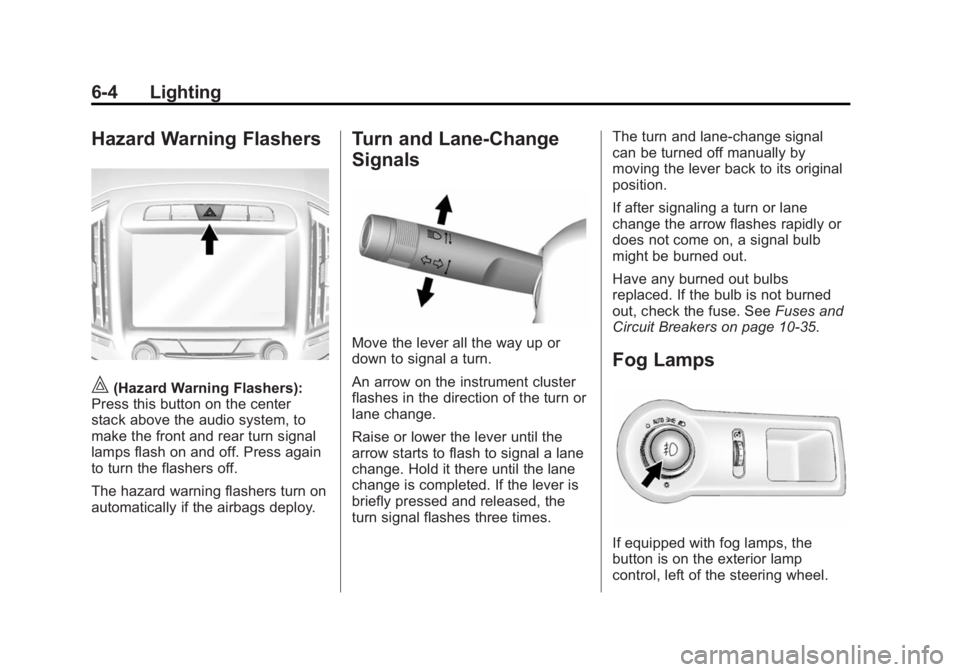
|(Hazard Warning Flashers):
Press this button on the center
stack above the audio system, to
make the front and rear turn signal
lamps flash on and off. Press again
to turn the flashers off.
The hazard warning flashers turn on
automatically if the airbags deploy.
Turn and Lane-Change
Signals
Move the lever all the way up or
down to signal a turn.
An arrow on the instrument cluster
flashes in the direction of the turn or
lane change.
Raise or lower the lever until the
arrow starts to flash to signal a lane
change. Hold it there until the lane
change is completed. If the lever is
briefly pressed and released, the
turn signal flashes three times. The turn and lane-change signal
can be turned off manually by
moving the lever back to its original
position.
If after signaling a turn or lane
change the arrow flashes rapidly or
does not come on, a signal bulb
might be burned out.
Have any burned out bulbs
replaced. If the bulb is not burned
out, check the fuse. See
Fuses and
Circuit Breakers on page 10-35.
Fog Lamps
If equipped with fog lamps, the
button is on the exterior lamp
control, left of the steering wheel.
Page 183 of 407
Black plate (6,1)Buick LaCrosse Owner Manual (GMNA-Localizing-U.S./Canada/Mexico-
7707475) - 2015 - CRC - 10/9/14
8-6 Climate Controls
Air Vents
Use the louvers on the air vents to
change the direction of the airflow.
To open the vent, move the
thumbwheel to
t. To close the vent,
move the thumbwheel to
l.
For vehicles with eAssist, there is a
battery cooling air vent on the shelf
behind the rear passenger seats
below the rear window. Keep this air
inlet clear from items that may block
airflow. Proper airflow is required to
keep the eAssist battery and control
system cool. Operation Tips
.Keep all outlets open whenever
possible for best system
performance.
.Keep the path under all seats
clear of objects to help circulate
the air inside the vehicle more
effectively.
.Use of non-GM approved hood
deflectors can adversely affect
the performance of the system.
Maintenance
Air Intake
Clear away any ice, snow, or leaves
from the air intake at the base of the
windshield that can block the flow of
air into the vehicle.
Passenger Compartment
Air Filter
The filter removes dust, pollen, and
other airborne irritants from outside
air that is pulled into the vehicle.
The filter should be replaced as part
of routine scheduled maintenance.
See
Maintenance Schedule on
page 11-2 for replacement intervals.
For more information, see your
dealer.
Page 186 of 407
Black plate (1,1)Buick LaCrosse Owner Manual (GMNA-Localizing-U.S./Canada/Mexico-
7707475) - 2015 - CRC - 10/9/14
Driving and Operating 9-1
Driving and
Operating
Driving Information
Distracted Driving . . . . . . . . . . . . . 9-2
Defensive Driving . . . . . . . . . . . . . 9-3
Drunk Driving . . . . . . . . . . . . . . . . . 9-3
Control of a Vehicle . . . . . . . . . . . 9-3
Braking . . . . . . . . . . . . . . . . . . . . . . . 9-3
Steering . . . . . . . . . . . . . . . . . . . . . . . 9-4
Off-Road Recovery . . . . . . . . . . . . 9-5
Loss of Control . . . . . . . . . . . . . . . . 9-6
Driving on Wet Roads . . . . . . . . . 9-6
Hill and Mountain Roads . . . . . . 9-7
Winter Driving . . . . . . . . . . . . . . . . . 9-8
If the Vehicle Is Stuck . . . . . . . . . 9-9
Vehicle Load Limits . . . . . . . . . . 9-10
Starting and Operating
New Vehicle Break-In . . . . . . . . 9-14
Ignition Positions (KeyAccess) . . . . . . . . . . . . . . . . . . . . 9-15
Ignition Positions (Keyless Access) . . . . . . . . . . . . . . . . . . . . 9-16
Starting the Engine . . . . . . . . . . 9-18
Engine Heater . . . . . . . . . . . . . . . 9-22 Retained Accessory
Power (RAP) . . . . . . . . . . . . . . . 9-23
Shifting Into Park . . . . . . . . . . . . 9-24
Shifting out of Park . . . . . . . . . . 9-25
Parking over Things That Burn . . . . . . . . . . . . . . . . . . 9-25
Engine Exhaust
Engine Exhaust . . . . . . . . . . . . . . 9-26
Running the Vehicle WhileParked . . . . . . . . . . . . . . . . . . . . . 9-26
Automatic Transmission
Automatic Transmission . . . . . 9-27
Manual Mode . . . . . . . . . . . . . . . . 9-29
Drive Systems
All-Wheel Drive . . . . . . . . . . . . . . 9-30
Brakes
Antilock BrakeSystem (ABS) . . . . . . . . . . . . . . 9-30
Parking Brake . . . . . . . . . . . . . . . 9-31
Brake Assist . . . . . . . . . . . . . . . . . 9-33
Hill Start Assist (HSA) . . . . . . . 9-33
Ride Control Systems
Traction Control/Electronic Stability Control . . . . . . . . . . . . 9-34
Limited-Slip Differential . . . . . . 9-36
Selective Ride Control . . . . . . . 9-36
Cruise Control
Cruise Control . . . . . . . . . . . . . . . 9-37
Adaptive Cruise Control . . . . . 9-39
Driver Assistance Systems
Driver Assistance Systems . . . . . . . . . . . . . . . . . . . . 9-47
Assistance Systems for Parking or Backing . . . . . . . . . 9-48
Assistance Systems for Driving . . . . . . . . . . . . . . . . . . . . . 9-50
Forward Collision Alert (FCA) System . . . . . . . . . . . . . . . . . . . . . 9-50
Active Emergency Braking System . . . . . . . . . . . . . . . . . . . . . 9-53
Side Blind Zone Alert (SBZA) . . . . . . . . . . . . . . . 9-54
Lane Change Alert . . . . . . . . . . . 9-55
Lane Departure Warning (LDW) . . . . . . . . . . . . . 9-57
Page 191 of 407
Black plate (6,1)Buick LaCrosse Owner Manual (GMNA-Localizing-U.S./Canada/Mexico-
7707475) - 2015 - CRC - 10/9/14
9-6 Driving and Operating
3. Turn the steering wheel to gostraight down the roadway.
Loss of Control
Skidding
There are three types of skids that
correspond to the vehicle's three
control systems:
.Braking Skid —wheels are not
rolling.
.Steering or Cornering Skid —
too much speed or steering in a
curve causes tires to slip and
lose cornering force.
.Acceleration Skid —too much
throttle causes the driving
wheels to spin.
Defensive drivers avoid most skids
by taking reasonable care suited to
existing conditions, and by not
overdriving those conditions. But
skids are always possible. If the vehicle starts to slide, follow
these suggestions:
.Ease your foot off the
accelerator pedal and steer the
way you want the vehicle to go.
The vehicle may straighten out.
Be ready for a second skid if it
occurs.
.Slow down and adjust your
driving according to weather
conditions. Stopping distance
can be longer and vehicle
control can be affected when
traction is reduced by water,
snow, ice, gravel, or other
material on the road. Learn to
recognize warning clues
—such
as enough water, ice, or packed
snow on the road to make a
mirrored surface —and slow
down when you have any doubt.
.Try to avoid sudden steering,
acceleration, or braking,
including reducing vehicle speed
by shifting to a lower gear. Any
sudden changes could cause
the tires to slide. Remember: Antilock brakes help
avoid only the braking skid.
Driving on Wet Roads
Rain and wet roads can reduce
vehicle traction and affect your
ability to stop and accelerate.
Always drive slower in these types
of driving conditions and avoid
driving through large puddles and
deep‐standing or flowing water.
{Warning
Wet brakes can cause crashes.
They might not work as well in a
quick stop and could cause
pulling to one side. You could
lose control of the vehicle.
After driving through a large
puddle of water or a car/vehicle
wash, lightly apply the brake
pedal until the brakes work
normally.
(Continued)
Page 195 of 407
Black plate (10,1)Buick LaCrosse Owner Manual (GMNA-Localizing-U.S./Canada/Mexico-
7707475) - 2015 - CRC - 10/9/14
9-10 Driving and Operating
Rocking the Vehicle to Get
it Out
Turn the steering wheel left and
right to clear the area around the
front wheels. Turn off any traction
system. Shift back and forth
between R (Reverse) and a low
forward gear, spinning the wheels
as little as possible. To prevent
transmission wear, wait until the
wheels stop spinning before shifting
gears. Release the accelerator
pedal while shifting, and press
lightly on the accelerator pedal
when the transmission is in gear.
Slowly spinning the wheels in the
forward and reverse directions
causes a rocking motion that could
free the vehicle. If that does not get
the vehicle out after a few tries, it
might need to be towed out. If the
vehicle does need to be towed out,
seeTowing the Vehicle on
page 10-82.
Vehicle Load Limits
It is very important to know how
much weight the vehicle can
carry. This weight is called the
vehicle capacity weight and
includes the weight of all
occupants, cargo, and all
nonfactory-installed options.
Two labels on the vehicle show
how much weight it may
properly carry, the Tire and
Loading Information label and
the Certification label.{Warning
Do not load the vehicle any
heavier than the Gross
Vehicle Weight Rating
(GVWR), or either the
maximum front or rear Gross
Axle Weight Rating (GAWR).
This can cause systems to
break and change the way the
vehicle handles. This could
cause loss of control and a
crash. Overloading can also
shorten the life of the vehicle.
Page 216 of 407
Black plate (31,1)Buick LaCrosse Owner Manual (GMNA-Localizing-U.S./Canada/Mexico-
7707475) - 2015 - CRC - 10/9/14
Driving and Operating 9-31
If driving safely on a wet road and it
becomes necessary to slam on the
brakes and continue braking to
avoid a sudden obstacle, a
computer senses the wheels are
slowing down. If one of the wheels
is about to stop rolling, the computer
will separately work the brakes at
each wheel.
ABS can change the brake pressure
to each wheel, as required, faster
than any driver could. This can help
you steer around the obstacle while
braking hard.
As the brakes are applied, the
computer keeps receiving updates
on wheel speed and controls
braking pressure accordingly.
Remember: ABS does not change
the time needed to get a foot up to
the brake pedal or always decrease
stopping distance. If you get too
close to the vehicle in front of you,
there will not be enough time to
apply the brakes if that vehiclesuddenly slows or stops. Always
leave enough room up ahead to
stop, even with ABS.
Using ABS
Do not pump the brakes. Just hold
the brake pedal down firmly and let
ABS work. You may hear the ABS
pump or motor operating and feel
the brake pedal pulsate. This is
normal.
Braking in Emergencies
ABS allows you to steer and brake
at the same time. In many
emergencies, steering can help
more than even the very best
braking.
Parking Brake
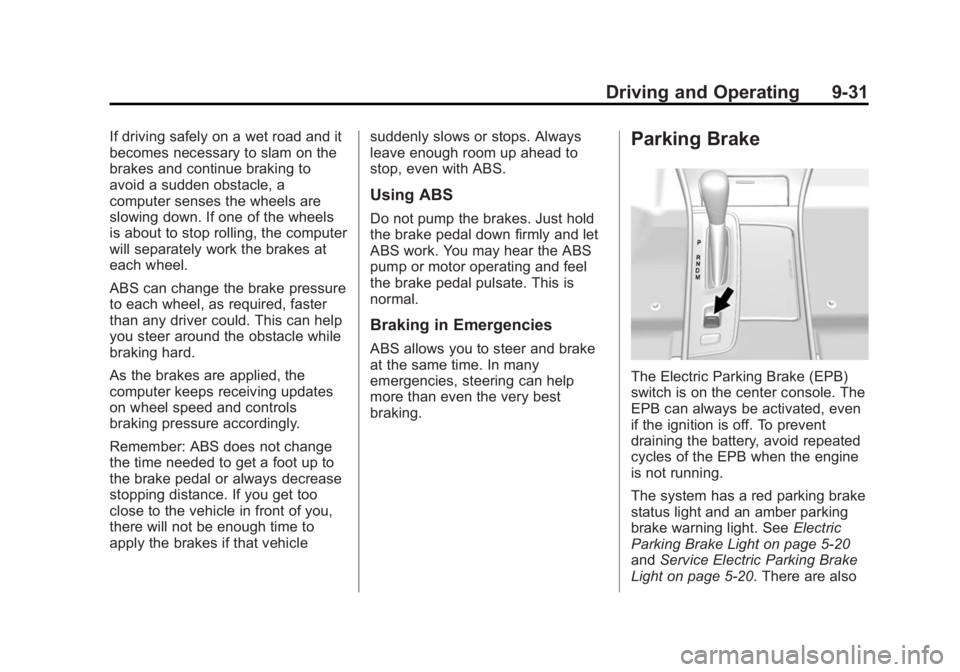
The Electric Parking Brake (EPB)
switch is on the center console. The
EPB can always be activated, even
if the ignition is off. To prevent
draining the battery, avoid repeated
cycles of the EPB when the engine
is not running.
The system has a red parking brake
status light and an amber parking
brake warning light. See
Electric
Parking Brake Light on page 5-20
and Service Electric Parking Brake
Light on page 5-20. There are also
Page 221 of 407
Black plate (36,1)Buick LaCrosse Owner Manual (GMNA-Localizing-U.S./Canada/Mexico-
7707475) - 2015 - CRC - 10/9/14
9-36 Driving and Operating
To turn TCS and StabiliTrak on
again, press and release the
g
button. The traction off lightiand
StabiliTrak OFF light
gin the
instrument cluster turn off.
Adding accessories can affect the
vehicle performance. See
Accessories and Modifications on
page 10-3.
Limited-Slip Differential
Vehicles with a limited-slip
differential can give more traction on
snow, mud, ice, sand, or gravel.
It works like a standard differential
most of the time, but when traction
is low, this feature allows the drive
wheel with the most traction to
move the vehicle.
Selective Ride Control
The vehicle may have a ride control
system called Selective Ride
Control. The system provides the
following performance benefits:
.Reduced Impact Harshness
.Improved Road Isolation
.Improved High-Speed Stability
.Improved Handling Response
.Better Control of Body Ride
Motions
To switch from TOUR to SPORT
mode, move the shift lever to the
M/S (Manual/Sport) position. TOUR:
Use for normal city and
highway driving. This setting
provides a smooth, soft ride.
SPORT: Use where road conditions
or personal preference demand
more control. This setting provides
more “feel,” or response to road
conditions through increased
steering effort and suspension
tuning.
The setting can be changed at any
time. Based on road conditions,
steering wheel angle, and vehicle
speed, the system automatically
adjusts to provide the best handling
while providing a smooth ride. The
TOUR and SPORT modes will feel
similar on a smooth road.
Page 222 of 407
Black plate (37,1)Buick LaCrosse Owner Manual (GMNA-Localizing-U.S./Canada/Mexico-
7707475) - 2015 - CRC - 10/9/14
Driving and Operating 9-37
Cruise Control
With cruise control the vehicle can
maintain a speed of about 40 km/h
(25 mph) or more without keeping
your foot on the accelerator. Cruise
control does not work at speeds
below 40 km/h (25 mph).
{Warning
Cruise control can be dangerous
where you cannot drive safely at
a steady speed. Do not use
cruise control on winding roads or
in heavy traffic.
Cruise control can be dangerous
on slippery roads. On such roads,
fast changes in tire traction can
cause excessive wheel slip, and
you could lose control. Do not use
cruise control on slippery roads.If equipped with the Traction Control
System (TCS), the system may
begin to limit wheel spin while you
are using cruise control. If this
happens, the cruise control will
automatically disengage. See
Traction Control/Electronic Stability
Control on page 9-34. If a collision
alert occurs when cruise control is
activated, cruise control is
disengaged. See
Forward Collision
Alert (FCA) System on page 9-50.
When road conditions allow you to
safely use it again, cruise control
can be turned back on.
If the brakes are applied, cruise
control disengages.
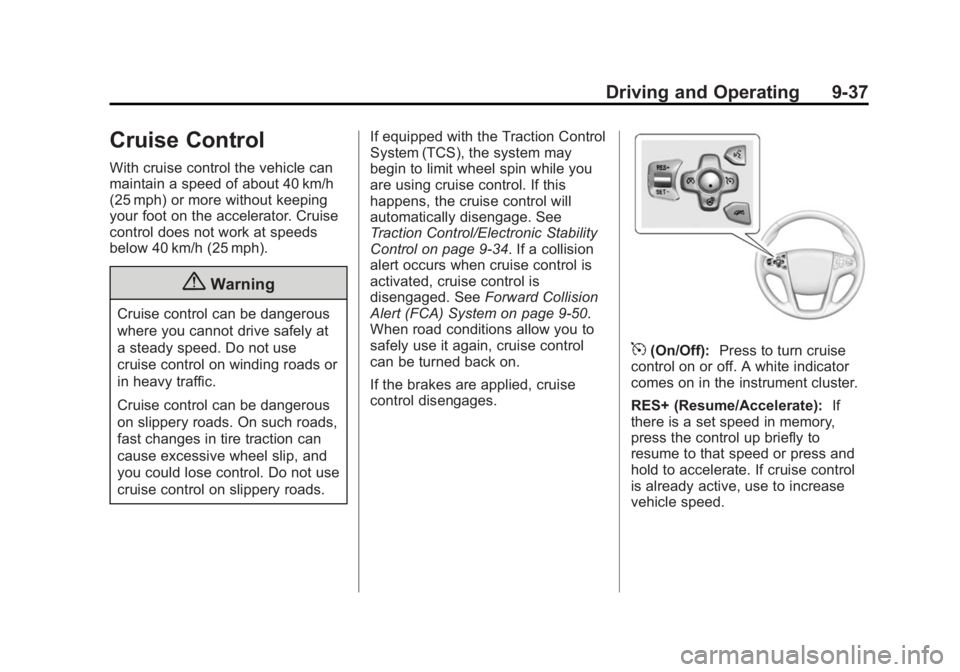
5(On/Off): Press to turn cruise
control on or off. A white indicator
comes on in the instrument cluster.
RES+ (Resume/Accelerate): If
there is a set speed in memory,
press the control up briefly to
resume to that speed or press and
hold to accelerate. If cruise control
is already active, use to increase
vehicle speed.
Page 225 of 407
Black plate (40,1)Buick LaCrosse Owner Manual (GMNA-Localizing-U.S./Canada/Mexico-
7707475) - 2015 - CRC - 10/9/14
9-40 Driving and Operating
{Warning
ACC has limited braking ability
and may not have time to slow
the vehicle down enough to avoid
a collision with another vehicle
you are following. This can occur
when vehicles suddenly slow or
stop ahead, or enter your lane.
Also see“Alerting the Driver” in
this section. Complete attention is
always required while driving and
you should be ready to take
action and apply the brakes. See
Defensive Driving on page 9-3.
{Warning
Adaptive Cruise Control will not
detect or brake for children,
pedestrians, animals, or other
objects.
(Continued)
Warning (Continued)
Do not use Adaptive Cruise
Control when:
.On winding and hilly roads or
when the sensors are
blocked by snow, ice, or dirt.
The system may not detect a
vehicle ahead. Keep the
entire front of the vehicle
clean.
.Visibility is low, such as in
fog, rain, or snow conditions.
Adaptive Cruise Control
performance is limited under
these conditions.
.On slippery roads where fast
changes in tire traction can
cause excessive wheel slip.
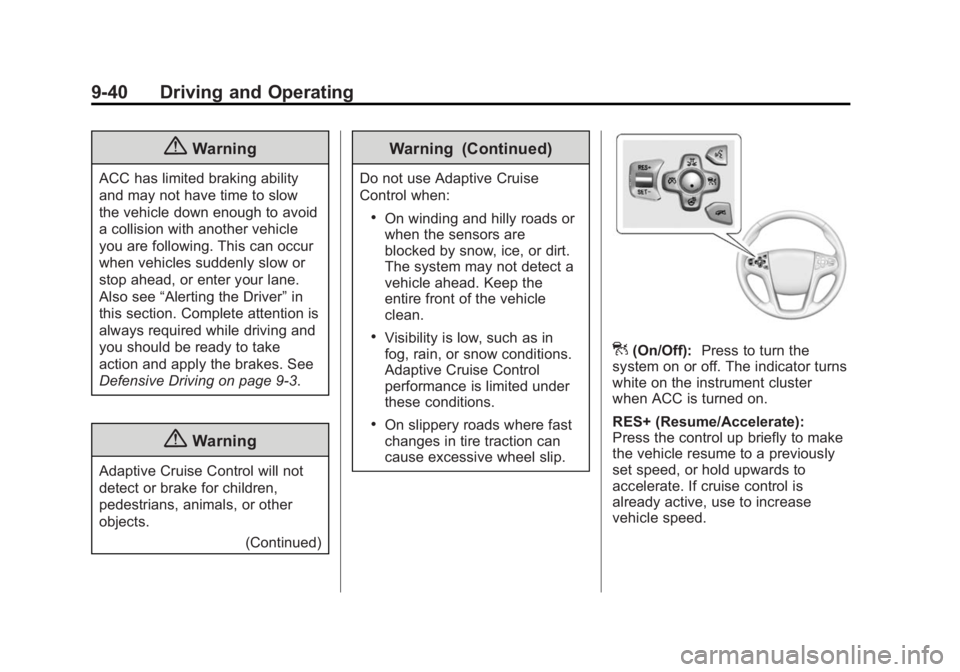
](On/Off):Press to turn the
system on or off. The indicator turns
white on the instrument cluster
when ACC is turned on.
RES+ (Resume/Accelerate):
Press the control up briefly to make
the vehicle resume to a previously
set speed, or hold upwards to
accelerate. If cruise control is
already active, use to increase
vehicle speed.
Page 227 of 407
Black plate (42,1)Buick LaCrosse Owner Manual (GMNA-Localizing-U.S./Canada/Mexico-
7707475) - 2015 - CRC - 10/9/14
9-42 Driving and Operating
When the accelerator pedal is
pressed, ACC will not brake
because it is overridden.
A warning message will appear
on the Driver Information Center
(DIC) and Head-Up Display
(HUD). SeeCruise Control
Messages on page 5-36.
.Press and hold RES+ up until
the desired set speed appears
on the display, then release it.
.To increase vehicle speed in
small increments, briefly press
RES+. For each press, the
vehicle increase to the next
5 km/h (1 mph) mark on the
speedometer.
When it is determined that there is
no vehicle ahead or the vehicle
ahead is beyond the selected
following gap, then the vehicle
speed will increase to the set speed.
The speedometer reading can be
displayed in either English or metric
units. See Instrument Cluster on
page 5-8. The increment value used
depends on the units displayed. Reducing Speed While ACC is at a
Set Speed
If ACC is already activated, do one
of the following:
.Use the brake to get to the
desired lower speed. Press
SET–
down and release the
accelerator pedal. The vehicle
will now cruise at the lower
speed.
.Press and hold SET– down until
the desired lower speed is
reached, then release it.
.To decrease the vehicle speed in
smaller increments, press SET−
down briefly. For each press, the
vehicle speed decreases to the
next 5 km/h (1 mph) mark on the
speedometer.
The speedometer reading can be
displayed in either English or metric
units. See Instrument Cluster on
page 5-8. The increment value used
depends on the units displayed. Selecting the Follow Distance Gap
When a slower moving vehicle is
detected ahead within the selected
following gap, ACC will adjust the
vehicle's speed and attempt to
maintain the follow distance gap
selected.
Press
3on the steering wheel to
adjust the following gap. Each press
cycles the gap button through three
settings: Far, Medium, or Near.
When pressed, the current gap
setting displays briefly on the
instrument cluster and HUD. The
gap setting will be maintained until it
is changed.
Since each gap setting corresponds
to a following time (Far, Medium,
or Near), the following distance will
vary based on vehicle speed. The
faster the vehicle speed, the further
back your vehicle will follow a
vehicle detected ahead. Consider
traffic and weather conditions when
selecting the following gap. The