radio controls BUICK LACROSSE 2015 Owner's Manual
[x] Cancel search | Manufacturer: BUICK, Model Year: 2015, Model line: LACROSSE, Model: BUICK LACROSSE 2015Pages: 407, PDF Size: 4.89 MB
Page 22 of 407
Black plate (15,1)Buick LaCrosse Owner Manual (GMNA-Localizing-U.S./Canada/Mexico-
7707475) - 2015 - CRC - 10/9/14
In Brief 1-15
Vehicle Features
Infotainment System
See the infotainment manual for
information on the radio, audio
players, phone, navigation system,
Rear Seat Entertainment (RSE),
and voice or speech recognition.
It also includes information on
settings.
Steering Wheel Controls
The infotainment system can be
operated by using the steering
wheel controls. See "Steering
Wheel Controls" in the infotainment
manual.
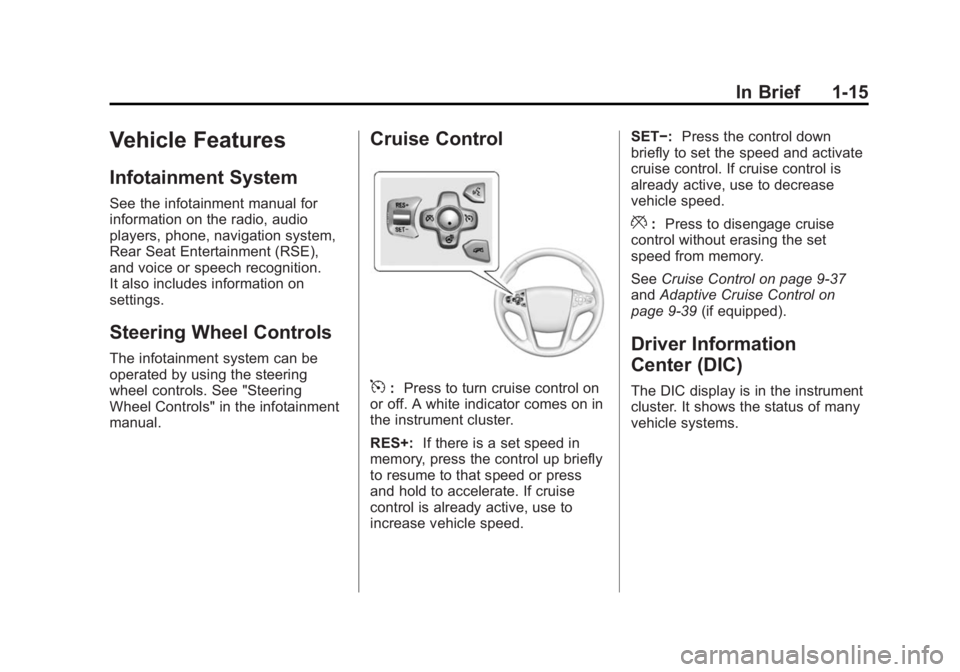
Cruise Control
5:Press to turn cruise control on
or off. A white indicator comes on in
the instrument cluster.
RES+: If there is a set speed in
memory, press the control up briefly
to resume to that speed or press
and hold to accelerate. If cruise
control is already active, use to
increase vehicle speed. SET−:
Press the control down
briefly to set the speed and activate
cruise control. If cruise control is
already active, use to decrease
vehicle speed.
*: Press to disengage cruise
control without erasing the set
speed from memory.
See Cruise Control on page 9-37
and Adaptive Cruise Control on
page 9-39 (if equipped).
Driver Information
Center (DIC)
The DIC display is in the instrument
cluster. It shows the status of many
vehicle systems.
Page 129 of 407
Black plate (16,1)Buick LaCrosse Owner Manual (GMNA-Localizing-U.S./Canada/Mexico-
7707475) - 2015 - CRC - 10/9/14
5-16 Instruments and Controls
If, after several seconds, both status
indicator lights remain on, or if there
are no lights at all, there may be a
problem with the lights or the
passenger sensing system. See
your dealer for service.
{Warning
If the airbag readiness light ever
comes on and stays on, it means
that something may be wrong
with the airbag system. To help
avoid injury to yourself or others,
have the vehicle serviced right
away. SeeAirbag Readiness
Light on page 5-14 for more
information, including important
safety information.
Charging System Light
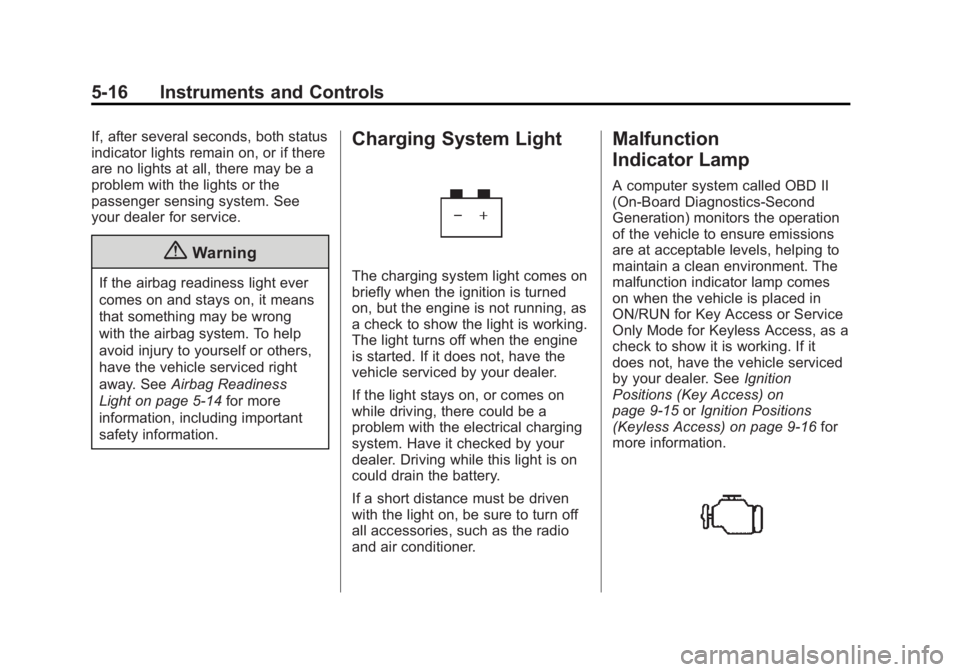
The charging system light comes on
briefly when the ignition is turned
on, but the engine is not running, as
a check to show the light is working.
The light turns off when the engine
is started. If it does not, have the
vehicle serviced by your dealer.
If the light stays on, or comes on
while driving, there could be a
problem with the electrical charging
system. Have it checked by your
dealer. Driving while this light is on
could drain the battery.
If a short distance must be driven
with the light on, be sure to turn off
all accessories, such as the radio
and air conditioner.
Malfunction
Indicator Lamp
A computer system called OBD II
(On-Board Diagnostics-Second
Generation) monitors the operation
of the vehicle to ensure emissions
are at acceptable levels, helping to
maintain a clean environment. The
malfunction indicator lamp comes
on when the vehicle is placed in
ON/RUN for Key Access or Service
Only Mode for Keyless Access, as a
check to show it is working. If it
does not, have the vehicle serviced
by your dealer. See Ignition
Positions (Key Access) on
page 9-15 orIgnition Positions
(Keyless Access) on page 9-16 for
more information.
Page 145 of 407
Black plate (32,1)Buick LaCrosse Owner Manual (GMNA-Localizing-U.S./Canada/Mexico-
7707475) - 2015 - CRC - 10/9/14
5-32 Instruments and Controls
The HUD information can be
displayed in various languages. The
speedometer reading and other
numerical values can be displayed
in either English or metric units.
The language selection is changed
through the radio and the units of
measurement is changed through
the instrument cluster. SeeVehicle
Personalization on page 5-45 and
“Settings” underInstrument Cluster
on page 5-8.
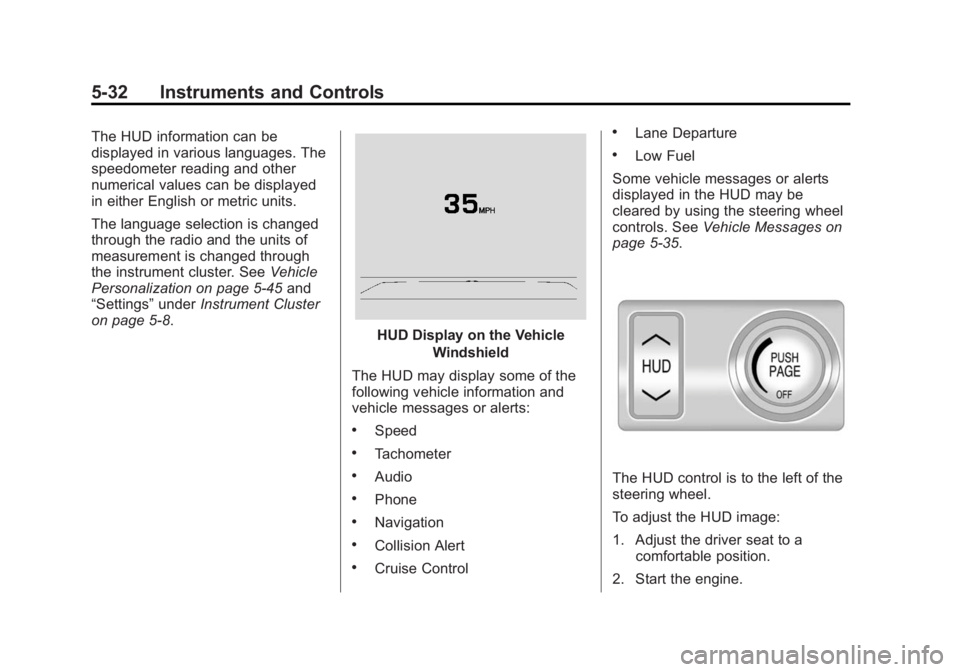
HUD Display on the Vehicle
Windshield
The HUD may display some of the
following vehicle information and
vehicle messages or alerts:
.Speed
.Tachometer
.Audio
.Phone
.Navigation
.Collision Alert
.Cruise Control
.Lane Departure
.Low Fuel
Some vehicle messages or alerts
displayed in the HUD may be
cleared by using the steering wheel
controls. See Vehicle Messages on
page 5-35.
The HUD control is to the left of the
steering wheel.
To adjust the HUD image:
1. Adjust the driver seat to a
comfortable position.
2. Start the engine.
Page 147 of 407
Black plate (34,1)Buick LaCrosse Owner Manual (GMNA-Localizing-U.S./Canada/Mexico-
7707475) - 2015 - CRC - 10/9/14
5-34 Instruments and Controls
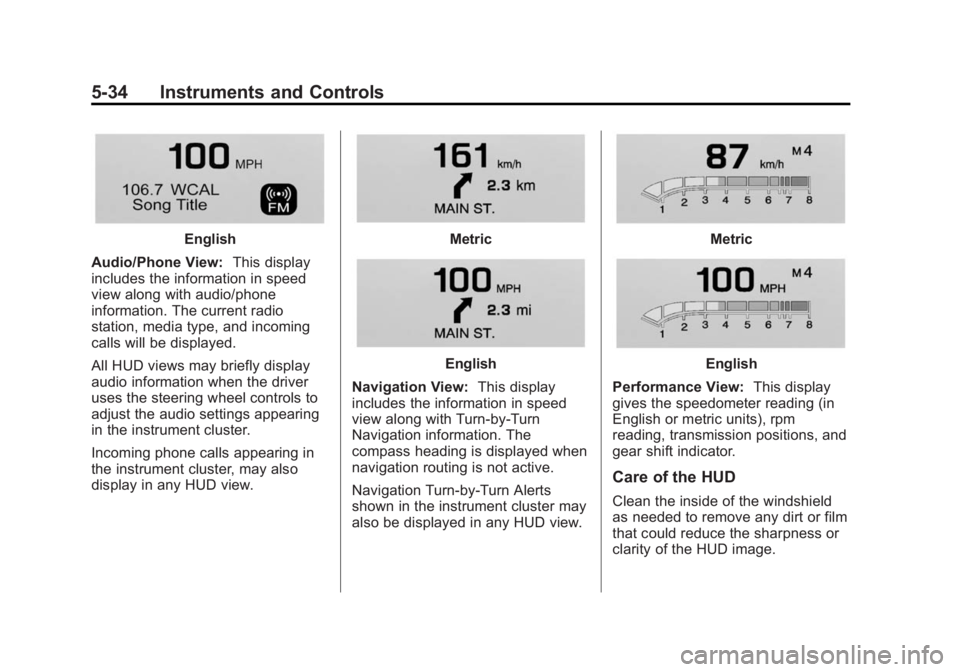
English
Audio/Phone View: This display
includes the information in speed
view along with audio/phone
information. The current radio
station, media type, and incoming
calls will be displayed.
All HUD views may briefly display
audio information when the driver
uses the steering wheel controls to
adjust the audio settings appearing
in the instrument cluster.
Incoming phone calls appearing in
the instrument cluster, may also
display in any HUD view.Metric
English
Navigation View: This display
includes the information in speed
view along with Turn-by-Turn
Navigation information. The
compass heading is displayed when
navigation routing is not active.
Navigation Turn-by-Turn Alerts
shown in the instrument cluster may
also be displayed in any HUD view.
Metric
English
Performance View: This display
gives the speedometer reading (in
English or metric units), rpm
reading, transmission positions, and
gear shift indicator.
Care of the HUD
Clean the inside of the windshield
as needed to remove any dirt or film
that could reduce the sharpness or
clarity of the HUD image.
Page 158 of 407
Black plate (45,1)Buick LaCrosse Owner Manual (GMNA-Localizing-U.S./Canada/Mexico-
7707475) - 2015 - CRC - 10/9/14
Instruments and Controls 5-45
Vehicle
Personalization
Use the audio system controls to
access the personalization menus
for customizing vehicle features.
The following are all possible
personalization features. Depending
on the vehicle, some may not be
available.
To access the personalization
menus:
1. Press SETTINGS on the Homepage on the infotainment system
display.
2. Press the desired feature to display a list of available
options.
3. Press the desired option.
4. Press to select the desired option setting.
5. Press
qBACK to return to the
previous menu.
Personalization Menus
The following list of features may be
available:
.Time and Date
.Language (Language)
.Valet Mode
.Radio
.Vehicle
.Bluetooth
.Voice
.Display
.Rear Camera
.Return to Factory Settings
.Software Information
Each menu is detailed in the
following information.
Time and Date
Manually set the time and date. See
Clock on page 5-4.
Language (Language)
Select Language, then select from
the available language(s).
Valet Mode
To turn Valet Mode on and off, see
“Valet Mode” under“Setting Radio
Preferences” in the infotainment
manual.
Radio
To manage the radio features, see
“Radio Setup” under“Setting Radio
Preferences” in the infotainment
manual.
Vehicle
Select and the following may be
displayed:
.Climate and Air Quality
.Collision/Detection Systems
.Comfort and Convenience
.Lighting
.Power Door Locks
.Remote Lock, Unlock, Start
Page 163 of 407
Black plate (50,1)Buick LaCrosse Owner Manual (GMNA-Localizing-U.S./Canada/Mexico-
7707475) - 2015 - CRC - 10/9/14
5-50 Instruments and Controls
Display
Select and the following may be
displayed:
.Theme
.Calibrate Touchscreen
.Turn Display Off
Theme
Select to change the color, font, and
art of the display.
Select Contemporary, Mainstreet,
Edge, or Velocity.
Calibrate Touchscreen
Select to calibrate the touchscreen,
then follow the prompts.
Turn Display Off
Select to turn the display off. Press
anywhere on the display area or any
faceplate button to turn the
display on.
Rear Camera
Select and the following may be
displayed:
.Guidance Lines
.Rear Park Assist Symbols
Guidance Lines
Select to turn Off or On. See
Assistance Systems for Parking or
Backing on page 9-48.
Rear Park Assist Symbols
Select to turn Off or On. See
Assistance Systems for Parking or
Backing on page 9-48.
Return to Factory Settings
Select and the following may be
displayed:
.Restore Vehicle Settings
.Clear All Private Data
.Restore Radio Settings Restore Vehicle Settings
This allows selection of restoring
vehicle settings.
Select Cancel or Restore.
Clear All Private Data
This allows selection to clear all
private information from the vehicle.
Select Cancel or Delete.
Restore Radio Settings
This allows selection to restore
radio settings.
Select Cancel or Restore.
Software Information
Select to view the infotainment
system current software information.
Page 164 of 407
Black plate (51,1)Buick LaCrosse Owner Manual (GMNA-Localizing-U.S./Canada/Mexico-
7707475) - 2015 - CRC - 10/9/14
Instruments and Controls 5-51
Universal Remote
System
SeeRadio Frequency Statement on
page 13-12.
Universal Remote System
Programming
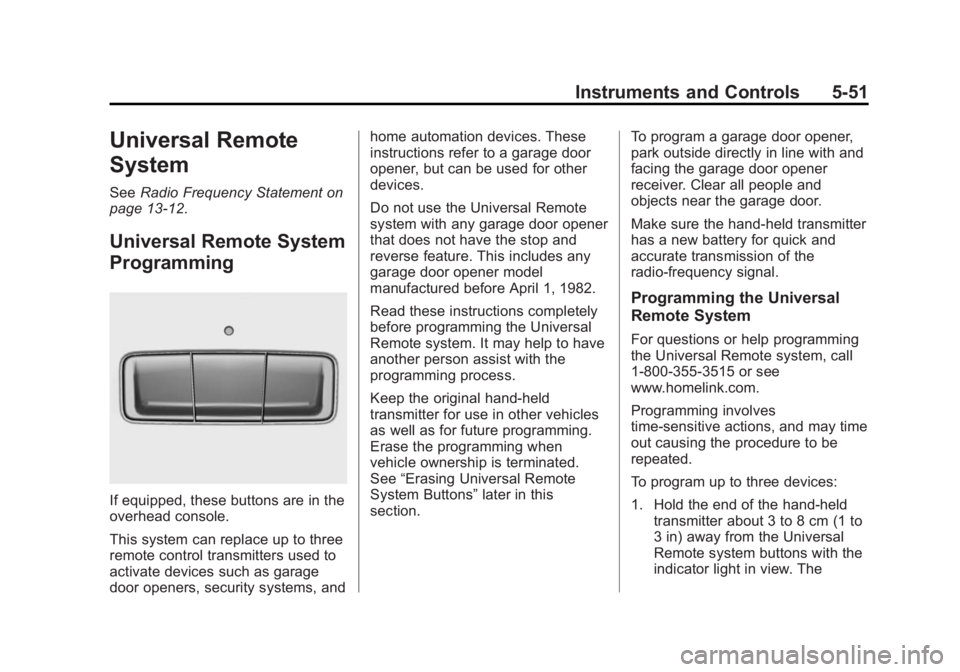
If equipped, these buttons are in the
overhead console.
This system can replace up to three
remote control transmitters used to
activate devices such as garage
door openers, security systems, and home automation devices. These
instructions refer to a garage door
opener, but can be used for other
devices.
Do not use the Universal Remote
system with any garage door opener
that does not have the stop and
reverse feature. This includes any
garage door opener model
manufactured before April 1, 1982.
Read these instructions completely
before programming the Universal
Remote system. It may help to have
another person assist with the
programming process.
Keep the original hand-held
transmitter for use in other vehicles
as well as for future programming.
Erase the programming when
vehicle ownership is terminated.
See
“Erasing Universal Remote
System Buttons” later in this
section. To program a garage door opener,
park outside directly in line with and
facing the garage door opener
receiver. Clear all people and
objects near the garage door.
Make sure the hand-held transmitter
has a new battery for quick and
accurate transmission of the
radio-frequency signal.
Programming the Universal
Remote System
For questions or help programming
the Universal Remote system, call
1-800-355-3515 or see
www.homelink.com.
Programming involves
time-sensitive actions, and may time
out causing the procedure to be
repeated.
To program up to three devices:
1. Hold the end of the hand-held
transmitter about 3 to 8 cm (1 to
3 in) away from the Universal
Remote system buttons with the
indicator light in view. The
Page 165 of 407
Black plate (52,1)Buick LaCrosse Owner Manual (GMNA-Localizing-U.S./Canada/Mexico-
7707475) - 2015 - CRC - 10/9/14
5-52 Instruments and Controls
hand-held transmitter was
supplied by the manufacturer of
the garage door opener receiver.
2. At the same time, press and hold both the hand-held
transmitter button and one of the
three Universal Remote system
buttons to be used to operate
the garage door. Do not release
either button until the indicator
light changes from a slow to a
rapid flash. Then release both
buttons.
Some garage door openers may
require substitution of Step 2
with the procedure under in
“Radio Signals for Canada and
Some Gate Operators” later in
this section.
3. Press and hold the newly programmed Universal Remote
system button for five seconds
while watching the indicator light
and garage door activation.
.If the indicator light stays on
continuously or the garage
door moves when the button is pressed, then
programming is complete.
There is no need to
complete Steps 4–6.
.If the indicator light does
not come on or the garage
door does not move, a
second button press may
be required. For a second
time, press and hold the
newly programmed button
for five seconds. If the light
stays on or the garage door
moves, programming is
complete.
.If the indicator light blinks
rapidly for two seconds,
then changes to a solid light
and the garage door does
not move, continue with
programming Steps 4–6.
Learn or Smart Button
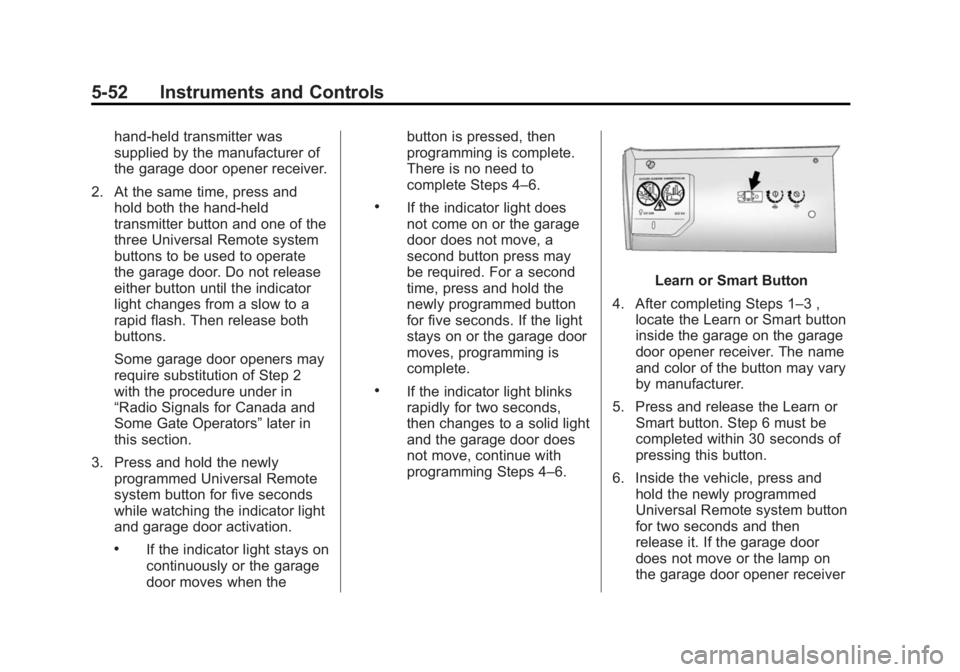
4. After completing Steps 1–3 , locate the Learn or Smart button
inside the garage on the garage
door opener receiver. The name
and color of the button may vary
by manufacturer.
5. Press and release the Learn or Smart button. Step 6 must be
completed within 30 seconds of
pressing this button.
6. Inside the vehicle, press and hold the newly programmed
Universal Remote system button
for two seconds and then
release it. If the garage door
does not move or the lamp on
the garage door opener receiver
Page 166 of 407
Black plate (53,1)Buick LaCrosse Owner Manual (GMNA-Localizing-U.S./Canada/Mexico-
7707475) - 2015 - CRC - 10/9/14
Instruments and Controls 5-53
does not flash, press and hold
the same button a second time
for two seconds, then release it.
Again, if the door does not move
or the garage door lamp does
not flash, press and hold the
same button a third time for
two seconds, then release it.
The Universal Remote system
should now activate the
garage door.
Repeat the process for
programming the two remaining
buttons.
Radio Signals for Canada and
Some Gate Operators
For questions or programming help
call 1-800-355-3515 or see
www.homelink.com.
Canadian radio-frequency laws and
some U.S. gate operators require
transmitter signals to time out or quit
after several seconds of
transmission. This may not be long enough for the Universal Remote
system to pick up the signal during
programming.
If the programming did not work,
replace Step 2 under
“Programming
the Universal Remote System” with
the following:
Press and hold the Universal
Remote system button while
pressing and releasing the
hand-held transmitter button every
two seconds until the signal has
been successfully accepted by the
Universal Remote system. The
Universal Remote system indicator
light will flash slowly at first and then
rapidly. Proceed with Step 3 under
“Programming the Universal Remote
System” to complete.
Universal Remote System
Operation
Using the Universal Remote
System
Press and hold the appropriate
Universal Remote system button for
at least one-half second. The
indicator light will come on while the
signal is being transmitted.
Erasing Universal Remote
System Buttons
Erase all programmed buttons when
vehicle ownership is terminated.
To erase:
1. Press and hold the two outside
buttons until the indicator light
begins to flash. This should take
about 10 seconds.
2. Release both buttons.
Page 182 of 407
Black plate (5,1)Buick LaCrosse Owner Manual (GMNA-Localizing-U.S./Canada/Mexico-
7707475) - 2015 - CRC - 10/9/14
Climate Controls 8-5
interior temperature is cold and the
outside temperature is about 4°C
(40°F) and below. The auto rear
defogger turns off automatically
after about 10 minutes, or after
five minutes if the outside
temperature is not as cold.
For eAssist vehicles, auto rear
defog will only run during a remote
start and the feature is not available
in the Vehicle Personalization menu.
If the vehicle is equipped with
heated outside rearview mirrors,
they turn on when the rear window
defogger button is on and help to
clear fog or frost from the surface of
the mirror. SeeHeated Mirrors on
page 2-19.
{Caution
Do not try to clear frost or other
material from the inside of the
front windshield and rear window
with a razor blade or anything
else that is sharp. This may
(Continued)
Caution (Continued)
damage the rear window
defogger grid and affect the
radio's ability to pick up stations
clearly. The repairs would not be
covered by the vehicle warranty.
Heated and Ventilated Front Seats
(If Equipped): Press
MorLto
heat the driver or passenger seat
cushion and seatback.
Press
Cor{, if equipped, to
ventilate the driver or passenger
seat. SeeHeated and Ventilated
Front Seats on page 3-9.
Remote Start Climate Control
Operation (If Equipped): If the
vehicle is equipped with the remote
start feature, the climate control
system may run when the vehicle is
started remotely. The system uses
the driver ’s previous settings to heat
or cool the inside of the vehicle. The rear defog may come on during
remote start based on cold ambient
conditions. If the vehicle has heated
or ventilated seats, they may come
on during a remote start. See
Remote Vehicle Start on page 2-9
and
Heated and Ventilated Front
Seats on page 3-9.
Sensor
The solar sensor, on top of the
instrument panel near the
windshield, monitors the solar heat.
The climate control system uses the
sensor information to adjust the
temperature, fan speed,
recirculation, and air delivery mode
for best comfort.
Do not cover the sensor; otherwise
the automatic climate control system
may not work properly.