park release BUICK LACROSSE 2017 Owner's Manual
[x] Cancel search | Manufacturer: BUICK, Model Year: 2017, Model line: LACROSSE, Model: BUICK LACROSSE 2017Pages: 346, PDF Size: 4.73 MB
Page 6 of 346
Buick LaCrosse Owner Manual (GMNA-Localizing-U.S./Canada-9803782) -
2017 - crc - 9/7/16
In Brief 5
In Brief
Instrument Panel
Instrument Panel . . . . . . . . . . . . . . . . 6
Initial Drive Information
Initial Drive Information . . . . . . . . . . 8
Stop/Start System . . . . . . . . . . . . . . . 8
Remote Keyless Entry (RKE)System . . . . . . . . . . . . . . . . . . . . . . . . 8
Remote Vehicle Start . . . . . . . . . . . 8
Door Locks . . . . . . . . . . . . . . . . . . . . . 9
Trunk Release . . . . . . . . . . . . . . . . . . 9
Windows . . . . . . . . . . . . . . . . . . . . . . . 10
Seat Adjustment . . . . . . . . . . . . . . . 10
Memory Features . . . . . . . . . . . . . . 11
Heated and Ventilated Seats . . . 12
Head Restraint Adjustment . . . . 12
Safety Belts . . . . . . . . . . . . . . . . . . . . 13
Passenger Sensing System . . . 13
Mirror Adjustment . . . . . . . . . . . . . . 13
Steering Wheel Adjustment . . . . 14
Interior Lighting . . . . . . . . . . . . . . . . 15
Exterior Lighting . . . . . . . . . . . . . . . 16
Windshield Wiper/Washer . . . . . . 16
Climate Controls . . . . . . . . . . . . . . . 17
Transmission . . . . . . . . . . . . . . . . . . 18
Vehicle Features
Infotainment System . . . . . . . . . . . 18
Steering Wheel Controls . . . . . . . 18
Cruise Control . . . . . . . . . . . . . . . . . 18
Driver Information Center (DIC) . . . . . . . . . . . . . . . . . 19
Forward Collision Alert (FCA) System . . . . . . . . . . . . . . . . . . . . . . . 19
Forward Automatic Braking (FAB) . . . . . . . . . . . . . . . . 19
Front Pedestrian Braking (FPB) System . . . . . . . . . . . . . . . . . . . . . . . 19
Lane Keep Assist (LKA) . . . . . . . 20
Lane Change Alert (LCA) . . . . . . 20
Rear Vision Camera (RVC) . . . . 20
Rear Cross Traffic Alert (RCTA) System . . . . . . . . . . . . . . . . . . . . . . . 20
Parking Assist . . . . . . . . . . . . . . . . . 20
Automatic Parking Assist (APA) . . . . . . . . . . . . . . . . . . 21
Power Outlets . . . . . . . . . . . . . . . . . 21
Universal Remote System . . . . . 21
Sunroof . . . . . . . . . . . . . . . . . . . . . . . . 22
Performance and Maintenance
Traction Control/Electronic Stability Control . . . . . . . . . . . . . . 23
Tire Pressure Monitor . . . . . . . . . . 23
Fuel . . . . . . . . . . . . . . . . . . . . . . . . . . . 23
E85 or FlexFuel . . . . . . . . . . . . . . . . 24
Engine Oil Life System . . . . . . . . 24
Driving for Better Fuel Economy . . . . . . . . . . . . . . . . . . . . . 24
Roadside Assistance Program . . . . . . . . . . . . . . . . . . . . . . 25
Page 8 of 346

Buick LaCrosse Owner Manual (GMNA-Localizing-U.S./Canada-9803782) -
2017 - crc - 9/7/16
In Brief 7
1.Air Vents 0160.
2. Exterior Lamp Controls 0148.
Fog Lamps 0151.
Instrument Panel Illumination
Control 0152.
3. Turn and Lane-Change Signals
0151.
4. Tap Shift Controls (If Equipped). See Manual Mode
0 185.
5. Instrument Cluster 0108.
Driver Information Center (DIC)
Display. See Driver Information
Center (DIC) 0122.
6. Windshield Wiper/Washer
0102.
7. Hazard Warning Flashers
0150.
8. Light Sensor. See Automatic
Headlamp System 0149.
9. Infotainment 0155.
10. Dual Automatic Climate Control
System 0156.
11. Traction Control/Electronic
Stability Control 0190. Parking Assist Button. See
Driver Assistance Systems
0
202.
SPORT Button (If Equipped).
See Selective Ride Control
0 192.
Lane Keep Assist (LKA) 0215
(If Equipped).
Automatic Parking Assist
Button (If Equipped). See
Driver Assistance Systems
0 202.
12. Shift Lever. See Automatic
Transmission 0181.
13. ENGINE START/STOP Button (Out of View). See Ignition
Positions 0173.
14. Steering Wheel Controls. See the infotainment manual.
Driver Information Center (DIC)
Controls. See Driver
Information Center (DIC) 0122.
15. Horn 0102.
16. Steering Wheel Adjustment
0101 (Out of View). 17.
Cruise Control 0192 (If
Equipped).
Adaptive Cruise Control 0194
(If Equipped).
Forward Collision Alert (FCA)
System 0207 (If Equipped).
Heated Steering Wheel 0102
(If Equipped).
18. Head-Up Display (HUD) 0125
(If Equipped).
19. Hood Release (Out of View). SeeHood 0229.
20. Front Storage.
21. Data Link Connector (DLC) (Out of View). See Malfunction
Indicator Lamp (Check Engine
Light) 0114.
22. Electric Parking Brake 0187.
Page 9 of 346
Buick LaCrosse Owner Manual (GMNA-Localizing-U.S./Canada-9803782) -
2017 - crc - 9/7/16
8 In Brief
Initial Drive
Information
This section provides a brief
overview about some of the
important features that may or may
not be on your specific vehicle.
For more detailed information, refer
to each of the features which can be
found later in this owner’s manual.
Stop/Start System
The vehicle may be equipped with a
fuel saving stop/start system to shut
off the engine and help
conserve fuel.
When the brakes are applied and
the vehicle is at a complete stop,
the engine may turn off. When the
brake pedal is released or the
accelerator pedal is pushed, the
engine will restart.
SeeStarting the Engine 0175.
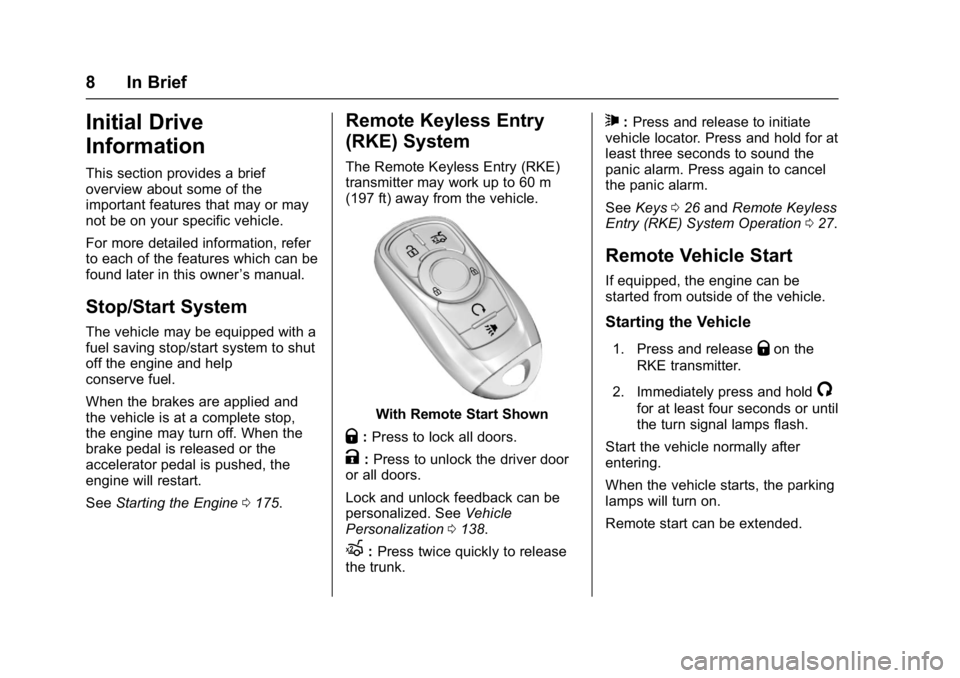
Remote Keyless Entry
(RKE) System
The Remote Keyless Entry (RKE)
transmitter may work up to 60 m
(197 ft) away from the vehicle.
With Remote Start Shown
Q:Press to lock all doors.
K:Press to unlock the driver door
or all doors.
Lock and unlock feedback can be
personalized. See Vehicle
Personalization 0138.
X:Press twice quickly to release
the trunk.
7: Press and release to initiate
vehicle locator. Press and hold for at
least three seconds to sound the
panic alarm. Press again to cancel
the panic alarm.
See Keys 026 and Remote Keyless
Entry (RKE) System Operation 027.
Remote Vehicle Start
If equipped, the engine can be
started from outside of the vehicle.
Starting the Vehicle
1. Press and releaseQon the
RKE transmitter.
2. Immediately press and hold
/
for at least four seconds or until
the turn signal lamps flash.
Start the vehicle normally after
entering.
When the vehicle starts, the parking
lamps will turn on.
Remote start can be extended.
Page 10 of 346
Buick LaCrosse Owner Manual (GMNA-Localizing-U.S./Canada-9803782) -
2017 - crc - 9/7/16
In Brief 9
Canceling a Remote Start
To cancel a remote start, do one of
the following:
.Press and hold
/until the
parking lamps turn off.
. Turn on the hazard warning
flashers.
. Turn the vehicle on and then off.
See Remote Vehicle Start 033.
Door Locks
To lock or unlock the doors:
.
From inside the vehicle, use the
power door lock controls. Pull
once on the door handle to
unlock it, and a second time to
open it.
. From outside, press
QorKon
the Remote Keyless Entry (RKE)
transmitter, or use the key in the
door. The key cylinder is
covered with a cap. See Remote
Keyless Entry (RKE) System
Operation 027.
See Door Locks 035.
Power Door Locks
The power door lock controls are on
the front door panels.
K:Press to unlock all doors.
Q: Press to lock all doors.
See Power Door Locks 036.
Keyless Access
The RKE transmitter must be within
1 m (3 ft) of the door being opened.
Press the button on the door handle
to open. See Keyless Access
Operation under Remote Keyless
Entry (RKE) System Operation 027.
Trunk Release
To open the trunk from outside the
vehicle, press
Xtwice quickly on
the Remote Keyless Entry (RKE)
transmitter.
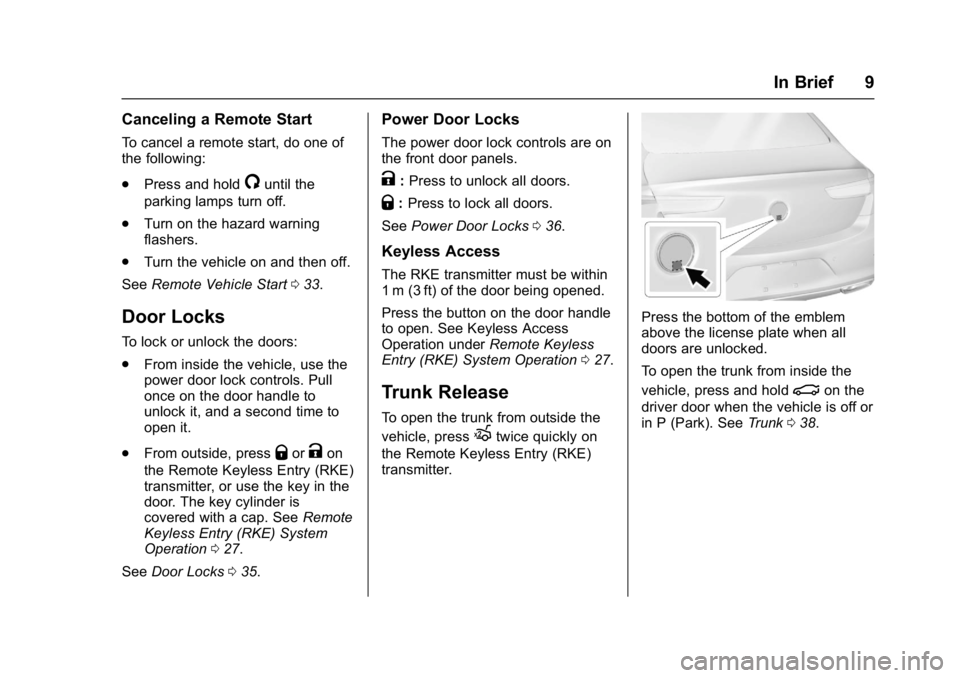
Press the bottom of the emblem
above the license plate when all
doors are unlocked.
To open the trunk from inside the
vehicle, press and hold
|on the
driver door when the vehicle is off or
in P (Park). See Trunk038.
Page 34 of 346
Buick LaCrosse Owner Manual (GMNA-Localizing-U.S./Canada-9803782) -
2017 - crc - 9/7/16
Keys, Doors, and Windows 33
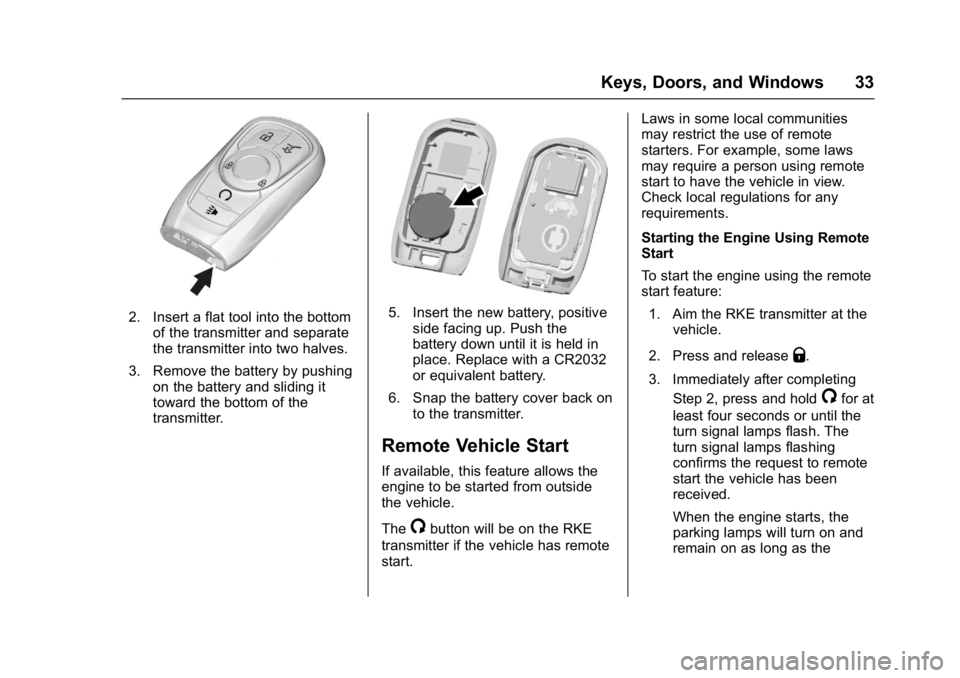
2. Insert a flat tool into the bottomof the transmitter and separate
the transmitter into two halves.
3. Remove the battery by pushing on the battery and sliding it
toward the bottom of the
transmitter.5. Insert the new battery, positiveside facing up. Push the
battery down until it is held in
place. Replace with a CR2032
or equivalent battery.
6. Snap the battery cover back on to the transmitter.
Remote Vehicle Start
If available, this feature allows the
engine to be started from outside
the vehicle.
The
/button will be on the RKE
transmitter if the vehicle has remote
start. Laws in some local communities
may restrict the use of remote
starters. For example, some laws
may require a person using remote
start to have the vehicle in view.
Check local regulations for any
requirements.
Starting the Engine Using Remote
Start
To start the engine using the remote
start feature:
1. Aim the RKE transmitter at the vehicle.
2. Press and release
Q.
3. Immediately after completing Step 2, press and hold
/for at
least four seconds or until the
turn signal lamps flash. The
turn signal lamps flashing
confirms the request to remote
start the vehicle has been
received.
When the engine starts, the
parking lamps will turn on and
remain on as long as the
Page 40 of 346
Buick LaCrosse Owner Manual (GMNA-Localizing-U.S./Canada-9803782) -
2017 - crc - 9/7/16
Keys, Doors, and Windows 39
Warning (Continued)
highest setting. See
“Climate Control Systems”
in the Index.
. If the vehicle has a power
liftgate, disable the power
liftgate function.
For more information about
carbon monoxide, see Engine
Exhaust 0180.
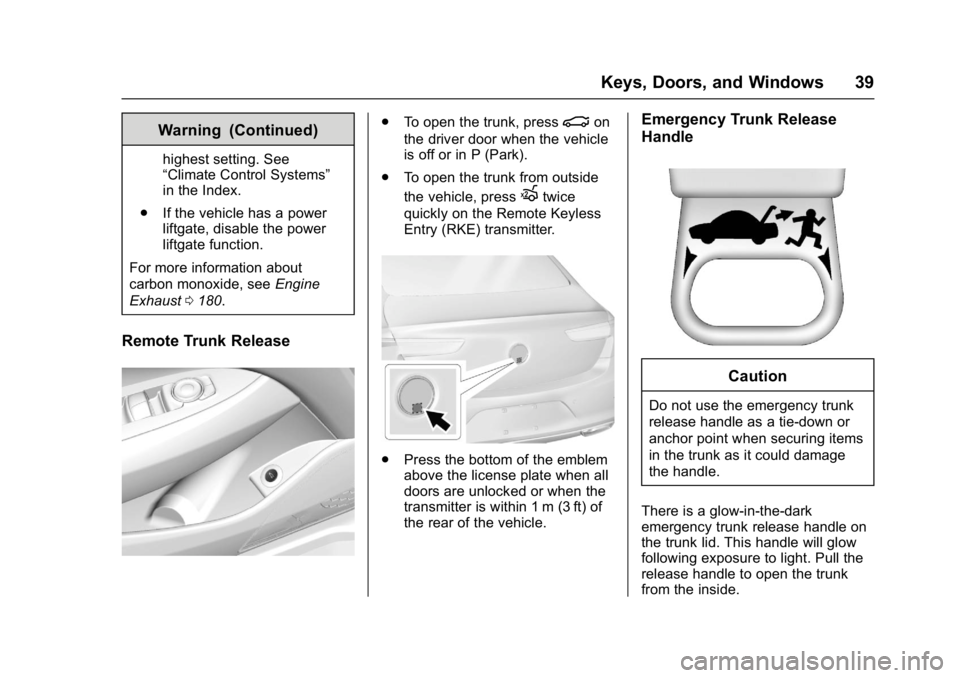
Remote Trunk Release
.
To open the trunk, press|on
the driver door when the vehicle
is off or in P (Park).
. To open the trunk from outside
the vehicle, press
Xtwice
quickly on the Remote Keyless
Entry (RKE) transmitter.
. Press the bottom of the emblem
above the license plate when all
doors are unlocked or when the
transmitter is within 1 m (3 ft) of
the rear of the vehicle.
Emergency Trunk Release
Handle
Caution
Do not use the emergency trunk
release handle as a tie-down or
anchor point when securing items
in the trunk as it could damage
the handle.
There is a glow-in-the-dark
emergency trunk release handle on
the trunk lid. This handle will glow
following exposure to light. Pull the
release handle to open the trunk
from the inside.
Page 118 of 346
Buick LaCrosse Owner Manual (GMNA-Localizing-U.S./Canada-9803782) -
2017 - crc - 9/7/16
Instruments and Controls 117
flashing after the parking brake is
released, or while driving, there is a
problem with the Electric Parking
Brake system. A message may also
display on the Driver Information
Center (DIC). SeeBrake System
Messages 0129.
If the light does not come on,
or remains flashing, see your dealer.
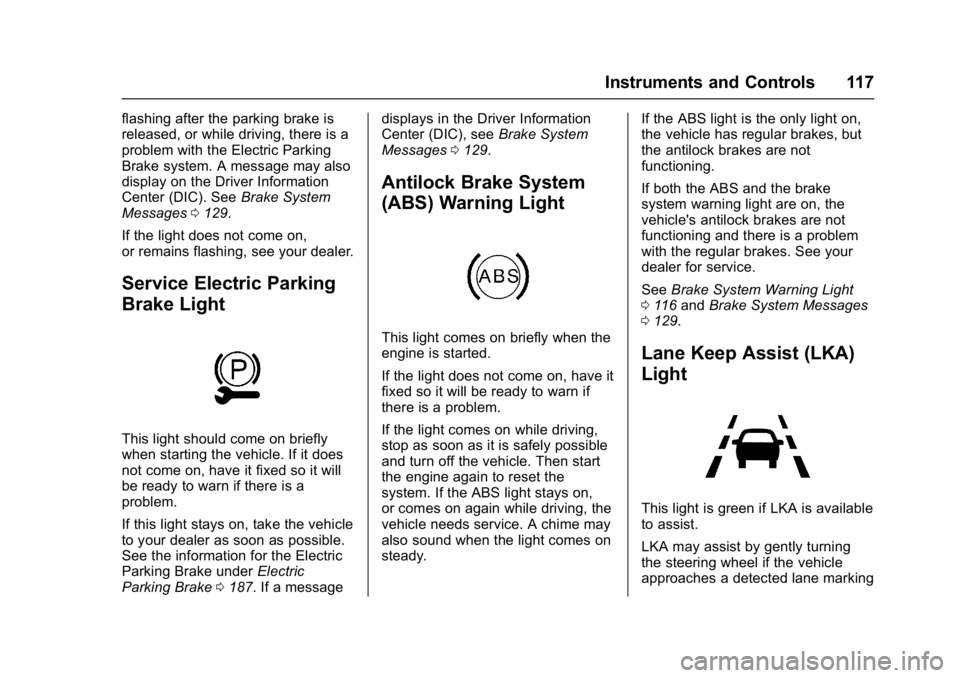
Service Electric Parking
Brake Light
This light should come on briefly
when starting the vehicle. If it does
not come on, have it fixed so it will
be ready to warn if there is a
problem.
If this light stays on, take the vehicle
to your dealer as soon as possible.
See the information for the Electric
Parking Brake under Electric
Parking Brake 0187. If a message displays in the Driver Information
Center (DIC), see
Brake System
Messages 0129.
Antilock Brake System
(ABS) Warning Light
This light comes on briefly when the
engine is started.
If the light does not come on, have it
fixed so it will be ready to warn if
there is a problem.
If the light comes on while driving,
stop as soon as it is safely possible
and turn off the vehicle. Then start
the engine again to reset the
system. If the ABS light stays on,
or comes on again while driving, the
vehicle needs service. A chime may
also sound when the light comes on
steady. If the ABS light is the only light on,
the vehicle has regular brakes, but
the antilock brakes are not
functioning.
If both the ABS and the brake
system warning light are on, the
vehicle's antilock brakes are not
functioning and there is a problem
with the regular brakes. See your
dealer for service.
See
Brake System Warning Light
0 116 and Brake System Messages
0 129.
Lane Keep Assist (LKA)
Light
This light is green if LKA is available
to assist.
LKA may assist by gently turning
the steering wheel if the vehicle
approaches a detected lane marking
Page 130 of 346
Buick LaCrosse Owner Manual (GMNA-Localizing-U.S./Canada-9803782) -
2017 - crc - 9/7/16
Instruments and Controls 129
Battery Voltage and
Charging Messages
BATTERY SAVER ACTIVE
This message displays when the
vehicle has detected that the battery
voltage is dropping beyond a
reasonable point. The battery saver
system starts reducing features of
the vehicle that may be noticed. At
the point that features are disabled,
this message displays. Turn off
unnecessary accessories to allow
the battery to recharge.
LOW BATTERY
This message is displayed when the
battery voltage is low. SeeBattery -
North America 0243.
SERVICE BATTERY
CHARGING SYSTEM
This message is displayed when
there is a fault in the battery
charging system. Take the vehicle to
your dealer for service.
Brake System Messages
BRAKE FLUID LOW
This message is displayed when the
brake fluid level is low. See Brake
Fluid 0242.
RELEASE PARK BRAKE
This message is displayed if the
Electric Parking Brake is on while
the vehicle is in motion. Release it
before attempting to drive. See
Electric Parking Brake 0187.
SERVICE BRAKE ASSIST
This message may be displayed
when there is a problem with the
brake boost assist system. When
this message is displayed, the brake
boost assist motor might be heard
operating and you might notice
pulsation in the brake pedal. This is
normal under these conditions. Take
the vehicle to your dealer for
service.
SERVICE PARKING BRAKE
This message is displayed when
there is a problem with the Electric
Parking Brake. See Electric Parking
Brake 0187. Take the vehicle to
your dealer.
STEP ON BRAKE TO
RELEASE PARK BRAKE
This message displays when
attempting to release the Electric
Parking Brake without the brake
pedal applied. See Electric Parking
Brake 0187.
Compass Messages
CAL
This message is displayed when the
compass needs to be calibrated.
See Compass 0103.
– –
Dashes will be displayed if the
compass needs service. See your
dealer for service.
Page 138 of 346
Buick LaCrosse Owner Manual (GMNA-Localizing-U.S./Canada-9803782) -
2017 - crc - 9/7/16
Instruments and Controls 137
shifted out of P (Park) soon. Have
the vehicle serviced as soon as
possible.
SERVICE SHIFTER SEE
OWNER’S MANUAL
The shift lever needs service. Have
the vehicle serviced as soon as
possible. If the vehicle is
automatically shifting into P (Park),
check to see if the P (Park) button
on top of the shifter is stuck. To
operate the vehicle, hold the shift
lever in the desired gear,
R (Reverse) or D (Drive), until
vehicle speed exceeds 15 km/h
(10 mph), then release the shift
lever.
SHIFT DENIED
This message displays when
attempting to shift to a gear not
appropriate for the vehicle speed
and engine revolutions per
minute (rpm).
SHIFT TO PARK
This message displays when the
transmission needs to be shifted to
P (Park). This may appear when
turning the ignition off if the vehicle
is not in P (Park).
TRANSMISSION HOT—IDLE
ENGINE
This message displays and a chime
sounds if the transmission fluid in
the vehicle gets hot. Driving with the
transmission fluid temperature high
can cause damage to the vehicle.
Stop the vehicle and let it idle to
allow the transmission to cool. This
message clears when the fluid
temperature reaches a safe level.
Vehicle Reminder
Messages
REAR SEAT REMINDER LOOK
IN REAR SEAT
This message displays under
certain conditions indicating there
may be an item or passenger in the
rear seat. Check before exiting the
vehicle.
Vehicle Speed Messages
SPEED LIMIT EXCEEDED
This message is displayed when the
vehicle speed is greater than the
speed warning speed. See "Speed
Warning" under Instrument Cluster
0 108.
SPEED LIMIT SET TO XXX
This message is displayed when the
speed warning is set. See "Speed
Warning" under Instrument Cluster
0 108.
Window Messages
OPEN, THEN CLOSE DRIVER/
PASSENGER WINDOW
This message is displayed when the
window needs to be reprogrammed.
If the vehicle's battery has been
discharged or disconnected, you
may need to program each front
window for the express-up feature to
work. See Power Windows 045.
Page 150 of 346
Buick LaCrosse Owner Manual (GMNA-Localizing-U.S./Canada-9803782) -
2017 - crc - 9/7/16
Lighting 149
5:Turns on the headlamps
together with the parking lamps and
instrument panel lights.
Exterior Lamps Off
Reminder
A warning chime sounds if the driver
door is opened while the ignition is
off and the exterior lamps are on.
Headlamp High/
Low-Beam Changer
Push the turn signal lever away
from you and release to turn the
high beams on. To return to low
beams, push the lever again or pull
it toward you and release.
This indicator light turns on in the
instrument cluster when the
high-beam headlamps are on.
Flash-to-Pass
To flash the high beams, pull the
turn signal lever toward you, and
release.
Daytime Running
Lamps (DRL)
DRL can make it easier for others to
see the front of your vehicle during
the day. Fully functional DRL are
required on all vehicles first sold in
Canada.
If equipped with High Intensity
Discharge (HID) headlamps, the
dedicated DRL will come on when
all of the following conditions
are met:
. The ignition is on.
. The exterior lamps control is
in AUTO.
. The light sensor determines it is
daytime.
. The parking brake is released or
the vehicle is not in P (Park). When the DRL are on, the taillamps,
sidemarker lamps, instrument panel
lights, and other lamps will not
be on.
The DRL turn off when the
headlamps are turned to
Oor the
ignition is off. For vehicles first sold
in Canada, the DRL can only be
turned off when the transmission is
in P (Park).
This vehicle may have a DRL
disabling function. When the DRL
are on and a turn signal is activated,
the DRL on that side will be off until
the turn signal goes off.
Automatic Headlamp
System
When the exterior lamp control is
set to AUTO and it is dark enough
outside, the headlamps come on
automatically.