clock BUICK LACROSSE 2018 Owner's Manual
[x] Cancel search | Manufacturer: BUICK, Model Year: 2018, Model line: LACROSSE, Model: BUICK LACROSSE 2018Pages: 362, PDF Size: 5.19 MB
Page 104 of 362
Buick LaCrosse Owner Manual (GMNA-Localizing-U.S./Canada-10999169) -
2018 - crc - 3/28/17
Instruments and Controls 103
Instruments and
Controls
Controls
Steering Wheel Adjustment . . . 104
Steering Wheel Controls . . . . . . 104
Heated Steering Wheel . . . . . . . 104
Horn . . . . . . . . . . . . . . . . . . . . . . . . . . 105
Windshield Wiper/Washer . . . . 105
Compass . . . . . . . . . . . . . . . . . . . . . 106
Clock . . . . . . . . . . . . . . . . . . . . . . . . . 106
Power Outlets . . . . . . . . . . . . . . . . 106
Wireless Charging . . . . . . . . . . . . 108
Warning Lights, Gauges, and
Indicators
Warning Lights, Gauges, andIndicators . . . . . . . . . . . . . . . . . . . 109
Instrument Cluster . . . . . . . . . . . . 110
Speedometer . . . . . . . . . . . . . . . . . 112
Odometer . . . . . . . . . . . . . . . . . . . . . 112
Tachometer . . . . . . . . . . . . . . . . . . . 112
Fuel Gauge . . . . . . . . . . . . . . . . . . . 113
Driver Efficiency Gauge (eAssist) . . . . . . . . . . . . . . . . . . . . 114
Engine Coolant Temperature Gauge . . . . . . . . . . . . . . . . . . . . . . 114
Seat Belt Reminders . . . . . . . . . . 115
Airbag Readiness Light . . . . . . . 115 Passenger Airbag Status
Indicator . . . . . . . . . . . . . . . . . . . . . 116
Charging System Light . . . . . . . 117
Malfunction Indicator Lamp (Check Engine Light) . . . . . . . . 117
Brake System Warning Light . . . . . . . . . . . . . . . . . . . . . . . . 119
Electric Parking Brake Light . . . . . . . . . . . . . . . . . . . . . . . . 119
Service Electric Parking Brake Light . . . . . . . . . . . . . . . . . . . . . . . . 120
Antilock Brake System (ABS) Warning Light . . . . . . . . . . . . . . . 120
Lane Keep Assist (LKA) Light . . . . . . . . . . . . . . . . . . . . . . . . 120
Vehicle Ahead Indicator . . . . . . 121
Traction Off Light . . . . . . . . . . . . . 121
StabiliTrak OFF Light . . . . . . . . . 121
Traction Control System (TCS)/ StabiliTrak Light . . . . . . . . . . . . . 122
Engine Coolant Temperature Warning Light . . . . . . . . . . . . . . . 122
Tire Pressure Light . . . . . . . . . . . 122
Engine Oil Pressure Light . . . . 123
Low Fuel Warning Light . . . . . . 123
Security Light . . . . . . . . . . . . . . . . . 124
High-Beam On Light . . . . . . . . . . 124
Adaptive Forward Lighting (AFL) Light . . . . . . . . . . . . . . . . . . 124
Front Fog Lamp Light . . . . . . . . . 124
Lamps On Reminder . . . . . . . . . 124 Cruise Control Light . . . . . . . . . . 125
Door Ajar Light . . . . . . . . . . . . . . . 125
Information Displays
Power Flows (eAssist) . . . . . . . . 125
Energy Information
(eAssist) . . . . . . . . . . . . . . . . . . . . 126
Driver Information Center (DIC) . . . . . . . . . . . . . . . . 126
Head-Up Display (HUD) . . . . . . 129
Vehicle Messages
Vehicle Messages . . . . . . . . . . . . 132
Engine Power Messages . . . . . 132
Vehicle Speed Messages . . . . . 133
Vehicle Personalization
Vehicle Personalization . . . . . . . 133
Universal Remote System
Universal Remote System . . . . 140
Universal Remote System Programming . . . . . . . . . . . . . . . 140
Universal Remote System Operation . . . . . . . . . . . . . . . . . . . 142
Page 107 of 362
Buick LaCrosse Owner Manual (GMNA-Localizing-U.S./Canada-10999169) -
2018 - crc - 3/28/17
106 Instruments and Controls
If the windshield wiper lever is then
moved to OFF before the driver
door is opened or within 10 minutes,
the wipers will restart and move to
the base of the windshield.
If the ignition is turned off while the
wipers are performing wipes due to
windshield washing, the wipers
continue to run until they reach the
base of the windshield.
Compass
The vehicle may have a compass
display on the Driver Information
Center (DIC). The compass receives
its heading and other information
from the Global Positioning
System (GPS) antenna, StabiliTrak,
and vehicle speed information.
The compass system is designed to
operate for a certain number of
miles or degrees of turn before
needing a signal from the GPS
satellites. When the compass
display shows CAL, drive the
vehicle for a short distance in an
open area where it can receive a
GPS signal. The compass systemwill automatically determine when a
GPS signal is restored and provide
a heading again.
Clock
Setting the Time and Date
To set the time or date:
1. Select SETTINGS from the Home Page, then select Time
and Date.
2. Select the desired function.
To set the time or date, touch
«or
ªto change the hour, minutes,
AM, PM, day, month, or year.
To change the 12-24Hr setting,
touch 12-24Hr.
To turn clock display on and off,
touch Clock Display, then select Off
or On.
To turn Auto Set on and off, touch
Auto Set, then select Off or On.
If auto timing is set, the time
displayed on the clock may not
update immediately when driving
into a new time zone. Auto set requires an active OnStar
®
subscription.
Touch
[to go to the last menu and
save the changes or
{to return to
the Home Page.
Power Outlets
Power Outlets 12-Volt Direct
Current
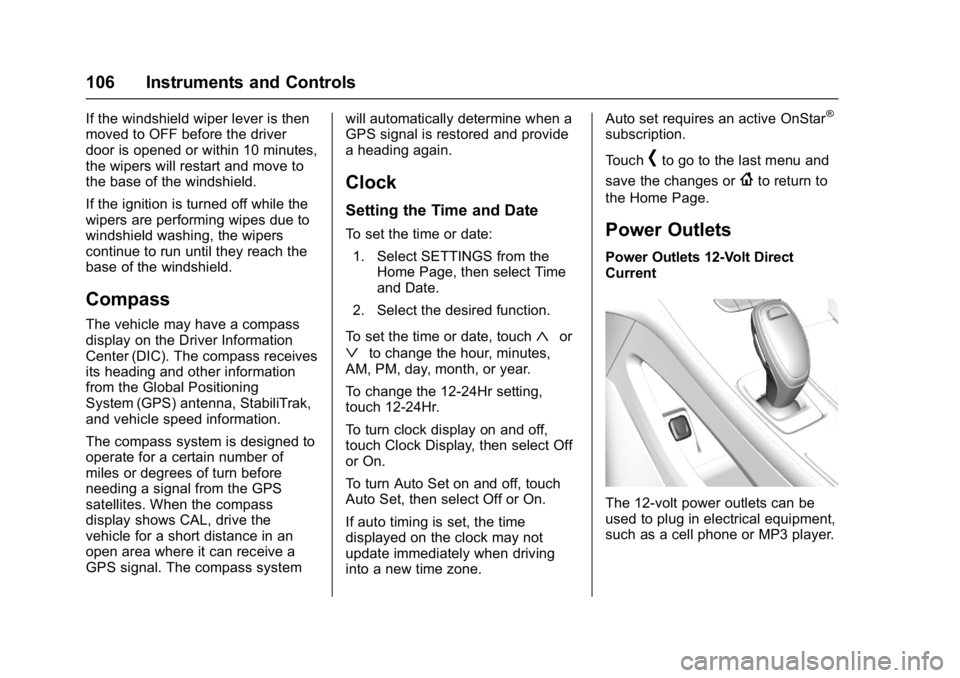
The 12-volt power outlets can be
used to plug in electrical equipment,
such as a cell phone or MP3 player.
Page 135 of 362
Buick LaCrosse Owner Manual (GMNA-Localizing-U.S./Canada-10999169) -
2018 - crc - 3/28/17
134 Instruments and Controls
Time and Date
Manually set the time and date. See
Clock0106.
Rear Seat Reminder
This allows for a chime and a
message when the rear door has
been opened before or during
operation of the vehicle.
Select Off or On.
Language
Select Language, then select from
the available language(s).
Valet Mode
To turn Valet Mode on and off, see
“Valet Mode” under“Setting Radio
Preferences” in the infotainment
manual.
Teen Driver
See “Teen Driver” under“Settings”
in the infotainment manual.
Radio
To manage the radio features, see
“Radio Setup” under“Setting Radio
Preferences” in the infotainment
manual.
Vehicle
Select and the following may be
displayed:
. Climate and Air Quality
. Collision/Detection Systems
. Comfort and Convenience
. Lighting
. Power Door Locks
. Remote Lock, Unlock, Start
Climate and Air Quality
Select and the following may be
displayed:
. Auto Fan Speed
. Air Quality Sensor
. Auto Defog
. Auto Rear Defog
. Ionizer Auto Fan Speed
This feature will set the auto fan
speed.
Select Low, Medium, or High.
Air Quality Sensor
This feature may operate the
recirculation mode automatically.
Select Off, Low Sensitivity, or High
Sensitivity.
Auto Defog
If equipped, the front defog will
automatically react to temperature
and humidity conditions that may
cause fogging.
Select Off or On.
Auto Rear Defog
This allows the Auto Rear Defog to
be turned on or off. This feature will
automatically turn on the rear
window defogger when it is cold
outside.
Select Off or On.
Page 149 of 362
Buick LaCrosse Owner Manual (GMNA-Localizing-U.S./Canada-10999169) -
2018 - crc - 3/28/17
148 Lighting
Interior Lighting
Instrument Panel
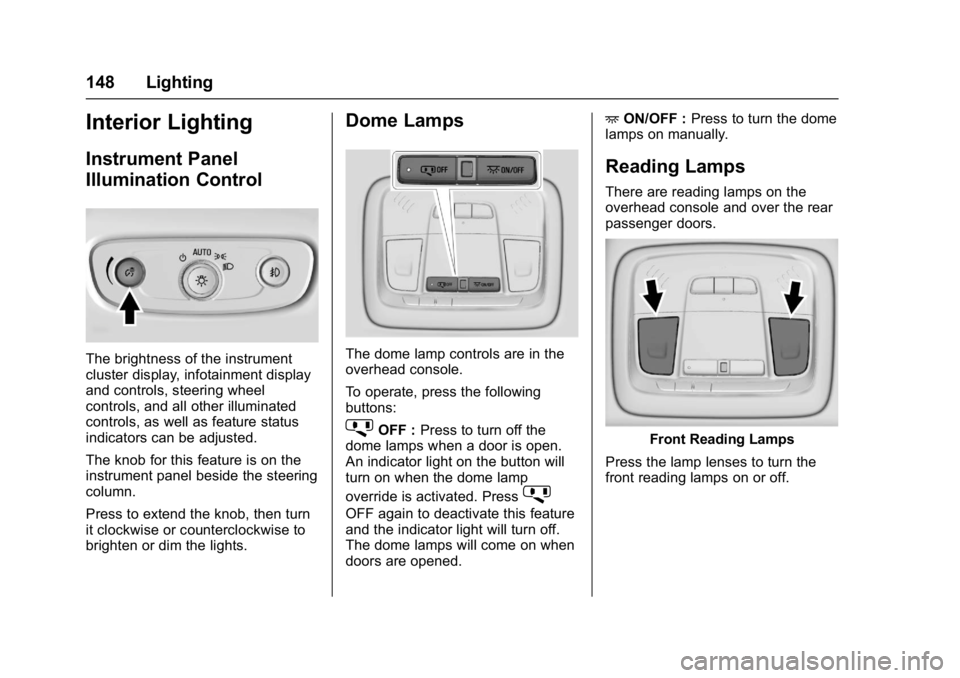
Illumination Control
The brightness of the instrument
cluster display, infotainment display
and controls, steering wheel
controls, and all other illuminated
controls, as well as feature status
indicators can be adjusted.
The knob for this feature is on the
instrument panel beside the steering
column.
Press to extend the knob, then turn
it clockwise or counterclockwise to
brighten or dim the lights.
Dome Lamps
The dome lamp controls are in the
overhead console.
To operate, press the following
buttons:
jOFF :Press to turn off the
dome lamps when a door is open.
An indicator light on the button will
turn on when the dome lamp
override is activated. Press
j
OFF again to deactivate this feature
and the indicator light will turn off.
The dome lamps will come on when
doors are opened. +
ON/OFF : Press to turn the dome
lamps on manually.
Reading Lamps
There are reading lamps on the
overhead console and over the rear
passenger doors.
Front Reading Lamps
Press the lamp lenses to turn the
front reading lamps on or off.
Page 155 of 362
Buick LaCrosse Owner Manual (GMNA-Localizing-U.S./Canada-10999169) -
2018 - crc - 3/28/17
154 Climate Controls
.Turn off the air conditioning
when it is not needed.
. Only use defrost to clear the
windows.
Automatic Operation
The system automatically controls
the fan speed, air delivery, air
conditioning, and recirculation in
order to heat or cool the vehicle to
the desired temperature.
When AUTO is lit, all four functions
operate automatically. Each function
can also be manually set and the
selected setting is displayed.
Functions not manually set will
continue to be automatically
controlled, even if the AUTO
indicator is not lit.
For automatic operation:
1. Press AUTO.
2. Set the temperature. Allow the system time to stabilize. Adjust
the temperature as needed for
best comfort.
To improve fuel efficiency and to
cool the vehicle faster with A/C on,
recirculation may be automatically selected in warm weather. Press
@to select recirculation; press it
again to select outside air.
Driver and Passenger
Temperature Controls : The
temperature can be adjusted
separately for the driver and the
passenger. Turn the knob clockwise
or counterclockwise to increase or
decrease the driver or passenger
temperature setting.
The driver and passenger
temperatures can also be adjusted
by touching the controls on the
climate control display.
Sync : Touch Sync on the climate
control display to link all passenger
settings to the driver settings. Adjust
the driver side temperature control
to change the linked temperature.
When the passenger settings are
adjusted, Sync is displayed when
the temperatures are unlinked.
Manual Operation
CLIMATE : Press CLIMATE to show
the climate control display.
ON/OFF : Press to turn the fan on
or off.
hi: Touch or press the fan controls
on the climate control display or
center stack to increase or decrease
the fan speed. The fan speed
setting displays. When the fan
speed is decreased completely, the
climate control system turns off.
It will turn back on if the fan speed
is increased.
Pressing either control cancels
automatic fan control and the fan is
controlled manually. Press AUTO to
return to automatic operation.
Air Delivery Mode Control : When
the climate information is displayed,
touch
6,Y, orXon the climate
control display to change the
direction of air flow. Any
combination of the three controls
can be selected. The selected air
delivery mode is lit. Pressing any
control cancels automatic air
delivery control and the direction of
the airflow is controlled manually.
Press AUTO to return to automatic
operation.
Page 243 of 362
Buick LaCrosse Owner Manual (GMNA-Localizing-U.S./Canada-10999169) -
2018 - crc - 3/28/17
242 Vehicle Care
The coolant surge tank is in the
engine compartment on the driver
side of the vehicle. SeeEngine
Compartment Overview 0231.
How to Add Coolant to the
Coolant Surge Tank
If no problem is found, check to see
if coolant is visible in the coolant
surge tank. If coolant is visible but
the coolant level is not at the
indicated level mark, add a 50/
50 mixture of clean, drinkable water
and DEX-COOL coolant at the
coolant surge tank, but be sure the
cooling system, including the
coolant surge tank pressure cap, is
cool before you do it.
{Warning
Steam and scalding liquids from a
hot cooling system are under
pressure. Turning the pressure
cap, even a little, can cause them
to come out at high speed and
you could be burned. Never turn
the cap when the cooling system,
(Continued)
Warning (Continued)
including the pressure cap, is hot.
Wait for the cooling system and
pressure cap to cool.
{Warning
Plain water, or other liquids such
as alcohol, can boil before the
proper coolant mixture will. With
plain water or the wrong mixture,
the engine could get too hot but
there would not be an overheat
warning. The engine could catch
fire and you or others could be
burned.
{Warning
Spilling coolant on hot engine
parts can burn you. Coolant
contains ethylene glycol and it will
burn if the engine parts are hot
enough.
Caution
Failure to follow the specific
coolant fill procedure could cause
the engine to overheat and could
cause system damage. If coolant
is not visible in the surge tank,
contact your dealer.
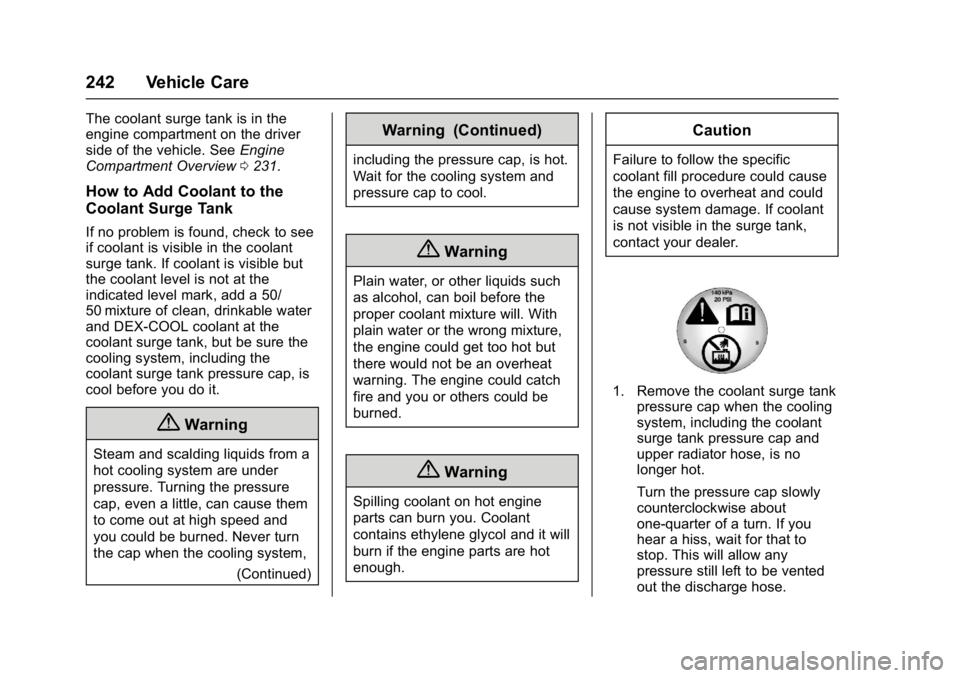
1. Remove the coolant surge tankpressure cap when the cooling
system, including the coolant
surge tank pressure cap and
upper radiator hose, is no
longer hot.
Turn the pressure cap slowly
counterclockwise about
one-quarter of a turn. If you
hear a hiss, wait for that to
stop. This will allow any
pressure still left to be vented
out the discharge hose.
Page 253 of 362
Buick LaCrosse Owner Manual (GMNA-Localizing-U.S./Canada-10999169) -
2018 - crc - 3/28/17
252 Vehicle Care
To replace one of these bulbs:1. Open the trunk. See Trunk
0 40.
2. Remove the fasteners to pull the trunk trim out.
3. Remove and retain the four nuts fastening the taillamp
assembly to the vehicle body.
4. Remove the taillamp assembly by pulling straight back.
5. Remove the bulb socket by turning it counterclockwise.
6. Remove the old bulb by pulling it straight out.
7. Reverse Steps 1–6 to install.License Plate Lamp
To replace one of these bulbs:
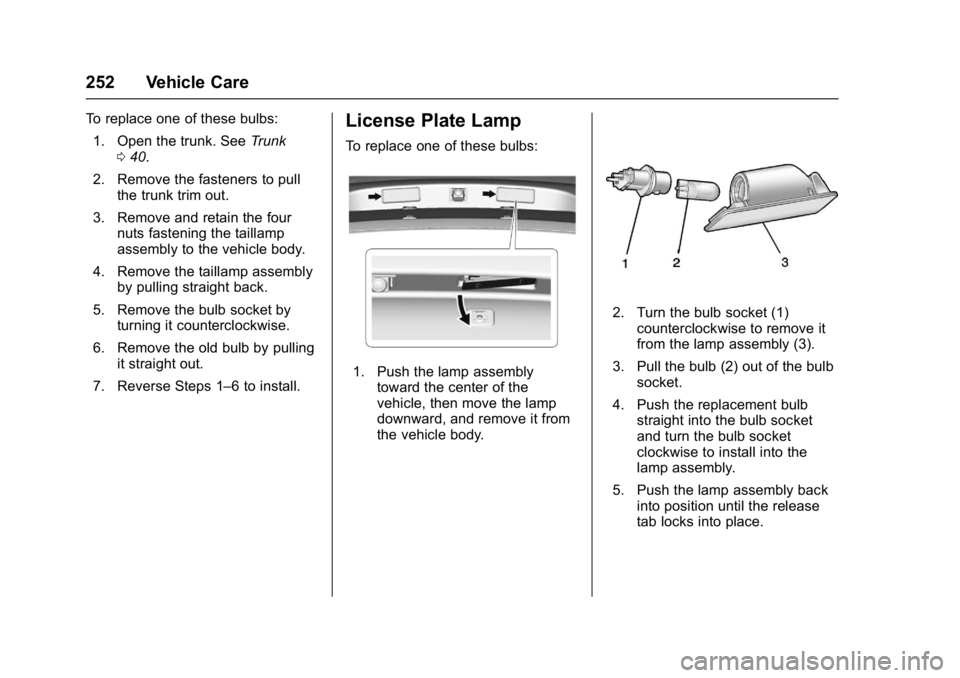
1. Push the lamp assembly toward the center of the
vehicle, then move the lamp
downward, and remove it from
the vehicle body.
2. Turn the bulb socket (1)counterclockwise to remove it
from the lamp assembly (3).
3. Pull the bulb (2) out of the bulb socket.
4. Push the replacement bulb straight into the bulb socket
and turn the bulb socket
clockwise to install into the
lamp assembly.
5. Push the lamp assembly back into position until the release
tab locks into place.
Page 283 of 362
Buick LaCrosse Owner Manual (GMNA-Localizing-U.S./Canada-10999169) -
2018 - crc - 3/28/17
282 Vehicle Care
Using the Tire Sealant and
Compressor Kit to Temporarily
Seal and Inflate a
Punctured Tire
When using the tire sealant and
compressor kit during cold
temperatures, warm the kit in a
heated environment for five minutes.
This will help to inflate the tire
faster.
If a tire goes flat, avoid further tire
and wheel damage by driving slowly
to a level place. Turn on the hazard
warning flashers. SeeHazard
Warning Flashers 0146.
See If a Tire Goes Flat 0279 for
other important safety warnings.
Do not remove any objects that
have penetrated the tire.
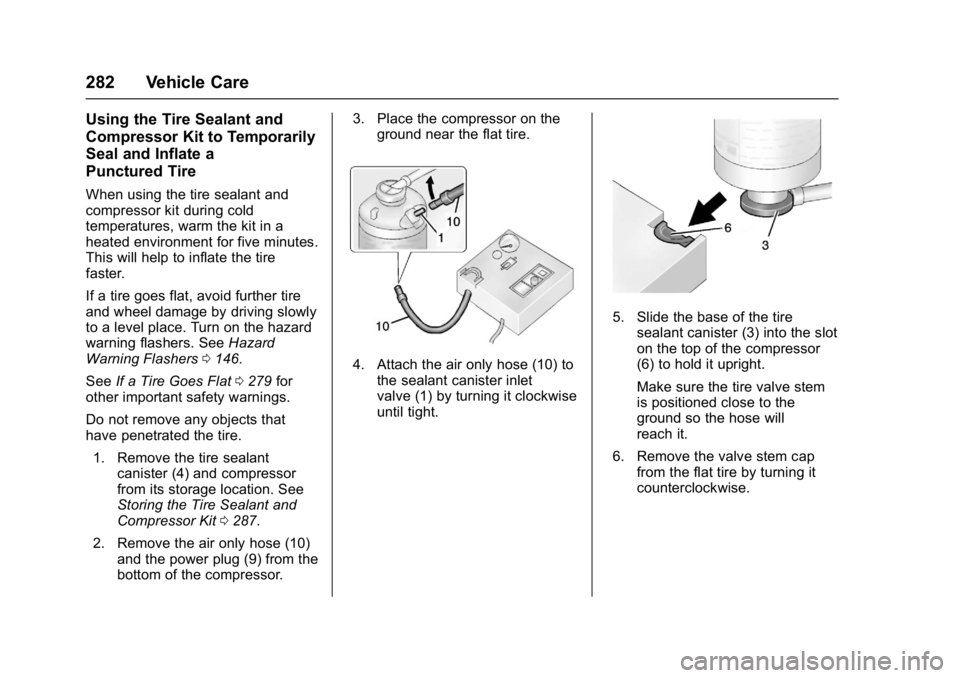
1. Remove the tire sealant canister (4) and compressor
from its storage location. See
Storing the Tire Sealant and
Compressor Kit 0287.
2. Remove the air only hose (10) and the power plug (9) from the
bottom of the compressor. 3. Place the compressor on the
ground near the flat tire.
4. Attach the air only hose (10) tothe sealant canister inlet
valve (1) by turning it clockwise
until tight.
5. Slide the base of the tire
sealant canister (3) into the slot
on the top of the compressor
(6) to hold it upright.
Make sure the tire valve stem
is positioned close to the
ground so the hose will
reach it.
6. Remove the valve stem cap from the flat tire by turning it
counterclockwise.
Page 284 of 362
Buick LaCrosse Owner Manual (GMNA-Localizing-U.S./Canada-10999169) -
2018 - crc - 3/28/17
Vehicle Care 283
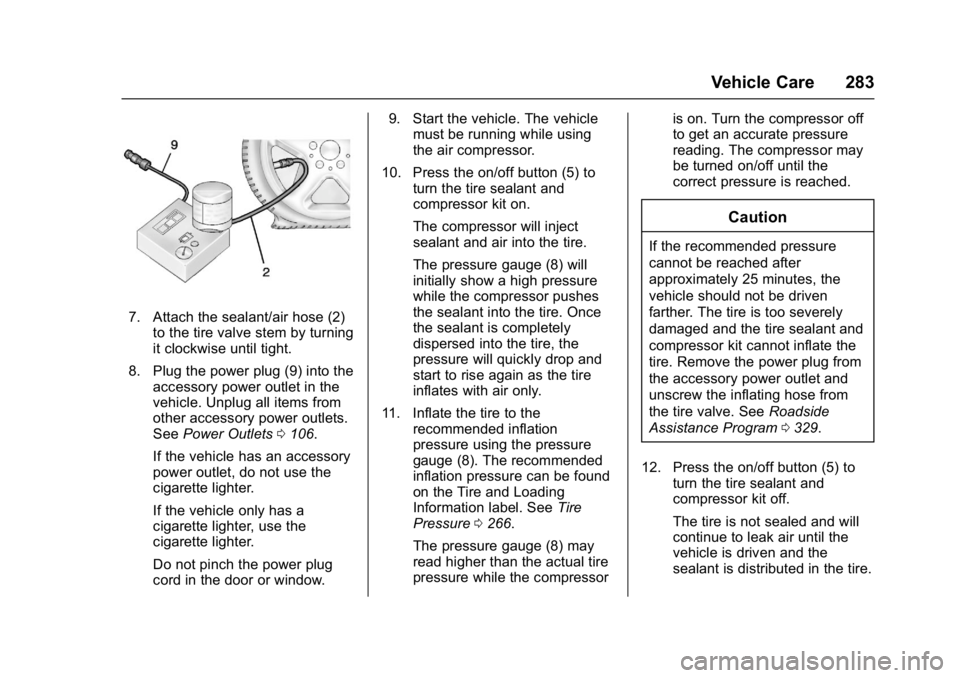
7. Attach the sealant/air hose (2)to the tire valve stem by turning
it clockwise until tight.
8. Plug the power plug (9) into the accessory power outlet in the
vehicle. Unplug all items from
other accessory power outlets.
See Power Outlets 0106.
If the vehicle has an accessory
power outlet, do not use the
cigarette lighter.
If the vehicle only has a
cigarette lighter, use the
cigarette lighter.
Do not pinch the power plug
cord in the door or window. 9. Start the vehicle. The vehicle
must be running while using
the air compressor.
10. Press the on/off button (5) to turn the tire sealant and
compressor kit on.
The compressor will inject
sealant and air into the tire.
The pressure gauge (8) will
initially show a high pressure
while the compressor pushes
the sealant into the tire. Once
the sealant is completely
dispersed into the tire, the
pressure will quickly drop and
start to rise again as the tire
inflates with air only.
11. Inflate the tire to the recommended inflation
pressure using the pressure
gauge (8). The recommended
inflation pressure can be found
on the Tire and Loading
Information label. See Tire
Pressure 0266.
The pressure gauge (8) may
read higher than the actual tire
pressure while the compressor is on. Turn the compressor off
to get an accurate pressure
reading. The compressor may
be turned on/off until the
correct pressure is reached.
Caution
If the recommended pressure
cannot be reached after
approximately 25 minutes, the
vehicle should not be driven
farther. The tire is too severely
damaged and the tire sealant and
compressor kit cannot inflate the
tire. Remove the power plug from
the accessory power outlet and
unscrew the inflating hose from
the tire valve. See
Roadside
Assistance Program 0329.
12. Press the on/off button (5) to turn the tire sealant and
compressor kit off.
The tire is not sealed and will
continue to leak air until the
vehicle is driven and the
sealant is distributed in the tire.
Page 285 of 362

Buick LaCrosse Owner Manual (GMNA-Localizing-U.S./Canada-10999169) -
2018 - crc - 3/28/17
284 Vehicle Care
Therefore, Steps 13–21 must
be done immediately after
Step 12.
Be careful while handling the
tire sealant and compressor kit
as it could be warm after
usage.
13. Unplug the power plug (9) from the accessory power outlet in
the vehicle.
14. Turn the sealant/air hose (2) counterclockwise to remove it
from the tire valve stem.
15. Replace the tire valve stem cap.
16. Remove the tire sealant canister (4) from the slot on top
of the compressor (6).
17. Turn the air only hose (10) counterclockwise to remove it
from the tire sealant canister
inlet valve (1).
18. Turn the sealant/air hose (2) clockwise onto the sealant
canister inlet valve (1) to
prevent sealant leakage. 19. Return the air only hose (10)
and power plug (9) back to
their original storage location.
20. If the flat tire was able to inflate
to the recommended inflation
pressure, remove the
maximum speed label from the
sealant canister and place it in
a highly visible location.
Do not exceed the speed on
this label until the damaged tire
is repaired or replaced.
21. Return the equipment to its original storage location in the
vehicle.
22. Immediately drive the vehicle 8 km (5 mi) to distribute the
sealant in the tire.
23. Stop at a safe location and check the tire pressure. Refer
to Steps 1–10 under “Using theTire Sealant and Compressor
Kit without Sealant to Inflate a
Tire (Not Punctured).”
If the tire pressure has fallen
more than 68 kPa (10 psi)
below the recommended
inflation pressure, stop driving
the vehicle. The tire is too
severely damaged and the tire
sealant cannot seal the tire.
See
Roadside Assistance
Program 0329.
If the tire pressure has not
dropped more than 68 kPa
(10 psi) from the recommended
inflation pressure, inflate the
tire to the recommended
inflation pressure.
24. Wipe off any sealant from the wheel, tire, or vehicle.
25. Dispose of the used tire sealant canister (4) at a local
dealer or in accordance with
local state codes and practices.
26. Replace it with a new canister available from your dealer.