eassist BUICK LACROSSE 2018 Owner's Manual
[x] Cancel search | Manufacturer: BUICK, Model Year: 2018, Model line: LACROSSE, Model: BUICK LACROSSE 2018Pages: 362, PDF Size: 5.19 MB
Page 6 of 362
Buick LaCrosse Owner Manual (GMNA-Localizing-U.S./Canada-10999169) -
2018 - crc - 3/28/17
In Brief 5
In Brief
Instrument Panel
Instrument Panel . . . . . . . . . . . . . . . . 6
Initial Drive Information
Initial Drive Information . . . . . . . . . . 8
Stop/Start System . . . . . . . . . . . . . . . 8
Remote Keyless Entry (RKE)System . . . . . . . . . . . . . . . . . . . . . . . . 8
Remote Vehicle Start . . . . . . . . . . . 8
Door Locks . . . . . . . . . . . . . . . . . . . . . 9
Trunk Release . . . . . . . . . . . . . . . . . . 9
Windows . . . . . . . . . . . . . . . . . . . . . . . 10
Seat Adjustment . . . . . . . . . . . . . . . 10
Memory Features . . . . . . . . . . . . . . 11
Heated and Ventilated Seats . . . 12
Head Restraint Adjustment . . . . 12
Seat Belts . . . . . . . . . . . . . . . . . . . . . 13
Passenger Sensing System . . . 13
Mirror Adjustment . . . . . . . . . . . . . . 13
Steering Wheel Adjustment . . . . 14
Interior Lighting . . . . . . . . . . . . . . . . 15
Exterior Lighting . . . . . . . . . . . . . . . 16
Windshield Wiper/Washer . . . . . . 16
Climate Controls . . . . . . . . . . . . . . . 17
Transmission . . . . . . . . . . . . . . . . . . 18
Vehicle Features
Infotainment System . . . . . . . . . . . 18 Steering Wheel Controls . . . . . . . 18
Cruise Control . . . . . . . . . . . . . . . . . 18
Driver Information
Center (DIC) . . . . . . . . . . . . . . . . . 19
Forward Collision Alert (FCA)
System . . . . . . . . . . . . . . . . . . . . . . . 19
Forward Automatic Braking (FAB) . . . . . . . . . . . . . . . . 19
Front Pedestrian Braking (FPB) System . . . . . . . . . . . . . . . . . . . . . . . 19
Lane Keep Assist (LKA) . . . . . . . 20
Lane Change Alert (LCA) . . . . . . 20
Rear Vision Camera (RVC) . . . . 20
Rear Cross Traffic Alert (RCTA) System . . . . . . . . . . . . . . . . . . . . . . . 20
Parking Assist . . . . . . . . . . . . . . . . . 20
Automatic Parking Assist (APA) . . . . . . . . . . . . . . . . . . 21
Power Outlets . . . . . . . . . . . . . . . . . 21
Universal Remote System . . . . . 21
Sunroof . . . . . . . . . . . . . . . . . . . . . . . . 22
eAssist Features
eAssist Overview . . . . . . . . . . . . . . 23
High Voltage Safety Information . . . . . . . . . . . . . . . . . . . 23
Automatic Engine Stop/Start Feature . . . . . . . . . . . . . . . . . . . . . . . 23
Regenerative Braking . . . . . . . . . . 24
Battery . . . . . . . . . . . . . . . . . . . . . . . . . 24
Service . . . . . . . . . . . . . . . . . . . . . . . . 24
Performance and Maintenance
Traction Control/Electronic Stability Control . . . . . . . . . . . . . . 24
Tire Pressure Monitor . . . . . . . . . . 25
Fuel . . . . . . . . . . . . . . . . . . . . . . . . . . . 25
E85 or FlexFuel . . . . . . . . . . . . . . . . 25
Engine Oil Life System . . . . . . . . 25
Driving for Better Fuel Economy . . . . . . . . . . . . . . . . . . . . . 26
Roadside Assistance Program . . . . . . . . . . . . . . . . . . . . . . 26
Page 24 of 362
Buick LaCrosse Owner Manual (GMNA-Localizing-U.S./Canada-10999169) -
2018 - crc - 3/28/17
In Brief 23
eAssist Features
eAssist Overview
Vehicles with the 2.5L engine have
eAssist, with additional features that
contribute to increased efficiency.
Vehicles with eAssist have an
automatic engine Stop/Start feature.
This feature saves fuel by shutting
the engine off when the vehicle is
stopped. When the engine shuts off
automatically, all the accessories
will continue to operate normally. In
very hot or cold conditions, the
engine may not shut off. See
Starting the Engine0172.
There are two air conditioning
settings available. The MAX setting
maximizes cabin comfort. The ECO
setting maximizes efficiency
allowing more frequent, and longer
engine stops than the MAX setting.
See Dual Automatic Climate Control
System 0152.
Vehicles with eAssist include an
AUTO STOP indicator on the
tachometer. See Instrument Cluster
0 110. The eAssist system uses a high
voltage battery, which is cooled with
air drawn from the vehicle interior.
The cold air intake for the battery is
under the leading edge of the rear
seat. The exhaust for warm air is in
the trunk. Do not cover the intake or
exhaust. See
Battery - North
America 0247.
High Voltage Safety
Information
Vehicles with eAssist have a
standard 12-volt battery and a high
voltage battery. Only a trained
service technician with the proper
knowledge and tools should inspect,
test, or replace the high voltage
battery. See your dealer if the high
voltage battery needs service.
In emergency situations, first
responders can cut the two clearly
labeled cut points in the engine
compartment to disable the high
voltage battery and air bag systems.
Do not cut the high voltage cable.
Automatic Engine Stop/
Start Feature
Vehicles with eAssist have an
automatic engine Stop/Start feature.
After the engine is started and has
reached operating temperature, this
feature may cause Auto Stop which
will turn the engine off when the
brake pedal is applied and the
vehicle comes to a complete stop.
When the brake pedal is released,
or the accelerator pedal is applied,
the engine will restart. The engine
will continue to run until the next
Auto Stop.
AUTO STOP on the tachometer
signifies that the engine is in Auto
Stop mode. See Tachometer0112.
Remember to put the transmission
in P (Park) and turn the ignition off
before exiting the vehicle.
See Starting the Engine 0172.
Page 25 of 362
Buick LaCrosse Owner Manual (GMNA-Localizing-U.S./Canada-10999169) -
2018 - crc - 3/28/17
24 In Brief
Regenerative Braking
Regenerative braking takes some of
the energy from the moving vehicle
and turns it into electrical energy.
This energy is then stored in the
vehicle's high voltage battery
system, contributing to increased
fuel efficiency.
The system works whenever the
accelerator pedal is released, and
increases the energy captured as
more brake pedal is applied.
Battery
This vehicle has a standard 12-volt
battery. Refer to the replacement
number on the original battery label
when a new standard 12-volt battery
is needed.
Vehicles with eAssist also have a
high voltage battery. Only a trained
service technician with the proper
knowledge and tools should inspect,
test, or replace the high voltage
battery. See your dealer if the high
voltage battery needs service. See
Battery - North America0247.
Service
Never try to do your own service on
eAssist components. You can be
injured and the vehicle can be
damaged if you try to do your own
service work. Service and repair of
these high voltage components
should only be performed by a
trained service technician with the
proper knowledge and tools. See
Doing Your Own Service Work
0229.
Performance and
Maintenance
Traction Control/
Electronic Stability
Control
The Traction Control System (TCS)
limits wheel spin. The system turns
on automatically every time the
vehicle is started.
.
To turn off TCS, press and
release
gon the center stack.
iilluminates.
. Press and release
gagain to
turn on TCS.
. To turn off both TCS and
StabiliTrak, press and hold
g
untiliandgilluminate.
. Press and release
gto turn on
both systems.
See Traction Control/Electronic
Stability Control 0190.
Page 75 of 362
Buick LaCrosse Owner Manual (GMNA-Localizing-U.S./Canada-10999169) -
2018 - crc - 3/28/17
74 Seats and Restraints
Warning (Continued)
by opening a window or a door.
If you experience breathing
problems following an airbag
deployment, you should seek
medical attention.
The vehicle has a feature that may
automatically unlock the doors, turn
on the interior lamps and hazard
warning flashers, and shut off the
fuel system after the airbags inflate.
The feature may also activate,
without airbag inflation, after an
event that exceeds a predetermined
threshold. After turning the ignition
off and then on again, the fuel
system will return to normal
operation; the doors can be locked,
the interior lamps can be turned off,
and the hazard warning flashers can
be turned off using the controls for
those features. If any of these
systems are damaged in the crash
they may not operate as normal.
{Warning
A crash severe enough to inflate
the airbags may have also
damaged important functions in
the vehicle, such as the fuel
system, brake and steering
systems, etc. Even if the vehicle
appears to be drivable after a
moderate crash, there may be
concealed damage that could
make it difficult to safely operate
the vehicle.
Use caution if you should attempt
to restart the engine after a crash
has occurred.
Vehicles with eAssist have a high
voltage battery and a standard
12-volt battery. If an airbag inflates
or the vehicle has been in a crash,
the vehicle's sensing system may
shut down the high voltage system.
When this occurs, the high voltage
battery is disconnected and the
vehicle is not charging the 12-volt
battery or the electrical system. The
vehicle may start but it shuts down once the 12-volt battery is depleted.
When the 12-volt battery is
depleted, the vehicle will not start
and the on-board jump start feature
is disabled. The airbag readiness
light and/or the 12-volt battery
warning light are displayed. Before
the vehicle can be operated again, it
must be serviced at your dealer.
In many crashes severe enough to
inflate the airbag, windshields are
broken by vehicle deformation.
Additional windshield breakage may
also occur from the front outboard
passenger airbag.
.
Airbags are designed to inflate
only once. After an airbag
inflates, you will need some new
parts for the airbag system.
If you do not get them, the
airbag system will not be there
to help protect you in another
crash. A new system will include
airbag modules and possibly
other parts. The service manual
for the vehicle covers the need
to replace other parts.
Page 104 of 362
Buick LaCrosse Owner Manual (GMNA-Localizing-U.S./Canada-10999169) -
2018 - crc - 3/28/17
Instruments and Controls 103
Instruments and
Controls
Controls
Steering Wheel Adjustment . . . 104
Steering Wheel Controls . . . . . . 104
Heated Steering Wheel . . . . . . . 104
Horn . . . . . . . . . . . . . . . . . . . . . . . . . . 105
Windshield Wiper/Washer . . . . 105
Compass . . . . . . . . . . . . . . . . . . . . . 106
Clock . . . . . . . . . . . . . . . . . . . . . . . . . 106
Power Outlets . . . . . . . . . . . . . . . . 106
Wireless Charging . . . . . . . . . . . . 108
Warning Lights, Gauges, and
Indicators
Warning Lights, Gauges, andIndicators . . . . . . . . . . . . . . . . . . . 109
Instrument Cluster . . . . . . . . . . . . 110
Speedometer . . . . . . . . . . . . . . . . . 112
Odometer . . . . . . . . . . . . . . . . . . . . . 112
Tachometer . . . . . . . . . . . . . . . . . . . 112
Fuel Gauge . . . . . . . . . . . . . . . . . . . 113
Driver Efficiency Gauge (eAssist) . . . . . . . . . . . . . . . . . . . . 114
Engine Coolant Temperature Gauge . . . . . . . . . . . . . . . . . . . . . . 114
Seat Belt Reminders . . . . . . . . . . 115
Airbag Readiness Light . . . . . . . 115 Passenger Airbag Status
Indicator . . . . . . . . . . . . . . . . . . . . . 116
Charging System Light . . . . . . . 117
Malfunction Indicator Lamp (Check Engine Light) . . . . . . . . 117
Brake System Warning Light . . . . . . . . . . . . . . . . . . . . . . . . 119
Electric Parking Brake Light . . . . . . . . . . . . . . . . . . . . . . . . 119
Service Electric Parking Brake Light . . . . . . . . . . . . . . . . . . . . . . . . 120
Antilock Brake System (ABS) Warning Light . . . . . . . . . . . . . . . 120
Lane Keep Assist (LKA) Light . . . . . . . . . . . . . . . . . . . . . . . . 120
Vehicle Ahead Indicator . . . . . . 121
Traction Off Light . . . . . . . . . . . . . 121
StabiliTrak OFF Light . . . . . . . . . 121
Traction Control System (TCS)/ StabiliTrak Light . . . . . . . . . . . . . 122
Engine Coolant Temperature Warning Light . . . . . . . . . . . . . . . 122
Tire Pressure Light . . . . . . . . . . . 122
Engine Oil Pressure Light . . . . 123
Low Fuel Warning Light . . . . . . 123
Security Light . . . . . . . . . . . . . . . . . 124
High-Beam On Light . . . . . . . . . . 124
Adaptive Forward Lighting (AFL) Light . . . . . . . . . . . . . . . . . . 124
Front Fog Lamp Light . . . . . . . . . 124
Lamps On Reminder . . . . . . . . . 124 Cruise Control Light . . . . . . . . . . 125
Door Ajar Light . . . . . . . . . . . . . . . 125
Information Displays
Power Flows (eAssist) . . . . . . . . 125
Energy Information
(eAssist) . . . . . . . . . . . . . . . . . . . . 126
Driver Information Center (DIC) . . . . . . . . . . . . . . . . 126
Head-Up Display (HUD) . . . . . . 129
Vehicle Messages
Vehicle Messages . . . . . . . . . . . . 132
Engine Power Messages . . . . . 132
Vehicle Speed Messages . . . . . 133
Vehicle Personalization
Vehicle Personalization . . . . . . . 133
Universal Remote System
Universal Remote System . . . . 140
Universal Remote System Programming . . . . . . . . . . . . . . . 140
Universal Remote System Operation . . . . . . . . . . . . . . . . . . . 142
Page 113 of 362
Buick LaCrosse Owner Manual (GMNA-Localizing-U.S./Canada-10999169) -
2018 - crc - 3/28/17
112 Instruments and Controls
Info Pages :PressTwhile Info
Pages is displayed to enter the Info
Pages menu and select the items to
be displayed in the Info App. See
Driver Information Center (DIC)
0 126.
Speed Warning : The Speed
Warning display allows the driver to
set a speed that they do not want to
exceed. To set the Speed Warning,
press
Twhen Speed Warning is
displayed. Scroll to Set Speed and
press
T. PressVto set the speed.
Once the speed is set, this feature
can be turned off by pressing
V
while viewing this page. If the
selected speed limit is exceeded, a
DIC message is displayed with a
chime.
Jump Start : The Jump Start
display is used to perform an
on-board jump start for eAssist
vehicles. See “Jump Starting - North
America (On-board with eAssist
Only)” in the Index.
Software Information : Displays
the open source software
information.
Speedometer
The speedometer shows the
vehicle's speed in either kilometers
per hour (km/h) or miles per
hour (mph).
Odometer
The odometer shows how far the
vehicle has been driven, in either
kilometers or miles.
Tachometer
The tachometer displays the engine
speed in revolutions per
minute (rpm).
For vehicles with the stop/start
system, when the ignition is on, the
tachometer indicates the vehicle
status. When pointing to AUTO
STOP, the engine is off but the
vehicle is on and can move. The
engine could auto start at any time.
When the indicator points to OFF,
the vehicle is off.
When the engine is on, the
tachometer will indicate the engine’s
revolutions per minute (rpm). The
tachometer may vary by several hundred rpm’s, during Auto Stop
mode, when the engine is shutting
off and restarting.
A slight bump may be felt when the
transmission is determining the
most fuel efficient operating range.
Caution
If the engine is operated with the
rpm’s in the warning area at the
high end of the tachometer, the
vehicle could be damaged, and
the damage would not be covered
by the vehicle warranty. Do not
operate the engine with the rpm’s
in the warning area.
Page 115 of 362
Buick LaCrosse Owner Manual (GMNA-Localizing-U.S./Canada-10999169) -
2018 - crc - 3/28/17
114 Instruments and Controls
Driver Efficiency Gauge
(eAssist)
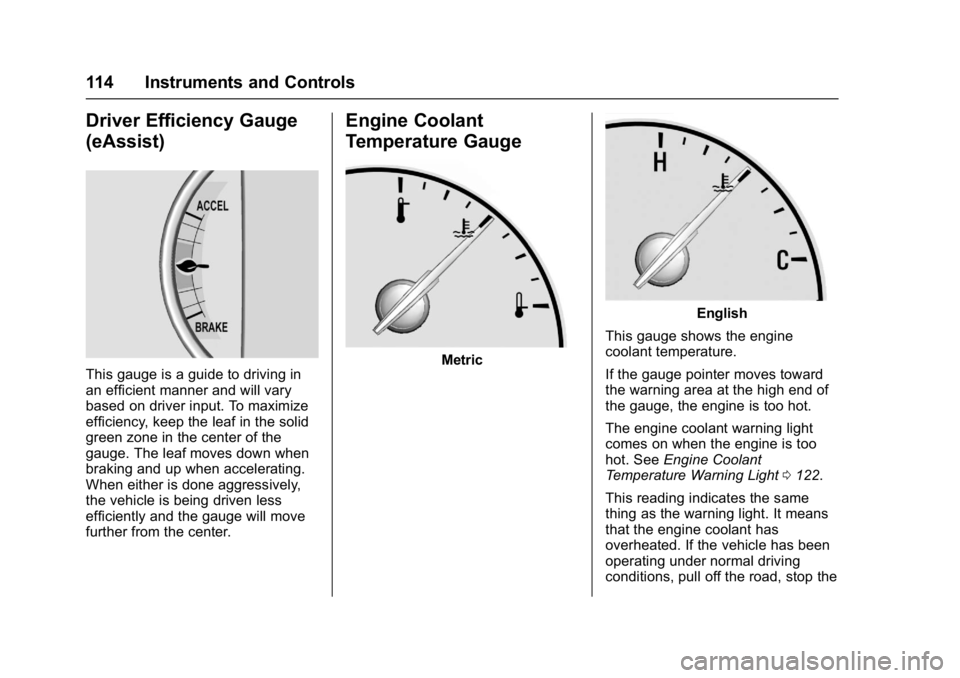
This gauge is a guide to driving in
an efficient manner and will vary
based on driver input. To maximize
efficiency, keep the leaf in the solid
green zone in the center of the
gauge. The leaf moves down when
braking and up when accelerating.
When either is done aggressively,
the vehicle is being driven less
efficiently and the gauge will move
further from the center.
Engine Coolant
Temperature Gauge
Metric
English
This gauge shows the engine
coolant temperature.
If the gauge pointer moves toward
the warning area at the high end of
the gauge, the engine is too hot.
The engine coolant warning light
comes on when the engine is too
hot. See Engine Coolant
Temperature Warning Light 0122.
This reading indicates the same
thing as the warning light. It means
that the engine coolant has
overheated. If the vehicle has been
operating under normal driving
conditions, pull off the road, stop the
Page 126 of 362
Buick LaCrosse Owner Manual (GMNA-Localizing-U.S./Canada-10999169) -
2018 - crc - 3/28/17
Instruments and Controls 125
Cruise Control Light
The cruise control light is white
when the cruise control is on and
ready, and turns green when the
cruise control is set and active.
SeeCruise Control 0193.
Adaptive Cruise Control Light
This light is white when the Adaptive
Cruise Control (ACC, if equipped) is
on and ready, and turns green when
the ACC is set and active. See
Adaptive Cruise Control 0195.
Door Ajar Light
This light comes on when a door is
open or not securely latched. Before
driving, check that all doors are
properly closed.
Information Displays
Power Flows (eAssist)
To view the Power Flow screens in
the infotainment display, touch
[
on the Home page or on the
Application Tray on the top of the
infotainment display. Then touch
FLOW at the bottom of the display.
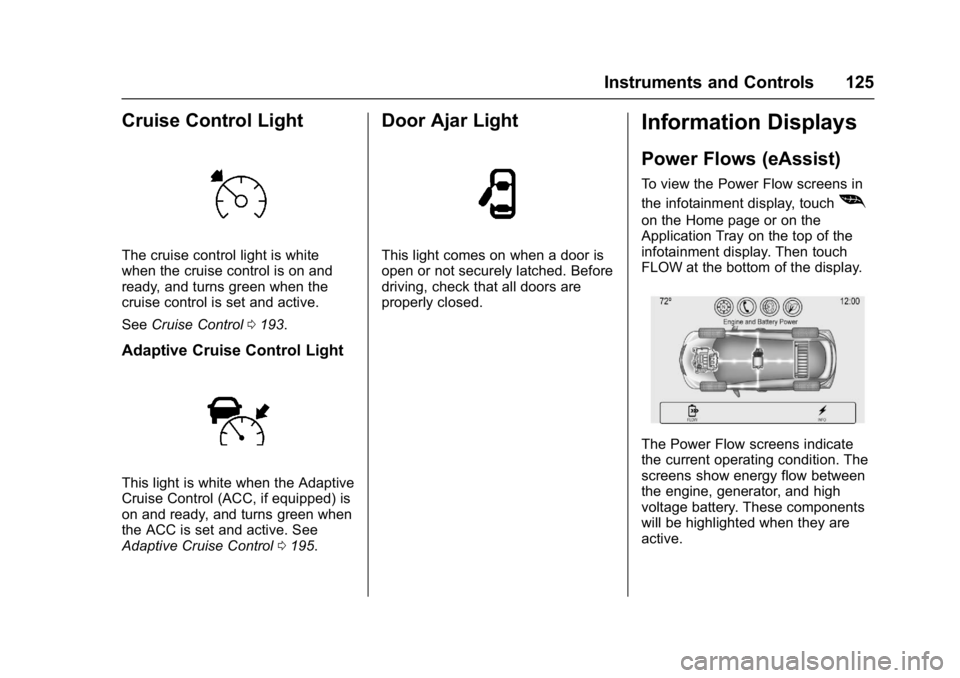
The Power Flow screens indicate
the current operating condition. The
screens show energy flow between
the engine, generator, and high
voltage battery. These components
will be highlighted when they are
active.
Page 127 of 362
Buick LaCrosse Owner Manual (GMNA-Localizing-U.S./Canada-10999169) -
2018 - crc - 3/28/17
126 Instruments and Controls
Energy Information
(eAssist)
To view the Consumption History
screen on the infotainment display,
touch
[on the Home page or on
the Application Tray on the top of
the infotainment display. Then touch
INFO at the bottom of the display.
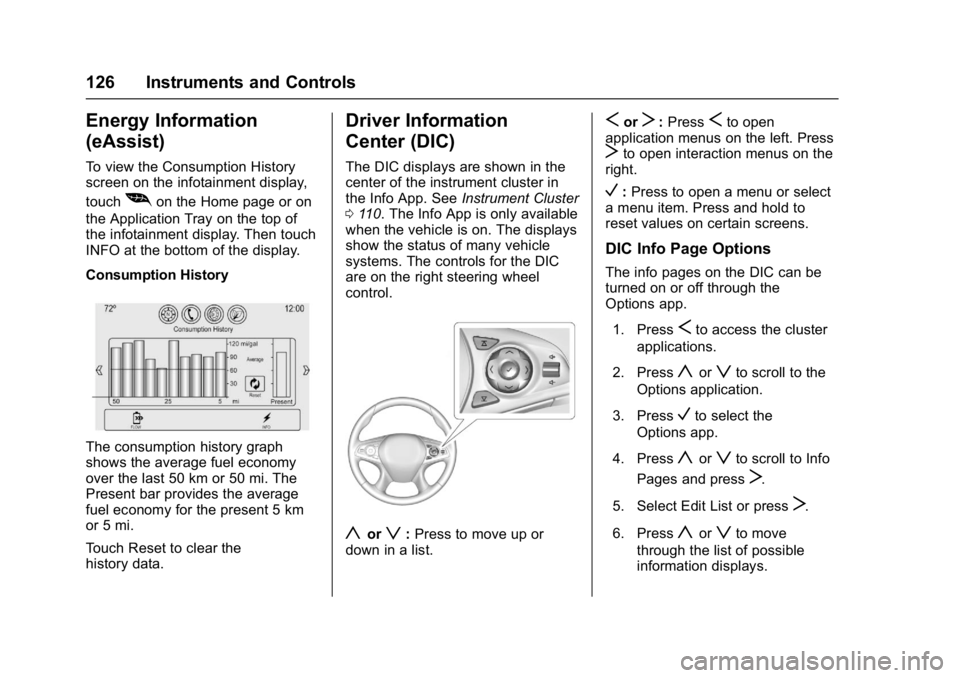
Consumption History
The consumption history graph
shows the average fuel economy
over the last 50 km or 50 mi. The
Present bar provides the average
fuel economy for the present 5 km
or 5 mi.
Touch Reset to clear the
history data.
Driver Information
Center (DIC)
The DIC displays are shown in the
center of the instrument cluster in
the Info App. See Instrument Cluster
0 110. The Info App is only available
when the vehicle is on. The displays
show the status of many vehicle
systems. The controls for the DIC
are on the right steering wheel
control.
yorz: Press to move up or
down in a list.
SorT: PressSto open
application menus on the left. Press
Tto open interaction menus on the
right.
V: Press to open a menu or select
a menu item. Press and hold to
reset values on certain screens.
DIC Info Page Options
The info pages on the DIC can be
turned on or off through the
Options app.
1. Press
Sto access the cluster
applications.
2. Press
yorzto scroll to the
Options application.
3. Press
Vto select the
Options app.
4. Press
yorzto scroll to Info
Pages and press
T.
5. Select Edit List or press
T.
6. Press
yorzto move
through the list of possible
information displays.
Page 129 of 362
Buick LaCrosse Owner Manual (GMNA-Localizing-U.S./Canada-10999169) -
2018 - crc - 3/28/17
128 Instruments and Controls
best average fuel economy. After
reset, the best value displays“-,-”
until the selected distance has been
traveled.
The display provides information on
how current driving behavior affects
the running average and how well
recent driving compares to the best
that has been achieved for the
selected distance.
Oil Life : Displays an estimate of
the oil's remaining useful life.
If REMAINING OIL LIFE 99% is
displayed, that means 99% of the
current oil life remains.
When the remaining oil life is low,
the CHANGE ENGINE OIL SOON
message will appear on the display.
The oil should be changed as soon
as possible. See Engine Oil0234.
In addition to the engine oil life
system monitoring the oil life,
additional maintenance is
recommended. See Maintenance
Schedule 0311.
The Oil Life display must be reset
after each oil change. It will not
reset itself. Do not reset the Oil Life
display accidentally at any time other than when the oil has just
been changed. It cannot be reset
accurately until the next oil change.
To reset the engine oil life system,
press and hold
Vfor several
seconds while the Oil Life display is
active. See Engine Oil Life System
0 237.
Tire Pressure : Displays the
approximate pressures of all four
tires. Tire pressure is displayed in
either kilopascal (kPa) or in pounds
per square inch (psi). If the pressure
is low, the value for that tire is
shown in amber.
See Tire Pressure Monitor System
0 268 andTire Pressure Monitor
Operation 0269.
Timer : To start the timer, press
V
while this display is active. The
display will show the amount of time
that has passed since the timer was
last reset. To stop the timer, press
V
briefly while this display is active
and the timer is running. To reset
the timer to zero, press and hold
V
while this display is active. Drive Cycle Summary (eAssist) :
Displays the distance traveled and
the fuel economy for that trip.
Follow Distance/Gap Setting :
The
current follow time to the vehicle
ahead is displayed as a time value
on this page when Adaptive Cruise
Control (ACC) is not engaged.
When ACC has been engaged, the
Following Distance Indicator page
switches to the Gap Setting page.
This page shows the current gap
setting.
See Forward Collision Alert (FCA)
System 0208 andAdaptive Cruise
Control 0195.
Top Consumers : Shows a list of
the features that are currently
impacting the fuel economy, in order
from highest to lowest. If a feature is
turned off, it will be removed from
the list.
Economy Trend : Displays history
of the Average Fuel Economy from
the last 50 km (30 miles). Each bar
represents about 5 km (3 miles) of
driving. The fuel economy will range
from 0 –15 L/100 km (0 –50 mpg).
During driving the bars will shift to