climate control BUICK LACROSSE 2019 Owner's Manual
[x] Cancel search | Manufacturer: BUICK, Model Year: 2019, Model line: LACROSSE, Model: BUICK LACROSSE 2019Pages: 374, PDF Size: 5.65 MB
Page 2 of 374
Buick LaCrosse Owner Manual (GMNA-Localizing-U.S./Canada-12032549) -
2019 - crc - 8/20/18
ContentsIntroduction . . . . . . . . . . . . . . . . . . . . . . 2
In Brief . . . . . . . . . . . . . . . . . . . . . . . . . . . 5
Keys, Doors, and Windows . . . . . 28
Seats and Restraints . . . . . . . . . . . 52
Storage . . . . . . . . . . . . . . . . . . . . . . . 102
Instruments and Controls . . . . . . 105
Lighting . . . . . . . . . . . . . . . . . . . . . . . 149
Infotainment System . . . . . . . . . . 156
Climate Controls . . . . . . . . . . . . . . 157
Driving and Operating . . . . . . . . . 164
Vehicle Care . . . . . . . . . . . . . . . . . . 234
Service and Maintenance . . . . . 318
Technical Data . . . . . . . . . . . . . . . . 332
Customer Information . . . . . . . . . 335
Reporting Safety Defects . . . . . . 345
OnStar . . . . . . . . . . . . . . . . . . . . . . . . 349
Connected Services . . . . . . . . . . . 357
Index . . . . . . . . . . . . . . . . . . . . 361
Page 6 of 374
Buick LaCrosse Owner Manual (GMNA-Localizing-U.S./Canada-12032549) -
2019 - crc - 8/20/18
In Brief 5
In Brief
Instrument Panel
Instrument Panel . . . . . . . . . . . . . . . . 6
Initial Drive Information
Initial Drive Information . . . . . . . . . . 8
Stop/Start System . . . . . . . . . . . . . . . 8
Remote Keyless Entry (RKE)System . . . . . . . . . . . . . . . . . . . . . . . . 8
Remote Vehicle Start . . . . . . . . . . . 8
Door Locks . . . . . . . . . . . . . . . . . . . . . 9
Trunk Release . . . . . . . . . . . . . . . . . . 9
Windows . . . . . . . . . . . . . . . . . . . . . . . 10
Seat Adjustment . . . . . . . . . . . . . . . 10
Memory Features . . . . . . . . . . . . . . 11
Heated and Ventilated Seats . . . 11
Head Restraint Adjustment . . . . 12
Seat Belts . . . . . . . . . . . . . . . . . . . . . 12
Passenger Sensing System . . . 12
Mirror Adjustment . . . . . . . . . . . . . . 13
Steering Wheel Adjustment . . . . 13
Interior Lighting . . . . . . . . . . . . . . . . 14
Exterior Lighting . . . . . . . . . . . . . . . 15
Windshield Wiper/Washer . . . . . . 15
Climate Controls . . . . . . . . . . . . . . . 16
Transmission . . . . . . . . . . . . . . . . . . 17
Vehicle Features
Infotainment System . . . . . . . . . . . 18
Steering Wheel Controls . . . . . . . 18
Cruise Control . . . . . . . . . . . . . . . . . 19
Driver Information Center (DIC) . . . . . . . . . . . . . . . . . 19
Forward Collision Alert (FCA) System . . . . . . . . . . . . . . . . . . . . . . . 20
Forward Automatic Braking (FAB) . . . . . . . . . . . . . . . . 20
Front Pedestrian Braking (FPB) System . . . . . . . . . . . . . . . . . . . . . . . 20
Lane Keep Assist (LKA) . . . . . . . 20
Lane Change Alert (LCA) . . . . . . 20
Rear Vision Camera (RVC) . . . . 21
Rear Cross Traffic Alert (RCTA) System . . . . . . . . . . . . . . . . . . . . . . . 21
Parking Assist . . . . . . . . . . . . . . . . . 21
Automatic Parking Assist (APA) . . . . . . . . . . . . . . . . . . 21
Power Outlets . . . . . . . . . . . . . . . . . 21
Universal Remote System . . . . . 22
Sunroof . . . . . . . . . . . . . . . . . . . . . . . . 22
eAssist Features
eAssist Overview . . . . . . . . . . . . . . 23
High Voltage Safety Information . . . . . . . . . . . . . . . . . . . 24
Automatic Engine Stop/Start Feature . . . . . . . . . . . . . . . . . . . . . . . 24 Regenerative Braking . . . . . . . . . . 24
Battery . . . . . . . . . . . . . . . . . . . . . . . . . 24
Service . . . . . . . . . . . . . . . . . . . . . . . . 24
Performance and Maintenance
Traction Control/Electronic
Stability Control . . . . . . . . . . . . . . 25
Tire Pressure Monitor . . . . . . . . . . 25
Fuel . . . . . . . . . . . . . . . . . . . . . . . . . . . 26
E85 or FlexFuel . . . . . . . . . . . . . . . . 26
Engine Oil Life System . . . . . . . . 26
Driving for Better Fuel Economy . . . . . . . . . . . . . . . . . . . . . 26
Roadside Assistance Program . . . . . . . . . . . . . . . . . . . . . . 27
Page 8 of 374

Buick LaCrosse Owner Manual (GMNA-Localizing-U.S./Canada-12032549) -
2019 - crc - 8/20/18
In Brief 7
1.Air Vents 0162.
2. Exterior Lamp Controls 0149.
Fog Lamps 0152.
Instrument Panel Illumination
Control 0153.
3. Turn and Lane-Change Signals
0152.
4. Tap Shift Controls (If Equipped). See Manual Mode
0 191.
5. Instrument Cluster 0114.
Driver Information Center (DIC)
Display. See Driver Information
Center (DIC) 0131.
6. Windshield Wiper/Washer
0107.
7. Hazard Warning Flashers
0151.
8. Light Sensor. See Automatic
Headlamp System 0150.
9. Infotainment 0156.
10. Dual Automatic Climate Control
System 0157. 11.
Traction Control/Electronic
Stability Control 0196.
Park Assist Button (If
Equipped). See Driver
Assistance Systems 0208.
SPORT Button (If Equipped).
See Selective Ride Control
0 198.
Lane Keep Assist (LKA) 0222
(If Equipped).
Automatic Parking Assist
Button (If Equipped). See
Driver Assistance Systems
0 208.
12. Shift Lever. See Automatic
Transmission 0187.
13. ENGINE START/STOP Button (Out of View). See Ignition
Positions 0176.
14. Steering Wheel Controls. See the infotainment manual.
Driver Information Center (DIC)
Controls. See Driver
Information Center (DIC) 0131.
15. Horn 0107. 16.
Steering Wheel Adjustment
0106 (Out of View).
17. Cruise Control 0199 (If
Equipped).
Adaptive Cruise Control 0201
(If Equipped).
Forward Collision Alert (FCA)
System 0214 (If Equipped).
Heated Steering Wheel 0106
(If Equipped).
18. Head-Up Display (HUD) 0134
(If Equipped).
19. Hood Release (Out of View). SeeHood 0237.
20. Front Storage.
21. Data Link Connector (DLC) (Out of View). See Malfunction
Indicator Lamp (Check Engine
Light) 0122.
22. Electric Parking Brake 0193.
Page 12 of 374
Buick LaCrosse Owner Manual (GMNA-Localizing-U.S./Canada-12032549) -
2019 - crc - 8/20/18
In Brief 11
Memory Features
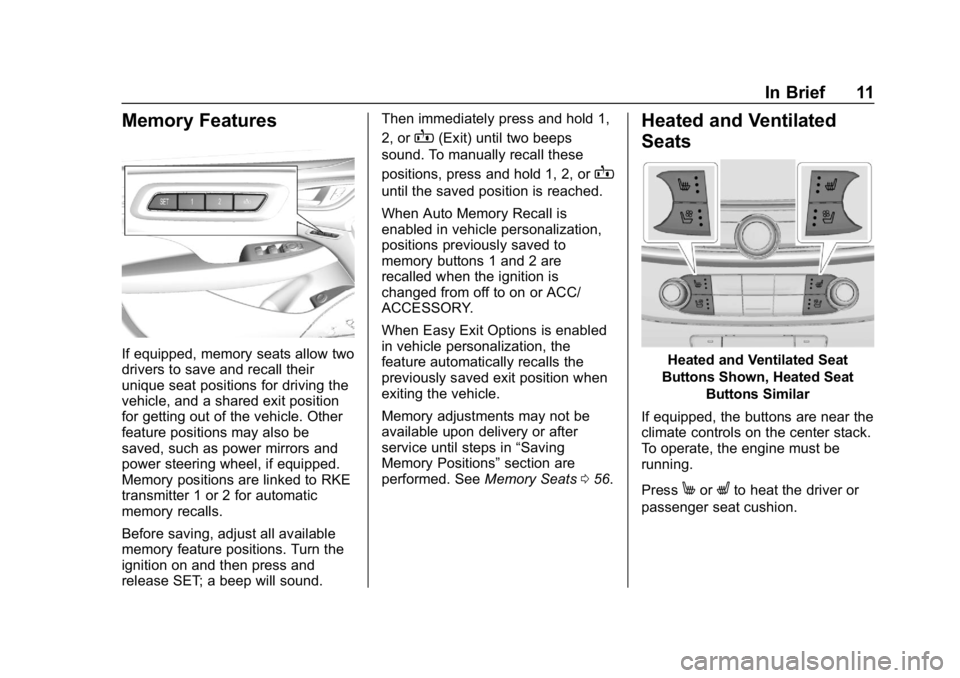
If equipped, memory seats allow two
drivers to save and recall their
unique seat positions for driving the
vehicle, and a shared exit position
for getting out of the vehicle. Other
feature positions may also be
saved, such as power mirrors and
power steering wheel, if equipped.
Memory positions are linked to RKE
transmitter 1 or 2 for automatic
memory recalls.
Before saving, adjust all available
memory feature positions. Turn the
ignition on and then press and
release SET; a beep will sound.Then immediately press and hold 1,
2, or
B(Exit) until two beeps
sound. To manually recall these
positions, press and hold 1, 2, or
B
until the saved position is reached.
When Auto Memory Recall is
enabled in vehicle personalization,
positions previously saved to
memory buttons 1 and 2 are
recalled when the ignition is
changed from off to on or ACC/
ACCESSORY.
When Easy Exit Options is enabled
in vehicle personalization, the
feature automatically recalls the
previously saved exit position when
exiting the vehicle.
Memory adjustments may not be
available upon delivery or after
service until steps in “Saving
Memory Positions” section are
performed. See Memory Seats056.
Heated and Ventilated
Seats
Heated and Ventilated Seat
Buttons Shown, Heated Seat Buttons Similar
If equipped, the buttons are near the
climate controls on the center stack.
To operate, the engine must be
running.
Press
MorLto heat the driver or
passenger seat cushion.
Page 17 of 374
Buick LaCrosse Owner Manual (GMNA-Localizing-U.S./Canada-12032549) -
2019 - crc - 8/20/18
16 In Brief
LO :Use for slow wipes.
INT : Use for intermittent wipes. To
adjust wipe frequency, turn the band
up for more frequent wipes or down
for less frequent wipes.
OFF : Use to turn the wipers off.
1x : For a single wipe, briefly move
the wiper lever down. For several
wipes, hold the wiper lever down.
f: Pull the windshield wiper
lever toward you to spray windshield
washer fluid and activate the wipers.
See Windshield Wiper/Washer
0 107.
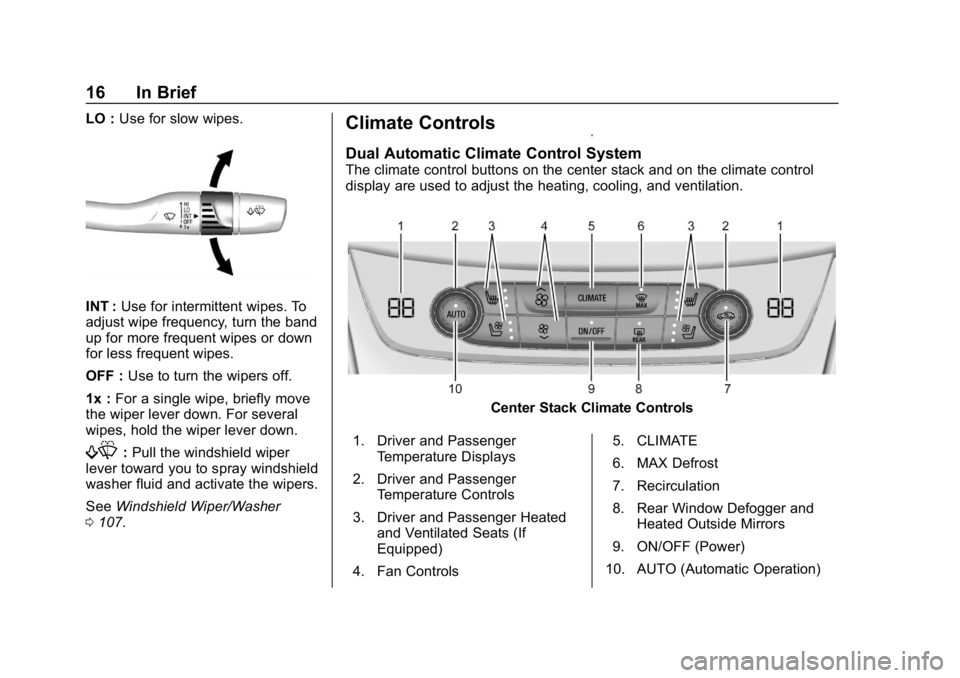
Climate Controls
Dual Automatic Climate Control System
The climate control buttons on the center stack and on the climate control
display are used to adjust the heating, cooling, and ventilation.
Center Stack Climate Controls
1. Driver and Passenger Temperature Displays
2. Driver and Passenger Temperature Controls
3. Driver and Passenger Heated and Ventilated Seats (If
Equipped)
4. Fan Controls 5. CLIMATE
6. MAX Defrost
7. Recirculation
8. Rear Window Defogger and
Heated Outside Mirrors
9. ON/OFF (Power)
10. AUTO (Automatic Operation)
Page 18 of 374
Buick LaCrosse Owner Manual (GMNA-Localizing-U.S./Canada-12032549) -
2019 - crc - 8/20/18
In Brief 17
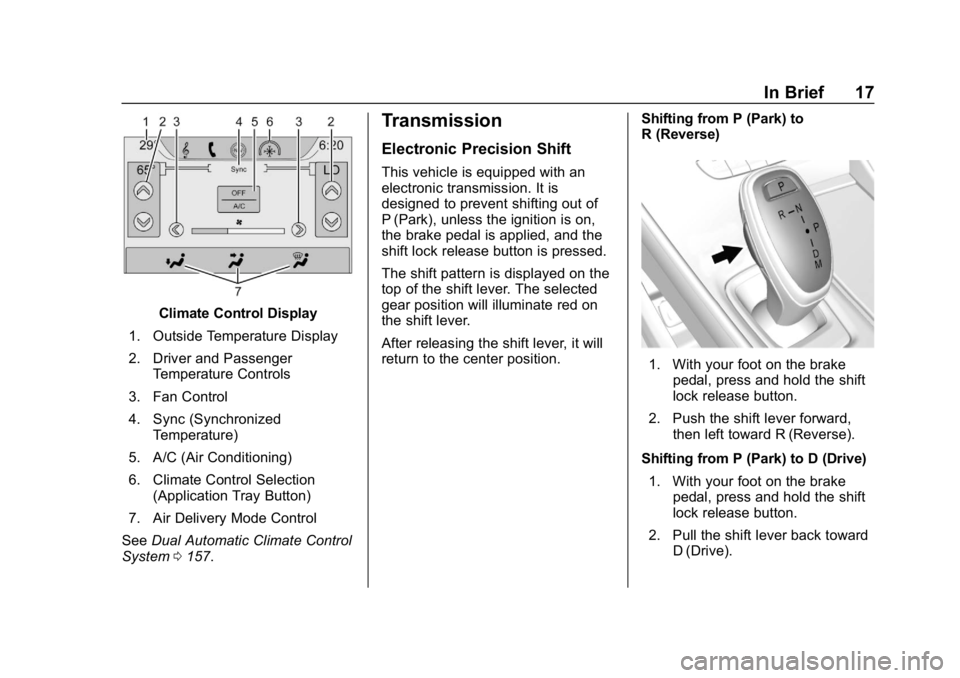
Climate Control Display
1. Outside Temperature Display
2. Driver and Passenger Temperature Controls
3. Fan Control
4. Sync (Synchronized Temperature)
5. A/C (Air Conditioning)
6. Climate Control Selection (Application Tray Button)
7. Air Delivery Mode Control
See Dual Automatic Climate Control
System 0157.
Transmission
Electronic Precision Shift
This vehicle is equipped with an
electronic transmission. It is
designed to prevent shifting out of
P (Park), unless the ignition is on,
the brake pedal is applied, and the
shift lock release button is pressed.
The shift pattern is displayed on the
top of the shift lever. The selected
gear position will illuminate red on
the shift lever.
After releasing the shift lever, it will
return to the center position. Shifting from P (Park) to
R (Reverse)
1. With your foot on the brake
pedal, press and hold the shift
lock release button.
2. Push the shift lever forward, then left toward R (Reverse).
Shifting from P (Park) to D (Drive) 1. With your foot on the brake pedal, press and hold the shift
lock release button.
2. Pull the shift lever back toward D (Drive).
Page 24 of 374
Buick LaCrosse Owner Manual (GMNA-Localizing-U.S./Canada-12032549) -
2019 - crc - 8/20/18
In Brief 23
The ignition must be on, in ACC/
ACCESSORY, or Retained
Accessory Power (RAP) must be
active. SeeRetained Accessory
Power (RAP) 0181.
Sunroof Switch
Express-Open/Express-Close : To
express-open the sunroof, fully
press and release
~(1). To
express-close, fully press and
release
g(1). To stop the sunroof
partway, press either switch a
second time.
The sunshade opens automatically
with the sunroof.
Open/Close (Manual Mode) : To
open the sunroof, press and hold
~(1). To close the sunroof, press
and hold
g(1). To stop the
sunroof partway, release the switch.
The sunshade opens automatically
with the sunroof.
Vent : Press
~(1) to vent the
sunroof. Press
g(1) to close the
sunroof vent. Power Sunshade Switch (Sunroof)
Open/Close :
Press
C(3) to open
the front sunshade. Press
g(3) to
close the front sunshade.
The sunroof has an automatic
reversal system. See Sunroof050.
For the rear window sunshade, see
Rear Window Sunshade 050.
eAssist Features
eAssist Overview
Vehicles with the 2.5L engine have
eAssist, with additional features that
contribute to increased efficiency.
Vehicles with eAssist have an
automatic engine Stop/Start feature.
This feature saves fuel by shutting
the engine off when the vehicle is
stopped. When the engine shuts off
automatically, all the accessories
will continue to operate normally. In
very hot or cold conditions, the
engine may not shut off. See
Starting the Engine 0177.
There are two air conditioning
settings available. The MAX setting
maximizes cabin comfort. The ECO
setting maximizes efficiency
allowing more frequent, and longer
engine stops than the MAX setting.
See Dual Automatic Climate Control
System 0157.
Vehicles with eAssist include an
AUTO STOP indicator on the
tachometer. See Instrument Cluster
0 114.
Page 28 of 374
Buick LaCrosse Owner Manual (GMNA-Localizing-U.S./Canada-12032549) -
2019 - crc - 8/20/18
In Brief 27
.Set the climate controls to the
desired temperature after the
engine is started, or turn them
off when not required.
. Avoid fast starts and accelerate
smoothly.
. Brake gradually and avoid
abrupt stops.
. Avoid idling the engine for long
periods of time.
. When road and weather
conditions are appropriate, use
cruise control.
. Always follow posted speed
limits or drive more slowly when
conditions require.
. Keep vehicle tires properly
inflated.
. Combine several trips into a
single trip.
. Replace the vehicle's tires with
the same TPC Spec number
molded into the tire's sidewall
near the size.
. Follow recommended scheduled
maintenance.Roadside Assistance
Program
U.S.: 1-800-252-1112
TTY Users (U.S. Only):
1-888-889-2438
Canada: 1-800-268-6800
New Buick owners are automatically
enrolled in the Roadside Assistance
Program.
See Roadside Assistance Program
0 339.
Page 37 of 374
Buick LaCrosse Owner Manual (GMNA-Localizing-U.S./Canada-12032549) -
2019 - crc - 8/20/18
36 Keys, Doors, and Windows
Laws in some local communities
may restrict the use of remote
starters. For example, some laws
may require a person using remote
start to have the vehicle in view.
Check local regulations for any
requirements.
Starting the Engine Using Remote
Start
To start the engine using the remote
start feature:1. Aim the RKE transmitter at the vehicle.
2. Press and release
Q.
3. Immediately after completing Step 2, press and hold
/for at
least four seconds or until the
turn signal lamps flash. The
turn signal lamps flashing
confirms the request to remote
start the vehicle has been
received.
When the engine starts, the
parking lamps will turn on and
remain on as long as the engine is running. The doors
will be locked and the climate
control system may come on.
Start the engine to drive the vehicle.
The engine will shut off after
15 minutes unless a time extension
is done or the engine is started.
The climate control system will use
the previous setting during a remote
start. The rear defog may come on
during remote start based on cold
ambient conditions. The rear defog
indicator light does not come on
during remote start. Vehicles with
heated or heated and ventilated
front seats can have this feature
turn on automatically during a
remote start. See Vehicle
Personalization 0138.
Extending Engine Run Time
The engine run time can also be
extended by another 15 minutes,
if during the first 15 minutes
Steps 1–3 are repeated while the
engine is still running. An extension
can be requested, 30 seconds after
starting. This provides a total of
30 minutes. The remote start can only be
extended once.
When the remote start is extended,
the second 15-minute period is
added on to the first 15 minutes for
a total of 30 minutes.
A maximum of two remote starts,
or a remote start with an extension,
are allowed between ignition cycles.
The vehicle's ignition must be
turned on and then off before the
remote start procedure can be used
again.
Canceling a Remote Start
To cancel a remote start, do any of
the following:
.
Aim the RKE transmitter at the
vehicle and press and hold
/
until the parking lamps turn off.
. Turn on the hazard warning
flashers.
. Turn the vehicle on and then off.
Page 42 of 374
Buick LaCrosse Owner Manual (GMNA-Localizing-U.S./Canada-12032549) -
2019 - crc - 8/20/18
Keys, Doors, and Windows 41
or by using the Remote
Keyless Entry (RKE)
transmitter.
2. Open the door from the outside.
When the safety lock is enabled,
adults and older children will not be
able to open the rear door from the
inside.
To cancel the safety lock:
1. Unlock the door and open it from the outside.
2. Move the lever up to unlock.
3. Do the same for the other door.Doors
Trunk
{Warning
Exhaust gases can enter the
vehicle if it is driven with the
liftgate, trunk/hatch open, or with
any objects that pass through the
seal between the body and the
trunk/hatch or liftgate. Engine
exhaust contains carbon
monoxide (CO) which cannot be
seen or smelled. It can cause
unconsciousness and even death.
If the vehicle must be driven with
the liftgate, or trunk/hatch open: . Close all of the windows.
. Fully open the air outlets on
or under the instrument
panel.
. Adjust the climate control
system to a setting that
brings in only outside air
(Continued)
Warning (Continued)
and set the fan speed to the
highest setting. See
“Climate Control Systems”
in the Index.
. If the vehicle has a power
liftgate, disable the power
liftgate function.
For more information about
carbon monoxide, see Engine
Exhaust 0186.
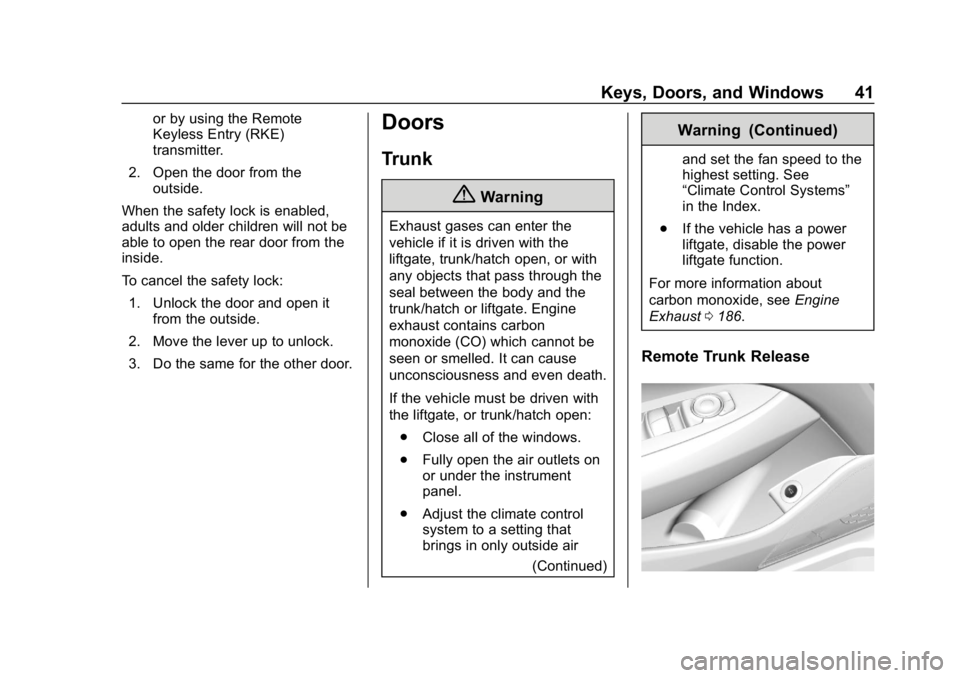
Remote Trunk Release