key BUICK LESABRE 2003 Service Manual
[x] Cancel search | Manufacturer: BUICK, Model Year: 2003, Model line: LESABRE, Model: BUICK LESABRE 2003Pages: 380, PDF Size: 2.75 MB
Page 158 of 380

DIC Vehicle Personalization
The DIC can be used to program the following personal
choice features available with your vehicle:
·Automatic Door Locks
·Window Lock Out
·Security Feedback
·Delayed Locking
·Perimeter Lighting
·Memory Seats
·Outside Curb View Assist Mirror
·Driver ID
·Language Selection
The personal choice settings displayed on the DIC are
determined by the transmitter used to enter the
vehicle. Each remote keyless entry transmitter was
pre-programmed to belong to DRIVER 1 or DRIVER 2
and is numbered on the back. After the unlock button on
a remote keyless entry transmitter is pressed and the
ignition is in RUN, the DIC will display the identi®ed
driver and recall the settings previously programmed for
that driver. The settings can also be recalled by
brie¯y pressing one of the MEMORY buttons located on
the driver's door.If you unlock the vehicle using your door key instead of
your transmitter, the DIC will not change drivers and
will recall the information from the last transmitter used
or the last driver using the memory seat controls. If
this happens and you were not the last driver of
the vehicle, simply press your correct driver number on
the memory seat controls or press the unlock button
on your remote keyless entry transmitter.
Use the following steps for personalization programming
instructions.
1. Turn the ignition on and keep the transaxle in
PARK (P).
2. Inform the DIC which driver you are by pressing the
unlock button on your remote keyless entry
transmitter or the appropriate memory seat control.
3. Press and hold the ENG/MET button for ®ve
seconds. WELCOME TO BUICK OPTION
FEATURE will appear in the display.
4. The ®rst choice to be made will be DRIVER
ID 1 or 2. Press the ENG/MET button to toggle
between your selections within a display and
RESET to choose the current selection and move
on to the next personal choice feature.
3-50
Page 159 of 380

If you would like to exit the selection mode without
moving through each of the personal choice features,
simply press a different button on the DIC or turn off the
ignition. Whatever personal choices you made will
still be retained, even without passing through each of
the features. In order for your personal choices to save,
you must press RESET after making your selections.
If you happen to move past a selection you would like to
make a personal choice for, press the unlock button
on your remote keyless entry transmitter or press
the appropriate driver number on the seat control. This
will return you to the beginning of the option feature
programming mode.
Automatic Door Locks
The door lock modes when shifting in and out of
PARK (P), can be changed through the DIC. You can
change these modes by different selections of the
following DIC displays:
·AUTO DOOR LOCKS ± OFF/ON
·UNLOCK ± OFF/ON
·UNLOCK ± KEY OFF/PARK
·DOOR TO UNLOCK ± DRIVER/ALL
If you choose OFF for AUTO DOOR LOCKS, your door
locks will operate normally with no automatic feature.If you choose ON for AUTO DOOR LOCKS, ON for
UNLOCK and KEY OFF, your doors will lock every time
you shift out of PARK (P), and the doors will unlock
every time you stop and turn the ignition to OFF.
If you choose ON for AUTO DOOR LOCKS, ON for
UNLOCK and PARK, your doors will lock every time you
shift out of PARK (P), and the doors will unlock every
time you stop and shift into PARK (P).
If you choose ON for AUTO DOOR LOCKS, and OFF
for UNLOCK, your doors will lock every time you
shift out of PARK (P), and there will be no automatic
door unlock when shifting back into PARK (P).
If you choose ON for UNLOCK and DRIVER for DOOR
TO UNLOCK, only the driver's door will automatically
unlock when shifting into PARK or turning the key
to OFF.
If you choose ON for UNLOCK and ALL for DOOR TO
UNLOCK, all doors will automatically unlock when
shifting into PARK or turning the key to OFF.
To change modes, do the following:
1. Move the arrow on the display between the
selections by pressing the ENG/MET button.
2. Once you have made your selection, press the
RESET button and your choice will be retained
in memory.
See
Programmable Automatic Door Locks on page 2-11for more information about this feature.
3-51
Page 160 of 380

Window Lock Out
The number of passenger windows locked out by the
window LOCK switch can be programmed through
the DIC.
If you choose R + PASS, all three passenger window
switches will be inactive when the window LOCK switch
is enabled.
If you choose REAR, only the two rear passenger
window switches will be locked out when the window
LOCK switch is enabled.
To change modes, do the following:
1. Move the arrow on the display between R + PASS
and REAR by pressing the ENG/MET button.
2. Once you have made your selection, press the
RESET button. Your choice will be retained in
memory.
For more information on this feature, see ªWindow Lock
Outº under
Power Windows on page 2-17.
Security Feedback
By choosing different combinations of these selections,
you can choose the type of transmitter activated
feedback when locking and unlocking your vehicle with
your transmitter. Each time you make a selection by
pressing the ENG/MET button, press the RESET button
to record your choice.
·KEYLESS FEEDBACK ± OFF/ON
·LIGHTS FEEDBACK ± OFF/ON
·HORN FEEDBACK ± OFF/ON
If you choose ON for KEYLESS FEEDBACK you will
also need to choose LIGHTS and/or HORN FEEDBACK.
You can select the following modes:
·If you choose OFF for KEYLESS FEEDBACK, you
will receive no security feedback when locking or
unlocking your vehicle.
·If you choose ON for KEYLESS FEEDBACK and
ON for LIGHTS FEEDBACK, the exterior lamps
will ¯ash twice when unlocking your vehicle
and once when locking your vehicle.
3-52
Page 161 of 380

·If you choose ON for KEYLESS FEEDBACK and
ON for HORN FEEDBACK, your horn will chirp
when all doors are unlocked and when locking your
vehicle.
·If you choose ON for KEYLESS, LIGHTS and
HORN FEEDBACK, your exterior lamps will
¯ash twice at the ®rst unlock button press, your
exterior lamps will ¯ash twice and the horn will chirp
once at the second unlock button press, and the
exterior lamps will ¯ash and the horn will chirp once
when locking your vehicle.
For more information on this feature, see ªSecurity
Feedbackº under
Remote Keyless Entry System
Operation on page 2-5.
Delayed Locking
This feature, which delays the actual locking of the
vehicle, can be made active or inactive through the DIC.
When DELAYED LOCKING ± OFF/ON appears on
the display, use the ENG/MET button to toggle the arrow
between OFF and ON. When you have made your
choice, press the RESET button to record your
selection.
For more information on this feature, see
Delayed
Locking on page 2-11.
Perimeter Lighting
Press the unlock button on the remote keyless entry
transmitter to turn on the DRL (high-beams at reduced
intensity), parking lamps and back-up lamps if it is
dark enough according to the Twilight Sentinel
ž.
You can control activation of this feature by choosing
OFF or ON when the PERIMETER LIGHTS choice
is displayed on the DIC. Make your choice by pressing
the ENG/MET button and record your choice by
pressing the RESET button. You will then be prompted
to choose a TIMEOUT period. See ªExterior Lightsº
following for more information.
For more information on this feature, see ªPerimeter
Lightingº under
Interior Lamps on page 3-17.
Exterior Lights
The EXTERIOR LIGHTS/TIMEOUT feature can be
changed to a desired setting by using the ENG/MET to
toggle from 5 to 30 seconds. Each toggle will increase
the time by ®ve seconds. Once the desired timeout
is displayed, press RESET to record your choice and
move on to the next personal choice feature.
Memory Seats
If your vehicle has this feature, the memory seat and
mirror positions will be recalled for the identi®ed
driver when the remote keyless entry transmitter is used
to enter the vehicle.
3-53
Page 162 of 380

You can program this feature to be active by choosing
ON when the SEAT RECALL choice appears, or
inactive by choosing OFF when the SEAT RECALL
choice appears on the DIC. Make your choices
by pressing the ENG/MET button and store them to
memory by pressing the RESET button.
You can also program this feature to recall your
memory seat position or the exit seat position.
MEMORY:Choose ON when the SEAT RECALL
choice appears, and then choose MEMORY when the
RECALL POSITION choice appears.
EXIT:Choose ON when the SEAT RECALL choice
appears, and then choose EXIT when the RECALL
POSITION choice appears. The seat will move when
you enter the vehicle after unlocking it with a remote
keyless entry transmitter. This will allow for easy entry.
For more information on this feature, see
Memory
Seat and Mirrors on page 2-44.
Outside Curb View Assist Mirror
If your vehicle has the outside curb view assist mirror,
which tips the passenger mirror down while the
vehicle is in REVERSE (R), it can be made active
or inactive through the DIC. When TILTMIRRORS ± OFF/ON appears on the display, use the
ENG/MET button to toggle the arrow between OFF
and ON. When you have made your choice, press the
RESET button to record your selection. For more
information on this feature, see
Outside Curb View
Assist Mirror on page 2-36.
Driver ID
This feature displays the DRIVER ID, as identi®ed by
the DIC. If this feature is ON, the DRIVER ID will
be displayed every time the ignition is turned on. If the
DRIVER ID is OFF, the DRIVER ID can be displayed
by pressing either a button on the remote keyless entry
transmitter or a memory seat button.
Language Selection
After DRIVER ID has been selected, ªLanguage
Englishº will be displayed. Pressing the RESET button
selects English as the DIC language and ends
programming. If you prefer the language to be French
or Spanish, press the ENG/MET button when ªLanguage
Englishº appears on the display. Hold the ENG/MET
button until the desired language is displayed, then
press the RESET button to select that language.
3-54
Page 185 of 380

·E34:The CD changer door is open. Completely
close the door to restore normal operation.
·E35:An empty magazine is inserted in the CD
changer. Try the magazine again with a disc loaded
on one of the trays.
If any error occurs repeatedly or if an error cannot be
corrected, contact your dealership. If your radio displays
an error number other than the error codes listed
previously, write it down and provide it to your dealership
when reporting the problem.
Personal Choice Radio Controls
If your vehicle has this feature it will enable two drivers
to store and recall personal settings for radio presets,
last tuned station, volume, tone, and audio source
(radio, cassette, or CD).
The memory buttons 1 and 2 for this feature are located
on the driver's door panel and correspond to the
numbers 1 and 2 found on the back of each remote
keyless entry transmitter.
To recall audio sources, press the unlock button on the
remote keyless entry transmitter and turn the ignition
on. The source last listened to will be recalled for
the identi®ed driver 1 or 2.To program this feature, do the following:
1. Set all radio preferences. For more information see
ªSetting Preset Stationsº and ªSetting the Toneº
listed for your particular radio.
2. Locate the memory buttons on the driver's
door panel.
3. Press one of the memory buttons 1 or 2 until you
hear two beeps. The beeps con®rm that your
selection has been saved and can now be recalled.
Follow these steps each time you want to change the
stored settings.Theft-Deterrent Feature
THEFTLOCKžis designed to discourage theft of your
radio. It works by using a secret code to disable all radio
functions whenever battery power is removed and the
radio is placed in a different vehicle. This feature
requires no user input to be activated. It is automatically
armed when it is put into the vehicle for the ®rst time.
When the ignition is turned off, the blinking red light
indicates that THEFTLOCK
žis armed.
If THEFTLOCK
žis activated, your radio will not operate
if stolen. The radio will display LOCKED and a red
LED indicator light will come on above the key symbol
to indicate a locked condition. If this occurs, the radio will
need to be returned to the dealer.
3-77
Page 193 of 380
Police records show that almost half of all motor
vehicle-related deaths involve alcohol. In most cases,
these deaths are the result of someone who was
drinking and driving. In recent years, more than
16,000 annual motor vehicle-related deaths have been
associated with the use of alcohol, with more than
300,000 people injured.
Many adults Ð by some estimates, nearly half the adult
population Ð choose never to drink alcohol, so they
never drive after drinking. For persons under 21,
it's against the law in every U.S. state to drink alcohol.
There are good medical, psychological and
developmental reasons for these laws.
The obvious way to eliminate the leading highway
safety problem is for people never to drink alcohol and
then drive. But what if people do? How much is ªtoo
muchº if someone plans to drive? It's a lot less
than many might think. Although it depends on each
person and situation, here is some general information
on the problem.
The Blood Alcohol Concentration (BAC) of someone
who is drinking depends upon four things:
·The amount of alcohol consumed
·The drinker's body weight
·The amount of food that is consumed before and
during drinking
·The length of time it has taken the drinker to
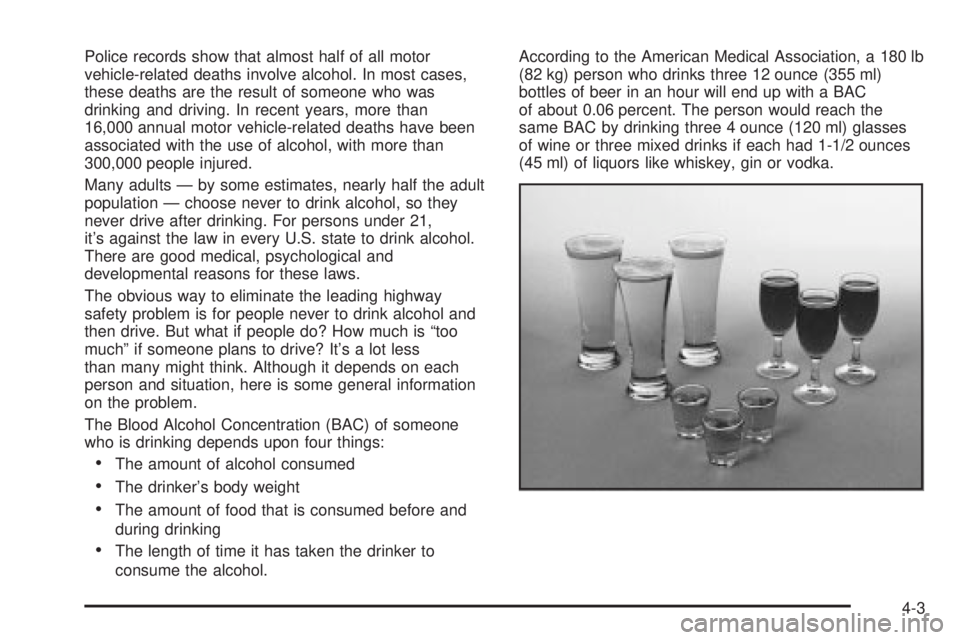
consume the alcohol.According to the American Medical Association, a 180 lb
(82 kg) person who drinks three 12 ounce (355 ml)
bottles of beer in an hour will end up with a BAC
of about 0.06 percent. The person would reach the
same BAC by drinking three 4 ounce (120 ml) glasses
of wine or three mixed drinks if each had 1-1/2 ounces
(45 ml) of liquors like whiskey, gin or vodka.
4-3
Page 223 of 380
Dolly Towing
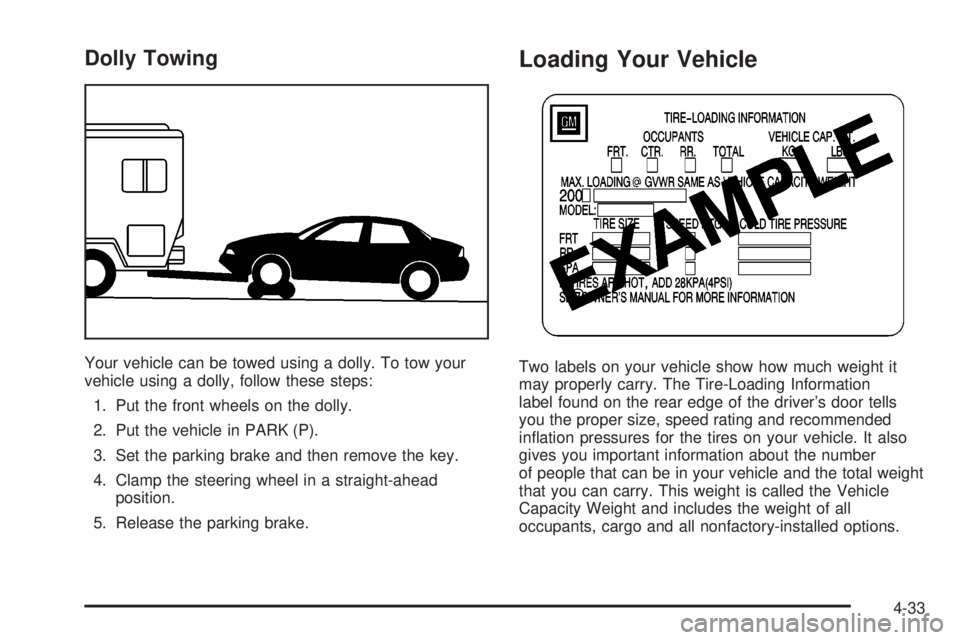
Your vehicle can be towed using a dolly. To tow your
vehicle using a dolly, follow these steps:
1. Put the front wheels on the dolly.
2. Put the vehicle in PARK (P).
3. Set the parking brake and then remove the key.
4. Clamp the steering wheel in a straight-ahead
position.
5. Release the parking brake.
Loading Your Vehicle
Two labels on your vehicle show how much weight it
may properly carry. The Tire-Loading Information
label found on the rear edge of the driver's door tells
you the proper size, speed rating and recommended
in¯ation pressures for the tires on your vehicle. It also
gives you important information about the number
of people that can be in your vehicle and the total weight
that you can carry. This weight is called the Vehicle
Capacity Weight and includes the weight of all
occupants, cargo and all nonfactory-installed options.
4-33
Page 268 of 380
When to Check Power Steering Fluid
It is not necessary to regularly check power steering ¯uid
unless you suspect there is a leak in the system or
you hear an unusual noise. A ¯uid loss in this system
could indicate a problem. Have the system inspected
and repaired.
How to Check Power Steering Fluid
Turn the key off, let the engine compartment cool down,
wipe the cap and the top of the reservoir clean, then
unscrew the cap and wipe the dipstick with a clean rag.
Replace the cap and completely tighten it. Then
remove the cap again and look at the ¯uid level on the
dipstick.
The level should be at the FULL COLD mark. If
necessary, add only enough ¯uid to bring the level up to
the mark.
What to Use
To determine what kind of ¯uid to use, seePart D:
Recommended Fluids and Lubricants on page 6-23.
Always use the proper ¯uid. Failure to use the proper
¯uid can cause leaks and damage hoses and seals.
Windshield Washer Fluid
What to Use
When you need windshield washer ¯uid, be sure to read
the manufacturer's instructions before use. If you will
be operating your vehicle in an area where the
temperature may fall below freezing, use a ¯uid that has
sufficient protection against freezing. See
Engine
Compartment Overview on page 5-12for reservoir
location.
Adding Washer Fluid
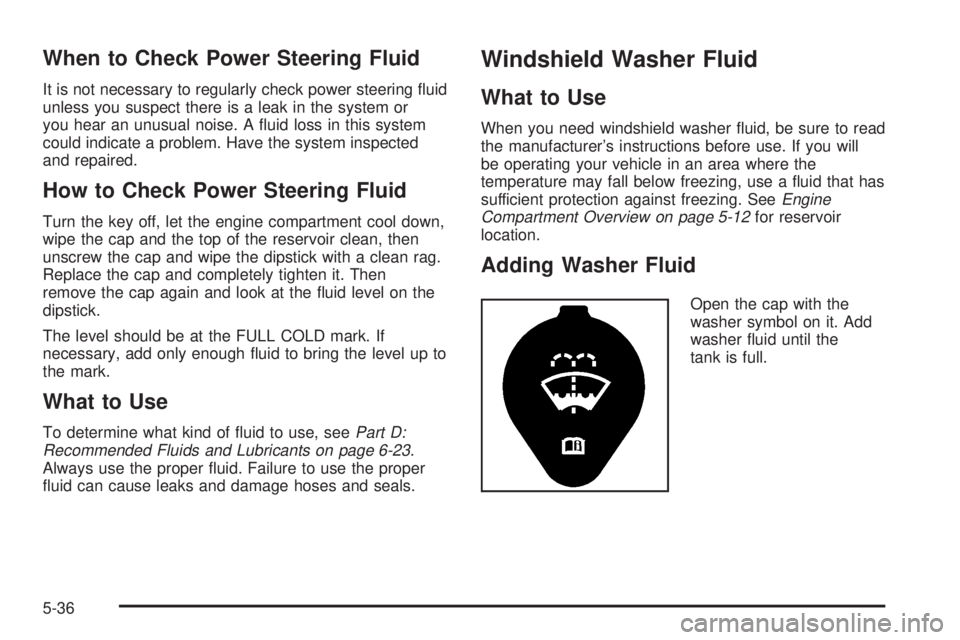
Open the cap with the
washer symbol on it. Add
washer ¯uid until the
tank is full.
5-36
Page 344 of 380
At Least Twice a Year
Restraint System Check
Make sure the safety belt reminder light and all your
belts, buckles, latch plates, retractors and anchorages
are working properly. Look for any other loose or
damaged safety belt system parts. If you see anything
that might keep a safety belt system from doing its
job, have it repaired. Have any torn or frayed safety belts
replaced.
Also look for any opened or broken air bag coverings,
and have them repaired or replaced. (The air bag
system does not need regular maintenance.)
Wiper Blade Check
Inspect wiper blades for wear or cracking. Replace
blade inserts that appear worn or damaged or that
streak or miss areas of the windshield. Also see
ªWindshield Wiper and Wiper Bladesº under
Cleaning
the Outside of Your Vehicle on page 5-80.
Weatherstrip Lubrication
Silicone grease on weatherstrips will make them last
longer, seal better, and not stick or squeak. Apply
silicone grease with a clean cloth. During very cold,
damp weather more frequent application may be
required. See
Part D: Recommended Fluids and
Lubricants on page 6-23.
Automatic Transaxle Check
Check the transaxle ¯uid level; add if needed. SeeAutomatic Transaxle Fluid on page 5-21. A ¯uid loss
may indicate a problem. Check the system and repair if
needed.
At Least Once a Year
Key Lock Cylinders Service
Lubricate the key lock cylinders with the lubricant
speci®ed in Part D.
Body Lubrication Service
Lubricate all body door hinges. Also lubricate all hinges
and latches, including those for the hood, glove box
door and console door. Part D tells you what to
use. More frequent lubrication may be required when
exposed to a corrosive environment.
6-18