change time BUICK LESABRE 2003 Owner's Manual
[x] Cancel search | Manufacturer: BUICK, Model Year: 2003, Model line: LESABRE, Model: BUICK LESABRE 2003Pages: 380, PDF Size: 2.75 MB
Page 2 of 380
GENERAL MOTORS, GM, the GM Emblem, BUICK, the
BUICK Emblem and the name LESABRE are registered
trademarks of General Motors Corporation.
This manual includes the latest information at the time it
was printed. We reserve the right to make changes
after that time without further notice. For vehicles ®rst
sold in Canada, substitute the name ªGeneral Motors of
Canada Limitedº for Buick Motor Division whenever it
appears in this manual.
Please keep this manual in your vehicle, so it will be
there if you ever need it when you're on the road. If you
sell the vehicle, please leave this manual in it so the
new owner can use it.
Litho in U.S.A.
Part No. 25735901 B First Edition
Copyright General Motors Corporation 11/05/02
All Rights Reserved
Canadian Owners
You can obtain a French copy of this manual from your
dealer or from:
Helm, Incorporated
P.O. Box 07130
Detroit, MI 48207
How to Use This Manual
Many people read their owner's manual from beginning
to end when they ®rst receive their new vehicle. If
you do this, it will help you learn about the features and
controls for your vehicle. In this manual, you will ®nd
that pictures and words work together to explain things.
Index
A good place to look for what you need is the Index in
back of the manual. It is an alphabetical list of what
is in the manual, and the page number where you will
®nd it.
ii
Page 67 of 380
Remote Keyless Entry System
Your keyless entry system operates on a radio
frequency subject to Federal Communications
Commission (FCC) Rules and with Industry Canada.
This device complies with Part 15 of the FCC Rules.
Operation is subject to the following two conditions:
1. This device may not cause interference, and
2. This device must accept any interference received,
including interference that may cause undesired
operation of the device.
This device complies with RSS-210 of Industry Canada.
Operation is subject to the following two conditions:
1. This device may not cause interference, and
2. This device must accept any interference received,
including interference that may cause undesired
operation of the device.
Changes or modi®cations to this system by other than
an authorized service facility could void authorization to
use this equipment.At times you may notice a decrease in range. This is
normal for any remote keyless entry system. If the
transmitter does not work or if you have to stand closer
to your vehicle for the transmitter to work, try this:
·Check the distance. You may be too far from your
vehicle. You may need to stand closer during
rainy or snowy weather.
·Check the location. Other vehicles or objects may
be blocking the signal. Take a few steps to the
left or right, hold the transmitter higher, and
try again.
·Check to determine if battery replacement is
necessary. See ªBattery Replacementº under
Remote Keyless Entry System Operation on
page 2-5.
·If you are still having trouble, see your dealer or a
quali®ed technician for service.
Remote Keyless Entry System
Operation
With this feature, you can lock and unlock your doors or
unlock your trunk from about 3 feet (1 m) up to 30
feet (9 m) away using the remote keyless entry
transmitter supplied with your vehicle.
2-5
Page 69 of 380

·Delayed Locking:This feature lets the driver delay
the actual locking of the vehicle. When all doors
have been closed, the doors will lock automatically
after ®ve seconds.
·Perimeter Lighting:When the button with the
unlock symbol on the remote keyless entry
transmitter is pressed, the daytime running lamps
(DRL), parking lamps and back-up lamps will
turn on.
For more detailed information and programming
instructions, refer to
DIC Vehicle Personalization on
page 3-50for each individual feature listed above.
Security Feedback
This feature provides feedback when the vehicle
receives a command from the remote keyless entry
transmitter. Feedback is only provided if all doors are
closed, the ignition is off and the Retained Accessory
Power (RAP) is inactive. One of the following modes
may be selected for each transmitter:
Mode 1:No feedback when locking or unlocking
vehicle.
Mode 2:Parking lamps, back-up lamps and the DRL
exterior lamps will ¯ash twice when unlocking the vehicle
and ¯ash once when locking the vehicle.Mode 3:Horn chirps when all doors are unlocked
(second time the button is pressed) and when locking
the vehicle.
Mode 4:Parking lamps, back-up lamps and the DRL
exterior lamps will ¯ash twice each time the button with
the unlock symbol is pressed; the horn chirps when
all doors are unlocked. Parking lamps and the
DRL exterior lamps ¯ash once and the horn chirps
when locking the vehicle.
The exterior lamps will not ¯ash if the manual parking
lamps are on.
If your vehicle is equipped with the DIC, you must
program this feature using it. See
Driver Information
Center (DIC) on page 3-45.
If your vehicle is not equipped with the DIC, do the
following to change to another mode:
1. Close all the doors and turn the ignition on. Keep
all doors closed throughout this procedure.
2. Press and hold LOCK on the driver's power door
lock switch throughout this procedure. All the
doors will lock.
3. Press the trunk button on the transmitter. The
security feedback will remain in its current mode.
The horn will chirp as feedback.
2-7
Page 70 of 380

4. Press the trunk button again. Each time the trunk
button is pressed, the security feedback will
advance to the next mode, and the horn will chirp.
5. Release the power door lock switch. The security
feedback will remain in the most current mode
selected.
This procedure only changes the mode for the
transmitter used to change this setting.
To verify the mode selected, remove the key from the
ignition and close all of the doors after you've exited the
vehicle. Press the lock button on the transmitter to be
veri®ed and con®rm the appropriate feedback.
Repeat with the unlock button.
Matching Transmitter(s) to Your
Vehicle
Each remote keyless entry transmitter is coded to
prevent another transmitter from unlocking your vehicle.
If a transmitter is lost or stolen, a replacement can
be purchased through your dealer. Remember to bring
any remaining transmitters with you when you go toyour dealer. When the dealer matches the replacement
transmitter to your vehicle, any remaining transmitters
must also be matched. Once your dealer has coded the
new transmitter, the lost transmitter will not unlock
your vehicle. Each vehicle can have a maximum of four
transmitters matched to it.
See your dealer to have additional transmitters matched
to your vehicle.
Battery Replacement
Under normal use, the battery in your remote keyless
entry transmitter should last about four years.
You can tell the battery is weak if the transmitter won't
work at the normal range in any location. If you have
to get close to your vehicle before the transmitter works,
it's probably time to change the battery.
Notice:When replacing the battery, use care not to
touch any of the circuitry. Static from your body
transferred to these surfaces may damage the
transmitter.
2-8
Page 73 of 380
Door Ajar Reminder
If your vehicle is equipped with the Driver Information
Center (DIC), and a door is not fully closed, the DIC will
display a DOOR AJAR message. See
Driver Information
Center (DIC) on page 3-45.
Delayed Locking
This feature lets the driver delay the actual locking of
the vehicle. When the driver's power door lock switch or
remote keyless entry lock button is pressed with the
key removed from the ignition, and the driver's
door open, a chime will sound three times to signal that
the delayed locking system is active. When all doors
have been closed, the doors will lock automatically after
®ve seconds. If any door is opened before this, the
®ve-second timer will reset itself once all the doors have
been closed again.
Pressing the driver's or passenger's power door lock
switch or the remote keyless entry transmitter button
again will override this feature.
Personal Choice Programming
The delayed locking feature can be turned on or off.
If your vehicle is equipped with the DIC, you must use it
to program this feature. See
Driver Information Center
(DIC) on page 3-45.To turn the feature on, do the following:
1. Close all the doors and turn the ignition on. Keep
all doors closed throughout this procedure.
2. Press and hold LOCK on the driver's power door
lock switch throughout this procedure. All the
doors will lock.
3. Press the unlock button on the transmitter. The lock
delay is still off and all doors will remain locked.
4. Press the unlock button on the transmitter again.
Lock delay is now active and all doors will unlock.
5. Release the power door lock switch.
To turn this feature off, repeat the previous procedure.
This procedure only changes the mode for the
transmitter used to change this setting.
Programmable Automatic
Door Locks
Close the doors and turn on the ignition. Every time you
move the shift lever out of PARK (P), all of the doors
will lock. And, every time you stop and move the
shift lever into PARK (P), the doors will unlock. If
someone needs to get out while you're not in PARK (P),
have that person use the manual door lock control or
power door lock switch. When the door is closed again,
it will not lock automatically. If you need to lock the
doors before shifting out of PARK (P), use the manual
door lock control or power door lock switch.
2-11
Page 74 of 380

Personalization Programming
You can program the automatic door locks feature to
change to the following modes:
Mode 0:No automatic door lock or unlock.
Mode 1:All doors automatically lock when shifted out
of PARK (P). No automatic door unlock.
Mode 2:All doors automatically lock when shifted out
of PARK (P). Only the driver's door automatically
unlocks when shifted into PARK (P).
Mode 3:All doors automatically lock when shifted out
of PARK (P). All doors automatically unlock when shifted
into PARK (P).
If your vehicle is equipped with the DIC, you must use
it to program this feature. See
Driver Information
Center (DIC) on page 3-45.
If your vehicle is not equipped with the DIC, use the
following procedure to change modes:
1. Close all the doors and turn the ignition on. Keep
all doors closed throughout this procedure.
2. Press and hold LOCK on the driver's power door
lock switch throughout this procedure. All the
doors will lock.3. Press the button with the lock symbol on the
remote keyless entry transmitter. The automatic
door locks will remain in the current mode.
4. Press the button with the lock symbol on the
transmitter again. Each time this button is pressed,
the mode will advance by one, going from
3 to 0 to 1, etc.
The door locks will cycle according to the mode
entered while customizing the memory door locks.
(Mode 0 has no feedback.)
5. Release the power door lock switch. The automatic
door locks will remain in the most recent mode
selected.
This procedure only changes the mode for the
transmitter used to change this setting.
2-12
Page 95 of 380

Mirrors
Manual Rearview Mirror
When you are sitting in a comfortable driving position,
adjust the mirror so you can see clearly behind your
vehicle. Grip the mirror in the center to move it up
or down and side to side. The day/night adjustment
allows you to adjust the mirror to avoid glare from any
headlamps behind you. Push the tab away from
you for daytime use; pull it toward you for night use.
Automatic Dimming Rearview Mirror
Your vehicle may have an automatic dimming rearview
mirror. Your vehicle's mirror may also contain OnStarž
controls. SeeOnStaržSystem on page 2-37for
more information.
At night, when the glare is too high, the mirror will
gradually darken to reduce glare. This change may take
a few seconds. The mirror will return to its clear
daytime state when the glare is reduced.
Mirror Operation
AUTO:Press this button to turn on the automatic
dimming feature.
OFF:Press this button to turn off the automatic
dimming feature.
O(On/Off):For mirrors equipped with OnStarž
controls, press this button to turn on the automatic
dimming feature. To turn off automatic dimming, press
this button again.
The indicator light will be illuminated when this feature
is active.
Automatic Dimming Rearview Mirror
with Compass
Your vehicle may have an automatic dimming rearview
mirror with a compass. Your vehicle's mirror may
also contain OnStar
žcontrols. SeeOnStaržSystem on
page 2-37for more information.
The mirror also includes an eight-point compass display
in the upper right corner of the mirror face.
When cleaning the mirror, use a paper towel or similar
material dampened with glass cleaner. Do not spray
glass cleaner directly on the mirror as that may cause
the liquid cleaner to enter the mirror housing.
2-33
Page 109 of 380
Instrument Panel Overview...............................3-4
Hazard Warning Flashers................................3-6
Other Warning Devices...................................3-6
Horn.............................................................3-7
Tilt Wheel.....................................................3-7
Turn Signal/Multifunction Lever.........................3-7
Exterior Lamps.............................................3-14
Interior Lamps..............................................3-17
Head-Up Display (HUD).................................3-20
Accessory Power Outlets...............................3-22
Ashtrays and Cigarette Lighter........................3-23
Climate Controls............................................3-24
Climate Control System.................................3-24
Dual Automatic Climate Control System...........3-26
Outlet Adjustment.........................................3-30
Steering Wheel Climate Controls.....................3-31
Climate Controls Personalization.....................3-31
Warning Lights, Gages and Indicators.............3-32
Instrument Panel Cluster................................3-33
Speedometer and Odometer...........................3-35
Tachometer.................................................3-35
Safety Belt Reminder Light.............................3-36Air Bag Readiness Light................................3-36
Battery Warning Light....................................3-37
Brake System Warning Light..........................3-37
Anti-Lock Brake System Warning Light.............3-38
Traction Control System (TCS) Warning Light . . .3-39
Engine Coolant Temperature Gage..................3-40
Malfunction Indicator Lamp.............................3-40
Oil Pressure Light.........................................3-43
Security Light...............................................3-44
Cruise Control Light......................................3-44
Service Vehicle Soon Light............................3-44
Fuel Gage...................................................3-45
Driver Information Center (DIC).......................3-45
DIC Controls and Displays.............................3-46
DIC Warnings and Messages.........................3-49
DIC Vehicle Personalization............................3-50
Audio System(s).............................................3-55
Setting the Time...........................................3-55
Radio with CD..............................................3-56
Radio with Cassette and CD..........................3-62
Trunk-Mounted CD Changer...........................3-73
Personal Choice Radio Controls......................3-77
Section 3 Instrument Panel
3-1
Page 123 of 380
Headlamps On Reminder
If you leave the exterior lamp buttons for the headlamps
or parking lamps on, remove the key from the ignition
and open the driver's door, you will hear a continuous
warning chime. The chime will turn off when the
lamps are turned off.
Daytime Running Lamps
Daytime Running Lamps (DRL) can make it easier for
others to see the front of your vehicle during the
day. DRL can be helpful in many different driving
conditions, but they can be especially helpful in the short
periods after dawn and before sunset. Fully functional
daytime running lamps are required on all vehicles
®rst sold in Canada.
A light sensor on top of the instrument panel monitors
the exterior light level for the operation of DRL and
Twilight Sentinel
ž, so be sure it isn't covered.
The DRL system will make your high-beam headlamps
turn on at reduced brightness in daylight when the
following conditions are met:
·The ignition is on,
·the exterior lamp button for the headlamps is
off and
·the transaxle is not in PARK (P).When the DRL are on, only your high-beam headlamps
will be on. The parking lamps, taillamps, sidemarker
and other lamps won't be on.
When it is dark enough outside, your low-beam
headlamps will come on. The other lamps that turn on
with your headlamps will also turn on. When it is
bright enough outside, the regular lamps will go off, and
your high-beam headlamps change to the reduced
brightness of DRL.
To turn off all exterior lighting at night when you are
parked, turn off the headlamps and move the Twilight
Sentinel
žlever all the way toward OFF. The exterior
lamps will turn back on automatically when you move
the transaxle out of PARK (P).
As with any vehicle, you should turn on the regular
headlamp system when you need it.
Cornering Lamps
If your vehicle has this feature, the cornering lamps
come on when the headlamps or parking lamps are on
and you signal a turn with the multifunction lever.
They provide more light for cornering.
3-15
Page 124 of 380
Twilight Sentinelž
Twilight Sentinelžturns your headlamps on and off by
sensing how dark it is outside.
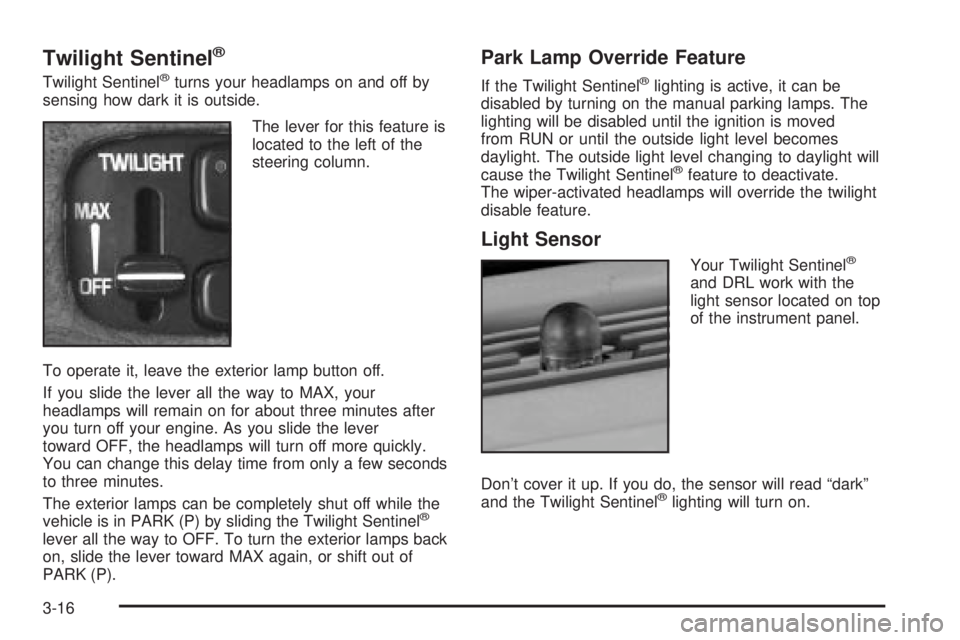
The lever for this feature is
located to the left of the
steering column.
To operate it, leave the exterior lamp button off.
If you slide the lever all the way to MAX, your
headlamps will remain on for about three minutes after
you turn off your engine. As you slide the lever
toward OFF, the headlamps will turn off more quickly.
You can change this delay time from only a few seconds
to three minutes.
The exterior lamps can be completely shut off while the
vehicle is in PARK (P) by sliding the Twilight Sentinel
ž
lever all the way to OFF. To turn the exterior lamps back
on, slide the lever toward MAX again, or shift out of
PARK (P).
Park Lamp Override Feature
If the Twilight Sentinelžlighting is active, it can be
disabled by turning on the manual parking lamps. The
lighting will be disabled until the ignition is moved
from RUN or until the outside light level becomes
daylight. The outside light level changing to daylight will
cause the Twilight Sentinel
žfeature to deactivate.
The wiper-activated headlamps will override the twilight
disable feature.
Light Sensor
Your Twilight Sentinelž
and DRL work with the
light sensor located on top
of the instrument panel.
Don't cover it up. If you do, the sensor will read ªdarkº
and the Twilight Sentinel
žlighting will turn on.
3-16