instrument BUICK LESABRE 2004 User Guide
[x] Cancel search | Manufacturer: BUICK, Model Year: 2004, Model line: LESABRE, Model: BUICK LESABRE 2004Pages: 392, PDF Size: 4.3 MB
Page 87 of 392
Key Reminder Warning
If you leave your key in OFF, you will hear a warning
chime when you open the driver’s door.
Always leave your key in LOCK while the engine is off.
If you leave it in any other position, you will drain
your battery power.
Retained Accessory Power (RAP)
After you turn the ignition off and remove the key, you
will still have power to such accessories as the
power windows, audio steering wheel controls (if
equipped), clock, sunroof (if equipped) and the radio for
up to 10 minutes. The instrument panel cluster lights
will stay on for a few seconds, then will go out. Once you
open a door, the power will shut off.
Starting Your Engine
Move your shift lever to PARK (P) or NEUTRAL (N).
Your engine will not start in any other position — that is
a safety feature. To restart when you are already
moving, use NEUTRAL (N) only.Notice:Shifting into PARK (P) with the vehicle
moving could damage the transaxle. Shift into
PARK (P) only when your vehicle is stopped.
1. With your foot off the accelerator pedal, turn your
ignition key to START. When the engine starts, let
go of the key. The idle speed will go down as
your engine gets warm.
Notice:Holding your key in START for longer than
15 seconds at a time will cause your battery to
be drained much sooner. And the excessive heat
can damage your starter motor. Wait about
15 seconds between each try to help avoid draining
your battery or damaging your starter.
2. If it does not start within 10 seconds, hold your key
in START for about 10 seconds at a time until your
engine starts. Wait about 15 seconds between
each try.
3. If your engine still will not start, or starts but then
stops, it could be ooded with too much gasoline.
Try pushing your accelerator pedal all the way to the
oor and holding it there as you hold the key in
START for about three seconds. If the vehicle starts
briey but then stops again, do the same thing.
This time keep the pedal down for ve or
six seconds to clear the extra gasoline from the
engine. After waiting about 15 seconds, repeat the
normal starting procedure.
2-23
Page 111 of 392
Instrument Panel Overview...............................3-4
Hazard Warning Flashers................................3-6
Other Warning Devices...................................3-6
Horn.............................................................3-7
Tilt Wheel.....................................................3-7
Turn Signal/Multifunction Lever.........................3-7
Exterior Lamps.............................................3-14
Interior Lamps..............................................3-17
Head-Up Display (HUD).................................3-20
Accessory Power Outlets...............................3-22
Ashtrays and Cigarette Lighter........................3-23
Climate Controls............................................3-24
Climate Control System.................................3-24
Dual Automatic Climate Control System...........3-26
Outlet Adjustment.........................................3-30
Steering Wheel Climate Controls.....................3-31
Climate Controls Personalization.....................3-31
Warning Lights, Gages and Indicators.............3-32
Instrument Panel Cluster................................3-33Speedometer and Odometer...........................3-35
Tachometer.................................................3-35
Safety Belt Reminder Light.............................3-36
Air Bag Readiness Light................................3-36
Battery Warning Light....................................3-37
Brake System Warning Light..........................3-37
Anti-Lock Brake System Warning Light.............3-38
Traction Control System (TCS) Warning Light . . .3-39
Engine Coolant Temperature Gage..................3-40
Malfunction Indicator Lamp.............................3-40
Oil Pressure Light.........................................3-43
Security Light...............................................3-44
Cruise Control Light......................................3-44
Service Vehicle Soon Light............................3-44
Fuel Gage...................................................3-45
Driver Information Center (DIC).......................3-45
DIC Controls and Displays.............................3-46
DIC Warnings and Messages.........................3-49
DIC Vehicle Personalization............................3-50
Section 3 Instrument Panel
3-1
Page 112 of 392
Audio System(s).............................................3-55
Setting the Time...........................................3-55
Radio with CD..............................................3-56
Radio with Cassette and CD..........................3-62
Trunk-Mounted CD Changer...........................3-73
Personal Choice Radio Controls......................3-77
Theft-Deterrent Feature..................................3-78
Audio Steering Wheel Controls.......................3-78Understanding Radio Reception......................3-79
Care of Your Cassette Tape Player.................3-80
Care of Your CDs.........................................3-81
Care of Your CD Player................................3-81
Diversity Antenna System..............................3-81
XM™ Satellite Radio Antenna System
(48 Contiguous US States).........................3-82
Chime Level Adjustment................................3-82
Section 3 Instrument Panel
3-2
Page 114 of 392
Instrument Panel Overview
3-4
Page 115 of 392
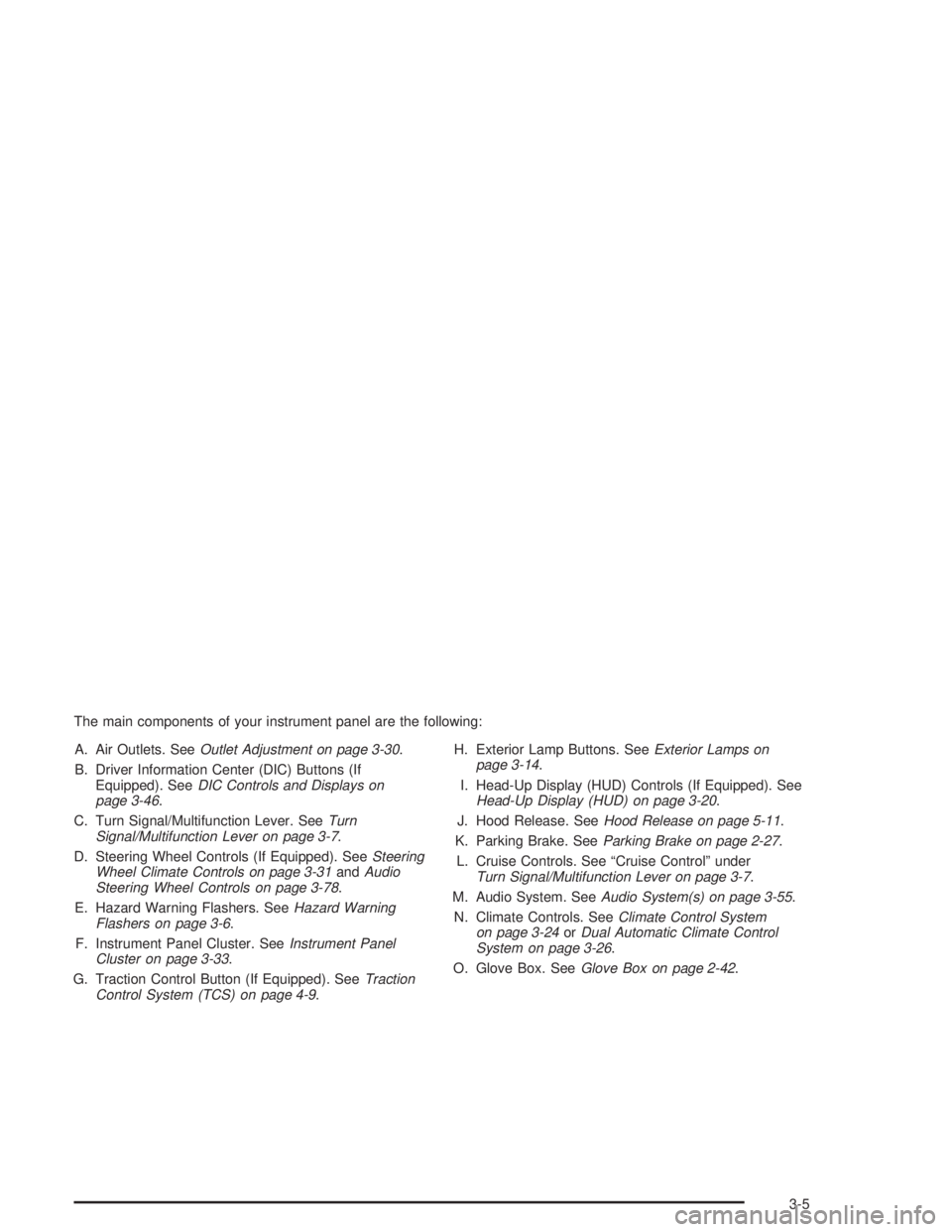
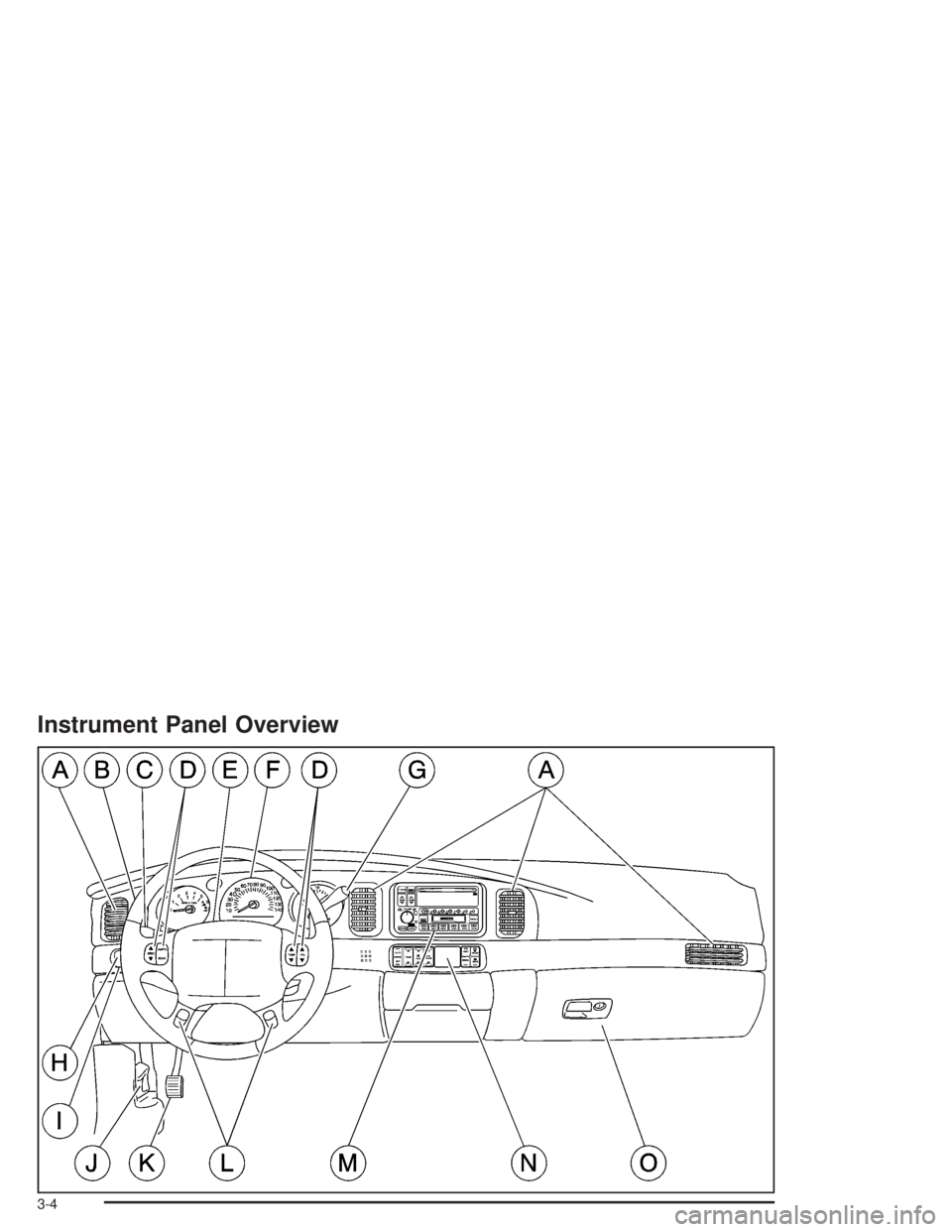
The main components of your instrument panel are the following:
A. Air Outlets. SeeOutlet Adjustment on page 3-30.
B. Driver Information Center (DIC) Buttons (If
Equipped). SeeDIC Controls and Displays on
page 3-46.
C. Turn Signal/Multifunction Lever. SeeTurn
Signal/Multifunction Lever on page 3-7.
D. Steering Wheel Controls (If Equipped). SeeSteering
Wheel Climate Controls on page 3-31andAudio
Steering Wheel Controls on page 3-78.
E. Hazard Warning Flashers. SeeHazard Warning
Flashers on page 3-6.
F. Instrument Panel Cluster. SeeInstrument Panel
Cluster on page 3-33.
G. Traction Control Button (If Equipped). SeeTraction
Control System (TCS) on page 4-9.H. Exterior Lamp Buttons. SeeExterior Lamps on
page 3-14.
I. Head-Up Display (HUD) Controls (If Equipped). See
Head-Up Display (HUD) on page 3-20.
J. Hood Release. SeeHood Release on page 5-11.
K. Parking Brake. SeeParking Brake on page 2-27.
L. Cruise Controls. See “Cruise Control” under
Turn Signal/Multifunction Lever on page 3-7.
M. Audio System. SeeAudio System(s) on page 3-55.
N. Climate Controls. SeeClimate Control System
on page 3-24orDual Automatic Climate Control
System on page 3-26.
O. Glove Box. SeeGlove Box on page 2-42.
3-5
Page 118 of 392
Turn and Lane-Change Signals
To signal a turn, move the lever on the left side of the
steering wheel all the way up or down. The lever returns
automatically when the turn is complete.
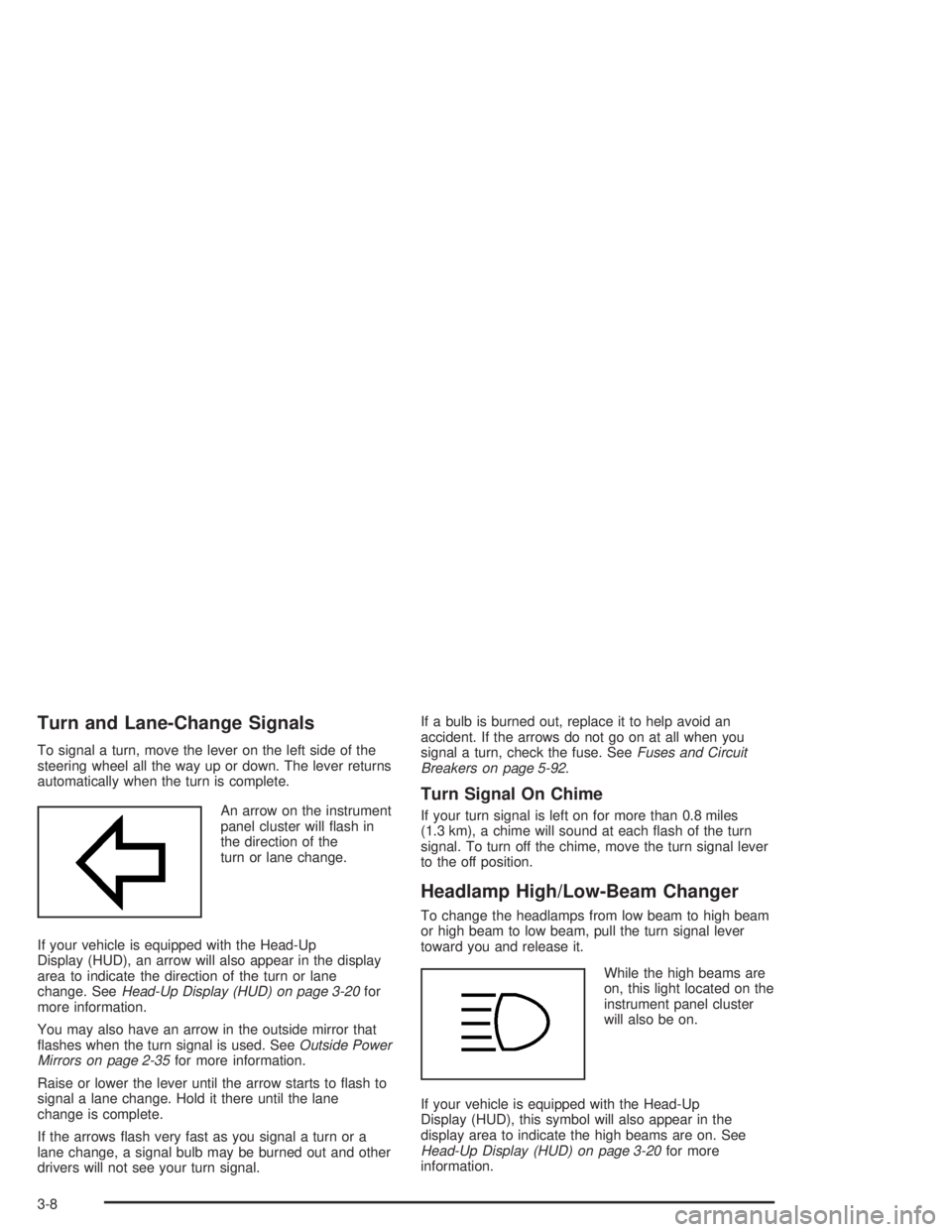
An arrow on the instrument
panel cluster will ash in
the direction of the
turn or lane change.
If your vehicle is equipped with the Head-Up
Display (HUD), an arrow will also appear in the display
area to indicate the direction of the turn or lane
change. SeeHead-Up Display (HUD) on page 3-20for
more information.
You may also have an arrow in the outside mirror that
ashes when the turn signal is used. SeeOutside Power
Mirrors on page 2-35for more information.
Raise or lower the lever until the arrow starts to ash to
signal a lane change. Hold it there until the lane
change is complete.
If the arrows ash very fast as you signal a turn or a
lane change, a signal bulb may be burned out and other
drivers will not see your turn signal.If a bulb is burned out, replace it to help avoid an
accident. If the arrows do not go on at all when you
signal a turn, check the fuse. SeeFuses and Circuit
Breakers on page 5-92.
Turn Signal On Chime
If your turn signal is left on for more than 0.8 miles
(1.3 km), a chime will sound at each ash of the turn
signal. To turn off the chime, move the turn signal lever
to the off position.
Headlamp High/Low-Beam Changer
To change the headlamps from low beam to high beam
or high beam to low beam, pull the turn signal lever
toward you and release it.
While the high beams are
on, this light located on the
instrument panel cluster
will also be on.
If your vehicle is equipped with the Head-Up
Display (HUD), this symbol will also appear in the
display area to indicate the high beams are on. See
Head-Up Display (HUD) on page 3-20for more
information.
3-8
Page 119 of 392

Flash-To-Pass
This feature lets you use the high-beam headlamps to
signal the driver in front of you that you want to pass. It
works even if your headlamps are off.
Pull the turn signal lever toward you briey to
ash-to-pass.
If the headlamps are off or on low beam, the high-beam
headlamps will turn on. They will stay on as long as
you hold the lever toward you and the high-beam
indicator on the instrument panel cluster will come on.
Windshield Wipers
The windshield wipers are controlled by turning the
band marked WIPER.
If your windshield wipers are on for more than six
seconds while you are driving, the low-beam headlamps,
instrument panel cluster backlighting and taillamps will
turn on. For more information see “Wiper Activated
Headlamps” underExterior Lamps on page 3-14.
OFF:Turn the band to OFF to turn the wipers off.
MIST:For a single wiping cycle, turn the band to MIST.
Hold it there until the wipers start, then let go. The
wipers will stop after one cycle. If you want more cycles,
hold the band on MIST longer.LO (Low Speed):Turn the band to LO for steady
wiping at a slow speed.
HI (High Speed):Turn the band to HI for steady wiping
at a high speed.
The wiper speed may be set for a long or short delay
between wipes. Turn the band to choose the delay time.
The closer to LO, the shorter the delay.
Heavy snow or ice can overload your wiper motor. A
circuit breaker will stop the motor until it cools.
Clear away snow or ice to prevent an overload.
Keep in mind that damaged wiper blades may prevent
you from seeing well enough to drive safely. To
avoid damage, be sure to clear ice and snow from the
wiper blades before using them. If your blades do
become damaged, get new blades or blade inserts.
Rainsense™ II Wipers
If your vehicle has this feature, the moisture sensor is
mounted on the interior of the windshield below the
rearview mirror and is used to automatically operate the
wipers. This system operates by monitoring the
amount of moisture build-up on the windshield. Wipes
occur as needed to clear the windshield depending
on the driving conditions and the sensitivity setting. In
light rain or snow, fewer wipes will occur. In heavy
rain or snow, wipes will occur more frequently.
3-9
Page 122 of 392
Setting Cruise Control
{CAUTION:
If you leave your cruise control on when you
are not using cruise, you might hit a button
and go into cruise when you do not want to.
You could be startled and even lose control.
Keep the cruise control switch off until you
want to use cruise control.
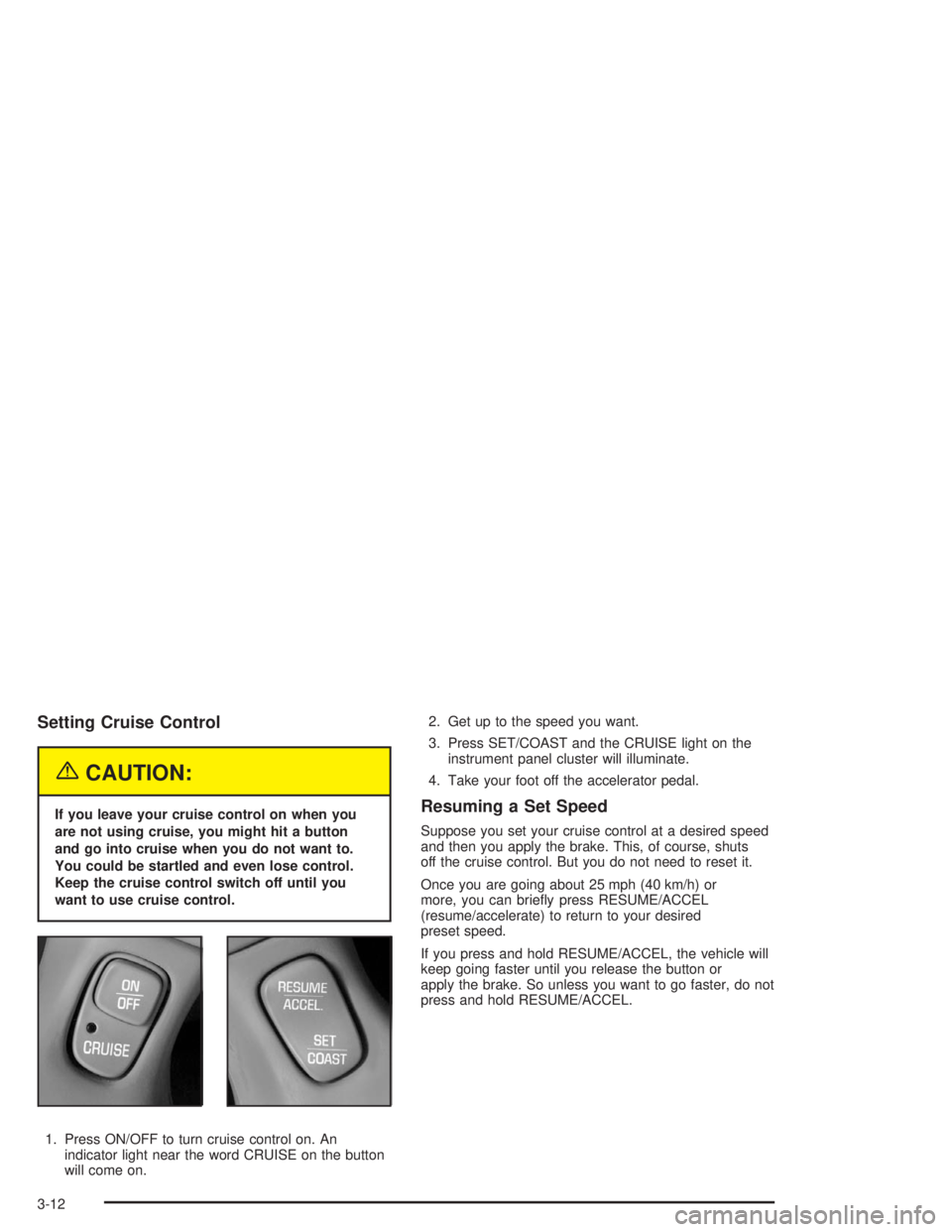
1. Press ON/OFF to turn cruise control on. An
indicator light near the word CRUISE on the button
will come on.2. Get up to the speed you want.
3. Press SET/COAST and the CRUISE light on the
instrument panel cluster will illuminate.
4. Take your foot off the accelerator pedal.Resuming a Set Speed
Suppose you set your cruise control at a desired speed
and then you apply the brake. This, of course, shuts
off the cruise control. But you do not need to reset it.
Once you are going about 25 mph (40 km/h) or
more, you can briey press RESUME/ACCEL
(resume/accelerate) to return to your desired
preset speed.
If you press and hold RESUME/ACCEL, the vehicle will
keep going faster until you release the button or
apply the brake. So unless you want to go faster, do not
press and hold RESUME/ACCEL.
3-12
Page 124 of 392
Exterior Lamps
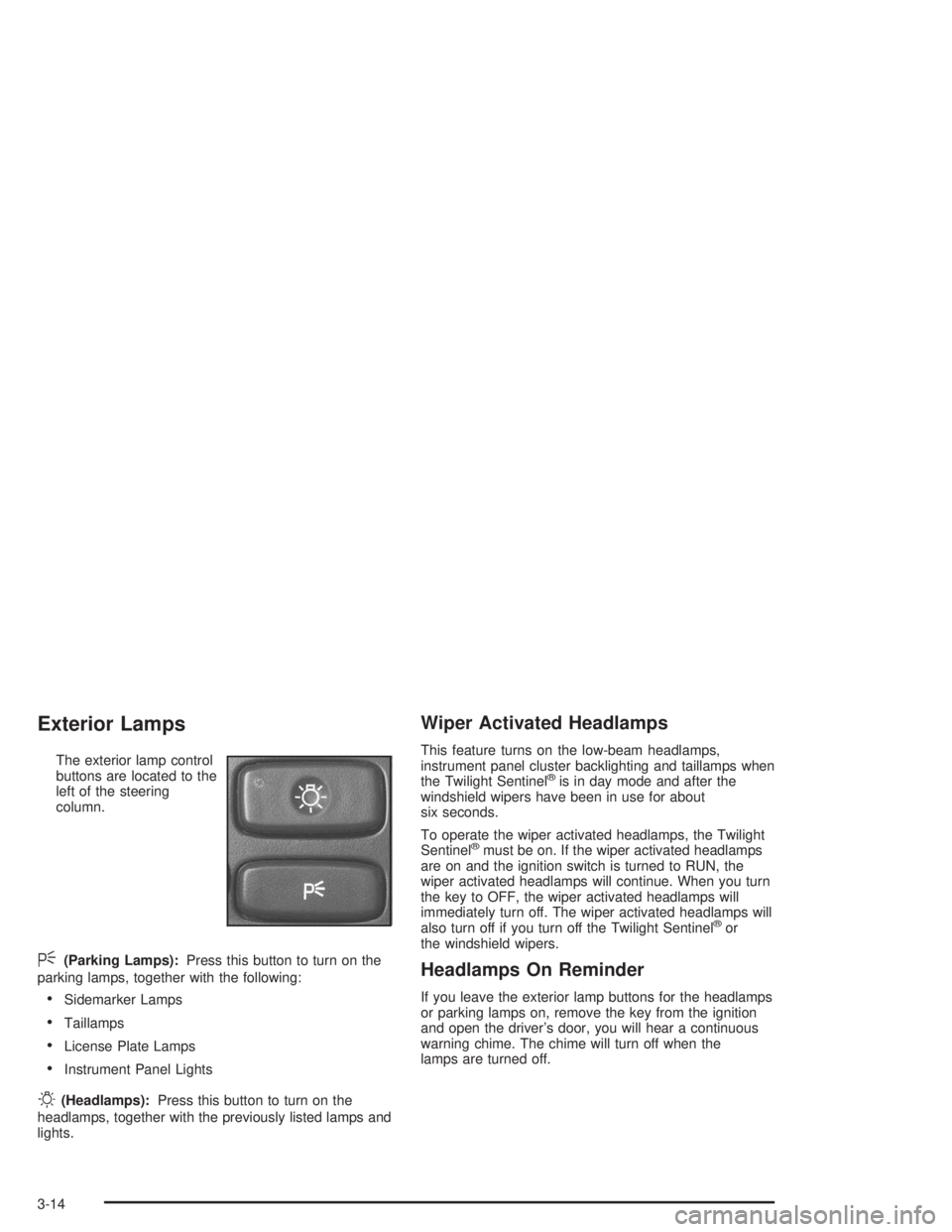
The exterior lamp control
buttons are located to the
left of the steering
column.
<(Parking Lamps):Press this button to turn on the
parking lamps, together with the following:
Sidemarker Lamps
Taillamps
License Plate Lamps
Instrument Panel Lights
O(Headlamps):Press this button to turn on the
headlamps, together with the previously listed lamps and
lights.
Wiper Activated Headlamps
This feature turns on the low-beam headlamps,
instrument panel cluster backlighting and taillamps when
the Twilight Sentinel
®is in day mode and after the
windshield wipers have been in use for about
six seconds.
To operate the wiper activated headlamps, the Twilight
Sentinel
®must be on. If the wiper activated headlamps
are on and the ignition switch is turned to RUN, the
wiper activated headlamps will continue. When you turn
the key to OFF, the wiper activated headlamps will
immediately turn off. The wiper activated headlamps will
also turn off if you turn off the Twilight Sentinel
®or
the windshield wipers.
Headlamps On Reminder
If you leave the exterior lamp buttons for the headlamps
or parking lamps on, remove the key from the ignition
and open the driver’s door, you will hear a continuous
warning chime. The chime will turn off when the
lamps are turned off.
3-14
Page 125 of 392
Daytime Running Lamps
Daytime Running Lamps (DRL) can make it easier for
others to see the front of your vehicle during the
day. DRL can be helpful in many different driving
conditions, but they can be especially helpful in the short
periods after dawn and before sunset. Fully functional
daytime running lamps are required on all vehicles
rst sold in Canada.
A light sensor on top of the instrument panel monitors
the exterior light level for the operation of DRL and
Twilight Sentinel
®, so be sure it is not covered.
The DRL system will make your high-beam headlamps
turn on at reduced brightness in daylight when the
following conditions are met:
The ignition is on.
The exterior lamp button for the headlamps is off.
The transaxle is not in PARK (P).When the DRL are on, only your high-beam headlamps
will be on. The parking lamps, taillamps, sidemarker
and other lamps will not be on.
When it is dark enough outside, your low-beam
headlamps will come on. The other lamps that turn on
with your headlamps will also turn on. When it is
bright enough outside, the regular lamps will go off, and
your high-beam headlamps change to the reduced
brightness of DRL.
To turn off all exterior lighting at night when you are
parked, turn off the headlamps and move the Twilight
Sentinel
®lever all the way toward OFF. The exterior
lamps will turn back on automatically when you move
the transaxle out of PARK (P).
As with any vehicle, you should turn on the regular
headlamp system when you need it.
Cornering Lamps
If your vehicle has this feature, the cornering lamps
come on when the headlamps or parking lamps are on
and you signal a turn with the multifunction lever.
They provide more light for cornering.
3-15