port BUICK LESABRE 2005 Owner's Guide
[x] Cancel search | Manufacturer: BUICK, Model Year: 2005, Model line: LESABRE, Model: BUICK LESABRE 2005Pages: 392, PDF Size: 2.45 MB
Page 180 of 392
TRAF (Traffic):If TRAF appears on the display, the
tuned station broadcasts traffic announcements.
To receive the traffic announcement from the tuned
station, press this button. Brackets will be displayed
around TRAF and when a traffic announcement comes
on the tuned radio station you will hear it.
If the station does not broadcast traffic announcements,
press this button and the radio will seek to a station
that does. When a station that broadcasts traffic
announcements is found, the radio will stop seeking and
brackets will be displayed around TRAF. If no station
is found that broadcasts traffic announcements,
NO TRAFFIC will appear on the display.
If the brackets are on the display and TRAF is not,
press the TRAF button to remove the brackets or use
the TUNE knob or the SEEK arrows to go to a
station that supports traffic announcements. If no station
is found, NO TRAFFIC will appear on the display.
The radio will play the traffic announcements even if the
volume is low. The radio will interrupt the play of a
cassette tape or CD if the last tuned station broadcasts
traffic announcements.
This function does not apply to XM™ Satellite
Radio Service.Radio Messages
CAL (Calibrate):The audio system has been calibrated
for your vehicle from the factory. If CAL appears on
the display, it means that the radio has not been
congured properly for the vehicle and must be returned
to your GM dealer for service.
LOCKED:This message is displayed when the
THEFTLOCK
®system has locked up. Return your
vehicle to your GM dealer for service.
If any error occurs repeatedly or if an error cannot be
corrected, contact your GM dealer.
3-70
Page 183 of 392
Playing a Cassette Tape
The tape player is built to work best with tapes that are
up to 30 to 45 minutes long on each side. Tapes
longer than that are so thin they may not work well in
this player. The longer side with the tape visible should
face to the right. If you hear nothing or hear a garbled
sound, the tape may not be in squarely. Press the eject
button to remove the tape and start over.
If the ignition and radio are off, press the eject or the
DISP button to insert and to begin play of a tape. If the
ignition is on and the radio is off, the tape can be
inserted and will begin playing.
While the tape is playing, use the VOLUME and AUDIO
controls just as you do for the radio. The display will
show an arrow to show which side of the tape is playing.
Cassette tape adapter kits for portable CD players will
work in the cassette tape player. See “CD Adapter Kits”
later for more information.
The tape bias is set automatically when a metal or
chrome tape is inserted.
If an error appears on the display, see “Cassette Tape
Messages” later in this section.
1
s(Reverse):Press this pushbutton to quickly
reverse the tape. The radio will play while the tape
reverses. Press this pushbutton again to return to
playing speed.2
\(Forward):Press this pushbutton to quickly
advance the tape. The radio will play while the tape
advances. Press this pushbutton again to return
to playing speed.
6 SIDE:Press this pushbutton to play the other side of
the tape.
©SEEK¨:The tape must have at least
three seconds of silence between each selection for seek
to work. Press the left or the right arrow to go to the
previous or to the next selection on the tape. SEEK and a
negative or positive number will appear on the display.
Pressing the left or right arrow multiple times will increase
the number of selections to be searched up to -5 or +5. If
-5 or +5 is shown on the display, the cassette tape player
will fast forward or rewind through the four selections and
stop at the fth selection.
To scan cassette tape selections, press and hold
either SEEK arrow for two seconds until SCN appears on
the display and you hear a beep. The tape will go to the
next selection, play for a few seconds, then go on to the
next selection. The cassette tape will only scan forward.
Press either SEEK arrow again to
stop scanning.
BAND:Press this button to listen to the radio when a
cassette tape or CD is playing. The inactive tape or CD
will remain safely inside the radio for future listening.
3-73
Page 184 of 392
CD TAPE:Press this button to play a cassette tape or
a CD when listening to the radio. The inactive tape
or CD will remain safely inside the radio for future
listening.
Z(Eject):Press this button, located next to the
cassette tape slot, to eject a tape. Eject may be
activated with either the ignition or radio off. Cassette
tapes may be loaded with the ignition and radio off if this
button is pressed rst.
Cassette Tape Messages
If an error message appears on the display, it could be
for one of the following reasons:
TIGHT TAPE:This message is displayed when the
tape is tight and the player cannot turn the tape hubs.
Remove the tape. Hold the tape with the open end down
and try to turn the right hub counterclockwise with a
pencil. Turn the tape over and repeat. If the hubs do not
turn easily, the tape may be damaged and should not
be used in the player. Try a new tape to make sure the
player is working properly.
BROKEN TAPE:This message is displayed when the
tape is broken. Try a new tape.CLEAN PLAYER:If this message appears on the
display, the cassette tape player needs to be cleaned. It
will still play tapes, but it should be cleaned as soon
as possible to prevent damage to the tapes and player.
SeeCare of Your Cassette Tape Player on page 3-83.
If the cassette tape is not playing correctly, for any other
reason, try a known good cassette.
If any error occurs repeatedly or if an error cannot be
corrected, contact your GM dealer. If the radio displays
an error message, write it down and provide it to
your GM dealer when reporting the problem.CD Adapter Kits
It is possible to use a portable CD player with your
cassette tape player after activating the bypass feature
on your tape player.
To activate the bypass feature, use the following steps:
1. Turn the ignition on.
2. Turn the radio off.
3. Insert the adapter into the cassette slot.
4. Press and hold the CD TAPE button until READY
appears on the display.
The override feature will remain active until the eject
button is pressed.
3-74
Page 186 of 392
To scan tracks, press and hold either SEEK arrow for
two seconds until SCAN appears on the display and you
hear a beep. The CD will go to the next track, play for
a few seconds, then go on to the next track. The sound
will mute and SCAN and the track number will appear
on the display. The CD will only scan forward. Press
either SEEK arrow again to stop scanning.
BAND:Press this button to listen to the radio when a
cassette tape or CD is playing. The inactive tape or CD
will remain safely inside the radio for future listening.
CD TAPE:Press this button to play a cassette tape or
CD when listening to the radio. The inactive tape or
CD will remain safely inside the radio for future listening.
Z(Eject):Press this button, located next to the
CD slot, to eject a tape. Eject may be activated with
either the ignition or radio off. CDs may be loaded with
the ignition and radio off if you press this button rst.
CD Messages
CHECK CD:If this message appears on the radio
display and/or the CD comes out, it could be for one of
the following reasons:
You are driving on a very rough road. When the
road becomes smoother, the CD should play.
The CD is dirty, scratched, wet, or upside down.
The air is very humid. If so, wait about an hour and
try again.
There may have been a problem while burning
the CD.
The label may be caught in the CD player.
If the CD is not playing correctly, for any other reason,
try a known good CD.
If any error occurs repeatedly or if an error cannot be
corrected, contact your GM dealer. If the radio displays
an error message, write it down and provide it to
your GM dealer when reporting the problem.
3-76
Page 190 of 392
To scan the tracks on all of the loaded CDs, press the
left SEEK arrow for two seconds until you hear a
beep. The CD will play the rst few seconds of each
track on each CD. DISC SCAN will appear on the
display. Press the left SEEK arrow again to
stop scanning.
BAND:Press this button to listen to the radio when a
CD is playing. The inactive CD will remain safely
inside the CD changer for future listening.
CD or CD TAPE:Press this button to play a CD if you
have a magazine loaded in the changer when listening
to the radio. Press this button to switch between playing
a cassette tape, CD, or the CD changer if all three
are loaded.
CD Messages
E (Error):If this message and a number appear on the
display, it could for one of the following reasons:
E30:You are driving on a very rough road. When
the road becomes smoother, the CD should play.
E30:The CD is dirty, scratched, wet, or
upside down.
E30:The air is very humid. If so, wait about an
hour and try again.
E34:The CD changer door is open. Completely
close the door to restore normal operation.
E35:An empty magazine is inserted in the CD
changer. Try the magazine again with a CD loaded
on one of the trays.
If any error occurs repeatedly or if an error cannot be
corrected, contact your dealer.
If the radio displays an error message other than the
error codes listed previously, write it down and provide it
to your dealer when reporting the problem.
Personal Choice Radio Controls
If your vehicle has this feature it will enable two drivers
to store and recall personal settings for radio presets,
last tuned station, volume, tone, and audio source
(radio, cassette, or CD).
The memory buttons, 1 and 2, are located on the
driver’s door panel and correspond to the numbers,
1 and 2, found on the back of each remote keyless entry
transmitter.
To recall audio sources, press the unlock button on the
remote keyless entry transmitter and turn the ignition
on. The radio settings will adjust to where they were last
set by the identied driver, 1 or 2.
3-80
Page 198 of 392
Your Driving, the Road, and
Your Vehicle
Defensive Driving
The best advice anyone can give about driving is:
Drive defensively.
Please start with a very important safety device in your
vehicle: Buckle up. SeeSafety Belts: They Are for
Everyone on page 1-8.
Defensive driving really means “be ready for anything.”
On city streets, rural roads, or freeways, it means
“always expect the unexpected.”
Assume that pedestrians or other drivers are going to
be careless and make mistakes. Anticipate what
they might do. Be ready for their mistakes.
Rear-end collisions are about the most preventable of
accidents. Yet they are common. Allow enough following
distance. It is the best defensive driving maneuver, in
both city and rural driving. You never know when the
vehicle in front of you is going to brake or turn suddenly.
Defensive driving requires that a driver concentrate on
the driving task. Anything that distracts from the driving
task — such as concentrating on a cellular telephone call,
reading, or reaching for something on the oor — makesproper defensive driving more difficult and can even
cause a collision, with resulting injury. Ask a passenger to
help do things like this, or pull off the road in a safe place
to do them yourself. These simple defensive driving
techniques could save your life.Drunken Driving
Death and injury associated with drinking and driving is
a national tragedy. It is the number one contributor
to the highway death toll, claiming thousands of victims
every year.
Alcohol affects four things that anyone needs to drive
a vehicle:
Judgment
Muscular Coordination
Vision
Attentiveness
Police records show that almost half of all motor
vehicle-related deaths involve alcohol. In most cases,
these deaths are the result of someone who was
drinking and driving. In recent years, more than
16,000 annual motor vehicle-related deaths have been
associated with the use of alcohol, with more than
300,000 people injured.
4-2
Page 202 of 392
Braking
Braking action involves perception time and
reaction time.
First, you have to decide to push on the brake pedal.
That is perception time. Then you have to bring up your
foot and do it. That is reaction time.
Average reaction time is about three-fourths of a
second. But that is only an average. It might be less
with one driver and as long as two or three seconds or
more with another. Age, physical condition, alertness,
coordination and eyesight all play a part. So do alcohol,
drugs and frustration. But even in three-fourths of a
second, a vehicle moving at 60 mph (100 km/h) travels
66 feet (20 m). That could be a lot of distance in an
emergency, so keeping enough space between
your vehicle and others is important.
And, of course, actual stopping distances vary greatly
with the surface of the road (whether it is pavement
or gravel); the condition of the road (wet, dry, icy); tire
tread; the condition of your brakes; the weight of
the vehicle and the amount of brake force applied.Avoid needless heavy braking. Some people drive
in spurts — heavy acceleration followed by heavy
braking — rather than keeping pace with traffic. This is
a mistake. Your brakes may not have time to cool
between hard stops. Your brakes will wear out much
faster if you do a lot of heavy braking. If you keep pace
with the traffic and allow realistic following distances,
you will eliminate a lot of unnecessary braking.
That means better braking and longer brake life.
If your engine ever stops while you are driving, brake
normally but do not pump your brakes. If you do,
the pedal may get harder to push down. If your engine
stops, you will still have some power brake assist.
But you will use it when you brake. Once the power
assist is used up, it may take longer to stop and
the brake pedal will be harder to push.
4-6
Page 206 of 392
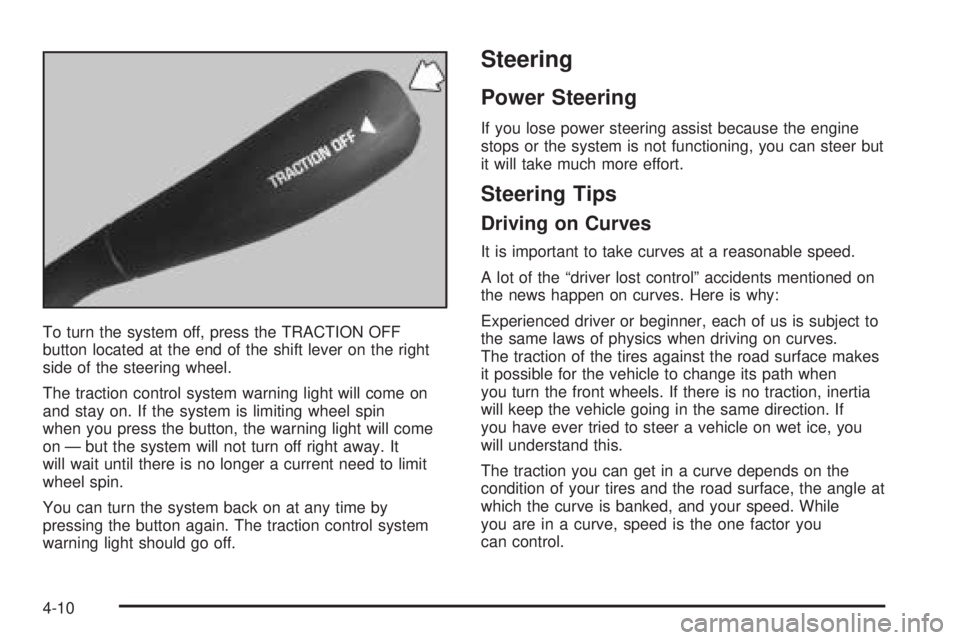
To turn the system off, press the TRACTION OFF
button located at the end of the shift lever on the right
side of the steering wheel.
The traction control system warning light will come on
and stay on. If the system is limiting wheel spin
when you press the button, the warning light will come
on — but the system will not turn off right away. It
will wait until there is no longer a current need to limit
wheel spin.
You can turn the system back on at any time by
pressing the button again. The traction control system
warning light should go off.
Steering
Power Steering
If you lose power steering assist because the engine
stops or the system is not functioning, you can steer but
it will take much more effort.
Steering Tips
Driving on Curves
It is important to take curves at a reasonable speed.
A lot of the “driver lost control” accidents mentioned on
the news happen on curves. Here is why:
Experienced driver or beginner, each of us is subject to
the same laws of physics when driving on curves.
The traction of the tires against the road surface makes
it possible for the vehicle to change its path when
you turn the front wheels. If there is no traction, inertia
will keep the vehicle going in the same direction. If
you have ever tried to steer a vehicle on wet ice, you
will understand this.
The traction you can get in a curve depends on the
condition of your tires and the road surface, the angle at
which the curve is banked, and your speed. While
you are in a curve, speed is the one factor you
can control.
4-10
Page 209 of 392

Passing
The driver of a vehicle about to pass another on a
two-lane highway waits for just the right moment,
accelerates, moves around the vehicle ahead, then
goes back into the right lane again. A simple maneuver?
Not necessarily! Passing another vehicle on a two-lane
highway is a potentially dangerous move, since the
passing vehicle occupies the same lane as oncoming
traffic for several seconds. A miscalculation, an error in
judgment, or a brief surrender to frustration or anger
can suddenly put the passing driver face to face with the
worst of all traffic accidents — the head-on collision.
So here are some tips for passing:
Drive ahead. Look down the road, to the sides
and to crossroads for situations that might affect
your passing patterns. If you have any doubt
whatsoever about making a successful pass,
wait for a better time.
Watch for traffic signs, pavement markings and lines.
If you can see a sign up ahead that might indicate a
turn or an intersection, delay your pass. A broken
center line usually indicates it is all right to pass,
providing the road ahead is clear. Never cross a solid
line on your side of the lane or a double solid line,
even if the road seems empty of approaching traffic.
Do not get too close to the vehicle you want to pass
while you are awaiting an opportunity. For one thing,
following too closely reduces your area of vision,
especially if you are following a larger vehicle. Also,
you will not have adequate space if the vehicle
ahead suddenly slows or stops. Keep back a
reasonable distance.
When it looks like a chance to pass is coming up,
start to accelerate but stay in the right lane and do
not get too close. Time your move so you will be
increasing speed as the time comes to move into the
other lane. If the way is clear to pass, you will have a
running start that more than makes up for the
distance you would lose by dropping back. And if
something happens to cause you to cancel your
pass, you need only slow down and drop back again
and wait for another opportunity.
If other vehicles are lined up to pass a slow vehicle,
wait your turn. But take care that someone is not
trying to pass you as you pull out to pass the slow
vehicle. Remember to glance over your shoulder and
check the blind spot.
4-13
Page 211 of 392

A cornering skid is best handled by easing your foot off
the accelerator pedal.
If you have the traction control system, remember:
It helps avoid only the acceleration skid. If you do not
have traction control, or if the system is off, then
an acceleration skid is also best handled by easing
your foot off the accelerator pedal.
If your vehicle starts to slide, ease your foot off the
accelerator pedal and quickly steer the way you want
the vehicle to go. If you start steering quickly enough,
your vehicle may straighten out. Always be ready
for a second skid if it occurs.
If you have StabiliTrak
®, you may see the STABILITY
SYSTEM ACTIVE message on the Driver Information
Center. See “Stability System Active Message”
underDIC Warnings and Messages on page 3-50.Of course, traction is reduced when water, snow, ice,
gravel, or other material is on the road. For safety, you
will want to slow down and adjust your driving to
these conditions. It is important to slow down on slippery
surfaces because stopping distance will be longer and
vehicle control more limited.
While driving on a surface with reduced traction, try
your best to avoid sudden steering, acceleration,
or braking, including engine braking by shifting to a
lower gear. Any sudden changes could cause the tires
to slide. You may not realize the surface is slippery
until your vehicle is skidding. Learn to recognize warning
clues — such as enough water, ice, or packed snow
on the road to make a mirrored surface — and
slow down when you have any doubt.
Remember: Any anti-lock brake system (ABS) helps
avoid only the braking skid.
4-15