door lock BUICK LESABRE 2005 Owner's Guide
[x] Cancel search | Manufacturer: BUICK, Model Year: 2005, Model line: LESABRE, Model: BUICK LESABRE 2005Pages: 392, PDF Size: 2.45 MB
Page 163 of 392
If you choose ON for AUTO DOOR LOCKS, ON for
UNLOCK and PARK, your doors will lock every time you
shift out of PARK (P), and the doors will unlock every
time you stop and shift into PARK (P).
If you choose ON for AUTO DOOR LOCKS, and OFF
for UNLOCK, your doors will lock every time you
shift out of PARK (P), and there will be no automatic
door unlock when shifting back into PARK (P).
If you choose ON for UNLOCK and DRIVER for DOOR
TO UNLOCK, only the driver’s door will automatically
unlock when shifting into PARK or turning the key
to OFF.
If you choose ON for UNLOCK and ALL for DOOR TO
UNLOCK, all doors will automatically unlock when
shifting into PARK or turning the key to OFF.
To change modes, do the following:
1. Move the arrow on the display between the
selections by pressing the ENG/MET button.
2. Once you have made your selection, press the
RESET button and your choice will be retained
in memory.
SeeProgrammable Automatic Door Locks on page 2-12
for more information about this feature.Window Lock Out
The number of passenger windows locked out by the
window LOCK switch can be programmed through
the DIC.
If you choose R + PASS, all three passenger window
switches will be inactive when the window LOCK switch
is enabled.
If you choose REAR, only the two rear passenger
window switches will be locked out when the window
LOCK switch is enabled.
To change modes, do the following:
1. Move the arrow on the display between R + PASS
and REAR by pressing the ENG/MET button.
2. Once you have made your selection, press
the RESET button. Your choice will be retained
in memory.
For more information on this feature, see “Window Lock
Out” underPower Windows on page 2-17.
3-53
Page 164 of 392
Security Feedback
By choosing different combinations of these selections,
you can choose the type of transmitter activated
feedback when locking and unlocking your vehicle with
your transmitter. Each time you make a selection by
pressing the ENG/MET button, press the RESET button
to record your choice.
KEYLESS FEEDBACK – OFF/ON
LIGHTS FEEDBACK – OFF/ON
HORN FEEDBACK – OFF/ON
If you choose ON for KEYLESS FEEDBACK you will
also need to choose LIGHTS and/or HORN FEEDBACK.
You can select the following modes:
If you choose OFF for KEYLESS FEEDBACK, you will
receive no security feedback when locking or
unlocking your vehicle.
If you choose ON for KEYLESS FEEDBACK and ON for
LIGHTS FEEDBACK, the exterior lamps will ash
twice when unlocking your vehicle and once when
locking your vehicle.If you choose ON for KEYLESS FEEDBACK and ON for
HORN FEEDBACK, your horn will chirp when all
doors are unlocked and when locking your vehicle.
If you choose ON for KEYLESS, LIGHTS and HORN
FEEDBACK, your exterior lamps will ash twice at
the rst unlock button press, your exterior lamps will
ash twice and the horn will chirp once at the second
unlock button press, and the exterior lamps will ash and
the horn will chirp once when locking your vehicle.
For more information on this feature, see “Security
Feedback” underRemote Keyless Entry System
Operation on page 2-6.
Delayed Locking
This feature, which delays the locking of the vehicle,
can be made active or inactive through the DIC. When
DELAYED LOCKING – OFF/ON appears on the
display, use the ENG/MET button to toggle the
arrow between OFF and ON. When you have made
your choice, press the RESET button to record
your selection.
For more information on this feature, seeDelayed
Locking on page 2-11.
3-54
Page 190 of 392
To scan the tracks on all of the loaded CDs, press the
left SEEK arrow for two seconds until you hear a
beep. The CD will play the rst few seconds of each
track on each CD. DISC SCAN will appear on the
display. Press the left SEEK arrow again to
stop scanning.
BAND:Press this button to listen to the radio when a
CD is playing. The inactive CD will remain safely
inside the CD changer for future listening.
CD or CD TAPE:Press this button to play a CD if you
have a magazine loaded in the changer when listening
to the radio. Press this button to switch between playing
a cassette tape, CD, or the CD changer if all three
are loaded.
CD Messages
E (Error):If this message and a number appear on the
display, it could for one of the following reasons:
E30:You are driving on a very rough road. When
the road becomes smoother, the CD should play.
E30:The CD is dirty, scratched, wet, or
upside down.
E30:The air is very humid. If so, wait about an
hour and try again.
E34:The CD changer door is open. Completely
close the door to restore normal operation.
E35:An empty magazine is inserted in the CD
changer. Try the magazine again with a CD loaded
on one of the trays.
If any error occurs repeatedly or if an error cannot be
corrected, contact your dealer.
If the radio displays an error message other than the
error codes listed previously, write it down and provide it
to your dealer when reporting the problem.
Personal Choice Radio Controls
If your vehicle has this feature it will enable two drivers
to store and recall personal settings for radio presets,
last tuned station, volume, tone, and audio source
(radio, cassette, or CD).
The memory buttons, 1 and 2, are located on the
driver’s door panel and correspond to the numbers,
1 and 2, found on the back of each remote keyless entry
transmitter.
To recall audio sources, press the unlock button on the
remote keyless entry transmitter and turn the ignition
on. The radio settings will adjust to where they were last
set by the identied driver, 1 or 2.
3-80
Page 191 of 392
To program this feature, do the following:
1. Set all radio preferences. For more information see
“Setting Preset Stations” and “Setting the Tone”
listed for the radio.
2. Locate the memory buttons on the driver’s
door panel.
3. Press one of the memory buttons, 1 or 2, until you
hear two beeps. The beeps conrm that the
selection has been saved and can now be recalled.
Follow these steps each time you want to change the
stored settings.
Theft-Deterrent Feature
THEFTLOCK®is designed to discourage theft of your
vehicle’s radio. It works by using a secret code to
disable all radio functions whenever battery power is
removed and the radio is placed in a different vehicle.
This feature requires no user input to be activated.
The radio is automatically armed when it is put into the
vehicle for the rst time.
When the ignition is turned off, the blinking red light
indicates that THEFTLOCK
®is armed.
If THEFTLOCK®is activated, the radio will not operate
if stolen. The radio will display LOCKED and a red
LED indicator light will come on above the key symbol
to indicate a locked condition. If this occurs, the radio will
need to be returned to your GM dealer.
Audio Steering Wheel Controls
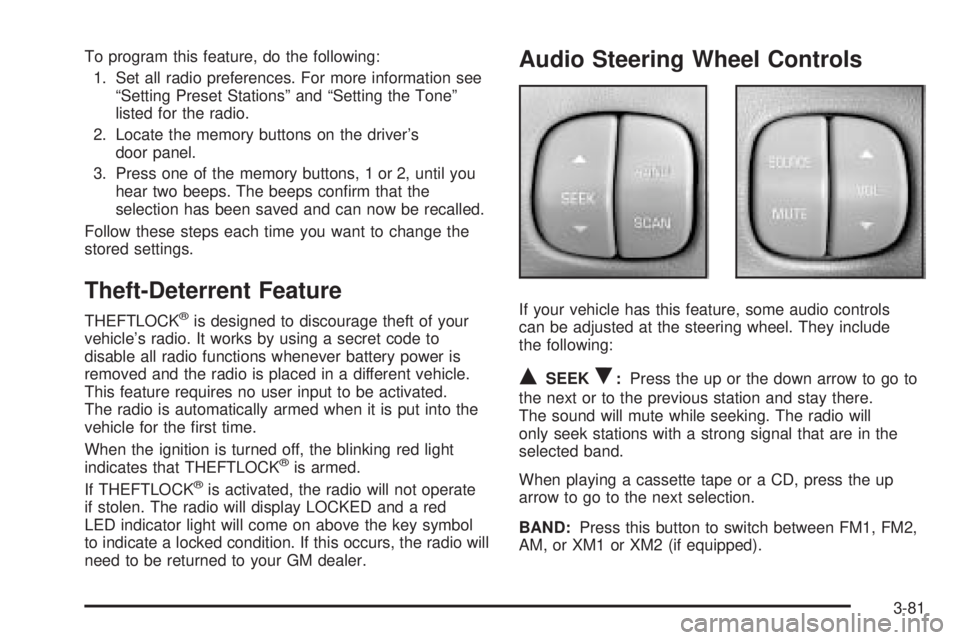
If your vehicle has this feature, some audio controls
can be adjusted at the steering wheel. They include
the following:
QSEEKR:Press the up or the down arrow to go to
the next or to the previous station and stay there.
The sound will mute while seeking. The radio will
only seek stations with a strong signal that are in the
selected band.
When playing a cassette tape or a CD, press the up
arrow to go to the next selection.
BAND:Press this button to switch between FM1, FM2,
AM, or XM1 or XM2 (if equipped).
3-81
Page 227 of 392
Loading Your Vehicle
It is very important to know how much weight your
vehicle can carry. This weight is called the vehicle
capacity weight and includes the weight of all occupants,
cargo and all nonfactory-installed options. Two labels
on your vehicle show how much weight it may properly
carry, the Tire and Loading Information label and the
Certication label.
{CAUTION:
Do not load your vehicle any heavier than the
Gross Vehicle Weight Rating (GVWR), or either
the maximum front or rear Gross Axle Weight
Rating (GAWR). If you do, parts on your
vehicle can break, and it can change the way
your vehicle handles. These could cause you
to lose control and crash. Also, overloading
can shorten the life of your vehicle.
Tire and Loading Information Label
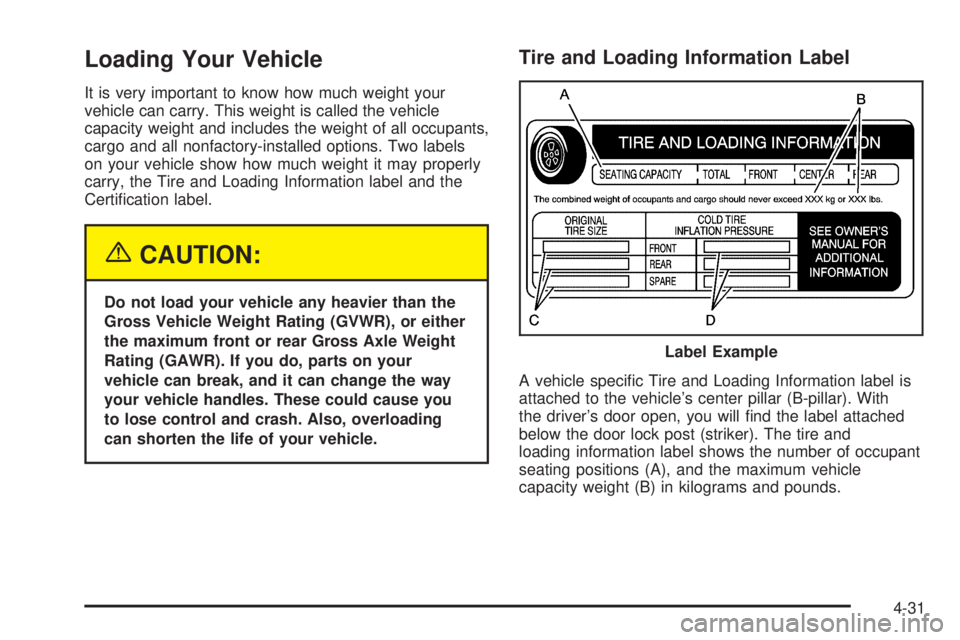
A vehicle specic Tire and Loading Information label is
attached to the vehicle’s center pillar (B-pillar). With
the driver’s door open, you will nd the label attached
below the door lock post (striker). The tire and
loading information label shows the number of occupant
seating positions (A), and the maximum vehicle
capacity weight (B) in kilograms and pounds.Label Example
4-31
Page 248 of 392
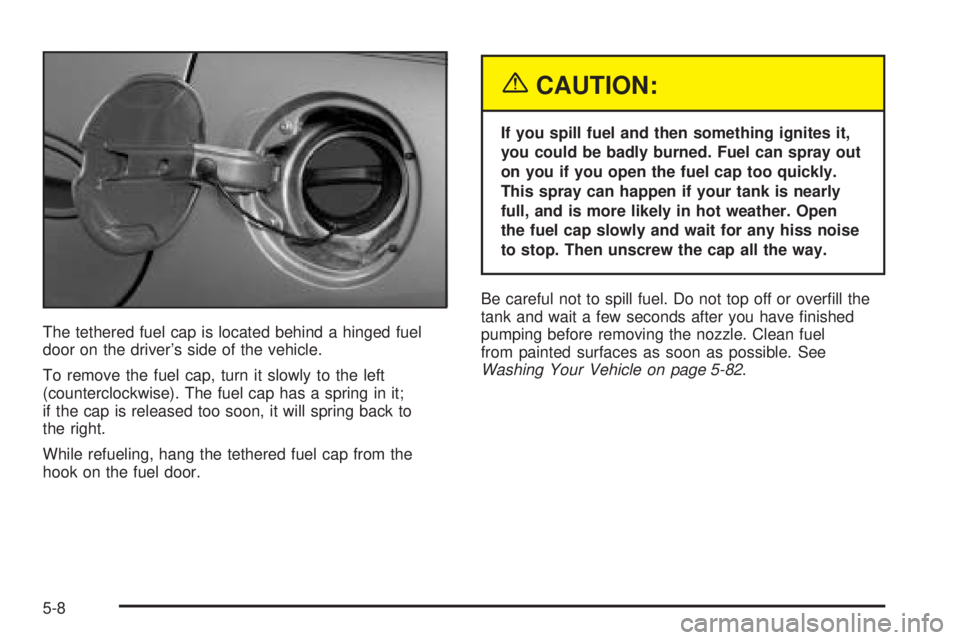
The tethered fuel cap is located behind a hinged fuel
door on the driver’s side of the vehicle.
To remove the fuel cap, turn it slowly to the left
(counterclockwise). The fuel cap has a spring in it;
if the cap is released too soon, it will spring back to
the right.
While refueling, hang the tethered fuel cap from the
hook on the fuel door.
{CAUTION:
If you spill fuel and then something ignites it,
you could be badly burned. Fuel can spray out
on you if you open the fuel cap too quickly.
This spray can happen if your tank is nearly
full, and is more likely in hot weather. Open
the fuel cap slowly and wait for any hiss noise
to stop. Then unscrew the cap all the way.
Be careful not to spill fuel. Do not top off or overll the
tank and wait a few seconds after you have nished
pumping before removing the nozzle. Clean fuel
from painted surfaces as soon as possible. See
Washing Your Vehicle on page 5-82.
5-8
Page 331 of 392
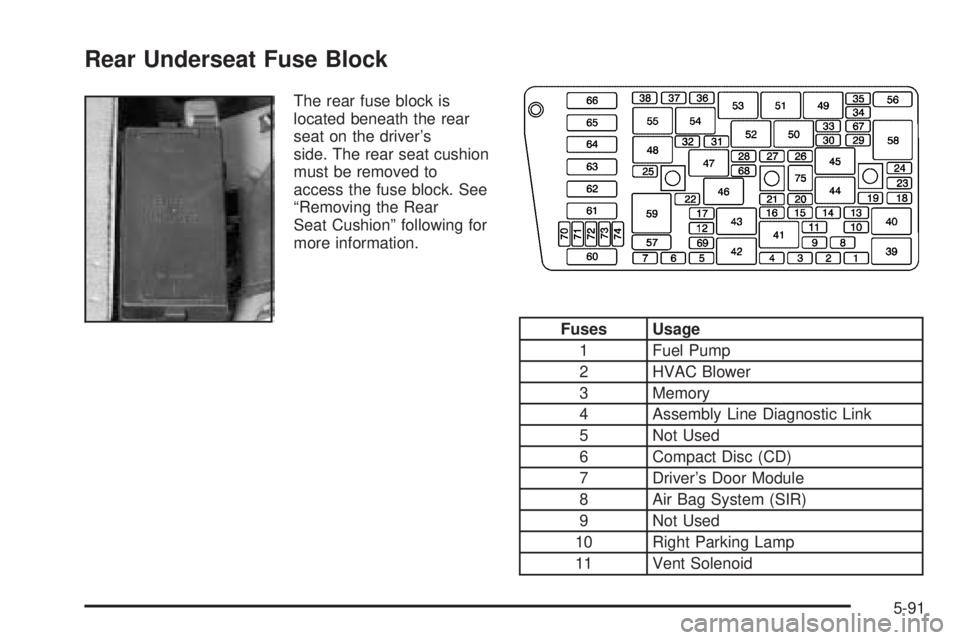
Rear Underseat Fuse Block
The rear fuse block is
located beneath the rear
seat on the driver’s
side. The rear seat cushion
must be removed to
access the fuse block. See
“Removing the Rear
Seat Cushion” following for
more information.
Fuses Usage
1 Fuel Pump
2 HVAC Blower
3 Memory
4 Assembly Line Diagnostic Link
5 Not Used
6 Compact Disc (CD)
7 Driver’s Door Module
8 Air Bag System (SIR)
9 Not Used
10 Right Parking Lamp
11 Vent Solenoid
5-91
Page 332 of 392

Fuses Usage
12 Ignition 1
13 Left Parking Lamp
14 Dimmer
15 Satellite Digital Radio
16 Left Front Heated Seat
17 Not Used
18 Rear Door Module
19 Stoplamp
20 Park/Reverse
21 Audio
22 Retained Accessory Power (RAP)
23 Not Used
24 Not Used
25 Passenger Door Module
26 Body
27 Interior Lamps
28 Not Used
29 Ignition SwitchFuses Usage
30 Instrument Panel
31 Right Front Heated Seat
32 Not Used
33 HVAC
34 Ignition 3 Rear
35 Anti-Lock Brake System (ABS)
36 Turn Signal/Hazard
37 HVAC Battery
38 Dimmer
Relays Usage
39 Fuel Pump
40 Parking Lamp
41 Ignition 1
42 Rear Fog Lamp
43 Not Used
44 Park
45 Reverse
5-92
Page 333 of 392
Relays Usage
46 Retained Accessory Power (RAP)
47 Fuel Tank Door Lock
48 Not Used
49 Ignition 3
50 Fuel Tank Door Release
51 Interior Lamps
52 Trunk Release
53 Front Courtesy Lamps
54 Not Used
55 Electronic Level Control (ELC)
Circuit
Breakers Usage
56 Power Seats
57 Power Windows
Relays Usage
58 Not Used
59 Rear Defogger
Fuses Usage
60 Not Used
61 Rear Defog
62 Not Used
63 Audio Amplier
64 Electronic Level Control (ELC)
65 Not Used
66 Not Used
67 Not Used
68 Not Used
69 Spare
70 Spare
71 Spare
72 Spare
73 Spare
74 Spare
75 Fuse Puller
5-93
Page 357 of 392
At Least Twice a Year
Restraint System Check
Make sure the safety belt reminder light and all your
belts, buckles, latch plates, retractors and anchorages
are working properly. Look for any other loose or
damaged safety belt system parts. If you see anything
that might keep a safety belt system from doing its
job, have it repaired. Have any torn or frayed safety
belts replaced.
Also look for any opened or broken airbag coverings,
and have them repaired or replaced. (The airbag system
does not need regular maintenance.)
Wiper Blade Check
Inspect wiper blades for wear or cracking. Replace
blade inserts that appear worn or damaged or that
streak or miss areas of the windshield. Also see
Windshield and Wiper Blades on page 5-83.
Weatherstrip Lubrication
Silicone grease on weatherstrips will make them last
longer, seal better, and not stick or squeak. Apply
silicone grease with a clean cloth. During very cold,
damp weather more frequent application may be
required. SeePart D: Recommended Fluids and
Lubricants on page 6-24.
Automatic Transaxle Check
Check the transaxle uid level; add if needed. See
Automatic Transaxle Fluid on page 5-21. A uid loss
may indicate a problem. Check the system and repair
if needed.
At Least Once a Year
Key Lock Cylinders Service
Lubricate the key lock cylinders with the lubricant
specied in Part D.
Body Lubrication Service
Lubricate all body door hinges. Also lubricate all hinges
and latches, including those for the hood, glove box
door and console door. Part D tells you what to
use. More frequent lubrication may be required when
exposed to a corrosive environment.
6-19