buttons BUICK LUCERNE 2006 User Guide
[x] Cancel search | Manufacturer: BUICK, Model Year: 2006, Model line: LUCERNE, Model: BUICK LUCERNE 2006Pages: 416, PDF Size: 2.6 MB
Page 135 of 416
Cruise Control
With cruise control, you can maintain a speed of about
25 mph (40 km/h) or more without keeping your foot
on the accelerator. This can really help on long
trips. Cruise control does not work at speeds below
about 25 mph (40 km/h).
When you apply your brakes, cruise control is turned off.
{CAUTION:
Cruise control can be dangerous where you
cannot drive safely at a steady speed. So, do
not use your cruise control on winding roads
or in heavy traffic.
Cruise control can be dangerous on slippery
roads. On such roads, fast changes in tire
traction can cause excessive wheel slip, and
you could lose control. Do not use cruise
control on slippery roads.
If your vehicle is in cruise control when the traction
control system (if equipped) begins to limit wheel spin,
the cruise control will automatically disengage.SeeTraction Control System (TCS) on page 4-9. When
road conditions allow you to safely use it again, you
may turn the cruise control back on.
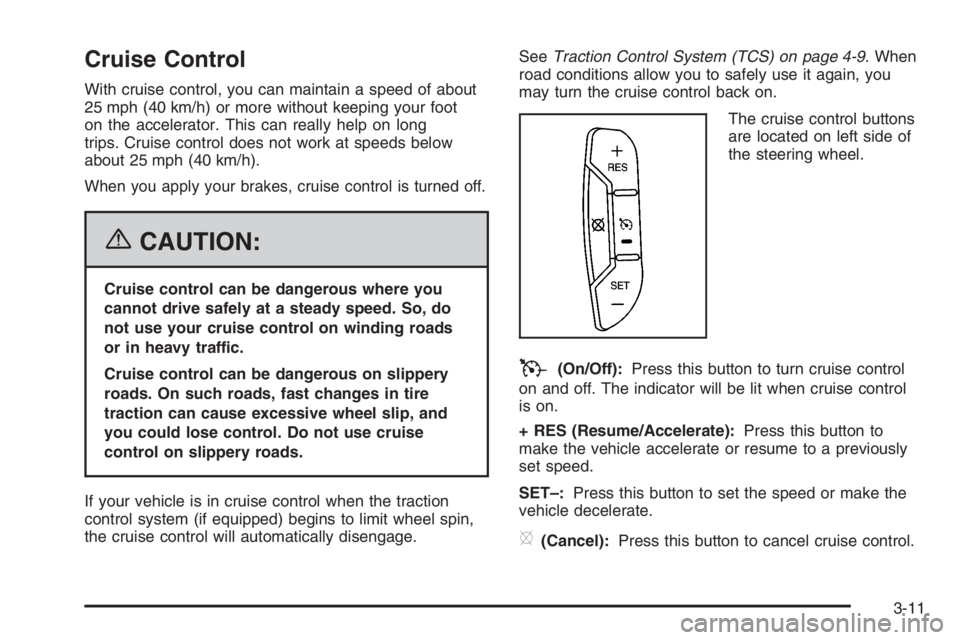
The cruise control buttons
are located on left side of
the steering wheel.
T(On/Off):Press this button to turn cruise control
on and off. The indicator will be lit when cruise control
is on.
+ RES (Resume/Accelerate):Press this button to
make the vehicle accelerate or resume to a previously
set speed.
SET–:Press this button to set the speed or make the
vehicle decelerate.
[(Cancel):Press this button to cancel cruise control.
3-11
Page 139 of 416
Wiper Activated Headlamps
This feature turns on the low-beam headlamps,
instrument panel cluster backlighting and taillamps
when the windshield wipers have been in use for about
six seconds.
If the wiper activated headlamps are on and the ignition
switch is turned to C (RUN), the wiper activated
headlamps will continue. When you turn the key to
A (OFF), the wiper activated headlamps will immediately
turn off. The wiper activated headlamps will also turn
off if you turn off the windshield wipers.
Headlamps on Reminder
If you leave the exterior lamp buttons for the headlamps
or parking lamps on, remove the key from the ignition
and open the driver’s door, you will hear a continuous
warning chime. The chime will turn off when the lamps
are turned off.
Daytime Running Lamps (DRL)
Daytime Running Lamps (DRL) can make it easier for
others to see the front of your vehicle during the
day. DRL can be helpful in many different driving
conditions, but they can be especially helpful in the short
periods after dawn and before sunset. Fully functional
daytime running lamps are required on all vehicles
rst sold in Canada.A light sensor on top of the instrument panel monitors
the exterior light level for the operation of DRL, so
be sure it is not covered.
The DRL system will make your low-beam headlamps
turn on at reduced brightness in daylight when the
following conditions are met:
The ignition is on.
The exterior lamp button for the headlamps is off.
The automatic transaxle is not in PARK (P).
When the DRL are on, only your low-beam headlamps
will be on. The parking lamps, taillamps, sidemarker
and other lamps will not be on.
When it is dark enough outside, your low-beam
headlamps will come on. The other lamps that turn on
with your headlamps will also turn on. When it is
bright enough outside, the regular lamps will go off, and
your low-beam headlamps change to the reduced
brightness of DRL.
To turn off all exterior lighting at night when you are
parked, turn the exterior lamp control to the off position.
The exterior lamps will turn back on automatically
when you move the transaxle out of PARK (P).
SeeExterior Lamps on page 3-14for more information.
As with any vehicle, you should turn on the regular
headlamp system when you need it.
3-15
Page 142 of 416
Front Reading Lamps
The front reading lamps, located on the headliner, are
turned on or off by pressing one of the buttons
located near each lamp.
Battery Load Management
The battery load management feature is designed to
monitor the vehicle’s electrical load and determine when
the battery is in a heavy discharge condition. During
times of high electrical loading, the engine may idle at a
higher RPM setting than normal to make sure the
battery charges. High electrical loads may occur when
several of the following are on: headlamps, high beams,
rear window defogger, fan at high speed, heated
seats (if equipped), and engine cooling fans.
If your vehicle’s battery remains in a heavy discharge
condition for a long period of time, the fan, rear
defogger, heated seats, and heated mirrors will be
disabled and the DIC will display SERVICE BATTERY
CHARGING SYSTEM. This can happen either under
long periods of idling or low speed driving with high
electrical loading, or in the event of a charging system
fault. SeeDIC Warnings and Messages on page 3-56
for more information.
Inadvertent Power Battery Saver
This feature is designed to protect your vehicle’s battery
against drainage from the interior lamps, or garage
door opener. When the ignition is turned off, the power
to these features will automatically turn off after
10 minutes. Power will be restored for an additional
10 minutes if any door is opened, the trunk is opened or
the courtesy lamp switch is turned on.
Ultrasonic Rear Parking
Assist (URPA)
If your vehicle is equipped, the Ultrasonic Rear Parking
Assist (URPA) system is designed to help you park
while in REVERSE (R). It operates only at speeds less
than 5 mph (8 km/h). URPA helps make parking
easier and helps you avoid colliding with objects such
as parked vehicles. The URPA system detects
objects that are close to the rear of the vehicle which
are at least 10 inches (25.4 cm) off the ground and
below hood or trunk level. The system detects objects
up to 8 feet (2.5 m) behind your vehicle. URPA
determines how close these objects are from your
bumper within this area. Ultrasonic sensors on the rear
bumper are used to detect the distance to the object.
3-18
Page 148 of 416

6(Floor):This mode directs most of the air to the
oor outlets with some air directed toward the side
window outlets and a little air directed to the windshield.
In this mode, the system will automatically use
outside air.
If recirculation is selected, it will stay on for three minutes
to reduce windshield fogging. The led will come on.
You can also select modes by using the following
buttons:
h(Recirculate):Press this button to recirculate
cabin air through the vehicle. It can be used to prevent
outside air and odors from entering your vehicle or
to help heat or cool the air inside your vehicle more
quickly. An indicator light below the button will come on
in this mode. Operation in this mode during periods
of high humidity and cool outside temperatures
may result in increased window fogging. If window
fogging is experienced, select the defrost mode.
#(Air Conditioning):Press this button to turn the air
conditioning system on or off. When this button is
pressed, an indicator light below the button will come on
to let you know the air conditioning is activated. Air
conditioning can be selected in any mode as long as the
fan knob is not in the off position. When in defrost
and defog the air-conditioning compressor will come on
automatically.On hot days during the vehicle’s initial start-up, open
the windows to let hot inside air escape; then close
them. This helps to reduce the time it takes for
the vehicle to cool down. It also helps the system to
operate more efficiently.
For quicker cool down on hot days, do the following:
1. Select the vent air mode.
2. Select the recirculation mode.
3. Select the air conditioner.
4. Select the coolest temperature.
5. Select the highest fan speed.
The air-conditioning system removes moisture from the
air, so you may sometimes notice a small amount of
water dripping underneath your vehicle while idling
or after turning off the engine. This is normal.
Defogging and Defrosting
Fog on the inside of the vehicle is a result of high humidity
causing moisture to condense on the cool window glass.
This can be minimized if the climate control system is
used properly. There are two modes to clear frost or fog
from the windshield. Use the defog mode to clear the
windows of condensation and to warm the vehicle’s
occupants. Use the defrost mode to remove frost or
condensation from the windshield quickly. Recirculation
cannot be selected when in these modes (the indicator
light will come on when pressed).
3-24
Page 152 of 416

7(Floor):Turn the control to this mode to direct most
of the air to the oor outlets with some air directed to
the side window outlets and the windshield.
The mode control can also be used to select the
oor/defog mode. Information on defogging and
defrosting can be found later in this section.
?(Recirculation):Press this button to keep outside
air from coming in the vehicle. It can be used to
prevent outside air and odors from entering your vehicle
or to help cool the air inside your vehicle more quickly.
Press this button to turn the recirculation mode on or off.
When the button is pressed, an indicator light will
come on.
«ª(Driver’s Temperature Controls):Press these
buttons next to the fan control to manually increase
or decrease the temperature inside your vehicle.
«ª(Passenger’s Temperature Controls):Press
these buttons next to the mode control to manually
increase or decrease the temperature for the front
passenger. If the passenger’s climate control system is
off, pressing one of these buttons will turn it on.PASS (Passenger’s Climate Control):Press this
button to turn the passenger’s climate control systems
on or off.
If the PASS button is pressed to turn the passenger
temperature setting off, the driver’s temperature setting
will control the temperature for the entire vehicle.
:(Outside Air):This mode allows outside air to
enter the vehicle. It can be used to prevent the
inside from becoming too dry. Press this button to turn
outside air on. Pressing the recirculation button will
cancel this mode. When the button is pressed, an
indicator light will turn on.
#(Air Conditioning):Press this button to override
the automatic system and turn the air conditioning
system on or off. When in AUTO, the air conditioning
compressor will come on automatically, as necessary.
The air conditioning system removes moisture from
the air, so you may notice a small amount of water
dripping underneath your vehicle while idling or after
turning off the engine. This is normal.
3-28
Page 174 of 416
Driver Information Center (DIC)
Your vehicle has a Driver Information Center (DIC).
All messages will appear in the DIC display located
below the speedometer in the instrument panel cluster.
The DIC buttons are located on the instrument panel,
to the left of the instrument panel cluster.
The DIC comes on when the ignition is on. After a short
delay, the DIC will display the information that was
last displayed before the engine was turned off.
The DIC displays trip, fuel, and vehicle system
information, and warning messages if a system problem
is detected. The bottom line of the DIC shows the
shift lever position indicator. SeeAutomatic Transaxle
Operation on page 2-25for more information.
If your vehicle’s DIC has these features, the compass
direction and the outside air temperature may also
display on the DIC when viewing the trip and fuel
information. The compass direction appears on the
top right corner of the DIC display. The outside
air temperature automatically appears in the bottom
right corner of the DIC display. If there is a problem with
the system that controls the temperature display, the
numbers will be replaced with dashes. If this occurs,
have the vehicle serviced by your GM dealer.
The DIC also allows some features to be customized.
SeeDIC Vehicle Customization on page 3-65for
more information.
DIC Controls and Displays
The DIC has different displays which can be accessed
by pressing the DIC buttons located on the instrument
panel, to the left of the instrument panel cluster.
DIC Buttons
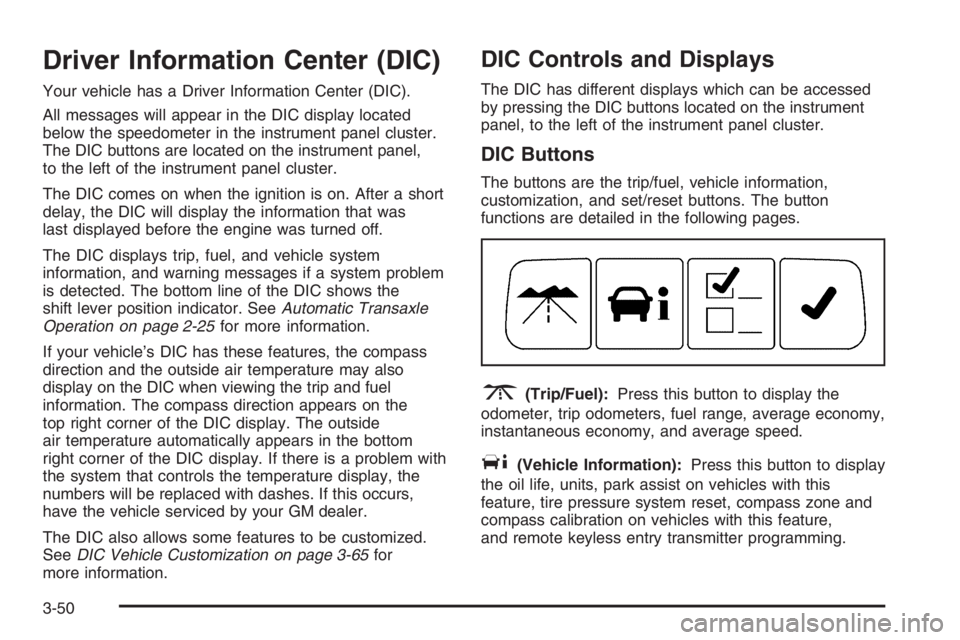
The buttons are the trip/fuel, vehicle information,
customization, and set/reset buttons. The button
functions are detailed in the following pages.
3(Trip/Fuel):Press this button to display the
odometer, trip odometers, fuel range, average economy,
instantaneous economy, and average speed.
T(Vehicle Information):Press this button to display
the oil life, units, park assist on vehicles with this
feature, tire pressure system reset, compass zone and
compass calibration on vehicles with this feature,
and remote keyless entry transmitter programming.
3-50
Page 179 of 416

Navigate to one of the trip/fuel menu screens to
view the direction the vehicle is moving. This will be
shown in the top right corner of the DIC display.
4. If you need to calibrate the compass, use the
compass calibration procedure. See “Compass
Calibration Procedure” following.
Compass Calibration
The compass can be manually calibrated. Only calibrate
the compass in a safe location where driving the vehicle
in circles is not a problem.
To calibrate the compass, use the following procedure:
Compass Calibration Procedure
1. Before calibrating the compass, make sure the
compass zone is set to the variance zone in
which the vehicle is traveling. See “Compass
Variance Procedure” earlier in this section.
2. Press the vehicle information button until the
PRESS
VTO CALIBRATE COMPASS screen
is displayed.
3. Press the set/reset button to start the compass
calibration.
4. The DIC will display CALIBRATING: DRIVE IN
CIRCLES. Drive the vehicle in circles at less
than 5 mph (8 km/h) to complete the calibration.
The DIC will display CALIBRATION COMPLETE
when the calibration is complete.
Remote Key
This display allows you to match the remote keyless
entry transmitter to your vehicle. To match a remote
keyless entry transmitter to your vehicle, do the
following:
1. Press the vehicle information button until PRESS
VTO RELEARN REMOTE KEY displays.
2. Press the set/reset button.
The message REMOTE KEY LEARNING ACTIVE
will display.
3. Press and hold the lock and unlock buttons on the
rst transmitter at the same time for approximately
15 seconds.
A chime will sound indicating that the transmitter is
matched.
4. To match additional transmitters at this time,
repeat Step 3.
Each vehicle can have a maximum of eight
transmitters matched to it.
5. To exit the programming mode, you must cycle
the key to OFF.
Blank Display
This display shows no information.
3-55
Page 180 of 416

Customization Menu Items
U
(Customization):Press this button to enter the
feature settings menu. This display allows you to
customize the feature settings on your vehicle.
SeeDIC Vehicle Customization on page 3-65for
more information.
DIC Warnings and Messages
Messages are displayed on the DIC to notify the driver
that the status of the vehicle has changed and that
some action may be needed by the driver to correct the
condition. Multiple messages may appear one after
another. Some messages may not require immediate
action, but you can press the set/reset button to
acknowledge that you received the message and clear it
from the DIC display. Pressing any of the DIC buttons
will also acknowledge and clear any messages.
Some messages cannot be cleared from the DIC display
because they are more urgent. These messages
require action before they can be cleared. You should
take any messages that appear on the display seriously
and remember that clearing the messages will only
make the messages disappear, not correct the problem.
The following are the possible messages that can be
displayed and some information about them.
AUTOMATIC LIGHT CONTROL OFF
This message will display when the automatic
headlamps are turned off.
AUTOMATIC LIGHT CONTROL ON
This message will display when the automatic
headlamps are turned on.
CHANGE ENGINE OIL SOON
This message will display when service is required
for the vehicle. See your GM dealer. SeeEngine Oil
on page 5-15andScheduled Maintenance on page 6-4
for more information.
Acknowledging the CHANGE ENGINE OIL SOON
message will not reset the OIL LIFE REMAINING.
That must be done at the OIL LIFE screen under the
vehicle information menu. See “Oil Life” underDIC
Controls and Displays on page 3-50andEngine Oil Life
System on page 5-18.
3-56
Page 197 of 416
FACTORY SETTINGS
This feature allows you to set all of the customization
features back to their factory default settings.
Press the customization button until FACTORY
SETTINGS appears on the DIC display. Press the
set/reset button to access the settings for this feature.
Then press the customization button to scroll through
the following choices:
RESTORE ALL (default):The customization features
will be set to their factory default settings.
DO NOT RESTORE:The customization features will
not be set to their factory default settings.
Select one of the available choices and press the
set/reset button while it is displayed on the DIC to
select it.
EXIT FEATURE SETTINGS
This feature allows you to exit the FEATURE
SETTINGS menu.
Press the customization button until FEATURE
SETTINGS PRESS
VTO EXIT appears in the DIC
display. Press the set/reset button to exit the menu.
If you do not exit, pressing the customization button
again will return you to the beginning of the FEATURE
SETTINGS menu.
Exiting the Feature Settings Menu
The feature settings menu will be exited when any of
the following occurs:
The vehicle is shifted out of PARK (P).
The vehicle is no longer in RUN.
The trip/fuel or vehicle information DIC buttons are
pressed.
The end of the feature settings menu is reached
and exited.
A 40 second time period has elapsed with no
selection made.
3-73
Page 199 of 416
Added sound equipment may interfere with the
operation of your vehicle’s engine, radio, or other
systems, and even damage them. Your vehicle’s
systems may interfere with the operation of sound
equipment that has been added.
Notice:The chime signals related to safety belts,
parking brake, and other functions of your vehicle
operate through the radio/entertainment system.
If that equipment is replaced or additional equipment
is added to your vehicle, the chimes may not
work. Make sure that replacement or additional
equipment is compatible with your vehicle before
installing it. SeeAccessories and Modifications
on page 5-3.
Your vehicle has a feature called Retained Accessory
Power (RAP). With RAP, the audio system can be
played even after the ignition is turned off. SeeRetained
Accessory Power (RAP) on page 2-22for more
information.Setting the Time
(Without Date Display)
If your vehicle has a base AM/FM radio with a single
CD player and preset buttons numbered one through
six, the radio will have a clock button for setting the time.
You can set the time by following these steps:
1. Press the clock button until the hour numbers begin
ashing on the display. Press the clock button a
second time and the minute numbers will begin
ashing on the display.
2. While either the hour or the minute numbers are
ashing, rotate the tune knob clockwise or
counterclockwise to increase or decrease the time.
Instead of using the tune knob, you can also
press the SEEK, FWD, or REV buttons to adjust
the time.
3. Press the clock button again until the clock
display stops ashing to set the currently
displayed time; otherwise, the ashing will stop
after ve seconds and the current time displayed
will be automatically set.
3-75