service indicator BUICK LUCERNE 2006 User Guide
[x] Cancel search | Manufacturer: BUICK, Model Year: 2006, Model line: LUCERNE, Model: BUICK LUCERNE 2006Pages: 416, PDF Size: 2.6 MB
Page 174 of 416
Driver Information Center (DIC)
Your vehicle has a Driver Information Center (DIC).
All messages will appear in the DIC display located
below the speedometer in the instrument panel cluster.
The DIC buttons are located on the instrument panel,
to the left of the instrument panel cluster.
The DIC comes on when the ignition is on. After a short
delay, the DIC will display the information that was
last displayed before the engine was turned off.
The DIC displays trip, fuel, and vehicle system
information, and warning messages if a system problem
is detected. The bottom line of the DIC shows the
shift lever position indicator. SeeAutomatic Transaxle
Operation on page 2-25for more information.
If your vehicle’s DIC has these features, the compass
direction and the outside air temperature may also
display on the DIC when viewing the trip and fuel
information. The compass direction appears on the
top right corner of the DIC display. The outside
air temperature automatically appears in the bottom
right corner of the DIC display. If there is a problem with
the system that controls the temperature display, the
numbers will be replaced with dashes. If this occurs,
have the vehicle serviced by your GM dealer.
The DIC also allows some features to be customized.
SeeDIC Vehicle Customization on page 3-65for
more information.
DIC Controls and Displays
The DIC has different displays which can be accessed
by pressing the DIC buttons located on the instrument
panel, to the left of the instrument panel cluster.
DIC Buttons
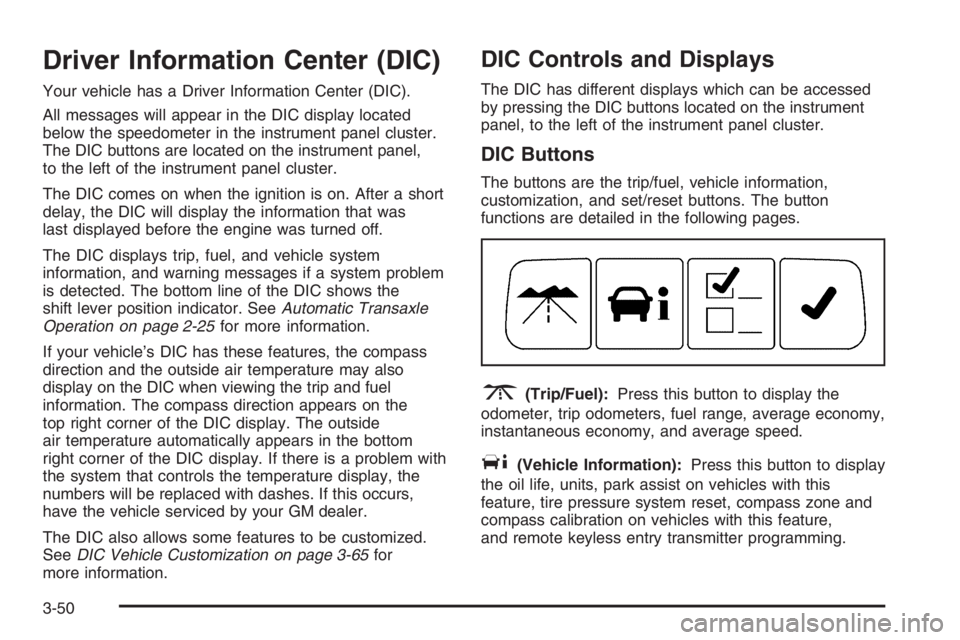
The buttons are the trip/fuel, vehicle information,
customization, and set/reset buttons. The button
functions are detailed in the following pages.
3(Trip/Fuel):Press this button to display the
odometer, trip odometers, fuel range, average economy,
instantaneous economy, and average speed.
T(Vehicle Information):Press this button to display
the oil life, units, park assist on vehicles with this
feature, tire pressure system reset, compass zone and
compass calibration on vehicles with this feature,
and remote keyless entry transmitter programming.
3-50
Page 236 of 416

StabiliTrak®System
Your vehicle may have this feature. The StabiliTrak®
system is an advanced computer controlled system that
helps the driver maintain directional control of the
vehicle in difficult driving conditions. This is
accomplished by selectively applying any one of the
vehicle’s brakes and reducing engine power. The
StabiliTrak
®system comes on automatically whenever
you start your vehicle. The system cannot be turned off.
The STABILITRAK NOT READY message may be
displayed in the DIC and the traction control system and
StabiliTrak
®warning light on the instrument panel
cluster will be on after rst driving the vehicle and
exceeding 30 mph 48 (km/h) for 30 seconds. The
StabiliTrak
®system is off until the light has turned off.
This could take up to 15 minutes.
The traction control system and StabiliTrak
®warning light
on the instrument panel cluster will ash when the system
is operating. SeeTraction Control System (TCS) Warning
Light on page 3-41,StabiliTrak
®Indicator Light on
page 3-42andDIC Warnings and Messages on
page 3-56for more information. You may also feel or
hear the system working. This is normal.The SERVICE STABILITRAK message will be displayed
and the traction control system and StabiliTrak
®warning
light on the instrument panel cluster will come on if there
is a problem with the system. When this light and the
SERVICE STABILITRAK message are on, the system is
not operational. Adjust your driving accordingly.
Panic Brake Assist
Your vehicle may have a panic brake assist system that
monitors the intention of the driver while braking. If
the system senses that the driver has applied hard/fast
pressure to the brake pedal, the system will generate
additional pressure, making it easier for the driver
to maintain brake application. When this happens the
brake pedal will feel easier to push. Just hold the brake
pedal down rmly and let the system work for you.
You may feel the brakes vibrate, or you may notice
some noise but this is normal. The brakes will return
to normal operation after the brake pedal has
been released.
4-10
Page 275 of 416

Notice:Your vehicle was not designed for fuel that
contains methanol. Do not use fuel containing
methanol. It can corrode metal parts in your fuel
system and also damage the plastic and rubber
parts. That damage would not be covered under
your warranty.
Some gasolines that are not reformulated for low
emissions may contain an octane-enhancing additive
called methylcyclopentadienyl manganese tricarbonyl
(MMT); ask the attendant where you buy gasoline
whether the fuel contains MMT. General Motors
recommends against the use of such gasolines. Fuels
containing MMT can reduce the life of spark plugs
and the performance of the emission control system may
be affected. The malfunction indicator lamp may turn
on. If this occurs, return to your authorized GM dealer for
service.Fuels in Foreign Countries
If you plan on driving in another country outside the
United States or Canada, the proper fuel may be hard
to nd. Never use leaded gasoline or any other fuel
not recommended in the previous text on fuel. Costly
repairs caused by use of improper fuel would not
be covered by your warranty.
To check the fuel availability, ask an auto club, or
contact a major oil company that does business in the
country where you will be driving.
5-7
Page 309 of 416

Always clean the brake uid reservoir cap and the area
around the cap before removing it. This will help
keep dirt from entering the reservoir.
{CAUTION:
With the wrong kind of uid in your brake
system, your brakes may not work well, or they
may not even work at all. This could cause a
crash. Always use the proper brake uid.
Notice:
Using the wrong uid can badly damage brake
system parts. For example, just a few drops of
mineral-based oil, such as engine oil, in your
brake system can damage brake system parts so
badly that they will have to be replaced. Do not
let someone put in the wrong kind of uid.
If you spill brake uid on your vehicle’s painted
surfaces, the paint nish can be damaged. Be
careful not to spill brake uid on your vehicle. If
you do, wash it off immediately. SeeWashing
Your Vehicle on page 5-87.
Brake Wear
Your vehicle has four-wheel disc brakes.
Disc brake pads have built-in wear indicators that make a
high-pitched warning sound when the brake pads are
worn and new pads are needed. The sound may come
and go or be heard all the time your vehicle is moving,
except when you are pushing on the brake pedal rmly.
{CAUTION:
The brake wear warning sound means that soon
your brakes will not work well. That could lead
to an accident. When you hear the brake wear
warning sound, have your vehicle serviced.
Notice:Continuing to drive with worn-out brake
pads could result in costly brake repair.
Some driving conditions or climates may cause a brake
squeal when the brakes are rst applied or lightly applied.
This does not mean something is wrong with your brakes.
Properly torqued wheel nuts are necessary to help
prevent brake pulsation. When tires are rotated, inspect
brake pads for wear and evenly tighten wheel nuts in
the proper sequence to GM torque specications.
Brake linings should always be replaced as complete
axle sets.
5-41
Page 410 of 416
Loading Your Vehicle.......................................4-29
Lockout Protection..........................................2-14
Locks
Delayed Locking..........................................2-12
Door ..........................................................2-11
Lockout Protection.......................................2-14
Power Door ................................................2-11
Programmable Automatic Door Locks.............2-13
Rear Door Security Locks.............................2-13
Loss of Control...............................................4-15
Lumbar
Power Controls............................................. 1-3
M
Maintenance Schedule
Additional Required Services........................... 6-6
At Each Fuel Fill........................................... 6-9
At Least Once a Month.................................. 6-9
At Least Once a Year..................................6-10
Introduction.................................................. 6-2
Maintenance Footnotes.................................. 6-7
Maintenance Record....................................6-14
Maintenance Requirements............................. 6-2
Normal Maintenance Replacement Parts.........6-13Maintenance Schedule (cont.)
Owner Checks and Services........................... 6-9
Recommended Fluids and Lubricants.............6-12
Scheduled Maintenance................................. 6-4
Using.......................................................... 6-2
Your Vehicle and the Environment................... 6-2
Malfunction Indicator Light................................3-44
Manual Passenger Seat.................................... 1-2
Memory Mirrors..............................................2-47
Memory Seat.................................................2-47
Message
DIC Warnings and Messages........................3-56
Mirrors
Automatic Dimming Rearview........................2-33
Automatic Dimming Rearview with
Compass................................................2-33
Manual Rearview Mirror................................2-33
Manual Rearview Mirror with Compass
and Temperature......................................1-10
Memory .....................................................2-47
Outside Automatic Dimming Heated Mirror......2-37
Outside Convex Mirror.................................2-37
Outside Curb View Assist Mirror....................2-36
Outside Power Mirrors..................................2-36
MyGMLink.com................................................ 7-3
8
Page 411 of 416
N
Navigation/Radio System,
see Navigation Manual.................................3-98
New Vehicle Break-In......................................2-21
Normal Maintenance Replacement Parts............6-13
O
Odometer......................................................3-35
Odometer, Trip...............................................3-35
Off-Road Recovery..........................................4-13
Oil
Engine.......................................................5-15
Pressure Light.............................................3-47
Oil, Engine Oil Life System..............................5-18
Older Children, Restraints................................1-30
Online Owner Center........................................ 7-3
OnStar
®System, see OnStar®Manual...............2-38
Other Warning Devices...................................... 3-6
Outlet Adjustment............................................3-31
Outlet(s), Accessory Power...............................3-21
Outside
Automatic Dimming Heated Mirror..................2-37
Convex Mirror.............................................2-37
Curb View Assist Mirror................................2-36
Power Mirrors.............................................2-36Overheated Engine Protection Operating Mode.....5-28
Owner Checks and Services.............................. 6-9
Owners, Canadian............................................... ii
P
Paint, Damage...............................................5-89
Panic Brake Assist..........................................4-10
Park Aid........................................................3-18
Park (P)
Shifting Into................................................2-29
Shifting Out of............................................2-30
Parking
Assist........................................................3-18
Brake........................................................2-28
Over Things That Burn.................................2-31
Passenger Airbag Status Indicator.....................3-37
Passenger Compartment Air Filter.....................3-31
Passenger Sensing System..............................1-63
Passing.........................................................4-13
PASS-Key
®III+..............................................2-19
PASS-Key®III+ Operation................................2-20
Perimeter Lighting...........................................3-17
Power
Accessory Outlet(s)......................................3-21
Door Locks.................................................2-11
Electrical System.........................................5-93
9