ecu BUICK LUCERNE 2006 Owner's Guide
[x] Cancel search | Manufacturer: BUICK, Model Year: 2006, Model line: LUCERNE, Model: BUICK LUCERNE 2006Pages: 416, PDF Size: 2.6 MB
Page 114 of 416

OnStar®System
OnStar®uses global positioning system (GPS) satellite
technology, wireless communications, and live advisors
to provide you with a wide range of safety, security,
information, and convenience services. If your airbags
deploy, the system is designed to make an automatic call
to OnStar
®Emergency where we can request emergency
services be sent to your location. If you lock your keys in
the car, call OnStar
®at 1-888-4-ONSTAR and they can
send a signal to unlock your doors. If you need roadside
assistance, press the OnStar
®button and they will get
you the help you need.
A complete OnStar
®User’s Guide and the Terms and
Conditions of the OnStar®Subscription Service
Agreement are included in the vehicle’s glove box
literature. For more information, visit www.onstar.com or
www.onstar.ca. Contact OnStar
®at 1-888-4-ONSTAR
(1-888-466-7827), or press the OnStar®button to speak
to an OnStar®advisor 24 hours a day, 7 days a week.Terms and conditions of the Subscription Service
Agreement can be found at www.onstar.com or
www.onstar.ca.
OnStar®Services
The OnStar®Directions and Connections Plan is
included on new vehicles for the rst year from the date
of purchase. You can extend this plan beyond the
rst year to meet your needs. For more information,
press the OnStar
®button to speak with an advisor.
Directions and Connections Plan
Automatic Notication of Airbag Deployment
Emergency Services
Roadside Assistance
Stolen Vehicle Tracking
AccidentAssist
Remote Door Unlock/Vehicle Alert
Remote Diagnostics
Online Concierge
Driving Directions
RideAssist
Information and Convenience Services
2-38
Page 116 of 416
Universal Home Remote
System
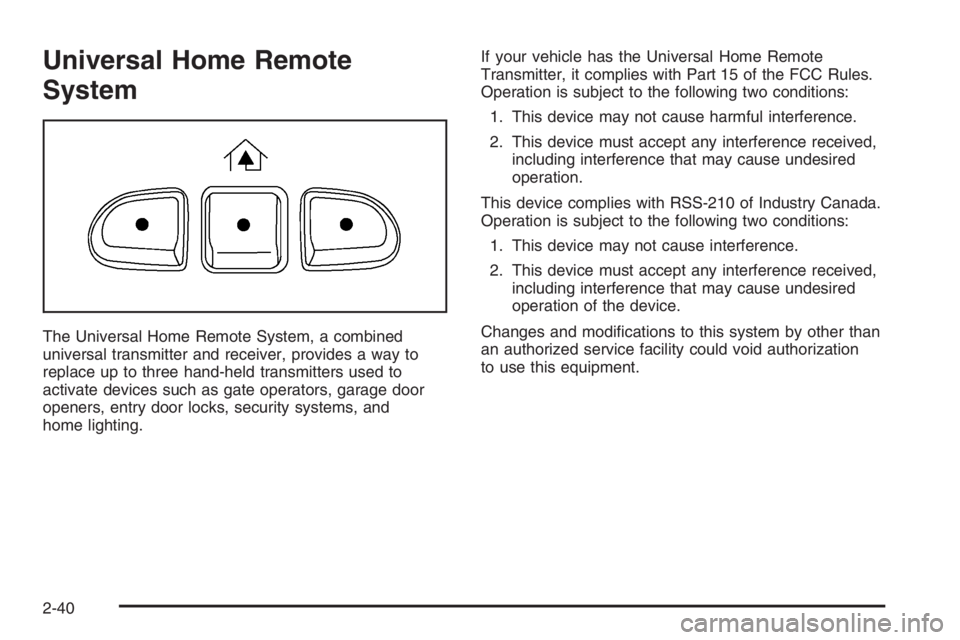
The Universal Home Remote System, a combined
universal transmitter and receiver, provides a way to
replace up to three hand-held transmitters used to
activate devices such as gate operators, garage door
openers, entry door locks, security systems, and
home lighting.If your vehicle has the Universal Home Remote
Transmitter, it complies with Part 15 of the FCC Rules.
Operation is subject to the following two conditions:
1. This device may not cause harmful interference.
2. This device must accept any interference received,
including interference that may cause undesired
operation.
This device complies with RSS-210 of Industry Canada.
Operation is subject to the following two conditions:
1. This device may not cause interference.
2. This device must accept any interference received,
including interference that may cause undesired
operation of the device.
Changes and modications to this system by other than
an authorized service facility could void authorization
to use this equipment.
2-40
Page 117 of 416
Universal Home Remote
System Operation
Do not use the Universal Home Remote with any garage
door opener that does not have the stop and reverse
feature. This includes any garage door opener model
manufactured before April 1, 1982. If you have a newer
garage door opener with rolling codes, please be sure to
follow Steps 6 through 8 to complete the programming of
your Universal Home Remote Transmitter.
Read the instructions completely before attempting to
program the Universal Home Remote. Because of
the steps involved, it may be helpful to have another
person available to assist you in the programming steps.
Keep the original hand-held transmitter for use in
other vehicles as well as for future Universal Home
Remote programming. It is also recommended that upon
the sale of the vehicle, the programmed Universal
Home Remote buttons should be erased for security
purposes. See “Erasing Universal Home Remote
Buttons” later in this section or, for assistance, see
Customer Assistance Offices on page 7-4.Be sure that people and objects are clear of the garage
door or gate operator you are programming. When
programming a garage door, it is advised to park outside
of the garage.
It is recommended that a new battery be installed in
your hand-held transmitter for quicker and more
accurate transmission of the radio-frequency signal.
Programming Universal Home Remote
Follow these steps to program up to three channels:
1. Press and hold down the two outside Universal
Home Remote buttons, releasing only when the
Universal Home Remote indicator light begins
to ash, after 20 seconds. Do not hold down the
buttons for longer than 30 seconds and do not
repeat this step to program a second and/or third
hand-held transmitter to the remaining two Universal
Home Remote buttons.
2. Position the end of your hand-held transmitter
about 1 to 3 inches (3 to 8 cm) away from the
Universal Home Remote buttons while keeping the
indicator light in view.
2-41
Page 120 of 416

Reprogramming a Single Universal
Home Remote Button
To program a device to Universal Home Remote using
a Universal Home Remote button previously trained,
follow these steps:
1. Press and hold the desired Universal Home
Remote button. Do not release the button.
2. The indicator light will begin to ash after
20 seconds. While still holding the Universal Home
Remote button, proceed with Step 2 under
“Programming Universal Home Remote” shown
earlier in this section.
For additional information on Universal Home Remote,
seeCustomer Assistance Offices on page 7-4.
Storage Areas
Glove Box
To open the glove box, lift up on the lever. The glove
box has a light inside. Use the key to lock and unlock.
Cupholder(s)
There are cupholders located in the full oor console, or
in the front of the center seat console. In addition to
this, cup holders are located in the rear armrest.
To access the full oor console cupholder slide the
cover back. To access the center seat console
cupholder, turn the front portion of console.
Front Storage Area
Your vehicle is equipped with a removable front storage
bin. For vehicles equipped with a center console,
push down then release to reveal the front bin and
accessory outlet. To remove, push up and forward to
loosen, then pull bin out. If your vehicle is equipped with
a center ex storage unit, pull the handle rearward to
open the front bin and accessory power outlet. To
remove, pull bin out.
2-44
Page 126 of 416
StabiliTrak®Indicator Light..............................3-42
Engine Coolant Temperature Warning Light......3-43
Engine Coolant Temperature Gage..................3-43
Tire Pressure Light.......................................3-44
Malfunction Indicator Lamp.............................3-44
Oil Pressure Light.........................................3-47
Security Light...............................................3-48
Fog Lamp Light............................................3-48
Cruise Control Light......................................3-48
Highbeam On Light.......................................3-48
Fuel Gage...................................................3-49
Driver Information Center (DIC).......................3-50
DIC Controls and Displays.............................3-50
DIC Warnings and Messages.........................3-56
DIC Vehicle Customization.............................3-65Audio System(s).............................................3-74
Setting the Time
(Without Date Display)...............................3-75
Setting the Time
(With Date Display)....................................3-76
Radio with CD (Base)...................................3-77
Radio with CD (MP3)....................................3-82
Navigation/Radio System...............................3-98
Theft-Deterrent Feature..................................3-98
Audio Steering Wheel Controls.......................3-99
Radio Reception.........................................3-100
Care of Your CDs.......................................3-100
Care of the CD Player.................................3-101
Backglass Antenna......................................3-101
XM™ Satellite Radio Antenna System............3-101
Section 3 Instrument Panel
3-2
Page 162 of 416
If the word ON or the on symbol is lit on the passenger
airbag status indicator, it means that the right front
passenger’s frontal airbag and seat-mounted side impact
airbag are enabled (may inate).
{CAUTION:
If the on indicator comes on when you have
a rear-facing child restraint installed in the
right front passenger’s seat, it means that
the passenger sensing system has not
turned off the passenger’s frontal airbag and
seat-mounted side impact airbag. A child in a
rear-facing child restraint can be seriously
injured or killed if the right front passenger’s
airbag inates. This is because the back of the
rear-facing child restraint would be very close
to the inating airbag. Do not use a rear-facing
child restraint in the right front passenger’s
seat if the airbag is turned on.Your vehicle has a rear seat that will accommodate a
rear-facing child restraint. A label on your sun visor says,
“Never put a rear-facing child seat in the front.” This is
because the risk to the rear-facing child is so great,
if the airbag deploys.
{CAUTION:
Even though the passenger sensing system is
designed to turn off the passenger’s frontal
airbag and seat-mounted side impact airbag if
the system detects a rear-facing child restraint,
no system is fail-safe, and no one can
guarantee that an airbag will not deploy under
some unusual circumstance, even though it is
turned off. We recommend that rear-facing
child restraints be secured in the rear seat,
even if the airbag is off.
3-38
Page 172 of 416

Security Light
For information
regarding this light,
seePASS-Key
®III+
Operation on page 2-20.
Fog Lamp Light
The fog lamps light will
come on when the fog
lamps are in use.
The light will go out when the fog lamps are turned off.
SeeFog Lamps on page 3-16for more information.
Cruise Control Light
This light comes on
whenever you set your
cruise control.
The light will go out when the cruise control is
turned off. SeeCruise Control on page 3-11for
more information.
Highbeam On Light
This light will come on
when the high-beam
headlamps are in use.
SeeHeadlamp High/Low-Beam Changer on page 3-8.
3-48
Page 212 of 416
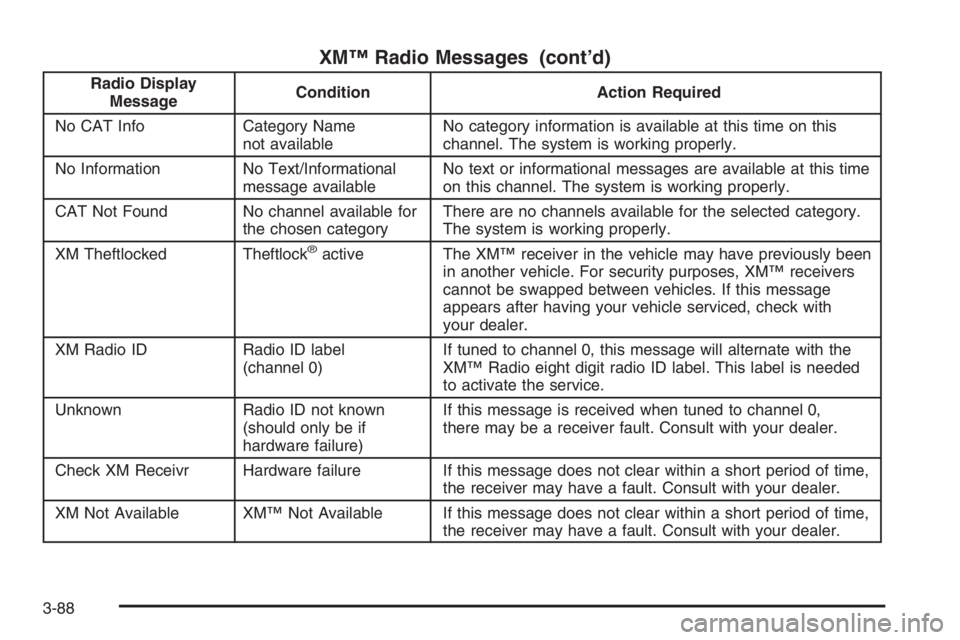
XM™ Radio Messages (cont’d)
Radio Display
MessageCondition Action Required
No CAT Info Category Name
not availableNo category information is available at this time on this
channel. The system is working properly.
No Information No Text/Informational
message availableNo text or informational messages are available at this time
on this channel. The system is working properly.
CAT Not Found No channel available for
the chosen categoryThere are no channels available for the selected category.
The system is working properly.
XM Theftlocked Theftlock
®active The XM™ receiver in the vehicle may have previously been
in another vehicle. For security purposes, XM™ receivers
cannot be swapped between vehicles. If this message
appears after having your vehicle serviced, check with
your dealer.
XM Radio ID Radio ID label
(channel 0)If tuned to channel 0, this message will alternate with the
XM™ Radio eight digit radio ID label. This label is needed
to activate the service.
Unknown Radio ID not known
(should only be if
hardware failure)If this message is received when tuned to channel 0,
there may be a receiver fault. Consult with your dealer.
Check XM Receivr Hardware failure If this message does not clear within a short period of time,
the receiver may have a fault. Consult with your dealer.
XM Not Available XM™ Not Available If this message does not clear within a short period of time,
the receiver may have a fault. Consult with your dealer.
3-88
Page 250 of 416
Winter Driving
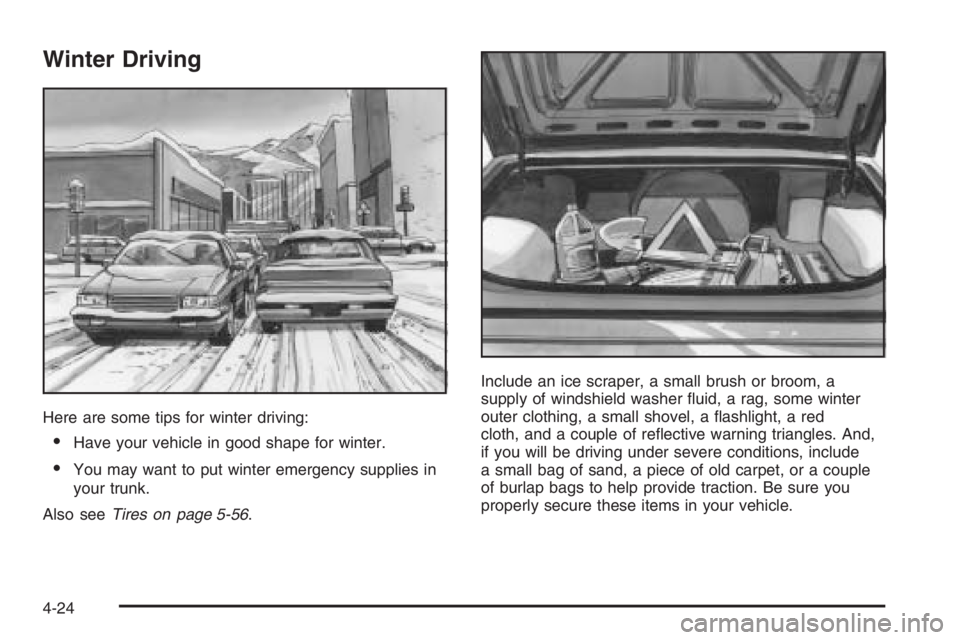
Here are some tips for winter driving:
Have your vehicle in good shape for winter.
You may want to put winter emergency supplies in
your trunk.
Also seeTires on page 5-56.Include an ice scraper, a small brush or broom, a
supply of windshield washer uid, a rag, some winter
outer clothing, a small shovel, a ashlight, a red
cloth, and a couple of reective warning triangles. And,
if you will be driving under severe conditions, include
a small bag of sand, a piece of old carpet, or a couple
of burlap bags to help provide traction. Be sure you
properly secure these items in your vehicle.
4-24
Page 259 of 416
{CAUTION:
Do not load your vehicle any heavier than the
Gross Vehicle Weight Rating (GVWR), or either
the maximum front or rear Gross Axle Weight
Rating (GAWR). If you do, parts on your
vehicle can break, and it can change the way
your vehicle handles. These could cause you
to lose control and crash. Also, overloading
can shorten the life of your vehicle.
Notice:Overloading your vehicle may cause
damage. Repairs would not be covered by your
warranty. Do not overload your vehicle.
If you put things inside your vehicle, like suitcases,
tools, packages, or anything else, they will go as fast
as the vehicle goes. If you have to stop or turn quickly,
or if there is a crash, they will keep going.
{CAUTION:
Things you put inside your vehicle can strike
and injure people in a sudden stop or turn, or
in a crash.
Put things in the trunk of your vehicle. In a
trunk, put them as far forward as you can.
Try to spread the weight evenly.
Never stack heavier things, like suitcases,
inside the vehicle so that some of them
are above the tops of the seats.
Do not leave an unsecured child restraint
in your vehicle.
When you carry something inside the
vehicle, secure it whenever you can.
4-33