ignition BUICK LUCERNE 2006 Owner's Guide
[x] Cancel search | Manufacturer: BUICK, Model Year: 2006, Model line: LUCERNE, Model: BUICK LUCERNE 2006Pages: 416, PDF Size: 2.6 MB
Page 138 of 416
Exterior Lamps
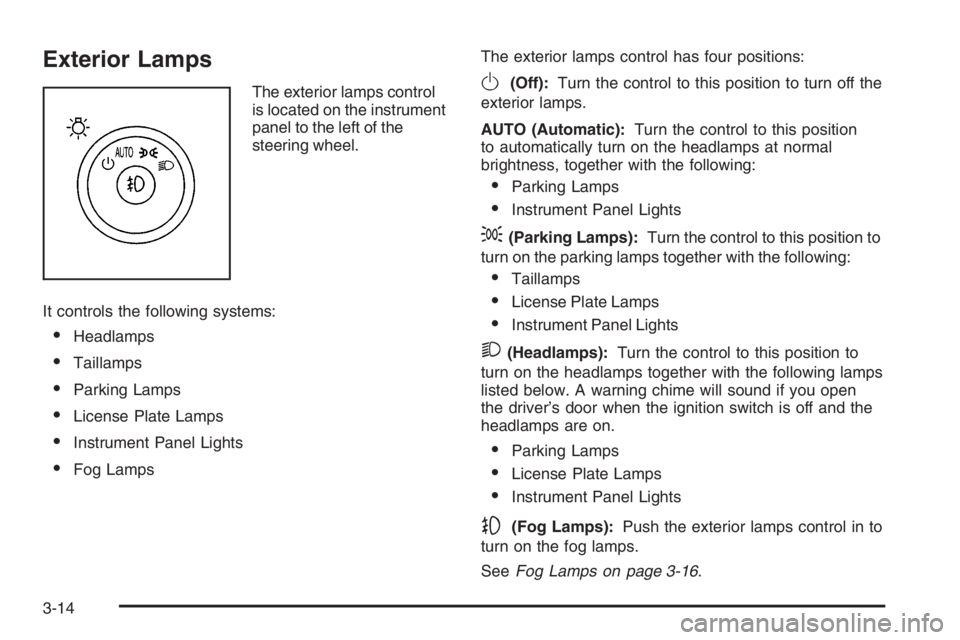
The exterior lamps control
is located on the instrument
panel to the left of the
steering wheel.
It controls the following systems:
Headlamps
Taillamps
Parking Lamps
License Plate Lamps
Instrument Panel Lights
Fog LampsThe exterior lamps control has four positions:
O(Off):Turn the control to this position to turn off the
exterior lamps.
AUTO (Automatic):Turn the control to this position
to automatically turn on the headlamps at normal
brightness, together with the following:
Parking Lamps
Instrument Panel Lights
;(Parking Lamps):Turn the control to this position to
turn on the parking lamps together with the following:
Taillamps
License Plate Lamps
Instrument Panel Lights
2(Headlamps):Turn the control to this position to
turn on the headlamps together with the following lamps
listed below. A warning chime will sound if you open
the driver’s door when the ignition switch is off and the
headlamps are on.
Parking Lamps
License Plate Lamps
Instrument Panel Lights
-(Fog Lamps):Push the exterior lamps control in to
turn on the fog lamps.
SeeFog Lamps on page 3-16.
3-14
Page 139 of 416
Wiper Activated Headlamps
This feature turns on the low-beam headlamps,
instrument panel cluster backlighting and taillamps
when the windshield wipers have been in use for about
six seconds.
If the wiper activated headlamps are on and the ignition
switch is turned to C (RUN), the wiper activated
headlamps will continue. When you turn the key to
A (OFF), the wiper activated headlamps will immediately
turn off. The wiper activated headlamps will also turn
off if you turn off the windshield wipers.
Headlamps on Reminder
If you leave the exterior lamp buttons for the headlamps
or parking lamps on, remove the key from the ignition
and open the driver’s door, you will hear a continuous
warning chime. The chime will turn off when the lamps
are turned off.
Daytime Running Lamps (DRL)
Daytime Running Lamps (DRL) can make it easier for
others to see the front of your vehicle during the
day. DRL can be helpful in many different driving
conditions, but they can be especially helpful in the short
periods after dawn and before sunset. Fully functional
daytime running lamps are required on all vehicles
rst sold in Canada.A light sensor on top of the instrument panel monitors
the exterior light level for the operation of DRL, so
be sure it is not covered.
The DRL system will make your low-beam headlamps
turn on at reduced brightness in daylight when the
following conditions are met:
The ignition is on.
The exterior lamp button for the headlamps is off.
The automatic transaxle is not in PARK (P).
When the DRL are on, only your low-beam headlamps
will be on. The parking lamps, taillamps, sidemarker
and other lamps will not be on.
When it is dark enough outside, your low-beam
headlamps will come on. The other lamps that turn on
with your headlamps will also turn on. When it is
bright enough outside, the regular lamps will go off, and
your low-beam headlamps change to the reduced
brightness of DRL.
To turn off all exterior lighting at night when you are
parked, turn the exterior lamp control to the off position.
The exterior lamps will turn back on automatically
when you move the transaxle out of PARK (P).
SeeExterior Lamps on page 3-14for more information.
As with any vehicle, you should turn on the regular
headlamp system when you need it.
3-15
Page 140 of 416
Fog Lamps
-(Fog Lamps):If your vehicle is equipped with fog
lamps, it is located on the exterior lamps control.
The exterior lamps control is located on the instrument
panel to the left of the steering column.
Your ignition must be in C (RUN) for the fog lamps to
illuminate.
To turn the fog lamps on, press the exterior lamps button.
A light will come on in the instrument panel cluster to let
you know that the fog lamps are on. Press the exterior
lamps button again to turn the fog lamps off.
The ignition must be in C (RUN) and the parking lamps
must be on for your fog lamps to work.
The fog lamps will go off while you change to high-beam
headlamps.
Some localities have laws that require the headlamps to
be on along with the fog lamps.
Cornering Lamps
If your vehicle has this feature, the cornering lamps
come on when: the headlamps or parking lamps are on,
the vehicle is not in PARK (P), and you signal a turn
with the turn signal/multifunction lever. They provide
more light for cornering.
Exterior Lighting Battery Saver
If the exterior lamp button has been left on, the exterior
lamps will turn off about 10 minutes after the ignition
is turned to A (OFF) and a door has been opened.
This protects against draining the battery in case you
have accidentally left the headlamps or parking
lamps on. If you need to leave the lamps on for more
than 10 minutes, use the manual control to turn the
lamps back on after the ignition is turned to A (OFF) and
any door is opened. To delay the lamps from turning
off, seeDIC Vehicle Customization on page 3-65.
Instrument Panel Brightness
D(Instrument Panel Brightness):This feature
controls the brightness of the instrument panel lights.
The button for this control is located next to the exterior
lamps control.
Push the button in and release to extend the button.
Turn the button clockwise to increase the brightness of
the instrument panel lights and counter clockwise to
decrease the brightness. Turning the button completely
clockwise to the detent will turn on the courtesy lamps.
3-16
Page 141 of 416

Courtesy Lamps
If it is dark enough outside, when any door is opened,
several lamps go on. They make it easy for you to enter
and leave the vehicle. Turn these lamps on manually
by turning the instrument panel brightness control
completely clockwise.
Entry Lighting
If it is dark enough outside when you press the unlock
button on the remote keyless entry transmitter, the
interior courtesy lamps will turn on and stay on for about
40 seconds. The lamps can be turned off immediately
by pressing the lock button on the remote keyless entry
transmitter, turning the ignition key to C (RUN) or
activating the power door locks.
Delayed Entry Lighting
The interior lamps will turn on if you open the door when it
is dark enough outside. When you close the door with
the ignition off, the interior lamps will stay on for up to
25 seconds or until the ignition is turned to an on position.
When the lamps turn off as a result of the 25 second
timer or the ignition switch being turned on, the lighting
will deactivate by way of the theater dimming effect.
Locking the doors will override the delayed entry lighting
feature and the lamps will turn off right away.
Theater Dimming
This feature allows for a three to ve-second fade out of
the courtesy lamps instead of immediate turn off.
Delayed Exit Lighting
If it is dark enough outside when you remove the key
from the ignition, the interior lamps will turn on and
stay on for about 25 seconds. This will give you time to
nd the door pull handle or lock switches. Once the
key is inserted into the ignition, the exit lighting will be
cancelled and the lighting will fade out.
Perimeter Lighting
If it is dark enough outside when the unlock button on
the remote keyless entry transmitter is pressed, the
DRL, parking lamps and back-up lamps will come on.
This feature can be programmed in the on for various
amounts of seconds or off mode for each transmitter.
SeeDIC Vehicle Customization on page 3-65for
information on programming.
3-17
Page 142 of 416
Front Reading Lamps
The front reading lamps, located on the headliner, are
turned on or off by pressing one of the buttons
located near each lamp.
Battery Load Management
The battery load management feature is designed to
monitor the vehicle’s electrical load and determine when
the battery is in a heavy discharge condition. During
times of high electrical loading, the engine may idle at a
higher RPM setting than normal to make sure the
battery charges. High electrical loads may occur when
several of the following are on: headlamps, high beams,
rear window defogger, fan at high speed, heated
seats (if equipped), and engine cooling fans.
If your vehicle’s battery remains in a heavy discharge
condition for a long period of time, the fan, rear
defogger, heated seats, and heated mirrors will be
disabled and the DIC will display SERVICE BATTERY
CHARGING SYSTEM. This can happen either under
long periods of idling or low speed driving with high
electrical loading, or in the event of a charging system
fault. SeeDIC Warnings and Messages on page 3-56
for more information.
Inadvertent Power Battery Saver
This feature is designed to protect your vehicle’s battery
against drainage from the interior lamps, or garage
door opener. When the ignition is turned off, the power
to these features will automatically turn off after
10 minutes. Power will be restored for an additional
10 minutes if any door is opened, the trunk is opened or
the courtesy lamp switch is turned on.
Ultrasonic Rear Parking
Assist (URPA)
If your vehicle is equipped, the Ultrasonic Rear Parking
Assist (URPA) system is designed to help you park
while in REVERSE (R). It operates only at speeds less
than 5 mph (8 km/h). URPA helps make parking
easier and helps you avoid colliding with objects such
as parked vehicles. The URPA system detects
objects that are close to the rear of the vehicle which
are at least 10 inches (25.4 cm) off the ground and
below hood or trunk level. The system detects objects
up to 8 feet (2.5 m) behind your vehicle. URPA
determines how close these objects are from your
bumper within this area. Ultrasonic sensors on the rear
bumper are used to detect the distance to the object.
3-18
Page 147 of 416
Climate Controls
Climate Control System
With this system you can control the heating, cooling,
and ventilation for your vehicle.
If your vehicle has the remote start feature and it is
activated, the climate control system will automatically
cool the vehicle if the temperature is greater than
90°F (32°C) and heat the vehicle if the temperature is
below 37°F (3°C). If the temperature is between
37°F (3°C) and 90°F (32°C), the last control setting
selected when the engine was running will be used.
Normal operation and the last setting of the climate
control system will return after the ignition key is turned
to the C (RUN) position. SeeRemote Keyless Entry
System Operation on page 2-6for more information.
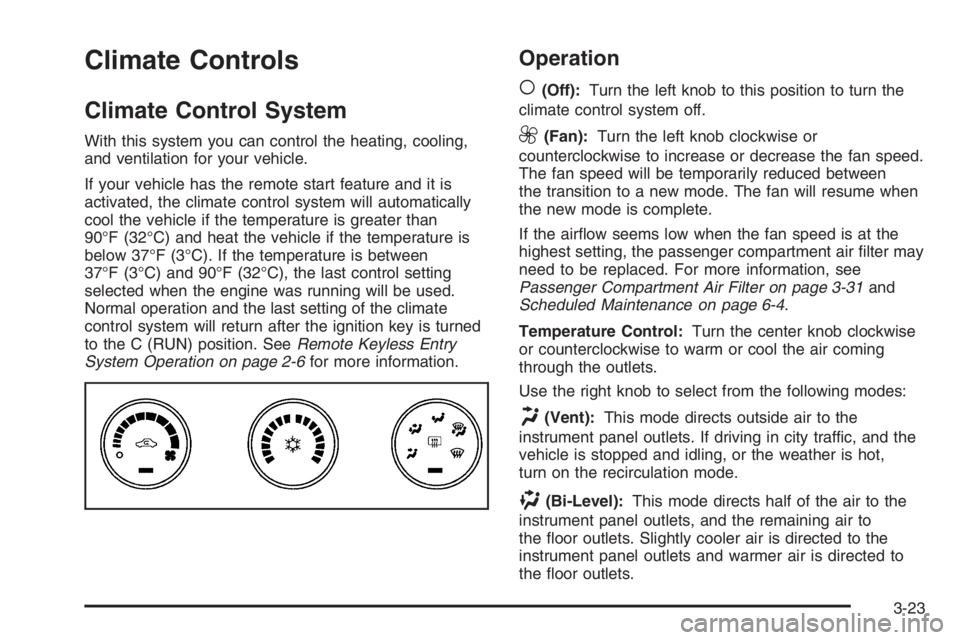
Operation
(
(Off):Turn the left knob to this position to turn the
climate control system off.
9(Fan):Turn the left knob clockwise or
counterclockwise to increase or decrease the fan speed.
The fan speed will be temporarily reduced between
the transition to a new mode. The fan will resume when
the new mode is complete.
If the airow seems low when the fan speed is at the
highest setting, the passenger compartment air lter may
need to be replaced. For more information, see
Passenger Compartment Air Filter on page 3-31and
Scheduled Maintenance on page 6-4.
Temperature Control:Turn the center knob clockwise
or counterclockwise to warm or cool the air coming
through the outlets.
Use the right knob to select from the following modes:
H(Vent):This mode directs outside air to the
instrument panel outlets. If driving in city traffic, and the
vehicle is stopped and idling, or the weather is hot,
turn on the recirculation mode.
)(Bi-Level):This mode directs half of the air to the
instrument panel outlets, and the remaining air to
the oor outlets. Slightly cooler air is directed to the
instrument panel outlets and warmer air is directed to
the oor outlets.
3-23
Page 149 of 416

See “Rear Window Defogger” later in this section for
information on clearing the rear window of fog or ice.
Turn the right knob to select the defog or defrost mode.
-(Defog):This mode directs half of the air to the
windshield and the side window outlets and half to the
oor outlets. When you select this mode, the system
turns recirculation off and runs the air conditioning
compressor unless the outside temperature is near or
below freezing. Pressing the recirculation button
will have no effect other than turning on the indicator
light while in defog mode.
0(Defrost):This mode directs most of the air to the
windshield and the side window outlets. When you select
this mode, the system turns recirculation off. Pressing the
recirculation button will have no effect other than turning
on the indicator light while in defrost mode.
Rear Window Defogger
The rear window defogger uses a warming grid to
remove fog from the rear window.
<(Rear Window Defogger):Press this button to turn
the rear window defogger on or off. An indicator light
below the button will come on to let you know that the
rear window defogger is activated. Be sure to clear
as much snow from the rear window as possible.The rear window defogger will only work when the
ignition is in run. The rear window defogger will stay on
for approximately 20 minutes after the button is
pressed if you are traveling at slower vehicle speeds.
At higher vehicle speeds, the rear defogger may stay on
continuously. If turned on again, the defogger will only
run for approximately 10 minutes before turning off.
The defogger can be turned off by pressing the button
again, by turning the ignition to B (ACCESSORY) or
C (RUN), or by turning off the engine.
If your vehicle has heated outside rearview mirrors,
the mirrors will heat to help clear fog or frost from the
surface of the mirror when the rear window defogger
is on. SeeOutside Automatic Dimming Heated
Mirror on page 2-37for more information.
Notice:Do not use anything sharp on the inside
of the rear window. If you do, you could cut or
damage the warming grid, and the repairs would
not be covered by your warranty. Do not attach
a temporary vehicle license, tape, a decal or
anything similar to the defogger grid.
3-25
Page 150 of 416
Dual Automatic Climate Control
System
With this system you can control the heating, cooling,
and ventilation for your vehicle.
If your vehicle has the remote start feature and it is
activated, the climate control system will automatically
cool the vehicle if the temperature is greater than
90°F (32°C) and heat the vehicle if the temperature is
below 37°F (3°C). If the temperature is between
37°F (3°C) and 90°F (32°C), the last control setting
selected when the engine was running will be used.
Normal operation and the last setting of the climate
control system will return after the ignition key is turned
to the C (RUN) position. SeeRemote Keyless Entry
System Operation on page 2-6for more information.
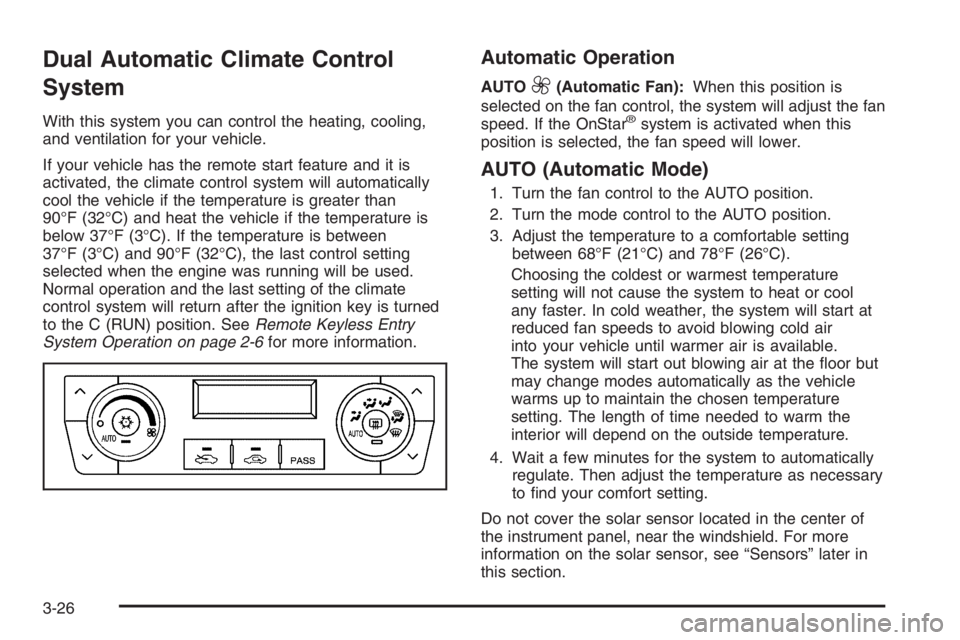
Automatic Operation
AUTO9(Automatic Fan):When this position is
selected on the fan control, the system will adjust the fan
speed. If the OnStar
®system is activated when this
position is selected, the fan speed will lower.
AUTO (Automatic Mode)
1. Turn the fan control to the AUTO position.
2. Turn the mode control to the AUTO position.
3. Adjust the temperature to a comfortable setting
between 68°F (21°C) and 78°F (26°C).
Choosing the coldest or warmest temperature
setting will not cause the system to heat or cool
any faster. In cold weather, the system will start at
reduced fan speeds to avoid blowing cold air
into your vehicle until warmer air is available.
The system will start out blowing air at the oor but
may change modes automatically as the vehicle
warms up to maintain the chosen temperature
setting. The length of time needed to warm the
interior will depend on the outside temperature.
4. Wait a few minutes for the system to automatically
regulate. Then adjust the temperature as necessary
to nd your comfort setting.
Do not cover the solar sensor located in the center of
the instrument panel, near the windshield. For more
information on the solar sensor, see “Sensors” later in
this section.
3-26
Page 154 of 416

Defogging and Defrosting
Fog on the inside of windows is a result of high humidity
(moisture) condensing on the cool window glass. This
can be minimized if the climate control system is
used properly. There are two modes to clear fog from
your windshield, defog and defrost.
W(Floor/Defog):Use this mode to clear the windows
of fog or moisture and to warm the passengers.
Turning the control to this mode directs approximately
half of the air to the oor outlets and the remaining air
is directed to the side window outlets and to the
windshield. When you select this mode, the system
turns off recirculation and runs the air-conditioning
compressor unless the outside temperature is at or
below freezing. The recirculation mode cannot be
selected while in the oor/defog mode.
0(Defrost):Use this mode to remove fog or frost
from the windshield more quickly. Turning the control to
this mode directs most of the air to the windshield
and the side window outlets. In this mode, the system
will automatically turn off recirculation and run the
air-conditioning compressor, unless the outside
temperature is at or below freezing. Recirculation cannot
be selected while in the defrost mode. Do not drive
the vehicle until all the windows are clear.
Rear Window Defogger
The rear window defogger uses a warming grid to
remove fog or frost from the rear window.
<(Rear Defogger):Press this button to turn the rear
window defogger on or off. An indicator light below
the button will come on to let you know that the rear
window defogger is activated. Be sure to clear as much
snow from the rear window as possible.
The rear window defogger will only work when the
ignition is in C (RUN). The rear window defogger will
stay on for approximately 20 minutes after the button is
pressed if you are traveling at slower vehicle speeds.
At higher vehicle speeds the rear window defogger may
stay on continuously. If turned on again, the defogger
will only run for approximately 10 minutes before turning
off. The defogger can be turned off by pressing the
button again, by turning the ignition to B (ACCESSORY)
or C (RUN), or by turning off the engine.
The heated outside rearview mirrors will heat to help clear
fog or frost from the surface of the mirror when the rear
window defogger is on. SeeOutside Automatic Dimming
Heated Mirror on page 2-37for more information.
Notice:Do not use a razor blade or sharp object to
clear the inside rear window. Do not adhere
anything to the defogger grid lines in the rear glass.
These actions may damage the rear defogger.
Repairs would not be covered by your warranty.
3-30
Page 161 of 416

{CAUTION:
If the airbag readiness light stays on after you
start your vehicle, it means the airbag system
may not be working properly. The airbags in
your vehicle may not inate in a crash, or they
could even inate without a crash. To help
avoid injury to yourself or others, have your
vehicle serviced right away if the airbag
readiness light stays on after you start your
vehicle.
The airbag readiness light should ash for a few
seconds when you turn the ignition key to RUN. If the
light does not come on then, have it xed so it will
be ready to warn you if there is a problem.
If there is a problem with the airbag system in your
vehicle, the Service airbag message will appear on the
DIC display. SeeDIC Warnings and Messages on
page 3-56for more information.
Passenger Airbag Status Indicator
Your vehicle has the passenger sensing system.
Your overhead console has a passenger airbag status
indicator.
When the ignition key is turned to RUN or START,
the passenger airbag status indicator will light ON and
OFF, or the symbol for on and off, for several seconds
as a system check. Then, after several more seconds,
the status indicator will light either ON or OFF, or either
the on or off symbol to let you know the status of the
right front passenger’s frontal airbag and seat-mounted
side impact airbag.United States
Canada
3-37