battery BUICK LUCERNE 2007 Owner's Guide
[x] Cancel search | Manufacturer: BUICK, Model Year: 2007, Model line: LUCERNE, Model: BUICK LUCERNE 2007Pages: 496, PDF Size: 2.77 MB
Page 226 of 496
REMOTE KEY LEARNING ACTIVE
This message displays while you are matching
a Remote Keyless Entry (RKE) transmitter to your
vehicle. See “Matching Transmitter(s) to Your
Vehicle” underRemote Keyless Entry (RKE)
System Operation on page 95andDIC Controls
and Displays on page 212for more information.
REPLACE BATTERY IN REMOTE KEY
This message displays when the battery in the
Remote Keyless Entry (RKE) transmitter needs to
be replaced. To replace the battery, see “Battery
Replacement” underRemote Keyless Entry (RKE)
System Operation on page 95.
RIGHT REAR DOOR OPEN
This message displays when the passenger’s
side rear door is not closed properly. When this
message appears, make sure that the passenger’s
door is closed completely.
SERVICE A/C (Air Conditioning)
SYSTEM
This message displays when the electronic
sensors that control the air conditioning and
heating systems are no longer working. Have the
climate control system serviced by your dealer
if you notice a drop in heating and air conditioning
efficiency.
SERVICE AIR BAG
This message displays when there is a problem
with the airbag system. Have your vehicle serviced
by your dealer immediately. SeeAirbag Readiness
Light on page 197for more information.
SERVICE BATTERY CHARGING
SYSTEM
This message displays when there is a problem
with the generator and battery charging systems.
Driving with this problem could drain the battery.
Turn off all unnecessary accessories. Stop
and turn off the vehicle as soon as it is safe to do
so. Have the electrical system checked by your
dealer immediately.
226
Page 232 of 496
Entering the Feature Settings Menu
1. Turn the ignition on and place the vehicle in
PARK (P).
To avoid excessive drain on the battery,
it is recommended that the headlamps are
turned off.
2. Press the customization button to enter the
feature settings menu.
If the menu is not available, FEATURE
SETTINGS AVAILABLE IN PARK will display.
Before entering the menu, make sure the
vehicle is in PARK (P).
Feature Settings Menu Items
The following are customization features that allow
you to program settings to the vehicle:
DISPLAY IN ENGLISH
This feature will only display if a language other
than English has been set. This feature allows you
to change the language in which the DIC messages
appear to English.
Press the customization button until the PRESS
V
TO DISPLAY IN ENGLISH screen appears on
the DIC display. Press the set/reset button
to display all DIC messages in English.
DISPLAY LANGUAGE
This feature allows you to select the language in
which the DIC messages will appear.
Press the customization button until the DISPLAY
LANGUAGE screen appears on the DIC display.
Press the set/reset button to access the settings
for this feature. Then press the customization
button to scroll through the following choices:
ENGLISH (default):All messages will appear in
English.
FRANCAIS (French):All messages will appear in
French.
ESPANOL (Spanish):All messages will appear
in Spanish.
NO CHANGE:No change will be made to this
feature. The current setting will remain.
Select one of the available choices and press
the set/reset button while it is displayed on the DIC
to select it.
232
Page 271 of 496

Navigation/Radio System
Your vehicle may have a navigation radio system.
The navigation system has built-in features
intended to minimize driver distraction. Technology
alone, no matter how advanced, can never replace
your own judgment. See the Navigation System
manual for some tips to help you reduce
distractions while driving.
Theft-Deterrent Feature
THEFTLOCK®is designed to discourage theft of
your vehicle’s radio. It works by using a secret code
to disable all radio functions whenever battery
power is removed and the radio is placed in a
different vehicle. This feature requires no user input
to be activated. The radio is automatically armed
when it is put into the vehicle for the rst time.
If THEFTLOCK
®is activated, the radio will not
operate if stolen. The radio will display LOCKED.
If this occurs, the radio will need to be returned
to your GM dealer.
Audio Steering Wheel Controls
If your vehicle has audio
steering wheel controls,
they may be differ
depending on your
vehicle’s options. Some
audio controls can be
adjusted at the steering
wheel. They include the
following:
xw(Next/Previous):Press the up or the down
arrow to go to the next or to the previous radio
station stored as a favorite.
When a CD is playing, press the up or the down
arrow to go to the next or previous track.
271
Page 305 of 496

You can run the engine to keep warm, but be
careful.
{CAUTION:
Snow can trap exhaust gases under
your vehicle. This can cause deadly CO
(carbon monoxide) gas to get inside.
CO could overcome you and kill you.
You cannot see it or smell it, so you might
not know it is in your vehicle. Clear away
snow from around the base of your
vehicle, especially any that is blocking
your exhaust pipe. And check around
again from time to time to be sure snow
does not collect there.
Open a window just a little on the side of
the vehicle that is away from the wind.
This will help keep CO out.
Run your engine only as long as you must. This
saves fuel. When you run the engine, make it go
a little faster than just idle. That is, push the
accelerator slightly. This uses less fuel for the heat
that you get and it keeps the battery charged.
305
Page 306 of 496

You will need a well-charged battery to restart the
vehicle, and possibly for signaling later on with
your headlamps. Let the heater run for a while.
Then, shut the engine off and close the window
almost all the way to preserve the heat. Start
the engine again and repeat this only when you
feel really uncomfortable from the cold. But do it as
little as possible. Preserve the fuel as long as
you can. To help keep warm, you can get out of
the vehicle and do some fairly vigorous exercises
every half hour or so until help comes.
If Your Vehicle is Stuck in Sand,
Mud, Ice, or Snow
In order to free your vehicle when it is stuck,
you will need to spin the wheels, but you do not
want to spin your wheels too fast. The method
known as rocking can help you get out when you
are stuck, but you must use caution.
{CAUTION:
If you let your vehicle’s tires spin at high
speed, they can explode, and you or others
could be injured. And, the transaxle or
other parts of the vehicle can overheat.
That could cause an engine compartment
re or other damage. When you are stuck,
spin the wheels as little as possible. Do not
spin the wheels above 35 mph (55 km/h) as
shown on the speedometer.
Notice:Spinning the wheels can destroy parts
of your vehicle as well as the tires. If you spin
the wheels too fast while shifting the transaxle
back and forth, you can destroy the transaxle.
SeeRocking Your Vehicle to Get It Out on
page 307.
For information about using tire chains on your
vehicle, seeTire Chains on page 406.
306
Page 323 of 496
Service........................................................ 325
Accessories and Modications................... 325
California Proposition 65 Warning.............. 326
Doing Your Own Service Work.................. 326
Adding Equipment to the Outside of
Your Vehicle.......................................... 327
Fuel............................................................. 327
Gasoline Octane........................................ 327
Gasoline Specications.............................. 328
California Fuel........................................... 328
Additives................................................... 328
Fuels in Foreign Countries........................ 329
Filling the Tank......................................... 330
Filling a Portable Fuel Container............... 332
Checking Things Under the Hood.............. 332
Hood Release........................................... 333
Engine Compartment Overview.................. 334
Engine Oil................................................. 337
Engine Oil Life System.............................. 340
Engine Air Cleaner/Filter............................ 342
Automatic Transaxle Fluid......................... 343
Engine Coolant.......................................... 347
Radiator Pressure Cap.............................. 351
Engine Overheating................................... 351Overheated Engine Protection
Operating Mode..................................... 353
Cooling System (3.8L V6 Engine).............. 354
Cooling System (4.6L V8 Engine).............. 360
Power Steering Fluid ................................. 364
Windshield Washer Fluid........................... 365
Brakes...................................................... 367
Battery...................................................... 370
Jump Starting............................................ 372
Headlamp Aiming........................................ 377
Bulb Replacement....................................... 380
Halogen Bulbs........................................... 380
Taillamps, Turn Signal, Stoplamps and
Sidemarker Lamps ................................. 380
Taillamps and Back-Up Lamps.................. 382
License Plate Lamp................................... 383
Replacement Bulbs................................... 383
Windshield Wiper Blade Replacement....... 383
Tires............................................................ 385
Tire Sidewall Labeling............................... 386
Tire Terminology and Denitions............... 389
Ination - Tire Pressure............................. 392
Tire Pressure Monitor System................... 393
Section 5 Service and Appearance Care
323
Page 335 of 496
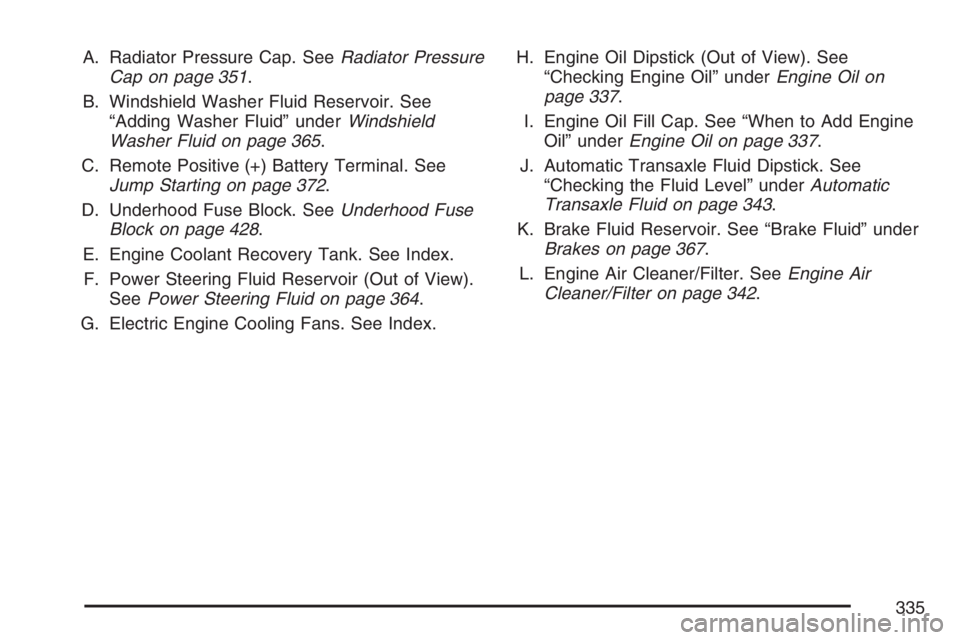
A. Radiator Pressure Cap. SeeRadiator Pressure
Cap on page 351.
B. Windshield Washer Fluid Reservoir. See
“Adding Washer Fluid” underWindshield
Washer Fluid on page 365.
C. Remote Positive (+) Battery Terminal. See
Jump Starting on page 372.
D. Underhood Fuse Block. SeeUnderhood Fuse
Block on page 428.
E. Engine Coolant Recovery Tank. See Index.
F. Power Steering Fluid Reservoir (Out of View).
SeePower Steering Fluid on page 364.
G. Electric Engine Cooling Fans. See Index.H. Engine Oil Dipstick (Out of View). See
“Checking Engine Oil” underEngine Oil on
page 337.
I. Engine Oil Fill Cap. See “When to Add Engine
Oil” underEngine Oil on page 337.
J. Automatic Transaxle Fluid Dipstick. See
“Checking the Fluid Level” underAutomatic
Transaxle Fluid on page 343.
K. Brake Fluid Reservoir. See “Brake Fluid” under
Brakes on page 367.
L. Engine Air Cleaner/Filter. SeeEngine Air
Cleaner/Filter on page 342.
335
Page 337 of 496
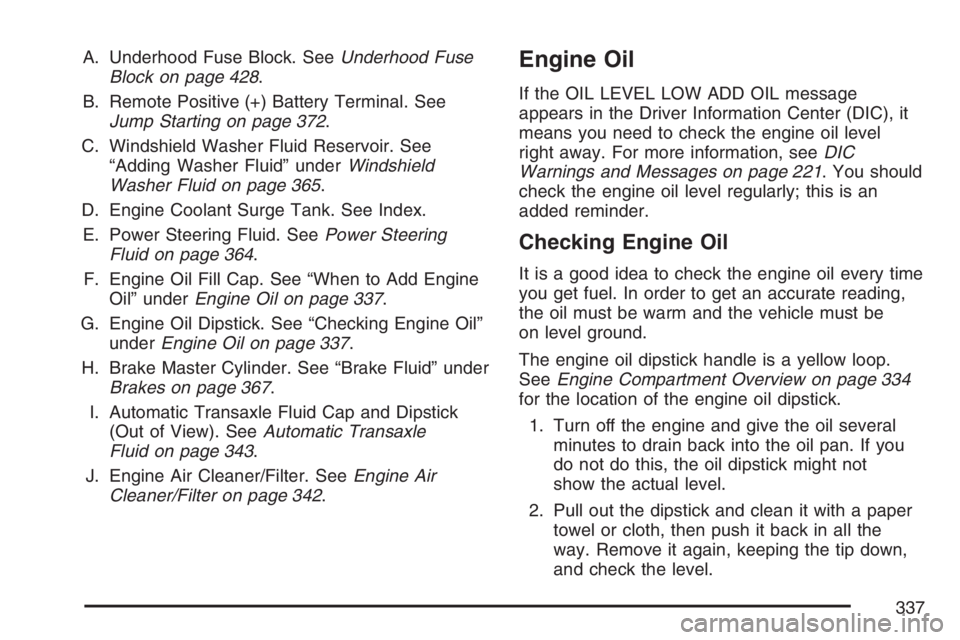
A. Underhood Fuse Block. SeeUnderhood Fuse
Block on page 428.
B. Remote Positive (+) Battery Terminal. See
Jump Starting on page 372.
C. Windshield Washer Fluid Reservoir. See
“Adding Washer Fluid” underWindshield
Washer Fluid on page 365.
D. Engine Coolant Surge Tank. See Index.
E. Power Steering Fluid. SeePower Steering
Fluid on page 364.
F. Engine Oil Fill Cap. See “When to Add Engine
Oil” underEngine Oil on page 337.
G. Engine Oil Dipstick. See “Checking Engine Oil”
underEngine Oil on page 337.
H. Brake Master Cylinder. See “Brake Fluid” under
Brakes on page 367.
I. Automatic Transaxle Fluid Cap and Dipstick
(Out of View). SeeAutomatic Transaxle
Fluid on page 343.
J. Engine Air Cleaner/Filter. SeeEngine Air
Cleaner/Filter on page 342.Engine Oil
If the OIL LEVEL LOW ADD OIL message
appears in the Driver Information Center (DIC), it
means you need to check the engine oil level
right away. For more information, seeDIC
Warnings and Messages on page 221. You should
check the engine oil level regularly; this is an
added reminder.
Checking Engine Oil
It is a good idea to check the engine oil every time
you get fuel. In order to get an accurate reading,
the oil must be warm and the vehicle must be
on level ground.
The engine oil dipstick handle is a yellow loop.
SeeEngine Compartment Overview on page 334
for the location of the engine oil dipstick.
1. Turn off the engine and give the oil several
minutes to drain back into the oil pan. If you
do not do this, the oil dipstick might not
show the actual level.
2. Pull out the dipstick and clean it with a paper
towel or cloth, then push it back in all the
way. Remove it again, keeping the tip down,
and check the level.
337
Page 370 of 496

Replacing Brake System Parts
The braking system on a vehicle is complex. Its
many parts have to be of top quality and work well
together if the vehicle is to have really good
braking. Your vehicle was designed and tested
with top-quality GM brake parts. When you replace
parts of your braking system — for example,
when your brake linings wear down and you need
new ones put in — be sure you get new
approved GM replacement parts. If you do not,
your brakes may no longer work properly.
For example, if someone puts in brake linings that
are wrong for your vehicle, the balance between
your front and rear brakes can change — for
the worse. The braking performance you have
come to expect can change in many other ways
if someone puts in the wrong replacement
brake parts.
Battery
Your vehicle has a maintenance free battery.
When it is time for a new battery, get one that has
the replacement number shown on the original
battery’s label. We recommend an ACDelco
®
replacement battery.
Warning:Battery posts, terminals, and related
accessories contain lead and lead compounds,
chemicals known to the State of California
to cause cancer and reproductive harm. Wash
hands after handling.
The battery is located under the rear seat cushion.
To access the battery, see “Removing the Rear
Seat Cushion” underRear Underseat Fuse
Block on page 431. You do not need to access
the battery to jump start your vehicle. See
Jump Starting on page 372.
370
Page 371 of 496
{CAUTION:
A battery that is not properly vented can
let sulfuric acid fumes into the area under
the rear seat cushion. These fumes can
damage your rear seat safety belt
systems. You may not be able to see this
damage, and the safety belts might not
provide the protection needed in a crash.
If a replacement battery is ever needed, it
must be vented in the same manner as
the original battery. Always make sure
that the vent hose is properly reattached
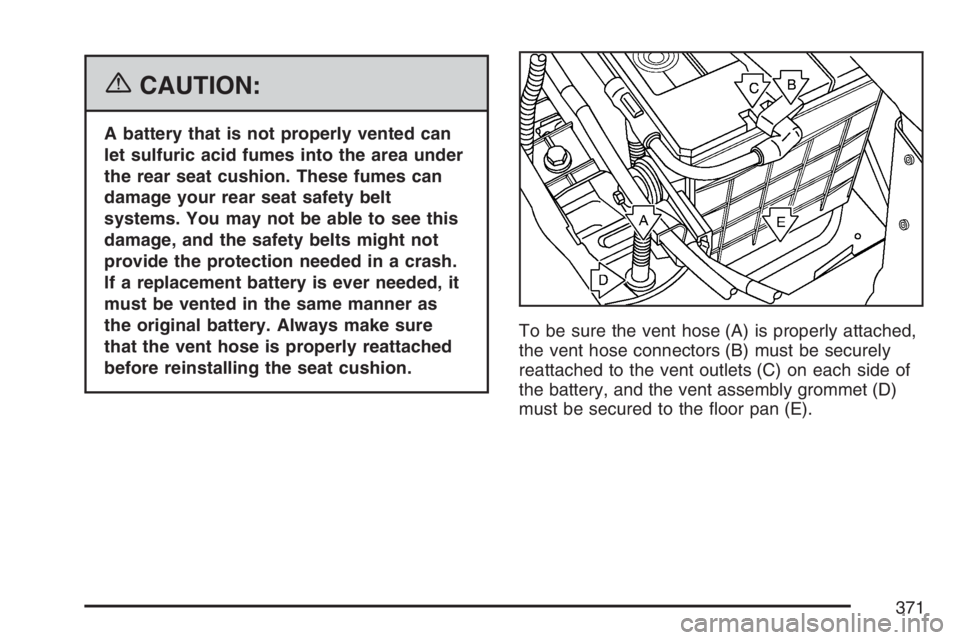
before reinstalling the seat cushion.To be sure the vent hose (A) is properly attached,
the vent hose connectors (B) must be securely
reattached to the vent outlets (C) on each side of
the battery, and the vent assembly grommet (D)
must be secured to the oor pan (E).
371