lock BUICK LUCERNE 2007 Owner's Guide
[x] Cancel search | Manufacturer: BUICK, Model Year: 2007, Model line: LUCERNE, Model: BUICK LUCERNE 2007Pages: 496, PDF Size: 2.77 MB
Page 95 of 496
At times you may notice a decrease in operating
range. This is normal for any RKE system. If the
transmitter does not work or if you have to stand
closer to your vehicle for the transmitter to work,
try this:
Check the distance. You may be too far from
your vehicle. You may need to stand closer
during rainy or snowy weather.
Check the location. Other vehicles or objects
may be blocking the signal. Take a few steps to
the left or right, hold the transmitter higher, and
try again.
Check to determine if battery replacement is
necessary. See “Battery Replacement” under
Remote Keyless Entry (RKE) System
Operation on page 95.
If you are still having trouble, see your dealer or
a qualied technician for service.
Remote Keyless Entry (RKE)
System Operation
The vehicle’s doors can be locked and unlocked,
and the trunk can be unlatched from about
3 feet (1 m) up to 60 feet (18 m) away with the
Remote Keyless Entry (RKE) transmitter.
If your vehicle has the remote start feature you can
also start your vehicle with the RKE transmitter.
Your RKE transmitter, with the remote start button,
provides an increased range of 195 feet (60 m)
away. However, the range may be less while the
vehicle is running. As a result, you may need to be
closer to your vehicle to turn it off than you were to
turn it on.
There are other conditions which can affect the
performance of the transmitter. SeeRemote
Keyless Entry (RKE) System on page 94.
95
Page 96 of 496

The following functions may be available if your
vehicle has the RKE system:
/(Remote Vehicle Start):If your vehicle has
this feature, it may be started from outside the
vehicle using the RKE transmitter. See “Remote
Vehicle Start” following for more detailed
information.
Q(Lock):Press the lock button to lock all the
doors. If enabled through the Driver Information
Center (DIC), the parking lamps will ash once to
indicate locking has occurred. If enabled through
the DIC, the horn will chirp when the lock button
is pressed again within ve seconds of the
previous press of the lock button. SeeDIC
Vehicle Customization on page 231for additional
information. Pressing the lock button may arm
the content theft-deterrent system. SeeContent
Theft-Deterrent on page 110.
"(Unlock):Press the unlock button to unlock the
driver’s door. If the button is pressed again within
ve seconds, all remaining doors will unlock.
The interior lamps will come on and stay on for
20 seconds or until the ignition is turned on. If
enabled through the DIC, the parking lamps will
ash once to indicate unlocking has occurred. See
DIC Vehicle Customization on page 231. Pressing
the unlock button on the RKE transmitter will disarm
the content theft-deterrent system. SeeContent
Theft-Deterrent on page 110.RKE with Remote StartRKE without Remote
Start
96
Page 97 of 496
V(Remote Trunk Release):Press and hold
this button for about one second to release
the trunk lid. The transaxle must be in PARK (P)
for this feature to operate.
L(Vehicle Locator/Panic Alarm):Press and
release this button to locate your vehicle. The turn
signal lamps will ash and the horn will sound three
times. Press and hold this button for more than
two seconds to activate the panic alarm. The turn
signal lamps will ash and the horn will sound
repeatedly for 30 seconds. The alarm will turn off
when the ignition is moved to RUN or the alarm
button is pressed again. The ignition must be in
OFF for the panic alarm to work.
Matching Transmitter(s) to Your
Vehicle
Each RKE transmitter is coded to prevent another
transmitter from unlocking your vehicle. If a
transmitter is lost or stolen, a replacement can be
purchased through your GM dealer. Remember to
bring any additional transmitters so they can also
be re-coded to match the new transmitter. Once
your dealer has coded the new transmitter, the lost
transmitter will not unlock your vehicle. The vehicle
can have a maximum of eight transmitters matched
to it. See “Remote Key” underDIC Controls and
Displays on page 212.
97
Page 100 of 496
To start the vehicle using the remote start feature,
do the following:
1. Aim the transmitter at the vehicle.
2. Press and release the transmitter’s lock
button, then immediately press and hold
the transmitter’s remote start button until the
turn signal lights ash or if the vehicle’s
lights are not visible, press and hold the
remote start button for at least four seconds.
The vehicle’s doors will lock.
When the vehicle starts, the parking lamps will
turn on and remain on while the vehicle is
running.
3. If it is your rst remote start since last driving,
repeat these steps while the engine is still
running for a 10 minute time extension.
Remote start can be extended one time.
When you enter the vehicle during a remote start,
and the engine is still running, turn the key to the
RUN position to drive the vehicle. If the vehicle
is left running it will automatically shut off after
10 minutes unless a time extension has been done.To manually shut off a remote start, do any of the
following:
Aim the RKE transmitter at the vehicle and
press the remote start button until the
parking lamps turn off.
Turn on the hazard warning ashers.
Turn the ignition switch on and then off.
The vehicle can be started remotely two separate
times between driving sequences. The engine
will run for 10 minutes after each remote start.
Or, you can extend the engine run time by another
10 minutes within the rst 10 minute remote
start time frame, and before the engine stops.
For example, if the lock button and then the
remote start buttons are pressed again after
the vehicle has been running for ve minutes,
10 minutes are added, allowing the engine to run
for 15 minutes.
The additional 10 minutes are considered a
second remote vehicle start.
100
Page 101 of 496

Once two remote starts, or a single remote start
with one time extension have been done, the
vehicle must be started with the key.
After the key is removed from the ignition, another
remote start can be performed.
The vehicle cannot be started remotely if the key
is in the ignition, the hood is not closed, or if
there is an emission control system malfunction.Remote Start Ready
If your vehicle does not have the remote vehicle
start feature, it may have the remote start ready
feature. This feature allows your dealer to add the
manufacturer’s remote vehicle start feature.
If your vehicle has the remote start ready feature,
your RKE transmitter will have extended range
that will allow you to lock or unlock your vehicle
from about 195 feet (60 m) away.
See your dealer if you would like to add the
manufacturer’s remote vehicle start feature to
your vehicle.
101
Page 102 of 496
Doors and Locks
Door Locks
{CAUTION:
Unlocked doors can be dangerous.
Passengers, especially children, can
easily open the doors and fall out of a
moving vehicle. When a door is
locked, the handle will not open it.
You increase the chance of being
thrown out of the vehicle in a crash if
the doors are not locked. So, wear
safety belts properly and lock the
doors whenever you drive.
CAUTION: (Continued)
CAUTION: (Continued)
Young children who get into unlocked
vehicles may be unable to get out. A
child can be overcome by extreme
heat and can suffer permanent injuries
or even death from heat stroke.
Always lock your vehicle whenever
you leave it.
Outsiders can easily enter through an
unlocked door when you slow down
or stop your vehicle. Locking your
doors can help prevent this from
happening.
There are several ways to lock and unlock your
vehicle.
From the outside, use either the key or the remote
keyless entry (RKE) transmitter.
102
Page 103 of 496
From the inside, use the power door lock switches
or manual lock knobs. The manual lock knobs are
located at the top of the door panel near the
window.
Push the manual lock knob down to lock the door.
To unlock the door, pull up on the knob.
Power Door Locks
The power door lock switches are located on the
armrest on the front doors.
K(Unlock):Press the side of the switch with the
unlock symbol to unlock the doors.
Q(Lock):Press the side of the switch with the
lock symbol to lock the doors.
Delayed Locking
This feature allows the driver to delay the actual
locking of the doors. When the driver’s power door
lock switch or remote keyless entry transmitter lock
button is pressed with the key removed from the
ignition, and the driver’s door open, a chime will
sound three times to signal that the delayed locking
system is active. When all doors have been closed,
the doors will lock automatically after several
seconds. If any door is opened before this, the timer
will reset itself once all the doors have been closed
again.
Pressing the driver’s or passenger’s power door
lock switch or the remote keyless entry transmitter
button again will override this feature.
103
Page 104 of 496
Personal Choice Programming
The delayed locking feature can be turned on or
off, using the Driver Information Center (DIC)
to program this feature. See “DELAY DOOR
LOCK” underDIC Vehicle Customization on
page 231.
Programmable Automatic
Door Locks
Your vehicle is programmed so that, when the
doors are closed, the ignition is on, and the shift
lever is moved out of PARK (P), all the doors will
lock. The doors will unlock every time you stop the
vehicle and move the shift lever into PARK (P).
If someone needs to get out while your vehicle is
not in PARK (P), have the person use the manual
lock knob or power door lock switch. When the door
is closed again, it will not lock automatically. Use
the manual lock knob or power door lock switch to
lock the door.
If your vehicle has a Driver Information Center
(DIC), you can choose various lock and unlock
settings. For programming information, see
DIC Vehicle Customization on page 231.
Rear Door Security Locks
Your vehicle has rear door security locks, that
prevent passengers from opening the rear doors
from the inside.
The rear door security locks are located on the
inside edge of each rear door. You must open the
rear doors to access them.
To assist you in nding the lock, your vehicle will
have one of the following:
104
Page 105 of 496
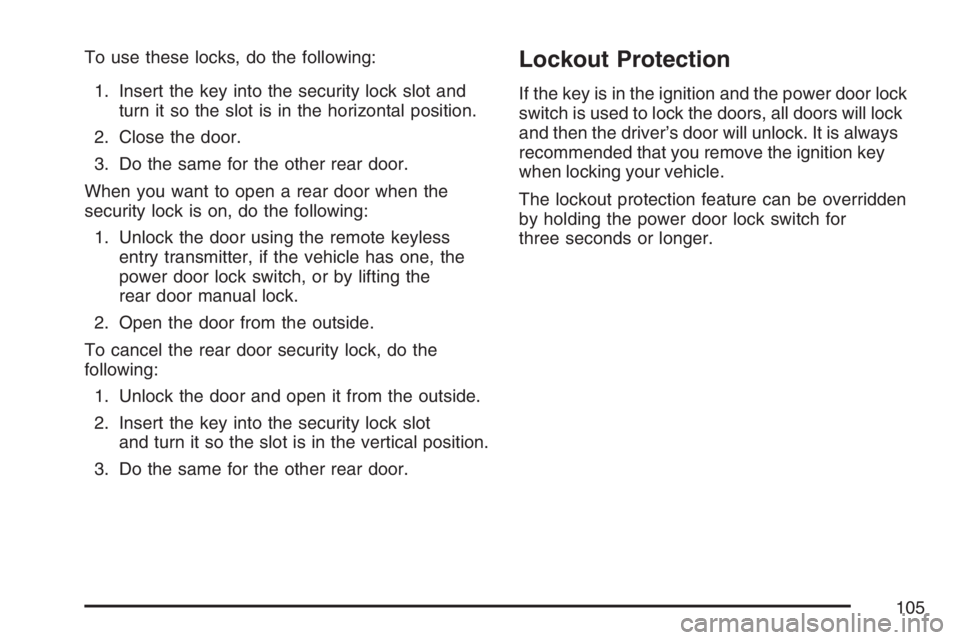
To use these locks, do the following:
1. Insert the key into the security lock slot and
turn it so the slot is in the horizontal position.
2. Close the door.
3. Do the same for the other rear door.
When you want to open a rear door when the
security lock is on, do the following:
1. Unlock the door using the remote keyless
entry transmitter, if the vehicle has one, the
power door lock switch, or by lifting the
rear door manual lock.
2. Open the door from the outside.
To cancel the rear door security lock, do the
following:
1. Unlock the door and open it from the outside.
2. Insert the key into the security lock slot
and turn it so the slot is in the vertical position.
3. Do the same for the other rear door.Lockout Protection
If the key is in the ignition and the power door lock
switch is used to lock the doors, all doors will lock
and then the driver’s door will unlock. It is always
recommended that you remove the ignition key
when locking your vehicle.
The lockout protection feature can be overridden
by holding the power door lock switch for
three seconds or longer.
105
Page 109 of 496
Power Windows
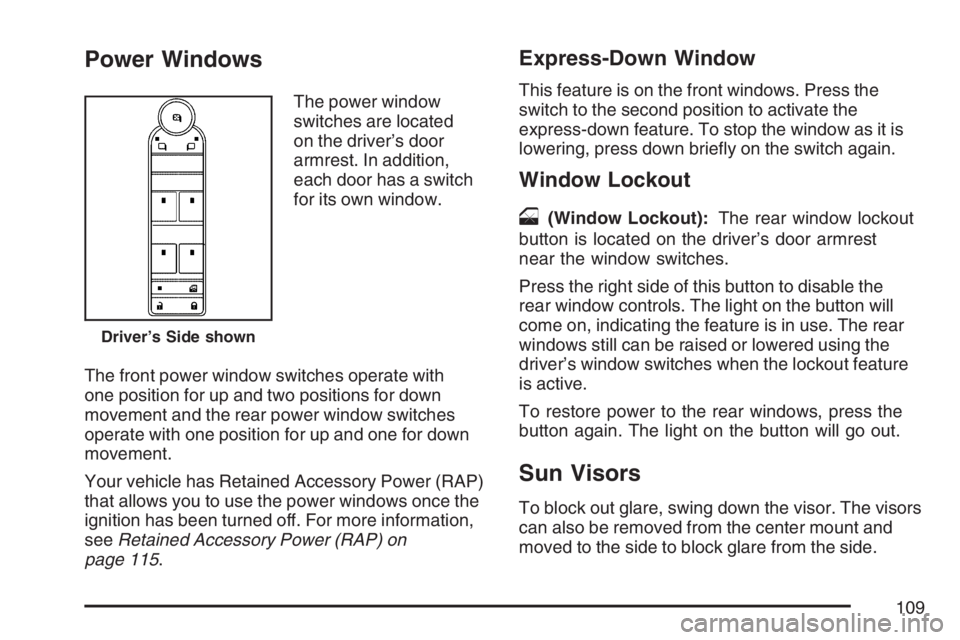
The power window
switches are located
on the driver’s door
armrest. In addition,
each door has a switch
for its own window.
The front power window switches operate with
one position for up and two positions for down
movement and the rear power window switches
operate with one position for up and one for down
movement.
Your vehicle has Retained Accessory Power (RAP)
that allows you to use the power windows once the
ignition has been turned off. For more information,
seeRetained Accessory Power (RAP) on
page 115.
Express-Down Window
This feature is on the front windows. Press the
switch to the second position to activate the
express-down feature. To stop the window as it is
lowering, press down briey on the switch again.
Window Lockout
o
(Window Lockout):The rear window lockout
button is located on the driver’s door armrest
near the window switches.
Press the right side of this button to disable the
rear window controls. The light on the button will
come on, indicating the feature is in use. The rear
windows still can be raised or lowered using the
driver’s window switches when the lockout feature
is active.
To restore power to the rear windows, press the
button again. The light on the button will go out.
Sun Visors
To block out glare, swing down the visor. The visors
can also be removed from the center mount and
moved to the side to block glare from the side.
Driver’s Side shown
109