ignition BUICK LUCERNE 2007 Repair Manual
[x] Cancel search | Manufacturer: BUICK, Model Year: 2007, Model line: LUCERNE, Model: BUICK LUCERNE 2007Pages: 496, PDF Size: 2.77 MB
Page 245 of 496
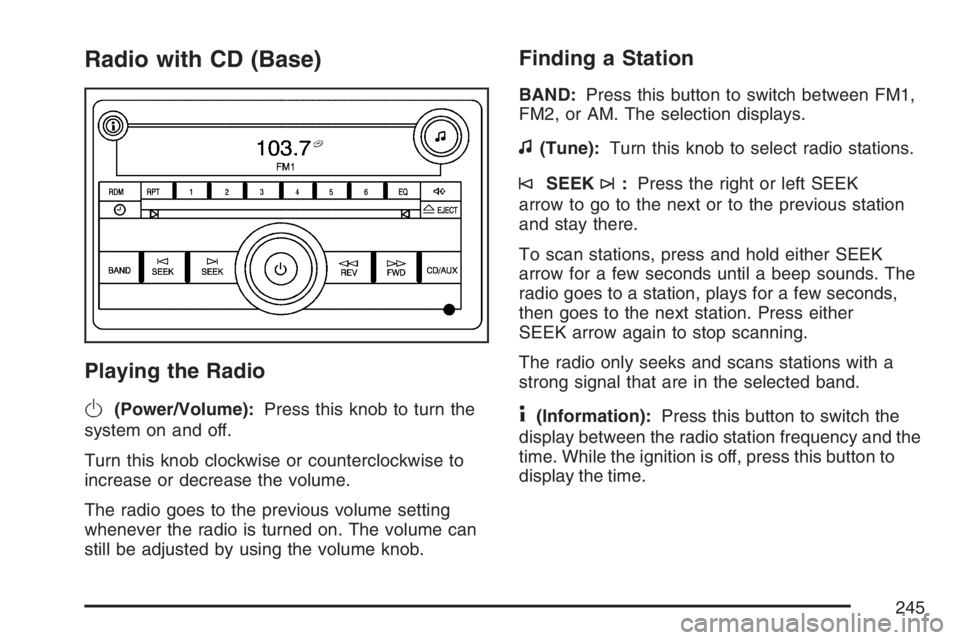
Radio with CD (Base)
Playing the Radio
O
(Power/Volume):Press this knob to turn the
system on and off.
Turn this knob clockwise or counterclockwise to
increase or decrease the volume.
The radio goes to the previous volume setting
whenever the radio is turned on. The volume can
still be adjusted by using the volume knob.
Finding a Station
BAND:Press this button to switch between FM1,
FM2, or AM. The selection displays.
f(Tune):Turn this knob to select radio stations.
©SEEK¨:Press the right or left SEEK
arrow to go to the next or to the previous station
and stay there.
To scan stations, press and hold either SEEK
arrow for a few seconds until a beep sounds. The
radio goes to a station, plays for a few seconds,
then goes to the next station. Press either
SEEK arrow again to stop scanning.
The radio only seeks and scans stations with a
strong signal that are in the selected band.
4(Information):Press this button to switch the
display between the radio station frequency and the
time. While the ignition is off, press this button to
display the time.
245
Page 247 of 496
Adjusting the Speakers (Balance/Fade)
`
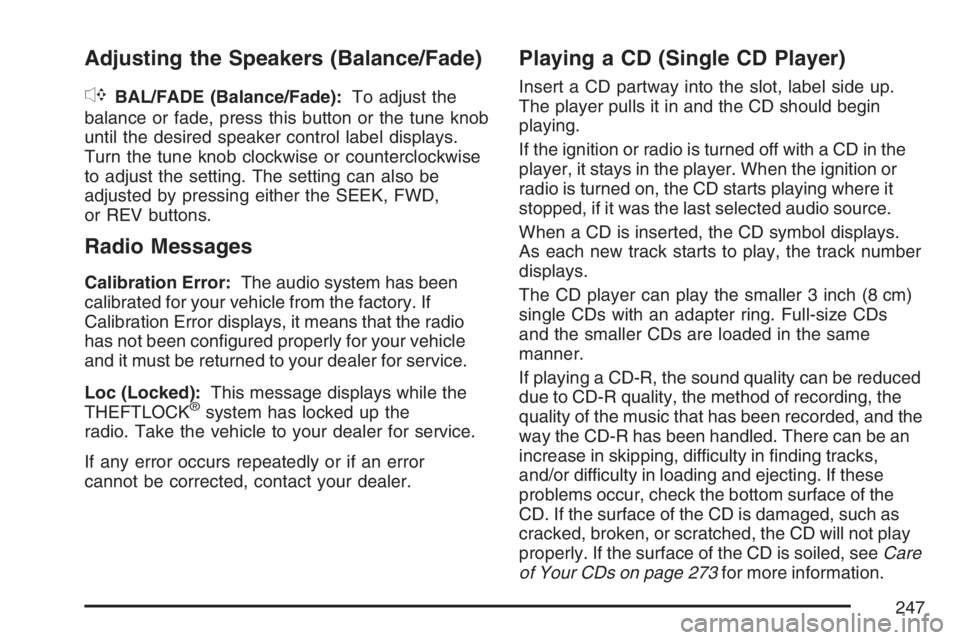
BAL/FADE (Balance/Fade):To adjust the
balance or fade, press this button or the tune knob
until the desired speaker control label displays.
Turn the tune knob clockwise or counterclockwise
to adjust the setting. The setting can also be
adjusted by pressing either the SEEK, FWD,
or REV buttons.
Radio Messages
Calibration Error:The audio system has been
calibrated for your vehicle from the factory. If
Calibration Error displays, it means that the radio
has not been congured properly for your vehicle
and it must be returned to your dealer for service.
Loc (Locked):This message displays while the
THEFTLOCK
®system has locked up the
radio. Take the vehicle to your dealer for service.
If any error occurs repeatedly or if an error
cannot be corrected, contact your dealer.
Playing a CD (Single CD Player)
Insert a CD partway into the slot, label side up.
The player pulls it in and the CD should begin
playing.
If the ignition or radio is turned off with a CD in the
player, it stays in the player. When the ignition or
radio is turned on, the CD starts playing where it
stopped, if it was the last selected audio source.
When a CD is inserted, the CD symbol displays.
As each new track starts to play, the track number
displays.
The CD player can play the smaller 3 inch (8 cm)
single CDs with an adapter ring. Full-size CDs
and the smaller CDs are loaded in the same
manner.
If playing a CD-R, the sound quality can be reduced
due to CD-R quality, the method of recording, the
quality of the music that has been recorded, and the
way the CD-R has been handled. There can be an
increase in skipping, difficulty in nding tracks,
and/or difficulty in loading and ejecting. If these
problems occur, check the bottom surface of the
CD. If the surface of the CD is damaged, such as
cracked, broken, or scratched, the CD will not play
properly. If the surface of the CD is soiled, seeCare
of Your CDs on page 273for more information.
247
Page 249 of 496

RDM (Random):With the random setting,
you can listen to CD tracks in random, rather
than sequential order. To use random, do the
following:
1. Press this button to play tracks from the CD
you are listening to in random order. The
random icon displays.
2. Press this button again to turn off random
play. The random icon disappears from the
display.
RPT (Repeat):With repeat, one track or an entire
CD can be repeated.
To repeat the track you are listening to,
press and release the RPT button. An arrow
symbol displays. Press RPT again to turn off
repeat play.
To repeat the CD you are listening to, press
and hold the RPT button for a few seconds.
An arrow symbol displays. Press RPT again to
turn off repeat play. When repeat is off, the
symbol no longer displays.
4(Information):Press this button to switch the
display between the track number, elapsed time of
the track, and the time. When the ignition is off,
press this button to display the time.
BAND:Press this button to listen to the radio
while a CD is playing. The CD remains inside the
radio for future listening.
CD/AUX (CD/Auxiliary):Press this button to
play a CD while listening to the radio. The CD icon
and track number displays while a CD is in the
player. Press this button again and the system
automatically searches for an auxiliary input
device such as a portable audio player.
249
Page 257 of 496
Radio Messages
Calibration Error:The audio system has been
calibrated for your vehicle from the factory. If
Calibration Error displays, it means that the radio
has not been congured properly for your vehicle
and it must be returned to your dealer for service.
Locked:This message is displayed when
the THEFTLOCK
®system has locked up the
radio. Take the vehicle to your dealer for service.
If any error occurs repeatedly or if an error
cannot be corrected, contact your dealer.
Radio Messages for XM Only
SeeXM Radio Messages on page 269later in this
section for further detail.
Playing a CD (Single CD Player)
Insert a CD partway into the slot, label side up.
The player pulls it in and the CD should begin
playing.
Playing a CD(s) (Six-Disc CD Player)
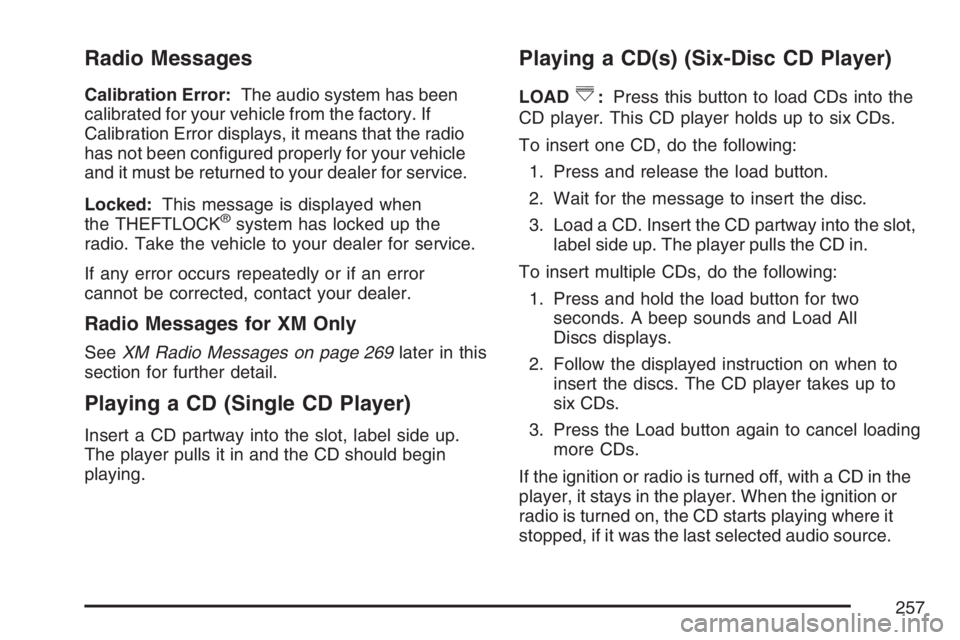
LOAD^:Press this button to load CDs into the
CD player. This CD player holds up to six CDs.
To insert one CD, do the following:
1. Press and release the load button.
2. Wait for the message to insert the disc.
3. Load a CD. Insert the CD partway into the slot,
label side up. The player pulls the CD in.
To insert multiple CDs, do the following:
1. Press and hold the load button for two
seconds. A beep sounds and Load All
Discs displays.
2. Follow the displayed instruction on when to
insert the discs. The CD player takes up to
six CDs.
3. Press the Load button again to cancel loading
more CDs.
If the ignition or radio is turned off, with a CD in the
player, it stays in the player. When the ignition or
radio is turned on, the CD starts playing where it
stopped, if it was the last selected audio source.
257
Page 265 of 496

File System and Naming
The song name that displays is the song name that
is contained in the ID3 tag. If the song name is not
present in the ID3 tag, then the radio displays the
le name without the extension (such as .mp3) as
the track name.
Track names longer than 32 characters or four
pages are shortened. The display does not show
parts of words on the last page of text and the
extension of the lename is not displayed.
Preprogrammed Playlists
Preprogrammed playlists that were created using
WinAmp™, MusicMatch™, or Real Jukebox™
software can be accessed, however, you do not
have playlist editing capability using the radio.
These playlists are treated as special folders
containing compressed audio song les.
Playing an MP3
Insert a CD-R partway into the slot (Single CD
Player), or press the load button and wait for the
message to insert disc (Six-Disc CD Player), label
side up. The player pulls it in, and the CD-R should
begin playing.If the ignition or radio is turned off with a CD-R in
the player it stays in the player. When the ignition or
radio is turned on, the CD-R starts to play where it
stopped, if it was the last selected audio source.
As each new track starts to play, the track number
and song title displays.
The CD player can play the smaller 3 inch (8 cm)
single CD-Rs with an adapter ring. Full-size CD-Rs
and the smaller CD-Rs are loaded in the same
manner.
If playing a CD-R, the sound quality can be reduced
due to CD-R quality, the method of recording, the
quality of the music that has been recorded, and the
way the CD-R has been handled. There can be an
increase in skipping, difficulty in nding tracks,
and/or difficulty in loading and ejecting. If these
problems occur, check the bottom surface of the
CD. If the surface of the CD is damaged, such as
cracked, broken, or scratched, the CD will not play
properly. If the surface of the CD is soiled, seeCare
of Your CDs on page 273for more information.
265
Page 301 of 496
{CAUTION:
Coasting downhill in NEUTRAL (N) or with
the ignition off is dangerous. Your brakes
will have to do all the work of slowing
down. They could get so hot that they
would not work well. You would then have
poor braking or even none going down a
hill. You could crash. Always have your
engine running and your vehicle in gear
when you go downhill.
Know how to go down hills. The most important
thing to know is this: let your engine do some of
the slowing down. Shift to a lower gear when
you go down a steep or long hill.
Know how to go uphill. Drive in the highest gear
possible.
Stay in your own lane when driving on two-lane
roads in hills or mountains. Do not swing wide
or cut across the center of the road. Drive at
speeds that let you stay in your own lane.
As you go over the top of a hill, be alert. There
could be something in your lane, like a stalled
car or an accident.
You may see highway signs on mountains that
warn of special problems. Examples are long
grades, passing or no-passing zones, a falling
rocks area, or winding roads. Be alert to these
and take appropriate action.
301
Page 312 of 496

If you put things inside your vehicle, like suitcases,
tools, packages, or anything else, they will go
as fast as the vehicle goes. If you have to stop or
turn quickly, or if there is a crash, they will
keep going.
{CAUTION:
Things you put inside your vehicle can
strike and injure people in a sudden stop
or turn, or in a crash.
Put things in the trunk of your vehicle.
In a trunk, put them as far forward as
you can. Try to spread the weight
evenly.
Never stack heavier things, like
suitcases, inside the vehicle so that
some of them are above the tops of
the seats.
Do not leave an unsecured child
restraint in your vehicle.
When you carry something inside the
vehicle, secure it whenever you can.
Automatic Level Control
This feature keeps the rear of your vehicle level
as the load changes. It is automatic, you do
not need to adjust anything. This type of level
control is fully automatic and will provide a better
leveled riding position as well as better handling
under a variety of passenger and loading
conditions. An air compressor connected to the
rear shocks will raise or lower the rear of the
vehicle to maintain proper vehicle height.
The system is activated when the ignition key is
turned to RUN and will automatically adjust vehicle
height thereafter. The system may exhaust
(lower vehicle height) for up to ten minutes after
the ignition key has been turned to OFF. You may
also hear the air compressor operating when
the height is being adjusted.
312
Page 373 of 496

Notice:Ignoring these steps could result in
costly damage to your vehicle that would
not be covered by your warranty.
Trying to start your vehicle by pushing or
pulling it will not work, and it could damage
your vehicle.
1. Check the other vehicle. It must have a
12-volt battery with a negative ground system.
Notice:If the other vehicle’s system is not a
12-volt system with a negative ground,
both vehicles can be damaged. Only use
vehicles with 12-volt systems with negative
grounds to jump start your vehicle.
2. Get the vehicles close enough so the jumper
cables can reach, but be sure the vehicles are
not touching each other. If they are, it could
cause a ground connection you do not
want. You would not be able to start your
vehicle, and the bad grounding could damage
the electrical systems.To avoid the possibility of the vehicles rolling,
set the parking brake rmly on both vehicles
involved in the jump start procedure. Put
an automatic transaxle in PARK (P) or
a manual transaxle in NEUTRAL before
setting the parking brake.
Notice:If you leave your radio or other
accessories on during the jump starting
procedure, they could be damaged. The repairs
would not be covered by your warranty.
Always turn off your radio and other
accessories when jump starting your vehicle.
3. Turn off the ignition on both vehicles.
Unplug unnecessary accessories plugged into
the cigarette lighter or the accessory power
outlet(s). Turn off the radio and all lamps that
are not needed. This will avoid sparks and
help save both batteries. And it could save
the radio!
373
Page 384 of 496
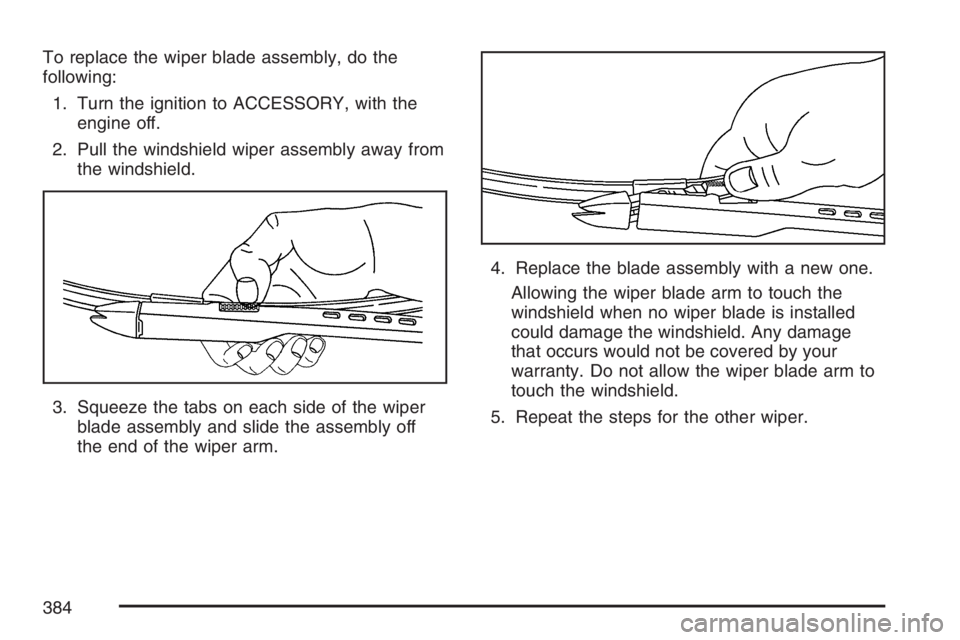
To replace the wiper blade assembly, do the
following:
1. Turn the ignition to ACCESSORY, with the
engine off.
2. Pull the windshield wiper assembly away from
the windshield.
3. Squeeze the tabs on each side of the wiper
blade assembly and slide the assembly off
the end of the wiper arm.4. Replace the blade assembly with a new one.
Allowing the wiper blade arm to touch the
windshield when no wiper blade is installed
could damage the windshield. Any damage
that occurs would not be covered by your
warranty. Do not allow the wiper blade arm to
touch the windshield.
5. Repeat the steps for the other wiper.
384
Page 394 of 496

The TPMS is designed to alert the driver, if a low
tire pressure condition exists. If your vehicle
has the Driver Information Center (DIC), the driver
may also check tire pressure levels using the
DIC buttons located on the instrument panel.
When a low tire pressure condition is detected,
the TPMS will illuminate the low tire pressure
warning symbol, located on the instrument panel
cluster, and at the same time a message to check
the pressure in a specic tire will also appear on
the DIC display. The low tire pressure warning
symbol on the instrument panel cluster and
the CHECK TIRE PRESSURE warning message
on the DIC display will appear at each ignition
cycle until the tires are inated to the correct
ination pressure. For additional information and
details about the DIC operation and displays
seeDIC Controls and Displays on page 212and
DIC Warnings and Messages on page 221.
You may notice, during cooler weather conditions,
that the tire pressure monitor light, located on
the instrument panel cluster, and the CHECK TIRE
PRESSURE message will appear when the
vehicle is rst started and the turn off as you startto drive the vehicle. This could be an early
indicator that the tire pressures are getting low
and need to be inated to the proper pressure.
Each tire, including the spare (if provided), should
be checked monthly when cold and inated to
the ination pressure recommended by the vehicle
manufacturer on the vehicle placard or tire
ination pressure label. (If your vehicle has tires of
a different size than the size indicated on the
vehicle placard or tire ination pressure label, you
should determine the proper tire ination
pressure for those tires.)
As an added safety
feature, your vehicle
has been equipped with
a tire pressure
monitoring system
(TPMS) that illuminates
a low tire pressure
telltale when one
or more of your tires is
signicantly
under-inated.
394