remote control BUICK LUCERNE 2007 Owner's Manual
[x] Cancel search | Manufacturer: BUICK, Model Year: 2007, Model line: LUCERNE, Model: BUICK LUCERNE 2007Pages: 496, PDF Size: 2.77 MB
Page 1 of 496
Seats and Restraint Systems
........................ 7
Front Seats
.............................................. 9
Rear Seats
............................................. 19
Safety Belts
............................................ 19
Child Restraints
...................................... 43
Airbag System
........................................ 70
Restraint System Check
......................... 88
Features and Controls
................................. 91
Keys
....................................................... 93
Doors and Locks
.................................. 102
Windows
............................................... 108
Theft-Deterrent Systems
....................... 110
Starting and Operating Your Vehicle
..... 113
Mirrors
.................................................. 129
OnStar
®System
................................... 135
Universal Home Remote System
.......... 139
Storage Areas
...................................... 151
Sunroof
................................................ 153Instrument Panel
........................................ 155
Instrument Panel Overview
................... 158
Climate Controls
................................... 182
Warning Lights, Gages, and Indicators
.... 194
Driver Information Center (DIC)
............ 212
Audio System(s)
................................... 241
Driving Your Vehicle
.................................. 275
Your Driving, the Road, and
Your Vehicle
..................................... 276
Towing
................................................. 313
Service and Appearance Care
................... 323
Service
................................................. 325
Fuel
...................................................... 327
Checking Things Under the Hood
......... 332
Headlamp Aiming
................................. 377
Bulb Replacement
................................ 380
Windshield Wiper Blade Replacement
.... 383
2007 Buick Lucerne Owner ManualM
1
Page 13 of 496
Memory Seat and Mirrors
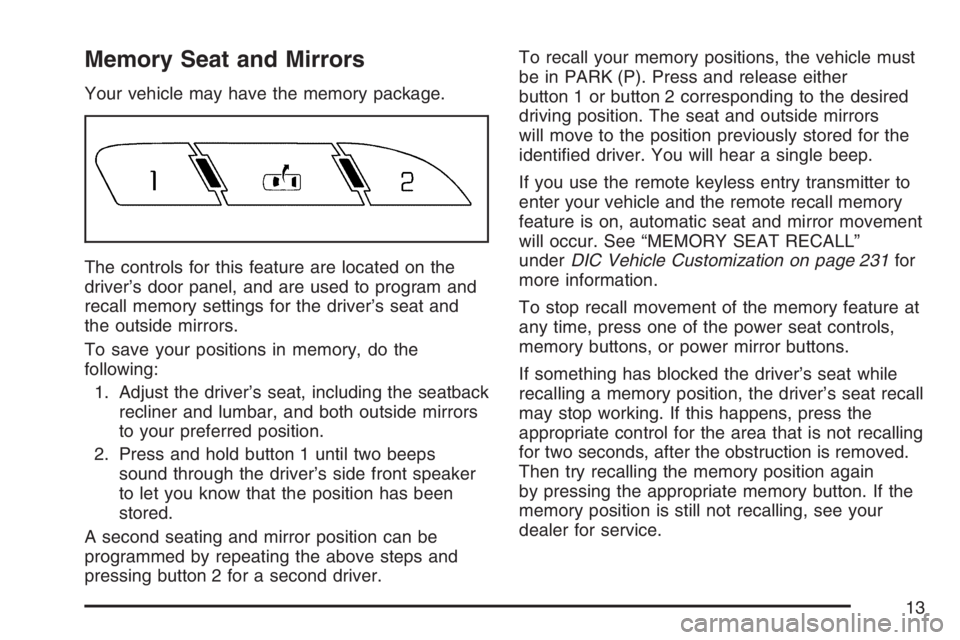
Your vehicle may have the memory package.
The controls for this feature are located on the
driver’s door panel, and are used to program and
recall memory settings for the driver’s seat and
the outside mirrors.
To save your positions in memory, do the
following:
1. Adjust the driver’s seat, including the seatback
recliner and lumbar, and both outside mirrors
to your preferred position.
2. Press and hold button 1 until two beeps
sound through the driver’s side front speaker
to let you know that the position has been
stored.
A second seating and mirror position can be
programmed by repeating the above steps and
pressing button 2 for a second driver.To recall your memory positions, the vehicle must
be in PARK (P). Press and release either
button 1 or button 2 corresponding to the desired
driving position. The seat and outside mirrors
will move to the position previously stored for the
identied driver. You will hear a single beep.
If you use the remote keyless entry transmitter to
enter your vehicle and the remote recall memory
feature is on, automatic seat and mirror movement
will occur. See “MEMORY SEAT RECALL”
underDIC Vehicle Customization on page 231for
more information.
To stop recall movement of the memory feature at
any time, press one of the power seat controls,
memory buttons, or power mirror buttons.
If something has blocked the driver’s seat while
recalling a memory position, the driver’s seat recall
may stop working. If this happens, press the
appropriate control for the area that is not recalling
for two seconds, after the obstruction is removed.
Then try recalling the memory position again
by pressing the appropriate memory button. If the
memory position is still not recalling, see your
dealer for service.
13
Page 91 of 496
Keys.............................................................. 93
Remote Keyless Entry (RKE) System.......... 94
Remote Keyless Entry (RKE) System
Operation................................................. 95
Doors and Locks........................................ 102
Door Locks................................................ 102
Power Door Locks..................................... 103
Delayed Locking........................................ 103
Programmable Automatic Door Locks........ 104
Rear Door Security Locks......................... 104
Lockout Protection..................................... 105
Trunk........................................................ 106
Windows...................................................... 108
Power Windows........................................ 109
Sun Visors................................................ 109
Theft-Deterrent Systems............................. 110
Content Theft-Deterrent............................. 110
PASS-Key
®III+......................................... 111
PASS-Key®III+ Operation......................... 112
Starting and Operating Your Vehicle......... 113
New Vehicle Break-In................................ 113
Ignition Positions....................................... 114
Retained Accessory Power (RAP)............. 115Starting the Engine.................................... 116
Engine Coolant Heater.............................. 117
Automatic Transaxle Operation.................. 119
Parking Brake........................................... 122
Shifting Into Park (P) ................................. 123
Shifting Out of Park (P)............................. 125
Parking Over Things That Burn................. 126
Engine Exhaust......................................... 127
Running the Engine While Parked............. 128
Mirrors......................................................... 129
Manual Rearview Mirror............................. 129
Manual Rearview Mirror with OnStar
®....... 129
Automatic Dimming Rearview Mirror
with OnStar
®.......................................... 129
Automatic Dimming Rearview Mirror with
OnStar
®and Compass........................... 130
Automatic Dimming Rearview Mirror
with Compass........................................ 132
Outside Power Mirrors............................... 133
Outside Curb View Assist Mirror................ 134
Outside Convex Mirror............................... 134
Outside Automatic Dimming
Heated Mirror......................................... 135
OnStar
®System.......................................... 135
Section 2 Features and Controls
91
Page 92 of 496
Universal Home Remote System................ 139
Universal Home Remote System
(With One Triangular LED)..................... 139
Universal Home Remote System
(With Three Round LED)....................... 140
Universal Home Remote System
Operation (With Three Round LED)....... 141
Universal Home Remote System
Operation (With One Triangular LED)..... 147Storage Areas............................................. 151
Glove Box................................................. 151
Cupholder(s).............................................. 151
Front Storage Area.................................... 151
Center Console Storage Area.................... 151
Center Flex Storage Unit........................... 152
Rear Seat Armrest.................................... 152
Convenience Net....................................... 152
Sunroof....................................................... 153
Section 2 Features and Controls
92
Page 97 of 496
V(Remote Trunk Release):Press and hold
this button for about one second to release
the trunk lid. The transaxle must be in PARK (P)
for this feature to operate.
L(Vehicle Locator/Panic Alarm):Press and
release this button to locate your vehicle. The turn
signal lamps will ash and the horn will sound three
times. Press and hold this button for more than
two seconds to activate the panic alarm. The turn
signal lamps will ash and the horn will sound
repeatedly for 30 seconds. The alarm will turn off
when the ignition is moved to RUN or the alarm
button is pressed again. The ignition must be in
OFF for the panic alarm to work.
Matching Transmitter(s) to Your
Vehicle
Each RKE transmitter is coded to prevent another
transmitter from unlocking your vehicle. If a
transmitter is lost or stolen, a replacement can be
purchased through your GM dealer. Remember to
bring any additional transmitters so they can also
be re-coded to match the new transmitter. Once
your dealer has coded the new transmitter, the lost
transmitter will not unlock your vehicle. The vehicle
can have a maximum of eight transmitters matched
to it. See “Remote Key” underDIC Controls and
Displays on page 212.
97
Page 99 of 496
3. Slide the new battery into the transmitter with
the positive side of the battery facing down.
Use a type CR2032 battery, or equivalent
type. Make sure the cover is on tightly,
so water will not get in.
4. Snap the front and the back of the transmitter
together.
5. Test the operation of the transmitter with the
vehicle.
Remote Vehicle Start
Your vehicle may have a remote starting feature.
This feature allows you to start the engine from
outside the vehicle. It may also start the vehicle’s
heating or air conditioning systems, rear window
defogger, and heated seats. SeeHeated Seats on
page 11andHeated and Cooled Seats on page 12
for additional information. When the remote start
system is active, the climate control system will
heat or cool the inside of the vehicle at the setting
the vehicle was set to when the vehicle was last
turned off. The rear window defogger will be turned
on by the climate control system when it is cold
outside. If the vehicle has heated seats, they may
also turn on. Cooled seats are not activated during
a remote start. Normal operation of the system will
return after the key is turned to the RUN position.Laws in some communities may restrict the use of
remote starters. For example, some laws may
require a person using the remote start to have
the vehicle in view when doing so. Check local
regulations for any requirements on remote starting
of vehicles.
Do not use the remote start feature if your vehicle
is low on fuel. Your vehicle may run out of fuel.
If your vehicle has remote start, the RKE transmitter
provides, an increased range of operation.
However, the range may be less while the vehicle is
running. As a result, you may need to be closer to
your vehicle to turn it off, than you were to turn it on.
There are other conditions which can affect the
performance of the transmitter, seeRemote
Keyless Entry (RKE) System on page 94for
additional information.
/(Remote Start):If your vehicle has the remote
start feature, the RKE transmitter will have a
button with this symbol on it.
99
Page 101 of 496

Once two remote starts, or a single remote start
with one time extension have been done, the
vehicle must be started with the key.
After the key is removed from the ignition, another
remote start can be performed.
The vehicle cannot be started remotely if the key
is in the ignition, the hood is not closed, or if
there is an emission control system malfunction.Remote Start Ready
If your vehicle does not have the remote vehicle
start feature, it may have the remote start ready
feature. This feature allows your dealer to add the
manufacturer’s remote vehicle start feature.
If your vehicle has the remote start ready feature,
your RKE transmitter will have extended range
that will allow you to lock or unlock your vehicle
from about 195 feet (60 m) away.
See your dealer if you would like to add the
manufacturer’s remote vehicle start feature to
your vehicle.
101
Page 106 of 496
Trunk
{CAUTION:
It can be dangerous to drive with the
trunk lid open because carbon monoxide
(CO) gas can come into your vehicle.
You cannot see or smell CO. It can
cause unconsciousness and even death.
If you must drive with the trunk lid
open or if electrical wiring or other cable
connections must pass through the seal
between the body and the trunk lid:
Make sure all other windows are shut.
Turn the fan on your heating or
cooling system to its highest speed
and select the control setting that will
force outside air into your vehicle. See
Climate Control System.
If you have air outlets on or under
the instrument panel, open them
all the way.
SeeEngine Exhaust on page 127.
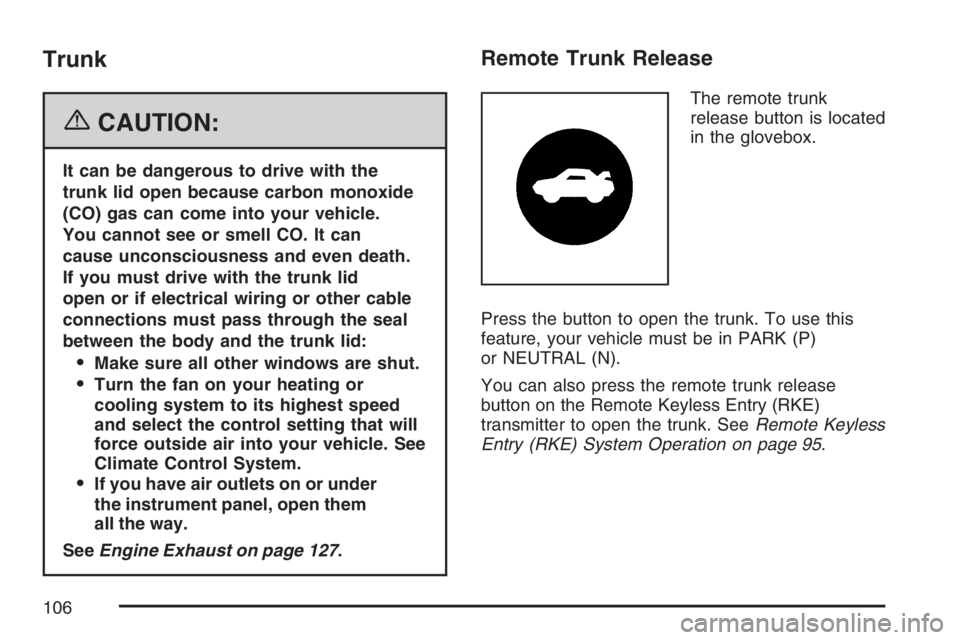
Remote Trunk Release
The remote trunk
release button is located
in the glovebox.
Press the button to open the trunk. To use this
feature, your vehicle must be in PARK (P)
or NEUTRAL (N).
You can also press the remote trunk release
button on the Remote Keyless Entry (RKE)
transmitter to open the trunk. SeeRemote Keyless
Entry (RKE) System Operation on page 95.
106
Page 138 of 496
OnStar®Virtual Advisor
OnStar®Virtual Advisor is a feature of OnStar®
Hands-Free Calling that uses your minutes
to access location-based weather, local traffic
reports, and stock quotes. By pressing the phone
button and giving a few simple voice commands,
you can browse through the various topics.
See the OnStar
®Owners Guide for more
information.
OnStar®Steering Wheel Controls
Your vehicle may have a Talk/Mute button that
can be used to interact with OnStar®Hands-Free
Calling. SeeAudio Steering Wheel Controls on
page 271for more information.
On some vehicles, you may have to hold the
button for a few seconds and give the command
“ONSTAR” in order to activate the OnStar
®
Hands-Free Calling feature.
On some vehicles, the mute button can be used to
dial numbers into voicemail systems, or to dial
phone extensions. See the OnStar
®Owner’s
Guide for more information.
How OnStar®Service Works
In order to provide you with OnStar®services, your
vehicle’s OnStar®system has the capability of
recording and transmitting vehicle information.
This information is automatically sent to an OnStar
®
Call Center at the time of an OnStar®button press,
Emergency button press or if your airbags or AACN
system deploys. The vehicle information usually
includes your GPS location and, in the event of a
crash, additional information regarding the accident
that your vehicle has been involved in (e.g. the
direction from which your vehicle was hit). When
you use the Virtual Advisor feature of OnStar
®
Hands-Free Calling, your vehicle also sends
OnStar®your GPS location so that we can
provide you with location-based services.
OnStar
®service cannot work unless your vehicle is
in a place where OnStar®has an agreement with a
wireless service provider for service in that area.
OnStar
®service also cannot work unless you
are in a place where the wireless service provider
OnStar
®has hired for that area has coverage,
network capacity and reception when the service is
needed, and technology that is compatible with the
OnStar
®service. Not all services are available
everywhere, particularly in remote or enclosed
areas, or at all times.
138
Page 139 of 496
OnStar®service that involves location information
about your vehicle cannot work unless GPS
satellite signals are unobstructed and available in
that place as well.
Your vehicle must have a working electrical
system (including adequate battery power) for the
OnStar
®equipment to operate. There are other
problems OnStar®cannot control that may prevent
OnStar®from providing OnStar®service to you
at any particular time or place. Some examples are
damage to important parts of your vehicle in an
accident, hills, tall buildings, tunnels, weather
or wireless phone network congestion.
Your Responsibility
You may need to increase the volume of your radio
to hear the OnStar®advisor. If the light next to the
OnStar®buttons is red, this means that your system
is not functioning properly and should be checked
by a dealer. If the light appears clear (no light is
appearing), your OnStar
®subscription has expired.
You can always press the OnStar®button to
conrm that your OnStar®equipment is active.
Universal Home Remote
System
Universal Home Remote System
(With One Triangular LED)
The Universal Home Remote System
provides a way to replace up to three hand-held
Radio-Frequency (RF) transmitters used to activate
devices such as garage door openers, security
systems, and home lighting.
This device complies with Part 15 of the FCC
Rules. Operation is subject to the following
two conditions:
1. This device may not cause harmful
interference.
2. This device must accept any interference
received, including interference that may
cause undesired operation.
The FCC Grant of Equipment Authorization
Certicate number is CB2OHHL3.
139