remote control BUICK LUCERNE 2007 User Guide
[x] Cancel search | Manufacturer: BUICK, Model Year: 2007, Model line: LUCERNE, Model: BUICK LUCERNE 2007Pages: 496, PDF Size: 2.77 MB
Page 141 of 496
This device complies with RSS-210 of Industry
Canada. Operation is subject to the following
two conditions:
1. This device may not cause interference.
2. This device must accept any interference
received, including interference that may
cause undesired operation of the device.
The Canadian Registration ID number
is 3521A-GTE05A.
Changes or modications to this system by other
than an authorized service facility could void
authorization to use this equipment.Universal Home Remote System
Operation (With Three Round LED)
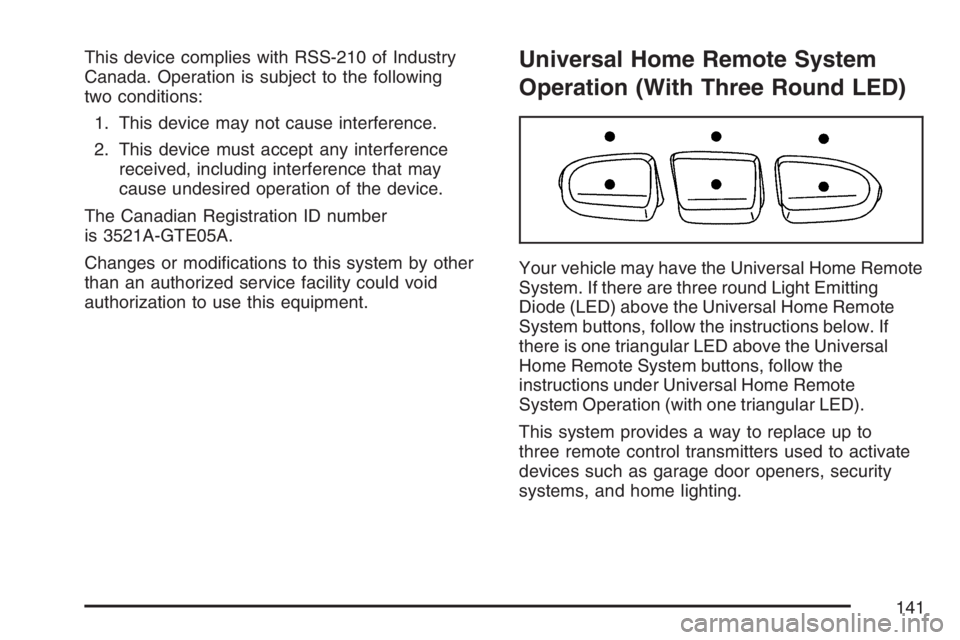
Your vehicle may have the Universal Home Remote
System. If there are three round Light Emitting
Diode (LED) above the Universal Home Remote
System buttons, follow the instructions below. If
there is one triangular LED above the Universal
Home Remote System buttons, follow the
instructions under Universal Home Remote
System Operation (with one triangular LED).
This system provides a way to replace up to
three remote control transmitters used to activate
devices such as garage door openers, security
systems, and home lighting.
141
Page 142 of 496
Do not use the this system with any garage door
opener that does not have the stop and reverse
feature. This includes any garage door opener
model manufactured before April 1, 1982.
Read the instructions completely before attempting
to program the transmitter. Because of the steps
involved, it may be helpful to have another person
available to assist you in programming the
transmitter.
Be sure to keep the original remote control
transmitter for use in other vehicles, as well as,
for future programming. You only need the
original remote control transmitter for xed code
programming. It is also recommended that upon
the sale or lease termination of the vehicle, the
programmed buttons should be erased for security
purposes. See “Erasing your Universal Home
Remote Buttons” later in this section.
Be sure that people and objects are clear
of the garage door or security device you are
programming. When programming a garage
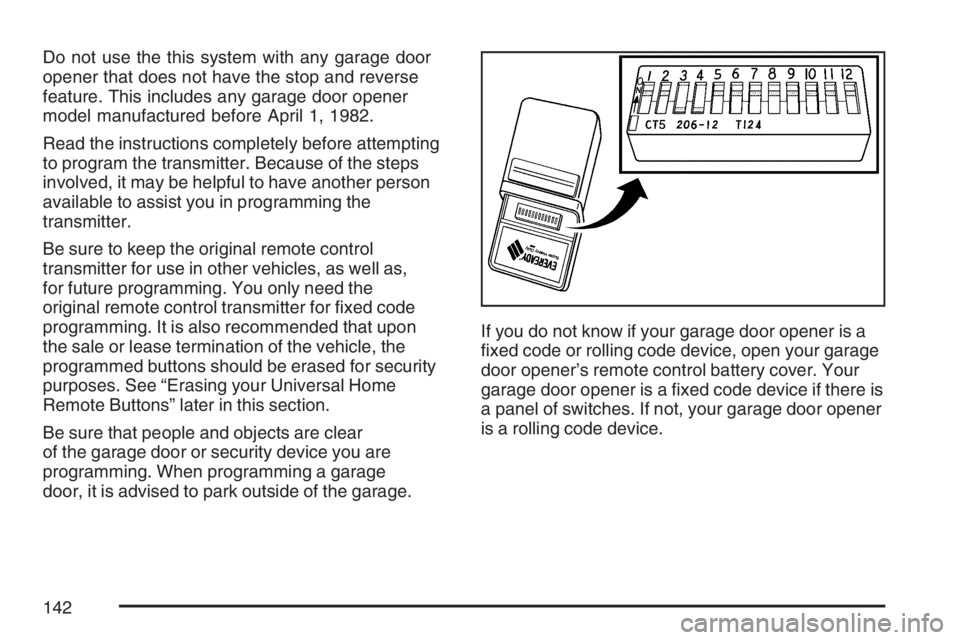
door, it is advised to park outside of the garage.If you do not know if your garage door opener is a
xed code or rolling code device, open your garage
door opener’s remote control battery cover. Your
garage door opener is a xed code device if there is
a panel of switches. If not, your garage door opener
is a rolling code device.
142
Page 144 of 496
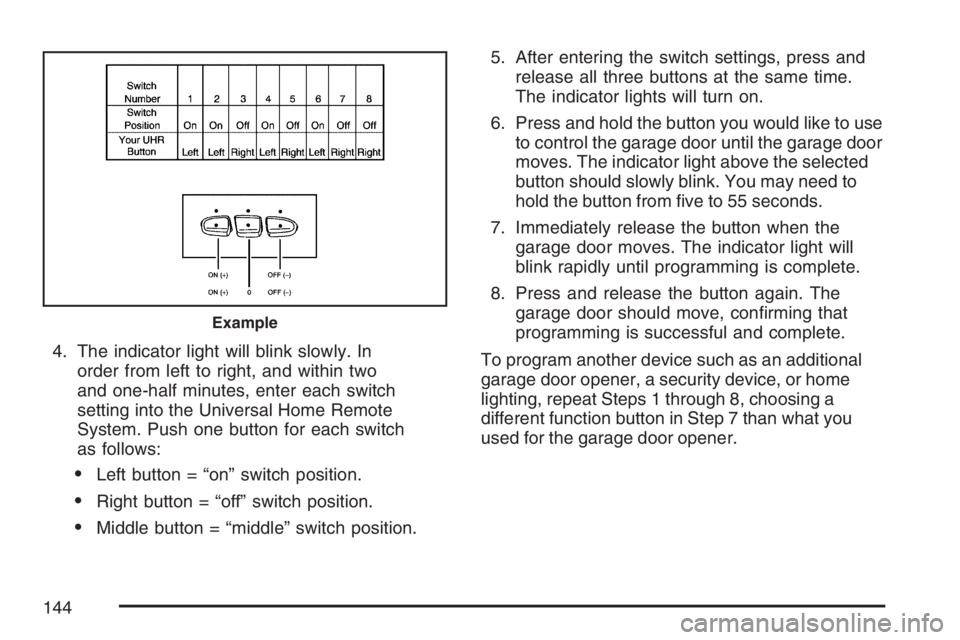
4. The indicator light will blink slowly. In
order from left to right, and within two
and one-half minutes, enter each switch
setting into the Universal Home Remote
System. Push one button for each switch
as follows:
Left button = “on” switch position.
Right button = “off” switch position.
Middle button = “middle” switch position.5. After entering the switch settings, press and
release all three buttons at the same time.
The indicator lights will turn on.
6. Press and hold the button you would like to use
to control the garage door until the garage door
moves. The indicator light above the selected
button should slowly blink. You may need to
hold the button from ve to 55 seconds.
7. Immediately release the button when the
garage door moves. The indicator light will
blink rapidly until programming is complete.
8. Press and release the button again. The
garage door should move, conrming that
programming is successful and complete.
To program another device such as an additional
garage door opener, a security device, or home
lighting, repeat Steps 1 through 8, choosing a
different function button in Step 7 than what you
used for the garage door opener.
Example
144
Page 145 of 496
Programming Universal Home
Remote — Rolling Code
Rolling code garage door openers are used for
garage doors produced after 1996 and are
code protected. Rolling code means the coded
signal is changed every time your remote control
garage door opener is used.
Programming a rolling code garage door opener
involves time-sensitive actions, so read the
entire procedure before you begin. If you do not
follow these actions, the device will time out
and you will have to repeat the procedure.
Follow these steps to program up to three
channels:
1. Press the two outside buttons at the same
time for one to two seconds, and immediately
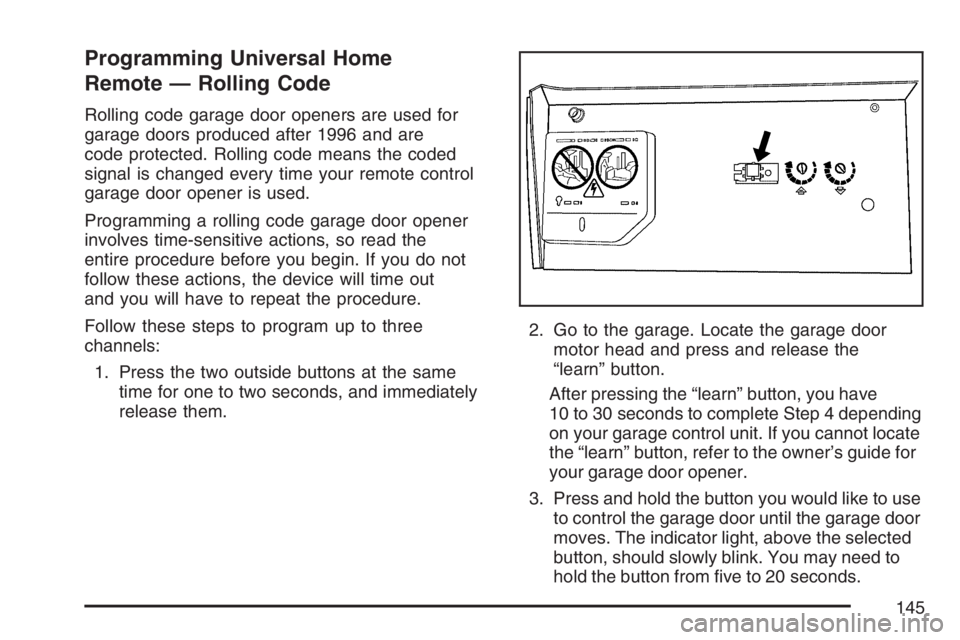
release them.2. Go to the garage. Locate the garage door
motor head and press and release the
“learn” button.
After pressing the “learn” button, you have
10 to 30 seconds to complete Step 4 depending
on your garage control unit. If you cannot locate
the “learn” button, refer to the owner’s guide for
your garage door opener.
3. Press and hold the button you would like to use
to control the garage door until the garage door
moves. The indicator light, above the selected
button, should slowly blink. You may need to
hold the button from ve to 20 seconds.
145
Page 174 of 496
Instrument Panel Brightness
D(Instrument Panel Brightness):This feature
controls the brightness of the instrument panel
lights.
The knob for this control is located next to the
exterior lamps control.
Push the knob in and release when it pops out.
Turn the knob clockwise to increase the brightness
of the instrument panel lights and counter clockwise
to decrease the brightness. Turning the knob
completely clockwise to the detent will turn on the
courtesy lamps.
Courtesy Lamps
When any door is opened, several lamps turn on
making it easier for you to enter and exit the
vehicle. Turn the instrument panel brightness
control completely clockwise to manually turn
on these lamps.
Entry Lighting
If it is dark enough outside when you press the
unlock button on the remote keyless entry
transmitter, the interior courtesy lamps will turn on
and stay on for about 40 seconds. The lamps can
be turned off immediately by pressing the lock
button on the remote keyless entry transmitter,
turning the ignition key to RUN or activating the
power door locks.
Delayed Entry Lighting
The interior lamps will turn on if you open the door
when it is dark enough outside. When you close the
door with the ignition off, the interior lamps will stay
on for up to 25 seconds or until the ignition is turned
to an on position. When the lamps turn off as a
result of the 25 second timer or the ignition switch
being turned on, the lighting will deactivate by way
of the theater dimming effect. Locking the doors will
override the delayed entry lighting feature and the
lamps will turn off right away.
174
Page 182 of 496
Ashtray(s) and Cigarette Lighter
Push down on the front center tray to reveal the
front ashtray, cigarette lighter, and accessory
power outlet. The ashtray can be removed
for cleaning. Hold the sides of the ashtray
and then pull the ashtray up and out.
Notice:If you put papers, pins, or other
ammable items in the ashtray, hot cigarettes
or other smoking materials could ignite
them and possibly damage your vehicle.
Never put ammable items in the ashtray.
To use the lighter, push the center all the way in
and let it go. When it is ready, the center will
pop back out by itself. Pull out the entire unit to
use it.
Notice:Holding a cigarette lighter in while it
is heating will not allow the lighter to back
away from the heating element when it is hot.
Damage from overheating may occur to the
lighter or heating element, or a fuse could be
blown. Do not hold a cigarette lighter in
while it is heating.
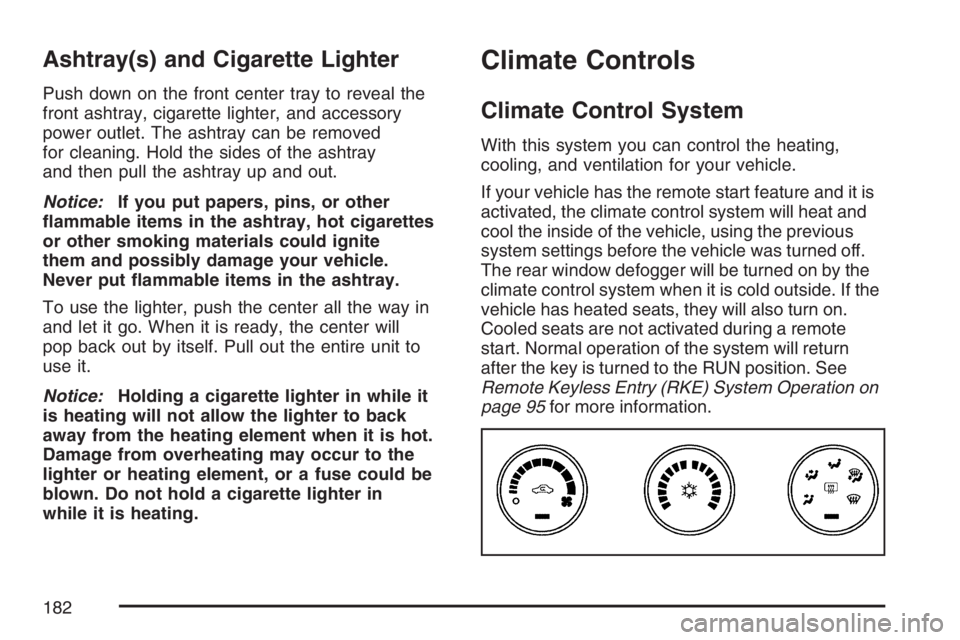
Climate Controls
Climate Control System
With this system you can control the heating,
cooling, and ventilation for your vehicle.
If your vehicle has the remote start feature and it is
activated, the climate control system will heat and
cool the inside of the vehicle, using the previous
system settings before the vehicle was turned off.
The rear window defogger will be turned on by the
climate control system when it is cold outside. If the
vehicle has heated seats, they will also turn on.
Cooled seats are not activated during a remote
start. Normal operation of the system will return
after the key is turned to the RUN position. See
Remote Keyless Entry (RKE) System Operation on
page 95for more information.
182
Page 186 of 496

Dual Automatic Climate Control
System
With this system you can control the heating,
cooling, and ventilation for your vehicle.
If your vehicle has the remote start feature and it is
activated, the climate control system will heat and
cool the inside of the vehicle, using the previous
system settings before the vehicle was turned off.
The rear window defogger will be turned on by the
climate control system when it is cold outside. If the
vehicle has heated seats, they will also turn on.
Cooled seats are not activated during a remote
start. Normal operation of the system will return
after the key is turned to the RUN position. See
Remote Keyless Entry (RKE) System Operation
on page 95for more information.
Automatic Operation
AUTO (Automatic Fan):When this position is
selected on the fan control, the system will adjust
the fan speed. If the OnStar
®system is activated
when this position is selected, the fan speed
will lower.
AUTO (Automatic Mode)
1. Turn the fan control to AUTO.
2. Turn the mode control to AUTO.
3. Adjust the temperature to a comfortable
setting between 68°F (21°C) and 78°F (26°C).
Choosing the coldest or warmest temperature
setting will not cause the system to heat or cool
any faster. In cold weather, the system will start
at reduced fan speeds to avoid blowing cold air
into your vehicle until warmer air is available.
The system will start out blowing air at the oor
but may change modes automatically as the
vehicle warms up to maintain the chosen
temperature setting. The length of time needed
to warm the interior will depend on the outside
temperature.
186
Page 226 of 496
REMOTE KEY LEARNING ACTIVE
This message displays while you are matching
a Remote Keyless Entry (RKE) transmitter to your
vehicle. See “Matching Transmitter(s) to Your
Vehicle” underRemote Keyless Entry (RKE)
System Operation on page 95andDIC Controls
and Displays on page 212for more information.
REPLACE BATTERY IN REMOTE KEY
This message displays when the battery in the
Remote Keyless Entry (RKE) transmitter needs to
be replaced. To replace the battery, see “Battery
Replacement” underRemote Keyless Entry (RKE)
System Operation on page 95.
RIGHT REAR DOOR OPEN
This message displays when the passenger’s
side rear door is not closed properly. When this
message appears, make sure that the passenger’s
door is closed completely.
SERVICE A/C (Air Conditioning)
SYSTEM
This message displays when the electronic
sensors that control the air conditioning and
heating systems are no longer working. Have the
climate control system serviced by your dealer
if you notice a drop in heating and air conditioning
efficiency.
SERVICE AIR BAG
This message displays when there is a problem
with the airbag system. Have your vehicle serviced
by your dealer immediately. SeeAirbag Readiness
Light on page 197for more information.
SERVICE BATTERY CHARGING
SYSTEM
This message displays when there is a problem
with the generator and battery charging systems.
Driving with this problem could drain the battery.
Turn off all unnecessary accessories. Stop
and turn off the vehicle as soon as it is safe to do
so. Have the electrical system checked by your
dealer immediately.
226
Page 291 of 496

Of course, traction is reduced when water, snow,
ice, gravel, or other material is on the road.
For safety, you will want to slow down and adjust
your driving to these conditions. It is important
to slow down on slippery surfaces because
stopping distance will be longer and vehicle control
more limited.
While driving on a surface with reduced traction, try
your best to avoid sudden steering, acceleration, or
braking, including reducing vehicle speed by
shifting to a lower gear. Any sudden changes could
cause the tires to slide. You may not realize the
surface is slippery until your vehicle is skidding.
Learn to recognize warning clues — such as
enough water, ice, or packed snow on the road to
make a mirrored surface — and slow down when
you have any doubt.
Remember: Any Anti-Lock Brake System (ABS)
helps avoid only the braking skid.Driving at Night
Night driving is more dangerous than day driving.
One reason is that some drivers are likely to
be impaired — by alcohol or drugs, with night
vision problems, or by fatigue.
Here are some tips on night driving.
Drive defensively.
Do not drink and drive.
Adjust the inside rearview mirror to reduce the
glare from headlamps behind you.
Since you cannot see as well, you may need
to slow down and keep more space between
you and other vehicles.
Slow down, especially on higher speed roads.
Your vehicle’s headlamps can light up only so
much road ahead.
In remote areas, watch for animals.
If you are tired, pull off the road in a safe
place and rest.
291
Page 495 of 496
Tires (cont.)
Different Size........................................... 402
If a Tire Goes Flat................................... 407
Ination - Tire Pressure............................ 392
Inspection and Rotation............................ 398
Installing the Spare Tire........................... 410
Pressure Monitor System......................... 393
Removing the Flat Tire............................. 410
Removing the Spare Tire and Tools......... 409
Storing a Flat or Spare Tire and Tools..... 416
Tire Sidewall Labeling.............................. 386
Tire Terminology and Denitions............... 389
Uniform Tire Quality Grading.................... 402
Wheel Alignment and Tire Balance........... 404
Wheel Replacement................................. 404
When It Is Time for New Tires................. 400
Towing
Recreational Vehicle................................. 313
Towing a Trailer....................................... 315
Your Vehicle............................................. 313Traction
Control System (TCS) .............................. 283
Control System Warning Light.................. 202
StabiliTrak
®System................................. 284
Transaxle
Fluid, Automatic....................................... 343
Transaxle Operation, Automatic................... 119
Trip Odometer............................................. 196
Trunk.......................................................... 106
Turn and Lane-Change Signals................... 162
Turn Signal/Multifunction Lever.................... 162
U
Ultrasonic Rear Parking Assist (URPA)........ 178
Understanding Radio Reception................... 272
Uniform Tire Quality Grading....................... 402
Universal Home Remote System........139, 140
Operation........................................141, 147
495