instrument panel BUICK LUCERNE 2008 User Guide
[x] Cancel search | Manufacturer: BUICK, Model Year: 2008, Model line: LUCERNE, Model: BUICK LUCERNE 2008Pages: 434
Page 102 of 434
Key In the Ignition
Never leave your vehicle with the keys inside, as it is an
easy target for joy riders or thieves. If you leave the
key in the ignition and park your vehicle, a chime
will sound, when you open the driver’s door. Always
remember to remove your key from the ignition and take
it with you. This will lock your ignition and transmission.
Also, always remember to lock the doors.
The battery could be drained if you leave the key in the
ignition while your vehicle is parked. You may not be
able to start your vehicle after it has been parked for an
extended period of time.
Retained Accessory Power (RAP)
The following accessories on your vehicle can be used
for up to 10 minutes after the engine is turned off.
Audio System
Audio Steering Wheel (if equipped)
Clock
Power Windows
Sunroof (if equipped)
Power to these accessories works up to 10 minutes or
until the driver’s door is opened.The instrument panel cluster lights stay on for a few
seconds, then will go out. Once the driver’s door
is opened, the power shuts off to these accessories.
Your vehicle has a feature designed to protect the
battery against drainage. For more information
seeInadvertent Power Battery Saver on page 3-19and
Electric Power Management on page 3-19.
Starting the Engine
Move your shift lever to PARK (P) or NEUTRAL (N).
Your engine will not start in any other position – this is a
safety feature. To restart when you are already
moving, use NEUTRAL (N) only.
Notice:Do not try to shift to PARK (P) if your
vehicle is moving. If you do, you could damage the
transmission. Shift to PARK (P) only when your
vehicle is stopped.
2-22
Page 107 of 434
SECOND (2):This position reduces vehicle speed even
more than THIRD (3) without using your brakes. You
can use SECOND (2) on hills. It can help control
your speed as you go down steep mountain roads, but
then you would also want to use your brakes off
and on.
Notice:Driving in SECOND (2) for more than
25 miles (40 km) or at speeds over 55 mph (90 km/h)
may damage the transmission. Also, shifting into
SECOND (2) at speeds above 65 mph (105 km/h) can
cause damage. Drive in THIRD (3) or DRIVE (D)
instead of SECOND (2).
FIRST (1):This position reduces vehicle speed even
more than SECOND (2) without using your brakes. You
can use it on very steep hills, or in deep snow or
mud. If the shift lever is put in FIRST (1) while going
forward, the transmission will not shift into rst gear until
the vehicle is going slowly enough.
Notice:Spinning the tires or holding the vehicle in
one place on a hill using only the accelerator
pedal may damage the transmission. The repair will
not be covered by your warranty. If you are stuck,
do not spin the tires. When stopping on a hill,
use the brakes to hold the vehicle in place.Parking Brake
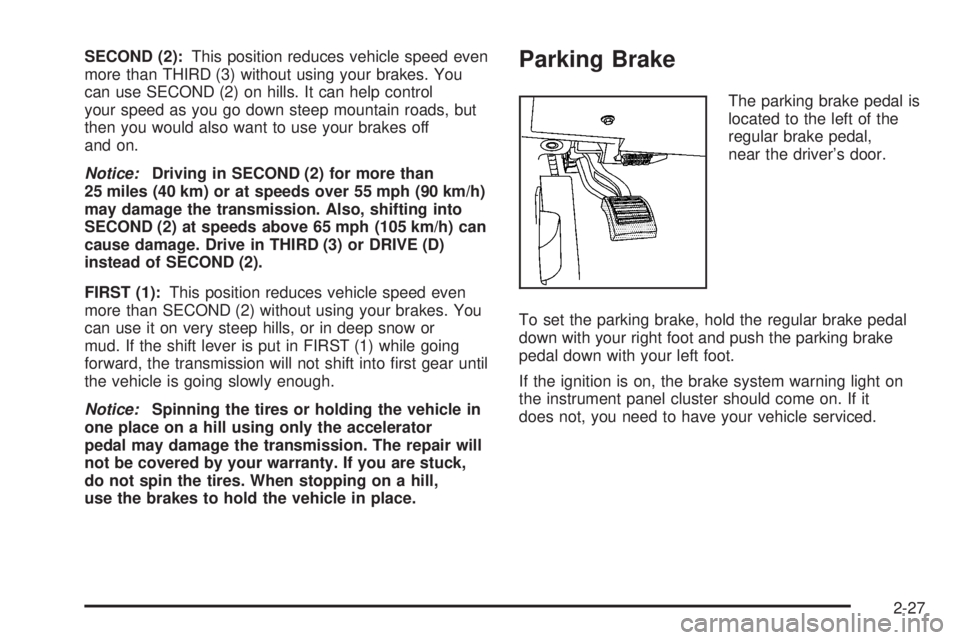
The parking brake pedal is
located to the left of the
regular brake pedal,
near the driver’s door.
To set the parking brake, hold the regular brake pedal
down with your right foot and push the parking brake
pedal down with your left foot.
If the ignition is on, the brake system warning light on
the instrument panel cluster should come on. If it
does not, you need to have your vehicle serviced.
2-27
Page 125 of 434
How the System Works
LDW uses a camera located between the inside
rearview mirror and the windshield to detect the lane
markings.
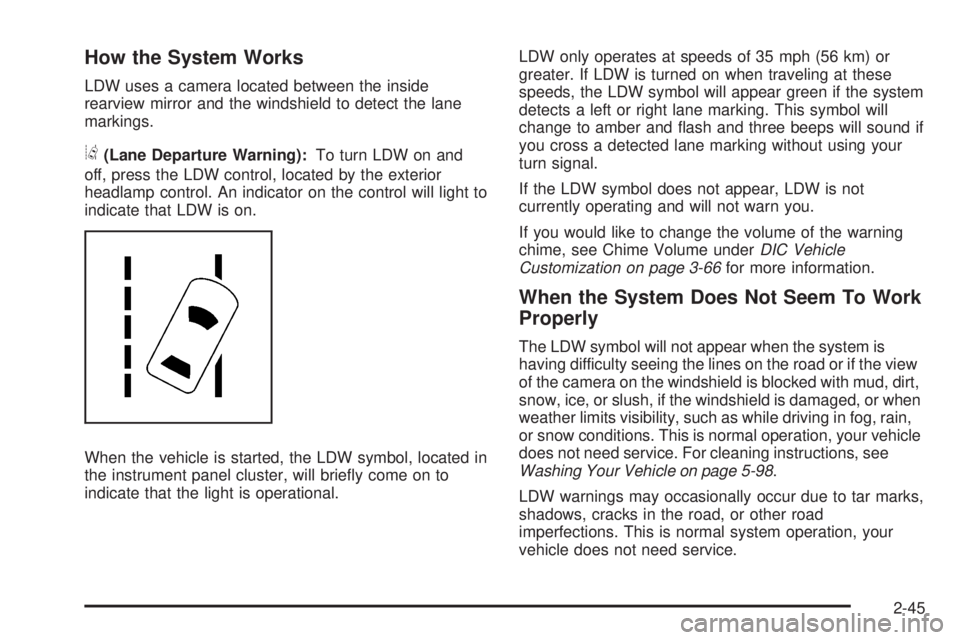
@(Lane Departure Warning):To turn LDW on and
off, press the LDW control, located by the exterior
headlamp control. An indicator on the control will light to
indicate that LDW is on.
When the vehicle is started, the LDW symbol, located in
the instrument panel cluster, will briey come on to
indicate that the light is operational.LDW only operates at speeds of 35 mph (56 km) or
greater. If LDW is turned on when traveling at these
speeds, the LDW symbol will appear green if the system
detects a left or right lane marking. This symbol will
change to amber and ash and three beeps will sound if
you cross a detected lane marking without using your
turn signal.
If the LDW symbol does not appear, LDW is not
currently operating and will not warn you.
If you would like to change the volume of the warning
chime, see Chime Volume underDIC Vehicle
Customization on page 3-66for more information.
When the System Does Not Seem To Work
Properly
The LDW symbol will not appear when the system is
having difficulty seeing the lines on the road or if the view
of the camera on the windshield is blocked with mud, dirt,
snow, ice, or slush, if the windshield is damaged, or when
weather limits visibility, such as while driving in fog, rain,
or snow conditions. This is normal operation, your vehicle
does not need service. For cleaning instructions, see
Washing Your Vehicle on page 5-98.
LDW warnings may occasionally occur due to tar marks,
shadows, cracks in the road, or other road
imperfections. This is normal system operation, your
vehicle does not need service.
2-45
Page 139 of 434

Instrument Panel Overview...............................3-4
Hazard Warning Flashers................................3-6
Other Warning Devices...................................3-6
Horn.............................................................3-6
Tilt Wheel.....................................................3-6
Power Tilt Wheel and Telescopic Steering
Column......................................................3-7
Heated Steering Wheel...................................3-7
Turn Signal/Multifunction Lever.........................3-8
Turn and Lane-Change Signals........................3-8
Headlamp High/Low-Beam Changer..................3-9
Flash-to-Pass.................................................3-9
Windshield Wipers..........................................3-9
Rainsense™ II Wipers...................................3-10
Windshield Washer.......................................3-11
Cruise Control..............................................3-12
Exterior Lamps.............................................3-14
Wiper Activated Headlamps............................3-15
Headlamps on Reminder................................3-16
Daytime Running Lamps (DRL).......................3-16
Fog Lamps..................................................3-17
Cornering Lamps..........................................3-17
Exterior Lighting Battery Saver........................3-17
Instrument Panel Brightness...........................3-17
Courtesy Lamps...........................................3-17Entry Lighting...............................................3-18
Delayed Entry Lighting...................................3-18
Theater Dimming..........................................3-18
Delayed Exit Lighting.....................................3-18
Perimeter Lighting.........................................3-18
Front Reading Lamps....................................3-18
Electric Power Management...........................3-19
Inadvertent Power Battery Saver.....................3-19
Battery Run-Down Protection..........................3-20
Accessory Power Outlet(s)
.............................3-20
Ashtray(s)....................................................3-21
Climate Controls............................................3-21
Climate Control System.................................3-21
Dual Automatic Climate Control System...........3-24
Outlet Adjustment.........................................3-30
Passenger Compartment Air Filter...................3-30
Warning Lights, Gages, and Indicators............3-32
Instrument Panel Cluster................................3-33
Speedometer and Odometer...........................3-34
Trip Odometer..............................................3-34
Tachometer.................................................3-34
Safety Belt Reminders...................................3-34
Airbag Readiness Light..................................3-35
Passenger Airbag Status Indicator...................3-36
Section 3 Instrument Panel
3-1
Page 140 of 434
Charging System Light..................................3-38
Brake System Warning Light..........................3-39
Antilock Brake System Warning Light...............3-40
Traction Control System (TCS) Warning Light . . .3-40
StabiliTrak
®Indicator Light..............................3-41
Lane Departure Warning Light........................3-42
Engine Coolant Temperature Warning Light......3-42
Engine Coolant Temperature Gage..................3-43
Tire Pressure Light.......................................3-43
Malfunction Indicator Lamp.............................3-44
Oil Pressure Light.........................................3-46
Security Light...............................................3-47
Fog Lamp Light............................................3-47
Cruise Control Light......................................3-47
Highbeam On Light.......................................3-47
Fuel Gage...................................................3-48Driver Information Center (DIC).......................3-48
DIC Operation and Displays...........................3-49
DIC Compass..............................................3-54
DIC Warnings and Messages.........................3-56
DIC Vehicle Customization.............................3-66
Audio System(s).............................................3-75
Setting the Time...........................................3-76
Radio(s)......................................................3-78
Using an MP3..............................................3-89
XM Radio Messages.....................................3-93
Navigation/Radio System...............................3-94
Theft-Deterrent Feature..................................3-94
Audio Steering Wheel Controls.......................3-95
Radio Reception...........................................3-96
Backglass Antenna.......................................3-97
XM™ Satellite Radio Antenna System.............3-97
Section 3 Instrument Panel
3-2
Page 142 of 434

Instrument Panel Overview
3-4
Page 143 of 434
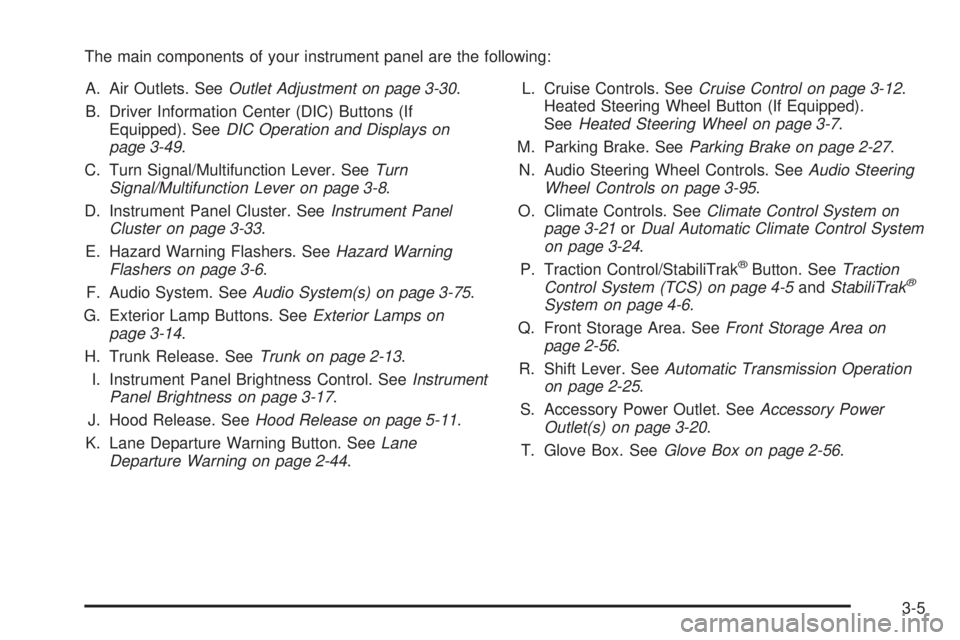
The main components of your instrument panel are the following:
A. Air Outlets. SeeOutlet Adjustment on page 3-30.
B. Driver Information Center (DIC) Buttons (If
Equipped). SeeDIC Operation and Displays on
page 3-49.
C. Turn Signal/Multifunction Lever. SeeTurn
Signal/Multifunction Lever on page 3-8.
D. Instrument Panel Cluster. SeeInstrument Panel
Cluster on page 3-33.
E. Hazard Warning Flashers. SeeHazard Warning
Flashers on page 3-6.
F. Audio System. SeeAudio System(s) on page 3-75.
G. Exterior Lamp Buttons. SeeExterior Lamps on
page 3-14.
H. Trunk Release. SeeTrunk on page 2-13.
I. Instrument Panel Brightness Control. SeeInstrument
Panel Brightness on page 3-17.
J. Hood Release. SeeHood Release on page 5-11.
K. Lane Departure Warning Button. SeeLane
Departure Warning on page 2-44.L. Cruise Controls. SeeCruise Control on page 3-12.
Heated Steering Wheel Button (If Equipped).
SeeHeated Steering Wheel on page 3-7.
M. Parking Brake. SeeParking Brake on page 2-27.
N. Audio Steering Wheel Controls. SeeAudio Steering
Wheel Controls on page 3-95.
O. Climate Controls. SeeClimate Control System on
page 3-21orDual Automatic Climate Control System
on page 3-24.
P. Traction Control/StabiliTrak
®Button. SeeTraction
Control System (TCS) on page 4-5andStabiliTrak®
System on page 4-6.
Q. Front Storage Area. SeeFront Storage Area on
page 2-56.
R. Shift Lever. SeeAutomatic Transmission Operation
on page 2-25.
S. Accessory Power Outlet. SeeAccessory Power
Outlet(s) on page 3-20.
T. Glove Box. SeeGlove Box on page 2-56.
3-5
Page 144 of 434

Hazard Warning Flashers
Your hazard warning ashers let you warn others. They
also let police know you have a problem. Your front
and rear turn signal lamps will ash on and off.
The hazard warning
asher button is located in
the center of the
instrument panel above
the radio.
Your hazard warning ashers work no matter what
position your key is in, and even if the key is not in the
ignition.
Press the button to make the front and rear turn signal
lamps ash on and off. Press the button again to
turn the ashers off.
When the hazard warning ashers are on, your turn
signals will not work.
Other Warning Devices
If you carry reective triangles, you can set them up at
the side of the road about 300 feet (100 m) behind
your vehicle.
Horn
Press near or on the horn symbols on the steering
wheel pad to sound the horn.
Tilt Wheel
A tilt wheel allows you to adjust the steering wheel
before you drive. You can also raise it to the highest
level to give your legs more room when you exit
and enter the vehicle.
The lever that allows you to tilt the steering wheel is
located on the left side of the steering column.
To tilt the wheel, hold the
wheel and pull the lever
toward you. Then move the
wheel to a comfortable
position and release
the lever to lock the wheel
in place.
3-6
Page 146 of 434

Turn Signal/Multifunction Lever
The lever on the left side of the steering column
includes the following:
GTurn and Lane-Change Signals. SeeTurn and
Lane-Change Signals on page 3-8.
23Headlamp High/Low-Beam Changer. See
Headlamp High/Low-Beam Changer on page 3-9.
Flash-To-Pass Feature. SeeFlash-to-Pass
on page 3-9.
NWindshield Wipers. SeeWindshield Wipers on
page 3-9.
LWindshield Washer. SeeWindshield Washer
on page 3-11.
_Heated Washer Fluid. SeeWindshield Washer
on page 3-11.
Turn and Lane-Change Signals
To signal a turn, move the lever on the left side of the
steering wheel all the way up or down. The lever returns
automatically when the turn is complete.
An arrow on the instrument
panel cluster will ash in
the direction of the
turn or lane change.
You may also have an arrow in the outside mirror that
ashes when the turn signal is used. SeeOutside Power
Mirrors on page 2-37for more information.
Raise or lower the lever until the arrow starts to ash to
signal a lane change. Hold it there until the lane
change is complete. If you momentarily press and
release the lever, the turn signal will ash three times.
If the arrows ash very fast as you signal a turn or
a lane change, a signal bulb may be burned out and
other drivers will not see your turn signal. If a bulb
is burned out, replace it to help avoid an accident.
If the arrows do not go on at all when you signal a turn,
check the fuse. SeeFuses and Circuit Breakers on
page 5-105.
3-8
Page 147 of 434

Turn Signal On Chime
If your turn signal is left on for more than 0.8 miles
(1.3 km), a chime will sound at each ash of the turn
signal. To turn off the chime, move the turn signal lever
to the off position.
Headlamp High/Low-Beam Changer
To change the headlamps from low beam to high
beam, push the turn signal lever away from you. To
change from high beam to low beam, pull the turn signal
lever toward you.
While the high beams are
on, this light located on the
instrument panel cluster
will also be on.
Flash-to-Pass
This feature lets you use the high-beam headlamps to
signal the driver in front of you that you want to pass. It
works even if your headlamps are off.Pull the turn signal lever toward you briey to
ash-to-pass.
If the headlamps are off or on low beam, the high-beam
headlamps will turn on. They will stay on as long as
you hold the lever toward you and the high-beam
indicator on the instrument panel cluster will come on.
Windshield Wipers
You control the windshield wipers by turning the band
with the wiper symbol on it.
8(Mist):Turn the band to mist for a single wiping
cycle. Hold it there until the wipers start. Then let
go. The wipers stop after one wipe. For more wipe
cycles, hold the band longer on mist.
6(Delay):Turn the band to choose the delay time
between wipe cycles. The wiper speed can be set for a
long or short delay between wipes. The closer the
band is set to the top of the lever, the shorter the delay.
6(Low Speed):Turn the band away from you
to the rst solid band past the delay settings for steady
wiping at low speed.
3-9