power seat BUICK LUCERNE 2009 Owner's Manual
[x] Cancel search | Manufacturer: BUICK, Model Year: 2009, Model line: LUCERNE, Model: BUICK LUCERNE 2009Pages: 436
Page 5 of 436
Head Restraints...............................................1-2
Front Seats......................................................1-4
Manual Seats................................................1-4
Power Seats..................................................1-5
Power Lumbar ...............................................1-5
Heated Seats.................................................1-6
Heated and Cooled Seats................................1-7
Memory Seat and Mirrors................................1-8
Reclining Seatbacks........................................1-9
Center Seat.................................................1-12
Rear Seats.....................................................1-12
Rear Seat Pass-Through Door........................1-12
Safety Belts...................................................1-12
Safety Belts: They Are for Everyone................1-12
How to Wear Safety Belts Properly.................1-18
Lap-Shoulder Belt.........................................1-27
Safety Belt Use During Pregnancy..................1-33
Lap Belt......................................................1-33
Safety Belt Extender.....................................1-34
Child Restraints.............................................1-35
Older Children..............................................1-35
Infants and Young Children............................1-38
Child Restraint Systems.................................1-41Where to Put the Restraint.............................1-44
Lower Anchors and Tethers for
Children (LATCH)......................................1-45
Securing a Child Restraint in a
Rear Seat Position....................................1-51
Securing a Child Restraint in the
Center Front Seat Position..........................1-54
Securing a Child Restraint in the
Right Front Seat Position............................1-54
Airbag System...............................................1-58
Where Are the Airbags?................................1-60
When Should an Airbag Inate?.....................1-63
What Makes an Airbag Inate?.......................1-65
How Does an Airbag Restrain?......................
.1-65
What Will You See After an Airbag Inates?.....1-66
Passenger Sensing System............................1-67
Servicing Your Airbag-Equipped Vehicle...........1-72
Adding Equipment to Your
Airbag-Equipped Vehicle.............................1-73
Restraint System Check..................................1-74
Checking the Restraint Systems......................1-74
Replacing Restraint System Parts
After a Crash............................................1-75
Section 1 Seats and Restraint System
1-1
Page 9 of 436
Power Seats
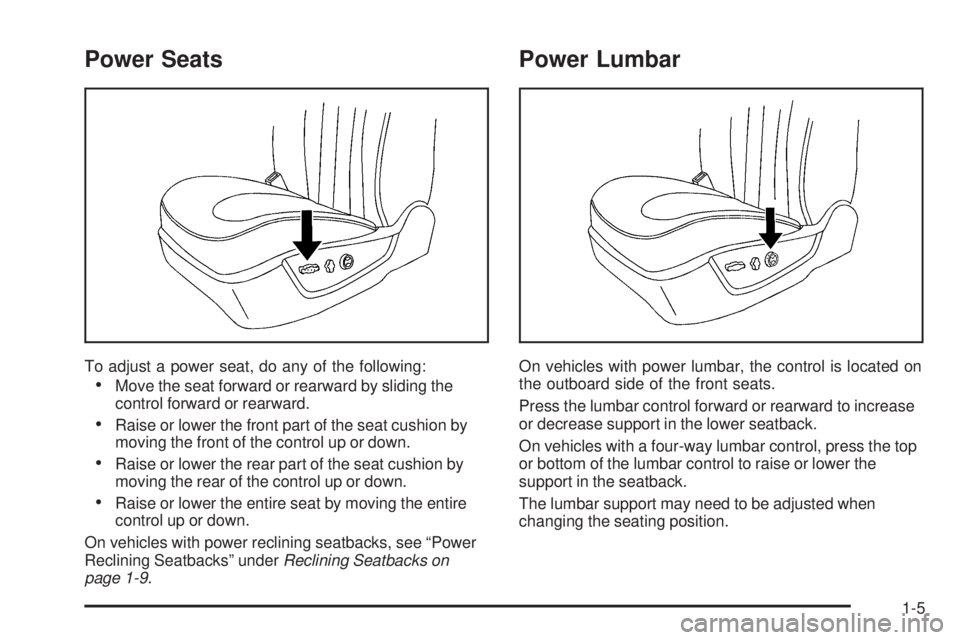
To adjust a power seat, do any of the following:
Move the seat forward or rearward by sliding the
control forward or rearward.
Raise or lower the front part of the seat cushion by
moving the front of the control up or down.
Raise or lower the rear part of the seat cushion by
moving the rear of the control up or down.
Raise or lower the entire seat by moving the entire
control up or down.
On vehicles with power reclining seatbacks, see “Power
Reclining Seatbacks” underReclining Seatbacks on
page 1-9.
Power Lumbar
On vehicles with power lumbar, the control is located on
the outboard side of the front seats.
Press the lumbar control forward or rearward to increase
or decrease support in the lower seatback.
On vehicles with a four-way lumbar control, press the top
or bottom of the lumbar control to raise or lower the
support in the seatback.
The lumbar support may need to be adjusted when
changing the seating position.
1-5
Page 12 of 436
Memory Seat and Mirrors
On vehicles with the memory feature the buttons are
located on the driver’s door.
1:Saves the seating position for driver 1.
2:Saves the seating position for driver 2.
B:Recalls the easy exit position.
For more programming information, seeDIC Vehicle
Customization on page 3-66.
To save your positions in memory:
1. Adjust the driver’s seat, including the seatback
recliner and lumbar, and both outside mirrors to
your preferred position.
2. Press and hold button 1 until two beeps sound to
let you know that the position has been stored.
3. Repeat the procedure for a second driver using
button 2.
The vehicle must be in PARK (P) to recall your memory
positions.
Press and release either button to recall the stored
setting. Each time a memory button is pressed, a single
beep sounds.If you use the remote keyless entry transmitter to enter
your vehicle and the remote recall memory feature
is on, automatic seat and mirror movement occurs.
To stop recall movement of the memory feature, press
one of the power seat controls, memory buttons, or
power mirror buttons.
If something has blocked the driver’s seat while recalling
a memory position, the driver’s seat recall may stop
working. If this happens, press the control for the area
that is not recalling for two seconds, after the obstruction
is removed. Try recalling the memory position again
by pressing the appropriate memory button. If the
memory position is still not recalling, see your
dealer/retailer for service.
Easy Exit Seat
B
:With the vehicle in PARK (P), press to recall the
exit position.
You will hear a single beep and the driver’s seat
moves back.
1-8
Page 14 of 436
To return the seatback to an upright position, do the
following:
1. Lift the lever fully without applying pressure to the
seatback and the seatback will return to the upright
position.
2. Push and pull on the seatback to make sure it is
locked.Power Reclining Seatbacks
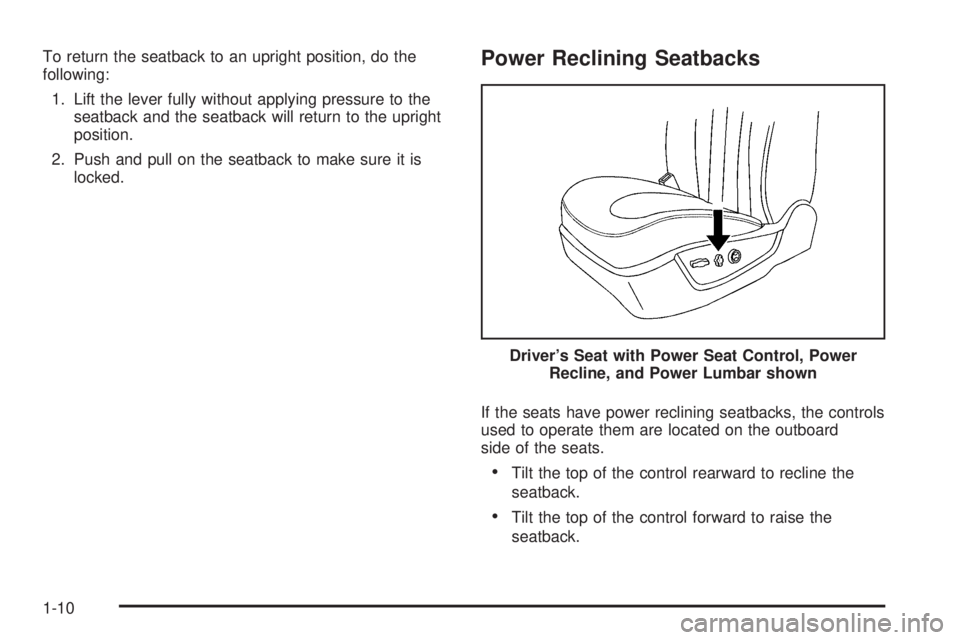
If the seats have power reclining seatbacks, the controls
used to operate them are located on the outboard
side of the seats.
Tilt the top of the control rearward to recline the
seatback.
Tilt the top of the control forward to raise the
seatback. Driver’s Seat with Power Seat Control, Power
Recline, and Power Lumbar shown
1-10
Page 96 of 436

Power Windows
{CAUTION:
Leaving children in a vehicle with the keys is
dangerous for many reasons, children or others
could be badly injured or even killed. They could
operate the power windows or other controls or
even make the vehicle move. The windows will
function and they could be seriously injured or
killed if caught in the path of a closing window.
Do not leave keys in a vehicle with children.
When there are children in the rear seat use the
window lockout button to prevent unintentional
operation of the windows.The power window
switches are located on
the driver’s door armrest.
In addition, each door
has a switch for its own
window.
The front power window switches operate with one
position for up and two positions for down movement
and the rear power window switches operate with
one position for up and one for down movement.
Your vehicle has Retained Accessory Power (RAP) that
allows you to use the power windows once the ignition
has been turned off. For more information, seeRetained
Accessory Power (RAP) on page 2-22. Driver’s Side shown
2-16
Page 137 of 436

Storage Areas
Glove Box
Lift the glovebox handle up to open it. Use the key to lock
and unlock the glovebox.
Cupholders
There are cupholders located in the full oor console, or
in the front of the center seat console. Cupholders are
also located in the rear armrest. Slide the cover back to
access the full oor console cupholder. Fold open the
front of the console to access the center seat console
cupholder.
Front Storage Area
To access the front storage area, push down and then
release. Push up and forward to remove.
Center Console Storage
If the vehicle has a full oor console it has two storage
areas. Lift the left lever located in the front of the armrest
lid to access the upper storage tray. Lift the right lever to
access the lower storage area. If the vehicle has a center
seat console it will have two storage areas. Press the
button located on the front of the armrest and lift the
armrest cover to access the upper storage area. Pull the
strap located behind the cup holder to access the lower
storage area.
Center Flex Storage Unit
This vehicle may have a center ex storage unit that
includes a front center seat with a lap belt and an
underseat storage compartment. The center seatback
can also be used as an armrest. Cupholders are also
located at the front edge of the storage unit and can
be accessed by folding the compartment forward.
Pull the handle rearward to open a storage compartment
and access the accessory power outlet. Pull out to
remove.
When not being used, the center seat lap belt can be
stored in the underseat storage compartment.
Rear Seat Armrest
This vehicle has a rear seat armrest with cupholders.
Pull the tab on the armrest forward, to access it.
Convenience Net
Use the convenience net, located in the rear, to store
small loads as far forward as possible. The net should not
be used to store heavy loads.
2-57
Page 157 of 436
Electric Power Management
The vehicle has Electric Power Management (EPM) that
estimates the battery’s temperature and state of charge.
It then adjusts the voltage for best performance and
extended life of the battery.
When the battery’s state of charge is low, the voltage is
raised slightly to quickly bring the charge back up. When
the state of charge is high, the voltage is lowered slightly
to prevent overcharging. If the vehicle has a voltmeter
gage or a voltage display on the Driver Information
Center (DIC), you may see the voltage move up or down.
This is normal. If there is a problem, an alert will be
displayed.
The battery can be discharged at idle if the electrical
loads are very high. This is true for all vehicles.
This is because the generator (alternator) may not
be spinning fast enough at idle to produce all the
power that is needed for very high electrical loads.
A high electrical load occurs when several of the
following are on, such as: headlamps, high beams,
fog lamps, rear window defogger, climate control fan at
high speed, heated seats, engine cooling fans, trailer
loads, and loads plugged into accessory power outlets.EPM works to prevent excessive discharge of the battery.
It does this by balancing the generator’s output and the
vehicle’s electrical needs. It can increase engine idle
speed to generate more power, whenever needed.
It can temporarily reduce the power demands of some
accessories.
Normally, these actions occur in steps or levels, without
being noticeable. In rare cases at the highest levels of
corrective action, this action may be noticeable to the
driver. If so, a Driver Information Center (DIC) message
might be displayed, such as BATTERY SAVER ACTIVE,
BATTERY VOLTAGE LOW, or LOW BATTERY. If this
message is displayed, it is recommended that the driver
reduce the electrical loads as much as possible. SeeDIC
Warnings and Messages on page 3-56.
Inadvertent Power Battery Saver
This feature is designed to protect your vehicle’s battery
against drainage from the interior lamps, or garage door
opener. When the ignition is turned off, the power to
these features will automatically turn off after 10 minutes.
Power will be restored for an additional 10 minutes if any
door is opened, the trunk is opened or the courtesy lamp
switch is turned on.
3-19
Page 158 of 436

Battery Run-Down Protection
This feature helps prevent the battery from
being drained, if the interior courtesy lamps,
reading/map lamps, visor vanity lamps or trunk
lamp are accidentally left on. If any of these lamps
are left on, they automatically turn off after 10 minutes,
if the ignition is off. The lamps will not come back on
again until one of the following occurs:
The ignition is turned on.
The exterior lamps control is turned off, then on
again.
The headlamps will time-out after 10 minutes, if they are
manually turned on before the ignition is off.
Accessory Power Outlet(s)
The accessory power outlets can be used to plug in
electrical equipment, such as a cellular telephone.
The vehicle may have up to three power outlets
depending on the type of front seat installed. If the
vehicle has front bucket seats with a center console,
there are two outlets inside the rear storage
compartment. An extra power outlet can be found
under the climate control system next to the ashtray.
The vehicle may have a small cap that must be pulled
down to access the accessory power outlet. Cover the
outlet with the protective cap when it is not being used.Notice:Leaving electrical equipment on for
extended periods will drain the battery. Always
turn off electrical equipment when not in use and
do not plug in equipment that exceeds the maximum
amperage rating.
Certain electrical accessories may not be compatible to
the accessory power outlets and could result in blown
vehicle or adapter fuses. If you experience a problem
see your dealer/retailer for additional information on the
accessory power outlets.
Notice:Adding any electrical equipment to the
vehicle can damage it or keep other components
from working as they should. The repairs would
not be covered by the vehicle warranty. Do not use
equipment exceeding maximum amperage rating
of 20 amperes. Check with your dealer/retailer before
adding electrical equipment.
When adding electrical equipment, be sure to follow
the proper installation instructions included with the
equipment.
Notice:Improper use of the power outlet can cause
damage not covered by the warranty. Do not hang
any type of accessory or accessory bracket from the
plug because the power outlets are designed for
accessory power plugs only.
3-20
Page 210 of 436
EASY EXIT RECALL
If your vehicle has this feature, it allows you to select
your preference for the automatic easy exit seat feature.
SeeMemory Seat and Mirrors on page 1-8for more
information.
Press the customization button until EASY EXIT
RECALL appears on the DIC display. Press the
set/reset button once to access the settings for this
feature. Then press the menu up/down button to scroll
through the following settings:
DOOR BUTTON ONLY:No automatic seat exit recall
will occur. The recall will only occur after pressing
the easy exit seat button.
BUTTON AND KEY OUT (default):If the features
are enabled through the EASY EXIT SETUP menu,
the driver’s seat will move back, and if the vehicle has
the power tilt wheel and telescopic steering feature, the
power steering column will move up and forward when
the key is removed from the ignition or after pressing
the easy exit seat button. The automatic easy exit seat
movement will only occur one time after the key is
removed from the ignition. If the automatic movement
has already occurred, and you put the key back in the
ignition and remove it again, the seat and steering
column will stay in the original exit position, unless a
memory recall took place prior to removing the key again.NO CHANGE:No change will be made to this feature.
The current setting will remain.
To select a setting, press the set/reset button while the
desired setting is displayed on the DIC.
EASY EXIT SETUP
If your vehicle has this feature, it allows you to select
which areas will recall with the automatic easy exit seat
feature. It also allows you to turn off the automatic easy
exit feature. SeeMemory Seat and Mirrors on page 1-8
and″EASY EXIT RECALL″earlier for more information.
Press the customization button until EASY EXIT SETUP
appears on the DIC display. Press the set/reset button
once to access the settings for this feature. Then press
the menu up/down button to scroll through the following
settings:
OFF:No automatic seat exit will recall.
SEAT ONLY:The driver’s seat will recall.
TILT ONLY:The steering wheel tilt feature will recall.
TELESCOPE ONLY:The steering column telescope
feature will recall.
SEAT/TILT:The driver’s seat and the steering wheel tilt
feature will recall.
3-72
Page 211 of 436
SEAT/TELESCOPE:The driver’s seat and the steering
column telescope feature will recall.
TILT/TELESCOPE:The steering wheel tilt and steering
column telescope features will recall.
ALL (default):The driver’s seat and the steering wheel
tilt and steering column telescope features will recall,
if your vehicle has this option.
NO CHANGE:No change will be made to this feature.
The current setting will remain.
To select a setting, press the set/reset button while the
desired setting is displayed on the DIC.
MEMORY SEAT RECALL
If your vehicle has this feature, it allows you to select
your preference for the remote memory seat recall
feature. SeeMemory Seat and Mirrors on page 1-8
for more information.Press the customization button until MEMORY SEAT
RECALL appears on the DIC display. Press the set/reset
button once to access the settings for this feature.
Then press the customization button to scroll through
the following settings:
OFF (default):No remote memory seat recall will
occur.
ON:The driver’s seat and outside mirrors will
automatically move to the stored driving position when
the unlock button on the Remote Keyless Entry (RKE)
transmitter is pressed. The steering column will also
move on vehicles with the power tilt and telescopic
steering feature. SeePower Tilt Wheel and Telescopic
Steering Column on page 3-7for more information.
See “Relearn Remote Key” underDIC Operation and
Displays on page 3-49for more information on matching
transmitters to driver ID numbers.
NO CHANGE:No change will be made to this feature.
The current setting will remain.
To select a setting, press the set/reset button while the
desired setting is displayed on the DIC.
3-73