buttons BUICK LUCERNE 2010 User Guide
[x] Cancel search | Manufacturer: BUICK, Model Year: 2010, Model line: LUCERNE, Model: BUICK LUCERNE 2010Pages: 474
Page 152 of 474

LDW warnings may occasionally occur due to tar
marks, shadows, cracks in the road, or other road
imperfections. This is normal system operation, the
vehicle does not need service.
LDW Error Message
SERVICE LANE DEPARTURE SYSTEM:This
message may appear in the DIC to indicate that LDW is
not working properly. If this message remains on after
continued driving, the system needs service. Take your
vehicle to your dealer.
LANE DEPARTURE SYSTEM UNAVAILABLE: This
message may appear in the DIC if LDW does not
activate due to a temporary condition.
Universal Home Remote
System
See Radio Frequency Statementon page 8‑20for
information regarding Part 15 of the Federal
Communications Commission (FCC) Rules and
RSS-210/211 of Industry Canada.
Universal Home Remote System
Operation (With Three Round LED)
This vehicle may have the Universal Home Remote
System. If there are three round Light Emitting Diode
(LED) indicator lights above the Universal Home
Remote buttons, follow the instructions below.
This system provides a way to replace up to three
remote control transmitters used to activate devices
such as garage door openers, security systems, and
home automation devices.
Do not use this system with any garage door opener
that does not have the stop and reverse feature. This
includes any garage door opener model manufactured
before April 1, 1982.
3-44
Page 153 of 474
Read the instructions completely before attempting to
program the transmitter. Because of the steps involved,
it may be helpful to have another person assist with
programming the transmitter.
Be sure to keep the original remote control transmitter
for use in other vehicles, as well as, for future
programming. Only the original remote control
transmitter is needed for Fixed Code programming.
The programmed buttons should be erased when the
vehicle is sold or the lease ends. See“Erasing
Universal Home Remote Buttons” later in this section.
Park the vehicle outside of the garage when
programming a garage door. Be sure that people and
objects are clear of the garage door or gate that is
being programmed.Programming Universal Home
Remote —Rolling Code
For questions or help programming the Universal
Home Remote System, call 1-866-572-2728 or
go to learcar2u.com.
Most garage door openers sold after 1996 are Rolling
Code units.
Programming a garage door opener involves
time-sensitive actions, so read the entire procedure
before starting. Otherwise, the device will time out and
the procedure will have to be repeated.
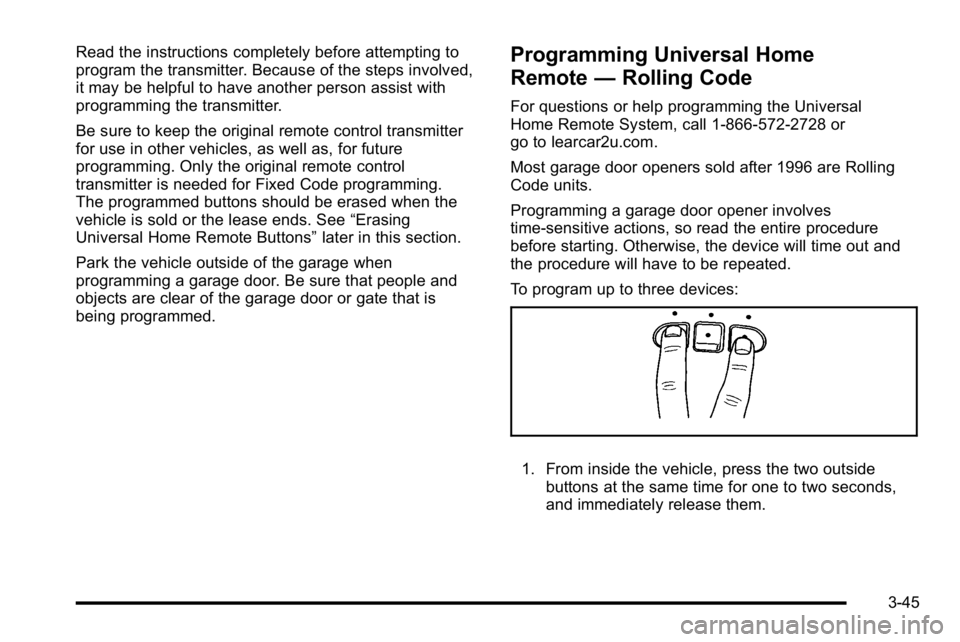
To program up to three devices:
1. From inside the vehicle, press the two outside
buttons at the same time for one to two seconds,
and immediately release them.
3-45
Page 157 of 474

2. Write down the eight to 12 switch settings from leftto right as follows:
.When a switch is in the up position, write “Left.”
.When a switch is in the down position, write
“Right.”
.If a switch is set between the up and down
position, write“Middle.”
The switch settings written down in Step 2 now
become the button strokes to be entered into
the Universal Home Remote in Step 4. Be sure
to enter the switch settings written down in
Step 2, in order from left to right, into the
Universal Home Remote, when completing
Step 4.
3. From inside your vehicle, first firmly press all three buttons at the same time for about three seconds.
Release the buttons to put the Universal Home
Remote into programming mode.
4. The indicator lights will blink slowly. Enter eachswitch setting from Step 2 into your vehicle's
Universal Home Remote. You will have two and
one-half minutes to complete Step 4. Now press
one button on the Universal Home Remote for
each switch setting as follows:
.If you wrote “Left,”press the left button in the
vehicle.
.If you wrote “Right,”press the right button in
the vehicle.
.If you wrote “Middle,”press the middle button in
the vehicle.
3-49
Page 158 of 474
5. After entering all of the switch positions, again,firmly press and release all three buttons at the
same time. The indicator lights will turn on.
6. Press and hold the button that will be used to control the garage door until the garage door
moves. The indicator light above the selected
button should slowly blink. This button may need to
be held for up to 55 seconds.
7. Immediately release the button when the garage door moves. The indicator light will blink rapidly
until programming is complete.
8. Press and release the same button again. The garage door should move, confirming that
programming is successful and complete.
To program another Fixed Code device such as an
additional garage door opener, a security device,
or home automation device, repeat Steps 1-8, choosing
a different button in Step 6 than what was used for the
garage door opener.Using Universal Home Remote
Press and hold the appropriate button for at least half of
a second. The indicator light will come on while the
signal is being transmitted.
Reprogramming Universal Home
Remote Buttons
Any of the three buttons can be reprogrammed by
repeating the instructions.
Erasing Universal Home Remote
Buttons
The programmed buttons should be erased when the
vehicle is sold or the lease ends.
To erase either Rolling Code or Fixed Code on the
Universal Home Remote device: 1. Press and hold the two outside buttons at the same time for approximately 20 seconds, until the
indicator lights, located directly above the buttons,
begin to blink rapidly.
2. Once the indicator lights begin to blink, release both buttons. The codes from all buttons will be
erased.
For help or information on the Universal Home Remote
System, call the customer assistance phone number
under Customer Assistance Offices on page 8‑6.
3-50
Page 169 of 474
Cruise Control
With cruise control, you can maintain a speed of about
40 km/h (25 mph) or more without keeping your foot on
the accelerator. Cruise control does not work at speeds
below about 40 km/h (25 mph).
{WARNING:
Cruise control can be dangerous where you
cannot drive safely at a steady speed. So, do not
use the cruise control on winding roads or in
heavy traffic.
Cruise control can be dangerous on slippery
roads. On such roads, fast changes in tire traction
can cause excessive wheel slip, and you could
lose control. Do not use cruise control on slippery
roads.
If your vehicle has the Traction Control System (TCS)
and the cruise control is on, TCS will begin to limit
wheel spin and the cruise control automatically turns
off. See Traction Control System (TCS)
on page 5‑6.
When road conditions allow you to safely use it again,
the cruise control can be turned back on.
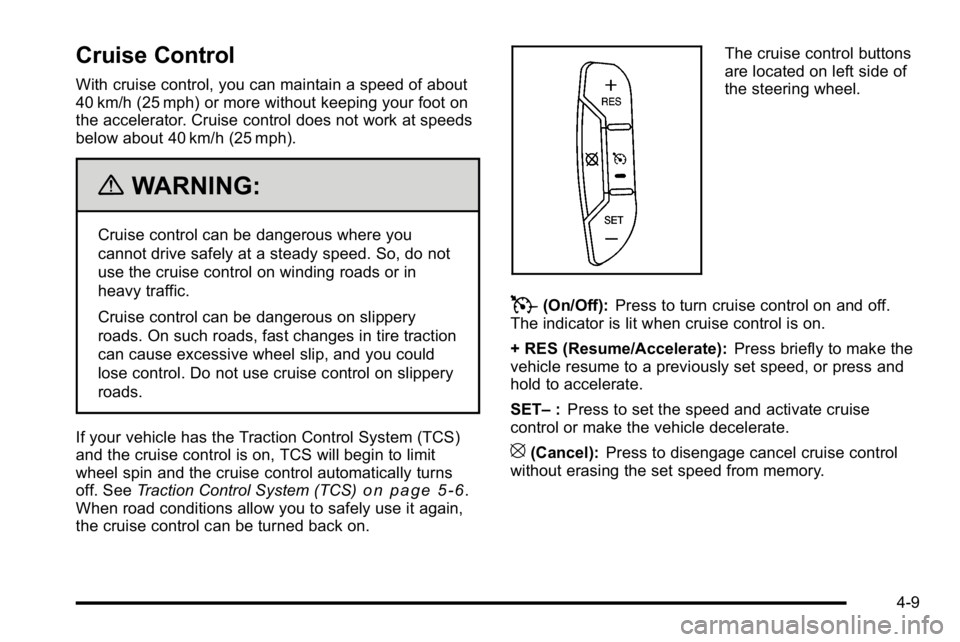
The cruise control buttons
are located on left side of
the steering wheel.
T(On/Off): Press to turn cruise control on and off.
The indicator is lit when cruise control is on.
+ RES (Resume/Accelerate): Press briefly to make the
vehicle resume to a previously set speed, or press and
hold to accelerate.
SET– :Press to set the speed and activate cruise
control or make the vehicle decelerate.
[(Cancel): Press to disengage cancel cruise control
without erasing the set speed from memory.
4-9
Page 173 of 474
Wiper Activated Headlamps
This feature activates the headlamps and parking lamps
after the windshield wipers are turned on and have
completed eight wipe cycles within four minutes.
When the ignition is turned to LOCK/OFF, the
wiper-activated headlamps immediately turn off. The
wiper-activated headlamps also turn off if the windshield
wipers are turned off.
Headlamps on Reminder
If you leave the exterior lamp buttons for the headlamps
or parking lamps on, remove the key from the ignition
and open the driver's door, you will hear a continuous
warning chime. The chime will turn off when the lamps
are turned off.
Daytime Running Lamps (DRL)
Daytime Running Lamps (DRL) can make it easier for
others to see the front of your vehicle during the day.
Fully functional daytime running lamps are required on
all vehicles first sold in Canada.
A light sensor on top of the instrument panel monitors
the exterior light level for the operation of DRL, so be
sure it is not covered.The DRL system makes the low-beam headlamps turn
on at reduced brightness in daylight when the following
conditions are met:
.The ignition is on.
.The exterior lamp button for the headlamps is off.
.The automatic transmission is not in P (Park).
When the DRL are on, only the low-beam headlamps
will be on. The parking lamps, taillamps, sidemarker
and other lamps will not be on.
When it is dark enough outside, the low-beam
headlamps will come on. The other lamps that turn on
with the headlamps will also turn on. When it is bright
enough outside, the regular lamps will go off, and the
low-beam headlamps change to the reduced brightness
of DRL.
To turn off all exterior lighting at night when the
vehicle is parked, turn the exterior lamp control to
the off position. The exterior lamps will turn back on
automatically when the transmission is moved out of
P (Park). See Exterior Lamps
on page 4‑12for more
information.
The regular headlamp system should be turned on
when needed.
4-13
Page 184 of 474
h(Auto Recirculation) :If AUTO is selected on
either the fan or mode control, the system automatically
controls the supply of fresh outside air or recirculates
the interior air to cool the car faster. The indicator light
on the recirculation button will light whenever the
system switches to recirculation. You may force outside
air by pressing the outside air button. The next time
AUTO fan or mode is selected, it will reset back to
AUTO operation.
Manual Operation
9(Off): Turns the climate control system off. Outside
air still enters the vehicle and is directed to the floor.
The airflow direction and temperature can be adjusted.
If the temperature is adjusted while the system is off,
the display will light to show the current settings.
w x(Driver Temperature Controls): Press these
buttons next to the fan control to increase or decrease
the temperature inside the vehicle.
w x(Passenger Temperature Controls): Press
these buttons next to the mode control to increase or
decrease the temperature for the front passenger. If the
passenger climate control system is off, pressing one of
these buttons turns it on.
9(Fan Control): Turn clockwise or counterclockwise
to increase or decrease the fan speed. Turning this
control completely counterclockwise turns on the
automatic fan operation.
If the airflow seems low when the fan speed is at the
highest setting, the passenger compartment air filter
may need to be replaced. For more information, see
Passenger Compartment Air Filter
on page 4‑28and
Scheduled Maintenance on page 7‑3.
Air Delivery Mode Control: Turn clockwise or
counterclockwise to change the direction of the airflow
in the vehicle.
To change the current mode, select one of the following:
F(Vent): Air is directed to the instrument panel outlets.
*(Bi-Level): Air is divided between the instrument
panel outlets and the floor outlets. In automatic
operation, cooler air is directed to the upper outlets and
warmer air to the floor outlets.
7(Floor): Air is directed to the floor outlets, with some
air directed to the windshield and side window outlets.
If recirculation is selected while in this mode, it stays on
for three minutes to reduce windshield fogging.
4-24
Page 207 of 474
Driver Information Center (DIC)
Your vehicle has a Driver Information Center (DIC).
All messages will appear in the DIC display located
below the speedometer in the instrument panel cluster.
The DIC buttons are located on the instrument panel, to
the left of the instrument panel cluster.
The DIC comes on when the ignition is on. After a short
delay, the DIC will display the information that was last
displayed before the engine was turned off.
The DIC displays trip, fuel, and vehicle system
information, and warning messages if a system problem
is detected. The bottom line of the DIC shows the shift
lever position indicator. SeeAutomatic Transmission
Operation
on page 3‑24for more information.
If your vehicle's DIC has these features, the compass
direction and the outside air temperature may also
display on the DIC when viewing the trip and fuel
information. The compass direction appears on the
top right corner of the DIC display. The outside air
temperature automatically appears in the bottom right
corner of the DIC display. If there is a problem with the
system that controls the temperature display, the
numbers will be replaced with dashes. If this occurs,
have the vehicle serviced by your dealer.
The DIC also allows some features to be customized.
See DIC Vehicle Customization
on page 4‑65for more
information.
DIC Operation and Displays
The DIC has different displays which can be accessed
by pressing the DIC buttons located on the instrument
panel, to the left of the instrument panel cluster.
DIC Buttons
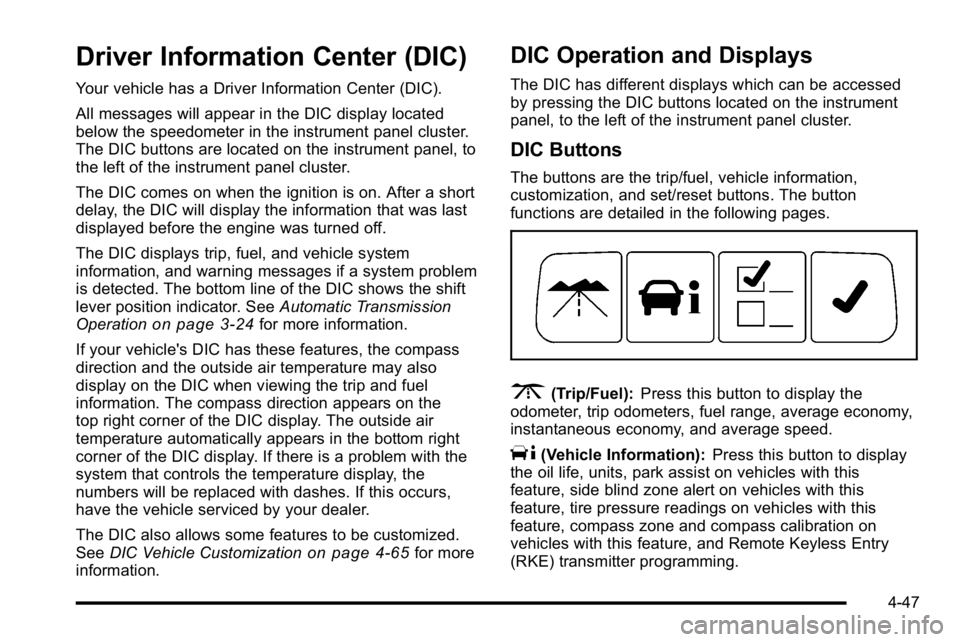
The buttons are the trip/fuel, vehicle information,
customization, and set/reset buttons. The button
functions are detailed in the following pages.
3(Trip/Fuel): Press this button to display the
odometer, trip odometers, fuel range, average economy,
instantaneous economy, and average speed.
T(Vehicle Information): Press this button to display
the oil life, units, park assist on vehicles with this
feature, side blind zone alert on vehicles with this
feature, tire pressure readings on vehicles with this
feature, compass zone and compass calibration on
vehicles with this feature, and Remote Keyless Entry
(RKE) transmitter programming.
4-47
Page 212 of 474

Relearn Remote Key
To access this display, the vehicle must be in PARK (P).
This display allows you to match Remote Keyless Entry
(RKE) transmitters to your vehicle. This procedure will
erase all previously learned transmitters. Therefore,
they must be relearned as additional transmitters.
To match an RKE transmitter to your vehicle:1. Press the vehicle information button until PRESS
VTO RELEARN REMOTE KEY displays.
2. Press the set/reset button until REMOTE KEY LEARNING ACTIVE is displayed.
3. Press and hold the lock and unlock buttons on the first transmitter at the same time for about
15 seconds.
On vehicles with memory recall seats, the first
transmitter learned will match driver 1 and the
second will match driver 2.
A chime will sound indicating that the transmitter is
matched. 4. To match additional transmitters at this time, repeat
Step 3.
Each vehicle can have a maximum of eight
transmitters matched to it.
5. To exit the programming mode, you must cycle the key to LOCK/OFF.
Blank Display
This display shows no information.
Customization Menu Items
U
(Customization): Press this button to enter the
feature settings menu. This display allows you to
customize the feature settings on your vehicle. See DIC
Vehicle Customization
on page 4‑65for more
information.
4-52
Page 215 of 474

DIC Warnings and Messages
Messages are displayed on the DIC to notify the driver
that the status of the vehicle has changed and that
some action may be needed by the driver to correct the
condition. Multiple messages may appear one after
another. Some messages may not require immediate
action, but you can press the set/reset button to
acknowledge that you received the message and clear
it from the DIC display. Pressing any of the DIC buttons
also acknowledges and clears any messages. Some
messages cannot be cleared from the DIC display
because they are more urgent. These messages require
action before they can be cleared. You should take any
messages that appear on the display seriously and
remember that clearing the messages will only make
the messages disappear, not correct the problem. The
following are the possible messages that can be
displayed and some information about them.
AUTOMATIC LIGHT CONTROL OFF
This message displays when the automatic headlamps
are turned off. SeeExterior Lampson page 4‑12for
more information.
AUTOMATIC LIGHT CONTROL ON
This message displays when the automatic headlamps
are turned on. See Exterior Lampson page 4‑12for
more information.
BATTERY SAVER ACTIVE
This message displays when the system detects that
the battery voltage is dropping beyond a reasonable
level. The battery saver system starts reducing certain
features of the vehicle that you may be able to notice.
At the point that the features are disabled, this message
is displayed. It means that the vehicle is trying to save
the charge in the battery.
Turn off all unnecessary accessories to allow the
battery to recharge.
The normal battery voltage range is 11.5 to 15.5 volts.
CHANGE ENGINE OIL SOON
This message displays when service is required for the
vehicle. See your dealer. See Engine Oilon page 6‑17andScheduled Maintenanceon page 7‑3for more
information.
Acknowledging the CHANGE ENGINE OIL SOON
message will not reset the OIL LIFE REMAINING. That
must be done at the OIL LIFE screen under the vehicle
information menu. See “Oil Life”underDIC Operation
and Displays
on page 4‑47and Engine Oil Life Systemon page 6‑20.
4-55