power steering BUICK LUCERNE 2010 User Guide
[x] Cancel search | Manufacturer: BUICK, Model Year: 2010, Model line: LUCERNE, Model: BUICK LUCERNE 2010Pages: 474
Page 231 of 474

EASY EXIT RECALL
If your vehicle has this feature, it allows you to select
your preference for the automatic easy exit seat feature.
SeeMemory Seat and Mirrors
on page 2‑7for more
information.
Press the customization button until EASY EXIT
RECALL appears on the DIC display. Press the set/
reset button once to access the settings for this feature.
Then press the menu up/down button to scroll through
the following settings:
DOOR BUTTON ONLY: No automatic seat exit recall
will occur. The recall will only occur after pressing the
easy exit seat button.
BUTTON AND KEY OUT (default): If the features are
enabled through the EASY EXIT SETUP menu, the
driver's seat will move back, and if the vehicle has the
power tilt wheel and telescopic steering feature, the
power steering column will move up and forward when
the key is removed from the ignition or after pressing
the easy exit seat button. The automatic easy exit seat
movement will only occur one time after the key is
removed from the ignition. If the automatic movement
has already occurred, and you put the key back in the
ignition and remove it again, the seat and steering
column will stay in the original exit position, unless a
memory recall took place prior to removing the key
again. NO CHANGE:
No change will be made to this feature.
The current setting will remain.
To select a setting, press the set/reset button while the
desired setting is displayed on the DIC.
EASY EXIT SETUP
If your vehicle has this feature, it allows you to select
which areas will recall with the automatic easy exit
seat feature. It also allows you to turn off the automatic
easy exit feature. See Memory Seat and Mirrors
on
page 2‑7and “EASY EXIT RECALL” earlier for more
information.
Press the customization button until EASY EXIT SETUP
appears on the DIC display. Press the set/reset button
once to access the settings for this feature. Then press
the menu up/down button to scroll through the following
settings:
OFF: No automatic seat exit will recall.
SEAT ONLY: The driver's seat will recall.
TILT ONLY: The steering wheel tilt feature will recall.
4-71
Page 232 of 474

TELESCOPE ONLY:The steering column telescope
feature will recall.
SEAT/TILT: The driver's seat and the steering wheel tilt
feature will recall.
SEAT/TELESCOPE: The driver's seat and the steering
column telescope feature will recall.
TILT/TELESCOPE: The steering wheel tilt and steering
column telescope features will recall.
ALL (default): The driver's seat and the steering wheel
tilt and steering column telescope features will recall,
if your vehicle has this option.
NO CHANGE: No change will be made to this feature.
The current setting will remain.
To select a setting, press the set/reset button while the
desired setting is displayed on the DIC.MEMORY SEAT RECALL
If your vehicle has this feature, it allows you to select
your preference for the remote memory seat recall
feature. See Memory Seat and Mirrors
on page 2‑7for more information.
Press the customization button until MEMORY SEAT
RECALL appears on the DIC display. Press the set/
reset button once to access the settings for this feature.
Then press the customization button to scroll through
the following settings:
OFF (default): No remote memory seat recall will
occur.
ON: The driver's seat and outside mirrors will
automatically move to the stored driving position when
the unlock button on the Remote Keyless Entry (RKE)
transmitter is pressed. The steering column will also
move on vehicles with the power tilt and telescopic
steering feature. See Power Tilt Wheel and Telescopic
Steering Column
on page 4‑4for more information.
See “Relearn Remote Key” underDIC Operation and
Displays
on page 4‑47for more information on
matching transmitters to driver ID numbers.
NO CHANGE: No change will be made to this feature.
The current setting will remain.
To select a setting, press the set/reset button while the
desired setting is displayed on the DIC.
4-72
Page 273 of 474
ABS can change the brake pressure to each wheel, as
required, faster than any driver could. This can help the
driver steer around the obstacle while braking hard.
As the brakes are applied, the computer keeps
receiving updates on wheel speed and controls braking
pressure accordingly.
Remember: ABS does not change the time needed to
get a foot up to the brake pedal or always decrease
stopping distance. If you get too close to the vehicle in
front of you, there will not be enough time to apply the
brakes if that vehicle suddenly slows or stops. Always
leave enough room up ahead to stop, even with ABS.
Using ABS
Do not pump the brakes. Just hold the brake pedal
down firmly and let antilock work. The antilock pump or
motor operating might be heard and the brake pedal
might be felt to pulsate, but this is normal.
Braking in Emergencies
ABS allows the driver to steer and brake at the same
time. In many emergencies, steering can help more
than even the very best braking.
Brake Assist
This vehicle has a Brake Assist feature designed to
assist the driver in stopping or decreasing vehicle
speed in emergency driving conditions. This feature
uses the stability system hydraulic brake control module
to supplement the power brake system under conditions
where the driver has quickly and forcefully applied the
brake pedal in an attempt to quickly stop or slow down
the vehicle. The stability system hydraulic brake control
module increases brake pressure at each corner of the
vehicle until the ABS activates. Minor brake pedal
pulsations or pedal movement during this time is normal
and the driver should continue to apply the brake pedal
as the driving situation dictates The Brake Assist
feature will automatically disengage when the brake
pedal is released or brake pedal pressure is quickly
decreased.
5-5
Page 276 of 474

It is recommended to leave the system on for normal
driving conditions, but it may be necessary to turn the
system off if the vehicle is stuck in sand, mud, ice or
snow, and you want to“rock”the vehicle to attempt to
free it. See If Your Vehicle is Stuck in Sand, Mud, Ice,
or Snow on page 5‑18.
Adding non‐dealer/non‐retailer accessories can affect
the vehicle's performance. See Accessories and
Modifications
on page 6‑3for more information.
Magnetic Ride Control™
The vehicle may have Magnetic Ride Control that
automatically adjusts the ride of the vehicle. The
controller receives input from the system to determine
the proper ride. If the controller detects a problem within
the system, the Driver Information Center (DIC) displays
a SERVICE SUSPENSION SYS message. See DIC
Warnings and Messages
on page 4‑55for more
information. If this message appears, have the vehicle
serviced at your dealer.
Steering
Power Steering
If power steering assist is lost because the engine stops
or the system is not functioning, the vehicle can be
steered but it will take more effort.
Steering Tips
It is important to take curves at a reasonable speed.
Traction in a curve depends on the condition of the tires
and the road surface, the angle at which the curve is
banked, and vehicle speed. While in a curve, speed is
the one factor that can be controlled.
If there is a need to reduce speed, do it before entering
the curve, while the front wheels are straight.
Try to adjust the speed so you can drive through the
curve. Maintain a reasonable, steady speed. Wait to
accelerate until out of the curve, and then accelerate
gently into the straightaway.
5-8
Page 303 of 474
Section 6 Service and Appearance Care
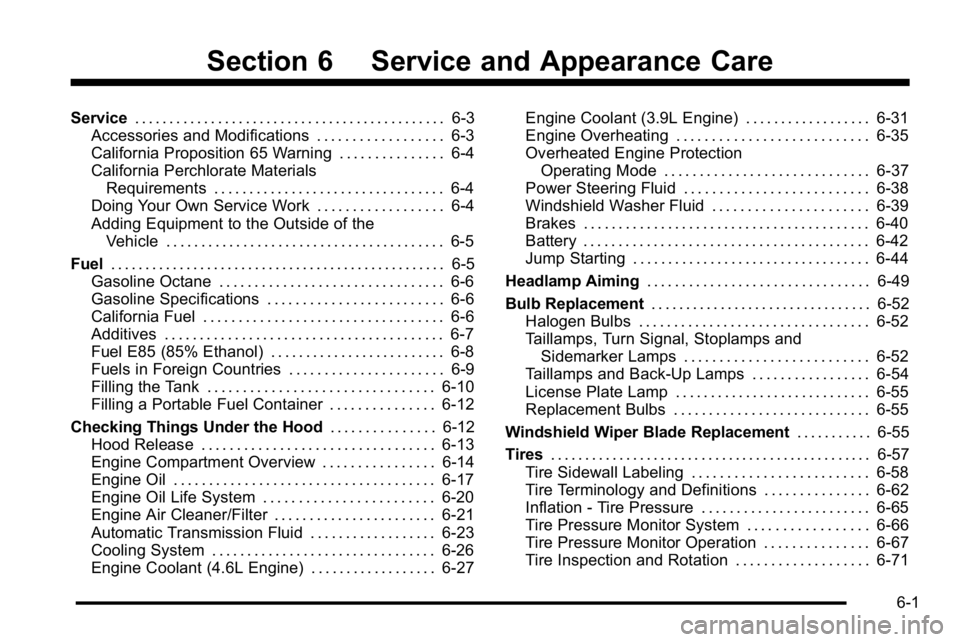
Service. . . . . . . . . . . . . . . . . . . . . . . . . . . . . . . . . . . . . . . . . . . . . 6-3
Accessories and Modifications . . . . . . . . . . . . . . . . . . 6-3
California Proposition 65 Warning . . . . . . . . . . . . . . . 6-4
California Perchlorate Materials Requirements . . . . . . . . . . . . . . . . . . . . . . . . . . . . . . . . . 6-4
Doing Your Own Service Work . . . . . . . . . . . . . . . . . . 6-4
Adding Equipment to the Outside of the Vehicle . . . . . . . . . . . . . . . . . . . . . . . . . . . . . . . . . . . . . . . . 6-5
Fuel . . . . . . . . . . . . . . . . . . . . . . . . . . . . . . . . . . . . . . . . . . . . . . . . . 6-5
Gasoline Octane . . . . . . . . . . . . . . . . . . . . . . . . . . . . . . . . 6-6
Gasoline Specifications . . . . . . . . . . . . . . . . . . . . . . . . . 6-6
California Fuel . . . . . . . . . . . . . . . . . . . . . . . . . . . . . . . . . . 6-6
Additives . . . . . . . . . . . . . . . . . . . . . . . . . . . . . . . . . . . . . . . . 6-7
Fuel E85 (85% Ethanol) . . . . . . . . . . . . . . . . . . . . . . . . . 6-8
Fuels in Foreign Countries . . . . . . . . . . . . . . . . . . . . . . 6-9
Filling the Tank . . . . . . . . . . . . . . . . . . . . . . . . . . . . . . . . 6-10
Filling a Portable Fuel Container . . . . . . . . . . . . . . . 6-12
Checking Things Under the Hood . . . . . . . . . . . . . . .6-12
Hood Release . . . . . . . . . . . . . . . . . . . . . . . . . . . . . . . . . 6-13
Engine Compartment Overview . . . . . . . . . . . . . . . . 6-14
Engine Oil . . . . . . . . . . . . . . . . . . . . . . . . . . . . . . . . . . . . . 6-17
Engine Oil Life System . . . . . . . . . . . . . . . . . . . . . . . . 6-20
Engine Air Cleaner/Filter . . . . . . . . . . . . . . . . . . . . . . . 6-21
Automatic Transmission Fluid . . . . . . . . . . . . . . . . . . 6-23
Cooling System . . . . . . . . . . . . . . . . . . . . . . . . . . . . . . . . 6-26
Engine Coolant (4.6L Engine) . . . . . . . . . . . . . . . . . . 6-27 Engine Coolant (3.9L Engine) . . . . . . . . . . . . . . . . . . 6-31
Engine Overheating . . . . . . . . . . . . . . . . . . . . . . . . . . . 6-35
Overheated Engine Protection
Operating Mode . . . . . . . . . . . . . . . . . . . . . . . . . . . . . 6-37
Power Steering Fluid . . . . . . . . . . . . . . . . . . . . . . . . . . 6-38
Windshield Washer Fluid . . . . . . . . . . . . . . . . . . . . . . 6-39
Brakes . . . . . . . . . . . . . . . . . . . . . . . . . . . . . . . . . . . . . . . . . 6-40
Battery . . . . . . . . . . . . . . . . . . . . . . . . . . . . . . . . . . . . . . . . . 6-42
Jump Starting . . . . . . . . . . . . . . . . . . . . . . . . . . . . . . . . . . 6-44
Headlamp Aiming . . . . . . . . . . . . . . . . . . . . . . . . . . . . . . . . 6-49
Bulb Replacement . . . . . . . . . . . . . . . . . . . . . . . . . . . . . . . . 6-52
Halogen Bulbs . . . . . . . . . . . . . . . . . . . . . . . . . . . . . . . . . 6-52
Taillamps, Turn Signal, Stoplamps and Sidemarker Lamps . . . . . . . . . . . . . . . . . . . . . . . . . . 6-52
Taillamps and Back-Up Lamps . . . . . . . . . . . . . . . . . 6-54
License Plate Lamp . . . . . . . . . . . . . . . . . . . . . . . . . . . . 6-55
Replacement Bulbs . . . . . . . . . . . . . . . . . . . . . . . . . . . . 6-55
Windshield Wiper Blade Replacement . . . . . . . . . . .6-55
Tires . . . . . . . . . . . . . . . . . . . . . . . . . . . . . . . . . . . . . . . . . . . . . . . 6-57
Tire Sidewall Labeling . . . . . . . . . . . . . . . . . . . . . . . . . 6-58
Tire Terminology and Definitions . . . . . . . . . . . . . . . 6-62
Inflation - Tire Pressure . . . . . . . . . . . . . . . . . . . . . . . . 6-65
Tire Pressure Monitor System . . . . . . . . . . . . . . . . . 6-66
Tire Pressure Monitor Operation . . . . . . . . . . . . . . . 6-67
Tire Inspection and Rotation . . . . . . . . . . . . . . . . . . . 6-71
6-1
Page 317 of 474

A.Underhood Fuse Block on page 6‑110.
B. Remote Positive (+) Battery Terminal. See Jump
Starting on page 6‑44.
C. Windshield Washer Fluid Reservoir. See “Adding
Washer Fluid” underWindshield Washer Fluid
on
page 6‑39.
D. Engine Coolant Recovery Tank. See Cooling
System on page 6‑26.
E. Radiator Pressure Cap. See Cooling System
on
page 6‑26.
F. Power Steering Fluid Reservoir (Out of View). See Power Steering Fluid on page 6‑38. G. Engine Oil Fill Cap. See
“When to Add Engine Oil”
under Engine Oil on page 6‑17.
H. Engine Oil Dipstick (Out of View). See “Checking
Engine Oil” underEngine Oil on page 6‑17.
I. Automatic Transmission Fluid Dipstick. See “Checking the Fluid Level” underAutomatic
Transmission Fluid on page 6‑23.
J. Brake Fluid Reservoir. See “Brake Fluid”under
Brakes on page 6‑40.
K. Engine Air Cleaner/Filter on page 6‑21.
6-15
Page 319 of 474

A.Underhood Fuse Blockon page 6‑110.
B. Remote Positive (+) Terminal. See Jump Starting
on page 6‑44.
C. Windshield Washer Fluid Reservoir. See “Adding
Washer Fluid” underWindshield Washer Fluid
on
page 6‑39.
D. Engine Coolant Surge Tank and Pressure Cap. See Cooling System on page 6‑26.
E. Remote Negative (−) Terminal. See Jump Starting
on page 6‑44.
F. Power Steering Fluid on page 6‑38.
G. Engine Oil Fill Cap. See “When to Add Engine Oil”
under Engine Oil on page 6‑17.
H. Engine Oil Dipstick. See “Checking Engine Oil”
under Engine Oil on page 6‑17.
I. Brake Master Cylinder Reservoir. See “Brake
Fluid” under Brakes on page 6‑40.
J. Automatic Transmission Fluid Cap and Dipstick (Out of View). See Automatic Transmission Fluid
on page 6‑23.
K. Engine Air Cleaner/Filter on page 6‑21.
Engine Oil
Checking Engine Oil
It is a good idea to check the engine oil level at each
fuel fill. In order to get an accurate reading, the oil must
be warm and the vehicle must be on level ground.
The engine oil dipstick handle is a yellow loop. See
Engine Compartment Overview
on page 6‑14for the
location of the engine oil dipstick.
1. Turn off the engine and give the oil several minutes to drain back into the oil pan. If this is not done, the
oil dipstick might not show the actual level.
2. Pull out the dipstick and clean it with a paper towel or cloth, then push it back in all the way. Remove it
again, keeping the tip down, and check the level.
6-17
Page 340 of 474

Power Steering Fluid
SeeEngine Compartment
Overviewon page 6‑14for information on the
location of the power
steering fluid reservoir.
When to Check Power Steering Fluid
It is not necessary to regularly check power steering
fluid unless you suspect there is a leak in the system or
you hear an unusual noise. A fluid loss in this system
could indicate a problem. Have the system inspected
and repaired.
How to Check Power Steering Fluid
To check the power steering fluid:
1. Turn the key off and let the engine compartment cool down.
2. Wipe the cap and the top of the reservoir clean.
3. Unscrew the cap and wipe the dipstick with a clean rag.
4. Replace the cap and completely tighten it.
5. Remove the cap again and look at the fluid level on the dipstick.
The level should be at the FULL COLD mark.
If necessary, add only enough fluid to bring the level
up to the mark.
What to Use
To determine what kind of fluid to use, see
Recommended Fluids and Lubricantson page 7‑9.
Always use the proper fluid.
Notice: Use of the incorrect fluid may damage the
vehicle and the damages may not be covered by the
vehicle's warranty. Always use the correct fluid
listed in Recommended Fluids and Lubricants
on
page 7‑9.
6-38
Page 364 of 474
Tire Terminology and Definitions
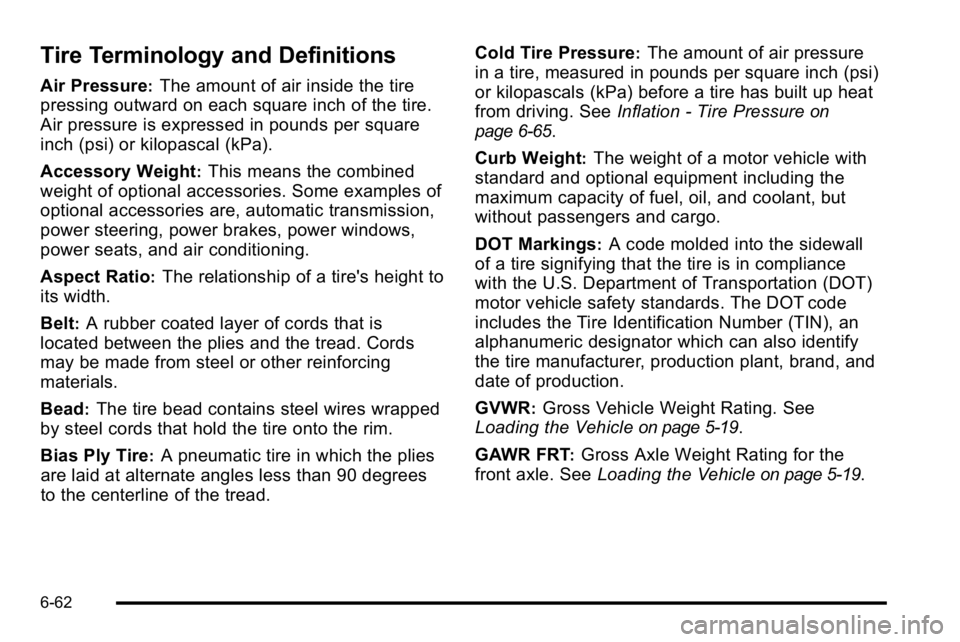
Air Pressure:The amount of air inside the tire
pressing outward on each square inch of the tire.
Air pressure is expressed in pounds per square
inch (psi) or kilopascal (kPa).
Accessory Weight
:This means the combined
weight of optional accessories. Some examples of
optional accessories are, automatic transmission,
power steering, power brakes, power windows,
power seats, and air conditioning.
Aspect Ratio
:The relationship of a tire's height to
its width.
Belt
:A rubber coated layer of cords that is
located between the plies and the tread. Cords
may be made from steel or other reinforcing
materials.
Bead
:The tire bead contains steel wires wrapped
by steel cords that hold the tire onto the rim.
Bias Ply Tire
:A pneumatic tire in which the plies
are laid at alternate angles less than 90 degrees
to the centerline of the tread. Cold Tire Pressure
:The amount of air pressure
in a tire, measured in pounds per square inch (psi)
or kilopascals (kPa) before a tire has built up heat
from driving. See Inflation - Tire Pressure
on
page 6‑65
.
Curb Weight
:The weight of a motor vehicle with
standard and optional equipment including the
maximum capacity of fuel, oil, and coolant, but
without passengers and cargo.
DOT Markings
:A code molded into the sidewall
of a tire signifying that the tire is in compliance
with the U.S. Department of Transportation (DOT)
motor vehicle safety standards. The DOT code
includes the Tire Identification Number (TIN), an
alphanumeric designator which can also identify
the tire manufacturer, production plant, brand, and
date of production.
GVWR
:Gross Vehicle Weight Rating. See
Loading the Vehicle
on page 5‑19.
GAWR FRT
:Gross Axle Weight Rating for the
front axle. See Loading the Vehicle
on page 5‑19.
6-62
Page 418 of 474
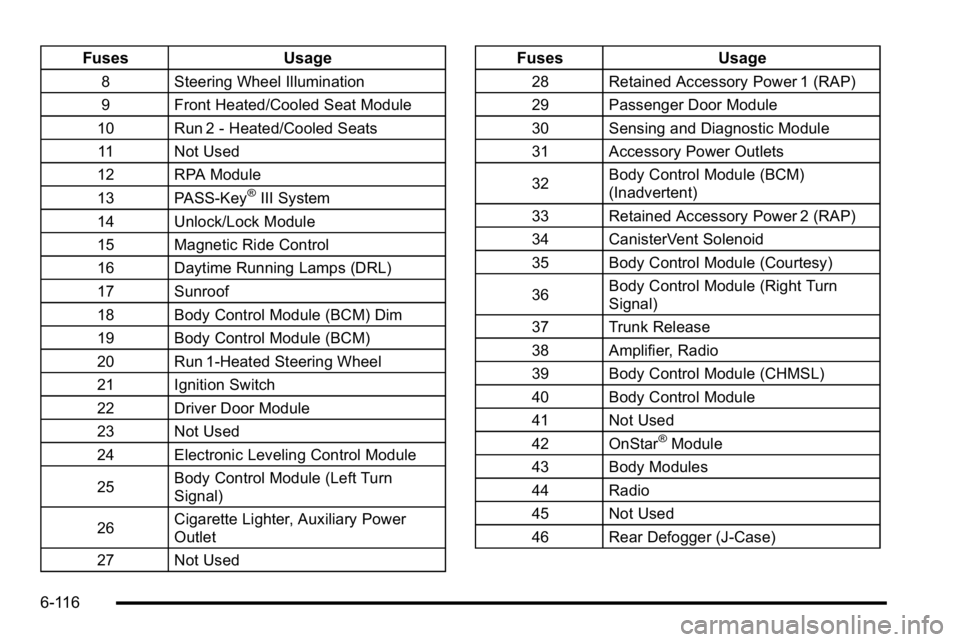
FusesUsage
8 Steering Wheel Illumination
9 Front Heated/Cooled Seat Module
10 Run 2 - Heated/Cooled Seats 11 Not Used
12 RPA Module
13 PASS-Key
®III System
14 Unlock/Lock Module
15 Magnetic Ride Control
16 Daytime Running Lamps (DRL)
17 Sunroof
18 Body Control Module (BCM) Dim
19 Body Control Module (BCM)
20 Run 1-Heated Steering Wheel
21 Ignition Switch
22 Driver Door Module
23 Not Used
24 Electronic Leveling Control Module
25 Body Control Module (Left Turn
Signal)
26 Cigarette Lighter, Auxiliary Power
Outlet
27 Not Used
Fuses Usage
28 Retained Accessory Power 1 (RAP)
29 Passenger Door Module
30 Sensing and Diagnostic Module
31 Accessory Power Outlets
32Body Control Module (BCM)
(Inadvertent)
33 Retained Accessory Power 2 (RAP)
34 CanisterVent Solenoid
35 Body Control Module (Courtesy)
36 Body Control Module (Right Turn
Signal)
37 Trunk Release
38 Amplifier, Radio
39 Body Control Module (CHMSL)
40 Body Control Module
41 Not Used
42 OnStar
®Module
43 Body Modules
44 Radio
45 Not Used
46 Rear Defogger (J-Case)
6-116