power steering BUICK LUCERNE 2010 Owner's Manual
[x] Cancel search | Manufacturer: BUICK, Model Year: 2010, Model line: LUCERNE, Model: BUICK LUCERNE 2010Pages: 474
Page 5 of 474
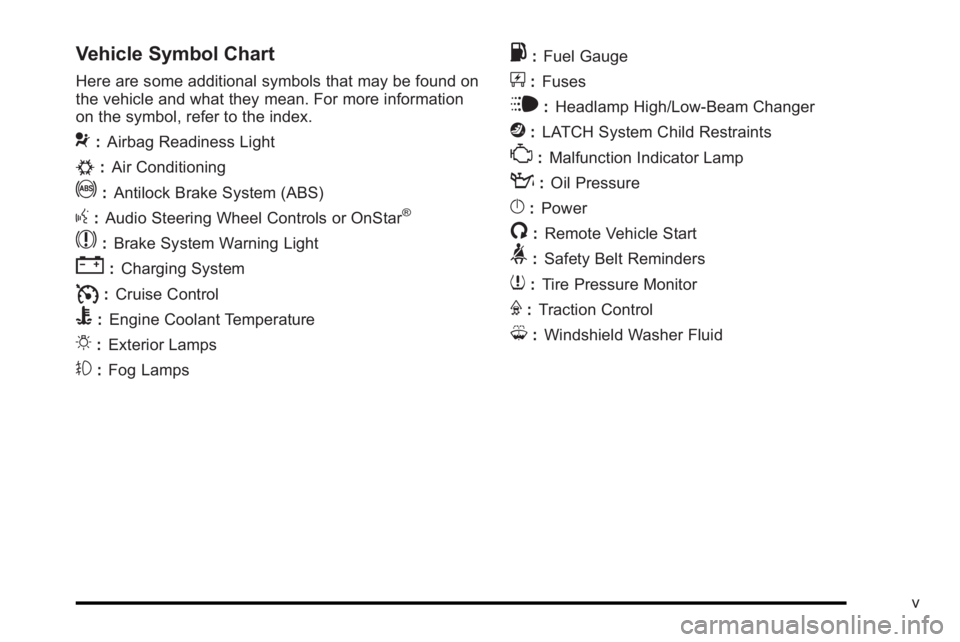
Vehicle Symbol Chart
Here are some additional symbols that may be found on
the vehicle and what they mean. For more information
on the symbol, refer to the index.
9:Airbag Readiness Light
#:Air Conditioning
!:Antilock Brake System (ABS)
g:Audio Steering Wheel Controls or OnStar®
$: Brake System Warning Light
":Charging System
I:Cruise Control
B: Engine Coolant Temperature
O:Exterior Lamps
#:Fog Lamps
.: Fuel Gauge
+:Fuses
i: Headlamp High/Low-Beam Changer
j:LATCH System Child Restraints
*: Malfunction Indicator Lamp
::Oil Pressure
}:Power
/:Remote Vehicle Start
>:Safety Belt Reminders
7:Tire Pressure Monitor
F:Traction Control
M:Windshield Washer Fluid
v
Page 7 of 474
Section 1 In Brief
Instrument Panel. . . . . . . . . . . . . . . . . . . . . . . . . . . . . . . . . . . 1-2
Initial Drive Information . . . . . . . . . . . . . . . . . . . . . . . . . . . 1-4
Remote Keyless Entry (RKE) System . . . . . . . . . . . 1-4
Remote Vehicle Start . . . . . . . . . . . . . . . . . . . . . . . . . . . 1-4
Door Locks . . . . . . . . . . . . . . . . . . . . . . . . . . . . . . . . . . . . . 1-5
Trunk Release . . . . . . . . . . . . . . . . . . . . . . . . . . . . . . . . . . 1-5
Windows . . . . . . . . . . . . . . . . . . . . . . . . . . . . . . . . . . . . . . . . 1-6
Seat Adjustment . . . . . . . . . . . . . . . . . . . . . . . . . . . . . . . . 1-6
Heated Seats . . . . . . . . . . . . . . . . . . . . . . . . . . . . . . . . . . . 1-8
Heated and Ventilated Seats . . . . . . . . . . . . . . . . . . . . 1-8
Head Restraint Adjustment . . . . . . . . . . . . . . . . . . . . . . 1-8
Safety Belt . . . . . . . . . . . . . . . . . . . . . . . . . . . . . . . . . . . . . . 1-8
Sensing System for Passenger Airbag . . . . . . . . . . 1-9
Mirror Adjustment . . . . . . . . . . . . . . . . . . . . . . . . . . . . . . . 1-9
Steering Wheel Adjustment . . . . . . . . . . . . . . . . . . . . 1-10
Interior Lighting . . . . . . . . . . . . . . . . . . . . . . . . . . . . . . . . 1-11
Exterior Lighting . . . . . . . . . . . . . . . . . . . . . . . . . . . . . . . 1-12
Windshield Wiper/Washer . . . . . . . . . . . . . . . . . . . . . . 1-13
Climate Controls . . . . . . . . . . . . . . . . . . . . . . . . . . . . . . . 1-13 Vehicle Features
. . . . . . . . . . . . . . . . . . . . . . . . . . . . . . . . . . 1-14
Radio(s) . . . . . . . . . . . . . . . . . . . . . . . . . . . . . . . . . . . . . . . 1-14
Satellite Radio . . . . . . . . . . . . . . . . . . . . . . . . . . . . . . . . . 1-16
Portable Audio Devices . . . . . . . . . . . . . . . . . . . . . . . . 1-16
Steering Wheel Controls . . . . . . . . . . . . . . . . . . . . . . . 1-16
Bluetooth
®. . . . . . . . . . . . . . . . . . . . . . . . . . . . . . . . . . . . . 1-17
Navigation System . . . . . . . . . . . . . . . . . . . . . . . . . . . . . 1-17
Driver Information Center (DIC) . . . . . . . . . . . . . . . . 1-18
Cruise Control . . . . . . . . . . . . . . . . . . . . . . . . . . . . . . . . . 1-19
Lane Departure Warning (LDW) . . . . . . . . . . . . . . . 1-19
Side Blind Zone Alert (SBZA) . . . . . . . . . . . . . . . . . . 1-20
Ultrasonic Parking Assist . . . . . . . . . . . . . . . . . . . . . . 1-20
Power Outlets . . . . . . . . . . . . . . . . . . . . . . . . . . . . . . . . . 1-20
Universal Remote System . . . . . . . . . . . . . . . . . . . . . 1-21
Performance and Maintenance . . . . . . . . . . . . . . . . . .1-21
Traction Control System (TCS) . . . . . . . . . . . . . . . . 1-21
StabiliTrak
®. . . . . . . . . . . . . . . . . . . . . . . . . . . . . . . . . . . . 1-22
Tire Pressure Monitor . . . . . . . . . . . . . . . . . . . . . . . . . . 1-22
Tire Sealant and Compressor Kit . . . . . . . . . . . . . . 1-23
Engine Oil Life System . . . . . . . . . . . . . . . . . . . . . . . . 1-23
Fuel E85 (85% Ethanol) . . . . . . . . . . . . . . . . . . . . . . . 1-23
Driving for Better Fuel Economy . . . . . . . . . . . . . . . 1-23
Roadside Assistance Program . . . . . . . . . . . . . . . . . 1-24
OnStar
®. . . . . . . . . . . . . . . . . . . . . . . . . . . . . . . . . . . . . . . 1-24
1-1
Page 9 of 474

A.Outlet Adjustment on page 4‑27.
B. DIC Operation and Displays
on page 4‑47(If Equipped).
C. Turn Signal/Multifunction Lever on page 4‑5.
D. Instrument Panel Cluster on page 4‑30.
E. Hazard Warning Flashers on page 4‑3.
F. Audio System(s) on page 4‑74.
G. Exterior Lamps on page 4‑12.
H. Trunk Release. See Trunk on page 3‑12.
I. Instrument Panel Brightness on page 4‑14.
J. Hood Release on page 6‑13.
K. Lane Departure Warning (LDW)
on page 3‑42(If Equipped). L.
Cruise Control
on page 4‑9.Heated Steering
Wheelon page 4‑4(If Equipped).
M. Parking Brake on page 3‑26.
N. Audio Steering Wheel Controls
on page 4‑105(If Equipped).
O. Climate Control System
on page 4‑18orDual
Automatic Climate Control System on page 4‑22.
P. Traction Control System (TCS)
on page 5‑6and
StabiliTrak®System on page 5‑6.
Q. Front Storage Area on page 3‑51.
R. Shift Lever. See Automatic Transmission Operation
on page 3‑24.
S. Accessory Power Outlet(s) on page 4‑17.
T. Glove Box on page 3‑51.
1-3
Page 11 of 474
When the vehicle starts, the parking lamps will turn on
and remain on as long as the engine is running. The
doors will be locked and the climate control system may
come on.
The engine will continue to run for 10 minutes. Repeat
the steps for a 10-minute time extension. Remote start
can be extended only once.
Canceling a Remote Start
To cancel a remote start:
.Aim the RKE transmitter at the vehicle and press
and hold
/until the parking lamps turn off.
.Turn on the hazard warning flashers.
.Turn the ignition on and then back off.
See Remote Vehicle Start on page 3‑7.
Door Locks
From the outside, unlock the door using either the key
or the RKE transmitter.
From the inside, use the power door lock switches or
manual lock knobs located at the top of the door panel
near the window.
Power Door Locks
On vehicles with power door locks, the switches are
located on the front doors.
"(Unlock): Press to unlock the doors.
Q(Lock):Remove the key from the ignition and press
to lock the doors.
For more information, see:
.Door Locks on page 3‑9.
.Power Door Locks on page 3‑10.
.Remote Keyless Entry (RKE) System Operationon page 3‑4.
Trunk Release
In addition to the trunk release button on the RKE
transmitter, there is a remote release
Vbutton
located to the left of the steering wheel, next to the
instrument panel brightness control. Press to open the
trunk.
See Trunk on page 3‑12.
1-5
Page 17 of 474
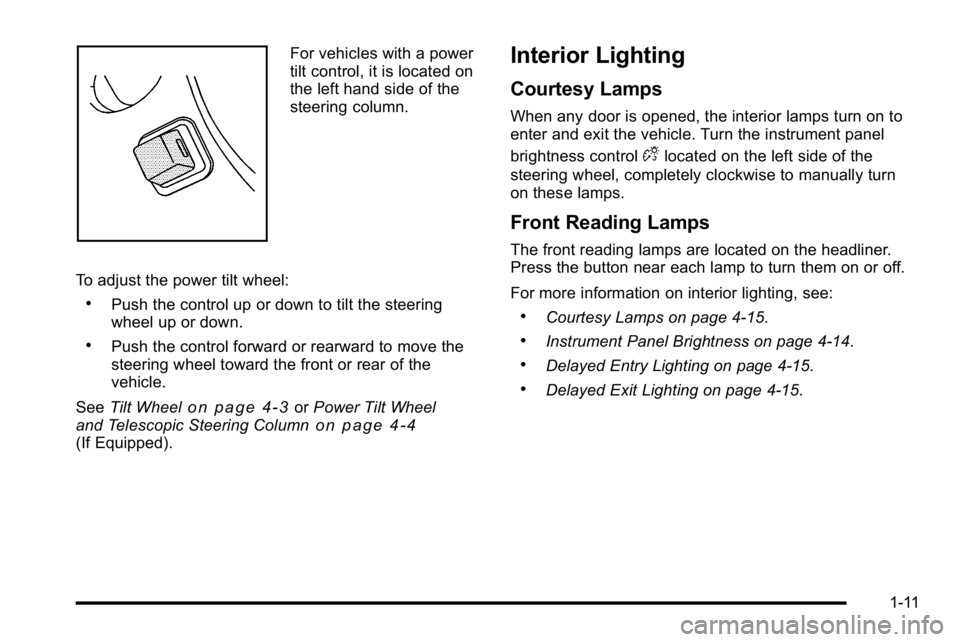
For vehicles with a power
tilt control, it is located on
the left hand side of the
steering column.
To adjust the power tilt wheel:
.Push the control up or down to tilt the steering
wheel up or down.
.Push the control forward or rearward to move the
steering wheel toward the front or rear of the
vehicle.
See Tilt Wheel
on page 4‑3orPower Tilt Wheel
and Telescopic Steering Columnon page 4‑4(If Equipped).
Interior Lighting
Courtesy Lamps
When any door is opened, the interior lamps turn on to
enter and exit the vehicle. Turn the instrument panel
brightness control
Dlocated on the left side of the
steering wheel, completely clockwise to manually turn
on these lamps.
Front Reading Lamps
The front reading lamps are located on the headliner.
Press the button near each lamp to turn them on or off.
For more information on interior lighting, see:
.Courtesy Lamps on page 4‑15.
.Instrument Panel Brightness on page 4‑14.
.Delayed Entry Lighting on page 4‑15.
.Delayed Exit Lighting on page 4‑15.
1-11
Page 32 of 474
![BUICK LUCERNE 2010 Owners Manual The OnStar system can record and transmit vehicle
information. This information is automatically sent to an
OnStar call center when
Qis pressed,]is pressed,
or if the airbags or ACR system deploy. Thi](/img/43/35351/w960_35351-31.png "BUICK LUCERNE 2010 Owners Manual The OnStar system can record and transmit vehicle
information. This information is automatically sent to an
OnStar call center when
Qis pressed,]is pressed,
or if the airbags or ACR system deploy. Thi")
The OnStar system can record and transmit vehicle
information. This information is automatically sent to an
OnStar call center when
Qis pressed,]is pressed,
or if the airbags or ACR system deploy. This information
usually includes the vehicle's GPS location and, in the
event of a crash, additional information regarding the
crash that the vehicle was involved in (e.g. the direction
from which the vehicle was hit). When the virtual
advisor feature of OnStar hands-free calling is used, the
vehicle also sends OnStar the vehicle's GPS location
so they can provide services where it is located.
Location information about the vehicle is only available
if the GPS satellite signals are unobstructed and
available.
The vehicle must have a working electrical system,
including adequate battery power, for the OnStar
equipment to operate. There are other problems OnStar
cannot control that may prevent OnStar from providing
OnStar service at any particular time or place. Some
examples are damage to important parts of the vehicle
in a crash, hills, tall buildings, tunnels, weather or
wireless phone network congestion.
OnStar Steering Wheel Controls
This vehicle may have a Talk/Mute button that can be
used to interact with OnStar hands-free calling. See
Audio Steering Wheel Controls
on page 4‑105for more
information.
On some vehicles, the mute button can be used to dial
numbers into voice mail systems, or to dial phone
extensions. See the OnStar Owner's Guide for more
information.
Your Responsibility
Increase the volume of the radio if the OnStar advisor
cannot be heard.
If the light next to the OnStar buttons is red, the system
may not be functioning properly. Press
Qand request a
vehicle diagnostic. If the light appears clear (no light is
appearing), your OnStar subscription has expired and
all services have been deactivated. Press
Qto confirm
that the OnStar equipment is active.
1-26
Page 129 of 474
Retained Accessory Power (RAP)
The following accessories can be used for up to
10 minutes after the engine is turned off.
.Audio System
.Audio Steering Wheel (if equipped)
.Clock
.Power Windows
.Sunroof (if equipped)
Power to these accessories works up to 10 minutes or
until the driver door is opened.
The instrument panel cluster lights stay on for a few
seconds, then will go out. Once the driver door is
opened, the power shuts off to these accessories. The
vehicle has a feature designed to protect the battery
against drainage. For more information see Inadvertent
Power Battery Saver
on page 4‑16and Electric Power
Management on page 4‑16.
Starting the Engine
Move the shift lever to P (Park) or N (Neutral). The
engine will not start in any other position. To restart
the engine when the vehicle is already moving, use
N (Neutral) only.
Notice: Do not try to shift to P (Park) if the vehicle
is moving. If you do, you could damage the
transmission. Shift to P (Park) only when the
vehicle is stopped.
Starting Procedure
1. With your foot off the accelerator pedal, turn the ignition to START. When the engine starts, let
go of the key. The idle speed will slow down
as the engine warms. Do not race the engine
immediately after starting it. Operate the engine
and transmission gently to allow the oil to warm up
and lubricate all moving parts.
3-21
Page 161 of 474
Section 4 Instrument Panel
Instrument Panel Overview. . . . . . . . . . . . . . . . . . . . . . . .4-3
Hazard Warning Flashers . . . . . . . . . . . . . . . . . . . . . . . 4-3
Horn . . . . . . . . . . . . . . . . . . . . . . . . . . . . . . . . . . . . . . . . . . . . 4-3
Tilt Wheel . . . . . . . . . . . . . . . . . . . . . . . . . . . . . . . . . . . . . . . 4-3
Power Tilt Wheel and Telescopic Steering Column . . . . . . . . . . . . . . . . . . . . . . . . . . . . . . . . . . . . . . . 4-4
Heated Steering Wheel . . . . . . . . . . . . . . . . . . . . . . . . . 4-4
Turn Signal/Multifunction Lever . . . . . . . . . . . . . . . . . . 4-5
Turn and Lane-Change Signals . . . . . . . . . . . . . . . . . 4-5
Headlamp High/Low-Beam Changer . . . . . . . . . . . . 4-6
Flash-to-Pass . . . . . . . . . . . . . . . . . . . . . . . . . . . . . . . . . . . 4-6
Windshield Wipers . . . . . . . . . . . . . . . . . . . . . . . . . . . . . . 4-6
Rainsense™ II Wipers . . . . . . . . . . . . . . . . . . . . . . . . . . 4-7
Windshield Washer . . . . . . . . . . . . . . . . . . . . . . . . . . . . . 4-8
Cruise Control . . . . . . . . . . . . . . . . . . . . . . . . . . . . . . . . . . 4-9
Exterior Lamps . . . . . . . . . . . . . . . . . . . . . . . . . . . . . . . . 4-12
Wiper Activated Headlamps . . . . . . . . . . . . . . . . . . . 4-13
Headlamps on Reminder . . . . . . . . . . . . . . . . . . . . . . 4-13
Daytime Running Lamps (DRL) . . . . . . . . . . . . . . . . 4-13
Fog Lamps . . . . . . . . . . . . . . . . . . . . . . . . . . . . . . . . . . . . 4-14
Cornering Lamps . . . . . . . . . . . . . . . . . . . . . . . . . . . . . . 4-14
Exterior Lighting Battery Saver . . . . . . . . . . . . . . . . . 4-14
Instrument Panel Brightness . . . . . . . . . . . . . . . . . . . 4-14
Courtesy Lamps . . . . . . . . . . . . . . . . . . . . . . . . . . . . . . . 4-15
Entry Lighting . . . . . . . . . . . . . . . . . . . . . . . . . . . . . . . . . . 4-15
Delayed Entry Lighting . . . . . . . . . . . . . . . . . . . . . . . . . 4-15 Theater Dimming . . . . . . . . . . . . . . . . . . . . . . . . . . . . . . 4-15
Delayed Exit Lighting . . . . . . . . . . . . . . . . . . . . . . . . . . 4-15
Perimeter Lighting . . . . . . . . . . . . . . . . . . . . . . . . . . . . . 4-15
Front Reading Lamps . . . . . . . . . . . . . . . . . . . . . . . . . . 4-15
Electric Power Management . . . . . . . . . . . . . . . . . . . 4-16
Inadvertent Power Battery Saver . . . . . . . . . . . . . . . 4-16
Battery Run-Down Protection . . . . . . . . . . . . . . . . . . 4-17
Accessory Power Outlet(s) . . . . . . . . . . . . . . . . . . . . . 4-17
Ashtray(s) . . . . . . . . . . . . . . . . . . . . . . . . . . . . . . . . . . . . . 4-18
Climate Controls . . . . . . . . . . . . . . . . . . . . . . . . . . . . . . . . . . 4-18
Climate Control System . . . . . . . . . . . . . . . . . . . . . . . . 4-18
Dual Automatic Climate Control System . . . . . . . 4-22
Outlet Adjustment . . . . . . . . . . . . . . . . . . . . . . . . . . . . . . 4-27
Passenger Compartment Air Filter . . . . . . . . . . . . . 4-28
Warning Lights, Gauges, and Indicators . . . . . . . .4-30
Instrument Panel Cluster . . . . . . . . . . . . . . . . . . . . . . . 4-30
Speedometer and Odometer . . . . . . . . . . . . . . . . . . . 4-32
Trip Odometer . . . . . . . . . . . . . . . . . . . . . . . . . . . . . . . . . 4-32
Tachometer . . . . . . . . . . . . . . . . . . . . . . . . . . . . . . . . . . . . 4-32
Safety Belt Reminders . . . . . . . . . . . . . . . . . . . . . . . . . 4-32
Airbag Readiness Light . . . . . . . . . . . . . . . . . . . . . . . . 4-33
Passenger Airbag Status Indicator . . . . . . . . . . . . . 4-34
Charging System Light . . . . . . . . . . . . . . . . . . . . . . . . 4-35
Brake System Warning Light . . . . . . . . . . . . . . . . . . . 4-36
Antilock Brake System (ABS) Warning Light . . . 4-37
4-1
Page 164 of 474

Power Tilt Wheel and Telescopic
Steering Column
For vehicles with a power
tilt control, it is located on
the left hand side of the
steering column.To adjust the power tilt wheel:
.Push the control up or down to tilt the steering
wheel up or down.
.Push the control forward or rearward to move the
steering wheel toward the front or rear of the
vehicle.
Heated Steering Wheel
For vehicles with a heated steering wheel, the button for
this feature is located on the steering wheel.
(:
Press to turn the heated steering wheel on or off.
A light on the button displays when the feature is
turned on.
The steering wheel takes about three minutes to start
heating.
4-4
Page 220 of 474

SERVICE BRAKE SYSTEM
This message displays if the ignition is on to inform the
driver that the brake fluid level is low. Have the brake
system serviced by your dealer as soon as possible.
The brake system warning light also appears on the
instrument panel cluster when this message appears
on the DIC. SeeBrake System Warning Light
on
page 4‑36.
SERVICE LANE DEPARTURE SYSTEM
If your vehicle has the Lane Departure Warning (LDW)
system, this message may display to indicate that the
LDW system is not working properly. If this message
remains on after continued driving, the system needs
service. See your dealer. See Lane Departure Warning
(LDW)
on page 3‑42for more information.
SERVICE PARK ASSIST
If your vehicle has this feature, this message displays if
there is a problem with the Ultrasonic Rear Parking
Assist (URPA) system. Do not use this system to help
you park. See Ultrasonic Rear Parking Assist (URPA)
on page 3‑37for more information. See your dealer for
service.
SERVICE POWER STEERING
Your vehicle may have a speed variable assist steering
system. See Steering on page 5‑8.
This message displays if a problem is detected with the
speed variable assist steering system. When this
message is displayed, you may notice that the effort
required to steer the vehicle decreases or feels lighter,
but you will still be able to steer the vehicle.
SERVICE SIDE BLIND ZONE ALERT
SYSTEM
If your vehicle has the Side Blind Zone Alert (SBZA)
system and this message displays, both SBZA displays
will remain on indicating there is a problem with the
SBZA system. If these displays remain on after
continued driving, the system needs service. See your
dealer. See Side Blind Zone Alert (SBZA)
on page 3‑39for more information.
4-60