steering wheel BUICK LUCERNE 2010 Owner's Guide
[x] Cancel search | Manufacturer: BUICK, Model Year: 2010, Model line: LUCERNE, Model: BUICK LUCERNE 2010Pages: 474
Page 161 of 474
Section 4 Instrument Panel
Instrument Panel Overview. . . . . . . . . . . . . . . . . . . . . . . .4-3
Hazard Warning Flashers . . . . . . . . . . . . . . . . . . . . . . . 4-3
Horn . . . . . . . . . . . . . . . . . . . . . . . . . . . . . . . . . . . . . . . . . . . . 4-3
Tilt Wheel . . . . . . . . . . . . . . . . . . . . . . . . . . . . . . . . . . . . . . . 4-3
Power Tilt Wheel and Telescopic Steering Column . . . . . . . . . . . . . . . . . . . . . . . . . . . . . . . . . . . . . . . 4-4
Heated Steering Wheel . . . . . . . . . . . . . . . . . . . . . . . . . 4-4
Turn Signal/Multifunction Lever . . . . . . . . . . . . . . . . . . 4-5
Turn and Lane-Change Signals . . . . . . . . . . . . . . . . . 4-5
Headlamp High/Low-Beam Changer . . . . . . . . . . . . 4-6
Flash-to-Pass . . . . . . . . . . . . . . . . . . . . . . . . . . . . . . . . . . . 4-6
Windshield Wipers . . . . . . . . . . . . . . . . . . . . . . . . . . . . . . 4-6
Rainsense™ II Wipers . . . . . . . . . . . . . . . . . . . . . . . . . . 4-7
Windshield Washer . . . . . . . . . . . . . . . . . . . . . . . . . . . . . 4-8
Cruise Control . . . . . . . . . . . . . . . . . . . . . . . . . . . . . . . . . . 4-9
Exterior Lamps . . . . . . . . . . . . . . . . . . . . . . . . . . . . . . . . 4-12
Wiper Activated Headlamps . . . . . . . . . . . . . . . . . . . 4-13
Headlamps on Reminder . . . . . . . . . . . . . . . . . . . . . . 4-13
Daytime Running Lamps (DRL) . . . . . . . . . . . . . . . . 4-13
Fog Lamps . . . . . . . . . . . . . . . . . . . . . . . . . . . . . . . . . . . . 4-14
Cornering Lamps . . . . . . . . . . . . . . . . . . . . . . . . . . . . . . 4-14
Exterior Lighting Battery Saver . . . . . . . . . . . . . . . . . 4-14
Instrument Panel Brightness . . . . . . . . . . . . . . . . . . . 4-14
Courtesy Lamps . . . . . . . . . . . . . . . . . . . . . . . . . . . . . . . 4-15
Entry Lighting . . . . . . . . . . . . . . . . . . . . . . . . . . . . . . . . . . 4-15
Delayed Entry Lighting . . . . . . . . . . . . . . . . . . . . . . . . . 4-15 Theater Dimming . . . . . . . . . . . . . . . . . . . . . . . . . . . . . . 4-15
Delayed Exit Lighting . . . . . . . . . . . . . . . . . . . . . . . . . . 4-15
Perimeter Lighting . . . . . . . . . . . . . . . . . . . . . . . . . . . . . 4-15
Front Reading Lamps . . . . . . . . . . . . . . . . . . . . . . . . . . 4-15
Electric Power Management . . . . . . . . . . . . . . . . . . . 4-16
Inadvertent Power Battery Saver . . . . . . . . . . . . . . . 4-16
Battery Run-Down Protection . . . . . . . . . . . . . . . . . . 4-17
Accessory Power Outlet(s) . . . . . . . . . . . . . . . . . . . . . 4-17
Ashtray(s) . . . . . . . . . . . . . . . . . . . . . . . . . . . . . . . . . . . . . 4-18
Climate Controls . . . . . . . . . . . . . . . . . . . . . . . . . . . . . . . . . . 4-18
Climate Control System . . . . . . . . . . . . . . . . . . . . . . . . 4-18
Dual Automatic Climate Control System . . . . . . . 4-22
Outlet Adjustment . . . . . . . . . . . . . . . . . . . . . . . . . . . . . . 4-27
Passenger Compartment Air Filter . . . . . . . . . . . . . 4-28
Warning Lights, Gauges, and Indicators . . . . . . . .4-30
Instrument Panel Cluster . . . . . . . . . . . . . . . . . . . . . . . 4-30
Speedometer and Odometer . . . . . . . . . . . . . . . . . . . 4-32
Trip Odometer . . . . . . . . . . . . . . . . . . . . . . . . . . . . . . . . . 4-32
Tachometer . . . . . . . . . . . . . . . . . . . . . . . . . . . . . . . . . . . . 4-32
Safety Belt Reminders . . . . . . . . . . . . . . . . . . . . . . . . . 4-32
Airbag Readiness Light . . . . . . . . . . . . . . . . . . . . . . . . 4-33
Passenger Airbag Status Indicator . . . . . . . . . . . . . 4-34
Charging System Light . . . . . . . . . . . . . . . . . . . . . . . . 4-35
Brake System Warning Light . . . . . . . . . . . . . . . . . . . 4-36
Antilock Brake System (ABS) Warning Light . . . 4-37
4-1
Page 162 of 474
Section 4 Instrument Panel
Traction Control System (TCS) WarningLight . . . . . . . . . . . . . . . . . . . . . . . . . . . . . . . . . . . . . . . . . 4-38
StabiliTrak
®Indicator Light . . . . . . . . . . . . . . . . . . . . . 4-39
Lane Departure Warning (LDW) Light . . . . . . . . . . 4-39
Engine Coolant Temperature Warning Light . . . . 4-40
Engine Coolant Temperature Gauge . . . . . . . . . . . 4-40
Tire Pressure Light . . . . . . . . . . . . . . . . . . . . . . . . . . . . 4-41
Malfunction Indicator Lamp . . . . . . . . . . . . . . . . . . . . 4-41
Oil Pressure Light . . . . . . . . . . . . . . . . . . . . . . . . . . . . . 4-44
Security Light . . . . . . . . . . . . . . . . . . . . . . . . . . . . . . . . . . 4-45
Fog Lamp Light . . . . . . . . . . . . . . . . . . . . . . . . . . . . . . . . 4-45
Cruise Control Light . . . . . . . . . . . . . . . . . . . . . . . . . . . 4-45
Highbeam On Light . . . . . . . . . . . . . . . . . . . . . . . . . . . . 4-45
Fuel Gauge . . . . . . . . . . . . . . . . . . . . . . . . . . . . . . . . . . . . 4-46 Driver Information Center (DIC)
. . . . . . . . . . . . . . . . . .4-47
DIC Operation and Displays . . . . . . . . . . . . . . . . . . . 4-47
DIC Compass . . . . . . . . . . . . . . . . . . . . . . . . . . . . . . . . . . 4-53
DIC Warnings and Messages . . . . . . . . . . . . . . . . . . 4-55
DIC Vehicle Customization . . . . . . . . . . . . . . . . . . . . 4-65
Audio System(s) . . . . . . . . . . . . . . . . . . . . . . . . . . . . . . . . . . 4-74
Setting the Clock . . . . . . . . . . . . . . . . . . . . . . . . . . . . . . 4-75
Radio(s) . . . . . . . . . . . . . . . . . . . . . . . . . . . . . . . . . . . . . . . 4-77
Using an MP3 . . . . . . . . . . . . . . . . . . . . . . . . . . . . . . . . . 4-87
XM Radio Messages . . . . . . . . . . . . . . . . . . . . . . . . . . . 4-92
Navigation/Radio System . . . . . . . . . . . . . . . . . . . . . . 4-93
Bluetooth
®. . . . . . . . . . . . . . . . . . . . . . . . . . . . . . . . . . . . . 4-93
Theft-Deterrent Feature . . . . . . . . . . . . . . . . . . . . . . 4-104
Audio Steering Wheel Controls . . . . . . . . . . . . . . . 4-105
Radio Reception . . . . . . . . . . . . . . . . . . . . . . . . . . . . . . 4-106
Backglass Antenna . . . . . . . . . . . . . . . . . . . . . . . . . . . 4-107
XM™ Satellite Radio Antenna System . . . . . . . . 4-107
4-2
Page 163 of 474
Instrument Panel Overview
Hazard Warning Flashers
The hazard warning flashers let you warn others that
you have a problem.
The hazard warning flasher button is located in the
center of the instrument panel above the radio.
|:Press to make the front and rear turn signal lamps
flash on and off. Press the button again to turn the
flashers off.
When the hazard warning flashers are on, the turn
signals will not work.
Horn
Press near or on the horn symbols on the steering
wheel pad to sound the horn.
Tilt Wheel
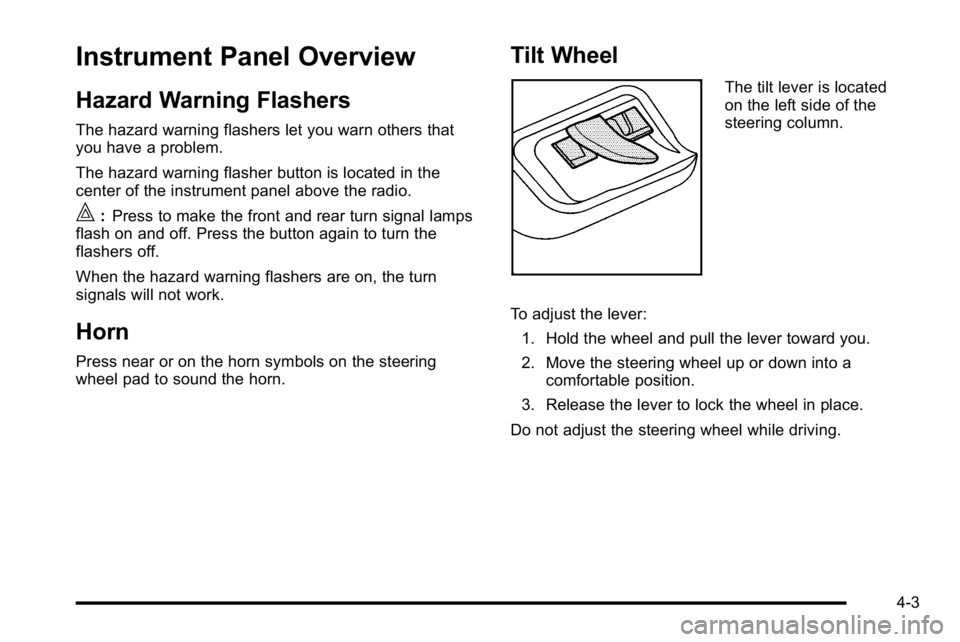
The tilt lever is located
on the left side of the
steering column.
To adjust the lever: 1. Hold the wheel and pull the lever toward you.
2. Move the steering wheel up or down into a comfortable position.
3. Release the lever to lock the wheel in place.
Do not adjust the steering wheel while driving.
4-3
Page 164 of 474

Power Tilt Wheel and Telescopic
Steering Column
For vehicles with a power
tilt control, it is located on
the left hand side of the
steering column.To adjust the power tilt wheel:
.Push the control up or down to tilt the steering
wheel up or down.
.Push the control forward or rearward to move the
steering wheel toward the front or rear of the
vehicle.
Heated Steering Wheel
For vehicles with a heated steering wheel, the button for
this feature is located on the steering wheel.
(:
Press to turn the heated steering wheel on or off.
A light on the button displays when the feature is
turned on.
The steering wheel takes about three minutes to start
heating.
4-4
Page 169 of 474
Cruise Control
With cruise control, you can maintain a speed of about
40 km/h (25 mph) or more without keeping your foot on
the accelerator. Cruise control does not work at speeds
below about 40 km/h (25 mph).
{WARNING:
Cruise control can be dangerous where you
cannot drive safely at a steady speed. So, do not
use the cruise control on winding roads or in
heavy traffic.
Cruise control can be dangerous on slippery
roads. On such roads, fast changes in tire traction
can cause excessive wheel slip, and you could
lose control. Do not use cruise control on slippery
roads.
If your vehicle has the Traction Control System (TCS)
and the cruise control is on, TCS will begin to limit
wheel spin and the cruise control automatically turns
off. See Traction Control System (TCS)
on page 5‑6.
When road conditions allow you to safely use it again,
the cruise control can be turned back on.
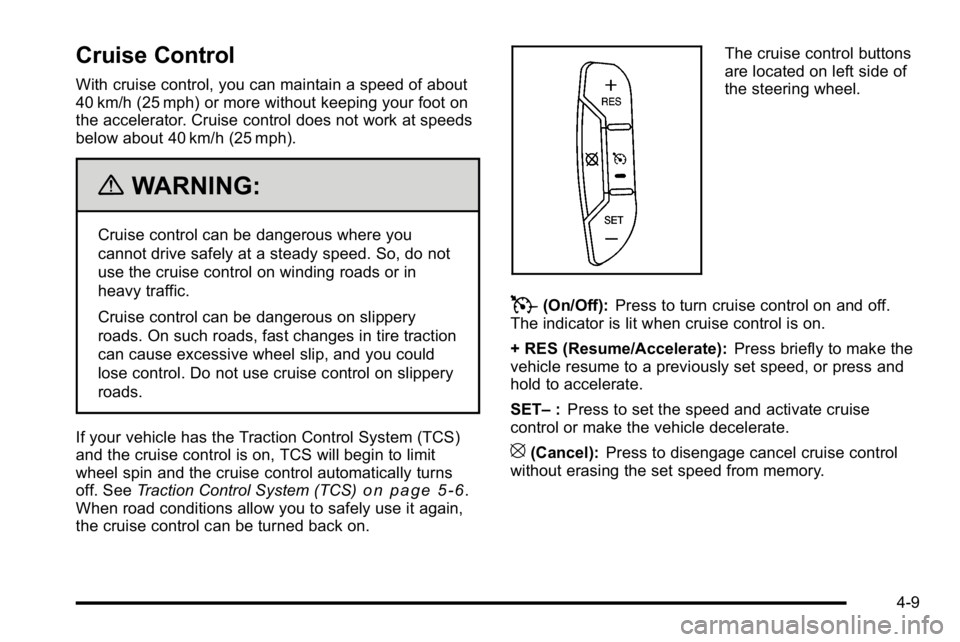
The cruise control buttons
are located on left side of
the steering wheel.
T(On/Off): Press to turn cruise control on and off.
The indicator is lit when cruise control is on.
+ RES (Resume/Accelerate): Press briefly to make the
vehicle resume to a previously set speed, or press and
hold to accelerate.
SET– :Press to set the speed and activate cruise
control or make the vehicle decelerate.
[(Cancel): Press to disengage cancel cruise control
without erasing the set speed from memory.
4-9
Page 170 of 474
Setting Cruise Control
The cruise control light on the instrument panel cluster
comes on after the cruise control has been set to the
desired speed. SeeInstrument Panel Cluster
on
page 4‑30.
{WARNING:
If you leave your cruise control on when you are
not using cruise, you might hit a button and go
into cruise when you do not want to. You could be
startled and even lose control. Keep the cruise
control switch off until you want to use cruise
control.
1. Press the
Tbutton to turn the cruise system on.
2. Get up to the desired speed.
3. Press and release the SET– button located on the
steering wheel.
4. Take your foot off the accelerator.
Resuming a Set Speed
If cruise control is set at a desired speed and then the
brakes are applied, the cruise control is disengaged
without erasing the set speed from memory.
Once the vehicle speed is 40 km/h (25 mph) or greater,
press the +RES button on the steering wheel. The
vehicle returns to the previously selected speed and
stays there.
Increasing Speed While Using Cruise
Control
If the cruise control system is already activated,
.Press and hold the +RES button on the steering
wheel until the desired speed is reached, then
release it.
.To increase vehicle speed in small increments,
press the +RES button. Each time this is done, the
vehicle goes about 1.6 km/h (1 mph) faster.
4-10
Page 171 of 474
Reducing Speed While Using Cruise
Control
If the cruise control system is already activated,
.Press and hold the SET–button on the steering
wheel until the lower speed desired is reached,
then release it.
.To slow down in small amounts, press the SET–
button briefly. Each time this is done, the vehicle
goes about 1.6 km/h (1 mph) slower.
Passing Another Vehicle While Using
Cruise Control
Use the accelerator pedal to increase vehicle speed.
When you take your foot off the pedal, the vehicle will
slow down to the cruise speed you set earlier.
Using Cruise Control on Hills
How well the cruise control will work on hills depends
upon the vehicle speed, load and the steepness of the
hills. When going up steep hills, you might have to step
on the accelerator pedal to maintain your speed. When
going downhill, you might have to brake or shift to a
lower gear to keep your speed down. If the brakes are
applied the cruise control will turn off.
Ending Cruise Control
There are three ways to end cruise control:
.To disengage cruise control, step lightly on the
brake pedal, or
.Press the[button on the steering wheel.
.To turn off the cruise control, press theTbutton
on the steering wheel.
4-11
Page 172 of 474
Erasing Speed Memory
The cruise control set speed memory is erased from
memory by pressing
Tor if the ignition is turned off.
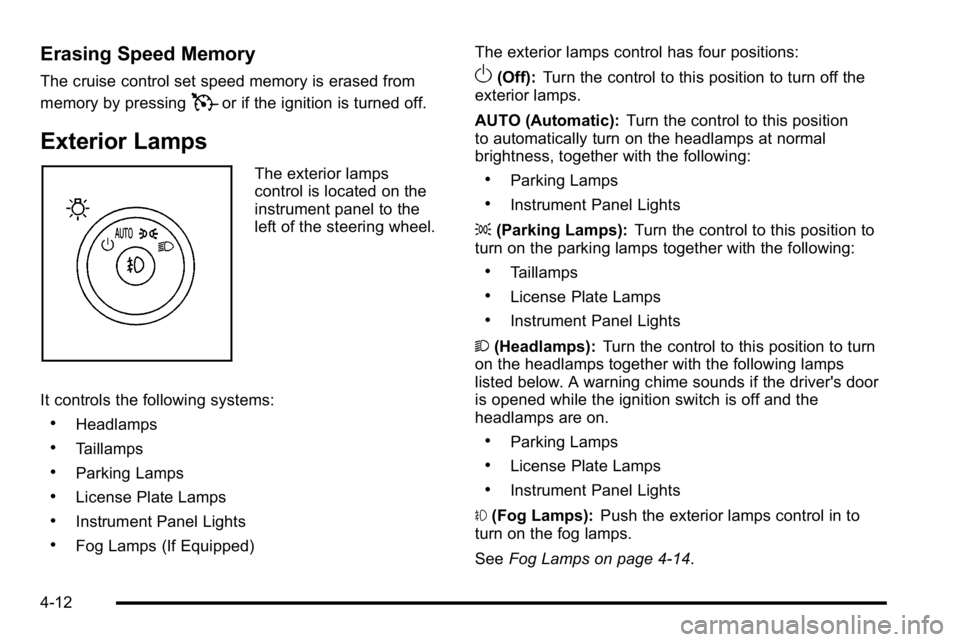
Exterior Lamps
The exterior lamps
control is located on the
instrument panel to the
left of the steering wheel.
It controls the following systems:
.Headlamps
.Taillamps
.Parking Lamps
.License Plate Lamps
.Instrument Panel Lights
.Fog Lamps (If Equipped) The exterior lamps control has four positions:
O(Off):
Turn the control to this position to turn off the
exterior lamps.
AUTO (Automatic): Turn the control to this position
to automatically turn on the headlamps at normal
brightness, together with the following:
.Parking Lamps
.Instrument Panel Lights
; (Parking Lamps): Turn the control to this position to
turn on the parking lamps together with the following:
.Taillamps
.License Plate Lamps
.Instrument Panel Lights
2 (Headlamps): Turn the control to this position to turn
on the headlamps together with the following lamps
listed below. A warning chime sounds if the driver's door
is opened while the ignition switch is off and the
headlamps are on.
.Parking Lamps
.License Plate Lamps
.Instrument Panel Lights
# (Fog Lamps): Push the exterior lamps control in to
turn on the fog lamps.
See Fog Lamps on page 4‑14.
4-12
Page 186 of 474

Sensors
The solar sensor, located in the defrost grille, in the
middle of the instrument panel, monitors the solar
radiation. Do not cover the solar sensor or the system
will not work properly.
There is also an interior temperature sensor located
next to the steering wheel that measures the
temperature of the air inside the vehicle.There is also an exterior temperature sensor located
behind the front grille. This sensor reads the outside air
temperature and helps maintain the temperature inside
the vehicle. Any cover on the front of the vehicle could
cause a false temperature reading to display.
In order to prevent false temperature readings at
startup, the displayed temperature will not change until
the following occurs:
.Vehicle speed is above 10 mph (16 km/h) for
five minutes.
.Vehicle speed is above 32 mph (51 km/h) for
two and a half minutes.
The climate control system uses the information from
these sensors to maintain your comfort setting by
adjusting the outlet temperature, fan speed, and the
air delivery mode. The system may also supply cooler
air to the side of the vehicle facing the sun. The
recirculation mode will also be used as needed to
maintain cool outlet temperatures.
4-26
Page 231 of 474

EASY EXIT RECALL
If your vehicle has this feature, it allows you to select
your preference for the automatic easy exit seat feature.
SeeMemory Seat and Mirrors
on page 2‑7for more
information.
Press the customization button until EASY EXIT
RECALL appears on the DIC display. Press the set/
reset button once to access the settings for this feature.
Then press the menu up/down button to scroll through
the following settings:
DOOR BUTTON ONLY: No automatic seat exit recall
will occur. The recall will only occur after pressing the
easy exit seat button.
BUTTON AND KEY OUT (default): If the features are
enabled through the EASY EXIT SETUP menu, the
driver's seat will move back, and if the vehicle has the
power tilt wheel and telescopic steering feature, the
power steering column will move up and forward when
the key is removed from the ignition or after pressing
the easy exit seat button. The automatic easy exit seat
movement will only occur one time after the key is
removed from the ignition. If the automatic movement
has already occurred, and you put the key back in the
ignition and remove it again, the seat and steering
column will stay in the original exit position, unless a
memory recall took place prior to removing the key
again. NO CHANGE:
No change will be made to this feature.
The current setting will remain.
To select a setting, press the set/reset button while the
desired setting is displayed on the DIC.
EASY EXIT SETUP
If your vehicle has this feature, it allows you to select
which areas will recall with the automatic easy exit
seat feature. It also allows you to turn off the automatic
easy exit feature. See Memory Seat and Mirrors
on
page 2‑7and “EASY EXIT RECALL” earlier for more
information.
Press the customization button until EASY EXIT SETUP
appears on the DIC display. Press the set/reset button
once to access the settings for this feature. Then press
the menu up/down button to scroll through the following
settings:
OFF: No automatic seat exit will recall.
SEAT ONLY: The driver's seat will recall.
TILT ONLY: The steering wheel tilt feature will recall.
4-71