instrument panel BUICK LUCERNE 2010 Owner's Guide
[x] Cancel search | Manufacturer: BUICK, Model Year: 2010, Model line: LUCERNE, Model: BUICK LUCERNE 2010Pages: 474
Page 175 of 474
Courtesy Lamps
When any door is opened, several lamps turn on
making it easier for you to enter and exit the vehicle.
Turn the instrument panel brightness control completely
clockwise to manually turn on these lamps.
Entry Lighting
If it is dark enough outside when you press the unlock
button on the remote keyless entry transmitter, the
interior courtesy lamps will turn on and stay on for about
40 seconds. The lamps can be turned off immediately
by pressing the lock button on the remote keyless entry
transmitter, turning the ignition key to ON/RUN or
activating the power door locks.
Delayed Entry Lighting
The interior lamps will turn on if you open the door
when it is dark enough outside. When you close the
door with the ignition off, the interior lamps will stay on
for up to 25 seconds or until the ignition is turned to an
on position. When the lamps turn off as a result of the
25 second timer or the ignition switch being turned on,
the lighting will deactivate by way of the theater
dimming effect. Locking the doors will override the
delayed entry lighting feature and the lamps will turn off
right away.
Theater Dimming
This feature allows for a three to five second fade out of
the courtesy lamps instead of immediate turn off.
Delayed Exit Lighting
If it is dark enough outside when you remove the key
from the ignition, the interior lamps will turn on and stay
on for about 25 seconds. This will give you time to find
the door pull handle or lock switches. Once the key
is inserted into the ignition, the exit lighting will be
cancelled and the lighting will fade out.
Perimeter Lighting
If it is dark enough outside when the unlock button on
the remote keyless entry transmitter is pressed, the
DRL, parking lamps and back-up lamps will come on.
This feature can be programmed on for various
amounts of time in seconds for each transmitter.
SeeDIC Vehicle Customization
on page 4‑65for
information on programming.
Front Reading Lamps
The front reading lamps are located on the headliner.
Press the button near each lamp to turn them on or off.
4-15
Page 180 of 474
To change the current mode, select one of the following:
H(Vent):Air is directed to the instrument panel
outlets.
)(Bi-Level): Air is divided between the instrument
panel outlets and the floor outlets. Slightly cooler air is
directed to the instrument panel outlets and warmer air
is directed to the floor outlets.
6(Floor): Air is directed to the floor outlets, with some
air directed to the windshield and side window outlets.
If recirculation is selected while in this mode, it stays on
for three minutes to reduce windshield fogging.
-(Floor/Defog): This clears the windows of fog or
moisture. Air is directed to the windshield and side
window outlets and to the floor outlets. The system
runs the air conditioning compressor unless the outside
temperature is near or below freezing.
0(Defrost): This mode clears the windshield of
fog or frost more quickly. Air is directed to the
windshield and side window outlets. The system runs
the air conditioning compressor unless the outside
temperature is near or below freezing.
#(Air Conditioning): Press to turn the air
conditioning system on or off. An indicator light below
the button comes on to show that this mode is on. Air
conditioning can be selected in any mode as long as
the fan knob is not in the off position.
On hot days during the vehicle's initial start-up, open
the windows to let hot inside air escape; then close
them. This helps to reduce the time it takes for the
vehicle to cool down. It also helps the system to operate
more efficiently.
For quicker cool down on hot days, do the following:
1. Select
H.
2. Select
h.
3. Select
#.
4. Select the coolest temperature.
5. Select the highest fan speed.
The air-conditioning system removes moisture from the
air, so a small amount of water might drip under the
vehicle while idling or after turning off the engine. This
is normal.
4-20
Page 183 of 474

Automatic Operation
AUTO (Automatic Fan):When AUTO is selected on
the fan control, the system automatically adjusts the fan
speed. If the OnStar
®system is activated when this
position is selected, the fan speed will lower.
AUTO (Automatic Mode)
1. Turn the fan control to AUTO.
2. Turn the mode control to AUTO.
3. Adjust the temperature to a comfortable setting between 68°F (21°C) and 78°F (26°C).
Choosing the coldest or warmest temperature
setting will not cause the system to heat or cool
any faster. In cold weather, the system starts at
reduced fan speeds to avoid blowing cold air into
the vehicle until warmer air is available. The
system will start out blowing air to the floor, but
may change modes automatically as the vehicle
warms up to maintain the chosen temperature
setting. The length of time needed to warm the
interior depends on the outside temperature.
4. Wait a few minutes for the system to automatically regulate. Then adjust the temperature as
necessary to find your comfort setting. Do not cover the solar sensor located in the center of
the instrument panel, near the windshield. For more
information on the solar sensor, see
“Sensors”later in
this section.
After the vehicle is started, the display shows the
interior temperature settings.
When the ENG/MET (English/metric) button on the
Driver Information Center (DIC) is pressed, the display
shows readings in Fahrenheit or Celsius. Use the
ENG/MET button to toggle between the readings.
AUTO (Automatic Air Conditioning): If AUTO is
selected on the fan or mode control, the system
automatically controls the air conditioning compressor.
The A/C compressor runs automatically even at cool
outside temperatures in order to dehumidify the air. The
A/C indicator light is lit when the system is operating
automatically. Press the A/C button on the fan control to
turn off the A/C. To clear windows better in defog or
defrost modes, the A/C compressor runs automatically
in damp cool conditions.
4-23
Page 184 of 474
h(Auto Recirculation) :If AUTO is selected on
either the fan or mode control, the system automatically
controls the supply of fresh outside air or recirculates
the interior air to cool the car faster. The indicator light
on the recirculation button will light whenever the
system switches to recirculation. You may force outside
air by pressing the outside air button. The next time
AUTO fan or mode is selected, it will reset back to
AUTO operation.
Manual Operation
9(Off): Turns the climate control system off. Outside
air still enters the vehicle and is directed to the floor.
The airflow direction and temperature can be adjusted.
If the temperature is adjusted while the system is off,
the display will light to show the current settings.
w x(Driver Temperature Controls): Press these
buttons next to the fan control to increase or decrease
the temperature inside the vehicle.
w x(Passenger Temperature Controls): Press
these buttons next to the mode control to increase or
decrease the temperature for the front passenger. If the
passenger climate control system is off, pressing one of
these buttons turns it on.
9(Fan Control): Turn clockwise or counterclockwise
to increase or decrease the fan speed. Turning this
control completely counterclockwise turns on the
automatic fan operation.
If the airflow seems low when the fan speed is at the
highest setting, the passenger compartment air filter
may need to be replaced. For more information, see
Passenger Compartment Air Filter
on page 4‑28and
Scheduled Maintenance on page 7‑3.
Air Delivery Mode Control: Turn clockwise or
counterclockwise to change the direction of the airflow
in the vehicle.
To change the current mode, select one of the following:
F(Vent): Air is directed to the instrument panel outlets.
*(Bi-Level): Air is divided between the instrument
panel outlets and the floor outlets. In automatic
operation, cooler air is directed to the upper outlets and
warmer air to the floor outlets.
7(Floor): Air is directed to the floor outlets, with some
air directed to the windshield and side window outlets.
If recirculation is selected while in this mode, it stays on
for three minutes to reduce windshield fogging.
4-24
Page 186 of 474

Sensors
The solar sensor, located in the defrost grille, in the
middle of the instrument panel, monitors the solar
radiation. Do not cover the solar sensor or the system
will not work properly.
There is also an interior temperature sensor located
next to the steering wheel that measures the
temperature of the air inside the vehicle.There is also an exterior temperature sensor located
behind the front grille. This sensor reads the outside air
temperature and helps maintain the temperature inside
the vehicle. Any cover on the front of the vehicle could
cause a false temperature reading to display.
In order to prevent false temperature readings at
startup, the displayed temperature will not change until
the following occurs:
.Vehicle speed is above 10 mph (16 km/h) for
five minutes.
.Vehicle speed is above 32 mph (51 km/h) for
two and a half minutes.
The climate control system uses the information from
these sensors to maintain your comfort setting by
adjusting the outlet temperature, fan speed, and the
air delivery mode. The system may also supply cooler
air to the side of the vehicle facing the sun. The
recirculation mode will also be used as needed to
maintain cool outlet temperatures.
4-26
Page 190 of 474

Warning Lights, Gauges, and
Indicators
Warning lights and gauges can signal that something is
wrong before it becomes serious enough to cause an
expensive repair or replacement. Paying attention to the
warning lights and gauges could prevent injury.
Warning lights come on when there might be or there is
a problem with one of the vehicle's functions. Some
warning lights come on briefly when the engine is
started to indicate they are working.
Gauges can indicate when there might be or there is a
problem with one of the vehicle's functions. Often
gauges and warning lights work together to indicate a
problem with the vehicle.When one of the warning lights comes on and stays on
while driving, or when one of the gauges shows there
could be a problem, check the section that explains
what to do. Follow this manual's advice. Waiting to do
repairs can be costly and even dangerous.
Instrument Panel Cluster
The instrument panel cluster is designed to show how
the vehicle is running. It shows how fast the vehicle is
going, how much fuel has been used, and many other
things needed to drive safely and economically.
The vehicle has this cluster or one very similar to it.
It includes indicator warning lights and gauges that are
explained on the following pages. Be sure to read
about them.
4-30
Page 207 of 474
Driver Information Center (DIC)
Your vehicle has a Driver Information Center (DIC).
All messages will appear in the DIC display located
below the speedometer in the instrument panel cluster.
The DIC buttons are located on the instrument panel, to
the left of the instrument panel cluster.
The DIC comes on when the ignition is on. After a short
delay, the DIC will display the information that was last
displayed before the engine was turned off.
The DIC displays trip, fuel, and vehicle system
information, and warning messages if a system problem
is detected. The bottom line of the DIC shows the shift
lever position indicator. SeeAutomatic Transmission
Operation
on page 3‑24for more information.
If your vehicle's DIC has these features, the compass
direction and the outside air temperature may also
display on the DIC when viewing the trip and fuel
information. The compass direction appears on the
top right corner of the DIC display. The outside air
temperature automatically appears in the bottom right
corner of the DIC display. If there is a problem with the
system that controls the temperature display, the
numbers will be replaced with dashes. If this occurs,
have the vehicle serviced by your dealer.
The DIC also allows some features to be customized.
See DIC Vehicle Customization
on page 4‑65for more
information.
DIC Operation and Displays
The DIC has different displays which can be accessed
by pressing the DIC buttons located on the instrument
panel, to the left of the instrument panel cluster.
DIC Buttons
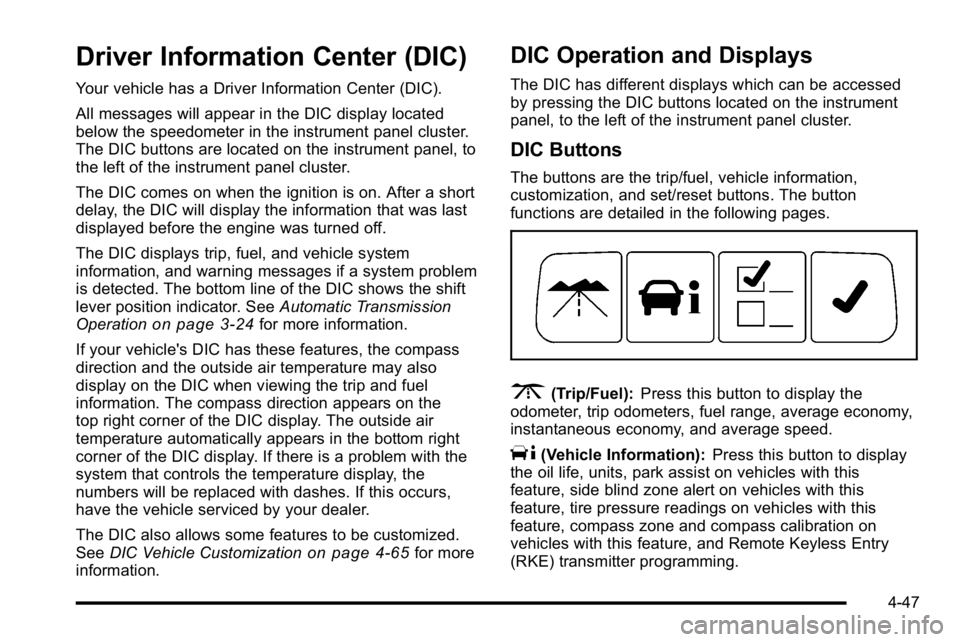
The buttons are the trip/fuel, vehicle information,
customization, and set/reset buttons. The button
functions are detailed in the following pages.
3(Trip/Fuel): Press this button to display the
odometer, trip odometers, fuel range, average economy,
instantaneous economy, and average speed.
T(Vehicle Information): Press this button to display
the oil life, units, park assist on vehicles with this
feature, side blind zone alert on vehicles with this
feature, tire pressure readings on vehicles with this
feature, compass zone and compass calibration on
vehicles with this feature, and Remote Keyless Entry
(RKE) transmitter programming.
4-47
Page 216 of 474

DRIVER DOOR OPEN
This message displays when the driver door is not
closed properly. Make sure that the door is closed
completely.
ENGINE HOT A/C
(Air Conditioning) OFF
This message displays when the engine coolant
becomes hotter than the normal operating temperature.
To avoid added strain on a hot engine, the air
conditioning compressor is automatically turned off.
When the coolant temperature returns to normal, the
A/C operation automatically resumes. You can continue
to drive your vehicle. If this message continues to
appear, have the system repaired by your dealer as
soon as possible to avoid compressor damage.
ENGINE OVERHEATED IDLE ENGINE
Notice:If you drive your vehicle while the engine is
overheating, severe engine damage may occur. If an
overheat warning appears on the instrument panel
cluster and/or DIC, stop the vehicle as soon as
possible. Do not increase the engine speed above
normal idling speed. See Engine Overheating
on
page 6‑35for more information.
This message displays when the engine coolant
temperature is too hot. Stop and allow the vehicle to
idle until it cools down.
ENGINE OVERHEATED STOP ENGINE
Notice: If you drive your vehicle while the engine is
overheating, severe engine damage may occur. If an
overheat warning appears on the instrument panel
cluster and/or DIC, stop the vehicle as soon as
possible. See Engine Overheating
on page 6‑35for
more information.
This message displays along with a continuous chime
when the engine has overheated. Stop and turn the
engine off immediately to avoid severe engine damage.
See Engine Overheating on page 6‑35.
ENGINE POWER IS REDUCED
This message displays when the vehicle's engine power
is reduced. Reduced engine power can affect the
vehicle's ability to accelerate. If this message is on, but
there is no reduction in performance, proceed to your
destination. The performance may be reduced the next
time the vehicle is driven. The vehicle may be driven
at a reduced speed while this message is on, but
acceleration and speed may be reduced. Anytime this
message stays on, the vehicle should be taken to your
dealer for service as soon as possible.
ERROR
This message displays while viewing the odometer or
trip odometers if there is a problem with the instrument
panel cluster. See your dealer for service.
4-56
Page 218 of 474

OIL PRESSURE LOW STOP ENGINE
Notice:If you drive your vehicle while the engine oil
pressure is low, severe engine damage may occur.
If a low oil pressure warning appears on the
instrument panel cluster and/or DIC, stop the
vehicle as soon as possible. Do not drive the
vehicle until the cause of the low oil pressure is
corrected. See Engine Oil
on page 6‑17for more
information.
This message displays when the vehicle's engine oil
pressure is low. The oil pressure light also appears on
the instrument panel cluster. See Oil Pressure Light
on
page 4‑44.
Stop the vehicle immediately, as engine damage can
result from driving a vehicle with low oil pressure. Have
the vehicle serviced by your dealer as soon as possible
when this message is displayed.
PARK ASSIST OFF
If your vehicle has this feature, after the vehicle has
been started, this message will reminder the driver
that the Ultrasonic Rear Parking Assist (URPA) system
has been turned off. Press the set/reset button to
acknowledge this message and clear it from the DIC
display. To turn the URPA system back on, see “Park
Assist” underDIC Operation and Displays
on
page 4‑47. See Ultrasonic Rear Parking Assist (URPA)on page 3‑37for more information.
PASSENGER DOOR OPEN
This message displays when the front passenger door
is not closed properly. Make sure that the door is closed
completely.
REMOTE KEY LEARNING ACTIVE
This message displays while you are matching a
Remote Keyless Entry (RKE) transmitter to your
vehicle. See “Matching Transmitter(s) to Your Vehicle”
under Remote Keyless Entry (RKE) System Operation
on page 3‑4andDIC Operation and Displayson
page 4‑47for more information.
4-58
Page 219 of 474
REPLACE BATTERY IN REMOTE KEY
This message displays when the battery in the Remote
Keyless Entry (RKE) transmitter needs to be replaced.
To replace the battery, see“Battery Replacement”under
Remote Keyless Entry (RKE) System Operation
on
page 3‑4.
RIGHT REAR DOOR OPEN
This message displays when the passenger side rear
door is not closed properly. Make sure that the door is
closed completely.
SERVICE A/C (Air Conditioning)
SYSTEM
This message displays when the electronic sensors
that control the air conditioning and heating systems are
no longer working. Have the climate control system
serviced by your dealer if you notice a drop in heating
and air conditioning efficiency.
SERVICE AIR BAG
This message displays when there is a problem with the
airbag system. Have your vehicle serviced by your
dealer immediately. See Airbag Readiness Light
on
page 4‑33for more information.
SERVICE BATTERY CHARGING
SYSTEM
This message displays when there is a problem with the
generator and battery charging systems. Driving with
this problem could drain the battery. Turn off all
unnecessary accessories. Stop and turn off the vehicle
as soon as it is safe to do so. Have the electrical
system checked by your dealer immediately.
SERVICE BRAKE ASSIST
This message displays if there is a problem with the
brake system. The brake system warning light and the
antilock brake system warning light may also be
displayed on the instrument panel cluster. See Brake
System Warning Light
on page 4‑36and Antilock
Brake System (ABS) Warning Lighton page 4‑37for
more information. If this happens, stop as soon as
possible and turn off the vehicle. Restart the vehicle
and check for the message on the DIC display. If the
message is displayed or appears again when you begin
driving, the brake system needs service. See your
dealer as soon as possible. See Brakes
on page 6‑40for more information.
4-59