lock BUICK LUCERNE 2010 Service Manual
[x] Cancel search | Manufacturer: BUICK, Model Year: 2010, Model line: LUCERNE, Model: BUICK LUCERNE 2010Pages: 474
Page 132 of 474
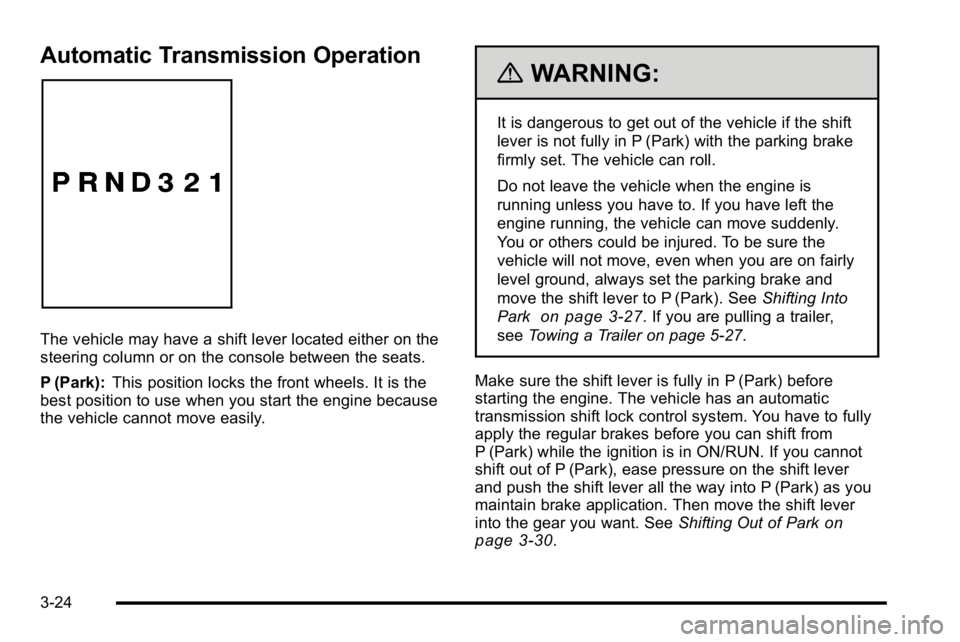
Automatic Transmission Operation
The vehicle may have a shift lever located either on the
steering column or on the console between the seats.
P (Park):This position locks the front wheels. It is the
best position to use when you start the engine because
the vehicle cannot move easily.
{WARNING:
It is dangerous to get out of the vehicle if the shift
lever is not fully in P (Park) with the parking brake
firmly set. The vehicle can roll.
Do not leave the vehicle when the engine is
running unless you have to. If you have left the
engine running, the vehicle can move suddenly.
You or others could be injured. To be sure the
vehicle will not move, even when you are on fairly
level ground, always set the parking brake and
move the shift lever to P (Park). See Shifting Into
Park
on page 3‑27. If you are pulling a trailer,
see Towing a Trailer on page 5‑27.
Make sure the shift lever is fully in P (Park) before
starting the engine. The vehicle has an automatic
transmission shift lock control system. You have to fully
apply the regular brakes before you can shift from
P (Park) while the ignition is in ON/RUN. If you cannot
shift out of P (Park), ease pressure on the shift lever
and push the shift lever all the way into P (Park) as you
maintain brake application. Then move the shift lever
into the gear you want. See Shifting Out of Park
on
page 3‑30.
3-24
Page 136 of 474
Steering Column Shift Lever
If the vehicle has a steering column shift lever, use this
procedure to shift the vehicle into P (Park):1. Hold the brake pedal down.
2. Move the shift lever into P (Park) by pulling the shift lever toward you and moving it up as far as it
will go.
3. With your foot still holding the brake pedal down, set the parking brake. See Parking Brake
on
page 3‑26for more information.
4. Turn the ignition key to LOCK/OFF.
5. Remove the key and take it with you. If you can leave the vehicle with the ignition key in your hand,
the vehicle is in P (Park).
Console Shift Lever
If the vehicle is equipped with a console shift lever, use
this procedure to shift the vehicle into P (Park):
1. Hold the brake pedal down.
2. Move the shift lever into P (Park) by pushing the lever all the way toward the front of the vehicle and
then to the left.
3. While keeping the brake pedal applied, set the parking brake. See Parking Brake
on page 3‑26for more information.
4. Turn the ignition key to LOCK/OFF.
5. Remove the key and take it with you. If you can leave the vehicle with the ignition key in your hand,
the vehicle is in P (Park).
3-28
Page 137 of 474
Leaving the Vehicle With the Engine
Running
{WARNING:
It can be dangerous to leave the vehicle with the
engine running. The vehicle could move suddenly
if the shift lever is not fully in P (Park) with the
parking brake firmly set. And, if you leave the
vehicle with the engine running, it could overheat
and even catch fire. You or others could be
injured. Do not leave the vehicle with the engine
running.If you have to leave the vehicle with the engine running,
be sure your vehicle is in P (Park) and the parking
brake is firmly set before you leave it. See
Parking
Brake
on page 3‑26for more information.
Torque Lock
Torque lock is when the weight of the vehicle puts too
much force on the parking pawl in the transmission.
This happens when parking on a hill and shifting the
transmission into P (Park) is not done properly and then
it is difficult to shift out of P (Park). To prevent torque
lock, set the parking brake and then shift into P (Park).
To find out how, see “Shifting Into Park”in this section.
If torque lock does occur, your vehicle may need to be
pushed uphill by another vehicle to relieve the parking
pawl pressure, so you can shift out of P (Park).
3-29
Page 138 of 474
Shifting Out of Park
Automatic Transmission Shift Lock
This vehicle has an electronic shift lock release system.
The shift lock release is designed to:
.Prevent ignition key removal unless the shift lever
is in P (Park)
.Prevent movement of the shift lever out of P (Park),
unless the ignition is in ON/RUN and the regular
brake pedal is applied.
The shift lock is always functional except in the case of
a an uncharged or low voltage (less than 9 volt) battery.
If the vehicle has an uncharged battery or a battery with
low voltage, try charging or jump starting the battery.
See Jump Starting on page 6‑44.
Console Shift
If the console shifter cannot be moved out of P (Park)
1. Apply and maintain the regular brakes.
2. Turn the ignition to ON/RUN position. See Ignition
Positions
on page 3‑20for more information.
3. Let up on the shift lever and make sure the shift lever is pushed all the way into P (Park).
4. Then, move the shift into the desired gear.
If you still cannot move the shift lever from P (Park),
consult your dealer or a professional towing service.
Column Shift
If the shifter cannot be moved out of P (Park) 1. Apply and maintain the regular brakes.
2. Turn the ignition key to the ON/RUN position. See Ignition Positions
on page 3‑20for more
information.
3. Shift out of the P (Park) position to the N (Neutral) position.
4. Then, move the shift into the desired gear.
If you still cannot move the shift lever from P (Park),
consult your dealer or a professional towing service.
Parking Over Things That Burn
{WARNING:
Things that can burn could touch hot exhaust
parts under the vehicle and ignite. Do not park
over papers, leaves, dry grass, or other things that
can burn.
3-30
Page 139 of 474
Engine Exhaust
{WARNING:
Engine exhaust contains Carbon Monoxide (CO)
which cannot be seen or smelled. Exposure to CO
can cause unconsciousness and even death.
Exhaust may enter the vehicle if:
.The vehicle idles in areas with poor ventilation
(parking garages, tunnels, deep snow that
may block underbody airflow or tail pipes).
.The exhaust smells or sounds strange or
different.
.The exhaust system leaks due to corrosion or
damage.(Continued)
WARNING: (Continued)
.The vehicle’s exhaust system has been
modified, damaged or improperly repaired.
.There are holes or openings in the vehicle
body from damage or after-market
modifications that are not completely sealed.
If unusual fumes are detected or if it is suspected
that exhaust is coming into the vehicle:
.Drive it only with the windows
completely down.
.Have the vehicle repaired immediately.
Never park the vehicle with the engine running in
an enclosed area such as a garage or a building
that has no fresh air ventilation.
3-31
Page 144 of 474
Side Blind Zone Alert (SBZA)
If the vehicle has the Side Blind Zone Alert (SBZA)
system, seeSide Blind Zone Alert (SBZA)on
page 3‑39.
Park Tilt Mirrors
If the vehicle has memory mirrors, the outside mirrors
have park tilt mirrors . This feature tilts the driver's side
and passenger side mirror to a factory programmed
position when the vehicle is in R (Reverse). This feature
may be useful in allowing you to view the curb when
you are parallel parking.
When the vehicle is shifted out of R (Reverse) and
either a five second delay has occurred, or the ignition
is turned to LOCK/OFF, the driver and passenger side
mirrors return to their original position.
See DIC Vehicle Customization
on page 4‑65for more
information.
Outside Convex Mirror
{WARNING:
A convex mirror can make things, like other
vehicles, look farther away than they really are.
If you cut too sharply into the right lane, you could
hit a vehicle on the right. Check the inside mirror
or glance over your shoulder before changing
lanes.
The passenger side mirror is convex shaped. A convex
mirror's surface is curved so more can be seen from the
driver seat.
Outside Heated Mirrors
For vehicles with heated mirrors:
<(Rear Window Defogger): Press to heat the
mirrors.
See “Rear Window Defogger” underClimate Control
System
on page 4‑18or Dual Automatic Climate
Control Systemon page 4‑22for more information.
3-36
Page 149 of 474

The SBZA displays may remain on if a trailer is
attached to the vehicle, or a bicycle or object is
extending out to either side of the vehicle.
When SBZA is disabled for any reason other than the
driver turning it off, the driver will not be able to turn
SBZA back on using the DIC. The SIDE BLIND ZONE
ALERT ON option will not be selectable if the conditions
for normal system operation are not met. Until normal
operating conditions for SBZA are met, you should not
rely upon SBZA while driving.
SBZA Error Messages
The following messages may appear in the DIC:
SIDE BLIND ZONE ALERT SYSTEM OFF:This
message indicates that the driver has turned the
system off.
SIDE BLIND ZONE SYS. UNAVAILABLE: This
message indicates that the SBZA system is disabled
because the sensor is blocked and cannot detect
vehicles in the blind zone. The sensor may be
blocked by mud, dirt, snow, ice, slush, or even heavy rainstorms. This message may also activate during
heavy rain or due to road spray. The vehicle does not
need service. For cleaning, see
Washing Your Vehicle
on page 6‑104.
SERVICE SIDE BLIND ZONE ALERT SYSTEM: If this
message appears, both SBZA displays will remain on
indicating there is a problem with the SBZA system.
If these displays remain on after continued driving, the
system needs service. Take the vehicle to your dealer.
FCC Information
See Radio Frequency Statementon page 8‑20for FCC
information.
Frequency of operation: 24.05GHz –24.25GHz
Field Strength: Not greater than 2.5V/m peak
(0.25V/m average) at a distance of 3 m.
The manufacturer is not responsible for any radio or TV
interference caused by unauthorized modifications to
this equipment. Such modifications could void the user's
authority to operate the equipment.
3-41
Page 151 of 474

How the System Works
LDW uses a camera located between the inside
rearview mirror and the windshield to detect the lane
markings.
@(Lane Departure Warning):To turn LDW on and
off, press the LDW control, located by the exterior
headlamp control. An indicator on the control will light
to indicate that LDW is on.
When the vehicle is started, the LDW symbol, located
in the instrument panel cluster, will briefly come on to
indicate that the light is operational. LDW only operates at speeds of 35 mph (56 km) or
greater. If LDW is turned on when traveling at these
speeds, the LDW symbol will appear green if the
system detects a left or right lane marking. This symbol
will change to amber and flash and three beeps will
sound if you cross a detected lane marking without
using the turn signal.
If the LDW symbol does not appear, LDW is not
currently operating and will not warn you.
To change the volume of the warning chime, see Chime
Volume under
DIC Vehicle Customization
on page 4‑65for more information.
When the System Does Not Seem To Work
Properly
The LDW symbol will not appear when the system is
having difficulty seeing the lines on the road or if the
view of the camera on the windshield is blocked with
mud, dirt, snow, ice, or slush, if the windshield is
damaged, or when weather limits visibility, such as
while driving in fog, rain, or snow conditions. This is
normal operation, the vehicle does not need service.
For cleaning instructions, see Washing Your Vehicle
on
page 6‑104.
3-43
Page 159 of 474
Storage Areas
Glove Box
Lift up the glove box handle to open it. Use the key to
lock and unlock the glove box.
Cupholders
There are cupholders located in the full floor console,
or in the front of the center seat console. Cupholders
are also located in the rear armrest. Slide the cover
back to access the full floor console cupholder. Fold
open the front of the console to access the center seat
console cupholder.
Front Storage Area
To access the front storage area, push down and then
release. Push up and forward to remove.
Center Console Storage
If the vehicle has a full floor console it has two storage
areas. Lift the left lever located in the front of the
armrest lid to access the upper storage tray. Lift the
right lever to access the lower storage area. If the
vehicle has a center seat console it will have two
storage areas. Press the button located on the front ofthe armrest and lift the armrest cover to access the
upper storage area. Pull the strap located behind the
cup holder to access the lower storage area.
Center Flex Storage Unit
This vehicle may have a center flex storage unit that
includes a front center seat with a lap belt and an
underseat storage compartment. The center seatback
can also be used as an armrest. Cupholders are also
located at the front edge of the storage unit and can be
accessed by folding the compartment forward.
Pull the handle rearward to open a storage
compartment and access the accessory power outlet.
Pull out to remove.
When not being used, the center seat lap belt can be
stored in the underseat storage compartment.
Rear Seat Armrest
This vehicle has a rear seat armrest with cupholders.
Pull the tab on the armrest forward, to access it.
Convenience Net
Use the convenience net, located in the rear, to store
small loads as far forward as possible. The net should
not be used to store heavy loads.
3-51
Page 161 of 474
Section 4 Instrument Panel
Instrument Panel Overview. . . . . . . . . . . . . . . . . . . . . . . .4-3
Hazard Warning Flashers . . . . . . . . . . . . . . . . . . . . . . . 4-3
Horn . . . . . . . . . . . . . . . . . . . . . . . . . . . . . . . . . . . . . . . . . . . . 4-3
Tilt Wheel . . . . . . . . . . . . . . . . . . . . . . . . . . . . . . . . . . . . . . . 4-3
Power Tilt Wheel and Telescopic Steering Column . . . . . . . . . . . . . . . . . . . . . . . . . . . . . . . . . . . . . . . 4-4
Heated Steering Wheel . . . . . . . . . . . . . . . . . . . . . . . . . 4-4
Turn Signal/Multifunction Lever . . . . . . . . . . . . . . . . . . 4-5
Turn and Lane-Change Signals . . . . . . . . . . . . . . . . . 4-5
Headlamp High/Low-Beam Changer . . . . . . . . . . . . 4-6
Flash-to-Pass . . . . . . . . . . . . . . . . . . . . . . . . . . . . . . . . . . . 4-6
Windshield Wipers . . . . . . . . . . . . . . . . . . . . . . . . . . . . . . 4-6
Rainsense™ II Wipers . . . . . . . . . . . . . . . . . . . . . . . . . . 4-7
Windshield Washer . . . . . . . . . . . . . . . . . . . . . . . . . . . . . 4-8
Cruise Control . . . . . . . . . . . . . . . . . . . . . . . . . . . . . . . . . . 4-9
Exterior Lamps . . . . . . . . . . . . . . . . . . . . . . . . . . . . . . . . 4-12
Wiper Activated Headlamps . . . . . . . . . . . . . . . . . . . 4-13
Headlamps on Reminder . . . . . . . . . . . . . . . . . . . . . . 4-13
Daytime Running Lamps (DRL) . . . . . . . . . . . . . . . . 4-13
Fog Lamps . . . . . . . . . . . . . . . . . . . . . . . . . . . . . . . . . . . . 4-14
Cornering Lamps . . . . . . . . . . . . . . . . . . . . . . . . . . . . . . 4-14
Exterior Lighting Battery Saver . . . . . . . . . . . . . . . . . 4-14
Instrument Panel Brightness . . . . . . . . . . . . . . . . . . . 4-14
Courtesy Lamps . . . . . . . . . . . . . . . . . . . . . . . . . . . . . . . 4-15
Entry Lighting . . . . . . . . . . . . . . . . . . . . . . . . . . . . . . . . . . 4-15
Delayed Entry Lighting . . . . . . . . . . . . . . . . . . . . . . . . . 4-15 Theater Dimming . . . . . . . . . . . . . . . . . . . . . . . . . . . . . . 4-15
Delayed Exit Lighting . . . . . . . . . . . . . . . . . . . . . . . . . . 4-15
Perimeter Lighting . . . . . . . . . . . . . . . . . . . . . . . . . . . . . 4-15
Front Reading Lamps . . . . . . . . . . . . . . . . . . . . . . . . . . 4-15
Electric Power Management . . . . . . . . . . . . . . . . . . . 4-16
Inadvertent Power Battery Saver . . . . . . . . . . . . . . . 4-16
Battery Run-Down Protection . . . . . . . . . . . . . . . . . . 4-17
Accessory Power Outlet(s) . . . . . . . . . . . . . . . . . . . . . 4-17
Ashtray(s) . . . . . . . . . . . . . . . . . . . . . . . . . . . . . . . . . . . . . 4-18
Climate Controls . . . . . . . . . . . . . . . . . . . . . . . . . . . . . . . . . . 4-18
Climate Control System . . . . . . . . . . . . . . . . . . . . . . . . 4-18
Dual Automatic Climate Control System . . . . . . . 4-22
Outlet Adjustment . . . . . . . . . . . . . . . . . . . . . . . . . . . . . . 4-27
Passenger Compartment Air Filter . . . . . . . . . . . . . 4-28
Warning Lights, Gauges, and Indicators . . . . . . . .4-30
Instrument Panel Cluster . . . . . . . . . . . . . . . . . . . . . . . 4-30
Speedometer and Odometer . . . . . . . . . . . . . . . . . . . 4-32
Trip Odometer . . . . . . . . . . . . . . . . . . . . . . . . . . . . . . . . . 4-32
Tachometer . . . . . . . . . . . . . . . . . . . . . . . . . . . . . . . . . . . . 4-32
Safety Belt Reminders . . . . . . . . . . . . . . . . . . . . . . . . . 4-32
Airbag Readiness Light . . . . . . . . . . . . . . . . . . . . . . . . 4-33
Passenger Airbag Status Indicator . . . . . . . . . . . . . 4-34
Charging System Light . . . . . . . . . . . . . . . . . . . . . . . . 4-35
Brake System Warning Light . . . . . . . . . . . . . . . . . . . 4-36
Antilock Brake System (ABS) Warning Light . . . 4-37
4-1