instrument panel BUICK LUCERNE 2010 Owner's Manual
[x] Cancel search | Manufacturer: BUICK, Model Year: 2010, Model line: LUCERNE, Model: BUICK LUCERNE 2010Pages: 474
Page 1 of 474
2010 Buick Lucerne Owner ManualM
In Brief. . . . . . . . . . . . . . . . . . . . . . . . . . . . . . . . . . . . . . . . . . . . 1-1
Instrument Panel . . . . . . . . . . . . . . . . . . . . . . . . . . . . . . . . . 1-2
Initial Drive Information . . . . . . . . . . . . . . . . . . . . . . . . . . . 1-4
Vehicle Features . . . . . . . . . . . . . . . . . . . . . . . . . . . . . . . . 1-14
Performance and Maintenance . . . . . . . . . . . . . . . . . . 1-21
Seats and Restraint System . . . . . . . . . . . . . . . . . . . . . . 2-1
Head Restraints . . . . . . . . . . . . . . . . . . . . . . . . . . . . . . . . . . 2-2
Front Seats . . . . . . . . . . . . . . . . . . . . . . . . . . . . . . . . . . . . . . . 2-3
Rear Seats . . . . . . . . . . . . . . . . . . . . . . . . . . . . . . . . . . . . . . 2-12
Safety Belts . . . . . . . . . . . . . . . . . . . . . . . . . . . . . . . . . . . . . 2-12
Child Restraints . . . . . . . . . . . . . . . . . . . . . . . . . . . . . . . . . 2-33
Airbag System . . . . . . . . . . . . . . . . . . . . . . . . . . . . . . . . . . 2-56
Restraint System Check . . . . . . . . . . . . . . . . . . . . . . . . . 2-74
Features and Controls . . . . . . . . . . . . . . . . . . . . . . . . . . . . 3-1
Keys . . . . . . . . . . . . . . . . . . . . . . . . . . . . . . . . . . . . . . . . . . . . . 3-3
Doors and Locks . . . . . . . . . . . . . . . . . . . . . . . . . . . . . . . . . 3-9
Windows . . . . . . . . . . . . . . . . . . . . . . . . . . . . . . . . . . . . . . . . 3-14
Theft-Deterrent Systems . . . . . . . . . . . . . . . . . . . . . . . . 3-16
Starting and Operating Your Vehicle . . . . . . . . . . . . . 3-19
Mirrors . . . . . . . . . . . . . . . . . . . . . . . . . . . . . . . . . . . . . . . . . . 3-33 Object Detection Systems . . . . . . . . . . . . . . . . . . . . . . . 3-37
Universal Home Remote System . . . . . . . . . . . . . . . . 3-44
Storage Areas . . . . . . . . . . . . . . . . . . . . . . . . . . . . . . . . . . . 3-51
Sunroof . . . . . . . . . . . . . . . . . . . . . . . . . . . . . . . . . . . . . . . . . 3-52
Instrument Panel . . . . . . . . . . . . . . . . . . . . . . . . . . . . . . . . . 4-1
Instrument Panel Overview . . . . . . . . . . . . . . . . . . . . . . . 4-3
Climate Controls . . . . . . . . . . . . . . . . . . . . . . . . . . . . . . . . 4-18
Warning Lights, Gauges, and Indicators . . . . . . . . . 4-30
Driver Information Center (DIC) . . . . . . . . . . . . . . . . . 4-47
Audio System(s) . . . . . . . . . . . . . . . . . . . . . . . . . . . . . . . . 4-74
Driving Your Vehicle . . . . . . . . . . . . . . . . . . . . . . . . . . . . . . 5-1
Your Driving, the Road, and the Vehicle . . . . . . . . . . 5-2
Towing . . . . . . . . . . . . . . . . . . . . . . . . . . . . . . . . . . . . . . . . . . 5-24
Service and Appearance Care . . . . . . . . . . . . . . . . . . . 6-1
Service . . . . . . . . . . . . . . . . . . . . . . . . . . . . . . . . . . . . . . . . . . . 6-3
Fuel . . . . . . . . . . . . . . . . . . . . . . . . . . . . . . . . . . . . . . . . . . . . . . 6-5
Checking Things Under the Hood . . . . . . . . . . . . . . . 6-12
Headlamp Aiming . . . . . . . . . . . . . . . . . . . . . . . . . . . . . . . 6-49
Bulb Replacement . . . . . . . . . . . . . . . . . . . . . . . . . . . . . . 6-52
Page 7 of 474
Section 1 In Brief
Instrument Panel. . . . . . . . . . . . . . . . . . . . . . . . . . . . . . . . . . . 1-2
Initial Drive Information . . . . . . . . . . . . . . . . . . . . . . . . . . . 1-4
Remote Keyless Entry (RKE) System . . . . . . . . . . . 1-4
Remote Vehicle Start . . . . . . . . . . . . . . . . . . . . . . . . . . . 1-4
Door Locks . . . . . . . . . . . . . . . . . . . . . . . . . . . . . . . . . . . . . 1-5
Trunk Release . . . . . . . . . . . . . . . . . . . . . . . . . . . . . . . . . . 1-5
Windows . . . . . . . . . . . . . . . . . . . . . . . . . . . . . . . . . . . . . . . . 1-6
Seat Adjustment . . . . . . . . . . . . . . . . . . . . . . . . . . . . . . . . 1-6
Heated Seats . . . . . . . . . . . . . . . . . . . . . . . . . . . . . . . . . . . 1-8
Heated and Ventilated Seats . . . . . . . . . . . . . . . . . . . . 1-8
Head Restraint Adjustment . . . . . . . . . . . . . . . . . . . . . . 1-8
Safety Belt . . . . . . . . . . . . . . . . . . . . . . . . . . . . . . . . . . . . . . 1-8
Sensing System for Passenger Airbag . . . . . . . . . . 1-9
Mirror Adjustment . . . . . . . . . . . . . . . . . . . . . . . . . . . . . . . 1-9
Steering Wheel Adjustment . . . . . . . . . . . . . . . . . . . . 1-10
Interior Lighting . . . . . . . . . . . . . . . . . . . . . . . . . . . . . . . . 1-11
Exterior Lighting . . . . . . . . . . . . . . . . . . . . . . . . . . . . . . . 1-12
Windshield Wiper/Washer . . . . . . . . . . . . . . . . . . . . . . 1-13
Climate Controls . . . . . . . . . . . . . . . . . . . . . . . . . . . . . . . 1-13 Vehicle Features
. . . . . . . . . . . . . . . . . . . . . . . . . . . . . . . . . . 1-14
Radio(s) . . . . . . . . . . . . . . . . . . . . . . . . . . . . . . . . . . . . . . . 1-14
Satellite Radio . . . . . . . . . . . . . . . . . . . . . . . . . . . . . . . . . 1-16
Portable Audio Devices . . . . . . . . . . . . . . . . . . . . . . . . 1-16
Steering Wheel Controls . . . . . . . . . . . . . . . . . . . . . . . 1-16
Bluetooth
®. . . . . . . . . . . . . . . . . . . . . . . . . . . . . . . . . . . . . 1-17
Navigation System . . . . . . . . . . . . . . . . . . . . . . . . . . . . . 1-17
Driver Information Center (DIC) . . . . . . . . . . . . . . . . 1-18
Cruise Control . . . . . . . . . . . . . . . . . . . . . . . . . . . . . . . . . 1-19
Lane Departure Warning (LDW) . . . . . . . . . . . . . . . 1-19
Side Blind Zone Alert (SBZA) . . . . . . . . . . . . . . . . . . 1-20
Ultrasonic Parking Assist . . . . . . . . . . . . . . . . . . . . . . 1-20
Power Outlets . . . . . . . . . . . . . . . . . . . . . . . . . . . . . . . . . 1-20
Universal Remote System . . . . . . . . . . . . . . . . . . . . . 1-21
Performance and Maintenance . . . . . . . . . . . . . . . . . .1-21
Traction Control System (TCS) . . . . . . . . . . . . . . . . 1-21
StabiliTrak
®. . . . . . . . . . . . . . . . . . . . . . . . . . . . . . . . . . . . 1-22
Tire Pressure Monitor . . . . . . . . . . . . . . . . . . . . . . . . . . 1-22
Tire Sealant and Compressor Kit . . . . . . . . . . . . . . 1-23
Engine Oil Life System . . . . . . . . . . . . . . . . . . . . . . . . 1-23
Fuel E85 (85% Ethanol) . . . . . . . . . . . . . . . . . . . . . . . 1-23
Driving for Better Fuel Economy . . . . . . . . . . . . . . . 1-23
Roadside Assistance Program . . . . . . . . . . . . . . . . . 1-24
OnStar
®. . . . . . . . . . . . . . . . . . . . . . . . . . . . . . . . . . . . . . . 1-24
1-1
Page 8 of 474
Instrument Panel
1-2
Page 9 of 474

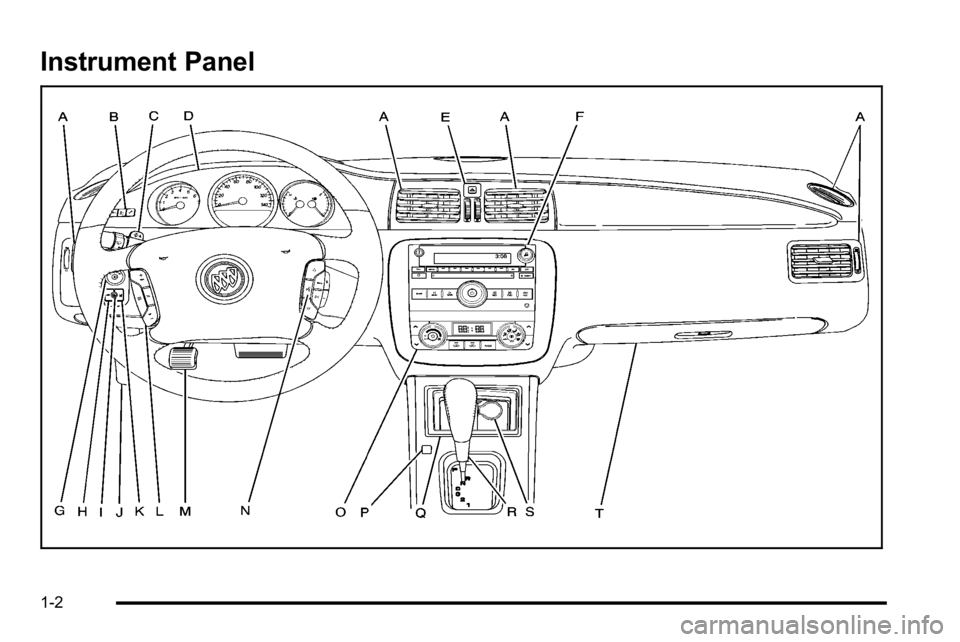
A.Outlet Adjustment on page 4‑27.
B. DIC Operation and Displays
on page 4‑47(If Equipped).
C. Turn Signal/Multifunction Lever on page 4‑5.
D. Instrument Panel Cluster on page 4‑30.
E. Hazard Warning Flashers on page 4‑3.
F. Audio System(s) on page 4‑74.
G. Exterior Lamps on page 4‑12.
H. Trunk Release. See Trunk on page 3‑12.
I. Instrument Panel Brightness on page 4‑14.
J. Hood Release on page 6‑13.
K. Lane Departure Warning (LDW)
on page 3‑42(If Equipped). L.
Cruise Control
on page 4‑9.Heated Steering
Wheelon page 4‑4(If Equipped).
M. Parking Brake on page 3‑26.
N. Audio Steering Wheel Controls
on page 4‑105(If Equipped).
O. Climate Control System
on page 4‑18orDual
Automatic Climate Control System on page 4‑22.
P. Traction Control System (TCS)
on page 5‑6and
StabiliTrak®System on page 5‑6.
Q. Front Storage Area on page 3‑51.
R. Shift Lever. See Automatic Transmission Operation
on page 3‑24.
S. Accessory Power Outlet(s) on page 4‑17.
T. Glove Box on page 3‑51.
1-3
Page 11 of 474
When the vehicle starts, the parking lamps will turn on
and remain on as long as the engine is running. The
doors will be locked and the climate control system may
come on.
The engine will continue to run for 10 minutes. Repeat
the steps for a 10-minute time extension. Remote start
can be extended only once.
Canceling a Remote Start
To cancel a remote start:
.Aim the RKE transmitter at the vehicle and press
and hold
/until the parking lamps turn off.
.Turn on the hazard warning flashers.
.Turn the ignition on and then back off.
See Remote Vehicle Start on page 3‑7.
Door Locks
From the outside, unlock the door using either the key
or the RKE transmitter.
From the inside, use the power door lock switches or
manual lock knobs located at the top of the door panel
near the window.
Power Door Locks
On vehicles with power door locks, the switches are
located on the front doors.
"(Unlock): Press to unlock the doors.
Q(Lock):Remove the key from the ignition and press
to lock the doors.
For more information, see:
.Door Locks on page 3‑9.
.Power Door Locks on page 3‑10.
.Remote Keyless Entry (RKE) System Operationon page 3‑4.
Trunk Release
In addition to the trunk release button on the RKE
transmitter, there is a remote release
Vbutton
located to the left of the steering wheel, next to the
instrument panel brightness control. Press to open the
trunk.
See Trunk on page 3‑12.
1-5
Page 17 of 474
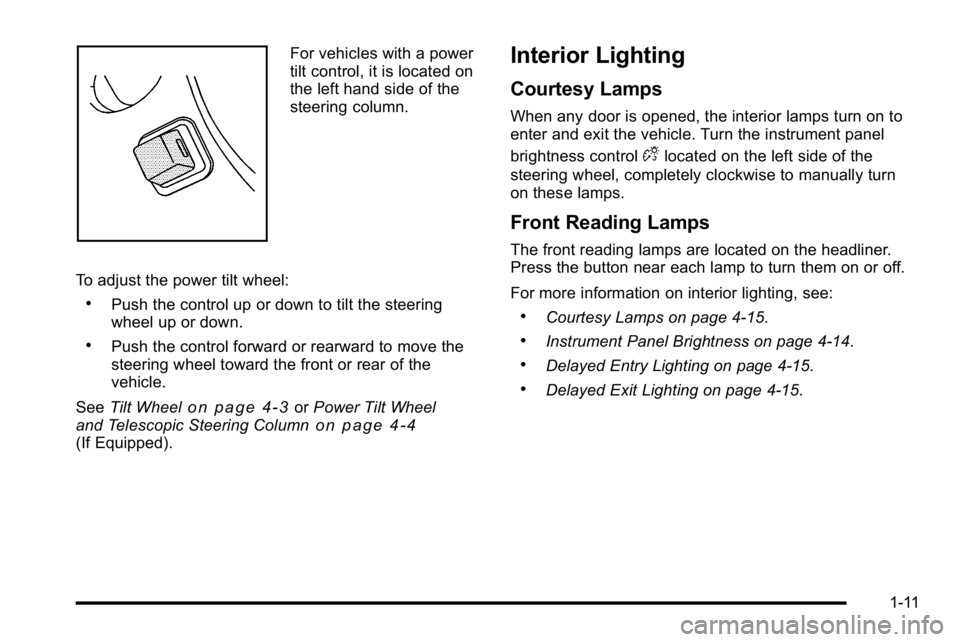
For vehicles with a power
tilt control, it is located on
the left hand side of the
steering column.
To adjust the power tilt wheel:
.Push the control up or down to tilt the steering
wheel up or down.
.Push the control forward or rearward to move the
steering wheel toward the front or rear of the
vehicle.
See Tilt Wheel
on page 4‑3orPower Tilt Wheel
and Telescopic Steering Columnon page 4‑4(If Equipped).
Interior Lighting
Courtesy Lamps
When any door is opened, the interior lamps turn on to
enter and exit the vehicle. Turn the instrument panel
brightness control
Dlocated on the left side of the
steering wheel, completely clockwise to manually turn
on these lamps.
Front Reading Lamps
The front reading lamps are located on the headliner.
Press the button near each lamp to turn them on or off.
For more information on interior lighting, see:
.Courtesy Lamps on page 4‑15.
.Instrument Panel Brightness on page 4‑14.
.Delayed Entry Lighting on page 4‑15.
.Delayed Exit Lighting on page 4‑15.
1-11
Page 18 of 474
Exterior Lighting
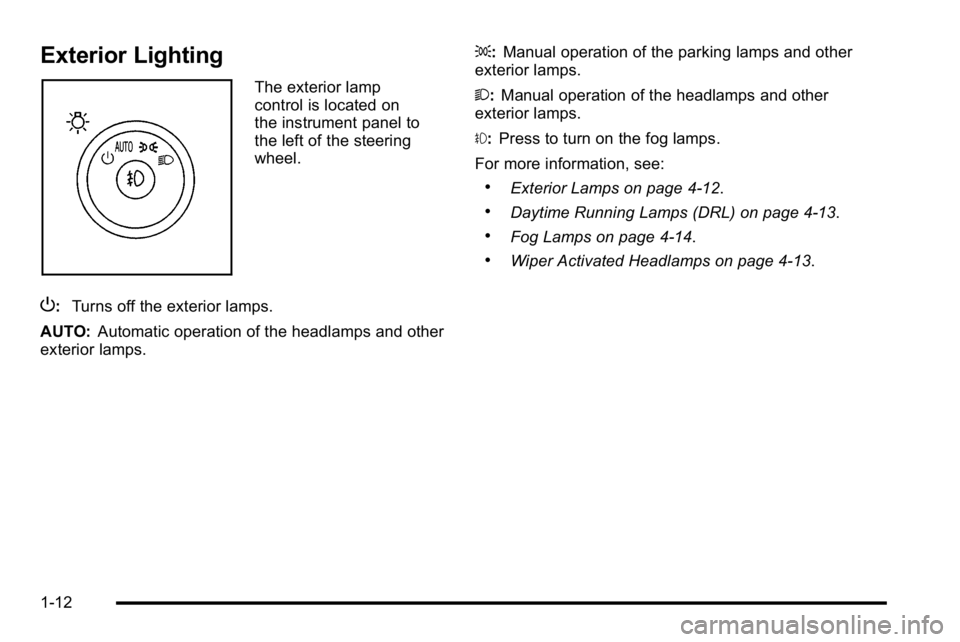
The exterior lamp
control is located on
the instrument panel to
the left of the steering
wheel.
P: Turns off the exterior lamps.
AUTO: Automatic operation of the headlamps and other
exterior lamps. ;:
Manual operation of the parking lamps and other
exterior lamps.
2: Manual operation of the headlamps and other
exterior lamps.
#: Press to turn on the fog lamps.
For more information, see:
.Exterior Lamps on page 4‑12.
.Daytime Running Lamps (DRL) on page 4‑13.
.Fog Lamps on page 4‑14.
.Wiper Activated Headlamps on page 4‑13.
1-12
Page 24 of 474
Driver Information Center (DIC)
The DIC display is located at the bottom of the
instrument panel cluster. It shows the status of
many vehicle systems and enables access to the
personalization menu.
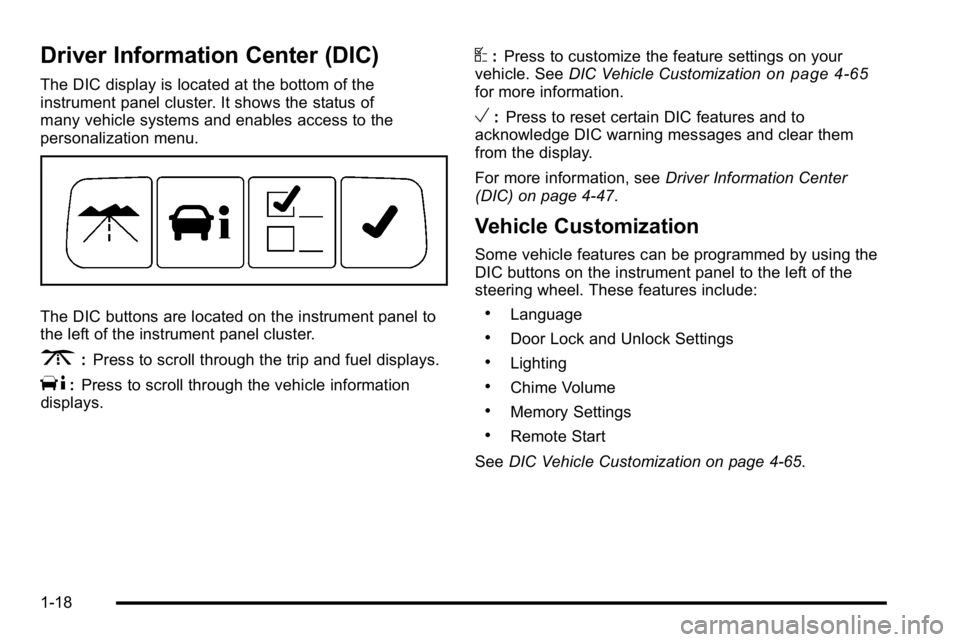
The DIC buttons are located on the instrument panel to
the left of the instrument panel cluster.
3:Press to scroll through the trip and fuel displays.
T:Press to scroll through the vehicle information
displays.
U: Press to customize the feature settings on your
vehicle. See DIC Vehicle Customizationon page 4‑65for more information.
V:Press to reset certain DIC features and to
acknowledge DIC warning messages and clear them
from the display.
For more information, see Driver Information Center
(DIC) on page 4‑47.
Vehicle Customization
Some vehicle features can be programmed by using the
DIC buttons on the instrument panel to the left of the
steering wheel. These features include:
.Language
.Door Lock and Unlock Settings
.Lighting
.Chime Volume
.Memory Settings
.Remote Start
See DIC Vehicle Customization on page 4‑65.
1-18
Page 25 of 474
Cruise Control
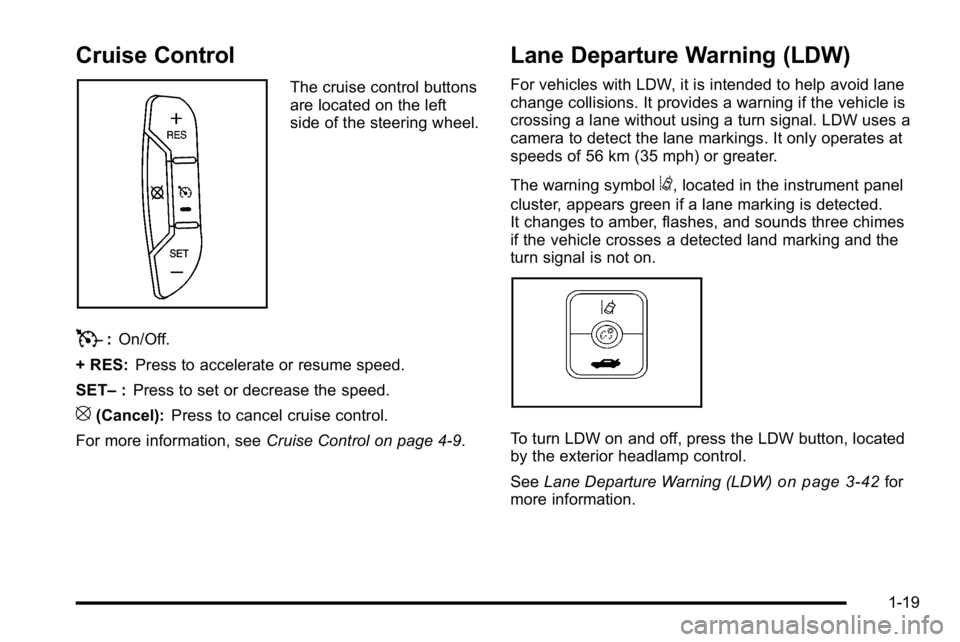
The cruise control buttons
are located on the left
side of the steering wheel.
T:On/Off.
+ RES: Press to accelerate or resume speed.
SET– :Press to set or decrease the speed.
[(Cancel): Press to cancel cruise control.
For more information, see Cruise Control on page 4‑9.
Lane Departure Warning (LDW)
For vehicles with LDW, it is intended to help avoid lane
change collisions. It provides a warning if the vehicle is
crossing a lane without using a turn signal. LDW uses a
camera to detect the lane markings. It only operates at
speeds of 56 km (35 mph) or greater.
The warning symbol
@, located in the instrument panel
cluster, appears green if a lane marking is detected.
It changes to amber, flashes, and sounds three chimes
if the vehicle crosses a detected land marking and the
turn signal is not on.
To turn LDW on and off, press the LDW button, located
by the exterior headlamp control.
See Lane Departure Warning (LDW)
on page 3‑42for
more information.
1-19
Page 47 of 474
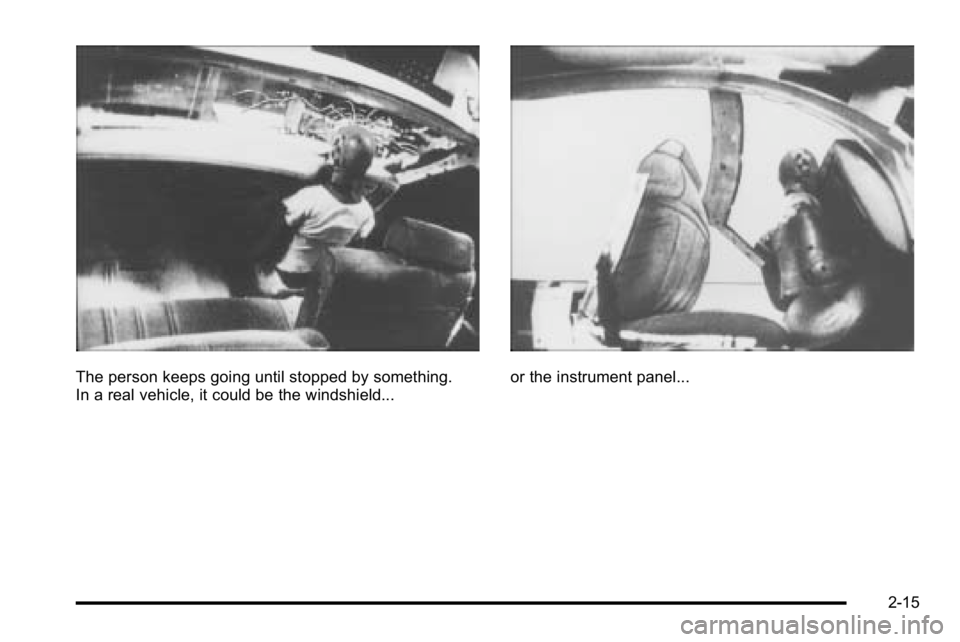
The person keeps going until stopped by something.
In a real vehicle, it could be the windshield...or the instrument panel...
2-15