door lock BUICK LUCERNE 2011 User Guide
[x] Cancel search | Manufacturer: BUICK, Model Year: 2011, Model line: LUCERNE, Model: BUICK LUCERNE 2011Pages: 450, PDF Size: 3.63 MB
Page 105 of 450
Black plate (1,1)Buick Lucerne Owner Manual - 2011
Section 3 Features and Controls
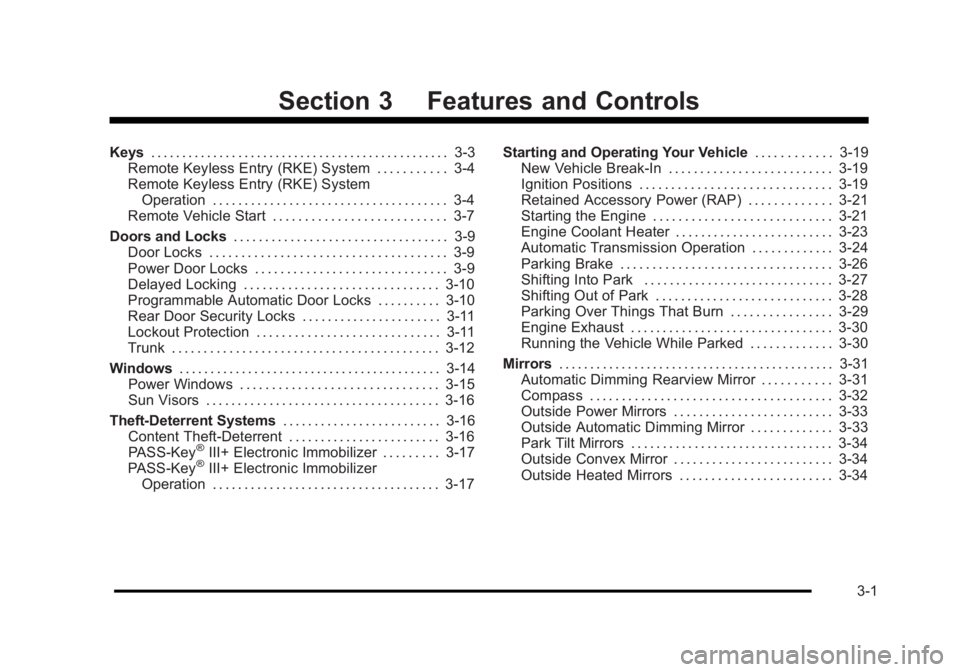
Keys. . . . . . . . . . . . . . . . . . . . . . . . . . . . . . . . . . . . . . . . . . . . . . . . 3-3
Remote Keyless Entry (RKE) System . . . . . . . . . . . 3-4
Remote Keyless Entry (RKE) System Operation . . . . . . . . . . . . . . . . . . . . . . . . . . . . . . . . . . . . . 3-4
Remote Vehicle Start . . . . . . . . . . . . . . . . . . . . . . . . . . . 3-7
Doors and Locks . . . . . . . . . . . . . . . . . . . . . . . . . . . . . . . . . . 3-9
Door Locks . . . . . . . . . . . . . . . . . . . . . . . . . . . . . . . . . . . . . 3-9
Power Door Locks . . . . . . . . . . . . . . . . . . . . . . . . . . . . . . 3-9
Delayed Locking . . . . . . . . . . . . . . . . . . . . . . . . . . . . . . . 3-10
Programmable Automatic Door Locks . . . . . . . . . . 3-10
Rear Door Security Locks . . . . . . . . . . . . . . . . . . . . . . 3-11
Lockout Protection . . . . . . . . . . . . . . . . . . . . . . . . . . . . . 3-11
Trunk . . . . . . . . . . . . . . . . . . . . . . . . . . . . . . . . . . . . . . . . . . 3-12
Windows . . . . . . . . . . . . . . . . . . . . . . . . . . . . . . . . . . . . . . . . . . 3-14
Power Windows . . . . . . . . . . . . . . . . . . . . . . . . . . . . . . . 3-15
Sun Visors . . . . . . . . . . . . . . . . . . . . . . . . . . . . . . . . . . . . . 3-16
Theft-Deterrent Systems . . . . . . . . . . . . . . . . . . . . . . . . .3-16
Content Theft-Deterrent . . . . . . . . . . . . . . . . . . . . . . . . 3-16
PASS-Key
®III+ Electronic Immobilizer . . . . . . . . . 3-17
PASS-Key®III+ Electronic Immobilizer
Operation . . . . . . . . . . . . . . . . . . . . . . . . . . . . . . . . . . . . 3-17 Starting and Operating Your Vehicle
. . . . . . . . . . . .3-19
New Vehicle Break-In . . . . . . . . . . . . . . . . . . . . . . . . . . 3-19
Ignition Positions . . . . . . . . . . . . . . . . . . . . . . . . . . . . . . 3-19
Retained Accessory Power (RAP) . . . . . . . . . . . . . 3-21
Starting the Engine . . . . . . . . . . . . . . . . . . . . . . . . . . . . 3-21
Engine Coolant Heater . . . . . . . . . . . . . . . . . . . . . . . . . 3-23
Automatic Transmission Operation . . . . . . . . . . . . . 3-24
Parking Brake . . . . . . . . . . . . . . . . . . . . . . . . . . . . . . . . . 3-26
Shifting Into Park . . . . . . . . . . . . . . . . . . . . . . . . . . . . . . 3-27
Shifting Out of Park . . . . . . . . . . . . . . . . . . . . . . . . . . . . 3-28
Parking Over Things That Burn . . . . . . . . . . . . . . . . 3-29
Engine Exhaust . . . . . . . . . . . . . . . . . . . . . . . . . . . . . . . . 3-30
Running the Vehicle While Parked . . . . . . . . . . . . . 3-30
Mirrors . . . . . . . . . . . . . . . . . . . . . . . . . . . . . . . . . . . . . . . . . . . . 3-31
Automatic Dimming Rearview Mirror . . . . . . . . . . . 3-31
Compass . . . . . . . . . . . . . . . . . . . . . . . . . . . . . . . . . . . . . . 3-32
Outside Power Mirrors . . . . . . . . . . . . . . . . . . . . . . . . . 3-33
Outside Automatic Dimming Mirror . . . . . . . . . . . . . 3-33
Park Tilt Mirrors . . . . . . . . . . . . . . . . . . . . . . . . . . . . . . . . 3-34
Outside Convex Mirror . . . . . . . . . . . . . . . . . . . . . . . . . 3-34
Outside Heated Mirrors . . . . . . . . . . . . . . . . . . . . . . . . 3-34
3-1
Page 107 of 450
Black plate (3,1)Buick Lucerne Owner Manual - 2011
Keys
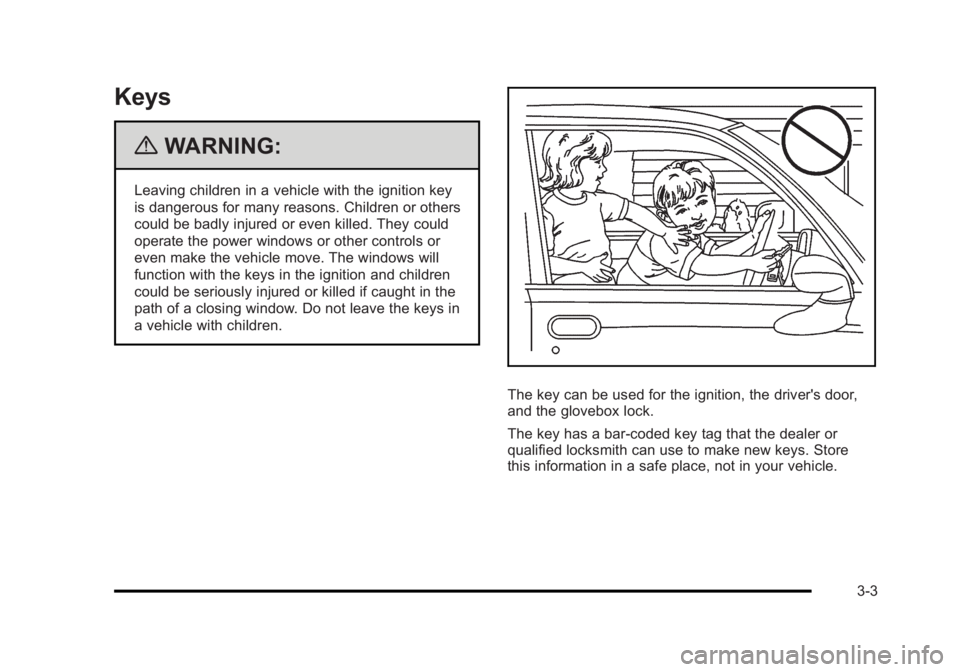
{WARNING:
Leaving children in a vehicle with the ignition key
is dangerous for many reasons. Children or others
could be badly injured or even killed. They could
operate the power windows or other controls or
even make the vehicle move. The windows will
function with the keys in the ignition and children
could be seriously injured or killed if caught in the
path of a closing window. Do not leave the keys in
a vehicle with children.
The key can be used for the ignition, the driver's door,
and the glovebox lock.
The key has a bar-coded key tag that the dealer or
qualified locksmith can use to make new keys. Store
this information in a safe place, not in your vehicle.
3-3
Page 109 of 450
Black plate (5,1)Buick Lucerne Owner Manual - 2011
Q(Lock):Press to lock all the doors. If enabled
through the Driver Information Center (DIC), the parking
lamps flash once to indicate locking has occurred.
If enabled through the DIC, the horn chirps when
Qis
pressed again within five seconds. See DIC Vehicle
Customization
on page 4‑58for additional information.
Pressing
Qmay arm the content theft‐deterrent system.
See Content Theft-Deterrent on page 3‑16.
"(Unlock): Press once to unlock the driver door. If"is
pressed again within five seconds, all remaining doors
unlock. The interior lamps come on and stay on for
20 seconds or until the ignition is turned on. If enabled
through the DIC, the parking lamps flash twice to
indicate unlocking has occurred. See DIC Vehicle
Customization
on page 4‑58.
Pressing
"on the RKE transmitter disarms the content
theft‐deterrent system. See Content Theft-Deterrent
on
page 3‑16.
V(Remote Trunk Release): Press and hold for
about one second to unlock the trunk. The transmission
must be in P (Park).
L(Vehicle Locator/Panic Alarm): Press and release
to locate the vehicle. The turn signal lamps flash and
the horn sounds three times.
Press and hold
Lfor more than two seconds to
activate the panic alarm. The turn signal lamps flash
and the horn sounds repeatedly for 30 seconds.
The alarm turns off when the ignition is moved to
ON/RUN or
Lis pressed again. The ignition must be
in LOCK/OFF for the panic alarm to work.
The vehicle comes with two transmitters. Each
transmitter will have a number on it, "1" or "2". These
numbers correspond to the driver of the vehicle. For
example, the memory seat position for driver 1 will
be recalled when using the transmitter labeled "1",
if enabled through the DIC. See Memory Seat and
Mirrors
on page 2‑7and DIC Vehicle Customizationon page 4‑58for more information.
3-5
Page 111 of 450
Black plate (7,1)Buick Lucerne Owner Manual - 2011
Remote Vehicle Start
Your vehicle may have a remote starting feature.
This feature allows you to start the engine from outside
the vehicle. It may also start the vehicle's heating or
air conditioning systems, rear window defogger, and
heated seats. SeeHeated Seats
on page 2‑4and
Heated and Ventilated Seatson page 2‑6for
additional information. When the remote start system is
active, the climate control system will heat or cool the
inside of the vehicle at the setting the vehicle was set to
when the vehicle was last turned off. The rear window
defogger will be turned on by the climate control system
when it is cold outside. If the vehicle has heated seats,
they may also turn on when it is cold outside. Cooled
seats are not activated during a remote start. Normal
operation of the system will return after the key is
turned to the ON/RUN position.
Laws in some communities may restrict the use of
remote starters. For example, some laws may require
a person using the remote start to have the vehicle in
view when doing so. Check local regulations for any
requirements on remote starting of vehicles.
Do not use the remote start feature if your vehicle is low
on fuel. Your vehicle may run out of fuel.
If your vehicle has the remote start feature, the RKE
transmitter functions will have an increased range of
operation. However, the range may be less while the
vehicle is running. There are other conditions which can affect the
performance of the transmitter, see
Remote Keyless
Entry (RKE) System
on page 3‑4for additional
information.
/ (Remote Start): This button will be on the RKE
transmitter if you have remote start.
To start the vehicle using the remote start feature:
1. Aim the transmitter at the vehicle.
2. Press and release the transmitter's lock button, then immediately press and hold the transmitter's
remote start button until the turn signal lights flash
or if the vehicle's lights are not visible, press
and hold the remote start button for at least
four seconds.
When the vehicle starts, the parking lamps will turn
on and remain on while the vehicle is running. The
vehicle's doors will be locked.
3. If it is the first remote start since the vehicle has been driven, repeat these steps, while the engine
is still running, to extend the engine running time
by 10 minutes. Remote start can be extended
one time.
After entering the vehicle during a remote start, insert
and turn the key to ON/RUN to drive the vehicle.
If the vehicle is left running it will automatically shut
off after 10 minutes unless a time extension has
been done.
3-7
Page 113 of 450
Black plate (9,1)Buick Lucerne Owner Manual - 2011
Doors and Locks
Door Locks
{WARNING:
Unlocked doors can be dangerous.
.Passengers, especially children, can easily
open the doors and fall out of a moving
vehicle. When a door is locked, the handle will
not open it. The chance of being thrown out of
the vehicle in a crash is increased if the doors
are not locked. So, all passengers should
wear safety belts properly and the doors
should be locked whenever the vehicle is
driven.
.Young children who get into unlocked vehicles
may be unable to get out. A child can be
overcome by extreme heat and can suffer
permanent injuries or even death from heat
stroke. Always lock the vehicle whenever
leaving it.(Continued)
WARNING: (Continued)
.Outsiders can easily enter through an
unlocked door when you slow down or stop
the vehicle. Locking the doors can help
prevent this from happening.
There are several ways to lock and unlock your vehicle.
From the outside, use either the key or the Remote
Keyless Entry (RKE) transmitter.
From the inside, use the power door lock switches or
manual lock knobs. The manual lock knobs are located
at the top of the door panel near the window.
Push the manual lock knob down to lock the door. To
unlock the door, pull up on the knob.
Power Door Locks
With power door locks, the switches on the front doors
can be used to lock and unlock the vehicle.
K(Unlock): Press to unlock the doors.
Q(Lock):Remove the key from the ignition and press
to lock the doors.
3-9
Page 114 of 450
Black plate (10,1)Buick Lucerne Owner Manual - 2011
Delayed Locking
This feature allows the driver to delay the actual locking
of the doors. When the driver power door lock switch
is pressed with the key removed from the ignition, and
the driver door open, a chime will sound three times
to signal that the delayed locking system is active.
When all doors have been closed, the doors will lock
automatically after several seconds. If any door is
opened before this, the timer will reset itself once all
the doors have been closed again.
Pressing the driver or passenger power door lock switch
again or the RKE transmitter button will override this
feature.
Personal Choice Programming
The delayed locking feature can be turned on or off,
using the Driver Information Center (DIC) to program
this feature. See“DELAY DOOR LOCK” underDIC
Vehicle Customization on page 4‑58.
Programmable Automatic Door
Locks
Your vehicle is programmed so that, when the doors are
closed, the ignition is on, and the shift lever is moved
out of P (Park), all the doors will lock. The doors will
unlock every time you stop the vehicle and move the
shift lever into P (Park).
If someone needs to get out while your vehicle is not in
P (Park), have the person use the manual lock knob or
power door lock switch. When the door is closed again,
it will not lock automatically. Use the manual lock knob
or power door lock switch to lock the door.
If your vehicle has a Driver Information Center (DIC),
you can choose various lock and unlock settings.
For programming information, see DIC Vehicle
Customization on page 4‑58.
3-10
Page 115 of 450
Black plate (11,1)Buick Lucerne Owner Manual - 2011
Rear Door Security Locks
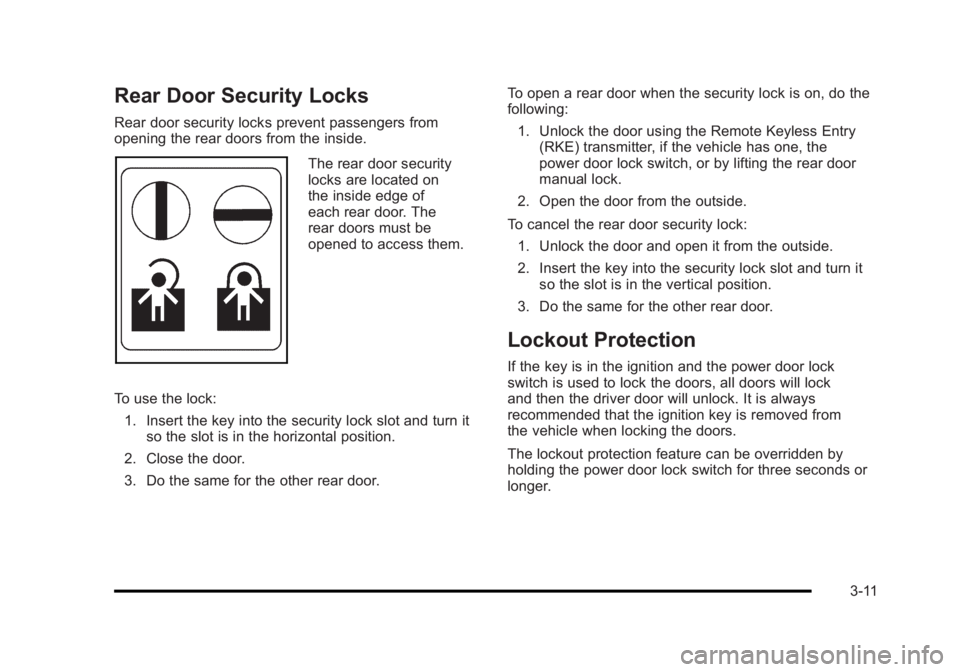
Rear door security locks prevent passengers from
opening the rear doors from the inside.
The rear door security
locks are located on
the inside edge of
each rear door. The
rear doors must be
opened to access them.
To use the lock: 1. Insert the key into the security lock slot and turn it so the slot is in the horizontal position.
2. Close the door.
3. Do the same for the other rear door. To open a rear door when the security lock is on, do the
following:
1. Unlock the door using the Remote Keyless Entry (RKE) transmitter, if the vehicle has one, the
power door lock switch, or by lifting the rear door
manual lock.
2. Open the door from the outside.
To cancel the rear door security lock: 1. Unlock the door and open it from the outside.
2. Insert the key into the security lock slot and turn it so the slot is in the vertical position.
3. Do the same for the other rear door.
Lockout Protection
If the key is in the ignition and the power door lock
switch is used to lock the doors, all doors will lock
and then the driver door will unlock. It is always
recommended that the ignition key is removed from
the vehicle when locking the doors.
The lockout protection feature can be overridden by
holding the power door lock switch for three seconds or
longer.
3-11
Page 119 of 450
Black plate (15,1)Buick Lucerne Owner Manual - 2011
Power Windows
{WARNING:
Leaving children in a vehicle with the keys is
dangerous for many reasons. Children or others
could be badly injured or even killed. They could
operate the power windows or other controls or
even make the vehicle move. The windows will
function and they could be seriously injured or
killed if caught in the path of a closing window. Do
not leave keys in a vehicle with children.
When there are children in the rear seat use the
window lockout button to prevent unintentional
operation of the windows.
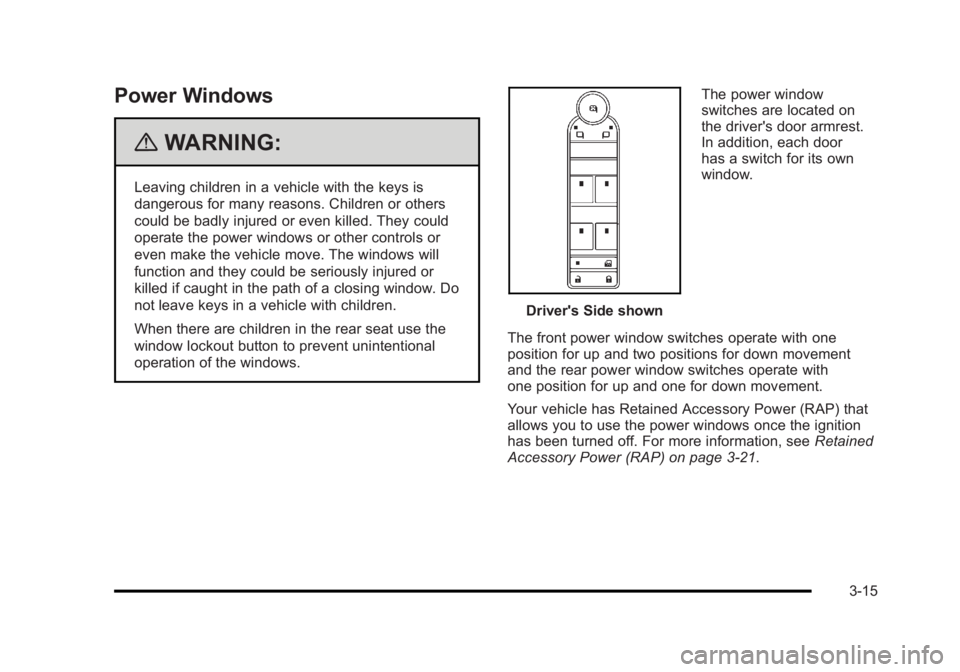
Driver's Side shownThe power window
switches are located on
the driver's door armrest.
In addition, each door
has a switch for its own
window.
The front power window switches operate with one
position for up and two positions for down movement
and the rear power window switches operate with
one position for up and one for down movement.
Your vehicle has Retained Accessory Power (RAP) that
allows you to use the power windows once the ignition
has been turned off. For more information, see Retained
Accessory Power (RAP) on page 3‑21.
3-15
Page 120 of 450
Black plate (16,1)Buick Lucerne Owner Manual - 2011
Express-Down Window
This feature is on the front windows. Press the switch
to the second position to activate the express-down
feature. To stop the window as it is lowering, press
down briefly on the switch again.
Window Lockout
o(Window Lockout): The rear window lockout button
is located on the driver's door armrest near the window
switches.
Press the right side of this button to disable the rear
window controls. The light on the button will come on,
indicating the feature is in use. The rear windows still
can be raised or lowered using the driver's window
switches when the lockout feature is active.
To restore power to the rear windows, press the button
again. The light on the button will go out.
Sun Visors
Pull the visor toward you, or move to the side to help
reduce glare.
On vehicles with a lighted vanity mirror, lift the attached
cover to use.
Theft-Deterrent Systems
This vehicle has theft-deterrent features, however, they
do not make it impossible to steal.
Content Theft-Deterrent
Your vehicle may have the optional content
theft-deterrent alarm system.
To activate the theft-deterrent system:
1. Open the door.
2. Lock the door with the power door lock switch or the Remote Keyless Entry (RKE) transmitter. If you
are using the RKE transmitter, the door does not
need to be open.
3. Close all doors.
Once armed, the alarm will go off if someone tries to
enter the vehicle without using the RKE transmitter or a
key or turns the ignition on with an incorrect key. The
horn will sound and the turn signal lamps will flash for
about 30 seconds.
When the alarm is armed, the trunk may be opened with
the RKE transmitter. The power door lock switches are
disabled and the doors remain locked. You must use
your RKE transmitter or your key to unlock the doors
when the system is armed.
3-16
Page 121 of 450
Black plate (17,1)Buick Lucerne Owner Manual - 2011
Arming with the Power Lock Switch
The alarm system will arm when you use either power
lock switch to lock the doors while any door is open and
the key is removed from the ignition. The alarm system
will not arm if the truck is open when you use either
power lock switch to lock the doors.
Arming with the RKE Transmitter
The alarm system will arm when you use your RKE
transmitter to lock the doors, if the key is not in the
ignition.
Disarming with the RKE Transmitter
The alarm system will disarm when you use your RKE
transmitter to unlock the doors.
The first time a remote unlock command is received,
three flashes will be seen and three horn chirps heard
to indicate an alarm condition has occurred since last
arming.
Disarming with Your Key
The alarm system will disarm when you use your key to
unlock the doors or insert your key in the ignition and
turn it from the LOCK/OFF position.
PASS-Key®III+ Electronic
Immobilizer
See Radio Frequency Statementon page 8‑18for information regarding Part 15 of the Federal
Communications Commission (FCC) rules and
Industry Canada Standards RSS-210/220/310.
PASS-Key®III+ Electronic
Immobilizer Operation
Your vehicle is equipped with PASS-Key®III+
(Personalized Automotive Security System)
theft-deterrent system. PASS-Key
®III+ is a passive
theft-deterrent system.
The system is automatically armed when the key is
removed from the ignition.
You do not have to manually arm or disarm the system.
The security light will come on if there is a problem with
arming or disarming the theft-deterrent system.
When the PASS-Key
®III+ system senses that someone
is using the wrong key, it prevents the vehicle from
starting. Anyone using a trial-and-error method to start
the vehicle will be discouraged because of the high
number of electrical key codes.
3-17