door lock BUICK LUCERNE 2011 Owner's Guide
[x] Cancel search | Manufacturer: BUICK, Model Year: 2011, Model line: LUCERNE, Model: BUICK LUCERNE 2011Pages: 450, PDF Size: 3.63 MB
Page 124 of 450
Black plate (20,1)Buick Lucerne Owner Manual - 2011
This position locks the ignition. It also locks the
transmission and steering column. This is the only
position in which the ignition key can be inserted or
removed.
Do not turn the engine off when the vehicle is moving.
This will cause a loss of power assist in the brake and
steering systems and disable the airbags.
In an emergency:1. Brake using a firm and steady pressure. Do not pump the brakes repeatedly. This may deplete
power assist, requiring increased brake pedal
force.
2. Shift the vehicle to N (Neutral). This can be done while the vehicle is moving. After shifting to
N (Neutral), firmly apply the brakes and steer the
vehicle to a safe location.
3. Come to a complete stop, shift to P (Park), and turn the ignition to LOCK/OFF. On vehicles with
an automatic transmission, the shift lever must
be in P (Park) to turn the ignition switch to the
LOCK/OFF position.
4. Set the parking brake. See Parking Brake
on
page 3‑26. The steering can bind with the wheels turned off center.
If this happens, move the steering wheel from right to
left while turning the key to ACC/ACCESSORY. If this
doesn't work, then the vehicle needs service.
B (ACC/ACCESSORY):
This position lets the radio and
windshield wipers operate while the engine is off. To
use ACC/ACCESSORY, turn the key clockwise.
C (ON/RUN): This position can be used to operate
electrical accessories and to display some of the
warning and indicator lights. The switch stays in this
position when the engine is running.
If you leave the key in the ACC/ACCESSORY or
ON/RUN position with the engine off, the battery could
be drained. You may not be able to start the vehicle if
the battery is allowed to drain for an extended period
of time.
D (START): This position starts the engine. When the
engine starts, release the key. The ignition switch
returns to ON/RUN for driving.
A warning tone will sound and the Driver Information
Center (DIC) will display DRIVER DOOR OPEN when
the driver door is opened if the ignition is in LOCK/OFF,
ACC/ACCESSORY and the key is in the ignition. See
DIC Warnings and Messageson page 4‑49for more
information.
3-20
Page 125 of 450
Black plate (21,1)Buick Lucerne Owner Manual - 2011
Retained Accessory Power (RAP)
The following accessories can be used for up to
10 minutes after the engine is turned off.
.Audio System
.Audio Steering Wheel (if equipped)
.Clock
.Power Windows
.Sunroof (if equipped)
Power to these accessories works up to 10 minutes or
until the driver door is opened.
The instrument panel cluster lights stay on for a few
seconds, then will go out. Once the driver door is
opened, the power shuts off to these accessories. The
vehicle has a feature designed to protect the battery
against drainage. For more information see Inadvertent
Power Battery Saver
on page 4‑14and Electric Power
Management on page 4‑14.
Starting the Engine
Move the shift lever to P (Park) or N (Neutral). The
engine will not start in any other position. To restart
the engine when the vehicle is already moving, use
N (Neutral) only. Notice:
Do not try to shift to P (Park) if the vehicle
is moving. If you do, you could damage the
transmission. Shift to P (Park) only when the vehicle
is stopped.
Starting Procedure
1. With your foot off the accelerator pedal, turn the
ignition to START. When the engine starts, let
go of the key. The idle speed will slow down
as the engine warms. Do not race the engine
immediately after starting it. Operate the engine
and transmission gently to allow the oil to warm up
and lubricate all moving parts.
The vehicle has a Computer-Controlled Cranking
System. This feature assists in starting the engine
and protects components. If the ignition key is
turned to the START position, and then released
when the engine begins cranking, the engine will
continue cranking for a few seconds or until the
vehicle starts. If the engine does not start and the
key is held in START, cranking will be stopped
after 15 seconds to prevent cranking motor
damage. To prevent gear damage, this system also
prevents cranking if the engine is already running.
3-21
Page 167 of 450
Black plate (11,1)Buick Lucerne Owner Manual - 2011
Wiper Activated Headlamps
This feature activates the headlamps and parking lamps
after the windshield wipers are turned on and have
completed eight wipe cycles within four minutes.
When the ignition is turned to LOCK/OFF, the
wiper-activated headlamps immediately turn off. The
wiper-activated headlamps also turn off if the windshield
wipers are turned off.
Headlamps on Reminder
If you leave the exterior lamp buttons for the headlamps
or parking lamps on, remove the key from the ignition
and open the driver's door, you will hear a continuous
warning chime. The chime will turn off when the lamps
are turned off.
Daytime Running Lamps (DRL)
Daytime Running Lamps (DRL) can make it easier for
others to see the front of your vehicle during the day.
Fully functional daytime running lamps are required on
all vehicles first sold in Canada.
A light sensor on top of the instrument panel monitors
the exterior light level for the operation of DRL, so be
sure it is not covered.The DRL system makes the low-beam headlamps turn
on at reduced brightness in daylight when the following
conditions are met:
.The engine is running.
.The exterior lamp button for the headlamps is off.
When the DRL are on, only the low-beam headlamps
will be on. The parking lamps, taillamps, sidemarker
and other lamps will not be on.
When it is dark enough outside, the low-beam
headlamps will come on. The other lamps that turn on
with the headlamps will also turn on. When it is bright
enough outside, the regular lamps will go off, and the
low-beam headlamps change to the reduced brightness
of DRL.
To turn off all exterior lighting at night when the vehicle
is parked, turn the exterior lamp control to the off
position. See Exterior Lamps
on page 4‑10for more
information.
The regular headlamp system should be turned on
when needed.
4-11
Page 168 of 450
Black plate (12,1)Buick Lucerne Owner Manual - 2011
Fog Lamps
The fog lamps button is on the exterior lamps control to
the left of the steering column.
#(Fog Lamps):Press to turn the fog lamps on or off.
A light comes on in the instrument panel cluster when
the fog lamps are in use. See Instrument Panel Cluster
on page 4‑28. The ignition must be in the ON/RUN
position for the fog lamps to work.
The fog lamps will go off when the headlamps are
changed to high-beam.
Some localities have laws that require the headlamps to
be on along with the fog lamps.
Cornering Lamps
For vehicles with this feature, the cornering lamps come
on when: the headlamps or parking lamps are on, the
vehicle is not in P (Park), and you signal a turn with the
turn signal/multifunction lever. They provide more light
for cornering.
Exterior Lighting Battery Saver
If the exterior lamp button has been left on, the exterior
lamps will turn off about 10 minutes after the ignition is
turned to LOCK/OFF and a door has been opened. This
protects against draining the battery if the headlamps or
parking lamps are accidentally left on. If the lamps need
to be left on for more than 10 minutes, use the exterior
lamp control to turn the lamps back on after the ignition
is turned to LOCK/OFF and any door is opened.
Instrument Panel Brightness
D (Instrument Panel Brightness): This feature
controls the brightness of the instrument panel lights.
The knob for this control is located next to the exterior
lamps control.
Push the knob in and release when it pops out. Turn
the knob clockwise to increase the brightness of the
instrument panel lights and counter clockwise to
decrease the brightness. Turning the knob completely
clockwise to the detent will turn on the courtesy lamps.
4-12
Page 169 of 450
Black plate (13,1)Buick Lucerne Owner Manual - 2011
Courtesy Lamps
When any door is opened, several lamps turn on
making it easier for you to enter and exit the vehicle.
Turn the instrument panel brightness control completely
clockwise to manually turn on these lamps.
Entry Lighting
If it is dark enough outside when you press the unlock
button on the remote keyless entry transmitter, the
interior courtesy lamps will turn on and stay on for about
40 seconds. The lamps can be turned off immediately
by pressing the lock button on the remote keyless entry
transmitter, turning the ignition key to ON/RUN or
activating the power door locks.
Delayed Entry Lighting
The interior lamps will turn on if you open the door
when it is dark enough outside. When you close the
door with the ignition off, the interior lamps will stay on
for up to 25 seconds or until the ignition is turned to an
on position. When the lamps turn off as a result of the
25 second timer or the ignition switch being turned
on, the lighting will deactivate by way of the theater
dimming effect. Locking the doors will override the
delayed entry lighting feature and the lamps will turn off
right away.
Theater Dimming
This feature allows for a three to five second fade out of
the courtesy lamps instead of immediate turn off.
Delayed Exit Lighting
If it is dark enough outside when you remove the key
from the ignition, the interior lamps will turn on and
stay on for about 25 seconds. This will give you time
to find the door pull handle or lock switches. Once the
key is inserted into the ignition, the exit lighting will be
cancelled and the lighting will fade out.
Perimeter Lighting
If it is dark enough outside when the unlock button on
the remote keyless entry transmitter is pressed, the
DRL, parking lamps and back-up lamps will come on.
This feature can be programmed on for various
amounts of time in seconds for each transmitter.
SeeDIC Vehicle Customization
on page 4‑58for
information on programming.
Front Reading Lamps
The front reading lamps are located on the headliner.
Press the button near each lamp to turn them on or off.
4-13
Page 215 of 450
Black plate (59,1)Buick Lucerne Owner Manual - 2011
Entering the Feature Settings Menu
1. Turn the ignition on and place the vehicle inP (Park).
To avoid excessive drain on the battery, it is
recommended that the headlamps are turned off.
2. Press the customization button to enter the feature settings menu.
If the menu is not available, FEATURE SETTINGS
AVAILABLE IN PARK will display. Before entering
the menu, make sure the vehicle is in P (Park).
Feature Settings Menu Items
The following are customization features that allow you
to program settings to the vehicle:
DISPLAY IN ENGLISH
This feature will only display if a language other than
English has been set. This feature allows you to change
the language in which the DIC messages appear to
English.
Press the customization button until the PRESS
VTO
DISPLAY IN ENGLISH screen appears on the DIC
display. Press the set/reset button once to display all
DIC messages in English.
DISPLAY LANGUAGE
This feature allows you to select the language in which
the DIC messages will appear.
Press the customization button until the DISPLAY
LANGUAGE screen appears on the DIC display. Press
the set/reset button once to access the settings for this
feature. Then press the customization button to scroll
through the following settings:
ENGLISH (default): All messages will appear in
English.
FRANCAIS: All messages will appear in French.
ESPANOL: All messages will appear in Spanish.
NO CHANGE: No change will be made to this feature.
The current setting will remain.
To select a setting, press the set/reset button while the
desired setting is displayed on the DIC.
AUTO DOOR LOCK
This feature allows you to select when the vehicle's
doors will automatically lock. See Programmable
Automatic Door Locks
on page 3‑10for more
information.
4-59
Page 216 of 450
Black plate (60,1)Buick Lucerne Owner Manual - 2011
Press the customization button until AUTO DOOR
LOCK appears on the DIC display. Press the set/reset
button once to access the settings for this feature. Then
press the customization button to scroll through the
following settings:
SHIFT OUT OF PARK (default):The doors
automatically lock when the doors are closed and the
vehicle is shifted out of P (Park).
AT VEHICLE SPEED: The doors automatically lock
when the vehicle speed is above 5 mph (8 km/h) for
three seconds.
NO CHANGE: No change will be made to this feature.
The current setting will remain.
To select a setting, press the set/reset button while the
desired setting is displayed on the DIC.
AUTO DOOR UNLOCK
This feature allows you to select whether or not to turn
off the automatic door unlocking feature. It also allows
you to select which doors and when the doors will
automatically unlock. See Programmable Automatic
Door Locks
on page 3‑10for more information. Press the customization button until AUTO DOOR
UNLOCK appears on the DIC display. Press the
set/reset button once to access the settings for this
feature. Then press the customization button to scroll
through the following settings:
OFF:
None of the doors will automatically unlock.
DRIVER AT KEY OUT: Only the driver's door will
unlock when the key is taken out of the ignition.
DRIVER IN PARK: Only the driver's door will unlock
when the vehicle is shifted into P (Park) .
ALL AT KEY OUT: All of the doors will unlock when the
key is taken out of the ignition.
ALL IN PARK (default): All of the doors will unlock
when the vehicle is shifted into P (Park).
NO CHANGE: No change will be made to this feature.
The current setting will remain.
To select a setting, press the set/reset button while the
desired setting is displayed on the DIC.
4-60
Page 217 of 450
Black plate (61,1)Buick Lucerne Owner Manual - 2011
REMOTE DOOR LOCK
This feature allows you to select the type of feedback
you will receive when locking the vehicle with the
Remote Keyless Entry (RKE) transmitter. You will not
receive feedback when locking the vehicle with the RKE
transmitter if the doors are open. SeeRemote Keyless
Entry (RKE) System Operation
on page 3‑4for more
information.
Press the customization button until REMOTE DOOR
LOCK appears on the DIC display. Press the set/reset
button once to access the settings for this feature. Then
press the customization button to scroll through the
following settings:
HORN & LIGHTS OFF: There will be no feedback
when you press the lock button on the RKE transmitter.
LIGHTS ONLY: The exterior lamps will flash when you
press the lock button on the RKE transmitter.
HORN ONLY: The horn will sound on the second press
of the lock button on the RKE transmitter.
HORN & LIGHTS ON (default): The exterior lamps
will flash when you press the lock button on the RKE
transmitter, and the horn will sound when the lock
button is pressed again within five seconds of the
previous command. NO CHANGE:
No change will be made to this feature.
The current setting will remain.
To select a setting, press the set/reset button while the
desired setting is displayed on the DIC.
REMOTE DOOR UNLOCK
This feature allows you to select the type of feedback
you will receive when unlocking the vehicle with the
Remote Keyless Entry (RKE) transmitter. You will not
receive feedback when unlocking the vehicle with the
RKE transmitter if the doors are open. See Remote
Keyless Entry (RKE) System Operation
on page 3‑4for more information.
Press the customization button until REMOTE DOOR
UNLOCK appears on the DIC display. Press the
set/reset button once to access the settings for this
feature. Then press the customization button to scroll
through the following settings:
LIGHTS OFF: The exterior lamps will not flash when
you press the unlock button on the RKE transmitter.
LIGHTS ON (default): The exterior lamps will flash
when you press the unlock button on the RKE
transmitter.
NO CHANGE: No change will be made to this feature.
The current setting will remain.
To select a setting, press the set/reset button while the
desired setting is displayed on the DIC.
4-61
Page 218 of 450
Black plate (62,1)Buick Lucerne Owner Manual - 2011
DELAY DOOR LOCK
This feature allows you to select whether or not the
locking of the vehicle's doors will be delayed. When
locking the doors with the power door lock switch and a
door is open, this feature will delay locking the doors
until five seconds after the last door is closed. You will
hear three chimes to signal that the delayed locking
feature is in use. The key must be out of the ignition
for this feature to work. You can temporarily override
delayed locking by pressing the power door lock switch
twice or the lock button on the RKE transmitter twice.
SeeDelayed Locking
on page 3‑10for more
information.
Press the customization button until DELAY DOOR
LOCK appears on the DIC display. Press the set/reset
button once to access the settings for this feature. Then
press the customization button to scroll through the
following settings:
OFF: There will be no delayed locking of the vehicle's
doors.
ON (default): The doors will not lock until five seconds
after the last door is closed.
NO CHANGE: No change will be made to this feature.
The current setting will remain.
To select a setting, press the set/reset button while the
desired setting is displayed on the DIC.
EXIT LIGHTING
This feature allows you to select the amount of time you
want the exterior lamps to remain on when it is dark
enough outside. This happens after the key is turned
from ON/RUN to LOCK/OFF.
Press the customization button until EXIT LIGHTING
appears on the DIC display. Press the set/reset button
once to access the settings for this feature. Then press
the customization button to scroll through the following
settings:
OFF: The exterior lamps will not turn on.
30 SECONDS (default): The exterior lamps will stay on
for 30 seconds.
1 MINUTE: The exterior lamps will stay on for
one minute.
2 MINUTES: The exterior lamps will stay on for
two minutes.
NO CHANGE: No change will be made to this feature.
The current setting will remain.
To select a setting, press the set/reset button while the
desired setting is displayed on the DIC.
4-62
Page 272 of 450
Black plate (18,1)Buick Lucerne Owner Manual - 2011
Loading the Vehicle
It is very important to know how much weight
your vehicle can carry. Two labels on your vehicle
show how much weight it may properly carry, the
Tire and Loading Information label and the Vehicle
Certification label.
{WARNING:
Do not load the vehicle any heavier than
the Gross Vehicle Weight Rating (GVWR),
or either the maximum front or rear Gross
Axle Weight Rating (GAWR). This can cause
systems to break and change the way the
vehicle handles. This could cause loss of
control and a crash. Overloading can also
shorten the life of the vehicle.
Tire and Loading Information Label
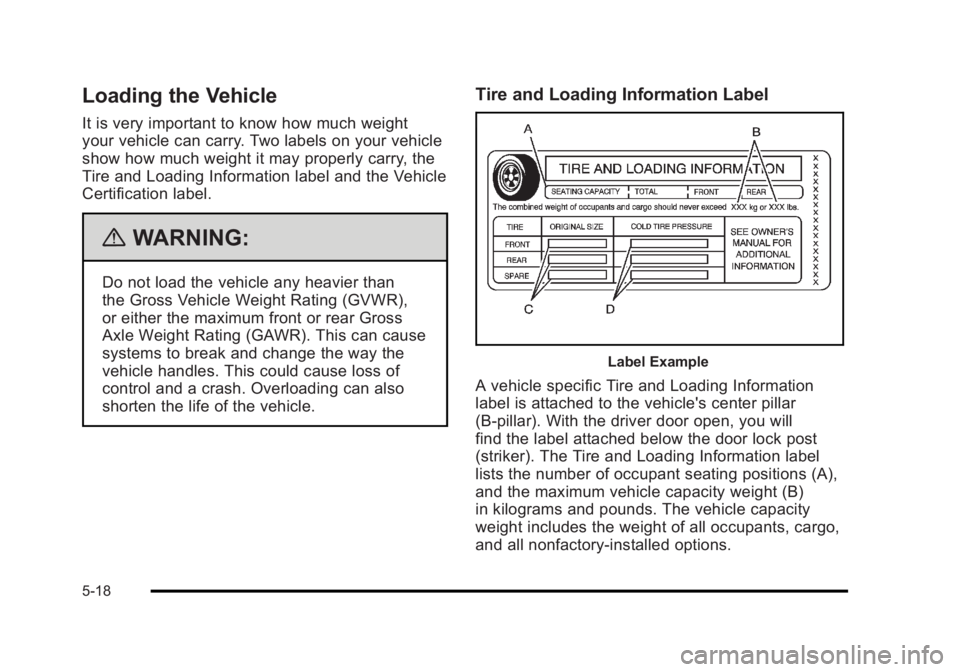
Label Example
A vehicle specific Tire and Loading Information
label is attached to the vehicle's center pillar
(B-pillar). With the driver door open, you will
find the label attached below the door lock post
(striker). The Tire and Loading Information label
lists the number of occupant seating positions (A),
and the maximum vehicle capacity weight (B)
in kilograms and pounds. The vehicle capacity
weight includes the weight of all occupants, cargo,
and all nonfactory‐installed options.
5-18