radio BUICK LUCERNE 2011 User Guide
[x] Cancel search | Manufacturer: BUICK, Model Year: 2011, Model line: LUCERNE, Model: BUICK LUCERNE 2011Pages: 450, PDF Size: 3.63 MB
Page 143 of 450
Black plate (39,1)Buick Lucerne Owner Manual - 2011
The SBZA displays may remain on if a trailer is
attached to the vehicle, or a bicycle or object is
extending out to either side of the vehicle.
When SBZA is disabled for any reason other than the
driver turning it off, the driver will not be able to turn
SBZA back on using the DIC. The SIDE BLIND ZONE
ALERT ON option will not be selectable if the conditions
for normal system operation are not met. Until normal
operating conditions for SBZA are met, you should not
rely upon SBZA while driving.
SBZA Error Messages
The following messages may appear in the DIC:
SIDE BLIND ZONE ALERT SYSTEM OFF:This
message indicates that the driver has turned the
system off.
SIDE BLIND ZONE SYS. UNAVAILABLE: This
message indicates that the SBZA system is disabled
because the sensor is blocked and cannot detect
vehicles in the blind zone. The sensor may be
blocked by mud, dirt, snow, ice, slush, or even heavy
rainstorms. This message may also activate during
heavy rain or due to road spray. The vehicle does not
need service. For cleaning, see Washing Your Vehicle
on page 6‑102. SERVICE SIDE BLIND ZONE ALERT SYSTEM:
If this
message appears, both SBZA displays will remain on
indicating there is a problem with the SBZA system.
If these displays remain on after continued driving, the
system needs service. Take the vehicle to your dealer.
FCC Information
See Radio Frequency Statementon page 8‑18for information regarding Part 15 of the Federal
Communications Commission (FCC) rules and
Industry Canada Standards RSS-210/220/310.
Frequency of operation: 24.05GHz –24.25GHz
Field Strength: Not greater than 2.5V/m peak
(0.25V/m average) at a distance of 3 m.
The manufacturer is not responsible for any radio or
TV interference caused by unauthorized modifications
to this equipment. Such modifications could void the
user's authority to operate the equipment.
3-39
Page 146 of 450
Black plate (42,1)Buick Lucerne Owner Manual - 2011
LDW Error Message
SERVICE LANE DEPARTURE SYSTEM:This
message may appear in the DIC to indicate that LDW is
not working properly. If this message remains on after
continued driving, the system needs service. Take your
vehicle to your dealer.
LANE DEPARTURE SYSTEM UNAVAILABLE: This
message may appear in the DIC if LDW does not
activate due to a temporary condition.
Universal Home Remote
System
See Radio Frequency Statementon page 8‑18for information regarding Part 15 of the Federal
Communications Commission (FCC) rules and Industry
Canada Standards RSS-210/220/310.
Universal Home Remote System
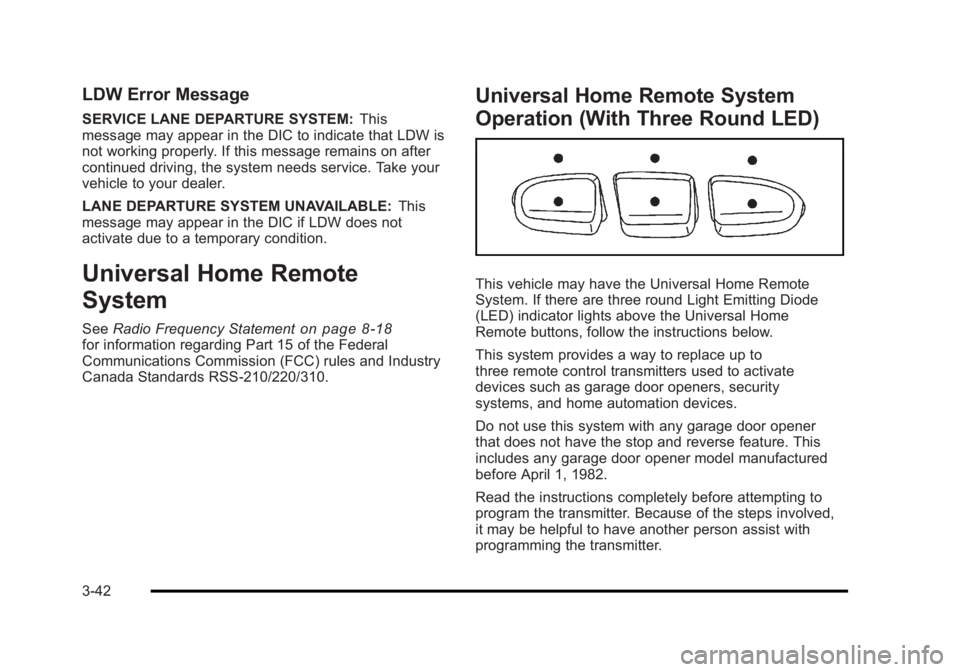
Operation (With Three Round LED)
This vehicle may have the Universal Home Remote
System. If there are three round Light Emitting Diode
(LED) indicator lights above the Universal Home
Remote buttons, follow the instructions below.
This system provides a way to replace up to
three remote control transmitters used to activate
devices such as garage door openers, security
systems, and home automation devices.
Do not use this system with any garage door opener
that does not have the stop and reverse feature. This
includes any garage door opener model manufactured
before April 1, 1982.
Read the instructions completely before attempting to
program the transmitter. Because of the steps involved,
it may be helpful to have another person assist with
programming the transmitter.
3-42
Page 153 of 450
Black plate (49,1)Buick Lucerne Owner Manual - 2011
Storage Areas
Glove Box
Lift up the glove box handle to open it. Use the key to
lock and unlock the glove box.
Cupholders
There are cupholders located in the full floor console,
or in the front of the center seat console. Cupholders
are also located in the rear armrest. Slide the cover
back to access the full floor console cupholder. Fold
open the front of the console to access the center seat
console cupholder.
Front Storage Area
To access the front storage area, push down and then
release. Push up and forward to remove.
Center Console Storage
If the vehicle has a full floor console it has two storage
areas. Lift the left lever located in the front of the
armrest lid to access the upper storage tray. Lift the
right lever to access the lower storage area. If the
vehicle has a center seat console it will have two
storage areas. Press the button located on the front of
the armrest and lift the armrest cover to access the
upper storage area. Pull the strap located behind the
cup holder to access the lower storage area.
There may be a USB port available in the center
console. SeeRadio(s)
on page 4‑69for more
information.
Center Flex Storage Unit
This vehicle may have a center flex storage unit that
includes a front center seat with a lap belt and an
underseat storage compartment. The center seatback
can also be used as an armrest. Cupholders are also
located at the front edge of the storage unit and can be
accessed by folding the compartment forward.
Pull the handle rearward to open a storage
compartment and access the accessory power
outlet. Pull out to remove.
When not being used, the center seat lap belt can be
stored in the underseat storage compartment.
3-49
Page 158 of 450
Black plate (2,1)Buick Lucerne Owner Manual - 2011
Section 4 Instrument Panel
StabiliTrak®Indicator Light . . . . . . . . . . . . . . . . . . . . . 4-34
Lane Departure Warning (LDW) Light . . . . . . . . . . 4-35
Engine Coolant Temperature Warning Light . . . . 4-36
Engine Coolant Temperature Gauge . . . . . . . . . . . 4-36
Tire Pressure Light . . . . . . . . . . . . . . . . . . . . . . . . . . . . 4-37
Malfunction Indicator Lamp . . . . . . . . . . . . . . . . . . . . 4-37
Oil Pressure Light . . . . . . . . . . . . . . . . . . . . . . . . . . . . . 4-40
Security Light . . . . . . . . . . . . . . . . . . . . . . . . . . . . . . . . . . 4-40
Front Fog Lamp Light . . . . . . . . . . . . . . . . . . . . . . . . . . 4-40
Cruise Control Light . . . . . . . . . . . . . . . . . . . . . . . . . . . 4-41
Highbeam On Light . . . . . . . . . . . . . . . . . . . . . . . . . . . . 4-41
Fuel Gauge . . . . . . . . . . . . . . . . . . . . . . . . . . . . . . . . . . . . 4-41
Driver Information Center (DIC) . . . . . . . . . . . . . . . . . .4-42
DIC Operation and Displays . . . . . . . . . . . . . . . . . . . 4-42
DIC Compass . . . . . . . . . . . . . . . . . . . . . . . . . . . . . . . . . . 4-47
DIC Warnings and Messages . . . . . . . . . . . . . . . . . . 4-49
DIC Vehicle Customization . . . . . . . . . . . . . . . . . . . . 4-58 Audio System(s)
. . . . . . . . . . . . . . . . . . . . . . . . . . . . . . . . . . 4-67
Setting the Clock . . . . . . . . . . . . . . . . . . . . . . . . . . . . . . 4-68
Radio(s) . . . . . . . . . . . . . . . . . . . . . . . . . . . . . . . . . . . . . . . 4-69
Using an MP3 . . . . . . . . . . . . . . . . . . . . . . . . . . . . . . . . . 4-78
XM Radio Messages . . . . . . . . . . . . . . . . . . . . . . . . . . . 4-84
Navigation/Radio System . . . . . . . . . . . . . . . . . . . . . . 4-85
Bluetooth
®. . . . . . . . . . . . . . . . . . . . . . . . . . . . . . . . . . . . . 4-86
Theft-Deterrent Feature . . . . . . . . . . . . . . . . . . . . . . . . 4-94
Audio Steering Wheel Controls . . . . . . . . . . . . . . . . 4-94
Radio Reception . . . . . . . . . . . . . . . . . . . . . . . . . . . . . . . 4-97
Backglass Antenna . . . . . . . . . . . . . . . . . . . . . . . . . . . . 4-97
XM™ Satellite Radio Antenna System . . . . . . . . . 4-98
4-2
Page 159 of 450
Black plate (3,1)Buick Lucerne Owner Manual - 2011
Instrument Panel Overview
Hazard Warning Flashers
The hazard warning flashers let you warn others that
you have a problem.
The hazard warning flasher button is located in the
center of the instrument panel above the radio.
|:Press to make the front and rear turn signal lamps
flash on and off. Press the button again to turn the
flashers off.
When the hazard warning flashers are on, the turn
signals will not work.
Horn
Press near or on the horn symbols on the steering
wheel pad to sound the horn.
Tilt Wheel
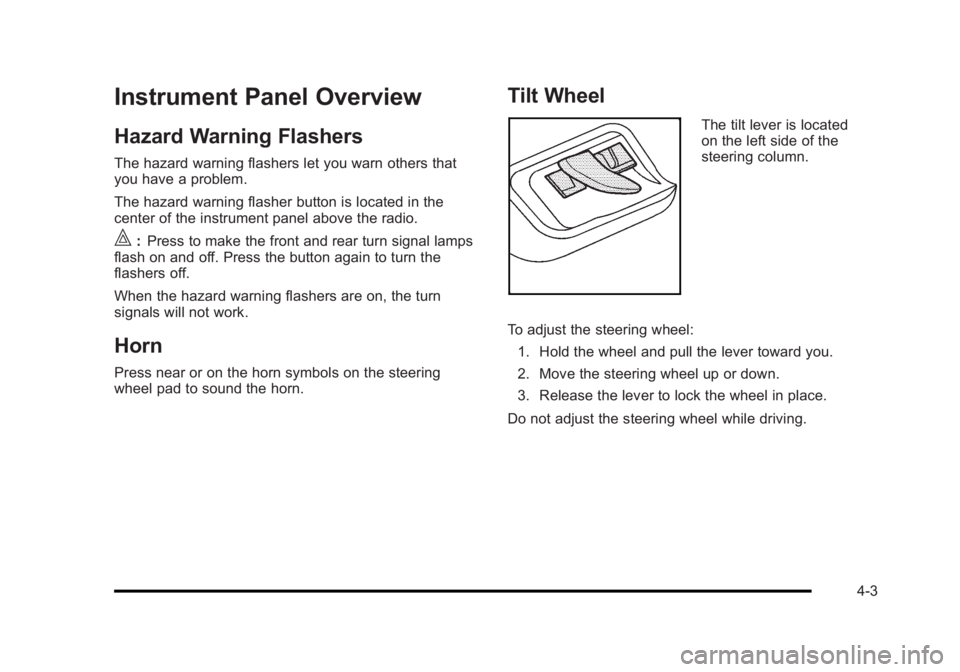
The tilt lever is located
on the left side of the
steering column.
To adjust the steering wheel: 1. Hold the wheel and pull the lever toward you.
2. Move the steering wheel up or down.
3. Release the lever to lock the wheel in place.
Do not adjust the steering wheel while driving.
4-3
Page 188 of 450
Black plate (32,1)Buick Lucerne Owner Manual - 2011
If, after several seconds, both status indicator lights
remain on, or if there are no lights at all, there may be a
problem with the lights or the passenger sensing
system. See your dealer for service.
{WARNING:
If the airbag readiness light ever comes on and
stays on, it means that something may be wrong
with the airbag system. To help avoid injury to
yourself or others, have the vehicle serviced right
away. SeeAirbag Readiness Light
on page 4‑30
for more information, including important safety
information.
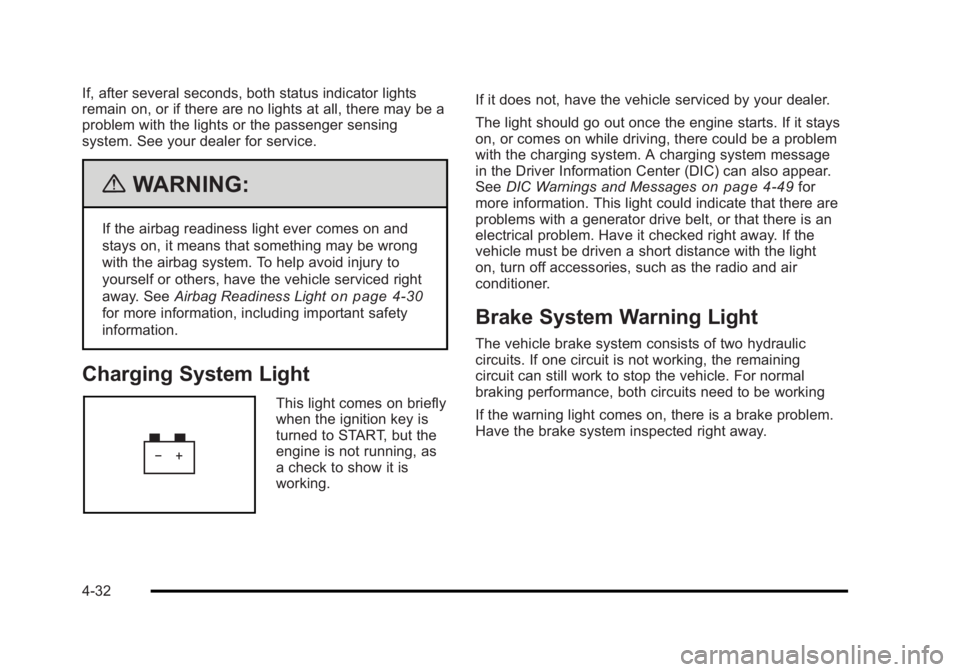
Charging System Light
This light comes on briefly
when the ignition key is
turned to START, but the
engine is not running, as
a check to show it is
working. If it does not, have the vehicle serviced by your dealer.
The light should go out once the engine starts. If it stays
on, or comes on while driving, there could be a problem
with the charging system. A charging system message
in the Driver Information Center (DIC) can also appear.
See
DIC Warnings and Messages
on page 4‑49for
more information. This light could indicate that there are
problems with a generator drive belt, or that there is an
electrical problem. Have it checked right away. If the
vehicle must be driven a short distance with the light
on, turn off accessories, such as the radio and air
conditioner.
Brake System Warning Light
The vehicle brake system consists of two hydraulic
circuits. If one circuit is not working, the remaining
circuit can still work to stop the vehicle. For normal
braking performance, both circuits need to be working
If the warning light comes on, there is a brake problem.
Have the brake system inspected right away.
4-32
Page 223 of 450
Black plate (67,1)Buick Lucerne Owner Manual - 2011
Exiting the Feature Settings Menu
The feature settings menu will be exited when any of
the following occurs:
.The vehicle is shifted out of P (Park).
.The vehicle is no longer in ON/RUN.
.The trip/fuel or vehicle information DIC buttons are
pressed.
.The end of the feature settings menu is reached
and exited.
.A 40 second time period has elapsed with no
selection made.
Audio System(s)
Determine which radio the vehicle has and read the
following pages to become familiar with its features.
{WARNING:
Taking your eyes off the road for extended periods
could cause a crash resulting in injury or death to
you or others. Do not give extended attention to
entertainment tasks while driving.This system provides access to many audio and non
audio listings.
To minimize taking your eyes off the road while driving,
do the following while the vehicle is parked:
.Become familiar with the operation and controls of
the audio system.
.Set up the tone, speaker adjustments, and preset
radio stations.
For more information, see Defensive Driving
on
page 5‑2.
Notice: Contact your dealer before adding any
equipment.
Adding audio or communication equipment could
interfere with the operation of the engine, radio,
or other systems, and could damage them. Follow
federal rules covering mobile radio and telephone
equipment.
The vehicle has Retained Accessory Power (RAP). With
RAP, the audio system can be played even after the
ignition is turned off. See Retained Accessory Power
(RAP)
on page 3‑21for more information.
4-67
Page 224 of 450
Black plate (68,1)Buick Lucerne Owner Manual - 2011
Setting the Clock
To set the time and date:1. Turn the ignition key to ACC/ACCESSORY or ON/RUN. Press
Oto turn the radio on.
2. Press
Hand the HR, MIN, MM, DD, YYYY (hour,
minute, month, day, and year) displays.
3. Press the softkey located below any one of the tabs that you want to change.
4. To increase the time or date do one of the following:
.Press the softkey located below the
selected tab.
.Press¨SEEK, or\FWD.
.Turnfclockwise.
5. To decrease the time or date do one of the following:
.Press©SEEK orsREV.
.Turnfcounterclockwise. The date does not automatically display. To see the
date press
Hwhile the radio is on. The date with
display times out after a few seconds and goes back to
the normal radio and time display.
To change the time default setting from 12 hour to
24 hour or to change the date default setting from
month/day/year to day/month/year:
1. Press
Hand then the softkey located below the
forward arrow label. Once the time 12H and 24H,
and the date MM/DD/YYYY (month, day, and year)
and DD/MM/YYYY (day, month, and year) displays.
2. Press the softkey located below the desired option.
3. Press
Hagain to apply the selected default, or let
the screen time out.
4-68
Page 225 of 450
Black plate (69,1)Buick Lucerne Owner Manual - 2011
Radio(s)
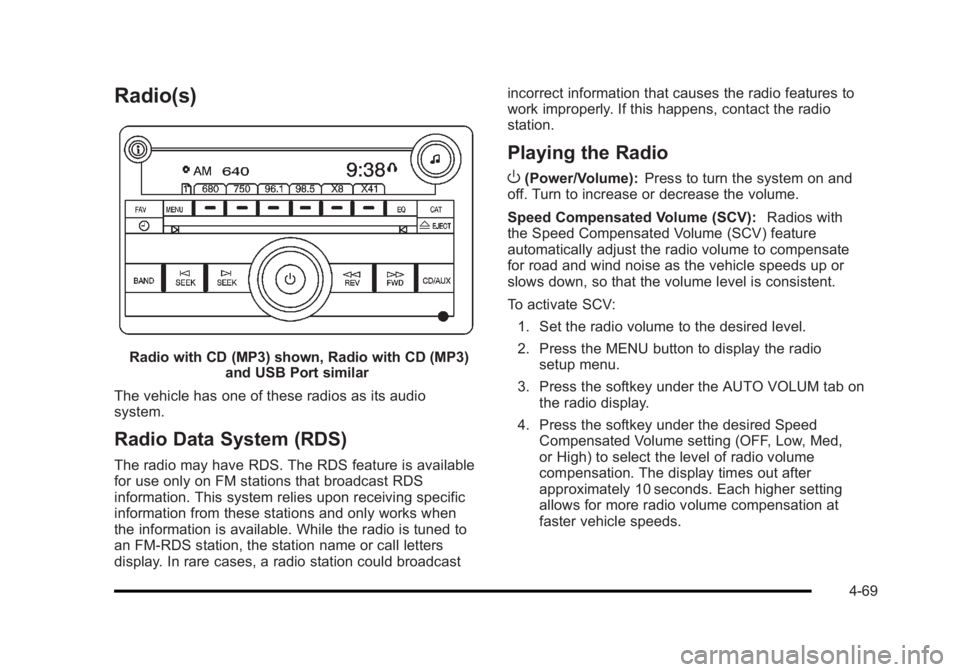
Radio with CD (MP3) shown, Radio with CD (MP3)and USB Port similar
The vehicle has one of these radios as its audio
system.
Radio Data System (RDS)
The radio may have RDS. The RDS feature is available
for use only on FM stations that broadcast RDS
information. This system relies upon receiving specific
information from these stations and only works when
the information is available. While the radio is tuned to
an FM-RDS station, the station name or call letters
display. In rare cases, a radio station could broadcast incorrect information that causes the radio features to
work improperly. If this happens, contact the radio
station.
Playing the Radio
O
(Power/Volume):
Press to turn the system on and
off. Turn to increase or decrease the volume.
Speed Compensated Volume (SCV): Radios with
the Speed Compensated Volume (SCV) feature
automatically adjust the radio volume to compensate
for road and wind noise as the vehicle speeds up or
slows down, so that the volume level is consistent.
To activate SCV:
1. Set the radio volume to the desired level.
2. Press the MENU button to display the radio setup menu.
3. Press the softkey under the AUTO VOLUM tab on the radio display.
4. Press the softkey under the desired Speed Compensated Volume setting (OFF, Low, Med,
or High) to select the level of radio volume
compensation. The display times out after
approximately 10 seconds. Each higher setting
allows for more radio volume compensation at
faster vehicle speeds.
4-69
Page 226 of 450
Black plate (70,1)Buick Lucerne Owner Manual - 2011
4(Information):For vehicles with XM, MP3, WMA,
or RDS features, press
4to display additional text
information related to the current FM-RDS or XM
station; or CD, MP3, WMA song. Song title information
will be displayed on the top line of the display while the
artist information will be displayed on the bottom line,
if the information is available during XM, CD, MP3,
or WMA playback. When information is not available,
“No Info” displays.
Auto Text (Satellite Radio Service, CD, MP3, and
WMA features): If additional information is available
for the current song being played, Auto Text will
automatically page/scroll the information every
three seconds above the FAV presets on the radio
display.
To activate Auto Text:
1. Press MENU to display the radio setup menu.
2. Press the softkey under AUTO TXT tab on the radio display.
3. Press the softkey under the ON tab on the radio display.
If
4is pressed and the song title or artist information is
longer than what can be displayed, the extra information
will page every three seconds when Auto Text is
activated.
Finding a Station
BAND: Press to choose between FM, AM, or XM™
(if equipped).
f(Tune): Turn to select radio stations.
©SEEK:Press to seek or scan stations with a strong
signal in the selected band.
.To seek stations, press and release the©SEEK
button to go to the previous station and stay there.
.To scan stations, press and hold the©SEEK
button for a few seconds until the radio beeps
once. The radio goes to a station, plays for a
few seconds, then goes to the next station. Press
the
©SEEK button again to stop scanning.
.To scan preset stations in the selected band, press
and hold the
©SEEK button for four seconds until
a double beep sounds. The radio goes to a stored
preset, plays for a few seconds, then goes to the
next stored preset. Press the
©SEEK button again
to stop scanning preset stations.
4-70